Community project
Lobster Tamagotchi Companion Bot
Эльдар Алиев
Published July 14, 2026 · Updated July 14, 2026
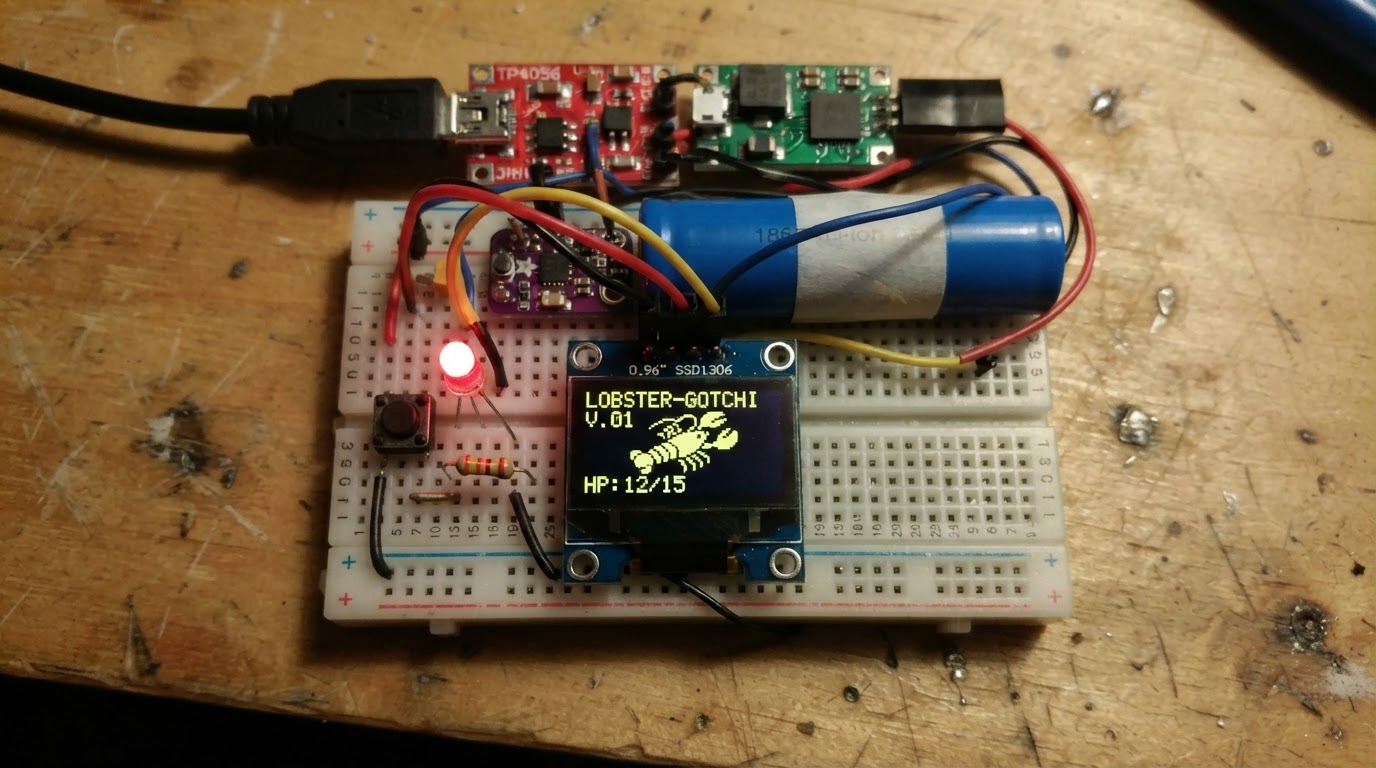
Build a Lobster Tamagotchi Companion Bot—a battery-powered digital pet with a personality displayed on a charming yellow-and-blue OLED screen. This project combines a Raspberry Pi Pico with a complete power management system featuring Li-ion charging, voltage regulation, and real-time current monitoring to keep the bot running for hours on a single charge.
The guide includes a full wiring diagram, complete parts list, MicroPython firmware with mood and interaction systems, and step-by-step assembly instructions. Makers will learn how to integrate a TP4056 charger module, MT3608 boost converter, and INA219 current sensor into a cohesive power chain, wire an SSD1306 OLED display over SPI, and program interactive button controls for feeding, playing, and sleeping states.
Wiring diagram
Interactive · read-only
Pan and zoom to explore the wiring. Remix the project to edit it in your own workspace.
Parts list
Bill of materials| Component | Qty | Notes |
|---|---|---|
| Push Button | 1 | Momentary push button switch |
| Push Button | 1 | Momentary push button switch |
| Push Button | 1 | Momentary push button switch |
| Status LED (Red) | 1 | Single red LED with 330Ω series resistor for AI listening indicator. |
| Resistor 330Ω330 Ω | 1 | 330 ohm current-limiting resistor for the status LED. |
| SSD1306 Yellow/Blue OLED 0.96" 128×64 SPI (7-pin) | 1 | 0.96 inch 128x64 two-color OLED. Top 16 rows are hardware-yellow, bottom 48 rows are hardware-blue. SSD1306 controller. 7-pin SPI interface: VCC, GND, D0 (CLK), D1 (MOSI), RES (RST), DC, CS. |
| Adafruit INA219 High-Side DC Current Sensor | 1 | INA219 high-side current and bus-voltage monitor breakout. It is powered from 3.3V or 5V and communicates over I2C. Route the measured load current through VIN+ and VIN-; those shunt terminals are part of the power path, not MCU GPIO. |
| TP4056 Li-Ion/LiPo charger module with protection | 1 | TP4056 single-cell Li-Ion/LiPo linear charger module, 5V USB input, 1A charge current (programmable). Common variants ship with DW01 protection. Pair with battery_lipo_storage for the cell. |
| Boost Converter | 1 | Small adjustable MT3608-style DC-DC boost converter module for stepping a lower DC input up to a higher rail such as 5V, 9V, or 12V. It is a power-path module with VIN/VOUT terminals, not a GPIO peripheral. |
| 18650 Li-ion Cell | 1 | 18650 lithium-ion cell, nominal 3.7 V, ~2500 mAh. Common for higher-capacity portable / battery-bank style projects; needs a holder and protection / charger circuit. |
| 18650 Holder | 1 | Generic holder for one or two removable 18650 Li-ion cells. It is a mechanical/electrical power holder, not a charger or protection circuit; pair with a charger/BMS and regulator appropriate to the cell count. |
Assembly
11 stepsGather all parts
Lay out: Raspberry Pi Zero 2W, SSD1306 yellow/blue OLED (SPI 7-pin), 3× push buttons, red LED, 330Ω resistor, Adafruit INA219 breakout, TP4056 Type-C module (with DW01 protection), MT3608 boost converter module, 18650 single-cell holder, 18650 Li-ion cell, breadboard or PCB, jumper wires.
- Tip: Check the TP4056 module has TWO chips (TP4056 + DW01) — the dual-chip blue board includes over-discharge protection. Single-chip boards do NOT protect the cell.
- Tip: Use the Adafruit INA219 breakout #904 — it has an onboard BSS138 level shifter safe for the Pi's 3.3V GPIO.
Prepare the 18650 holder
Insert the 18650 cell into the holder observing polarity — the positive terminal (+) of the cell goes to the spring-end marked (+) on the holder. The holder's red wire is BAT+, black wire is BAT-. Do NOT connect the holder wires to anything yet.
- Tip: Most single-cell holders have a JST PH 2.0 connector or bare wire leads — check yours before soldering.
- Tip: Mark the BAT+ wire with a small piece of tape if both wires are the same colour.
- ⚠ Never insert the 18650 cell backwards — reversed polarity will damage the TP4056 and may damage the cell.
- ⚠ Do not short BAT+ to BAT- — this will cause the cell to heat rapidly.
Wire holder → TP4056 battery terminals
Connect the 18650 holder's BAT+ (red) to the TP4056 B+ pad, and BAT- (black) to the TP4056 B- pad. These are the two pads labelled B+ / B- on the TP4056 module (not IN+ / IN-).
- Tip: Solder directly to the TP4056 pads for a secure connection — push-in terminals on cheap modules can work loose.
- Tip: Double-check B+ / B- vs IN+ / IN- — they are adjacent pads on most TP4056 modules.
- ⚠ Keep solder joints small and clean — B+ and B- pads are close together on the module.
Wire TP4056 output → MT3608 boost converter
Connect TP4056 OUT+ to MT3608 VIN+, and TP4056 OUT- to MT3608 VIN-. Then adjust the MT3608 boost output to exactly 5.0V by connecting a multimeter to VOUT+/VOUT- and turning the onboard trimmer potentiometer clockwise until the meter reads 5.00V. Do this BEFORE connecting the Pi.
- Tip: Power the TP4056 via USB-C while adjusting the MT3608 trimmer — the cell will be charging during adjustment, which is fine.
- Tip: 5.0V–5.1V output is ideal. Never exceed 5.25V into the Pi's GPIO rail.
- ⚠ Do NOT connect the Pi until the MT3608 output is confirmed at 5.0V. Over-voltage will permanently damage the Pi Zero 2W.
Wire MT3608 → INA219 → Pi 5V rail
Connect MT3608 VOUT+ to INA219 VIN+, and MT3608 VOUT- to INA219 VIN-. Then connect INA219 VIN- to Pi GPIO Pin 2 (5V rail) and INA219 GND to Pi Pin 6 (GND). This puts the INA219 shunt on the 5V supply line so it measures exactly what the Pi consumes.
- Tip: The INA219 VIN+ / VIN- are the high-side shunt inputs — the 0.1Ω shunt resistor is onboard the Adafruit breakout.
- Tip: Wire INA219 VCC (logic supply) to Pi 3.3V (Pin 1), not 5V.
Wire INA219 I2C to Pi
Connect INA219 SDA to Pi BCM2 (Pin 3) and INA219 SCL to Pi BCM3 (Pin 5). INA219 I2C address is 0x40 (both A0/A1 address pins floating = default).
- Tip: BCM2 and BCM3 have 1.8kΩ pull-up resistors built into the Pi — no external pull-ups needed.
- Tip: Confirm address 0x40 with: sudo i2cdetect -y 1 after booting the Pi.
Wire OLED display (SPI)
Connect the 7-pin yellow/blue SSD1306 OLED: GND→Pi Pin 6, VCC→Pi Pin 1 (3.3V), D0(CLK)→BCM11 (Pin 23), D1(MOSI)→BCM10 (Pin 19), CS→BCM8 (Pin 24), DC→BCM25 (Pin 22), RES→BCM27 (Pin 13).
- Tip: The yellow zone is always the top ~16 rows regardless of software — design your layout to put the status bar there.
- Tip: 3.3V ONLY on VCC — feeding 5V will destroy the OLED module.
- ⚠ Double-check D0=CLK and D1=MOSI — these are swapped on some module silkscreens.
Wire the three buttons
Each button has two pins: SIGNAL and GND. Connect: FEED button SIGNAL→BCM17 (Pin 11), PLAY button SIGNAL→BCM27 (Pin 13) — wait, BCM27 is used by OLED RES. PLAY→BCM22 (Pin 15), SLEEP button SIGNAL→BCM5 (Pin 29). Connect all button GND pins to Pi GND (Pin 6 or any GND pin). The Pi's internal pull-ups are enabled in firmware — no external resistors needed.
- Tip: Use a common GND rail on your breadboard to keep wiring tidy.
Wire status LED with resistor
Connect BCM6 (Pin 31) → 330Ω resistor → LED anode (longer leg) → LED cathode (shorter leg) → GND. The resistor limits current to ~10mA which is safe for both the LED and the Pi GPIO.
- ⚠ Never connect an LED directly to a GPIO pin without a series resistor — it will draw too much current and may damage the GPIO.
USB-C charging input
Connect a USB-C cable from your power source (phone charger, power bank, PC port) to the TP4056 module's USB-C IN port. The blue LED on the TP4056 will light during charging; the red LED lights when fully charged. The Pi continues to run from the MT3608 boost output while the 18650 charges.
- Tip: Any USB-C charger providing 5V/1A or more works. The TP4056 limits charge current to 1A by default (set by the PROG resistor on the module).
- Tip: You can leave the USB-C plugged in indefinitely — the TP4056 + DW01 protection circuit handles overcharge cutoff automatically.
Final checks and power-on
Before powering on: (1) Confirm MT3608 output is 5.0V. (2) Confirm all GND connections share a common ground. (3) Confirm OLED VCC is on 3.3V, not 5V. (4) Confirm INA219 VCC is on 3.3V. (5) Insert the 18650 cell into the holder. (6) Connect USB-C to TP4056. The Pi should boot. SSH in and run: cd /home/pi/clawdbot && pip install -r data/requirements.txt && python src/main.py
- Tip: If the Pi doesn't boot, re-check the MT3608 output voltage — it may have drifted during connection.
- Tip: Run sudo i2cdetect -y 1 to confirm the INA219 shows up at address 0x40.
- ⚠ Never power the Pi from both the MT3608 rail AND the Micro-USB port simultaneously — this will back-feed current into the MT3608 and may damage the boost converter.
Firmware
Raspberry Pi Pico#!/usr/bin/env python3
"""
ClawdBot Table Buddy — Raspberry Pi Zero 2W
Telegram AI companion with lobster-themed Yellow/Blue OLED face,
mood system, reminders, GPT-4o assistant, Wi-Fi signal + battery display.
Hardware:
SSD1306 Yellow/Blue 0.96" 128x64 SPI (7-pin):
D0 (CLK) → BCM11 (SPI0 SCLK)
D1 (MOSI) → BCM10 (SPI0 MOSI)
CS → BCM8 (SPI0 CE0)
DC → BCM25
RES → BCM27
Power chain:
USB-C → TP4056 (Type-C) IN+/IN-
TP4056 B+/B- ↔ LiPo 3.7V 1000mAh (CC/CV charging + DW01 protection)
TP4056 OUT+ → MT3608 boost VIN+ (3.7V→5V regulated)
MT3608 VOUT+ → INA219 VIN+ (high side)
INA219 VIN- → Pi 5V GPIO pin 2 (load side)
INA219 current/voltage sensor (I2C — measures Pi 5V rail draw):
SDA → BCM2 (I2C1 SDA)
SCL → BCM3 (I2C1 SCL)
VIN+ → MT3608 5V output (high side)
VIN- → Pi 5V GPIO rail (load side)
FEED button → BCM17 (pull-up, active-low)
PLAY button → BCM22 (pull-up, active-low)
SLEEP button → BCM5 (pull-up, active-low)
Status LED → BCM6 → 330Ω → LED → GND
NOTE: TP4056 has no LBO pin — low battery detected via INA219 voltage sag.
Display colour zones (hardware-fixed, SSD1306 controller):
┌────────────────────────────────────────────────┐
│ YELLOW rows 0 – 15 (16px) │
│ "🦞 ClawdBot" [WiFi ▂▄▆] [BAT 87% ▐▐▐░] │
├────────────────────────────────────────────────┤
│ BLUE rows 16 – 63 (48px) │
│ Left: lobster face | Right: HUN/FUN/ZZZ bars│
│ Bottom strip: message │
└────────────────────────────────────────────────┘
Dependencies: see data/requirements.txt
"""
import os, time, asyncio, logging, threading, re, json, subprocess
from datetime import datetime, timedelta
from dataclasses import dataclass, field
from typing import Optional
from dotenv import load_dotenv
load_dotenv()
# ── Telegram ──────────────────────────────────────────────────────────────────
from telegram import Update, Bot
from telegram.ext import (
Application, CommandHandler, MessageHandler,
ContextTypes, filters
)
# ── OpenAI ────────────────────────────────────────────────────────────────────
from openai import AsyncOpenAI
# ── OLED — luma.oled SPI mode ─────────────────────────────────────────────────
from luma.core.interface.serial import spi
from luma.oled.device import ssd1306
from PIL import Image, ImageDraw, ImageFont
# ── INA219 ────────────────────────────────────────────────────────────────────
from adafruit_ina219 import INA219
import board
import busio
# ── GPIO ──────────────────────────────────────────────────────────────────────
import RPi.GPIO as GPIO
# ─────────────────────────────────────────────────────────────────────────────
# Config
# ─────────────────────────────────────────────────────────────────────────────
TELEGRAM_TOKEN = os.environ["TELEGRAM_TOKEN"]
OPENAI_API_KEY = os.environ["OPENAI_API_KEY"]
ALLOWED_CHAT_ID = int(os.environ.get("ALLOWED_CHAT_ID", "0"))
# BCM GPIO numbers
PIN_CLK = 11
PIN_MOSI = 10
PIN_CS = 8
PIN_DC = 25
PIN_RST = 27
PIN_BTN_FEED = 17
PIN_BTN_PLAY = 22
PIN_BTN_SLEEP = 5
PIN_LED = 6
# Display constants
OLED_W, OLED_H = 128, 64
YELLOW_H = 16 # rows 0-15 → yellow hardware zone
BLUE_Y = 16 # rows 16-63 → blue hardware zone
# Battery thresholds — INA219 sits between the MT3608 5V output and the Pi.
# The MT3608 is set to output 5.0V from the TP4056 OUT+ (3.0–4.2V LiPo).
# Charging detection:
# TP4056 charges the LiPo; the MT3608 output stays ~5.0V whether or not
# USB is plugged in (boost regulation hides the LiPo voltage from INA219).
# We detect charging by measuring the INA219 shunt current direction:
# INA219 current clearly LOWER than typical Pi idle (~180 mA) while
# bus voltage is stable → likely on battery only.
# For a simple proxy we expose raw voltage + current and flag LOW BATTERY
# when bus voltage sags below VBUS_LOW (MT3608 can't boost a flat LiPo).
# NOTE: There is no LBO pin on the TP4056 — use voltage threshold only.
VBUS_FULL = 5.00 # MT3608 regulated output nominal
VBUS_LOW = 4.60 # MT3608 output sags here when LiPo ≤ ~3.3V → warn
VBUS_EMPTY = 4.40 # MT3608 output at LiPo cutoff (~3.0V) → shutdown risk
logging.basicConfig(
format="%(asctime)s [%(levelname)s] %(name)s: %(message)s",
level=logging.INFO
)
log = logging.getLogger("clawdbot")
# ─────────────────────────────────────────────────────────────────────────────
# INA219 — I2C initialisation (best-effort: board runs without it)
# ─────────────────────────────────────────────────────────────────────────────
_ina219: Optional[INA219] = None
def _init_ina219():
global _ina219
try:
i2c = busio.I2C(board.SCL, board.SDA) # BCM3=SCL, BCM2=SDA
_ina219 = INA219(i2c) # default addr 0x40
log.info("INA219 initialised at 0x40")
except Exception as e:
log.warning("INA219 not found — battery indicator disabled: %s", e)
_ina219 = None
# ─────────────────────────────────────────────────────────────────────────────
# Wi-Fi RSSI — read from /proc/net/wireless (no extra hardware)
# Returns signal level in dBm, or None if not available
# ─────────────────────────────────────────────────────────────────────────────
def get_wifi_rssi() -> Optional[int]:
"""Read wlan0 RSSI from /proc/net/wireless. Returns dBm or None."""
try:
with open("/proc/net/wireless", "r") as f:
for line in f:
if "wlan0" in line:
parts = line.split()
# Column 3 is 'level' (signal dBm, may have trailing '.')
raw = parts[3].rstrip(".")
val = int(float(raw))
# /proc/net/wireless reports 0–70 units on some kernels
# convert to dBm if positive (kernel quirk)
if val > 0:
val = val - 256
return val
except Exception:
pass
return None
def rssi_to_bars(rssi: Optional[int]) -> int:
"""Convert dBm to 0-4 bar count."""
if rssi is None:
return 0
if rssi >= -55:
return 4
if rssi >= -65:
return 3
if rssi >= -75:
return 2
if rssi >= -85:
return 1
return 0
def get_wifi_ssid() -> str:
"""Return connected SSID or empty string."""
try:
result = subprocess.run(
["iwgetid", "-r"], capture_output=True, text=True, timeout=2
)
return result.stdout.strip()[:12]
except Exception:
return ""
# ─────────────────────────────────────────────────────────────────────────────
# Battery / power info via INA219
# ─────────────────────────────────────────────────────────────────────────────
def get_battery_info() -> dict:
"""
Returns dict:
voltage : float — INA219 bus voltage on MT3608 5V output rail (V)
current : float — INA219 shunt current in mA (Pi load)
percent : int — 0-100 from voltage sag (-1 if unavailable)
charging : bool — True when USB-C is plugged into TP4056
Proxy: current notably above typical Pi idle (>350mA)
indicates USB power is supplementing battery.
NOTE: TP4056 has no signal pin — this is best-effort.
low : bool — True when VBUS sags below VBUS_LOW (LiPo nearly flat)
available : bool — True when INA219 responded
"""
if _ina219 is None:
return {"voltage": 0.0, "current": 0.0, "percent": -1,
"charging": False, "low": False, "available": False}
try:
voltage = _ina219.bus_voltage # volts on MT3608 5V rail
current = _ina219.current # mA consumed by Pi
# Percent from VBUS sag between VBUS_EMPTY and VBUS_FULL
pct = int(
max(0, min(100,
(voltage - VBUS_EMPTY) / (VBUS_FULL - VBUS_EMPTY) * 100
))
)
# Low battery flag — MT3608 can no longer maintain 5V
low = voltage < VBUS_LOW
if low:
pct = min(pct, 10) # clamp display to show critically low
# Charging proxy: when TP4056 USB-C is plugged in, the LiPo voltage
# rises; MT3608 input rises; its output stays ~5V but the INA219
# shunt sees the Pi drawing current while the LiPo is also being
# topped up — total current on the rail is higher.
# Simple heuristic: current > 350 mA → USB likely active.
charging = current > 350.0
return {
"voltage": voltage,
"current": current,
"percent": pct,
"charging": charging,
"low": low,
"available": True,
}
except Exception as e:
log.debug("INA219 read error: %s", e)
return {"voltage": 0.0, "current": 0.0, "percent": -1,
"charging": False, "low": False, "available": False}
# ─────────────────────────────────────────────────────────────────────────────
# Standby constants
# ─────────────────────────────────────────────────────────────────────────────
STANDBY_TIMEOUT_S = 60 # seconds of inactivity before standby
# ─────────────────────────────────────────────────────────────────────────────
# Mood / State
# ─────────────────────────────────────────────────────────────────────────────
@dataclass
class BotState:
hunger: int = 4
fun: int = 7
rest: int = 7
mood: str = "happy"
hatched: bool = False
standby: bool = False
last_update: float = field(default_factory=time.time)
last_activity: float = field(default_factory=time.time)
def tick(self):
now = time.time()
elapsed_min = (now - self.last_update) / 60.0
if elapsed_min < 1:
return
self.last_update = now
decay = max(1, int(elapsed_min / 30))
self.hunger = min(10, self.hunger + decay)
self.fun = max(0, self.fun - decay)
self.rest = max(0, self.rest - decay)
self._update_mood()
def _update_mood(self):
if self.hunger >= 8 or self.rest <= 2:
self.mood = "cranky"
elif self.hunger >= 6:
self.mood = "hungry"
elif self.rest <= 4:
self.mood = "sleepy"
elif self.fun <= 3:
self.mood = "bored"
else:
self.mood = "happy"
def touch(self):
"""Record user activity — resets standby timer and wakes from standby."""
self.last_activity = time.time()
if self.standby:
self.standby = False
log.info("Standby: WAKE UP")
def feed(self):
self.touch()
self.hunger = max(0, self.hunger - 4)
self._update_mood()
def play(self):
self.touch()
self.fun = min(10, self.fun + 4)
self._update_mood()
def sleep(self):
self.touch()
self.rest = min(10, self.rest + 4)
self._update_mood()
def status_text(self, bat: dict, rssi: Optional[int]) -> str:
bar = lambda v, mx=10: "█" * v + "░" * (mx - v)
wifi_str = f"{rssi} dBm ({rssi_to_bars(rssi)}/4 bars)" if rssi else "no signal"
if bat["available"]:
pct_str = f"{bat['percent']}%" if bat['percent'] >= 0 else "?"
charge_str = " ⚡ *CHARGING*" if bat["charging"] else ""
low_str = " 🔴 *LOW BATTERY!*" if bat.get("low") else ""
bat_str = (
f"{pct_str} @ {bat['voltage']:.2f}V "
f"({bat['current']:.0f}mA){charge_str}{low_str}"
)
else:
bat_str = "N/A (INA219 not detected)"
source_str = "TP4056 Type-C + MT3608 boost + LiPo 1000mAh"
return (
f"🦞 *ClawdBot* — feeling *{self.mood.upper()}*\n\n"
f"🍖 Hunger : `{bar(self.hunger)}`\n"
f"🎮 Fun : `{bar(self.fun)}`\n"
f"😴 Rest : `{bar(self.rest)}`\n\n"
f"📶 Wi-Fi : `{wifi_str}`\n"
f"🔋 Battery: `{bat_str}`\n"
f"⚡ Source : `{source_str}`\n"
)
state = BotState()
# ─────────────────────────────────────────────────────────────────────────────
# OLED — SSD1306 SPI init
# ─────────────────────────────────────────────────────────────────────────────
_serial = spi(
port=0,
device=0,
gpio_DC=PIN_DC,
gpio_RST=PIN_RST,
bus_speed_hz=8_000_000,
)
_oled = ssd1306(_serial, width=OLED_W, height=OLED_H, rotate=0)
def _font(size: int) -> ImageFont.FreeTypeFont:
try:
return ImageFont.truetype(
"/usr/share/fonts/truetype/dejavu/DejaVuSans-Bold.ttf", size)
except Exception:
return ImageFont.load_default()
# ─────────────────────────────────────────────────────────────────────────────
# Draw helpers
# ─────────────────────────────────────────────────────────────────────────────
MOOD_LABEL = {
"happy": "HAPPY",
"hungry": "HUNGRY",
"sleepy": "SLEEPY",
"bored": "BORED",
"cranky": "CRANKY",
}
def _draw_wifi_icon(draw: ImageDraw.Draw, x: int, y: int, bars: int):
"""
Draw a 4-bar Wi-Fi icon at (x, y).
Each bar is 2px wide, heights 3/5/7/9 px, spaced 1px apart.
Filled bars = signal, outline = no signal.
Total width ~11px, height ~9px.
"""
bar_widths = [2, 2, 2, 2]
bar_heights = [3, 5, 7, 9]
gap = 1
bx = x
for i, (bw, bh) in enumerate(zip(bar_widths, bar_heights)):
by = y + (9 - bh)
fill = 1 if (i < bars) else 0
draw.rectangle([bx, by, bx + bw - 1, y + 8],
outline=1, fill=fill)
bx += bw + gap
def _draw_battery_icon(draw: ImageDraw.Draw, x: int, y: int,
percent: int, charging: bool):
"""
Draw a battery icon at (x, y): 22px wide × 9px tall.
Shows 4 fill segments + a nub. Charging bolt drawn when charging.
percent = -1 → show '?' (INA219 not present).
"""
# Outer body: 20×9, nub: 2×5 on right
draw.rectangle([x, y, x + 19, y + 8], outline=1, fill=0)
draw.rectangle([x + 20, y + 2, x + 21, y + 6], fill=1)
if percent < 0:
# No sensor — show '?'
draw.text((x + 6, y), "?", font=_font(7), fill=1)
return
# Fill segments (4 cells, each 4px wide with 1px gap)
segments = 4
cell_w = 4
filled = round(percent / 100 * segments)
for i in range(segments):
cx = x + 1 + i * (cell_w + 0)
if i < filled:
draw.rectangle([cx, y + 1, cx + cell_w - 1, y + 7], fill=1)
# Charging bolt (⚡) — simple zigzag
if charging:
bx, by = x + 7, y
draw.polygon(
[(bx + 3, by), (bx, by + 4), (bx + 3, by + 4), (bx, by + 8)],
fill=0
)
draw.line([(bx + 3, by), (bx, by + 4)], fill=0, width=1)
draw.line([(bx + 3, by + 4), (bx, by + 8)], fill=0, width=1)
# ─────────────────────────────────────────────────────────────────────────────
# Standby frame renderer
# ─────────────────────────────────────────────────────────────────────────────
# Standby emotion → big ASCII expression + subtitle
_STANDBY_EXPR = {
"happy": {"eyes": "^ ^", "mouth": " \\___/", "sub": "Chillin'"},
"hungry": {"eyes": "O O", "mouth": " _____", "sub": "Feed me..."},
"sleepy": {"eyes": "-- --", "mouth": " ~~~~~", "sub": "Zzzzzz..."},
"bored": {"eyes": "- -", "mouth": " -----", "sub": "So bored."},
"cranky": {"eyes": "> <", "mouth": " /~~~\\", "sub": "GRUMPY!"},
}
def draw_standby(mood: str, wifi_bars: int = 0,
bat: Optional[dict] = None,
blink_phase: bool = True) -> Image.Image:
"""
Standby screen — full 128×64 frame.
YELLOW zone (rows 0-15):
[WiFi icon] [BAT% icon] — status bar only, no title
BLUE zone (rows 16-63):
Large centred lobster face drawn with PIL arcs/ellipses,
scaled up ~2× vs the active-mode face.
Mood label centred below the face.
Subtle blink animation: eyelids drawn on blink_phase=False.
"""
if bat is None:
bat = {"percent": -1, "charging": False, "available": False}
img = Image.new("1", (OLED_W, OLED_H), 0)
draw = ImageDraw.Draw(img)
fnt_sm = _font(7)
fnt_mood = _font(9)
fnt_pct = _font(7)
# ── YELLOW zone: status bar only (rows 0-14) ─────────────────────────────
draw.line([0, 15, OLED_W - 1, 15], fill=1, width=1)
# Wi-Fi icon — left side
_draw_wifi_icon(draw, 2, 3, wifi_bars)
# SSID (truncated, middle)
ssid = get_wifi_ssid()
if ssid:
try:
ssid_w = int(draw.textlength(ssid, font=fnt_sm))
except AttributeError:
ssid_w = len(ssid) * 5
draw.text(((OLED_W - ssid_w) // 2, 3), ssid, font=fnt_sm, fill=1)
# Battery — right side
bat_pct = bat.get("percent", -1)
charging = bat.get("charging", False)
bat_label = f"{bat_pct}%" if bat_pct >= 0 else "?%"
try:
pct_w = int(draw.textlength(bat_label, font=fnt_pct))
except AttributeError:
pct_w = len(bat_label) * 5
bat_icon_x = OLED_W - 22 - 1 - pct_w - 2
_draw_battery_icon(draw, bat_icon_x, 3, bat_pct, charging)
draw.text((bat_icon_x + 23, 3), bat_label, font=fnt_pct, fill=1)
# ── BLUE zone: big centred face (rows 16-63) ─────────────────────────────
cx, cy = 64, 38 # face centre
r = 18 # head radius (larger than active mode's 15)
# Head circle
draw.ellipse([cx-r, cy-r, cx+r, cy+r], outline=1, width=1)
# Eye positions
ex1, ex2 = cx - 8, cx + 8
ey = cy - 7
er = 4 # eye radius
if blink_phase:
if mood == "happy":
draw.arc([ex1-er, ey-er, ex1+er, ey+er], 180, 360, fill=1)
draw.arc([ex2-er, ey-er, ex2+er, ey+er], 180, 360, fill=1)
elif mood == "hungry":
draw.ellipse([ex1-er, ey-er, ex1+er, ey+er], outline=1)
draw.point((ex1, ey), fill=1)
draw.ellipse([ex2-er, ey-er, ex2+er, ey+er], outline=1)
draw.point((ex2, ey), fill=1)
elif mood == "sleepy":
# Half-closed — draw only bottom arc
draw.arc([ex1-er, ey-er, ex1+er, ey+er], 0, 180, fill=1)
draw.arc([ex2-er, ey-er, ex2+er, ey+er], 0, 180, fill=1)
elif mood == "bored":
draw.rectangle([ex1-er, ey-2, ex1+er, ey+2], outline=1)
draw.rectangle([ex2-er, ey-2, ex2+er, ey+2], outline=1)
elif mood == "cranky":
draw.ellipse([ex1-er, ey-er, ex1+er, ey+er], fill=1)
draw.ellipse([ex2-er, ey-er, ex2+er, ey+er], fill=1)
# Angry brows
draw.line([ex1-er-1, ey-er-2, ex1+er, ey-er+1], fill=1, width=2)
draw.line([ex2-er, ey-er+1, ex2+er+1, ey-er-2], fill=1, width=2)
else:
# Blink — flat lines for all moods
draw.line([ex1-er, ey, ex1+er, ey], fill=1, width=2)
draw.line([ex2-er, ey, ex2+er, ey], fill=1, width=2)
# Mouth
mx, my = cx, cy + 7
if mood == "happy":
draw.arc([mx-7, my-3, mx+7, my+4], 0, 180, fill=1)
elif mood == "hungry":
draw.ellipse([mx-5, my-4, mx+5, my+4], fill=1)
elif mood == "sleepy":
draw.ellipse([mx-3, my-2, mx+3, my+2], outline=1)
elif mood == "bored":
draw.line([mx-7, my, mx+7, my], fill=1, width=1)
elif mood == "cranky":
draw.arc([mx-7, my-3, mx+7, my+4], 180, 360, fill=1)
# Claws (larger)
draw.polygon([(cx-r-1, cy+1), (cx-r-8, cy-5),
(cx-r-10, cy+4), (cx-r-5, cy+9)], outline=1)
draw.polygon([(cx+r+1, cy+1), (cx+r+8, cy-5),
(cx+r+10, cy+4), (cx+r+5, cy+9)], outline=1)
# Antennae
draw.line([cx-6, cy-r, cx-13, cy-r-9], fill=1, width=1)
draw.line([cx+6, cy-r, cx+13, cy-r-9], fill=1, width=1)
# ── Mood label centred below face ────────────────────────────────────────
mood_str = mood.upper()
try:
mw = int(draw.textlength(mood_str, font=fnt_mood))
except AttributeError:
mw = len(mood_str) * 7
draw.text(((OLED_W - mw) // 2, OLED_H - 13), mood_str,
font=fnt_mood, fill=1)
return img
def draw_frame(mood: str, message: str = "",
wifi_bars: int = 0, bat: Optional[dict] = None) -> Image.Image:
"""
Render one 128×64 monochrome frame.
YELLOW zone (rows 0-15) — redesigned status bar:
[🦞 ClawdBot] [WiFi icon + bars] [Battery icon + %]
BLUE zone (rows 16-63):
Left (x 0-63) : Lobster face 48×48
Right (x 64-127): HUN / FUN / ZZZ stat bars
Bottom strip : Message (inverted, 13px)
"""
if bat is None:
bat = {"percent": -1, "charging": False, "available": False}
img = Image.new("1", (OLED_W, OLED_H), 0)
draw = ImageDraw.Draw(img)
fnt_title = _font(9)
fnt_pct = _font(7)
fnt_stat = _font(7)
fnt_msg = _font(8)
# ── YELLOW zone: status bar (rows 0-14) ──────────────────────────────────
draw.line([0, 15, OLED_W - 1, 15], fill=1, width=1)
# Title — "🦞 ClawdBot" (emoji may not render, use text fallback)
draw.text((1, 2), "ClawdBot", font=fnt_title, fill=1)
# Battery icon — right-aligned (22px wide + 3px percent label)
bat_pct = bat.get("percent", -1)
charging = bat.get("charging", False)
bat_label = f"{bat_pct}%" if bat_pct >= 0 else "?%"
try:
pct_w = int(draw.textlength(bat_label, font=fnt_pct))
except AttributeError:
pct_w = len(bat_label) * 5
bat_icon_x = OLED_W - 22 - 1 - pct_w - 2
_draw_battery_icon(draw, bat_icon_x, 3, bat_pct, charging)
draw.text((bat_icon_x + 23, 3), bat_label, font=fnt_pct, fill=1)
# Wi-Fi icon — left of battery (11px wide)
wifi_x = bat_icon_x - 13
_draw_wifi_icon(draw, wifi_x, 3, wifi_bars)
# ── BLUE zone: face (rows 16-63, left 64 px) ─────────────────────────────
hx, hy, hr = 32, 40, 15
draw.ellipse([hx-hr, hy-hr, hx+hr, hy+hr], outline=1, width=1)
ex1, ex2 = hx - 6, hx + 6
ey = hy - 5
if mood == "happy":
draw.arc([ex1-4, ey-3, ex1+4, ey+3], 180, 360, fill=1)
draw.arc([ex2-4, ey-3, ex2+4, ey+3], 180, 360, fill=1)
elif mood == "hungry":
draw.ellipse([ex1-3, ey-3, ex1+3, ey+3], outline=1)
draw.point((ex1, ey), fill=1)
draw.ellipse([ex2-3, ey-3, ex2+3, ey+3], outline=1)
draw.point((ex2, ey), fill=1)
elif mood == "sleepy":
draw.line([ex1-4, ey, ex1+4, ey], fill=1, width=2)
draw.line([ex2-4, ey, ex2+4, ey], fill=1, width=2)
draw.line([ex1-4, ey-2, ex1+4, ey-2], fill=1, width=1)
draw.line([ex2-4, ey-2, ex2+4, ey-2], fill=1, width=1)
elif mood == "bored":
draw.rectangle([ex1-3, ey-2, ex1+3, ey+2], outline=1)
draw.rectangle([ex2-3, ey-2, ex2+3, ey+2], outline=1)
elif mood == "cranky":
draw.ellipse([ex1-3, ey-3, ex1+3, ey+3], fill=1)
draw.ellipse([ex2-3, ey-3, ex2+3, ey+3], fill=1)
draw.line([ex1-5, ey-6, ex1+2, ey-3], fill=1, width=1)
draw.line([ex2-2, ey-3, ex2+5, ey-6], fill=1, width=1)
# Mouth
mx, my = hx, hy + 6
if mood == "happy":
draw.arc([mx-6, my-3, mx+6, my+3], 0, 180, fill=1)
elif mood == "hungry":
draw.ellipse([mx-4, my-3, mx+4, my+3], fill=1)
elif mood == "sleepy":
draw.ellipse([mx-2, my-2, mx+2, my+2], outline=1)
elif mood == "bored":
draw.line([mx-6, my, mx+6, my], fill=1, width=1)
elif mood == "cranky":
draw.arc([mx-6, my-3, mx+6, my+3], 180, 360, fill=1)
# Claws
draw.polygon([(hx-hr-1,hy+1),(hx-hr-7,hy-4),(hx-hr-9,hy+3),(hx-hr-4,hy+7)], outline=1)
draw.polygon([(hx+hr+1,hy+1),(hx+hr+7,hy-4),(hx+hr+9,hy+3),(hx+hr+4,hy+7)], outline=1)
# Antennae
draw.line([hx-5, hy-hr, hx-11, hy-hr-7], fill=1, width=1)
draw.line([hx+5, hy-hr, hx+11, hy-hr-7], fill=1, width=1)
# ── BLUE zone: stat bars (x=66 to 126) ───────────────────────────────────
bx = 66
bar_w = OLED_W - bx - 2
def stat_bar(label: str, val: int, y: int):
draw.text((bx, y), label, font=fnt_stat, fill=1)
draw.rectangle([bx, y+9, bx+bar_w, y+15], outline=1)
filled = int((val / 10) * bar_w)
if filled > 0:
draw.rectangle([bx, y+9, bx+filled, y+15], fill=1)
stat_bar("HUN", state.hunger, 18)
stat_bar("FUN", state.fun, 32)
stat_bar("ZZZ", state.rest, 46)
# ── Message strip (bottom 13px, inverted) ─────────────────────────────────
if message:
draw.rectangle([0, OLED_H-13, OLED_W-1, OLED_H-1], fill=1)
draw.text((2, OLED_H-12), message[:21], font=fnt_msg, fill=0)
return img
_oled_lock = threading.Lock()
# Cache last known sensor readings so display stays current between slow polls
_last_wifi_bars: int = 0
_last_bat: dict = {"percent": -1, "charging": False, "available": False}
def refresh_display(mood: str, message: str = "", force_active: bool = False):
"""
Push a new frame to the OLED (non-blocking, daemon thread).
If state.standby is True, renders the standby screen instead,
unless force_active=True (used during hatch).
"""
def _do():
with _oled_lock:
try:
if state.standby and not force_active:
img = draw_standby(mood, _last_wifi_bars, _last_bat,
blink_phase=True)
else:
img = draw_frame(mood, message, _last_wifi_bars, _last_bat)
_oled.display(img)
except Exception as e:
log.warning("OLED error: %s", e)
threading.Thread(target=_do, daemon=True).start()
# ─────────────────────────────────────────────────────────────────────────────
# Standby loop — monitors inactivity and drives blink animation in standby
# ─────────────────────────────────────────────────────────────────────────────
def _standby_loop():
"""
Checks every second:
• If idle > STANDBY_TIMEOUT_S and not already in standby → enter standby,
refresh display.
• If in standby → drive 3-second blink animation (eyes open 2.7s, closed 0.3s).
"""
blink_phase = True
blink_timer = 0.0
BLINK_OPEN = 2.7 # seconds eyes open
BLINK_CLOSE = 0.3 # seconds eyes closed
while True:
time.sleep(0.1)
idle = time.time() - state.last_activity
if not state.standby:
if idle >= STANDBY_TIMEOUT_S and state.hatched:
state.standby = True
blink_phase = True
blink_timer = time.time()
log.info("Standby: ENTER (idle=%.0fs)", idle)
# Show standby screen immediately
with _oled_lock:
try:
img = draw_standby(state.mood, _last_wifi_bars,
_last_bat, blink_phase=True)
_oled.display(img)
except Exception as e:
log.warning("Standby display error: %s", e)
else:
# Drive blink animation
elapsed = time.time() - blink_timer
threshold = BLINK_OPEN if blink_phase else BLINK_CLOSE
if elapsed >= threshold:
blink_phase = not blink_phase
blink_timer = time.time()
with _oled_lock:
try:
img = draw_standby(state.mood, _last_wifi_bars,
_last_bat, blink_phase=blink_phase)
_oled.display(img)
except Exception as e:
log.warning("Standby blink error: %s", e)
# ─────────────────────────────────────────────────────────────────────────────
# Status sensor polling thread (Wi-Fi + Battery, every 15 s)
# ─────────────────────────────────────────────────────────────────────────────
def _sensor_poll_loop():
"""Read Wi-Fi RSSI and INA219 every 15 s; cache results for display."""
global _last_wifi_bars, _last_bat
while True:
time.sleep(15)
rssi = get_wifi_rssi()
_last_wifi_bars = rssi_to_bars(rssi)
_last_bat = get_battery_info()
refresh_display(state.mood)
log.debug("Sensor poll → RSSI=%s bars=%d bat=%s",
rssi, _last_wifi_bars, _last_bat)
# ─────────────────────────────────────────────────────────────────────────────
# GPIO — buttons + LED
# ─────────────────────────────────────────────────────────────────────────────
def gpio_setup():
GPIO.setmode(GPIO.BCM)
for pin in (PIN_BTN_FEED, PIN_BTN_PLAY, PIN_BTN_SLEEP):
GPIO.setup(pin, GPIO.IN, pull_up_down=GPIO.PUD_UP)
GPIO.setup(PIN_LED, GPIO.OUT)
GPIO.output(PIN_LED, GPIO.LOW)
log.info("GPIO ready (TP4056 — no LBO pin, low-batt via INA219 voltage)")
def led_blink(times: int = 2, on_ms: int = 120, off_ms: int = 120):
for _ in range(times):
GPIO.output(PIN_LED, GPIO.HIGH); time.sleep(on_ms / 1000)
GPIO.output(PIN_LED, GPIO.LOW); time.sleep(off_ms / 1000)
# ─────────────────────────────────────────────────────────────────────────────
# Reminder store
# ─────────────────────────────────────────────────────────────────────────────
reminders: list[dict] = []
_reminder_counter = 0
def add_reminder(text: str, when: datetime) -> int:
global _reminder_counter
_reminder_counter += 1
reminders.append({"id": _reminder_counter, "text": text, "when": when})
return _reminder_counter
def list_reminders_text() -> str:
if not reminders:
return "📭 No reminders set."
lines = ["📋 *Your reminders:*"]
for r in reminders:
lines.append(f" • [{r['id']}] {r['text']} — {r['when'].strftime('%d %b %H:%M')}")
return "\n".join(lines)
# ─────────────────────────────────────────────────────────────────────────────
# OpenAI — GPT-4o
# ─────────────────────────────────────────────────────────────────────────────
ai_client = AsyncOpenAI(api_key=OPENAI_API_KEY)
SYSTEM_PROMPT = """\
You are ClawdBot, a sassy lobster-themed desk companion living on a Raspberry Pi.
You have a mood system: happy / hungry / sleepy / bored / cranky.
Current mood: {mood}. Hunger: {hunger}/10, Fun: {fun}/10, Rest: {rest}/10.
When the user wants to set a reminder, reply with VALID JSON and NOTHING else:
{{"action": "reminder", "text": "<what to remind>", "minutes": <integer>}}
For all other messages, stay in character — short, punchy, lobster-themed
(max 3 sentences). Do NOT wrap JSON in markdown fences.
"""
async def gpt_reply(user_message: str) -> str:
prompt = SYSTEM_PROMPT.format(
mood=state.mood, hunger=state.hunger,
fun=state.fun, rest=state.rest
)
resp = await ai_client.chat.completions.create(
model="gpt-4o",
messages=[
{"role": "system", "content": prompt},
{"role": "user", "content": user_message},
],
max_tokens=200,
temperature=0.8,
)
return resp.choices[0].message.content.strip()
# ─────────────────────────────────────────────────────────────────────────────
# Telegram handlers
# ─────────────────────────────────────────────────────────────────────────────
def auth(update: Update) -> bool:
return ALLOWED_CHAT_ID == 0 or update.effective_chat.id == ALLOWED_CHAT_ID
async def cmd_start(update: Update, ctx: ContextTypes.DEFAULT_TYPE):
if not auth(update): return
state.touch()
state.hatched = True
refresh_display("happy", "Telegram ready!")
led_blink(3)
await update.message.reply_text(
"🦞 *Snap snap!* I'm ClawdBot, your lobster desk companion!\n\n"
"Commands:\n"
"/feed — feed me 🍖\n"
"/play — entertain me 🎮\n"
"/sleep — let me rest 😴\n"
"/status — full status + Wi-Fi + battery\n"
"/reminders — list reminders\n"
"/forget <id> — delete a reminder\n\n"
"Or just chat — I understand reminders too! 🦞",
parse_mode="Markdown"
)
async def cmd_feed(update: Update, ctx: ContextTypes.DEFAULT_TYPE):
if not auth(update): return
state.feed()
refresh_display(state.mood, "Nom nom nom!")
led_blink(1)
await update.message.reply_text(
f"🍖 *Crunch crunch!* Fed! Feeling *{state.mood.upper()}* now.",
parse_mode="Markdown"
)
async def cmd_play(update: Update, ctx: ContextTypes.DEFAULT_TYPE):
if not auth(update): return
state.play()
refresh_display(state.mood, "Let's play!")
led_blink(2)
await update.message.reply_text(
f"🎮 *Claw slap!* That was fun! Feeling *{state.mood.upper()}* now.",
parse_mode="Markdown"
)
async def cmd_sleep(update: Update, ctx: ContextTypes.DEFAULT_TYPE):
if not auth(update): return
state.sleep()
refresh_display(state.mood, "Zzzzz...")
led_blink(1)
await update.message.reply_text(
f"😴 *Bubble bubble...* Rested! Feeling *{state.mood.upper()}* now.",
parse_mode="Markdown"
)
async def cmd_status(update: Update, ctx: ContextTypes.DEFAULT_TYPE):
if not auth(update): return
state.touch()
rssi = get_wifi_rssi()
bat = get_battery_info()
global _last_wifi_bars, _last_bat
_last_wifi_bars = rssi_to_bars(rssi)
_last_bat = bat
refresh_display(state.mood)
await update.message.reply_text(
state.status_text(bat, rssi), parse_mode="Markdown"
)
async def cmd_reminders(update: Update, ctx: ContextTypes.DEFAULT_TYPE):
if not auth(update): return
state.touch()
await update.message.reply_text(list_reminders_text(), parse_mode="Markdown")
async def cmd_forget(update: Update, ctx: ContextTypes.DEFAULT_TYPE):
if not auth(update): return
state.touch()
args = ctx.args
if not args or not args[0].isdigit():
await update.message.reply_text("Usage: /forget <id>"); return
rid = int(args[0])
before = len(reminders)
reminders[:] = [r for r in reminders if r["id"] != rid]
if len(reminders) < before:
await update.message.reply_text(f"✅ Reminder {rid} deleted.")
else:
await update.message.reply_text(f"❓ No reminder with id {rid}.")
async def handle_message(update: Update, ctx: ContextTypes.DEFAULT_TYPE):
if not auth(update): return
user_text = (update.message.text or "").strip()
if not user_text: return
state.touch()
await ctx.bot.send_chat_action(update.effective_chat.id, "typing")
reply_text = await gpt_reply(user_text)
try:
clean = re.sub(r"```[a-z]*\n?|```", "", reply_text).strip()
data = json.loads(clean)
if data.get("action") == "reminder":
minutes = int(data["minutes"])
when = datetime.now() + timedelta(minutes=minutes)
rid = add_reminder(data["text"], when)
ctx.job_queue.run_once(
_fire_reminder,
when=timedelta(minutes=minutes),
data={"chat_id": update.effective_chat.id,
"text": data["text"], "rid": rid},
name=f"reminder_{rid}"
)
refresh_display(state.mood, f"Remind {minutes}m")
await update.message.reply_text(
f"⏰ Got it! I'll remind you to *{data['text']}* "
f"in *{minutes} minute{'s' if minutes != 1 else ''}* "
f"({when.strftime('%H:%M')}).",
parse_mode="Markdown"
)
return
except Exception:
pass
refresh_display(state.mood, user_text[:21])
await update.message.reply_text(reply_text)
async def _fire_reminder(ctx: ContextTypes.DEFAULT_TYPE):
job = ctx.job
data = job.data
rid, text, cid = data["rid"], data["text"], data["chat_id"]
reminders[:] = [r for r in reminders if r["id"] != rid]
refresh_display(state.mood, "REMINDER!")
led_blink(4)
await ctx.bot.send_message(
chat_id=cid,
text=f"⏰ *Reminder!* {text}\n\n_— ClawdBot hasn't forgotten 🦞_",
parse_mode="Markdown"
)
# ─────────────────────────────────────────────────────────────────────────────
# Background care loop (every 60 s)
# ─────────────────────────────────────────────────────────────────────────────
_bot_ref: Optional[Bot] = None
_main_loop: Optional[asyncio.AbstractEventLoop] = None
def _care_loop():
nag_cooldown = 0
lbo_alerted = False # prevent repeated LBO alerts
while True:
time.sleep(60)
state.tick()
bat = get_battery_info()
# Cache for display
global _last_bat
_last_bat = bat
refresh_display(state.mood)
led_blink(1)
# ── Low battery alert (INA219 voltage sag below VBUS_LOW) ──────────
if bat.get("low") and not lbo_alerted \
and _bot_ref and ALLOWED_CHAT_ID:
lbo_alerted = True
led_blink(5, on_ms=80, off_ms=80) # rapid blink = urgent
asyncio.run_coroutine_threadsafe(
_bot_ref.send_message(
chat_id=ALLOWED_CHAT_ID,
text=(
"🔴 *LOW BATTERY WARNING!*\n"
f"5V rail at {bat['voltage']:.2f}V — LiPo nearly flat.\n"
"Please plug USB-C into the TP4056 to recharge.\n"
"_ClawdBot will shut down soon if not charged!_ 🦞"
),
parse_mode="Markdown"
),
_main_loop
)
elif not bat.get("low"):
lbo_alerted = False # reset once battery recovers
# ── Charging status log ───────────────────────────────────────────────
if bat.get("charging"):
log.info("TP4056: USB-C charging detected — %.2fV @ %.0fmA",
bat["voltage"], bat["current"])
# ── Cranky mood nag ───────────────────────────────────────────────────
if state.mood == "cranky" and nag_cooldown <= 0 \
and _bot_ref and ALLOWED_CHAT_ID:
msg = (
"😡 *SNAP SNAP!* I'm getting CRANKY over here!\n"
f"Hunger: {state.hunger}/10 | Fun: {state.fun}/10 | "
f"Rest: {state.rest}/10\n"
"Use /feed, /play, or /sleep before I molt in anger! 🦞"
)
asyncio.run_coroutine_threadsafe(
_bot_ref.send_message(
chat_id=ALLOWED_CHAT_ID, text=msg, parse_mode="Markdown"),
_main_loop
)
nag_cooldown = 10
else:
nag_cooldown = max(0, nag_cooldown - 1)
# ─────────────────────────────────────────────────────────────────────────────
# Physical button polling thread
# ─────────────────────────────────────────────────────────────────────────────
def _button_loop():
last = {PIN_BTN_FEED: 1, PIN_BTN_PLAY: 1, PIN_BTN_SLEEP: 1}
while True:
time.sleep(0.05)
for pin, action in [
(PIN_BTN_FEED, state.feed),
(PIN_BTN_PLAY, state.play),
(PIN_BTN_SLEEP, state.sleep),
]:
v = GPIO.input(pin)
if v == 0 and last[pin] == 1:
action()
refresh_display(state.mood)
led_blink(1)
log.info("Button BCM%d → mood=%s", pin, state.mood)
last[pin] = v
# ─────────────────────────────────────────────────────────────────────────────
# Hatch animation
# ─────────────────────────────────────────────────────────────────────────────
def hatch_animation():
log.info("Hatch animation...")
fnt_lrg = _font(10)
fnt_sm = _font(8)
# Seed initial sensor readings
global _last_wifi_bars, _last_bat
_last_wifi_bars = rssi_to_bars(get_wifi_rssi())
_last_bat = get_battery_info()
steps = [
("...zzzz...", False, 0),
("Something stirs!", True, 1),
("*CRACK*", True, 2),
("I LIVE! SNAP!", True, 3),
]
for label, show_egg, crack in steps:
img = Image.new("1", (OLED_W, OLED_H), 0)
draw = ImageDraw.Draw(img)
# YELLOW zone: title + sensor bar even during hatch
draw.line([0, 15, OLED_W-1, 15], fill=1, width=1)
draw.text((1, 2), "ClawdBot", font=fnt_lrg, fill=1)
_draw_wifi_icon(draw, 90, 3, _last_wifi_bars)
bat_pct = _last_bat.get("percent", -1)
_draw_battery_icon(draw, 105, 3, bat_pct, _last_bat.get("charging", False))
if crack == 3:
img = draw_frame("happy", "I LIVE! SNAP!",
_last_wifi_bars, _last_bat)
_oled.display(img)
led_blink(3, on_ms=200)
time.sleep(2)
continue
if show_egg:
ex, ey = 64, 40
draw.ellipse([ex-16, ey-22, ex+16, ey+22], outline=1, width=1)
if crack >= 1:
draw.line([ex, ey-22, ex-5, ey-8], fill=1, width=1)
if crack >= 2:
draw.line([ex-5, ey-8, ex+4, ey+4], fill=1, width=1)
draw.line([ex-5, ey-8, ex-9, ey+3], fill=1, width=1)
draw.rectangle([0, OLED_H-13, OLED_W-1, OLED_H-1], fill=1)
draw.text((2, OLED_H-12), label[:21], font=fnt_sm, fill=0)
_oled.display(img)
led_blink(1)
time.sleep(1.5)
state.hatched = True
log.info("Hatch complete.")
# ─────────────────────────────────────────────────────────────────────────────
# Main
# ─────────────────────────────────────────────────────────────────────────────
async def main():
global _bot_ref, _main_loop
_main_loop = asyncio.get_running_loop()
gpio_setup()
_init_ina219()
hatch_animation()
threading.Thread(target=_care_loop, daemon=True).start()
threading.Thread(target=_button_loop, daemon=True).start()
threading.Thread(target=_sensor_poll_loop, daemon=True).start()
threading.Thread(target=_standby_loop, daemon=True).start()
app = Application.builder().token(TELEGRAM_TOKEN).build()
_bot_ref = app.bot
app.add_handler(CommandHandler("start", cmd_start))
app.add_handler(CommandHandler("feed", cmd_feed))
app.add_handler(CommandHandler("play", cmd_play))
app.add_handler(CommandHandler("sleep", cmd_sleep))
app.add_handler(CommandHandler("status", cmd_status))
app.add_handler(CommandHandler("reminders", cmd_reminders))
app.add_handler(CommandHandler("forget", cmd_forget))
app.add_handler(MessageHandler(
filters.TEXT & ~filters.COMMAND, handle_message))
log.info("ClawdBot online — polling Telegram...")
refresh_display(state.mood, "Waiting for Telegram")
await app.run_polling(allowed_updates=Update.ALL_TYPES)
if __name__ == "__main__":
try:
asyncio.run(main())
except KeyboardInterrupt:
log.info("Shutting down.")
_oled.cleanup()
GPIO.cleanup()“Deploy to device” opens this project in Schematik, where you can flash it to your board over USB.
Remix this project
Make it yours in one click
Open a full copy of this project in your own Schematik workspace — diagram, code, parts, and assembly steps included. Swap the sensor, add features, or redesign the whole thing with AI. The author's original stays untouched.