Community project
Interactive Desktop Robot Buddy
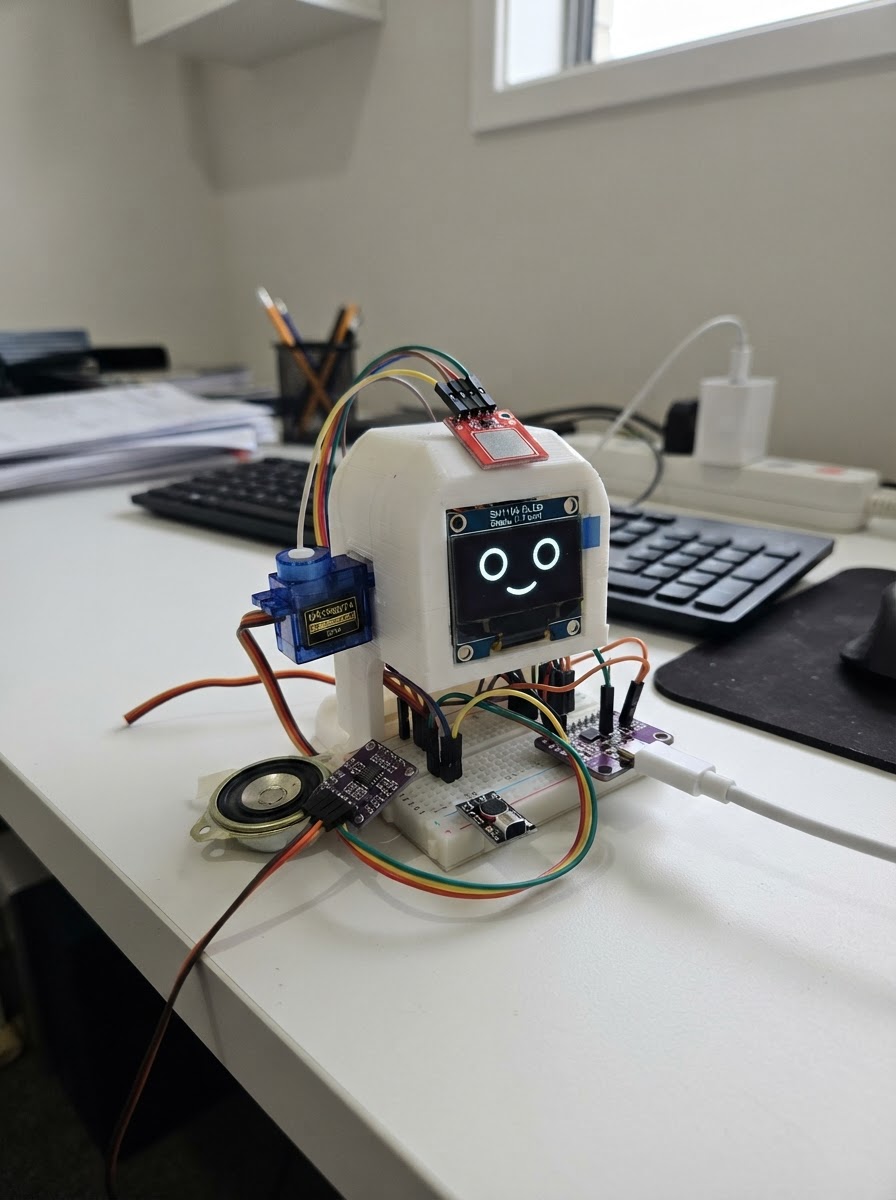
Build an interactive desktop robot buddy with expressive animations, touch interaction, and voice capabilities. This charming companion features an animated OLED face that displays different moods and reactions, articulated arms controlled by servos, and audio I/O powered by an ESP32 microcontroller. The guide includes a complete wiring diagram, parts list, 3D-printable enclosure files, and step-by-step assembly instructions to bring your robot buddy to life.
The firmware enables the robot to respond to touch input, detect sounds, play audio feedback, and capture voice samples to repeat back. Customize the personality by adjusting eye animations, arm poses, and reaction timings. This project combines mechanical assembly with embedded programming to create an engaging interactive device perfect for learning about microcontrollers, audio processing, and creative robotics.
Wiring diagram

Gather all the parts
Assemble it in 8 steps
1. Export Abi’s cool enclosure parts
Open `data/abi_desktop_buddy_housing.scad` in OpenSCAD. Set `part_to_render` to `front`, render and export an STL; repeat for `rear`. Optionally set it to `accessories` to print the removable bow and ear inserts in a contrasting color. The front shell includes the cute-tech ear/headphone silhouette, raised OLED visor, feet, speaker grille, microphone holes, touch recess, and arm openings.
- Use 0.20 mm layers, 3 walls/perimeters, and 15–20% infill.
- A pink front shell, dark rear cover, and lavender bow/ear accents match the preview colors, but any colors work.
- Measure your actual generic modules before printing and adjust the parameters near the top of the SCAD file if needed.
- Print the front shell with supports only if your slicer identifies the ear/visor overhangs; avoid supports inside the OLED opening and servo cradles.
- The printed shell is mechanical only: keep all electronics disconnected while fitting parts.
2. Fit the face, arms, and cosmetic accents
Mount the SH1106 OLED behind the raised front visor. Place each SG90 in its internal side cradle, center the arm position before fastening its horn, and confirm that both arms move freely through the side slots. Glue or use thin foam tape to attach the optional bow and inner-ear inserts after the electronics test passes.
- Keep the arms short and lightweight so the SG90 gears are not overloaded.
- Use removable foam tape for the decorative bow so it can be replaced easily.
- The raised visor hides the OLED board edge and gives the face a cleaner finished look.
- Disconnect power before fitting or removing servo horns.
- Do not use glue near the OLED glass, servo spline, or moving arm slots.
3. Wire the OLED face
Connect OLED VCC to ESP32 3V3, GND to ESP32 GND, SDA to GPIO21, and SCL to GPIO22. Seat the display so its glass is centered in the visor opening.
- Keep I²C wires short and routed away from servo power wiring.
- The common OLED I²C address is 0x3C.
- Use 3.3 V for the OLED unless its board specifically documents safe 5 V logic operation.
4. Install the touch interaction pad
Connect TTP223 VCC to ESP32 3V3, GND to common GND, and OUT to GPIO27. Mount its sensing face immediately behind the front circular touch recess so Abi can be tapped or petted.
- Use thin double-sided tape or a small non-metallic bracket.
- Test touch sensitivity before closing the rear shell.
- Do not place the touch electrode against metal hardware or thick conductive paint.
5. Wire both SG90 arm servos
Connect the left servo signal wire to GPIO25 and right servo signal wire to GPIO26. Connect both red wires to the external regulated +5 V supply and both brown/black wires to that supply GND.
- Use a regulated 5 V supply rated for at least 3 A.
- Route the servo leads so they cannot touch the horn or arm travel slots.
- Never power servo red wires from ESP32 3V3.
- External 5 V supply GND must connect to ESP32 GND.
- If 3.3 V control pulses are unreliable, add a proper 3.3 V-to-5 V signal buffer for GPIO25 and GPIO26.
6. Install the speaker and audio amplifier
Mount the 8 Ω speaker behind the front honeycomb grille, using its rim rather than its cone for adhesive. Connect MAX98357A VIN to external +5 V, GND to common GND, BCLK to GPIO18, LRC/WS to GPIO19, and DIN to GPIO23. Connect the speaker only between SPK+ and SPK−.
- Keep speaker wires short or twisted to reduce noise.
- The honeycomb grille is designed to leave the speaker cone unobstructed.
- Never connect either speaker terminal to GND; MAX98357A uses bridged outputs.
- Disconnect power before changing speaker wiring.
7. Install the INMP441 microphone
Connect INMP441 VDD to ESP32 3V3, GND to common GND, SCK to GPIO18, WS to GPIO19, SD to GPIO32, and L/R to GND. Align its sound port behind the small front microphone-hole array, not behind the speaker grille.
- The microphone shares I²S clocks GPIO18 and GPIO19 with the amplifier.
- For Abi’s echo mode, point the microphone outward and keep it several centimetres from the speaker.
- Use 3.3 V only for INMP441 VDD.
- Do not cover the microphone sound port with glue, tape, or fabric.
8. Close Abi and check the finished desktop buddy
Tie ESP32 GND, external 5 V adapter GND, servo grounds, amplifier GND, OLED GND, touch-pad GND, and microphone GND together. Confirm no wire rubs on the arms, slide on the rear shell, and fasten it with four M3 screws into the front-shell posts. The rear cover keeps the USB, external 5 V cable, and ventilation accessible.
- Leave the bow off until all electronics and arm movement have been tested.
- Touch the pad for the greeting after you deploy the existing firmware.
- The rear ventilation slots help avoid trapping heat around the electronics.
- Verify external 5 V polarity before connecting it.
- Use an enclosed, certified power adapter and keep mains wiring out of the enclosure.
- Do not close the case until both arms have been tested through their complete travel.
Review all connections
1. Connections between "face_oled" and "ESP32"
2. Connections between "left_arm_servo" and "ESP32"
3. Connections between "right_arm_servo" and "ESP32"
4. Connections between "touch_pad" and "ESP32"
5. Connections between "servo_supply" and "ESP32"
6. Connections between "audio_amp" and "ESP32"
7. Connections between "microphone" and "ESP32"
Deploy the firmware
#include <Arduino.h>
#include <Wire.h>
#include <driver/i2s.h>
#include <Adafruit_GFX.h>
#include <Adafruit_SH110X.h>
#include <ESP32Servo.h>

enum Reaction { IDLE, GREETING, SURPRISED, IDLE_POSE, LISTENING, REPEATING };
enum Mood { CALM, HAPPY, SHY, CURIOUS, SLEEPY };
enum EyeAnimation { EYE_NEUTRAL, EYE_LOOK_AROUND, EYE_SHY_GLANCE, EYE_WINK, EYE_HEARTS, EYE_DOUBLE_BLINK };


// Forward declarations

// Forward declarations
void drawHeart(int x, int y);

void setArms(int leftAngle, int rightAngle);
void drawLashes(int x, int y);
void drawFace();
void setupAudioAndMicrophone();
void writeTone(uint16_t frequency, uint16_t durationMs);
void playGreetingChirp();
void playSurprisedChirp();
void playHappyChirp();
void captureAndRepeatVoice();
void startGreeting(uint32_t now);
void startSoundReaction(uint32_t now);
void startIdlePose(uint32_t now);
void finishReaction(uint32_t now);
void updateReaction(uint32_t now);
void updateBlink(uint32_t now);
void updateEyeAnimation(uint32_t now);
bool heardLoudSound();

constexpr int OLED_SDA = 21, OLED_SCL = 22;
constexpr int LEFT_SERVO_PIN = 25, RIGHT_SERVO_PIN = 26, TOUCH_PIN = 27;
constexpr int I2S_BCLK_PIN = 18, I2S_LRC_PIN = 19, I2S_SPEAKER_DATA_PIN = 23, I2S_MIC_DATA_PIN = 32;
constexpr uint8_t OLED_ADDRESS = 0x3C;
constexpr uint32_t SAMPLE_RATE = 16000;
constexpr uint32_t VOICE_CAPTURE_MS = 1400;
constexpr size_t VOICE_SAMPLES = SAMPLE_RATE * VOICE_CAPTURE_MS / 1000;
constexpr int32_t CLAP_THRESHOLD = 180000;
constexpr int LEFT_REST = 82, RIGHT_REST = 98;

Adafruit_SH1106G display(128, 64, &Wire, -1);
Servo leftArm, rightArm;
static int32_t voiceBuffer[VOICE_SAMPLES];
Reaction reaction = IDLE;
Mood mood = CALM;
bool eyesClosed = false, previousTouch = false;
uint8_t waveStep = 0, idlePose = 0;
uint32_t lastBlinkMs = 0, nextBlinkDelayMs = 3000, blinkStartedMs = 0, lastTouchMs = 0;
uint32_t lastReactionStepMs = 0, lastSoundReactionMs = 0, nextIdleActionMs = 0;
EyeAnimation eyeAnimation = EYE_NEUTRAL;
uint32_t eyeAnimationStartedMs = 0, lastEyeFrameMs = 0, nextEyeAnimationMs = 0;
float pupilOffsetX = 0.0f, pupilOffsetY = 0.0f;

void setArms(int leftAngle, int rightAngle) {
  leftArm.write(constrain(leftAngle, 0, 180));
  rightArm.write(constrain(rightAngle, 0, 180));
}

void drawLashes(int x, int y) {
  display.drawLine(x - 11, y - 8, x - 14, y - 13, SH110X_WHITE);
  display.drawLine(x - 4, y - 10, x - 5, y - 15, SH110X_WHITE);
  display.drawLine(x + 5, y - 9, x + 8, y - 14, SH110X_WHITE);
}

void drawHeart(int x, int y) {
  display.fillCircle(x - 3, y - 2, 3, SH110X_BLACK);
  display.fillCircle(x + 3, y - 2, 3, SH110X_BLACK);
  display.fillTriangle(x - 6, y - 1, x + 6, y - 1, x, y + 7, SH110X_BLACK);
}

void drawFace() {
  display.clearDisplay();
  display.setTextColor(SH110X_WHITE);
  display.setTextSize(1);
  display.setCursor(52, 0);
  display.print("Abi");

  if (reaction == LISTENING) {
    display.drawCircle(36, 29, 12, SH110X_WHITE);
    display.drawCircle(93, 29, 12, SH110X_WHITE);
    display.fillCircle(36, 29, 4, SH110X_WHITE);
    display.fillCircle(93, 29, 4, SH110X_WHITE);
    drawLashes(36, 29); drawLashes(93, 29);
    display.setCursor(37, 49); display.print("Listening...");
  } else if (reaction == REPEATING) {
    display.fillRoundRect(22, 18, 27, 22, 10, SH110X_WHITE);
    display.fillRoundRect(79, 18, 27, 22, 10, SH110X_WHITE);
    display.fillCircle(36, 29, 6, SH110X_BLACK);
    display.fillCircle(93, 29, 6, SH110X_BLACK);
    drawLashes(36, 29); drawLashes(93, 29);
    display.setCursor(25, 49); display.print("Abi says hi!");
  } else if (eyesClosed || mood == SLEEPY) {
    display.drawLine(24, 28, 48, mood == SLEEPY ? 30 : 28, SH110X_WHITE);
    display.drawLine(80, mood == SLEEPY ? 30 : 28, 104, 28, SH110X_WHITE);
    drawLashes(36, 29); drawLashes(93, 29);
  } else if (reaction == SURPRISED) {
    display.drawCircle(36, 29, 12, SH110X_WHITE); display.drawCircle(93, 29, 12, SH110X_WHITE);
    display.fillCircle(36, 29, 5, SH110X_WHITE); display.fillCircle(93, 29, 5, SH110X_WHITE);
    drawLashes(36, 29); drawLashes(93, 29);
  } else {
    display.fillRoundRect(22, 18, 27, 22, 10, SH110X_WHITE);
    display.fillRoundRect(79, 18, 27, 22, 10, SH110X_WHITE);
    int lpX = 36 + static_cast<int>(pupilOffsetX);
    int rpX = 93 + static_cast<int>(pupilOffsetX);
    int lpY = 29 + static_cast<int>(pupilOffsetY);
    int rpY = 29 + static_cast<int>(pupilOffsetY);
    if (eyeAnimation == EYE_HEARTS) {
      drawHeart(lpX, lpY - 1); drawHeart(rpX, rpY - 1);
    } else {
      display.fillCircle(lpX, lpY, 6, SH110X_BLACK);
      if (eyeAnimation != EYE_WINK) display.fillCircle(rpX, rpY, 6, SH110X_BLACK);
      display.fillCircle(lpX - 2, lpY - 2, 2, SH110X_WHITE);
      if (eyeAnimation != EYE_WINK) display.fillCircle(rpX - 2, rpY - 2, 2, SH110X_WHITE);
    }
    if (eyeAnimation == EYE_WINK) {
      display.fillRect(79, 18, 27, 22, SH110X_BLACK);
      display.drawLine(80, 29, 104, 29, SH110X_WHITE);
    }
    drawLashes(36, 29); drawLashes(93, 29);
  }

  if (reaction != LISTENING && reaction != REPEATING) {
    if (mood == HAPPY || reaction == GREETING) {
      display.fillCircle(17, 42, 4, SH110X_WHITE); display.fillCircle(111, 42, 4, SH110X_WHITE);
    } else {
      display.drawCircle(17, 42, 4, SH110X_WHITE); display.drawCircle(111, 42, 4, SH110X_WHITE);
    }
    display.drawLine(14, 42, 20, 42, SH110X_WHITE); display.drawLine(108, 42, 114, 42, SH110X_WHITE);
    if (reaction == SURPRISED) display.drawCircle(64, 51, 5, SH110X_WHITE);
    else if (reaction == GREETING || mood == HAPPY) {
      display.drawRoundRect(43, 47, 42, 9, 5, SH110X_WHITE); display.drawLine(51, 50, 77, 50, SH110X_WHITE);
    } else if (mood == SLEEPY) {
      display.drawLine(57, 51, 71, 51, SH110X_WHITE); display.setCursor(105, 3); display.print("z");
    } else {
      display.drawLine(52, 50, 76, 50, SH110X_WHITE); display.drawPixel(51, 49, SH110X_WHITE); display.drawPixel(77, 49, SH110X_WHITE);
    }
  }
  display.display();
}

void setupAudioAndMicrophone() {
  i2s_config_t config = {};
  config.mode = static_cast<i2s_mode_t>(I2S_MODE_MASTER | I2S_MODE_TX | I2S_MODE_RX);
  config.sample_rate = SAMPLE_RATE;
  config.bits_per_sample = I2S_BITS_PER_SAMPLE_32BIT;
  config.channel_format = I2S_CHANNEL_FMT_ONLY_LEFT;
  config.communication_format = I2S_COMM_FORMAT_STAND_I2S;
  config.dma_buf_count = 6;
  config.dma_buf_len = 128;
  config.tx_desc_auto_clear = true;
  i2s_driver_install(I2S_NUM_0, &config, 0, nullptr);
  i2s_pin_config_t pins = {};
  pins.bck_io_num = I2S_BCLK_PIN; pins.ws_io_num = I2S_LRC_PIN;
  pins.data_out_num = I2S_SPEAKER_DATA_PIN; pins.data_in_num = I2S_MIC_DATA_PIN;
  i2s_set_pin(I2S_NUM_0, &pins);
  i2s_zero_dma_buffer(I2S_NUM_0);
}

void writeTone(uint16_t frequency, uint16_t durationMs) {
  uint32_t samples = (SAMPLE_RATE * durationMs) / 1000, phase = 0;
  int32_t buffer[128];
  uint32_t phaseStep = (static_cast<uint64_t>(frequency) << 32) / SAMPLE_RATE;
  for (uint32_t sent = 0; sent < samples;) {
    uint32_t count = min(static_cast<uint32_t>(128), samples - sent);
    for (uint32_t i = 0; i < count; ++i) {
      buffer[i] = (phase & 0x80000000UL) ? -360000000 : 360000000;
      phase += phaseStep;
    }
    size_t written = 0;
    i2s_write(I2S_NUM_0, buffer, count * sizeof(int32_t), &written, portMAX_DELAY);
    sent += count;
  }
}

void playGreetingChirp() { writeTone(880, 70); writeTone(1320, 100); i2s_zero_dma_buffer(I2S_NUM_0); }
void playSurprisedChirp() { writeTone(1560, 65); writeTone(1040, 90); i2s_zero_dma_buffer(I2S_NUM_0); }
void playHappyChirp() { writeTone(660, 50); writeTone(880, 50); writeTone(1320, 80); i2s_zero_dma_buffer(I2S_NUM_0); }

void captureAndRepeatVoice() {
  reaction = LISTENING;
  mood = CALM;
  setArms(70, 110);
  drawFace();
  delay(180);

  size_t captured = 0;
  while (captured < VOICE_SAMPLES) {
    size_t bytesRead = 0;
    size_t request = min(sizeof(int32_t) * static_cast<size_t>(128), (VOICE_SAMPLES - captured) * sizeof(int32_t));
    i2s_read(I2S_NUM_0, voiceBuffer + captured, request, &bytesRead, portMAX_DELAY);
    captured += bytesRead / sizeof(int32_t);
  }

  reaction = REPEATING;
  drawFace();
  const float pitchRatio = 1.28f;
  int32_t output[128];
  float sourceIndex = 0.0f;
  while (sourceIndex < captured - 1) {
    size_t count = 0;
    while (count < 128 && sourceIndex < captured - 1) {
      size_t base = static_cast<size_t>(sourceIndex);
      float fraction = sourceIndex - base;
      int64_t mixed = static_cast<int64_t>(voiceBuffer[base]) + static_cast<int64_t>((voiceBuffer[base + 1] - voiceBuffer[base]) * fraction);
      output[count++] = static_cast<int32_t>(mixed * 0.72f);
      sourceIndex += pitchRatio;
    }
    size_t written = 0;
    i2s_write(I2S_NUM_0, output, count * sizeof(int32_t), &written, portMAX_DELAY);
  }
  i2s_zero_dma_buffer(I2S_NUM_0);
}

void startGreeting(uint32_t now) {
  reaction = GREETING; mood = HAPPY; waveStep = 0; lastReactionStepMs = now;
  eyeAnimation = EYE_WINK; eyeAnimationStartedMs = now;
  setArms(55, 125); drawFace(); playGreetingChirp();
}
void startSoundReaction(uint32_t now) {
  reaction = SURPRISED; mood = CALM; lastReactionStepMs = now; lastSoundReactionMs = now;
  setArms(45, 135); drawFace(); playSurprisedChirp();
}
void startIdlePose(uint32_t now) {
  reaction = IDLE_POSE; idlePose = esp_random() % 3; lastReactionStepMs = now;
  eyeAnimationStartedMs = now;
  if (idlePose == 0) { mood = CURIOUS; eyeAnimation = EYE_LOOK_AROUND; setArms(70, 112); }
  else if (idlePose == 1) { mood = SHY; eyeAnimation = EYE_SHY_GLANCE; setArms(62, 118); }
  else { mood = HAPPY; eyeAnimation = EYE_HEARTS; setArms(62, 118); playHappyChirp(); }
  drawFace();
}
void finishReaction(uint32_t now) {
  reaction = IDLE; setArms(LEFT_REST, RIGHT_REST);
  eyeAnimation = EYE_NEUTRAL;
  mood = (esp_random() % 4 == 0) ? SLEEPY : CALM;
  nextIdleActionMs = now + 8000 + (esp_random() % 9000);
  drawFace();
}
void updateReaction(uint32_t now) {
  if (reaction == GREETING) {
    if (now - lastReactionStepMs < 260) return;
    lastReactionStepMs = now;
    if (waveStep < 6) { rightArm.write((waveStep % 2 == 0) ? 55 : 125); ++waveStep; return; }
    finishReaction(now);
  } else if (reaction == SURPRISED && now - lastReactionStepMs >= 700) {
    captureAndRepeatVoice();
    lastSoundReactionMs = millis();
    finishReaction(millis());
  } else if (reaction == IDLE_POSE && now - lastReactionStepMs >= 1400) {
    finishReaction(now);
  }
}
void updateBlink(uint32_t now) {
  if (reaction == SURPRISED || reaction == LISTENING || reaction == REPEATING || mood == SLEEPY || eyeAnimation == EYE_WINK) return;
  if (!eyesClosed && now - lastBlinkMs >= nextBlinkDelayMs) {
    eyesClosed = true; blinkStartedMs = now;
    if (esp_random() % 5 == 0) { eyeAnimation = EYE_DOUBLE_BLINK; eyeAnimationStartedMs = now; }
    drawFace();
  }
  if (eyesClosed && now - blinkStartedMs >= 115) {
    eyesClosed = false; lastBlinkMs = now; nextBlinkDelayMs = 2500 + (esp_random() % 2500); drawFace();
  }
}

void updateEyeAnimation(uint32_t now) {
  if (now - lastEyeFrameMs < 16) return; // 60 Hz animation scheduler.
  lastEyeFrameMs = now;
  uint32_t elapsed = now - eyeAnimationStartedMs;
  float targetX = 0.0f, targetY = 0.0f;
  bool redraw = false;
  if (eyeAnimation == EYE_LOOK_AROUND) {
    float phase = (elapsed % 1200) / 1200.0f;
    targetX = phase < 0.5f ? -4.0f + phase * 16.0f : 4.0f - (phase - 0.5f) * 16.0f;
    redraw = true;
  } else if (eyeAnimation == EYE_SHY_GLANCE) {
    targetX = -3.0f; targetY = 3.0f; redraw = true;
  } else if (eyeAnimation == EYE_WINK) {
    targetX = -1.0f; redraw = true;
    if (elapsed > 520) { eyeAnimation = EYE_HEARTS; eyeAnimationStartedMs = now; }
  } else if (eyeAnimation == EYE_HEARTS) {
    redraw = true;
    if (reaction != IDLE_POSE && elapsed > 420) { eyeAnimation = EYE_NEUTRAL; }
  } else if (eyeAnimation == EYE_DOUBLE_BLINK && elapsed > 230 && elapsed < 340) {
    eyesClosed = true; redraw = true;
  } else if (eyeAnimation == EYE_DOUBLE_BLINK && elapsed >= 340) {
    eyesClosed = false; eyeAnimation = EYE_NEUTRAL; redraw = true;
  }
  pupilOffsetX += (targetX - pupilOffsetX) * 0.28f;
  pupilOffsetY += (targetY - pupilOffsetY) * 0.28f;
  if (redraw) drawFace();
}
bool heardLoudSound() {
  int32_t samples[128]; size_t bytesRead = 0;
  i2s_read(I2S_NUM_0, samples, sizeof(samples), &bytesRead, 0);
  size_t count = bytesRead / sizeof(int32_t);
  if (count < 32) return false;
  int64_t totalMagnitude = 0;
  for (size_t i = 0; i < count; ++i) totalMagnitude += llabs(static_cast<int64_t>(samples[i] >> 8));
  return (totalMagnitude / static_cast<int64_t>(count)) > CLAP_THRESHOLD;
}

void setup() {
  pinMode(TOUCH_PIN, INPUT);
  Wire.begin(OLED_SDA, OLED_SCL);
  if (!display.begin(OLED_ADDRESS, true)) while (true) delay(1000);
  leftArm.setPeriodHertz(50); rightArm.setPeriodHertz(50);
  leftArm.attach(LEFT_SERVO_PIN, 500, 2400); rightArm.attach(RIGHT_SERVO_PIN, 500, 2400);
  setArms(LEFT_REST, RIGHT_REST);
  setupAudioAndMicrophone();
  lastBlinkMs = millis(); nextIdleActionMs = lastBlinkMs + 7000;
  nextEyeAnimationMs = lastBlinkMs + 5000;
  drawFace();
}

void loop() {
  uint32_t now = millis();
  bool touched = digitalRead(TOUCH_PIN) == HIGH;
  if (touched && !previousTouch && now - lastTouchMs > 250 && reaction == IDLE) {
    lastTouchMs = now; startGreeting(now);
  }
  previousTouch = touched;
  if (reaction == IDLE && now - lastSoundReactionMs > 1600 && heardLoudSound()) startSoundReaction(now);
  else if (reaction == IDLE && now >= nextIdleActionMs) startIdlePose(now);
  updateReaction(now);
  updateBlink(now);
  updateEyeAnimation(now);
}
Remix this project
Make it yours in one click
Open a full copy of this project in your own Schematik workspace — diagram, code, parts, and assembly steps included. Swap the sensor, add features, or redesign the whole thing with AI. The author's original stays untouched.