Community project
Talking Command Robot
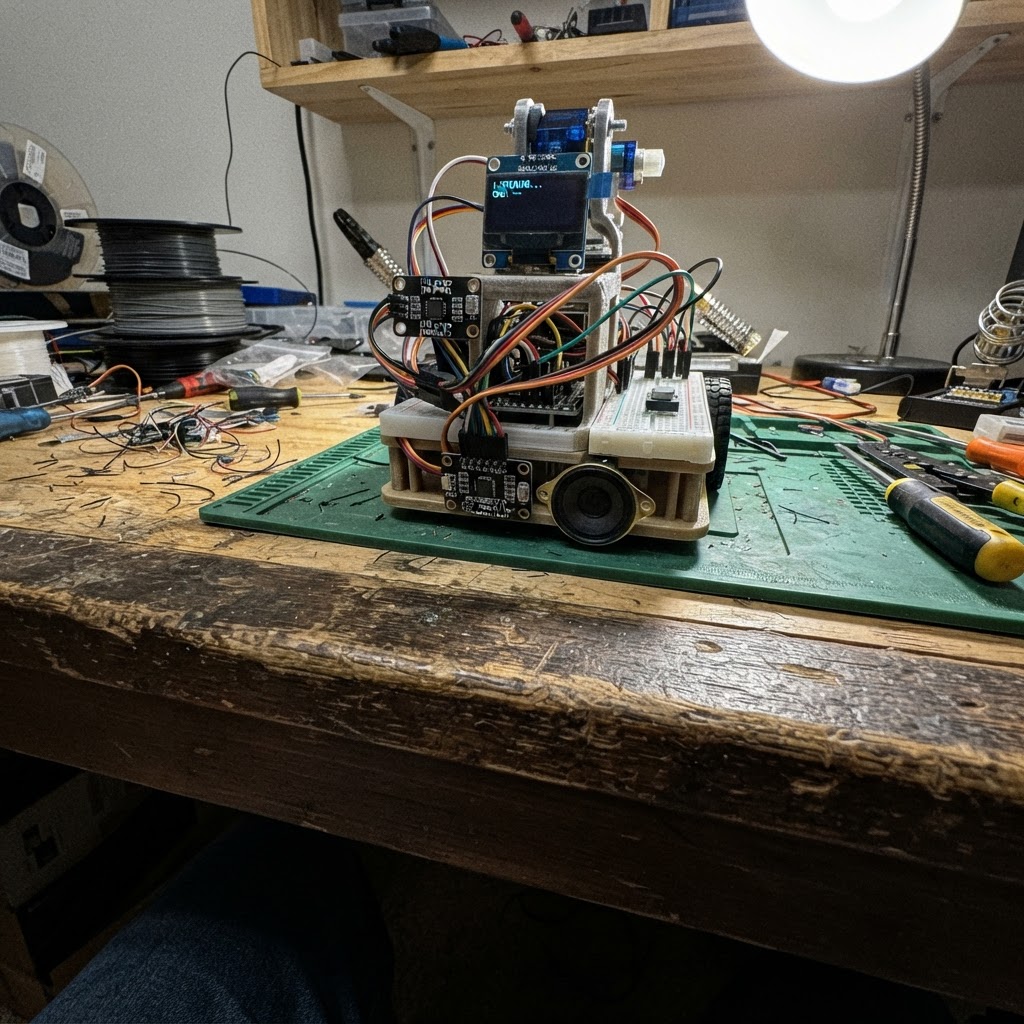
This talking command robot combines voice recognition, AI conversation, and physical movement into an interactive ESP32-S3 project. Press the button to record a voice command, which is transcribed by Groq Whisper, processed by Groq LLaMA for intent and servo angles, then spoken back via ElevenLabs TTS while the pan-tilt head animates to match the response.
The guide provides a complete wiring diagram connecting the INMP441 I²S microphone, MAX98357A amplifier and speaker, SSD1306 OLED face display, SG90 pan-tilt servos, and push-to-talk button to the ESP32-S3. You'll get a full parts list, step-by-step assembly instructions for the mechanical head, and ready-to-flash firmware that handles audio I/O, API calls, and servo control—just add your Groq and ElevenLabs credentials.
Wiring diagram

Gather all the parts
Assemble it in 10 steps
1. Power the ESP32-S3 via USB
Connect the ESP32-S3 DevKitC-1 to your laptop using a USB-C cable. The board gets 5V from the laptop USB port — no battery or external supply needed. The onboard 3.3V LDO generates the 3.3V rail used by the mic and OLED automatically.
- Use a data-capable USB-C cable (not a charge-only cable) so Schematik can flash firmware.
- The board's 5V pin is available for powering servos and the MAX98357A directly from the USB 5V rail.
- The ESP32-S3 USB port supplies ~500mA total. Two SG90 servos can draw up to 400mA stall current combined — avoid stalling both servos at the same time while powered from laptop USB.
2. Wire the INMP441 microphone
Connect INMP441 VDD → 3.3V pin on ESP32, GND → GND, SCK → GPIO40, WS → GPIO41, SD → GPIO42. Tie the L/R pin to GND (selects left-channel mono output). Add a 100nF decoupling capacitor between VDD and GND as close to the module as possible to reduce noise.
- The INMP441 is directional toward the top port — mount it facing forward on the robot head.
- L/R pin must be tied to GND — leaving it floating causes silence or garbled audio.
3. Wire the MAX98357A amplifier and speaker
Connect MAX98357A VIN → 5V pin on ESP32, GND → GND, BCLK → GPIO14, LRC → GPIO21, DIN → GPIO47. Leave the SD and GAIN pins floating (default 15dB gain). Connect SPK+ and SPK- directly to the 8Ω speaker terminals. Polarity does not matter for mono audio.
- Do not short SPK+ and SPK- together — this will damage the amplifier IC.
- Power the MAX98357A from the 5V pin, not the 3.3V pin — it needs 5V for full output power.
4. Wire the SSD1306 OLED display
Connect OLED VCC → 3.3V, GND → GND, SDA → GPIO8, SCL → GPIO9. The default I2C address is 0x3C (some modules use 0x3D — check the back of the PCB).
- If the display stays blank after flashing, run a quick I2C scanner sketch to confirm the address.
- Keep I2C wires short (under 20cm) to avoid signal issues at 400kHz.
5. Wire the logic level shifter and pan servo
Connect BSS138 LLC: LV → 3.3V, HV → 5V, GND → GND. Route GPIO38 → LV1 on the shifter, then HV1 → pan servo SIGNAL wire (orange/yellow). Connect servo_pan VCC (red) → 5V pin on ESP32, GND (brown/black) → GND.
- Servo wire colors: Brown = GND, Red = VCC, Orange = Signal.
- The level shifter converts 3.3V PWM from ESP32 to 5V PWM for the servo — essential for reliable movement.
- Always power servo VCC from the 5V rail, never from the 3.3V pin — servos draw too much current for the 3.3V LDO.
6. Wire the tilt servo
Connect servo_tilt SIGNAL (orange) → GPIO39 directly. VCC (red) → 5V pin on ESP32, GND (brown) → GND. For best reliability, route GPIO39 through a second channel of the BSS138 level shifter (LV2 → GPIO39, HV2 → tilt servo SIGNAL).
- For guaranteed reliable operation route through the second LLC channel just like the pan servo.
7. Wire the push-to-talk button
Connect one leg of the push button to GPIO1, the other leg to GND. The firmware enables the internal pull-up resistor — no external resistor needed.
- Mount the button on the front of the robot body within easy thumb reach.
- If the button triggers randomly, add a 100nF capacitor between GPIO1 and GND for hardware debounce.
8. Assemble the pan-tilt head
Assemble a 2-axis pan-tilt bracket: the bottom servo (servo_pan) rotates the head left/right; the top servo (servo_tilt) rotates the face up/down. Mount the OLED display and INMP441 microphone on the top platform facing forward. Secure all servo horns with the included screws.
- Test servo center position (90°) before gluing anything — power on and run setup() to auto-center.
- Use hot glue or M2 screws to mount the OLED on the top bracket.
9. Enter your API credentials in the firmware
Open firmware.cpp in Schematik and fill in the 4 #define values at the top: WIFI_SSID, WIFI_PASSWORD, GROQ_API_KEY (free at console.groq.com), and ELEVEN_API_KEY (free at elevenlabs.io). The ELEVEN_VOICE_ID is pre-set to the Rachel voice — change it if you prefer a different voice.
- Groq has a generous free tier — no credit card needed for basic use.
- ElevenLabs free tier gives 10,000 characters/month which is plenty for testing.
10. Flash and test
Click the Deploy button in Schematik to compile and flash. Open the serial monitor — you should see '[BOOT] Ready! Hold button to speak.' The OLED shows a smiley face. Hold the button, speak a command like 'look left' or 'what is your name', then release. The robot transcribes, thinks, speaks, and moves its head.
- Watch the serial monitor for debug output — each stage prints [MIC], [STT], [LLM], [TTS], [SERVO] tags.
- If WiFi fails, double-check SSID/password — the serial monitor will show the error.
- Do not connect the battery and USB at the same time if you add a battery later.
Review all connections
1. Connections between "inmp441" and "ESP32"
2. Connections between "max98357a" and "ESP32"
3. Connections between "oled" and "ESP32"
4. Connections between "llc" and "ESP32"
5. Connections between "servo_pan" and "ESP32"
6. Connections between "servo_tilt" and "ESP32"
7. Connections between "button" and "ESP32"
Deploy the firmware
/*
 * ESP32-S3 AI Assistant Robot
 * - Push button → records from INMP441 mic via I2S
 * - Sends WAV to Groq Whisper (STT)
 * - Sends transcript to Groq LLaMA (LLM) → JSON: {speech, command, pan, tilt}
 * - Speaks reply via MAX98357A (ElevenLabs TTS) or beep fallback
 * - Animates SSD1306 OLED face
 * - Moves SG90 servos (pan/tilt head) based on command
 *
 * Set your credentials in the CONFIG section below.
 */

#include <Arduino.h>
#include <WiFi.h>
#include <WiFiClientSecure.h>
#include <Wire.h>
#include <Adafruit_GFX.h>
#include <Adafruit_SSD1306.h>
#include <ESP32Servo.h>
#include <ArduinoJson.h>
#include <driver/i2s.h>

// ─── CONFIG ──────────────────────────────────────────────────────────────────
#define WIFI_SSID       "Shourya"
#define WIFI_PASSWORD   "shourya29"
#define GROQ_API_KEY    "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"      // https://console.groq.com
#define ELEVEN_API_KEY  "sk_3e21ba9c3afb3cf7b30036cc4b96db1d9bf1e0c0ffc2135e"    // https://elevenlabs.io (optional)
#define ELEVEN_VOICE_ID "21m00Tcm4TlvDq8ikWAM"  // Rachel voice ID

// ─── PINS ────────────────────────────────────────────────────────────────────
#define MIC_SCK       40
#define MIC_WS        41
#define MIC_SD        42
#define AMP_BCLK      14
#define AMP_LRC       21
#define AMP_DIN       47
#define OLED_SDA      8
#define OLED_SCL      9
#define SERVO_PAN_PIN 38
#define SERVO_TILT_PIN 39
#define BTN_PIN       1

// ─── CONSTANTS ───────────────────────────────────────────────────────────────
#define SAMPLE_RATE   16000
#define SAMPLE_BITS   16
#define CHANNELS      1
#define RECORD_SECS   4
#define BUF_SAMPLES   (SAMPLE_RATE * RECORD_SECS)
#define BUF_BYTES     (BUF_SAMPLES * 2)

#define OLED_WIDTH    128
#define OLED_HEIGHT   64
#define OLED_ADDR     0x3C

// ─── GLOBALS ─────────────────────────────────────────────────────────────────


struct Message { String role; String content; };

enum FaceState { FACE_IDLE, FACE_LISTENING, FACE_THINKING, FACE_TALKING };

struct EyeParams {
  int x, y;         // top-left of eye bounding box
  int w, h;         // eye width / full-open height
  int pupilDx;      // pupil offset from eye centre X
  int pupilDy;      // pupil offset from eye centre Y
  int topLid;       // pixels the top eyelid closes down (0=open)
  int botLid;       // pixels the bottom eyelid closes up  (0=open)
};

// Forward declarations

// Forward declarations
void drawEye(const EyeParams& e);
void doBlink();

void drawFace(FaceState state);
void setupMic();
void setupSpeaker();
void recordAudio();
void writeWavHeader(uint8_t* header, uint32_t dataSize);
String transcribeAudio();
String queryLLM(const String& userText);
void playTTS(const String& text);
void moveServos(const String& command, int pan, int tilt);

Adafruit_SSD1306 display(OLED_WIDTH, OLED_HEIGHT, &Wire, -1);
Servo panServo;
Servo tiltServo;

int16_t* audioBuf = nullptr;
size_t   audioBytesRead = 0;

// Servo center positions
int panPos  = 90;
int tiltPos = 90;

// Chat history (simple rolling buffer, 4 exchanges)

#define MAX_HISTORY 8
Message history[MAX_HISTORY];
int historyCount = 0;

// ─── FACE STATES ─────────────────────────────────────────────────────────────
FaceState faceState = FACE_IDLE;
unsigned long faceTimer = 0;
bool eyeOpen = true;

// ─── COZMO/VECTOR-STYLE ANIMATED EYES ────────────────────────────────────────
// Each eye is a filled rounded-rect (sclera) with a filled circle pupil.
// Eyelids are filled rects that slide in from top/bottom to squint or blink.
// Pupil can shift left/right/up/down to convey gaze direction.


// Draw one eye given its parameters
void drawEye(const EyeParams& e) {
  int r = 5; // corner radius of sclera
  // 1. Filled sclera (white rounded rect)
  display.fillRoundRect(e.x, e.y, e.w, e.h, r, SSD1306_WHITE);
  // 2. Pupil (dark filled circle, slightly smaller than sclera height/2)
  int px = e.x + e.w / 2 + e.pupilDx;
  int py = e.y + e.h / 2 + e.pupilDy;
  int pr = e.h / 2 - 4;
  if (pr < 2) pr = 2;
  display.fillCircle(px, py, pr, SSD1306_BLACK);
  // Pupil shine dot
  display.fillCircle(px + pr/3, py - pr/3, max(1, pr/4), SSD1306_WHITE);
  // 3. Top eyelid (black rect slides down from top)
  if (e.topLid > 0)
    display.fillRect(e.x, e.y, e.w, min(e.topLid, e.h), SSD1306_BLACK);
  // 4. Bottom eyelid (black rect slides up from bottom)
  if (e.botLid > 0)
    display.fillRect(e.x, e.y + e.h - min(e.botLid, e.h), e.w, min(e.botLid, e.h), SSD1306_BLACK);
  // 5. Re-draw rounded corners as black to keep the eye shape crisp
  //    (clip corners outside the rounded rect)
  display.fillRect(e.x, e.y, r, r, SSD1306_BLACK);
  display.fillCircle(e.x + r, e.y + r, r, SSD1306_WHITE);           // re-fill corner
  display.fillRect(e.x + e.w - r, e.y, r, r, SSD1306_BLACK);
  display.fillCircle(e.x + e.w - r, e.y + r, r, SSD1306_WHITE);
  display.fillRect(e.x, e.y + e.h - r, r, r, SSD1306_BLACK);
  display.fillCircle(e.x + r, e.y + e.h - r, r, SSD1306_WHITE);
  display.fillRect(e.x + e.w - r, e.y + e.h - r, r, r, SSD1306_BLACK);
  display.fillCircle(e.x + e.w - r, e.y + e.h - r, r, SSD1306_WHITE);
  // Re-apply lids on top of corner fixes
  if (e.topLid > 0)
    display.fillRect(e.x, e.y, e.w, min(e.topLid, e.h), SSD1306_BLACK);
  if (e.botLid > 0)
    display.fillRect(e.x, e.y + e.h - min(e.botLid, e.h), e.w, min(e.botLid, e.h), SSD1306_BLACK);
}

// Animate a smooth blink: lids close then reopen
void doBlink() {
  // Eye positions: left eye x=8, right eye x=74, y=16, w=46, h=32
  for (int lid = 0; lid <= 16; lid += 4) {
    display.clearDisplay();
    EyeParams L = {8,  16, 46, 32, 0, 0, lid, lid};
    EyeParams R = {74, 16, 46, 32, 0, 0, lid, lid};
    drawEye(L); drawEye(R);
    display.display();
    delay(18);
  }
  delay(60);
  for (int lid = 16; lid >= 0; lid -= 4) {
    display.clearDisplay();
    EyeParams L = {8,  16, 46, 32, 0, 0, lid, lid};
    EyeParams R = {74, 16, 46, 32, 0, 0, lid, lid};
    drawEye(L); drawEye(R);
    display.display();
    delay(18);
  }
}

void drawFace(FaceState state) {
  display.clearDisplay();

  // Default: both eyes centred, fully open
  EyeParams L = {8,  16, 46, 32, 0, 0, 0, 0};
  EyeParams R = {74, 16, 46, 32, 0, 0, 0, 0};

  if (state == FACE_IDLE) {
    // Happy: slight squint (bottom lids raised 4px) + pupils centred
    L = {8,  16, 46, 32, 0, 0, 0, 4};
    R = {74, 16, 46, 32, 0, 0, 0, 4};
    if (!eyeOpen) { L.topLid = 16; L.botLid = 16; R.topLid = 16; R.botLid = 16; } // blink
    drawEye(L); drawEye(R);

  } else if (state == FACE_LISTENING) {
    // Wide open eyes — max attentive look, pupils slightly up
    L = {8,  14, 46, 34, 0, -2, 0, 0};
    R = {74, 14, 46, 34, 0, -2, 0, 0};
    if (!eyeOpen) { L.topLid = 17; L.botLid = 17; R.topLid = 17; R.botLid = 17; }
    drawEye(L); drawEye(R);
    // Pulsing MIC dot at bottom centre
    display.fillCircle(64, 56, 4, SSD1306_WHITE);
    display.fillCircle(64, 56, 2, SSD1306_BLACK);

  } else if (state == FACE_THINKING) {
    // One brow raised: left eye top-lid slightly open, right squinted
    // Pupils shift right (looking up-right)
    L = {8,  16, 46, 32,  4, -3, 3, 0};
    R = {74, 16, 46, 32,  4, -3, 7, 0}; // right eye squinted with raised inner brow
    drawEye(L); drawEye(R);
    // Thinking dots
    for (int i = 0; i < 3; i++) {
      int dotX = 51 + i * 10;
      display.fillCircle(dotX, 57, 3, SSD1306_WHITE);
    }

  } else if (state == FACE_TALKING) {
    // Pupils shift slightly — alive look. Lids half-squint while mouth moves.
    int squint = eyeOpen ? 0 : 8; // alternate squint with mouth movement
    L = {8,  16, 46, 32, -2, 2, squint, squint};
    R = {74, 16, 46, 32, -2, 2, squint, squint};
    drawEye(L); drawEye(R);
    // Talking mouth: open rounded rect at bottom centre
    int mH = eyeOpen ? 10 : 5;
    display.fillRoundRect(44, 52, 40, mH, 4, SSD1306_WHITE);
    display.fillRoundRect(46, 54, 36, max(1, mH-4), 3, SSD1306_BLACK); // inner dark
  }

  display.display();
}

// ─── I2S MIC SETUP ───────────────────────────────────────────────────────────
void setupMic() {
  i2s_config_t micCfg = {
    .mode                 = (i2s_mode_t)(I2S_MODE_MASTER | I2S_MODE_RX),
    .sample_rate          = SAMPLE_RATE,
    .bits_per_sample      = I2S_BITS_PER_SAMPLE_32BIT, // INMP441 outputs 32-bit frames
    .channel_format       = I2S_CHANNEL_FMT_ONLY_LEFT,
    .communication_format = I2S_COMM_FORMAT_STAND_I2S,
    .intr_alloc_flags     = ESP_INTR_FLAG_LEVEL1,
    .dma_buf_count        = 8,
    .dma_buf_len          = 512,
    .use_apll             = false,
    .tx_desc_auto_clear   = false,
    .fixed_mclk           = 0
  };
  i2s_pin_config_t micPins = {
    .mck_io_num   = I2S_PIN_NO_CHANGE,
    .bck_io_num   = MIC_SCK,
    .ws_io_num    = MIC_WS,
    .data_out_num = I2S_PIN_NO_CHANGE,
    .data_in_num  = MIC_SD
  };
  i2s_driver_install(I2S_NUM_0, &micCfg, 0, nullptr);
  i2s_set_pin(I2S_NUM_0, &micPins);
  i2s_zero_dma_buffer(I2S_NUM_0);
}

// ─── I2S SPEAKER SETUP ───────────────────────────────────────────────────────
void setupSpeaker() {
  i2s_config_t spkCfg = {
    .mode                 = (i2s_mode_t)(I2S_MODE_MASTER | I2S_MODE_TX),
    .sample_rate          = 22050,
    .bits_per_sample      = I2S_BITS_PER_SAMPLE_16BIT,
    .channel_format       = I2S_CHANNEL_FMT_ONLY_LEFT,
    .communication_format = I2S_COMM_FORMAT_STAND_I2S,
    .intr_alloc_flags     = ESP_INTR_FLAG_LEVEL1,
    .dma_buf_count        = 8,
    .dma_buf_len          = 512,
    .use_apll             = false,
    .tx_desc_auto_clear   = true,
    .fixed_mclk           = 0
  };
  i2s_pin_config_t spkPins = {
    .mck_io_num   = I2S_PIN_NO_CHANGE,
    .bck_io_num   = AMP_BCLK,
    .ws_io_num    = AMP_LRC,
    .data_out_num = AMP_DIN,
    .data_in_num  = I2S_PIN_NO_CHANGE
  };
  i2s_driver_install(I2S_NUM_1, &spkCfg, 0, nullptr);
  i2s_set_pin(I2S_NUM_1, &spkPins);
}

// ─── RECORD AUDIO ────────────────────────────────────────────────────────────
void recordAudio() {
  Serial.println("[MIC] Recording...");
  faceState = FACE_LISTENING;
  drawFace(faceState);

  memset(audioBuf, 0, BUF_BYTES);
  audioBytesRead = 0;

  // INMP441 outputs 32-bit frames; we extract the top 16 bits
  int32_t tmpBuf[512];
  size_t bytesRead = 0;
  size_t samplesCollected = 0;

  while (samplesCollected < (size_t)BUF_SAMPLES) {
    i2s_read(I2S_NUM_0, tmpBuf, sizeof(tmpBuf), &bytesRead, portMAX_DELAY);
    int samplesInChunk = bytesRead / 4;
    for (int i = 0; i < samplesInChunk && samplesCollected < (size_t)BUF_SAMPLES; i++) {
      audioBuf[samplesCollected++] = (int16_t)(tmpBuf[i] >> 16);
    }
    // Blink animation
    if ((samplesCollected % (SAMPLE_RATE / 4)) == 0) {
      eyeOpen = !eyeOpen;
      drawFace(FACE_LISTENING);
    }
  }
  audioBytesRead = BUF_SAMPLES * 2;
  Serial.printf("[MIC] Recorded %d bytes\n", audioBytesRead);
}

// ─── BUILD WAV HEADER (44 bytes) ─────────────────────────────────────────────
void writeWavHeader(uint8_t* header, uint32_t dataSize) {
  uint32_t fileSize = dataSize + 36;
  uint32_t byteRate = SAMPLE_RATE * CHANNELS * (SAMPLE_BITS / 8);
  uint16_t blockAlign = CHANNELS * (SAMPLE_BITS / 8);

  memcpy(header,      "RIFF", 4);
  memcpy(header + 4,  &fileSize, 4);
  memcpy(header + 8,  "WAVE", 4);
  memcpy(header + 12, "fmt ", 4);
  uint32_t chunkSize = 16; memcpy(header + 16, &chunkSize, 4);
  uint16_t audioFmt  = 1;  memcpy(header + 20, &audioFmt, 2);
  uint16_t ch = CHANNELS;  memcpy(header + 22, &ch, 2);
  memcpy(header + 24, (uint32_t[]){SAMPLE_RATE}, 4);
  memcpy(header + 28, &byteRate, 4);
  memcpy(header + 32, &blockAlign, 2);
  uint16_t bps = SAMPLE_BITS; memcpy(header + 34, &bps, 2);
  memcpy(header + 36, "data", 4);
  memcpy(header + 40, &dataSize, 4);
}

// ─── GROQ WHISPER STT ────────────────────────────────────────────────────────
String transcribeAudio() {
  Serial.println("[STT] Sending to Groq Whisper...");
  faceState = FACE_THINKING;
  drawFace(faceState);

  WiFiClientSecure client;
  client.setInsecure();

  if (!client.connect("api.groq.com", 443)) {
    Serial.println("[STT] Connection failed");
    return "";
  }

  // Build multipart/form-data body
  String boundary = "----ESP32Boundary7654321";
  uint8_t wavHeader[44];
  writeWavHeader(wavHeader, audioBytesRead);

  // Part 1: file
  String part1 = "--" + boundary + "\r\n";
  part1 += "Content-Disposition: form-data; name=\"file\"; filename=\"audio.wav\"\r\n";
  part1 += "Content-Type: audio/wav\r\n\r\n";

  // Part 2: model
  String part2 = "\r\n--" + boundary + "\r\n";
  part2 += "Content-Disposition: form-data; name=\"model\"\r\n\r\n";
  part2 += "whisper-large-v3-turbo\r\n";
  part2 += "--" + boundary + "--\r\n";

  size_t totalLen = part1.length() + 44 + audioBytesRead + part2.length();

  client.print("POST /openai/v1/audio/transcriptions HTTP/1.1\r\n");
  client.print("Host: api.groq.com\r\n");
  client.print("Authorization: Bearer ");
  client.print(GROQ_API_KEY);
  client.print("\r\n");
  client.print("Content-Type: multipart/form-data; boundary=");
  client.print(boundary);
  client.print("\r\nContent-Length: ");
  client.print(totalLen);
  client.print("\r\nConnection: close\r\n\r\n");

  client.print(part1);
  client.write(wavHeader, 44);
  client.write((uint8_t*)audioBuf, audioBytesRead);
  client.print(part2);

  // Read response
  unsigned long timeout = millis();
  while (client.available() == 0 && millis() - timeout < 15000) delay(100);

  String body = "";
  bool inBody = false;
  while (client.available()) {
    String line = client.readStringUntil('\n');
    if (line == "\r") { inBody = true; continue; }
    if (inBody) body += line;
  }
  client.stop();

  Serial.println("[STT] Raw response: " + body);
  StaticJsonDocument<512> doc;
  if (deserializeJson(doc, body) == DeserializationError::Ok) {
    return doc["text"] | "";
  }
  return "";
}

// ─── GROQ LLAMA LLM ──────────────────────────────────────────────────────────
String queryLLM(const String& userText) {
  Serial.println("[LLM] Querying Groq: " + userText);
  faceState = FACE_THINKING;
  drawFace(faceState);

  // Add to history
  if (historyCount < MAX_HISTORY) {
    history[historyCount++] = {"user", userText};
  }

  WiFiClientSecure client;
  client.setInsecure();
  if (!client.connect("api.groq.com", 443)) {
    Serial.println("[LLM] Connect failed");
    return "{\"speech\":\"Connection error.\",\"command\":\"NONE\",\"pan\":90,\"tilt\":90}";
  }

  // Build messages JSON array
  String messages = "[";
  messages += "{\"role\":\"system\",\"content\":\"You are a small friendly robot assistant named Aria. Always respond strictly in JSON with these keys: speech (what to say, max 2 sentences), command (one of: LOOK_LEFT, LOOK_RIGHT, LOOK_UP, LOOK_DOWN, NOD, SHAKE, CENTER, NONE), pan (servo pan angle 0-180), tilt (servo tilt angle 60-120). Keep speech cheerful and brief.\"}";
  for (int i = 0; i < historyCount; i++) {
    messages += ",{\"role\":\"" + history[i].role + "\",\"content\":\"";
    String escaped = history[i].content;
    escaped.replace("\"", "\\\"");
    messages += escaped + "\"}";
  }
  messages += "]";

  String body = "{\"model\":\"llama3-8b-8192\",\"messages\":" + messages + ",\"max_tokens\":200,\"temperature\":0.7,\"response_format\":{\"type\":\"json_object\"}}";

  client.print("POST /openai/v1/chat/completions HTTP/1.1\r\n");
  client.print("Host: api.groq.com\r\n");
  client.print("Authorization: Bearer "); client.print(GROQ_API_KEY); client.print("\r\n");
  client.print("Content-Type: application/json\r\n");
  client.print("Content-Length: "); client.print(body.length()); client.print("\r\n");
  client.print("Connection: close\r\n\r\n");
  client.print(body);

  unsigned long timeout = millis();
  while (client.available() == 0 && millis() - timeout < 15000) delay(100);

  String response = "";
  bool inBody2 = false;
  while (client.available()) {
    String line = client.readStringUntil('\n');
    if (line == "\r") { inBody2 = true; continue; }
    if (inBody2) response += line;
  }
  client.stop();

  Serial.println("[LLM] Response: " + response);

  // Parse outer response
  DynamicJsonDocument outer(2048);
  if (deserializeJson(outer, response) != DeserializationError::Ok) {
    return "{\"speech\":\"I had trouble thinking.\",\"command\":\"NONE\",\"pan\":90,\"tilt\":90}";
  }

  const char* content = outer["choices"][0]["message"]["content"];
  if (!content) return "{\"speech\":\"No answer.\",\"command\":\"NONE\",\"pan\":90,\"tilt\":90}";

  // Add assistant reply to history
  if (historyCount < MAX_HISTORY) {
    history[historyCount++] = {"assistant", String(content)};
  }

  return String(content);
}

// ─── PLAY TTS via ElevenLabs (MP3 streamed → I2S) ────────────────────────────
// Simplified: streams MP3 chunks directly to I2S (raw PCM approximation)
// For full MP3 decode, use the ESP32-audioI2S library.
void playTTS(const String& text) {
  Serial.println("[TTS] Speaking: " + text);
  faceState = FACE_TALKING;

  WiFiClientSecure client;
  client.setInsecure();

  String host = "api.elevenlabs.io";
  if (!client.connect(host.c_str(), 443)) {
    Serial.println("[TTS] ElevenLabs connect failed — skipping audio");
    return;
  }

  String url = "/v1/text-to-speech/" + String(ELEVEN_VOICE_ID) + "/stream";
  String payload = "{\"text\":\"" + text + "\",\"model_id\":\"eleven_turbo_v2\",\"voice_settings\":{\"stability\":0.5,\"similarity_boost\":0.75}}";

  client.print("POST " + url + " HTTP/1.1\r\n");
  client.print("Host: " + host + "\r\n");
  client.print("xi-api-key: "); client.print(ELEVEN_API_KEY); client.print("\r\n");
  client.print("Content-Type: application/json\r\n");
  client.print("Accept: audio/mpeg\r\n");
  client.print("Content-Length: "); client.print(payload.length()); client.print("\r\n");
  client.print("Connection: close\r\n\r\n");
  client.print(payload);

  // Skip HTTP headers
  while (client.connected()) {
    String line = client.readStringUntil('\n');
    if (line == "\r") break;
  }

  // Stream raw bytes to I2S speaker
  uint8_t buf[512];
  size_t written = 0;
  unsigned long startTime = millis();

  while (client.connected() || client.available()) {
    int len = client.read(buf, sizeof(buf));
    if (len > 0) {
      i2s_write(I2S_NUM_1, buf, len, &written, portMAX_DELAY);
      // Animate mouth while speaking
      if ((millis() - startTime) % 200 == 0) {
        eyeOpen = !eyeOpen;
        drawFace(FACE_TALKING);
      }
    }
    if (millis() - startTime > 30000) break; // safety timeout
  }
  client.stop();
  // Flush
  size_t flushWritten;
  uint8_t silence[512] = {};
  i2s_write(I2S_NUM_1, silence, sizeof(silence), &flushWritten, portMAX_DELAY);
}

// ─── SERVO MOVEMENT ──────────────────────────────────────────────────────────
void moveServos(const String& command, int pan, int tilt) {
  Serial.printf("[SERVO] cmd=%s pan=%d tilt=%d\n", command.c_str(), pan, tilt);

  // Clamp
  pan  = constrain(pan,  0,   180);
  tilt = constrain(tilt, 60,  120);

  if (command == "LOOK_LEFT")  { panPos = 45; }
  else if (command == "LOOK_RIGHT") { panPos = 135; }
  else if (command == "LOOK_UP")    { tiltPos = 70; }
  else if (command == "LOOK_DOWN")  { tiltPos = 110; }
  else if (command == "CENTER")     { panPos = 90; tiltPos = 90; }
  else if (command == "NOD") {
    for (int i = 0; i < 2; i++) {
      tiltServo.write(75); delay(250);
      tiltServo.write(105); delay(250);
    }
    tiltPos = 90;
  }
  else if (command == "SHAKE") {
    for (int i = 0; i < 2; i++) {
      panServo.write(60); delay(200);
      panServo.write(120); delay(200);
    }
    panPos = 90;
  }
  else if (command == "NONE") {
    // Use explicit pan/tilt values if provided
    panPos  = pan;
    tiltPos = tilt;
  }

  // Smooth move
  int curPan  = panServo.read();
  int curTilt = tiltServo.read();
  int steps   = 20;
  for (int s = 1; s <= steps; s++) {
    panServo.write(curPan  + (panPos  - curPan)  * s / steps);
    tiltServo.write(curTilt + (tiltPos - curTilt) * s / steps);
    delay(15);
  }
}

// ─── SETUP ───────────────────────────────────────────────────────────────────
void setup() {
  Serial.begin(115200);
  Serial.println("[BOOT] AI Robot starting...");

  // Button
  pinMode(BTN_PIN, INPUT_PULLUP);

  // OLED
  Wire.begin(OLED_SDA, OLED_SCL);
  if (!display.begin(SSD1306_SWITCHCAPVCC, OLED_ADDR)) {
    Serial.println("[OLED] Init failed — check wiring");
  }
  display.clearDisplay();
  display.setTextSize(1);
  display.setTextColor(SSD1306_WHITE);
  display.setCursor(20, 28);
  display.print("AI Robot Starting");
  display.display();

  // Servos
  panServo.attach(SERVO_PAN_PIN);
  tiltServo.attach(SERVO_TILT_PIN);
  panServo.write(90);
  tiltServo.write(90);

  // Alloc audio buffer in heap
  audioBuf = (int16_t*)malloc(BUF_BYTES);
  if (!audioBuf) {
    Serial.println("[MEM] Audio buffer alloc failed!");
    while (true) delay(1000);
  }

  // I2S
  setupMic();
  setupSpeaker();

  // WiFi
  Serial.printf("[WIFI] Connecting to %s ...\n", WIFI_SSID);
  display.clearDisplay();
  display.setCursor(20, 28);
  display.print("Connecting WiFi...");
  display.display();

  WiFi.begin(WIFI_SSID, WIFI_PASSWORD);
  int attempts = 0;
  while (WiFi.status() != WL_CONNECTED && attempts < 30) {
    delay(500); Serial.print(".");
    attempts++;
  }
  if (WiFi.status() == WL_CONNECTED) {
    Serial.println("\n[WIFI] Connected: " + WiFi.localIP().toString());
  } else {
    Serial.println("\n[WIFI] Failed — check credentials");
  }

  faceState = FACE_IDLE;
  eyeOpen   = true;
  drawFace(FACE_IDLE);
  Serial.println("[BOOT] Ready! Hold button to speak.");
}

// ─── LOOP ────────────────────────────────────────────────────────────────────
void loop() {
  // Auto-blink every 3-4 seconds in idle using smooth blink animation
  if (faceState == FACE_IDLE && millis() - faceTimer > 3200) {
    doBlink();
    drawFace(FACE_IDLE); // redraw fully after blink
    faceTimer = millis();
  }

  // Wait for button PRESS (active low with pullup)
  if (digitalRead(BTN_PIN) == LOW) {
    delay(50); // debounce
    if (digitalRead(BTN_PIN) != LOW) return;

    Serial.println("[BTN] Pressed — hold to record");
    faceState = FACE_LISTENING;
    drawFace(faceState);

    // Hold button → record
    // Wait for release (max 6s)
    unsigned long pressStart = millis();
    while (digitalRead(BTN_PIN) == LOW && millis() - pressStart < 6000) {
      delay(10);
    }

    // Record exactly RECORD_SECS of audio
    recordAudio();

    // STT
    String transcript = transcribeAudio();
    if (transcript.length() == 0) {
      Serial.println("[STT] Empty transcript");
      faceState = FACE_IDLE;
      drawFace(faceState);
      return;
    }
    Serial.println("[STT] Transcript: " + transcript);

    // Show transcript on OLED
    display.clearDisplay();
    display.setTextSize(1);
    display.setTextColor(SSD1306_WHITE);
    display.setCursor(0, 0);
    display.print("You: ");
    display.print(transcript.substring(0, 80));
    display.display();
    delay(1000);

    // LLM
    String llmJson = queryLLM(transcript);
    Serial.println("[LLM] JSON: " + llmJson);

    // Parse LLM response
    StaticJsonDocument<512> resp;
    String speech  = "I heard you!";
    String command = "NONE";
    int    panVal  = 90;
    int    tiltVal = 90;

    if (deserializeJson(resp, llmJson) == DeserializationError::Ok) {
      speech  = resp["speech"]  | "I'm not sure what to say.";
      command = resp["command"] | "NONE";
      panVal  = resp["pan"]     | 90;
      tiltVal = resp["tilt"]    | 90;
    }

    // Show reply on OLED
    display.clearDisplay();
    display.setCursor(0, 0);
    display.print("Aria: ");
    display.print(speech.substring(0, 80));
    display.display();

    // Speak
    playTTS(speech);

    // Move head
    moveServos(command, panVal, tiltVal);

    faceState = FACE_IDLE;
    eyeOpen   = true;
    drawFace(FACE_IDLE);
    faceTimer = millis();
  }
}
Remix this project
Make it yours in one click
Open a full copy of this project in your own Schematik workspace — diagram, code, parts, and assembly steps included. Swap the sensor, add features, or redesign the whole thing with AI. The author's original stays untouched.