Community project
Air Humidity Display
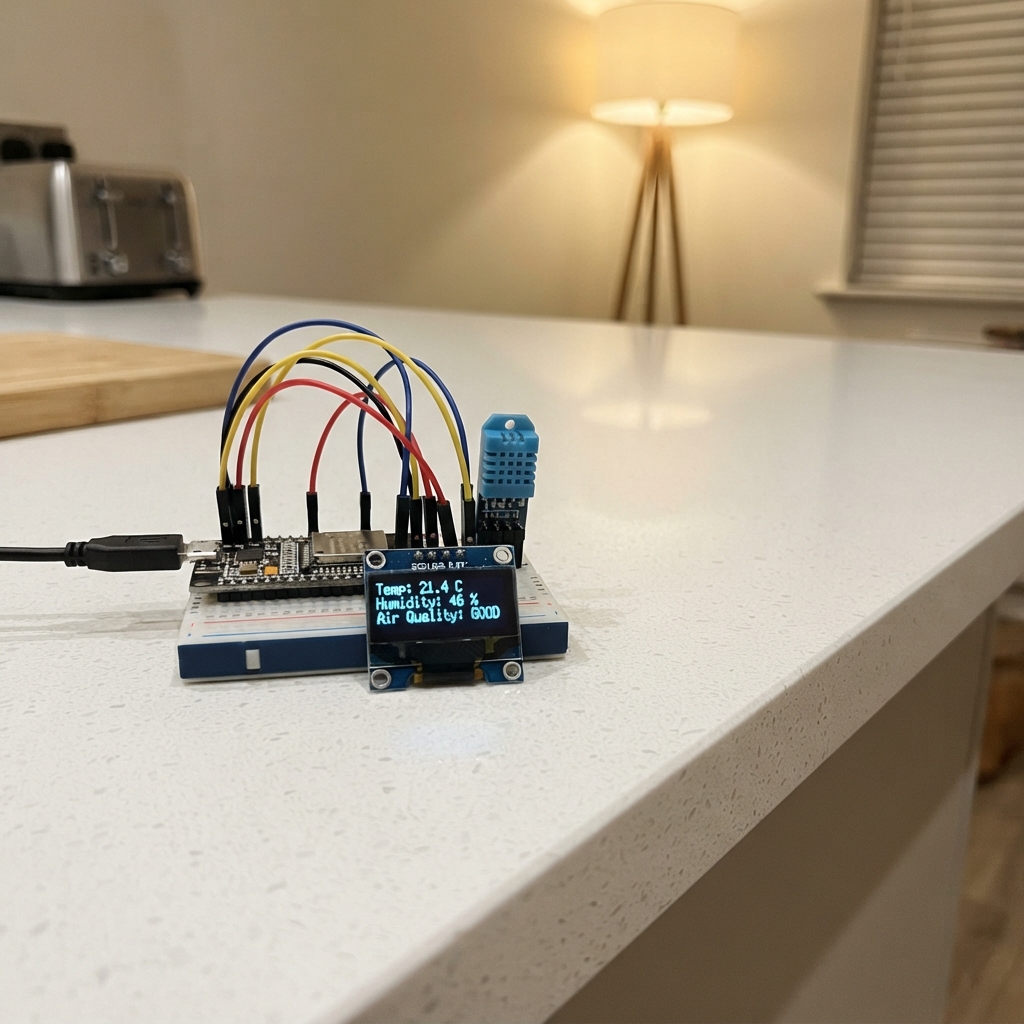
This project builds a real-time humidity monitor using an ESP32 microcontroller, DHT11 sensor, and SSD1306 OLED display. The system reads ambient humidity levels and displays them on a small screen, making it useful for tracking environmental conditions in any space.
The guide provides a complete wiring diagram showing how to connect the OLED display and DHT11 sensor to the ESP32, a full parts list, and step-by-step assembly instructions. Firmware is included to handle sensor readings, display updates, and optional data logging to Google Sheets via WiFi, allowing makers to monitor humidity trends over time.
Wiring diagram

Gather all the parts
Assemble it in 4 steps
1. Tắt nguồn rồi đặt các phần lên bàn
Rút cáp USB khỏi ESP32 trước. Đặt ESP32, OLED 0.96 inch và DHT11 sao cho nhìn rõ nhãn chân trên từng mạch.
- Màn OLED I2C thường ghi bốn chân GND, VCC, SCL và SDA.
- DHT11 dạng mô-đun thường ghi VCC, DATA và GND.
- Không cắm hoặc rút dây khi ESP32 đang có điện vì chạm nhầm dây có thể làm hỏng mạch.
2. Nối màn OLED
Dùng dây nối OLED: VCC → chân 3V3 của ESP32 (power), GND → GND (ground), SDA → GPIO21 (data), SCL → GPIO22 (data).
- Các chữ GPIO21 và GPIO22 có thể in là 21 và 22 trên bo mạch.
- Màn này dùng điện 3.3V cùng ESP32.
- Hãy chắc VCC và GND không bị đảo — cấp nguồn ngược có thể làm hỏng màn hình.
3. Nối cảm biến DHT11
Dùng dây nối DHT11: VCC → 3V3 của ESP32 (power), GND → GND (ground), DATA → GPIO27 (signal). Nếu bạn có DHT11 rời 4 chân thay vì mô-đun 3 chân, thêm điện trở 4.7–10 kΩ nối giữa VCC và DATA để tín hiệu ổn định.
- Đặt DHT11 tránh sát nguồn nhiệt hoặc luồng gió mạnh để số đo gần với không khí xung quanh hơn.
- Nếu DHT11 là mô-đun ba chân có sẵn mạch nhỏ, nó thường đã có điện trở cần thiết.
- Không cấp 5V vào chân DATA của DHT11 vì GPIO của ESP32 chỉ dùng mức tín hiệu 3.3V.
4. Cấp nguồn và kiểm tra
Kiểm tra lại toàn bộ dây, sau đó cắm ESP32 vào máy tính bằng cáp USB. Màn hình sẽ hiện độ ẩm theo phần trăm và làm mới khoảng mỗi 2 giây.
- Nếu OLED chỉ sáng nhưng không có chữ, kiểm tra lại hai dây SDA và SCL.
- Nếu OLED không hiện gì, một số mô-đun dùng địa chỉ khác 0x3D; hãy kiểm tra nhãn hoặc thông tin của mô-đun.
- Dừng ngay nếu bất kỳ mạch nào nóng bất thường; rút USB trước khi đổi dây.
Review all connections
1. Connections between "oled_1" and "ESP32"
2. Connections between "dht11_1" and "ESP32"
Deploy the firmware
#include <Arduino.h>
#include <Wire.h>
#include <WiFi.h>
#include <HTTPClient.h>
#include <WiFiClientSecure.h>
#include <Adafruit_GFX.h>
#include <Adafruit_SSD1306.h>
#include <DHT.h>


// Forward declarations
void showMessage(const char *line1, const char *line2);
void showValues(float airHumidity, int gasOne, int gasTwo);
void updateSimulatedGasValues();
void startWifi();
bool uploadToGoogleSheets();

constexpr int DHT_PIN = 27;
constexpr int OLED_SDA_PIN = 21;
constexpr int OLED_SCL_PIN = 22;
constexpr uint8_t SCREEN_WIDTH = 128;
constexpr uint8_t SCREEN_HEIGHT = 64;
constexpr uint8_t OLED_ADDRESS = 0x3C;
constexpr unsigned long READ_INTERVAL_MS = 2000;
constexpr unsigned long UPLOAD_INTERVAL_MS = 20000;
constexpr unsigned long WIFI_RETRY_INTERVAL_MS = 30000;

const char *WIFI_SSID = "YOUR_WIFI_SSID";
const char *WIFI_PASS = "YOUR_WIFI_PASSWORD";
const char *SHEETS_WEB_APP_URL =
    "https://script.google.com/macros/s/AKfycbwAvTXGWs5MF2O78SfbQrMTWB6zNAO9GuU6QILcq1QRVG6JKoO9BD66O-5ZTwfVUG-f/exec";

DHT dht(DHT_PIN, DHT11);
Adafruit_SSD1306 display(SCREEN_WIDTH, SCREEN_HEIGHT, &Wire, -1);

float humidity = NAN;
int gas1 = 0;
int gas2 = 0;
float shownHumidity = NAN;
int shownGas1 = -1;
int shownGas2 = -1;
unsigned long lastReadMs = 0;
unsigned long lastUploadMs = 0;
unsigned long lastWifiRetryMs = 0;

void showMessage(const char *line1, const char *line2) {
  display.clearDisplay();
  display.setTextColor(SSD1306_WHITE);
  display.setTextSize(1);
  display.setCursor(0, 10);
  display.println(line1);
  display.setCursor(0, 30);
  display.println(line2);
  display.display();
}

void showValues(float airHumidity, int gasOne, int gasTwo) {
  display.clearDisplay();
  display.setTextColor(SSD1306_WHITE);
  display.setTextSize(1);
  display.setCursor(0, 4);
  display.print("Do am: ");
  display.print(airHumidity, 0);
  display.println(" %");
  display.setCursor(0, 25);
  display.print("Gas 1: ");
  display.println(gasOne);
  display.setCursor(0, 46);
  display.print("Gas 2: ");
  display.println(gasTwo);
  display.display();
}

void updateSimulatedGasValues() {
  const unsigned long seconds = millis() / 1000UL;
  gas1 = 120 + static_cast<int>((seconds * 7UL) % 181UL);
  gas2 = 180 + static_cast<int>((seconds * 11UL) % 221UL);
}

void startWifi() {
  WiFi.mode(WIFI_STA);
  WiFi.disconnect(false, false);
  delay(100);
  Serial.println("Dang ket noi WiFi");
  WiFi.begin(WIFI_SSID, WIFI_PASS);
  lastWifiRetryMs = millis();
}

bool uploadToGoogleSheets() {
  WiFiClientSecure client;
  client.setInsecure();
  HTTPClient http;

  if (!http.begin(client, SHEETS_WEB_APP_URL)) {
    Serial.println("Khong mo duoc ket noi Google Sheets");
    return false;
  }

  // Google Apps Script redirects the /exec address to its receiving service.
  http.setFollowRedirects(HTTPC_STRICT_FOLLOW_REDIRECTS);
  http.setTimeout(15000);
  http.addHeader("Content-Type", "application/x-www-form-urlencoded");
  const String body = "humidity=" + String(humidity, 1) +
                      "&gas1=" + String(gas1) +
                      "&gas2=" + String(gas2);
  const int statusCode = http.POST(body);
  const String response = statusCode > 0 ? http.getString() : "";
  http.end();

  Serial.print("Gui Google Sheets: HTTP ");
  Serial.print(statusCode);
  if (response.length() > 0) {
    Serial.print(" | Phan hoi: ");
    Serial.println(response);
  } else {
    Serial.println();
  }
  return statusCode >= 200 && statusCode < 300;
}

void setup() {
  Serial.begin(115200);
  Wire.begin(OLED_SDA_PIN, OLED_SCL_PIN);
  if (!display.begin(SSD1306_SWITCHCAPVCC, OLED_ADDRESS)) {
    Serial.println("Khong tim thay OLED o dia chi 0x3C");
    while (true) {
      delay(1000);
    }
  }

  dht.begin();
  showMessage("Dang khoi dong...", "Ket noi WiFi");
  startWifi();
}

void loop() {
  const unsigned long now = millis();
  static bool wifiWasConnected = false;
  const bool wifiConnected = WiFi.status() == WL_CONNECTED;

  if (wifiConnected && !wifiWasConnected) {
    Serial.print("WiFi da ket noi. IP: ");
    Serial.println(WiFi.localIP());
  }
  wifiWasConnected = wifiConnected;

  if (!wifiConnected && now - lastWifiRetryMs >= WIFI_RETRY_INTERVAL_MS) {
    startWifi();
  }

  if (now - lastReadMs >= READ_INTERVAL_MS) {
    lastReadMs = now;
    const float reading = dht.readHumidity();
    if (isnan(reading)) {
      Serial.println("Doc DHT11 that bai");
      showMessage("Khong doc duoc DHT11", "Kiem tra day DATA");
    } else {
      humidity = reading;
      updateSimulatedGasValues();
      if (humidity != shownHumidity || gas1 != shownGas1 || gas2 != shownGas2) {
        showValues(humidity, gas1, gas2);
        shownHumidity = humidity;
        shownGas1 = gas1;
        shownGas2 = gas2;
      }
    }
  }

  if (!isnan(humidity) && wifiConnected && now - lastUploadMs >= UPLOAD_INTERVAL_MS) {
    lastUploadMs = now;
    uploadToGoogleSheets();
  }
}
Remix this project
Make it yours in one click
Open a full copy of this project in your own Schematik workspace, diagram, code, parts, and assembly steps included. Swap the sensor, add features, or redesign the whole thing with AI. The author's original stays untouched.