Community project
Bluetooth Burger Phone Ringing
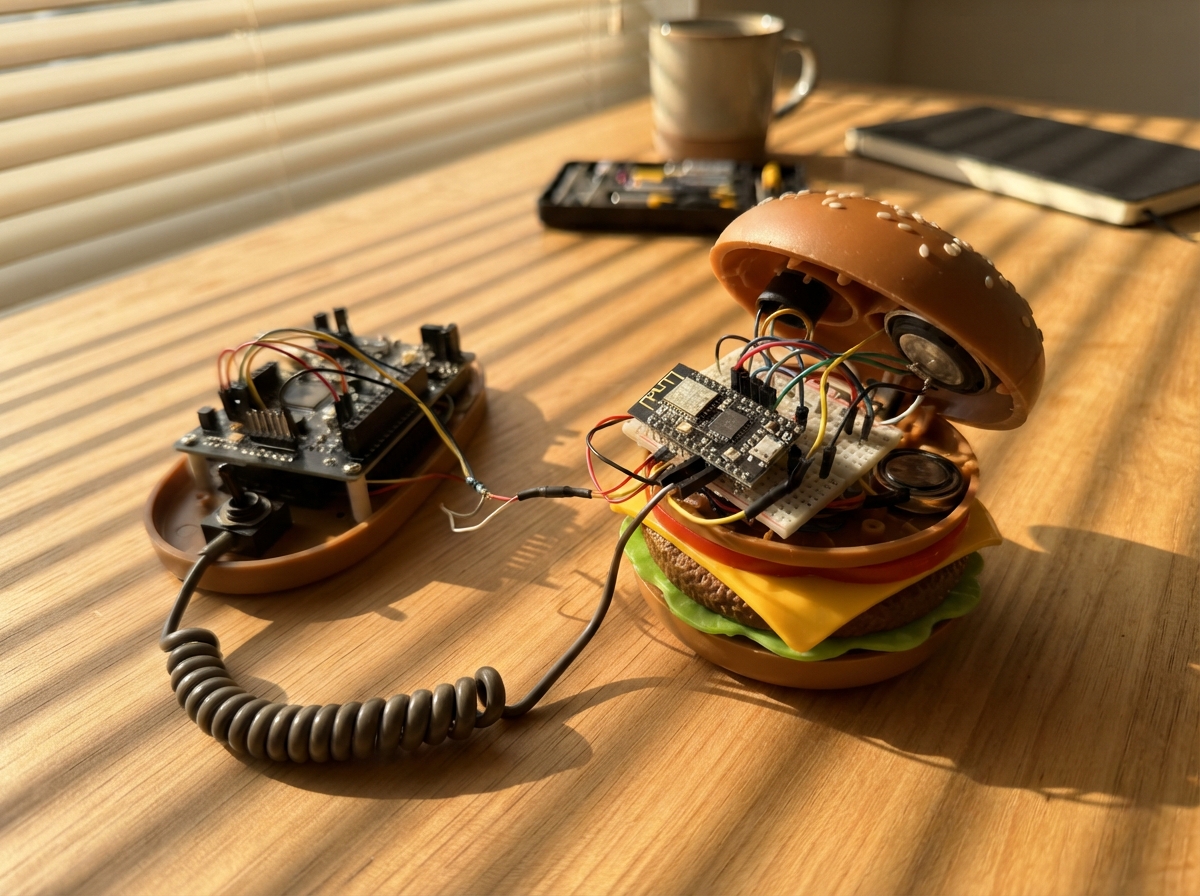
Transform a vintage burger phone into a working Bluetooth receiver that rings when calls arrive. This project pairs a DFRobot BT401 Bluetooth module with an Arduino Uno to detect incoming calls and trigger the phone's mechanical ringer, while the original cradle switch, microphone, and earpiece handle the audio interface.
The guide provides a complete wiring diagram, full parts list with resistor values for the ringer circuit, step-by-step assembly instructions, and Arduino firmware that manages Bluetooth pairing, call state detection, and hook-switch control. Builders will learn how to interface a Bluetooth module with legacy phone hardware and implement call signaling using a transistor-driven speaker circuit.
Wiring diagram

Gather all the parts
Assemble it in 7 steps
1. Remove the landline connection
Unplug the telephone line before opening the burger phone. Remove the old base circuit and ringer. Permanently disconnect or remove the telephone-line socket so this conversion cannot be plugged into a wall phone line. Keep the shell, cord and isolated cradle switch. The keypad is not used.
- Never connect any part of this USB circuit to a telephone line; ringing voltage can damage it and shock you.
2. Check that the boards fit
Dry-fit the Nano, 23 x 15.5 mm BT401 module, speaker and small soldered circuit board before cutting anything. Leave the Nano USB port accessible. Keep metal and wiring away from the BT401 antenna end. Allow room for insulated connections and strain relief. This is a soldering build, not a plug-in kit.
3. Connect power and Bluetooth control
Use Nano USB power only, from a certified 5 V USB supply rated at least 500 mA. BT401 VCC pin 13 goes to 5V; GND pin 12 goes to GND. Fit the 100 uF capacitor across 5V and GND, positive to 5V. TX pin 26 goes to D0 (status data). D1 sends commands through the 1 kohm top resistor to RX pin 25; the 2 kohm bottom resistor connects that RX junction to GND, lowering the 5 V signal to about 3.3 V. Put removable jumpers in both UART wires. Leave unused module pins unconnected.
- Disconnect both Bluetooth UART jumpers before Deploy, then reconnect after programming. The Nano UART is shared with USB; do not send serial monitor text during operation.
4. Connect the cradle switch
With power off, use a continuity meter to find two switch contacts that connect only while the handset rests on the cradle. Fully separate them from the old electronics. Connect one to D4 (handset detection) and the other to GND. If the original switch is mounted on the old board, isolate its tracks completely.
5. Fit the replacement microphone and earpiece
Replace the unknown original handset transducers with the listed two-wire electret capsule and 32 ohm earpiece. Identify the cord conductors by continuity, not colour. Route microphone minus and earpiece minus to SGND pin 11; run SGND separately to the common power ground. Fit 1 uF ceramic from DVDD pin 7 to SGND. Bias microphone plus from DVDD through 6.2 kohm, and couple microphone plus to MIC pin 8 through the second 1 uF ceramic capacitor. DACL pin 10 connects to the positive side of the 10 uF capacitor; capacitor negative goes through 22 ohm to earpiece plus. Keep microphone wires short and away from ringtone wiring.
- Do not connect the earpiece directly to a DAC output without its capacitor. Start with the handset away from your ear and increase volume only on the mobile phone if needed.
6. Build the low-voltage ringtone speaker circuit
Connect 5V through the 100 ohm 0.5 W resistor to speaker plus. Speaker minus goes to transistor collector. Emitter goes to GND. D9 goes through 1 kohm to base; 100 kohm connects base to GND. Fit the diode across the speaker, banded end to speaker plus. Check the transistor supplier's B/C/E lead diagram, not just its flat face. This produces a modest electronic ring, not a loud mechanical bell.
7. Pair and test before closing
Reconnect UART jumpers after programming, then restart USB power with the handset down. Pair the mobile phone with BT401-AUDIO, not BT401-BLE, and allow phone-call audio. Call the mobile from another phone: the base speaker should pulse. Lift the handset to answer and replace it to hang up. Test both speech directions and remote hang-up. If a call arrives with the handset already lifted, answer on the mobile and choose Bluetooth audio. Test outside the shell first, then insulate every solder joint, secure the boards and cord, and repeat the test after closing.
- Ordinary mobile calls are the target. Internet calling apps may behave differently. No battery is used. Physical fit and audio levels must be checked on your actual shell.
Review all connections
1. Connections between "bt" and "Arduino"
2. Connections between "tx_top" and "Arduino"
3. Connections between "tx_bottom" and "Arduino"
4. Connections between "hook" and "Arduino"
5. Connections between "dac_cap" and "Arduino"
6. Connections between "mic_bias" and "Arduino"
7. Connections between "mic" and "Arduino"
8. Connections between "mic_cap" and "Arduino"
9. Connections between "ear_cap" and "Arduino"
10. Connections between "ear_limit" and "Arduino"
11. Connections between "ear" and "Arduino"
12. Connections between "base" and "Arduino"
13. Connections between "base_pull" and "Arduino"
14. Connections between "q" and "Arduino"
15. Connections between "ring_limit" and "Arduino"
16. Connections between "diode" and "Arduino"
17. Connections between "supply_cap" and "Arduino"
Deploy the firmware
#include <Arduino.h>
#include <string.h>
// Wiring checked: D0 RX, D1 TX divider, D4 cradle, D9 ringer.
// BT401 uses the Nano hardware UART. Unplug BT TX and RX for Deploy.
constexpr uint8_t HOOK_PIN=4, RING_PIN=9;
char line[80]; uint8_t used=0, callState=0;
bool rawDown=true, down=true;
uint32_t hookChanged=0,lastStatus=0,lastPoll=0;
void command(const char *s) { Serial.print(s); Serial.print("\r\n"); }
void setup(){
  pinMode(HOOK_PIN,INPUT_PULLUP);
  pinMode(RING_PIN,OUTPUT); digitalWrite(RING_PIN,LOW);
  down=rawDown=(digitalRead(HOOK_PIN)==LOW);
  Serial.begin(115200);
  delay(2200); // Manufacturer requires two seconds before initialization.
  const char *init[]={"AT+CM01","AT+B201","AT+B501","AT+CN00","AT+CA08","AT+C401","AT+C200"};
  for(auto s:init){command(s); delay(150);}
}
void loop(){
  uint32_t now=millis();
  while(Serial.available()){
    char c=Serial.read();
    if(c=='\r'||c=='\n'){
      line[used]=0;
      char *s=strstr(line,"TS+");
      if(s && strlen(s)>=5 && s[3]=='0' && s[4]>='0' && s[4]<='4'){
        callState=s[4]-'0'; lastStatus=now;
      }
      used=0;
    }else if(used<sizeof(line)-1){line[used++]=c;}else{used=0;}
  }
  bool fresh=now-lastStatus<2000;
  bool v=digitalRead(HOOK_PIN)==LOW;
  if(v!=rawDown){rawDown=v;hookChanged=now;}
  if(v!=down && now-hookChanged>=40){
    down=v;
    if(fresh){
      if(!down && callState==3){command("AT+BA04");callState=4;}
      else if(down && callState==4){command("AT+BA03");callState=1;}
      else if(down && callState==3){command("AT+BA02");callState=1;}
    }
  }
  if(now-lastPoll>=350){lastPoll=now;command("AT+TS");}
  bool ring=fresh && callState==3 && down && (now%3000<1200);
  static bool sounding=false;
  if(ring!=sounding){sounding=ring;if(ring)tone(RING_PIN,1000);else noTone(RING_PIN);}
}

// Circuit pin roles confirmed after component metadata refresh.
Remix this project
Make it yours in one click
Open a full copy of this project in your own Schematik workspace, diagram, code, parts, and assembly steps included. Swap the sensor, add features, or redesign the whole thing with AI. The author's original stays untouched.