Community project
Cloud-Controlled Smart Rover
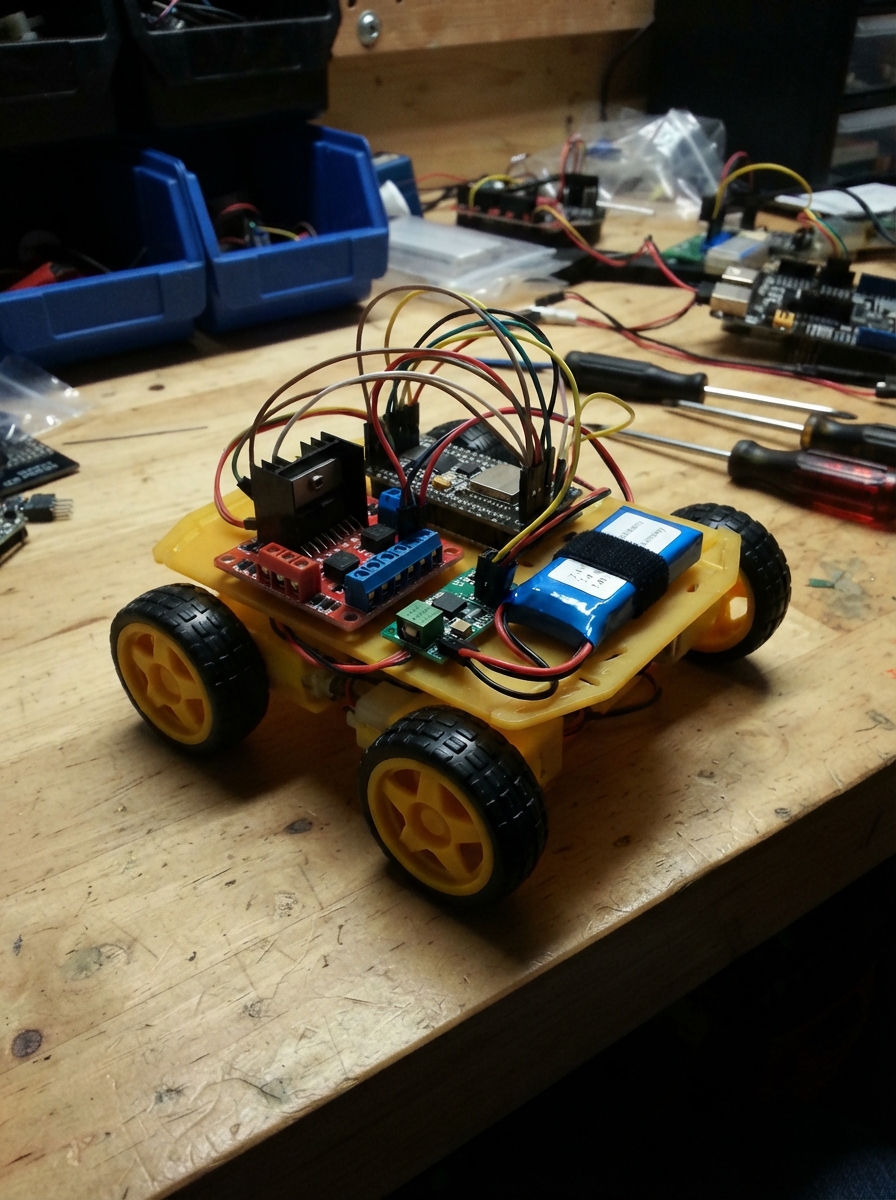
Build a WiFi-enabled rover that responds to commands from anywhere using MQTT cloud messaging. This project combines an ESP32 microcontroller with dual TT motors, an L298N motor driver, and a 7.4V LiPo battery to create a mobile platform capable of forward, backward, and turning movements controlled remotely through a web interface or MQTT broker.
The guide includes a complete wiring diagram showing how to connect the motor controller to the ESP32, a full parts list with specifications, ready-to-upload firmware with WiFi and MQTT support, and step-by-step assembly instructions. Learn how to mount the motors and controller, configure the power distribution with the buck converter for the ESP32, wire the control signals, and test your rover's movement before deploying it to the cloud.
Wiring diagram

Gather all the parts
Assemble it in 6 steps
1. 固定电机和控制板
把 left_motor 和 right_motor 固定在小车底盘左右两侧,让两个车轮朝外;再把 motor_driver 和 ESP32 DevKit v1 固定在不会碰到车轮的位置。电机线不要被车轮或齿轮夹住。
- 先不要接电池,整个接线过程都保持断电。
- 电机轴和车轮转动时会夹住细导线,导线被拉断可能让小车突然失控。
2. 把两个电机接到驱动板
把左侧电机的两根线接到 motor_driver 的 M1+ 和 M1- 螺丝端子;把右侧电机的两根线接到 M2+ 和 M2-。每根线剥开约 5 mm 后压在金属夹片下,再轻拉确认没有松动。
- 如果“前进”时某一边车轮反转,只需在断电后交换那一个电机的两根线。
- 不要把电机线接到 ESP32 的针脚;电机需要的电流会损坏控制板。
3. 接电机电源和公共地线
将 battery_2s 的正极接到 motor_driver 的 VS 和 VD;将 battery_2s 的负极接到 motor_driver 的 GND。也把 battery_2s 的正极接到 buck_5v 的 VIN+,负极接到 buck_5v 的 VIN-。这些负极必须全部相连,才能让控制信号有共同的参考点。
- 使用能承受电机电流的较粗红线接正极、黑线接负极。
- 电池正负极接反会损坏降压模块和电机驱动板;接电前逐个核对红线到正极、黑线到负极。
4. 设定并接好 5V 降压输出
在没有连接 ESP32 时,先给 battery_2s 接电并用万用表调节 buck_5v,使 VOUT+ 与 VOUT- 恰好为 5.0V。断电后,把 VOUT+ 接 ESP32 的 VIN 或 5V 针脚,把 VOUT- 接 ESP32 的 GND。
- 调压完成后再接 ESP32;接线完成才重新接电池。
- 超过 5V 的降压输出接到 ESP32 的 VIN/5V 针脚可能损坏开发板;绝不能把 7.4V 电池直接接到 ESP32。
5. 接四根控制线
用四根细跳线连接 motor_driver 的 E1 → ESP32 GPIO25(速度信号)、M1 → GPIO26(左轮方向信号)、E2 → GPIO27(速度信号)、M2 → GPIO33(右轮方向信号)。再确认 motor_driver 的 GND 与 ESP32 的 GND 已通过电池负极和降压模块负极连在一起。
- GPIO 编号印在 ESP32 开发板针脚旁;不要使用标有 25、26、27、33 以外的针脚替代。
- 如果没有公共 GND,小车可能随机转动或完全不响应控制指令。
6. 首次上电测试
把小车抬高,使两个车轮悬空。先用 USB 给 ESP32 供电并通过 Schematik 部署固件,然后接上电池。未填写 Wi-Fi 名称时,用手机连接 RobotCar-Control 热点,密码 robotcar123,在浏览器打开 192.168.4.1/cmd?move=forward 进行短暂测试。
- 用 stop 替换网址末尾的 forward 可以立刻停车;没有新指令时,小车会在约 1 秒后自动停车。
- 第一次测试必须让车轮离地;方向接反或机械卡住时,落地测试可能让小车突然冲出。
Review all connections
1. Connections between "battery_2s" and "ESP32"
2. Connections between "buck_5v" and "ESP32"
3. Connections between "motor_driver" and "ESP32"
Deploy the firmware
#include <WiFi.h>
#include <WebServer.h>
#include <PubSubClient.h>

// Fill in these two values when you want cloud MQTT control.
const char* WIFI_SSID = "";
const char* WIFI_PASSWORD = "";
const char* MQTT_HOST = "test.mosquitto.org";
const uint16_t MQTT_PORT = 1883;
const char* MQTT_COMMAND_TOPIC = "schematik/robotcar/cmd";
const char* MQTT_STATUS_TOPIC = "schematik/robotcar/status";

const int LEFT_PWM_PIN = 25;
const int LEFT_DIR_PIN = 26;
const int RIGHT_PWM_PIN = 27;
const int RIGHT_DIR_PIN = 33;
const uint8_t DRIVE_SPEED = 210;
const unsigned long COMMAND_TIMEOUT_MS = 1000;
const unsigned long MQTT_RETRY_MS = 5000;

WebServer server(80);
WiFiClient wifiClient;
PubSubClient mqtt(wifiClient);
unsigned long lastCommandMs = 0;
unsigned long lastMqttAttemptMs = 0;
bool moving = false;

void setMotor(int pwmPin, int directionPin, bool forward, uint8_t speed) {
  digitalWrite(directionPin, forward ? LOW : HIGH);
  analogWrite(pwmPin, speed);
}

void stopMotors() {
  analogWrite(LEFT_PWM_PIN, 0);
  analogWrite(RIGHT_PWM_PIN, 0);
  moving = false;
}

void driveForward() {
  setMotor(LEFT_PWM_PIN, LEFT_DIR_PIN, true, DRIVE_SPEED);
  setMotor(RIGHT_PWM_PIN, RIGHT_DIR_PIN, true, DRIVE_SPEED);
  moving = true;
}

void driveBackward() {
  setMotor(LEFT_PWM_PIN, LEFT_DIR_PIN, false, DRIVE_SPEED);
  setMotor(RIGHT_PWM_PIN, RIGHT_DIR_PIN, false, DRIVE_SPEED);
  moving = true;
}

void turnLeft() {
  setMotor(LEFT_PWM_PIN, LEFT_DIR_PIN, false, DRIVE_SPEED);
  setMotor(RIGHT_PWM_PIN, RIGHT_DIR_PIN, true, DRIVE_SPEED);
  moving = true;
}

void turnRight() {
  setMotor(LEFT_PWM_PIN, LEFT_DIR_PIN, true, DRIVE_SPEED);
  setMotor(RIGHT_PWM_PIN, RIGHT_DIR_PIN, false, DRIVE_SPEED);
  moving = true;
}

bool processCommand(String command) {
  command.trim();
  command.toLowerCase();
  if (command == "forward") {
    driveForward();
  } else if (command == "back" || command == "backward") {
    driveBackward();
  } else if (command == "left") {
    turnLeft();
  } else if (command == "right") {
    turnRight();
  } else if (command == "stop") {
    stopMotors();
  } else {
    return false;
  }
  lastCommandMs = millis();
  return true;
}

void mqttCallback(char* topic, byte* payload, unsigned int length) {
  String command;
  for (unsigned int i = 0; i < length; ++i) {
    command += static_cast<char>(payload[i]);
  }
  if (processCommand(command)) {
    mqtt.publish(MQTT_STATUS_TOPIC, command.c_str());
  }
}

void startLocalControlPage() {
  WiFi.mode(WIFI_AP);
  WiFi.softAP("RobotCar-Control", "robotcar123");
  server.on("/", HTTP_GET, []() {
    server.send(200, "text/html", "<h1>Robot car control</h1><p>Use /cmd?move=forward, backward, left, right, or stop.</p>");
  });
  server.on("/cmd", HTTP_GET, []() {
    if (!server.hasArg("move")) {
      server.send(400, "text/plain", "Add move=forward, backward, left, right, or stop");
      return;
    }
    String command = server.arg("move");
    if (processCommand(command)) {
      server.send(200, "text/plain", "Command accepted: " + command);
    } else {
      server.send(400, "text/plain", "Unknown command");
    }
  });
  server.begin();
}

void connectToWifi() {
  if (strlen(WIFI_SSID) == 0) {
    startLocalControlPage();
    return;
  }
  WiFi.mode(WIFI_STA);
  WiFi.begin(WIFI_SSID, WIFI_PASSWORD);
  unsigned long startMs = millis();
  while (WiFi.status() != WL_CONNECTED && millis() - startMs < 15000) {
    delay(250);
  }
  if (WiFi.status() != WL_CONNECTED) {
    startLocalControlPage();
  }
}

void reconnectMqttIfNeeded() {
  if (WiFi.status() != WL_CONNECTED || mqtt.connected()) {
    return;
  }
  if (millis() - lastMqttAttemptMs < MQTT_RETRY_MS) {
    return;
  }
  lastMqttAttemptMs = millis();
  String clientId = "schematik-car-" + String(static_cast<uint32_t>(ESP.getEfuseMac()), HEX);
  if (mqtt.connect(clientId.c_str())) {
    mqtt.subscribe(MQTT_COMMAND_TOPIC);
    mqtt.publish(MQTT_STATUS_TOPIC, "online");
  }
}

void setup() {
  pinMode(LEFT_DIR_PIN, OUTPUT);
  pinMode(RIGHT_DIR_PIN, OUTPUT);
  pinMode(LEFT_PWM_PIN, OUTPUT);
  pinMode(RIGHT_PWM_PIN, OUTPUT);
  stopMotors();
  mqtt.setServer(MQTT_HOST, MQTT_PORT);
  mqtt.setCallback(mqttCallback);
  connectToWifi();
}

void loop() {
  server.handleClient();
  reconnectMqttIfNeeded();
  mqtt.loop();
  if (moving && millis() - lastCommandMs >= COMMAND_TIMEOUT_MS) {
    stopMotors();
    if (mqtt.connected()) {
      mqtt.publish(MQTT_STATUS_TOPIC, "stopped: command timeout");
    }
  }
  delay(10);
}
Remix this project
Make it yours in one click
Open a full copy of this project in your own Schematik workspace — diagram, code, parts, and assembly steps included. Swap the sensor, add features, or redesign the whole thing with AI. The author's original stays untouched.