Community project
ESP32 Live Flight Radar
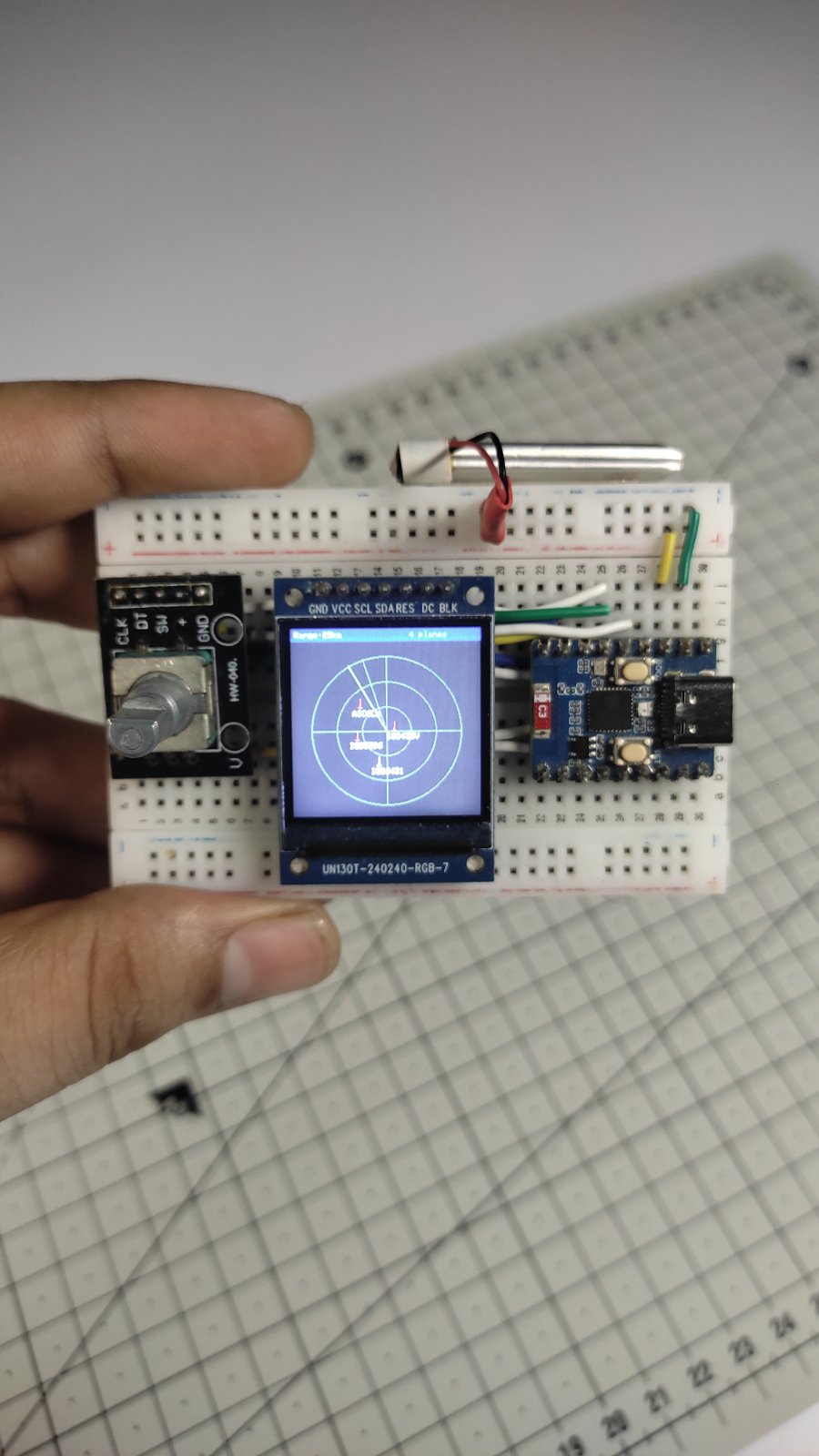
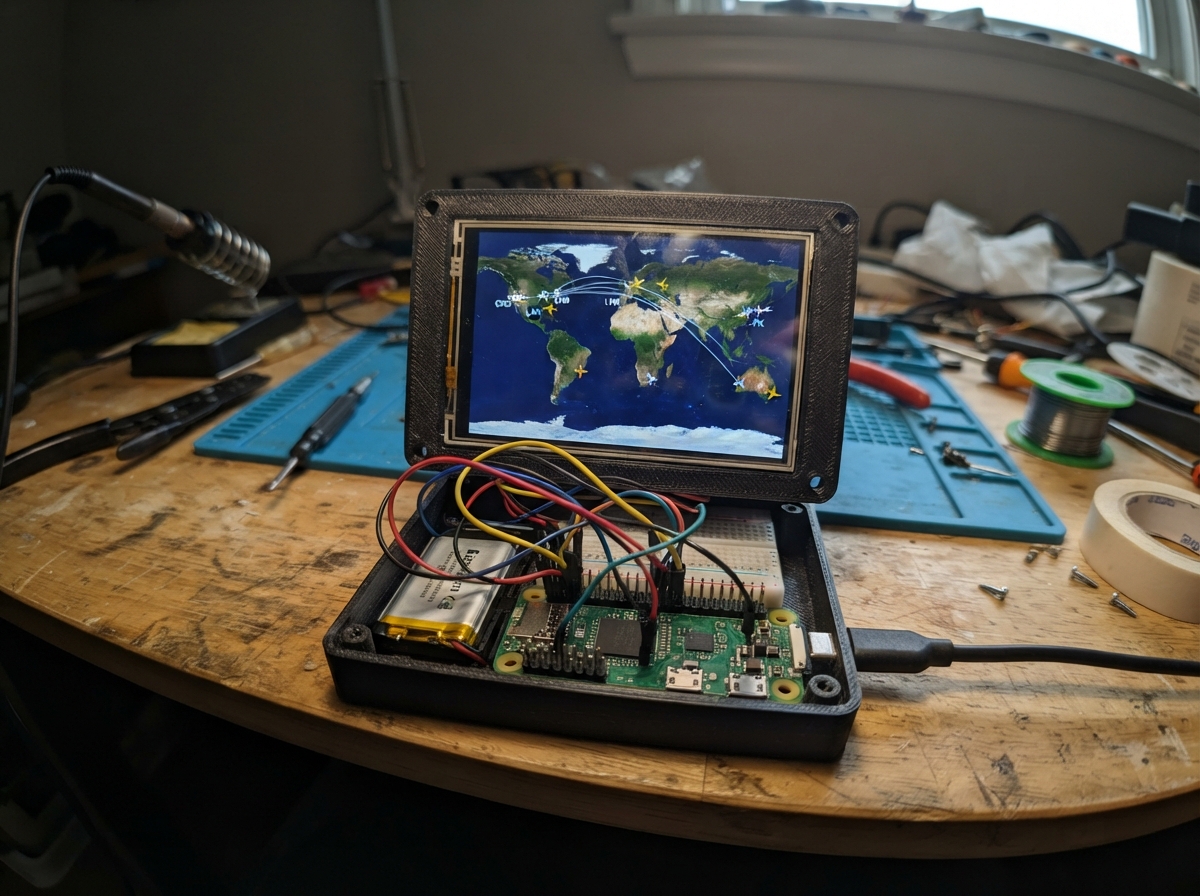
This project builds a live flight radar display using an ESP32 microcontroller connected to the OpenSky Network API. Aircraft data streams to a compact 240×240 SPI TFT display, showing real-time positions, altitudes, and flight information within a configurable radius of a home location. A rotary encoder lets you adjust the radar range and pan the view.
The guide provides a complete parts list, wiring diagram for the ST7789 display and KY-040 encoder, step-by-step assembly instructions, and ready-to-flash firmware with OAuth2 authentication for OpenSky. After configuration with your WiFi credentials and API keys, the radar displays aircraft as colored symbols indicating altitude, with velocity and callsign data available on demand.
Wiring diagram

Gather all the parts
Assemble it in 8 steps
1. Gather tools & parts
You will need: Waveshare ESP32-C3-Zero (or -Zero-M), a 1.3-inch ST7789 240×240 SPI TFT module (no-CS variant – CS is tied to GND on the module PCB), a KY-040 rotary encoder module, a solderless breadboard, and jump wires. A USB-C cable to connect the ESP32-C3-Zero to your computer.
- Confirm your TFT module has no CS pin exposed – it should have exactly 7 pins: VCC, GND, SCK, MOSI, RES/RST, DC, BLK.
- Waveshare ESP32-C3-Zero-M comes with header pins pre-soldered; the plain -Zero requires soldering.
2. Power rails on the breadboard
Insert the ESP32-C3-Zero into the breadboard. Connect the board's 3V3 pin to the positive rail and GND to the negative rail. All peripheral VCC and GND connections below will tie to these rails.
- Do NOT connect anything to the 5V pin of the board when the board is powered by USB-C – it is an input only and can damage the regulator if driven from another 5V source.
3. Wire the ST7789 TFT display
Connect the TFT module as follows: • TFT VCC → 3V3 rail • TFT GND → GND rail • TFT SCK (clock) → GPIO4 • TFT MOSI (data) → GPIO6 • TFT DC → GPIO7 • TFT RES / RST → GPIO5 • TFT BLK (backlight) → GPIO3 Note: The user-specified RST was GPIO10; in this build it is moved to GPIO5 because GPIO10 is shared with the onboard WS2812 LED. If you need GPIO5 for something else you may instead tie RST high through a 10 kΩ resistor (always reset) and change TFT_RST to -1 in the firmware.
- The SPI bus uses software-mapped GPIO4/GPIO6 via the ESP32 SPI2 peripheral (fully flexible pin routing) – no hardware SPI pin constraint.
- The backlight pin is driven HIGH to turn on full brightness. You may optionally connect it through a ~47 Ω resistor to limit current, though most modules include onboard current-limit resistors.
- GPIO10 is wired to the onboard WS2812 RGB LED data line on the ESP32-C3-Zero. Do NOT use GPIO10 for the TFT RST or any time-sensitive signal – use GPIO5 as specified.
4. Wire the KY-040 rotary encoder
Connect the encoder module as follows: • KY-040 VCC → 3V3 rail • KY-040 GND → GND rail • KY-040 CLK → GPIO0 • KY-040 DT → GPIO1 • KY-040 SW → GPIO2 The internal pull-ups configured in firmware eliminate the need for external pull-up resistors.
- CLK and DT are the quadrature rotation outputs. SW is the integrated push-button – press it to force an immediate flight data refresh.
- GPIO0, GPIO1, and GPIO2 are ADC-capable GPIOs with no boot-critical function on the C3-Zero, making them ideal for encoder use.
5. Double-check all connections
Before powering on, verify: 1. No bare wire bridges between 3V3 and GND on the breadboard. 2. All seven TFT wires connected at both ends. 3. All five KY-040 wires connected at both ends. 4. No peripherals connected to the reserved GPIO12–GPIO17 (internal flash) or GPIO18/19 (USB D-/D+).
- The ESP32-C3-Zero operates at 3.3 V logic. Do not connect any 5 V signal directly to its GPIO pins.
6. Configure WiFi and OpenSky credentials in firmware
Open the project in Schematik and edit firmware.cpp: • Replace YOUR_WIFI_SSID and YOUR_WIFI_PASSWORD with your network credentials. • Register a free account at opensky-network.org, go to Account → API Clients, create a client, and paste the client_id and client_secret into OPENSKY_CLIENT_ID and OPENSKY_CLIENT_SECRET. • Set HOME_LAT and HOME_LON to your location in decimal degrees (e.g., 51.5074 / -0.1278 for London). • Adjust RANGE_STEPS if you want different zoom levels.
- Anonymous API access still works (no token) but is severely rate-limited. The OAuth2 flow included in this firmware gives you 4000+ daily credits.
- Keep your client_secret private – do not commit firmware.cpp to a public repository.
7. Flash and deploy
Connect the ESP32-C3-Zero to your computer via USB-C. To enter flash mode: hold the BOOT button, then connect (or press RESET while holding BOOT). Click the Deploy button in Schematik. The board will reboot automatically after a successful flash.
- USB CDC Serial output appears at 115200 baud in Schematik's serial monitor – watch for [API], [Token], and [Enc] debug messages.
- The display should show 'FlightRadar / Connecting WiFi…' within 2 seconds of boot, then the radar map within 20 seconds.
8. Using the radar
• Rotate the KY-040 knob clockwise to increase search range (0.5 → 1 → 2 → 5 → 10 degrees), counter-clockwise to decrease. • Press the knob button to force an immediate API refresh. • Aircraft icons point in their direction of travel. Green = low altitude, yellow = mid, red = high, grey = on ground. • The callsign is shown next to each icon. • Data refreshes automatically every 15 seconds.
- A 2-degree range (~220 km diameter around home) is a good starting point for typical mid-latitude airspace density.
- If the display shows '0 AC' consistently, open the serial monitor and check for [API] HTTP error codes – a 429 means you hit the rate limit.
Review all connections
1. Connections between "tft" and "ESP32"
2. Connections between "encoder" and "ESP32"
Deploy the firmware
// ============================================================
//  FlightRadar – ESP32-C3-Zero  +  ST7789 240×240  +  KY-040
//  OpenSky Network REST API  (OAuth2 bearer token, no Basic-Auth)
// ============================================================
#include <Arduino.h>
#include <WiFi.h>
#include <HTTPClient.h>
#include <WiFiClientSecure.h>
#include <Arduino_GFX_Library.h>
#include <ArduinoJson.h>
#include <math.h>

// ── User config ───────────────────────────────────────────────
#define WIFI_SSID       ""
#define WIFI_PASSWORD   ""

// OpenSky OAuth2 credentials (create at opensky-network.org → Account → API Clients)
#define OPENSKY_CLIENT_ID      ""
#define OPENSKY_CLIENT_SECRET  ""

// Home position (WGS-84 decimal degrees)

struct Aircraft {
    char   icao24[8];
    char   callsign[10];
    float  lon;
    float  lat;
    float  altM;      // baro altitude metres
    float  trackDeg;  // true track degrees
    float  velMs;     // velocity m/s
    bool   onGround;
    bool   valid;
};


// Forward declarations
void wifiConnect();
bool fetchToken();
bool ensureToken();
bool fetchFlights();
inline uint16_t altColor(float altM, bool onGnd);
void drawPlane(int cx, int cy, float hdgDeg, uint16_t colour);
void latLonToXY(float lat, float lon, float range, int &px, int &py);
void render();
void encoderSetup();
void encoderPoll();
void backlightOn();

constexpr float HOME_LAT =  51.4779f;   // default: Greenwich, London
constexpr float HOME_LON =  -0.0015f;

// Search range presets (degrees)
constexpr float RANGE_STEPS[]   = {0.5f, 1.0f, 2.0f, 5.0f, 10.0f};
constexpr int   RANGE_STEP_CNT  = 5;

// Poll interval (ms)
constexpr uint32_t POLL_MS = 15000;

// ── Pin definitions ───────────────────────────────────────────
#define TFT_SCK   4
#define TFT_MOSI  6
#define TFT_DC    7
#define TFT_RST   5
#define TFT_BLK   3
#define ENC_CLK   0
#define ENC_DT    1
#define ENC_SW    2

// ── Display setup (Arduino_GFX, no-CS, SPI2) ─────────────────
Arduino_DataBus *bus = new Arduino_ESP32SPI(
    TFT_DC,           // DC
    GFX_NOT_DEFINED,  // CS – tied low on module
    TFT_SCK,          // SCK
    TFT_MOSI,         // MOSI
    GFX_NOT_DEFINED,  // MISO
    2                 // SPI host: HSPI=1, VSPI/SPI2=2 (SPI2 on C3)
);

Arduino_GFX *gfx = new Arduino_ST7789(
    bus,
    TFT_RST,   // RST
    0,         // rotation (0=portrait)
    true,      // IPS panel
    240, 240,  // width, height
    0, 0,      // col/row offset 1
    0, 80      // col/row offset 2 (240×240 crop of 320-row controller)
);

// ── Colour palette ────────────────────────────────────────────
#define C_BG        0x0000u  // black
#define C_GRID      0x1082u  // dark grey
#define C_HOME      0xFFE0u  // yellow
#define C_TEXT      0xFFFFu  // white
#define C_LOW       0x07E0u  // green  (< 3 000 m)
#define C_MID       0xFFE0u  // yellow (3 000–9 000 m)
#define C_HIGH      0xF800u  // red    (> 9 000 m)
#define C_GND       0x7BEFu  // light grey (on-ground)
#define C_RANGE_IND 0x001Fu  // blue (range ring)

// ── Aircraft state vector (OpenSky fields by index) ───────────


constexpr int MAX_AC = 40;
Aircraft acList[MAX_AC];
int      acCount = 0;

// ── Encoder state ─────────────────────────────────────────────
volatile int  encPos    = 2;    // start index → 2.0° range
volatile bool swPressed = false;
int           lastCLK;

// ── OAuth2 token ──────────────────────────────────────────────
String  accessToken;
uint32_t tokenExpiresAt = 0;   // millis()

// ── Misc ──────────────────────────────────────────────────────
uint32_t lastPoll     = 0;
bool     needRedraw   = true;
uint32_t lastEncCheck = 0;

// ─────────────────────────────────────────────────────────────
//  WIFI
// ─────────────────────────────────────────────────────────────
void wifiConnect() {
    Serial.printf("[WiFi] Connecting to %s", WIFI_SSID);
    WiFi.mode(WIFI_STA);
    WiFi.begin(WIFI_SSID, WIFI_PASSWORD);
    uint32_t t = millis();
    while (WiFi.status() != WL_CONNECTED) {
        if (millis() - t > 20000) {
            Serial.println("\n[WiFi] Timeout – rebooting");
            ESP.restart();
        }
        delay(500);
        Serial.print('.');
    }
    Serial.printf("\n[WiFi] Connected, IP: %s\n", WiFi.localIP().toString().c_str());
}

// ─────────────────────────────────────────────────────────────
//  OAUTH2 TOKEN FETCH
// ─────────────────────────────────────────────────────────────
bool fetchToken() {
    const char *tokenUrl =
        "https://auth.opensky-network.org/auth/realms/opensky-network"
        "/protocol/openid-connect/token";

    WiFiClientSecure client;
    client.setInsecure();   // skip cert validation (saves ~60 KB of root-CA data)
    HTTPClient http;
    http.begin(client, tokenUrl);
    http.addHeader("Content-Type", "application/x-www-form-urlencoded");

    char body[256];
    snprintf(body, sizeof(body),
        "grant_type=client_credentials&client_id=%s&client_secret=%s",
        OPENSKY_CLIENT_ID, OPENSKY_CLIENT_SECRET);

    int code = http.POST(body);
    if (code != 200) {
        Serial.printf("[Token] HTTP %d\n", code);
        http.end();
        return false;
    }

    String payload = http.getString();
    http.end();

    StaticJsonDocument<512> doc;
    if (deserializeJson(doc, payload)) {
        Serial.println("[Token] JSON parse failed");
        return false;
    }

    accessToken   = doc["access_token"].as<String>();
    int expiresIn = doc["expires_in"] | 1800;
    tokenExpiresAt = millis() + (uint32_t)(expiresIn - 30) * 1000;

    Serial.printf("[Token] OK, expires in %d s\n", expiresIn);
    return true;
}

bool ensureToken() {
    if (accessToken.length() > 0 && millis() < tokenExpiresAt) return true;
    return fetchToken();
}

// ─────────────────────────────────────────────────────────────
//  API FETCH
// ─────────────────────────────────────────────────────────────
bool fetchFlights() {
    if (!ensureToken()) return false;

    float range = RANGE_STEPS[encPos];
    float lamin = HOME_LAT - range;
    float lamax = HOME_LAT + range;
    float lomin = HOME_LON - range;
    float lomax = HOME_LON + range;

    char url[256];
    snprintf(url, sizeof(url),
        "https://opensky-network.org/api/states/all"
        "?lamin=%.4f&lomin=%.4f&lamax=%.4f&lomax=%.4f",
        lamin, lomin, lamax, lomax);
    Serial.printf("[API] GET %s\n", url);

    WiFiClientSecure client;
    client.setInsecure();
    HTTPClient http;
    http.begin(client, url);
    http.setTimeout(10000);

    char auth[512];
    snprintf(auth, sizeof(auth), "Bearer %s", accessToken.c_str());
    http.addHeader("Authorization", auth);

    int code = http.GET();
    Serial.printf("[API] HTTP %d\n", code);
    if (code != 200) {
        http.end();
        return false;
    }

    // Stream-parse with ArduinoJson filter to save RAM
    StaticJsonDocument<256> filter;
    filter["states"] = true;

    // Response can be large; use dynamic allocation with a cap
    DynamicJsonDocument doc(24576);
    DeserializationError err = deserializeJson(doc, http.getStream(),
        DeserializationOption::Filter(filter));
    http.end();

    if (err) {
        Serial.printf("[API] JSON err: %s\n", err.c_str());
        return false;
    }

    acCount = 0;
    JsonArray states = doc["states"];
    Serial.printf("[API] %d state vectors\n", states.size());

    for (JsonArray sv : states) {
        if (acCount >= MAX_AC) break;

        Aircraft &a = acList[acCount];
        a.valid = false;

        // Field order per OpenSky docs:
        // [0]=icao24 [1]=callsign [2]=origin_country
        // [3]=time_position [4]=last_contact
        // [5]=longitude [6]=latitude [7]=baro_altitude
        // [8]=on_ground [9]=velocity [10]=true_track
        // [11]=vertical_rate [12]=sensors [13]=geo_altitude
        // ...
        if (sv[5].isNull() || sv[6].isNull()) continue; // no position

        strncpy(a.icao24,   sv[0] | "",  sizeof(a.icao24)-1);
        const char *cs = sv[1] | "";
        strncpy(a.callsign, cs,           sizeof(a.callsign)-1);
        // trim trailing spaces
        for (int i = strlen(a.callsign)-1; i >= 0 && a.callsign[i]==' '; i--)
            a.callsign[i] = '\0';

        a.lon      = sv[5] | 0.0f;
        a.lat      = sv[6] | 0.0f;
        a.altM     = sv[7].isNull() ? 0.0f : (float)(double)sv[7];
        a.onGround = sv[8] | false;
        a.velMs    = sv[9].isNull() ? 0.0f : (float)(double)sv[9];
        a.trackDeg = sv[10].isNull() ? 0.0f : (float)(double)sv[10];
        a.valid    = true;
        acCount++;
    }

    Serial.printf("[API] Parsed %d aircraft\n", acCount);
    return true;
}

// ─────────────────────────────────────────────────────────────
//  DRAWING HELPERS
// ─────────────────────────────────────────────────────────────
inline uint16_t altColor(float altM, bool onGnd) {
    if (onGnd)         return C_GND;
    if (altM < 3000)   return C_LOW;
    if (altM < 9000)   return C_MID;
    return C_HIGH;
}

// Draw a small plane icon (body + wings) centred at (cx,cy),
// rotated to heading hdg (0=north, CW positive).
void drawPlane(int cx, int cy, float hdgDeg, uint16_t colour) {
    float rad = hdgDeg * (M_PI / 180.0f);
    float s   = sinf(rad);
    float c   = cosf(rad);

    // Fuselage: 6-pixel half-length
    int x0 = cx + (int)roundf(-s * -6);
    int y0 = cy + (int)roundf(-c * -6);
    int x1 = cx + (int)roundf(-s *  6);
    int y1 = cy + (int)roundf(-c *  6);
    gfx->drawLine(x0, y0, x1, y1, colour);

    // Wings: 5-pixel half-span, perpendicular to fuselage at 30% back
    int wx = cx + (int)roundf(-s * 1);
    int wy = cy + (int)roundf(-c * 1);
    int lx = wx + (int)roundf( c * -5);
    int ly = wy + (int)roundf(-s * -5);
    int rx = wx + (int)roundf( c *  5);
    int ry = wy + (int)roundf(-s *  5);
    gfx->drawLine(lx, ly, rx, ry, colour);

    // Tail: 2-pixel half-span, near back
    int tx = cx + (int)roundf(-s * 5);
    int ty = cy + (int)roundf(-c * 5);
    int tlx = tx + (int)roundf( c * -2);
    int tly = ty + (int)roundf(-s * -2);
    int trx = tx + (int)roundf( c *  2);
    int try_ = ty + (int)roundf(-s *  2);
    gfx->drawLine(tlx, tly, trx, try_, colour);
}

// Map lat/lon offset from home to pixel (x,y) on 240×240 display
void latLonToXY(float lat, float lon, float range,
                int &px, int &py) {
    float dlat = lat - HOME_LAT;
    float dlon = (lon - HOME_LON) * cosf(HOME_LAT * M_PI / 180.0f);
    // +dlat = north = up → invert for screen y (y↓)
    px = 120 + (int)( (dlon / range) * 110.0f );
    py = 120 - (int)( (dlat / range) * 110.0f );
}

// ─────────────────────────────────────────────────────────────
//  RENDER
// ─────────────────────────────────────────────────────────────
void render() {
    float range = RANGE_STEPS[encPos];

    gfx->fillScreen(C_BG);

    // Compass rose / grid lines
    gfx->drawLine(120, 0,   120, 239, C_GRID);
    gfx->drawLine(0,   120, 239, 120, C_GRID);
    // Range ring (approximate)
    gfx->drawCircle(120, 120, 110, C_RANGE_IND);

    // Home dot
    gfx->fillCircle(120, 120, 3, C_HOME);

    // Status bar (top)
    gfx->setTextSize(1);
    gfx->setTextColor(C_TEXT);
    gfx->setCursor(2, 2);
    gfx->printf("%.1f deg | %d AC", range, acCount);

    // Draw aircraft
    for (int i = 0; i < acCount; i++) {
        Aircraft &a = acList[i];
        if (!a.valid) continue;
        int px, py;
        latLonToXY(a.lat, a.lon, range, px, py);
        if (px < 4 || px > 235 || py < 14 || py > 235) continue; // clip

        uint16_t col = altColor(a.altM, a.onGround);
        drawPlane(px, py, a.trackDeg, col);

        // Callsign
        gfx->setTextSize(1);
        gfx->setTextColor(col);
        int lx = px + 7;
        int ly = py - 4;
        if (lx > 200) lx = px - 36;
        if (ly < 12)  ly = py + 6;
        gfx->setCursor(lx, ly);
        gfx->print(a.callsign);
    }

    // Bottom: range guide
    gfx->setTextSize(1);
    gfx->setTextColor(C_RANGE_IND);
    gfx->setCursor(2, 229);
    gfx->print("SW: change range");
}

// ─────────────────────────────────────────────────────────────
//  ENCODER (polled, no ISR needed at 50 ms intervals)
// ─────────────────────────────────────────────────────────────
void encoderSetup() {
    pinMode(ENC_CLK, INPUT_PULLUP);
    pinMode(ENC_DT,  INPUT_PULLUP);
    pinMode(ENC_SW,  INPUT_PULLUP);
    lastCLK = digitalRead(ENC_CLK);
}

void encoderPoll() {
    int clk = digitalRead(ENC_CLK);
    if (clk != lastCLK) {
        int dt = digitalRead(ENC_DT);
        if (dt != clk) {
            encPos++;  // CW
        } else {
            encPos--;  // CCW
        }
        encPos = constrain(encPos, 0, RANGE_STEP_CNT - 1);
        needRedraw = true;
        Serial.printf("[Enc] pos=%d range=%.1f deg\n",
                      encPos, RANGE_STEPS[encPos]);
        lastCLK = clk;
    }

    if (digitalRead(ENC_SW) == LOW) {
        if (!swPressed) {
            swPressed = true;
            Serial.println("[Enc] SW pressed – forcing poll");
            lastPoll = 0;   // trigger immediate re-fetch
        }
    } else {
        swPressed = false;
    }
}

// ─────────────────────────────────────────────────────────────
//  BACKLIGHT (simple GPIO high)
// ─────────────────────────────────────────────────────────────
void backlightOn() {
    pinMode(TFT_BLK, OUTPUT);
    digitalWrite(TFT_BLK, HIGH);
}

// ─────────────────────────────────────────────────────────────
//  SETUP
// ─────────────────────────────────────────────────────────────
void setup() {
    Serial.begin(115200);
    delay(300);
    Serial.println("\n[Boot] FlightRadar starting");

    backlightOn();

    // Init display
    if (!gfx->begin(40000000)) {
        Serial.println("[TFT] Init failed!");
    } else {
        Serial.println("[TFT] OK");
    }
    gfx->fillScreen(C_BG);
    gfx->setTextSize(2);
    gfx->setTextColor(C_TEXT);
    gfx->setCursor(20, 100);
    gfx->print("FlightRadar");
    gfx->setTextSize(1);
    gfx->setCursor(30, 125);
    gfx->print("Connecting WiFi...");

    encoderSetup();
    wifiConnect();

    gfx->fillScreen(C_BG);
    gfx->setCursor(20, 110);
    gfx->setTextSize(1);
    gfx->setTextColor(C_TEXT);
    gfx->print("Fetching token...");

    if (!fetchToken()) {
        Serial.println("[Boot] Token fetch failed – check credentials");
        gfx->setCursor(20, 125);
        gfx->setTextColor(C_HIGH);
        gfx->print("Token FAILED");
    }

    lastPoll = millis() - POLL_MS;  // trigger first poll immediately
    Serial.println("[Boot] Setup complete");
}

// ─────────────────────────────────────────────────────────────
//  LOOP
// ─────────────────────────────────────────────────────────────
void loop() {
    uint32_t now = millis();

    // Encoder
    if (now - lastEncCheck >= 5) {
        lastEncCheck = now;
        encoderPoll();
    }

    // Periodic fetch
    if (now - lastPoll >= POLL_MS) {
        lastPoll = now;
        Serial.println("[Loop] Polling OpenSky...");

        if (WiFi.status() != WL_CONNECTED) {
            Serial.println("[Loop] WiFi lost, reconnecting...");
            wifiConnect();
        }

        if (fetchFlights()) {
            needRedraw = true;
        } else {
            Serial.println("[Loop] Fetch failed, keeping stale data");
        }
    }

    // Redraw when state changed
    if (needRedraw) {
        needRedraw = false;
        render();
    }

    delay(5);
}
Remix this project
Make it yours in one click
Open a full copy of this project in your own Schematik workspace — diagram, code, parts, and assembly steps included. Swap the sensor, add features, or redesign the whole thing with AI. The author's original stays untouched.