Community project
Ice Fishing Bite Vibration Monitor
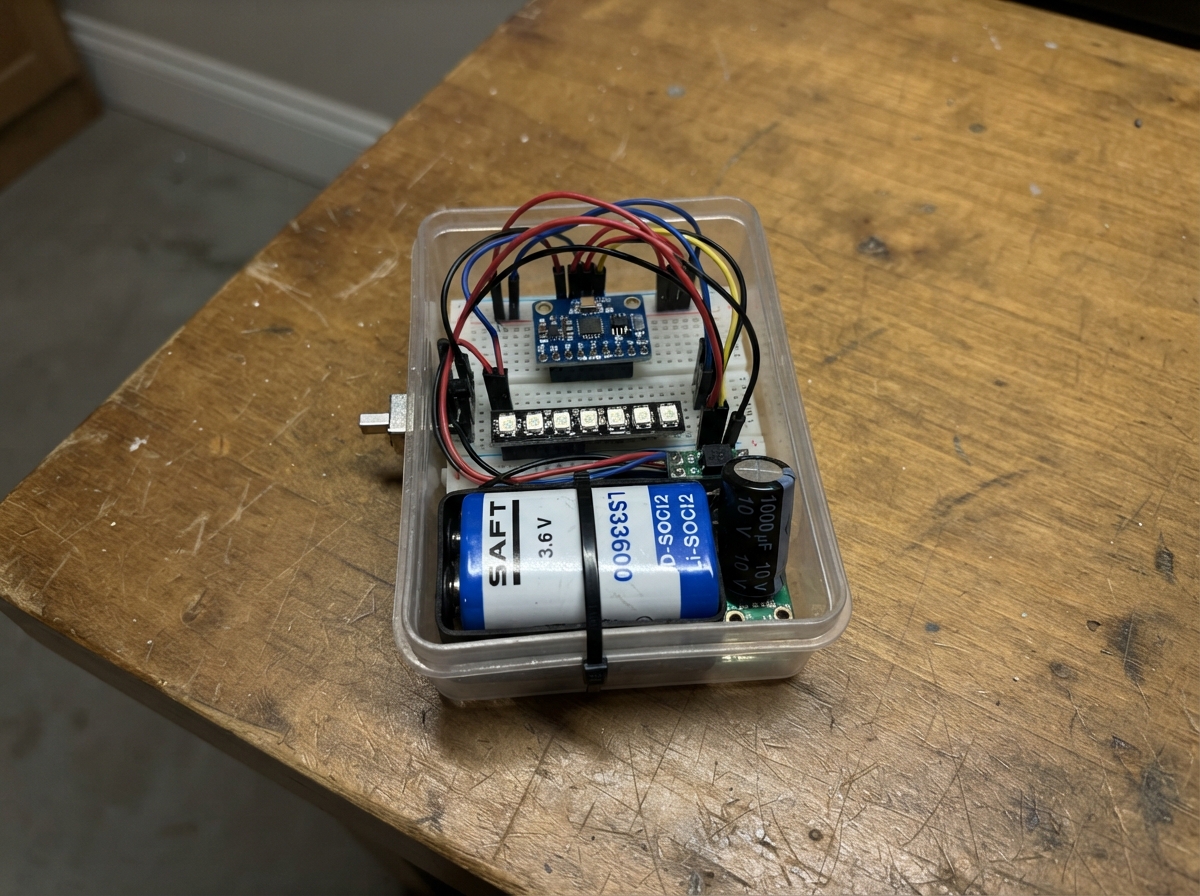
This project builds a wireless vibration detector for ice fishing tip-ups that alerts anglers to bites in real time. The sensor unit mounts on a tip-up and uses an ADXL345 accelerometer to detect the characteristic motion of a fish taking the line, then broadcasts the signal via ESP-NOW to a receiver box equipped with an 8-pixel LED bar that displays the intensity of the vibration.
The guide provides a complete parts list, wiring diagrams for both the sensor and receiver units, step-by-step assembly instructions, and ready-to-load MicroPython firmware. The D-cell Li-SOCl2 battery provides long cold-weather runtime, while the buck-boost converter ensures stable 3.3V power delivery to the ESP32 and accelerometer throughout the fishing season.
Wiring diagram

Gather all the parts
Assemble it in 6 steps
1. Build the two protected power leads
Make one power lead for each box. Connect the positive end of battery_sensor_1 to reg_sensor_1 VIN and the battery negative end to GND. Connect the positive end of battery_receiver_1 to reg_receiver_1 VIN and its negative end to GND. On each regulator, connect VOUT to the ESP32 3V3 pin and GND to an ESP32 GND pin. Do not connect either battery directly to an ESP32.
- Use a battery holder or firmly insulated contacts; the exposed metal ends of a D cell can short against tools.
- Set each regulator output to 3.3 V with a meter before plugging it into an ESP32.
- The SAFT cells are non-rechargeable — never connect either cell to a charger or USB charging circuit.
- Putting 3.6 V straight into the ESP32 3V3 pin can damage the board.
2. Add the radio burst capacitors
Place cap_sensor_1 across the sensor box 3.3 V supply: its long positive leg goes to 3V3 (power) and its striped negative leg goes to GND (ground). Repeat with cap_receiver_1 in the LED box. Keep both capacitors close to the ESP32 power pins.
- The striped band marks the negative capacitor lead.
- A reversed electrolytic capacitor can overheat or burst, so make sure its striped lead goes only to GND.
3. Wire the tip-up motion sensor
In the tip-up box, connect adxl345_1 VCC to 3V3 (power), GND to GND (ground), SDA to GPIO21 (motion data), and SCL to GPIO22 (motion clock). Connect SDO to GND (address selection) and CS to 3V3 (keeps the sensor in the correct mode). Mount this small board rigidly inside the waterproof box, then fasten the box firmly to the stationary tip-up base beside the trip bar; do not let it touch the moving spool, flag, or fishing line.
- A rigid mount makes small line tugs easier to detect; soft foam around the sensor makes it less sensitive.
- Leave enough clearance to fold and operate the tip-up normally.
- Keep the electronics box outside the hole and do not block the flag or line release, or the tip-up may fail to trip.
4. Set the tip-up box to sensor mode
On the ESP32 in the tip-up box, wire role_switch_1 COM to GPIO27 (role signal) and its GND terminal to GND (ground). Close the switch. A closed switch tells this copy of the program to measure movement and send it.
- Mark this switch position “SENSOR” on the box so it is easy to check on the ice.
- Do not use GPIO0, GPIO2, or GPIO12 for this switch; those pins can prevent the ESP32 from starting normally.
5. Wire the LED receiver box
In the receiver box, connect apa102_bar_1 VCC to 3V3 (power), GND to GND (ground), DI to GPIO23 (LED data), and CI to GPIO18 (LED clock). Use the same role-switch wiring as the sensor box, but leave the switch open. An open switch tells this copy of the program to listen and show the received vibration level.
- Fit the LED bar behind a clear window so green, yellow, and red are easy to see without opening the box.
- Use short wires between the LED bar and its ESP32.
- Make sure VCC and GND are not swapped — swapped power can damage the LED bar.
6. Load the matching program into both ESP32 boards
With the battery packs disconnected, plug each ESP32 into USB one at a time. Load the same project firmware onto both boards. The closed role switch makes one board the tip-up sender; the open role switch makes the other board the LED receiver.
- Test on a table first: shake the sensor box gently and the receiver bar should rise from green through yellow to red.
- Attach the battery packs only after the USB test is complete.
- Do not leave the USB cable connected outdoors where moisture can reach the board.
Review all connections
1. Connections between "adxl345_1" and "ESP32"
2. Connections between "apa102_bar_1" and "ESP32"
3. Connections between "role_switch_1" and "ESP32"
4. Connections between "battery_sensor_1" and "ESP32"
5. Connections between "reg_sensor_1" and "ESP32"
6. Connections between "cap_sensor_1" and "ESP32"
7. Connections between "battery_receiver_1" and "ESP32"
8. Connections between "reg_receiver_1" and "ESP32"
9. Connections between "cap_receiver_1" and "ESP32"
Deploy the firmware
from machine import Pin, I2C
import time
import network
import espnow
import apa102

I2C_SDA_PIN = 21
I2C_SCL_PIN = 22
LED_DATA_PIN = 23
LED_CLOCK_PIN = 18
ROLE_PIN = 27
ADXL345_ADDRESS = 0x53
LED_COUNT = 8
SEND_INTERVAL_MS = 100
SIGNAL_TIMEOUT_MS = 2500
PACKET_SIGNATURE = b"TI"
BROADCAST_MAC = b"\xff\xff\xff\xff\xff\xff"

sensor_role = Pin(ROLE_PIN, Pin.IN, Pin.PULL_UP).value() == 0
last_send_ms = time.ticks_ms()
last_packet_ms = time.ticks_ms()
sequence_number = 0
quiet_motion = 0.0
last_x = None
last_y = None
last_z = None
shown_level = -1
received_level = 0

station = network.WLAN(network.STA_IF)
station.active(True)
radio = espnow.ESPNow()
radio.active(True)
if sensor_role:
    radio.add_peer(BROADCAST_MAC)

led_bar = apa102.APA102(Pin(LED_CLOCK_PIN), Pin(LED_DATA_PIN), LED_COUNT)


def write_adxl_register(register, value):
    i2c.writeto_mem(ADXL345_ADDRESS, register, bytes([value]))


def setup_sensor():
    global i2c
    i2c = I2C(0, scl=Pin(I2C_SCL_PIN), sda=Pin(I2C_SDA_PIN), freq=400000)
    time.sleep_ms(20)
    # +/-2 g, 100 Hz output, full-resolution measurement mode.
    write_adxl_register(0x2D, 0x00)
    write_adxl_register(0x31, 0x08)
    write_adxl_register(0x2C, 0x0A)
    write_adxl_register(0x2D, 0x08)


def read_acceleration():
    raw = i2c.readfrom_mem(ADXL345_ADDRESS, 0x32, 6)
    x = int.from_bytes(raw[0:2], "little", True)
    y = int.from_bytes(raw[2:4], "little", True)
    z = int.from_bytes(raw[4:6], "little", True)
    return x, y, z


def show_level(level):
    global shown_level
    if level == shown_level:
        return
    shown_level = level
    lit = (level * LED_COUNT) // 100
    if level > 0 and lit == 0:
        lit = 1
    for index in range(LED_COUNT):
        if index < lit:
            if index < 3:
                led_bar[index] = (0, 80, 0)
            elif index < 6:
                led_bar[index] = (80, 55, 0)
            else:
                led_bar[index] = (80, 0, 0)
        else:
            led_bar[index] = (0, 0, 0)
    led_bar.write()


def send_vibration():
    global last_x, last_y, last_z, quiet_motion, sequence_number
    try:
        x, y, z = read_acceleration()
    except OSError:
        return
    if last_x is None:
        last_x, last_y, last_z = x, y, z
        return
    movement = abs(x - last_x) + abs(y - last_y) + abs(z - last_z)
    last_x, last_y, last_z = x, y, z
    quiet_motion = quiet_motion * 0.985 + movement * 0.015
    bite_motion = movement - quiet_motion - 6.0
    if bite_motion < 0:
        bite_motion = 0
    level = int(bite_motion * 2.0)
    if level > 100:
        level = 100
    radio.send(BROADCAST_MAC, PACKET_SIGNATURE + bytes([level, sequence_number]), False)
    sequence_number = (sequence_number + 1) & 0xFF


show_level(0)
if sensor_role:
    setup_sensor()

while True:
    now = time.ticks_ms()
    if sensor_role:
        if time.ticks_diff(now, last_send_ms) >= SEND_INTERVAL_MS:
            last_send_ms = now
            send_vibration()
    else:
        host, message = radio.irecv(0)
        if message is not None and len(message) == 4 and message[0:2] == PACKET_SIGNATURE:
            received_level = message[2]
            last_packet_ms = now
        if time.ticks_diff(now, last_packet_ms) > SIGNAL_TIMEOUT_MS:
            show_level(0)
        else:
            show_level(received_level)
    time.sleep_ms(10)
Remix this project
Make it yours in one click
Open a full copy of this project in your own Schematik workspace — diagram, code, parts, and assembly steps included. Swap the sensor, add features, or redesign the whole thing with AI. The author's original stays untouched.