Community project
Maritime AIS Tracker Display
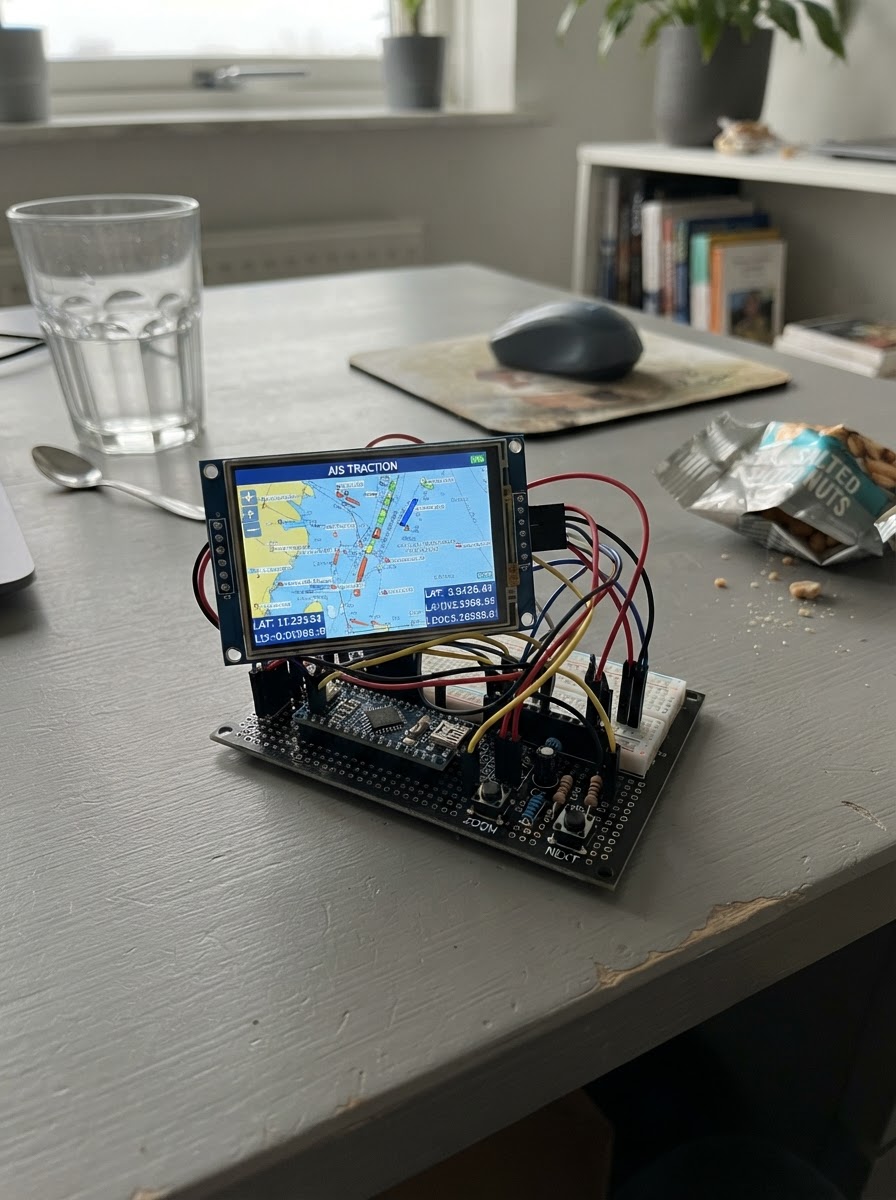
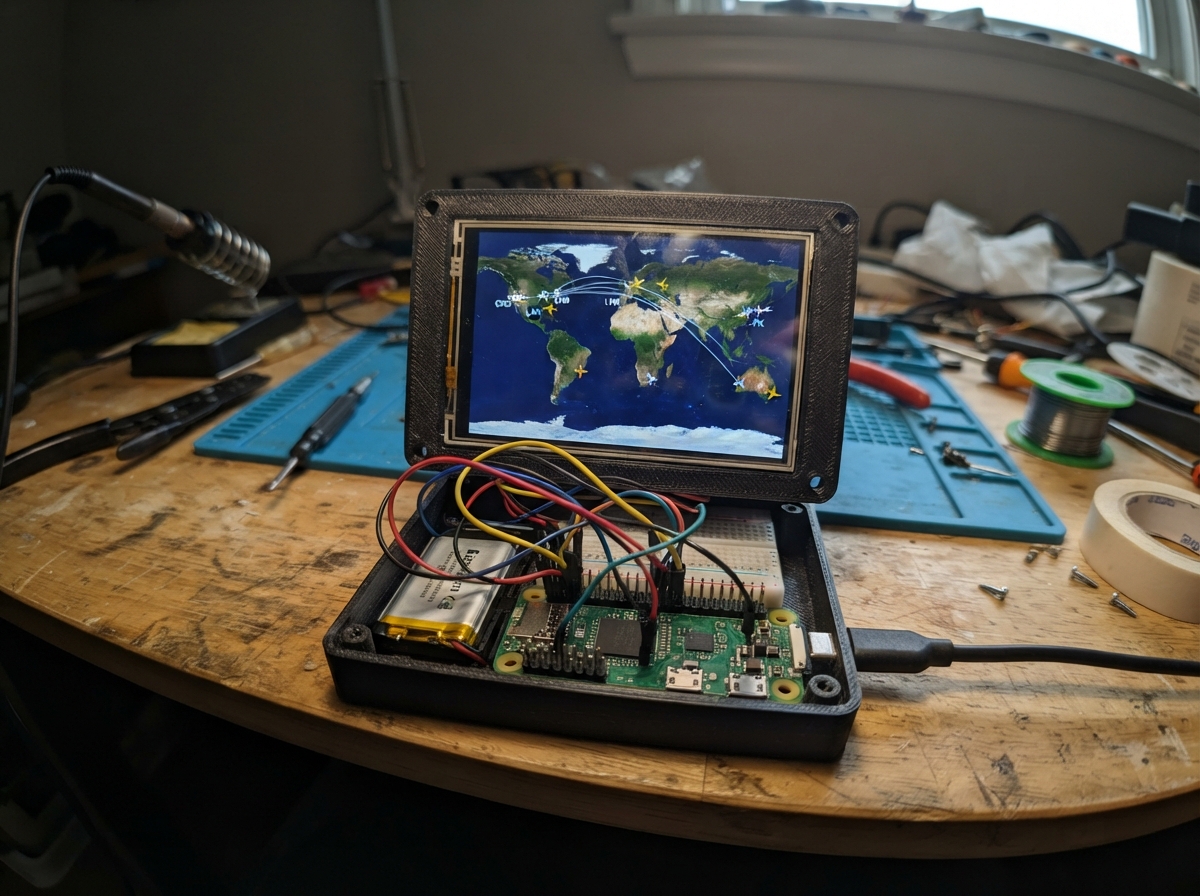
This project builds a real-time maritime AIS tracker display using an ESP32 and a 3.5-inch color TFT screen. The device connects to a WebSocket AIS data feed over WiFi, receives ship position and vessel information, and renders an interactive map view with ship markers, details panels, and country flags. Two push buttons allow zooming and navigating between tracked vessels.
The guide provides a complete wiring diagram, component checklist, and step-by-step assembly instructions for the compact carrier PCB, USB-C power section, SPI display wiring with decoupling, and button integration. Firmware is included with configuration placeholders for WiFi credentials and your AIS provider endpoint, along with JSON parsing logic to handle multiple ship object formats and real-time position updates.
Wiring diagram

Gather all the parts
Assemble it in 5 steps
1. Plan the compact carrier PCB
Use the 85 × 56 mm TFT outline as the reference and place the ESP32-WROOM-32E USB-C AIS Carrier directly behind it. Put four plated M3 mounting holes in the carrier corners, outside the display’s active area. Keep the ESP32 antenna end clear of copper, ground pours, the display PCB, and the wooden enclosure by at least 15 mm where practical; orient it toward an enclosure opening.
- Place the USB-C connector on a board edge reachable from outside the enclosure.
- Use a four-layer PCB if possible: solid ground plane, short SPI routes, and a quiet antenna keep Wi-Fi reliable.
- Do not cover the ESP32 PCB antenna with a metal bracket, foil, or a ground-filled area.
- Confirm the TFT module’s mounting-hole pattern before committing the carrier-hole coordinates.
2. Build the USB-C, programming, and 3.3 V power section
On the custom carrier, wire USB-C VBUS through protection to the 5 V input of the AMS1117-3.3. Fit the regulator’s required input/output capacitors and 100 nF ceramic bypasses at the ESP32 supply pins. Wire the CP2102 to ESP32 UART0 (CP2102 TXD → GPIO3/RX0, CP2102 RXD ← GPIO1/TX0) and use its DTR/RTS auto-program transistor circuit to EN and GPIO0. Fit the EN reset and GPIO0 boot switches with their 10 kΩ pull-ups.
- Use two 5.1 kΩ resistors from USB-C CC1 and CC2 to GND so a USB-C source supplies 5 V.
- Use a USB-C receptacle that exposes USB 2.0 D+ and D−, and route them as a short matched pair to the CP2102.
- USB-C VBUS is 5 V: never connect it directly to the ESP32 or TFT 3.3 V logic rail.
- An AMS1117 dissipates heat; use generous copper around it and choose a USB supply capable of at least 1 A.
3. Wire the SPI display and its local decoupling
Connect the TFT to the 3.3 V rail and common ground. Wire SCK to GPIO18, MOSI to GPIO23, CS to GPIO4, DC to GPIO26, RESET to GPIO25, and LED/backlight to GPIO33. Place C1 (47 µF) and C2 (100 nF) beside the TFT VCC/GND connector, with the shortest possible ground return.
- Keep SCK, MOSI, CS, DC, and RESET short and routed over a continuous ground plane.
- If the selected TFT board has an onboard 5 V regulator/level shifters, still use its 3.3 V logic-compatible input mode; verify its actual pin labels before soldering.
- The ESP32 GPIOs are 3.3 V only. Do not feed a 5 V TFT logic signal back into an ESP32 pin.
- The display’s MISO and touch pins are deliberately unused in this design; leave them unconnected.
4. Install the two navigation buttons
Connect one terminal of each normally-open switch to GND. Connect the Zoom switch signal to GPIO32 and the Next-ship switch signal to GPIO27. Fit R1 from 3.3 V to the Zoom signal and R2 from 3.3 V to the Next-ship signal, so each input is HIGH released and LOW when pressed.
- Mount the buttons where they can be reached through the enclosure front or side.
- Label the enclosure controls ZOOM and NEXT.
- Do not enable or rely on internal pull-ups for these switches; the fitted external 10 kΩ resistors provide the required pull-up network.
5. Inspect before enclosure installation
With power disconnected, check for shorts between 3.3 V and GND, then verify all display control nets against the wiring list. Mount the TFT first using nonconductive spacers if the display back touches the carrier, then secure the carrier with M3 screws and standoffs inside the wooden enclosure.
- Add a small ventilation gap near the regulator and keep a USB-C access cutout.
- After flashing with Schematik’s Deploy button, enter the Wi-Fi and AIS WebSocket values in the firmware constants and deploy again.
- Disconnect USB before changing wiring.
- The example firmware will not contact an AIS provider until valid Wi-Fi credentials and a provider WebSocket host/path are entered.
Review all connections
1. Connections between "tft_ili9488" and "ESP32"
2. Connections between "button_zoom" and "ESP32"
3. Connections between "button_next" and "ESP32"
4. Connections between "r1_zoom_pullup" and "ESP32"
5. Connections between "r2_next_pullup" and "ESP32"
6. Connections between "c2_local_3v3" and "ESP32"
Deploy the firmware
#include <Arduino.h>
#include <WiFi.h>
#include <WebSocketsClient.h>
#include <ArduinoJson.h>
#include <Arduino_GFX_Library.h>

// Enter credentials and the WebSocket endpoint supplied by your AIS provider.
// This sketch expects a text JSON message containing either one ship object, or
// {"ships":[...]} / {"data":[...]}; each ship needs mmsi, name, lat, lon,
// course, speed, country and type where available.

struct Ship {
  uint32_t mmsi;
  char name[25];
  char country[4];
  char type[15];
  float lat;
  float lon;
  float course;
  float speed;
  uint32_t lastSeen;
  bool valid;
};


// Forward declarations
uint16_t shipColor(const Ship &s);
void label(int16_t x, int16_t y, const char *text, uint16_t color, uint8_t size);
void drawFlag(int16_t x, int16_t y, const char *cc);
void drawHeader();
void drawMapBase();
bool projectShip(const Ship &s, int16_t &x, int16_t &y);
void drawShipMarker(const Ship &s, bool selected);
void drawDetails();
void redraw();
int findShip(uint32_t mmsi);
void updateShip(JsonObject obj);
void parseAIS(const uint8_t *payload, size_t length);
void webSocketEvent(WStype_t type, uint8_t *payload, size_t length);
void connectWebSocket();
void handleButtons();

constexpr char WIFI_SSID[] = "YOUR_WIFI_SSID";
constexpr char WIFI_PASSWORD[] = "YOUR_WIFI_PASSWORD";
constexpr char WS_HOST[] = "example.invalid";
constexpr uint16_t WS_PORT = 443;
constexpr char WS_PATH[] = "/ais";
constexpr bool WS_TLS = true;

constexpr int TFT_CS = 4;
constexpr int TFT_SCK = 18;
constexpr int TFT_MOSI = 23;
constexpr int TFT_DC = 26;
constexpr int TFT_RST = 25;
constexpr int TFT_BL = 33;
constexpr int BUTTON_ZOOM = 32;
constexpr int BUTTON_NEXT = 27;

constexpr uint8_t MAX_SHIPS = 24;
constexpr uint32_t BUTTON_DEBOUNCE_MS = 45;
constexpr uint32_t WIFI_RETRY_MS = 10000;

Arduino_DataBus *bus = new Arduino_ESP32SPI(TFT_DC, TFT_CS, TFT_SCK, TFT_MOSI, GFX_NOT_DEFINED);
Arduino_GFX *gfx = new Arduino_ILI9488_18bit(bus, TFT_RST, 1, false);
WebSocketsClient webSocket;


Ship ships[MAX_SHIPS] = {};
uint8_t selectedShip = 0;
uint8_t zoomIndex = 2;
const float zoomDegrees[] = {0.35f, 0.75f, 1.5f, 3.0f, 6.0f};
float mapLat = 0.0f;
float mapLon = 0.0f;
bool screenReady = false;
bool mapDirty = true;
bool detailsDirty = true;
bool socketConnected = false;
uint32_t lastWiFiAttempt = 0;
uint32_t lastZoomPress = 0;
uint32_t lastNextPress = 0;

constexpr uint16_t NAVY = 0x012B;
constexpr uint16_t OCEAN = 0x0416;
constexpr uint16_t GRID = 0x241F;
constexpr uint16_t PANEL = 0x18C3;
constexpr uint16_t TEXT = 0xFFFF;
constexpr uint16_t MUTED = 0xBDF7;
constexpr uint16_t VESSEL = 0xFFE0;
constexpr uint16_t CARGO = 0x07FF;
constexpr uint16_t TANKER = 0xF800;
constexpr uint16_t PASSENGER = 0xF81F;

uint16_t shipColor(const Ship &s) {
  if (strstr(s.type, "tanker") || strstr(s.type, "Tanker")) return TANKER;
  if (strstr(s.type, "pass") || strstr(s.type, "Pass")) return PASSENGER;
  if (strstr(s.type, "cargo") || strstr(s.type, "Cargo")) return CARGO;
  return VESSEL;
}

void label(int16_t x, int16_t y, const char *text, uint16_t color, uint8_t size = 1) {
  gfx->setTextColor(color);
  gfx->setTextSize(size);
  gfx->setCursor(x, y);
  gfx->print(text);
}

void drawFlag(int16_t x, int16_t y, const char *cc) {
  // Compact drawn flags for common AIS flag states; unknown codes retain their label.
  gfx->fillRect(x, y, 18, 12, 0xFFFF);
  if (!strcmp(cc, "US")) {
    gfx->fillRect(x, y, 18, 12, 0xF800); for (int i = 1; i < 6; i += 2) gfx->fillRect(x, y + i * 2, 18, 2, 0xFFFF);
    gfx->fillRect(x, y, 8, 6, 0x001F);
  } else if (!strcmp(cc, "NL")) {
    gfx->fillRect(x, y, 18, 4, 0xF800); gfx->fillRect(x, y + 4, 18, 4, 0xFFFF); gfx->fillRect(x, y + 8, 18, 4, 0x001F);
  } else if (!strcmp(cc, "DE")) {
    gfx->fillRect(x, y, 18, 4, 0x0000); gfx->fillRect(x, y + 4, 18, 4, 0xF800); gfx->fillRect(x, y + 8, 18, 4, 0xFFE0);
  } else if (!strcmp(cc, "NO")) {
    gfx->fillRect(x, y, 18, 12, 0xF800); gfx->fillRect(x + 5, y, 3, 12, 0xFFFF); gfx->fillRect(x, y + 5, 18, 3, 0xFFFF); gfx->fillRect(x + 6, y, 1, 12, 0x001F); gfx->fillRect(x, y + 6, 18, 1, 0x001F);
  } else if (!strcmp(cc, "JP")) {
    gfx->fillCircle(x + 9, y + 6, 4, 0xF800);
  } else if (!strcmp(cc, "CN")) {
    gfx->fillRect(x, y, 18, 12, 0xF800); gfx->fillCircle(x + 5, y + 4, 2, 0xFFE0);
  } else if (!strcmp(cc, "PA") || !strcmp(cc, "LR")) {
    gfx->fillRect(x, y, 9, 12, 0xF800); gfx->fillRect(x + 9, y, 9, 12, 0x001F);
  } else if (!strcmp(cc, "SG")) {
    gfx->fillRect(x, y, 18, 6, 0xF800); gfx->fillRect(x, y + 6, 18, 6, 0xFFFF);
  } else {
    gfx->drawRect(x, y, 18, 12, MUTED);
  }
}

void drawHeader() {
  gfx->fillRect(0, 0, 480, 28, NAVY);
  label(8, 8, "LIVE AIS", TEXT, 2);
  label(142, 10, socketConnected ? "STREAM CONNECTED" : "STREAM OFFLINE", socketConnected ? 0x07E0 : 0xFD20, 1);
  label(355, 10, "Zoom", MUTED, 1);
  char z[10]; snprintf(z, sizeof(z), "%.2f°", zoomDegrees[zoomIndex]);
  label(402, 10, z, TEXT, 1);
}

void drawMapBase() {
  gfx->fillRect(0, 28, 330, 292, OCEAN);
  for (int x = 0; x < 330; x += 55) gfx->drawFastVLine(x, 28, 292, GRID);
  for (int y = 28; y < 320; y += 48) gfx->drawFastHLine(0, y, 330, GRID);
  label(8, 36, "MAP / nearest vessels", MUTED, 1);
}

bool projectShip(const Ship &s, int16_t &x, int16_t &y) {
  const float span = zoomDegrees[zoomIndex];
  float dx = (s.lon - mapLon) / span;
  float dy = (s.lat - mapLat) / span;
  if (dx < -1.0f || dx > 1.0f || dy < -1.0f || dy > 1.0f) return false;
  x = 165 + (int16_t)(dx * 160.0f);
  y = 174 - (int16_t)(dy * 135.0f);
  return true;
}

void drawShipMarker(const Ship &s, bool selected) {
  int16_t x, y;
  if (!projectShip(s, x, y)) return;
  uint16_t c = shipColor(s);
  gfx->fillTriangle(x, y - 7, x - 5, y + 6, x + 5, y + 6, c);
  if (selected) gfx->drawCircle(x, y, 10, TEXT);
}

void drawDetails() {
  gfx->fillRect(330, 28, 150, 292, PANEL);
  label(342, 40, "VESSEL", MUTED, 1);
  if (!ships[selectedShip].valid) {
    label(342, 70, "Waiting for", TEXT, 1);
    label(342, 86, "AIS JSON...", TEXT, 1);
    label(342, 120, "NEXT: cycle", MUTED, 1);
    label(342, 136, "ZOOM: scale", MUTED, 1);
    return;
  }
  const Ship &s = ships[selectedShip];
  label(342, 62, s.name, TEXT, 1);
  drawFlag(342, 80, s.country);
  label(366, 82, s.country, TEXT, 1);
  char line[32];
  snprintf(line, sizeof(line), "MMSI %lu", (unsigned long)s.mmsi); label(342, 104, line, MUTED, 1);
  snprintf(line, sizeof(line), "%.1f kn", s.speed); label(342, 128, line, CARGO, 2);
  snprintf(line, sizeof(line), "COG %.0f°", s.course); label(342, 154, line, TEXT, 1);
  snprintf(line, sizeof(line), "%.4f", s.lat); label(342, 184, line, MUTED, 1);
  snprintf(line, sizeof(line), "%.4f", s.lon); label(342, 200, line, MUTED, 1);
  label(342, 240, s.type, shipColor(s), 1);
  label(342, 288, "NEXT: vessel", MUTED, 1);
  label(342, 304, "ZOOM: map", MUTED, 1);
}

void redraw() {
  drawHeader();
  drawMapBase();
  for (uint8_t i = 0; i < MAX_SHIPS; ++i) if (ships[i].valid) drawShipMarker(ships[i], i == selectedShip);
  drawDetails();
  mapDirty = detailsDirty = false;
}

int findShip(uint32_t mmsi) {
  for (uint8_t i = 0; i < MAX_SHIPS; ++i) if (ships[i].valid && ships[i].mmsi == mmsi) return i;
  for (uint8_t i = 0; i < MAX_SHIPS; ++i) if (!ships[i].valid) return i;
  return 0;
}

void updateShip(JsonObject obj) {
  uint32_t mmsi = obj["mmsi"] | obj["MMSI"] | 0UL;
  if (!mmsi) return;
  int index = findShip(mmsi);
  Ship &s = ships[index];
  s.mmsi = mmsi;
  strlcpy(s.name, obj["name"] | obj["shipName"] | "Unnamed", sizeof(s.name));
  strlcpy(s.country, obj["country"] | obj["flag"] | "--", sizeof(s.country));
  strlcpy(s.type, obj["type"] | obj["shipType"] | "Vessel", sizeof(s.type));
  s.lat = obj["lat"] | obj["latitude"] | s.lat;
  s.lon = obj["lon"] | obj["longitude"] | s.lon;
  s.course = obj["course"] | obj["cog"] | 0.0f;
  s.speed = obj["speed"] | obj["sog"] | 0.0f;
  s.lastSeen = millis();
  s.valid = true;
  if (index == 0 || !ships[selectedShip].valid) { mapLat = s.lat; mapLon = s.lon; selectedShip = index; }
  mapDirty = detailsDirty = true;
}

void parseAIS(const uint8_t *payload, size_t length) {
  JsonDocument doc;
  if (deserializeJson(doc, payload, length)) return;
  JsonArray entries = doc["ships"].as<JsonArray>();
  if (entries.isNull()) entries = doc["data"].as<JsonArray>();
  if (!entries.isNull()) {
    for (JsonObject entry : entries) updateShip(entry);
  } else if (doc.is<JsonObject>()) {
    updateShip(doc.as<JsonObject>());
  }
}

void webSocketEvent(WStype_t type, uint8_t *payload, size_t length) {
  if (type == WStype_CONNECTED) { socketConnected = true; mapDirty = true; }
  else if (type == WStype_DISCONNECTED) { socketConnected = false; mapDirty = true; }
  else if (type == WStype_TEXT) parseAIS(payload, length);
}

void connectWebSocket() {
  if (strcmp(WS_HOST, "example.invalid") == 0) return;
  if (WS_TLS) webSocket.beginSSL(WS_HOST, WS_PORT, WS_PATH);
  else webSocket.begin(WS_HOST, WS_PORT, WS_PATH);
  webSocket.onEvent(webSocketEvent);
  webSocket.setReconnectInterval(5000);
}

void handleButtons() {
  uint32_t now = millis();
  if (!digitalRead(BUTTON_ZOOM) && now - lastZoomPress > BUTTON_DEBOUNCE_MS) {
    lastZoomPress = now; zoomIndex = (zoomIndex + 1) % 5; mapDirty = detailsDirty = true;
  }
  if (!digitalRead(BUTTON_NEXT) && now - lastNextPress > BUTTON_DEBOUNCE_MS) {
    lastNextPress = now;
    for (uint8_t n = 1; n <= MAX_SHIPS; ++n) {
      uint8_t candidate = (selectedShip + n) % MAX_SHIPS;
      if (ships[candidate].valid) { selectedShip = candidate; mapLat = ships[candidate].lat; mapLon = ships[candidate].lon; mapDirty = detailsDirty = true; break; }
    }
  }
}

void setup() {
  pinMode(TFT_BL, OUTPUT); digitalWrite(TFT_BL, HIGH);
  pinMode(BUTTON_ZOOM, INPUT); // External 10 kΩ pull-up R1.
  pinMode(BUTTON_NEXT, INPUT); // External 10 kΩ pull-up R2.
  Serial.begin(115200);
  gfx->begin();
  gfx->fillScreen(OCEAN);
  WiFi.mode(WIFI_STA);
  if (strcmp(WIFI_SSID, "YOUR_WIFI_SSID") != 0) WiFi.begin(WIFI_SSID, WIFI_PASSWORD);
  redraw();
}

void loop() {
  uint32_t now = millis();
  if (WiFi.status() == WL_CONNECTED) webSocket.loop();
  else if (strcmp(WIFI_SSID, "YOUR_WIFI_SSID") != 0 && now - lastWiFiAttempt > WIFI_RETRY_MS) {
    lastWiFiAttempt = now; WiFi.begin(WIFI_SSID, WIFI_PASSWORD);
  }
  static bool wasConnected = false;
  bool connected = WiFi.status() == WL_CONNECTED;
  if (connected && !wasConnected) connectWebSocket();
  wasConnected = connected;
  handleButtons();
  // Only repaint when stream state, ship data, selection, or zoom changes.
  if (mapDirty || detailsDirty) redraw();
}
Remix this project
Make it yours in one click
Open a full copy of this project in your own Schematik workspace — diagram, code, parts, and assembly steps included. Swap the sensor, add features, or redesign the whole thing with AI. The author's original stays untouched.