Community project
RTK Excavator Grade Control
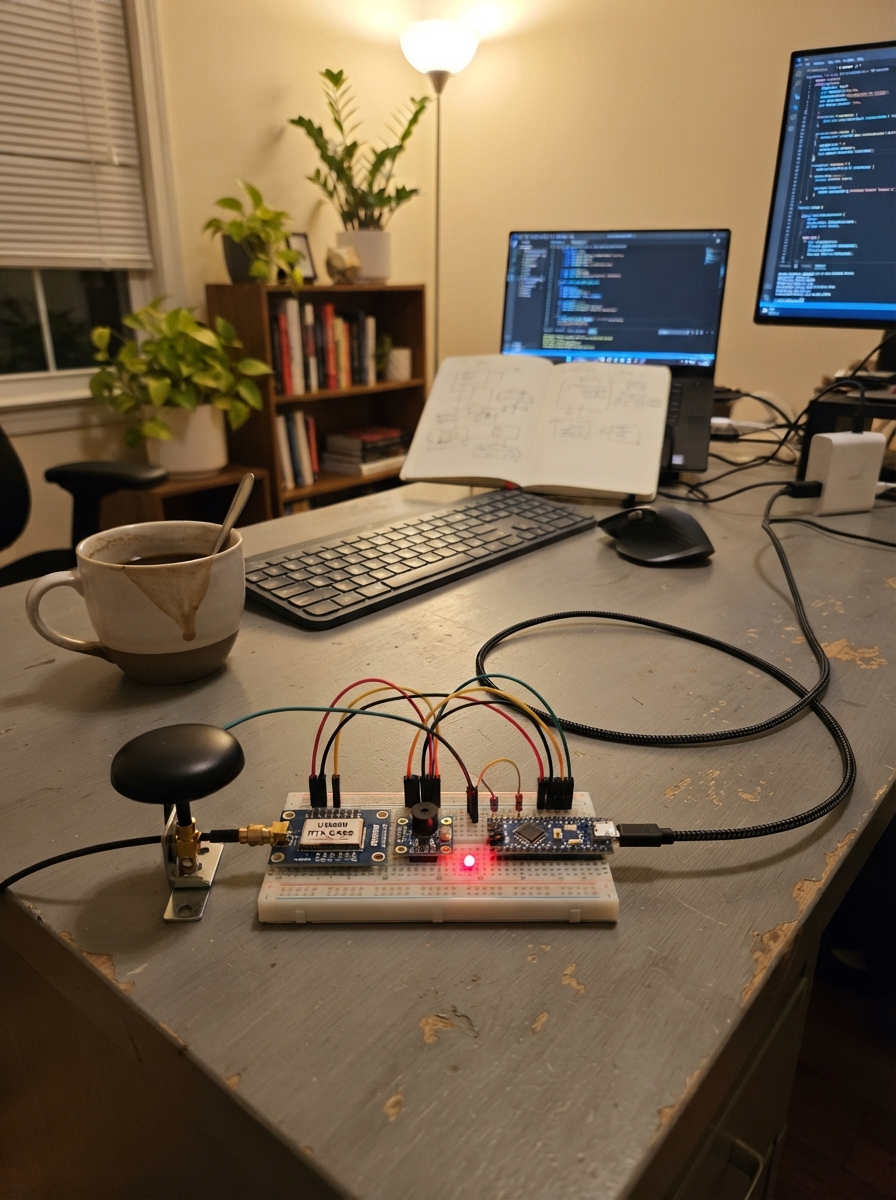
This project builds a benchtop prototype for RTK-based excavator grade control guidance, using centimeter-level GNSS positioning and 9-axis inertial measurement to help operators maintain precise slopes during earthmoving work. The system combines a SparkFun UM980 triband RTK receiver, BNO085 IMU, status LEDs, and a piezo buzzer to provide real-time feedback on grade deviation via Bluetooth to a tablet interface.
The guide includes a complete wiring diagram, parts list with all connections, and step-by-step assembly instructions for the benchtop prototype. Readers will learn how to integrate RTK GNSS with IMU data for grade measurement, configure the ESP32 firmware for Bluetooth telemetry, and set up the system for testing and calibration. Note that this prototype is designed for operator guidance only, not direct machine control.
Wiring diagram

Gather all the parts
Assemble it in 7 steps
1. Montar somente o protótipo de bancada
Esta entrega usa módulos prontos, sem PCB fabricável, bateria ou carregador. Não ligar à alimentação de 12/24 V da escavadeira.
- Não controla a máquina. Não há certificação industrial nem precisão vertical garantida de 3 cm.
2. Conectar receptor e antena
Use o SparkFun UM980 23286: TX da UART2 → GPIO20 (dados recebidos); RX da UART2 → GPIO21 (comandos e correções). 5V do receptor → 5V do SuperMini; GND → GND. Conecte a antena ativa ao SMA, mantendo VANT na posição INT de fábrica. Não ligue o USB do receptor simultaneamente ao USB do SuperMini.
- O receptor usa seu próprio LDO integrado; não unir seu 3V3 ao 3V3 do ESP32.
- Antena multibanda com céu aberto, longe de superfícies que reflitam o sinal.
3. Fixar e ligar a IMU
Use o breakout Adafruit BNO085. VIN → 3V3; GND → GND; SDA → GPIO0 (dados); SCL → GPIO1 (relógio); RST → GPIO3; INT → GPIO4. Mantenha os jumpers no modo I2C de fábrica. Fixe rigidamente, eixo X para frente e Z para cima. Confira o sinal da inclinação e o braço rígido de 0,8 m com medições conhecidas.
- A estrutura metálica afeta o magnetômetro. Calibre longe de motores; valide novamente na montagem final.
- A biblioteca usa fusão interna, sem ajuste DLPF validado para vibração de escavadeira. Não adicionar filtro lento sem medir o erro de movimento.
4. Ligar indicadores e buzzer
GPIO5 → resistor 1 kΩ → anodo do LED azul; GPIO7 → resistor 1 kΩ → anodo do verde; GPIO10 → resistor 1 kΩ → anodo do vermelho. Todos os catodos → GND. Piezo PS1240: SIG → GPIO6; outro terminal → GND.
- Azul: alvo acima; vermelho: alvo abaixo; verde: diferença dentro de ±3 cm, com dois bipes ao entrar. Azul e vermelho piscando juntos: inválido ou alvo ainda não definido.
5. Preparar alimentação e testes
Alimente apenas pelo USB do SuperMini, com cabo e porta USB de 5 V capazes de pelo menos 1 A. Antes de energizar, verifique curtos e polaridades. Fixe os módulos numa base isolante; mantenha a antena do ESP32 desobstruída.
- Não usar na operação real antes de testar perda de BLE, perda de RTK, vibração, inclinação e alvos conhecidos.
6. Identificar o protótipo e suas limitações
O nome é ARTELOQ ROVER V2. Este circuito modular não inclui CAD ou Gerbers de PCB 90x70 mm. Não inclui bateria ou carregador. O botão ZERO foi substituído por comando BLE para evitar pinos de inicialização.
- Não há sincronização PPS nem filtro de vibração validado. Não garante precisão de 3 cm em movimento e não determina altura de caçamba articulada.
- A referência de altura é a altitude GGA, não altura elipsoidal. Conferir sinal do pitch e braço rígido de 0,8 m.
7. Conferir compatibilidade com o tablet
É necessário aplicativo BLE GATT que encaminhe RTCM3 binário; aplicativo não incluído. Serviço 6e400001-b5a3-f393-e0a9-e50e24dcca9e. RX RTCM: 6e400002-b5a3-f393-e0a9-e50e24dcca9e (WRITE). Telemetria: 6e400003-b5a3-f393-e0a9-e50e24dcca9e (READ/NOTIFY). Comando: 6e400004-b5a3-f393-e0a9-e50e24dcca9e (WRITE): enviar exatamente ZERO, sem quebra de linha, para definir alvo atual com RTK válido. Alvo é perdido ao desligar.
- Usar base fixa inicialmente: o firmware não retorna GGA para serviços NTRIP/VRS. Fragmentar RTCM conforme MTU e controlar vazão; preferir WRITE com resposta.
- UART2 precisa estar em 115200. O firmware solicita GGA a 5 Hz ao ligar. Não há autenticação BLE nesta versão de bancada.
- O verde entra em ±3 cm e permanece até ±3,5 cm para evitar alternância.
Review all connections
1. Connections between "gnss" and "ESP32"
2. Connections between "imu" and "ESP32"
3. Connections between "buzzer" and "ESP32"
4. Connections between "antenna" and "ESP32"
5. Connections between "r_blue" and "ESP32"
6. Connections between "led_blue" and "ESP32"
7. Connections between "r_green" and "ESP32"
8. Connections between "led_green" and "ESP32"
9. Connections between "r_red" and "ESP32"
10. Connections between "led_red" and "ESP32"
Deploy the firmware
#include <Arduino.h>
#include <Wire.h>
#include <Adafruit_BNO08x.h>
#include <NimBLEDevice.h>
#include <freertos/FreeRTOS.h>
#include <freertos/queue.h>
#include <math.h>
// ARTELOQ ROVER V2: operator guidance bench prototype, not machine control.
constexpr int BLUE=5,GREEN=7,RED=10,BUZZ=6;
HardwareSerial gnss(1);
Adafruit_BNO08x imu(3);
sh2_SensorValue_t event;
QueueHandle_t rxQueue,cmdQueue;
NimBLECharacteristic *telemetry;
uint32_t lastGga=0,lastImu=0,lastRtcm=0,beepStart=0;
bool imuOK=false,haveTarget=false,valid=false;
double altitude=0,pitch=0,target=0,current=0;
int quality=0,grade=-1;
char sentence[200]; size_t sentenceLen=0;
const char *SERVICE="6e400001-b5a3-f393-e0a9-e50e24dcca9e";
class Rx : public NimBLECharacteristicCallbacks {
 void onWrite(NimBLECharacteristic *c,NimBLEConnInfo&) override {
  auto v=c->getValue();
  for(size_t i=0;i<v.size();i++){uint8_t b=v[i]; if(xQueueSend(rxQueue,&b,0)!=pdTRUE){xQueueReset(rxQueue);break;}}
 }
} rxCallbacks;
class Cmd : public NimBLECharacteristicCallbacks {
 void onWrite(NimBLECharacteristic *c,NimBLEConnInfo&) override {
  auto v=c->getValue(); if(v=="ZERO"){char x='Z'; xQueueSend(cmdQueue,&x,0);}
 }
} cmdCallbacks;
class RoverServerCallbacks : public NimBLEServerCallbacks {
 void onDisconnect(NimBLEServer*,NimBLEConnInfo&,int) override {NimBLEDevice::startAdvertising();}
} serverCallbacks;
uint32_t crc24(const uint8_t *p,size_t n){uint32_t c=0;while(n--){c^=uint32_t(*p++)<<16;for(int k=0;k<8;k++){c<<=1;if(c&0x1000000)c^=0x1864CFB;}}return c&0xffffff;}
void correctionByte(uint8_t b){
 static uint8_t frame[1030];static size_t n=0,want=0;static uint32_t previous=0;
 if(millis()-previous>1000)n=0; previous=millis();
 if(n==0 && b!=0xd3)return;
 frame[n++]=b;
 if(n==2 && (b&0xfc)){n=0;return;}
 if(n==3)want=6+((frame[1]&3)<<8)+frame[2];
 if(n>=3 && n==want){uint32_t expected=(uint32_t(frame[n-3])<<16)|(uint32_t(frame[n-2])<<8)|frame[n-1];
  if(crc24(frame,n-3)==expected){gnss.write(frame,n);lastRtcm=millis();} n=0;
 }
}
bool number(const char *s,double &v){char *end;v=strtod(s,&end);return *s && !*end && isfinite(v);}
void parseGga(){
 char *star=strchr(sentence,'*');if(!star||strlen(star)!=3||sentence[0]!='$')return;
 uint8_t sum=0;for(char *p=sentence+1;p<star;p++)sum^=*p;
 char *end;long supplied=strtol(star+1,&end,16);if(*end||sum!=supplied)return;
 *star=0;char *fields[20];int n=1;fields[0]=sentence;
 for(char *p=sentence;*p&&n<20;p++)if(*p==','){*p=0;fields[n++]=p+1;}
 if(n<15 || strlen(fields[0])!=6 || strcmp(fields[0]+3,"GGA"))return;
 quality=atoi(fields[6]);lastGga=millis();double h,age;
 if(quality!=4||!number(fields[9],h)||strcmp(fields[10],"M")||!number(fields[13],age)||age<0||age>3){quality=0;return;}
 altitude=h;
}
void setGrade(int g){
 if(g==grade)return;
 grade=g;digitalWrite(BLUE,g==1);digitalWrite(GREEN,g==0);digitalWrite(RED,g==2);
 if(g==0)beepStart=millis();else {beepStart=0;noTone(BUZZ);}
}
void setup(){
 Serial.begin(115200);
 for(int p:{BLUE,GREEN,RED,BUZZ}){pinMode(p,OUTPUT);digitalWrite(p,LOW);}
 pinMode(4,INPUT); Wire.begin(0,1);Wire.setClock(100000);
 imuOK=imu.begin_I2C();if(imuOK)imuOK=imu.enableReport(SH2_ROTATION_VECTOR,20000);
 gnss.setRxBufferSize(2048);gnss.begin(115200,SERIAL_8N1,20,21);
 delay(1500);gnss.print("MODE ROVER SURVEY\r\n");delay(100);gnss.print("GPGGA COM2 0.2\r\n");
 rxQueue=xQueueCreate(8192,1);cmdQueue=xQueueCreate(4,1);
 if(!rxQueue||!cmdQueue){Serial.println("Falha de memoria");while(true)delay(1000);}
 NimBLEDevice::init("ARTELOQ ROVER V2");NimBLEDevice::setMTU(247);
 auto s=NimBLEDevice::createServer();s->setCallbacks(&serverCallbacks);
 auto svc=s->createService(SERVICE);
 auto rx=svc->createCharacteristic("6e400002-b5a3-f393-e0a9-e50e24dcca9e",NIMBLE_PROPERTY::WRITE|NIMBLE_PROPERTY::WRITE_NR);rx->setCallbacks(&rxCallbacks);
 telemetry=svc->createCharacteristic("6e400003-b5a3-f393-e0a9-e50e24dcca9e",NIMBLE_PROPERTY::READ|NIMBLE_PROPERTY::NOTIFY);
 auto cmd=svc->createCharacteristic("6e400004-b5a3-f393-e0a9-e50e24dcca9e",NIMBLE_PROPERTY::WRITE);cmd->setCallbacks(&cmdCallbacks);
 svc->start();auto adv=NimBLEDevice::getAdvertising();adv->setName("ARTELOQ ROVER V2");adv->addServiceUUID(SERVICE);adv->enableScanResponse(true);adv->start();
 Serial.println("Prototipo: envie RTCM3 por BLE; ZERO define alvo atual apenas com RTK valido.");
}
void loop(){
 uint32_t now=millis();uint8_t b;int budget=2048;
 while(budget--&&xQueueReceive(rxQueue,&b,0)==pdTRUE)correctionByte(b);
 budget=1024;while(budget--&&gnss.available()){
  char c=gnss.read();if(c=='$')sentenceLen=0;
  if(c=='\n'){sentence[sentenceLen]=0;if(sentenceLen)parseGga();sentenceLen=0;}
  else if(c!='\r'){if(sentenceLen<sizeof(sentence)-1)sentence[sentenceLen++]=c;else sentenceLen=0;}
 }
 if(imuOK){if(imu.wasReset()){lastImu=0;imu.enableReport(SH2_ROTATION_VECTOR,20000);}
  if(imu.getSensorEvent(&event)&&event.sensorId==SH2_ROTATION_VECTOR&&event.status>=2){
   auto q=event.un.rotationVector;
   double a=2.0*(q.real*q.j-q.k*q.i);a=constrain(a,-1.0,1.0);
   // No added low-pass lag: fused orientation; vibration must be validated physically.
   pitch=asin(a);lastImu=now;
  }
 }
 valid=lastGga&&now-lastGga<1000&&quality==4&&lastImu&&now-lastImu<200&&lastRtcm&&now-lastRtcm<3000;
 current=altitude+0.8*sin(pitch);
 char command;while(xQueueReceive(cmdQueue,&command,0)==pdTRUE){if(valid){target=current;haveTarget=true;}}
 if(!valid||!haveTarget)setGrade(-1);
 else {double d=target-current;int g=(d>0.03)?1:(d< -0.03)?2:0;
  // Green exit hysteresis of 5 mm; never widens initial acceptance band.
  if(grade==0&&fabs(d)<=0.035)g=0;setGrade(g);
 }
 if(grade<0){bool on=(now/250)%2;digitalWrite(BLUE,on);digitalWrite(GREEN,LOW);digitalWrite(RED,on);}
 if(beepStart){uint32_t dt=now-beepStart;if(dt<100||(dt>=220&&dt<320))tone(BUZZ,4000);else noTone(BUZZ);if(dt>=320)beepStart=0;}
 static uint32_t published=0;if(now-published>=500){published=now;char text[160];snprintf(text,sizeof(text),"valid=%d,target=%d,h=%.3f,pitch=%.2f,diff=%.3f,grade=%d",valid,haveTarget,current,pitch*180/PI,target-current,grade);telemetry->setValue(text);telemetry->notify();Serial.println(text);}
 delay(1);
}
Download project files
Remix this project
Make it yours in one click
Open a full copy of this project in your own Schematik workspace — diagram, code, parts, and assembly steps included. Swap the sensor, add features, or redesign the whole thing with AI. The author's original stays untouched.