Community project
Adaptive Cyclone Inlet Test Rig
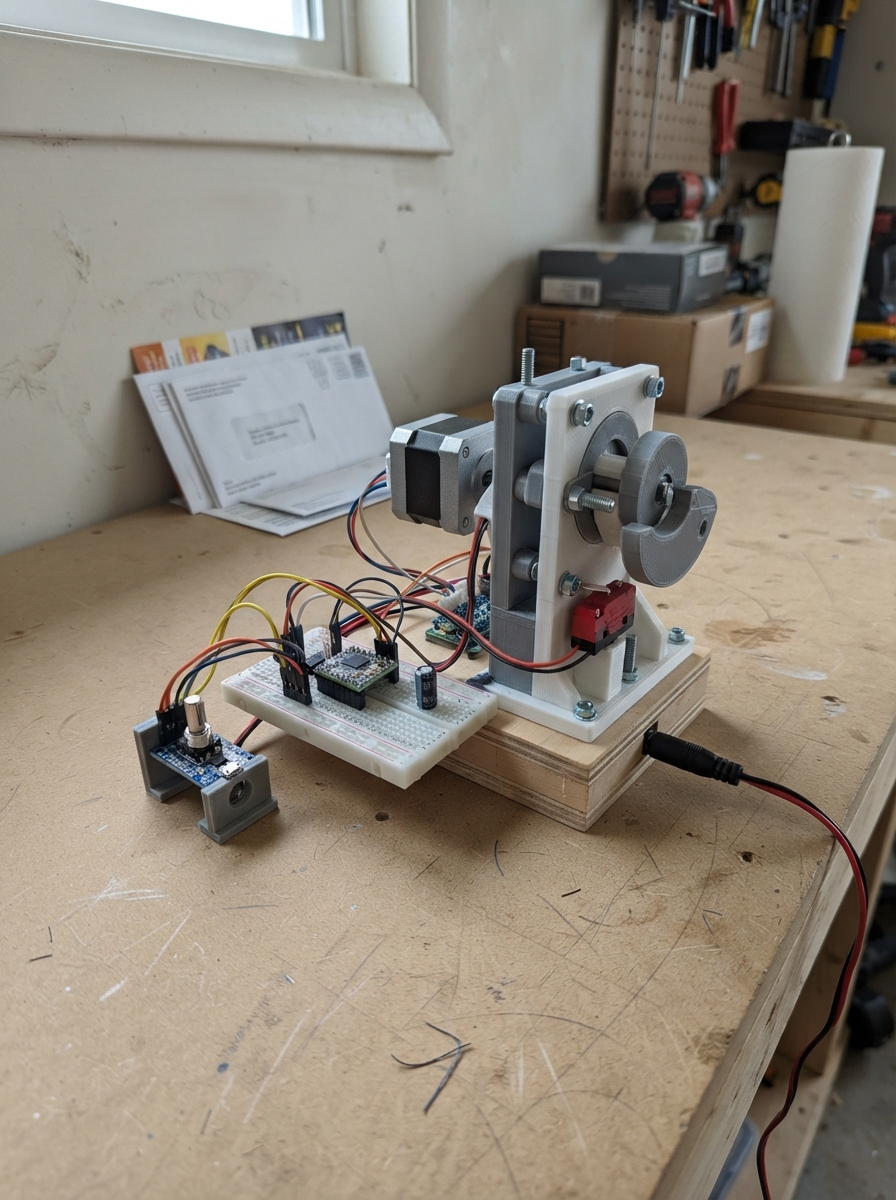
This project builds a test rig for controlling a cyclone inlet flap using a stepper motor and rotary encoder. The rig automatically homes the flap to a closed position on startup, then allows manual adjustment via the encoder knob. It's useful for testing inlet flow control, characterizing motor performance, or developing adaptive inlet strategies.
The guide provides a complete wiring diagram, parts list, and step-by-step assembly instructions. Firmware running on an ESP32 manages the NEMA 17 stepper motor through an A4988 driver, reads encoder input for manual positioning, and uses a limit switch to establish a known home state. Testing procedures ensure smooth motion before connecting to the actual inlet system.
Wiring diagram

Gather all the parts
Assemble it in 7 steps
1. Make the flap and its position marks
Build the square inlet box with a flap on a shaft. Make a paper strip marked 0, 25, 50, 75, and 100, where 0 is fully closed and 100 is fully open; tape it beside the shaft. Print or make a handwheel with a pointer that lines up with these marks. Use a removable coupler or pull-pin between the handwheel and motor shaft so you can turn the flap by hand only after the motor is disconnected.
- Before adding the motor, turn the flap through its full range by hand. It must not rub the inlet walls.
- The marks are the usable airflow-opening setting, not an exact airflow measurement.
- Do not leave a rigid hand handle connected to a powered motor shaft — the motor can turn the handle suddenly and injure fingers or damage the linkage.
2. Mount the motor and closed stop
Mount flap_stepper so its shaft drives the flap through a flexible coupler, belt, or linkage. Set the flap to the fully closed position, then mount closed_limit so the moving flap or linkage presses its small lever only at that position.
- A flexible coupler protects the motor if the flap reaches a hard stop.
- The closed switch should click just before the flap is forced hard against its frame.
- Keep the motor, switch, and wiring outside the dust and airflow path; cyclone dust can jam the mechanism.
3. Fit the driver and its protection capacitor
Place stepper_driver in an enclosure close to the motor. Put motor_bulk_capacitor directly across the driver’s VMOT and GND terminals: capacitor + to VMOT (power), and its striped - lead to GND (ground).
- Keep these two capacitor wires as short as possible.
- Set the A4988 current-limit screw for your motor’s rated phase current before operating the flap.
- The striped capacitor lead must go to GND — reversing it can make the capacitor burst.
- Never plug or unplug the motor while the 12 V adapter is connected; that can destroy the A4988 driver.
4. Connect the motor power and motor coils
Connect motor_supply +12V to stepper_driver VMOT (motor power), and motor_supply GND to GND (ground). Connect the motor’s matched coil pair to 1A and 1B, then its other matched coil pair to 2A and 2B. The four coil colors vary, so use the motor’s data sheet or a meter to identify each pair.
- Keep the 12 V supply unplugged until every connection has been checked.
- If the flap travels toward open while it should home closed, swap the DIR setting in firmware or reverse one complete motor coil pair.
- Do not connect 12 V to the ESP32 3V3 pin — it will damage the board.
5. Wire the ESP32 control side
With USB and 12 V disconnected, wire stepper_driver VDD to ESP32 3V3 (logic power), GND to ESP32 GND (ground), STEP to GPIO26 (step signal), DIR to GPIO27 (direction signal), and ENABLE to GPIO25 (motor on/off signal). Wire MS1, MS2, and MS3 each to GND (full-step setting). Join RESET to SLEEP, then wire that joined point to 3V3 so the driver stays awake.
- The ESP32 USB power and the 12 V driver supply must share GND; without that shared ground the control signals are unreliable.
- Make sure VMOT receives only the 12 V adapter and VDD receives only 3.3 V — swapping them can damage the driver and ESP32.
6. Wire the knob and closed switch
Wire position_knob VCC to 3V3 (power), GND to GND (ground), CLK to GPIO32 (turn signal), DT to GPIO33 (turn direction signal), and SW to GPIO14 (push signal). Wire closed_limit COM to GND (ground) and NO to GPIO4 (closed-position signal).
- Turn the knob after power-up to set the opening in small steps; press it once to send the flap back to its closed reference switch.
- If knob direction feels backward, swap its CLK and DT wires.
- Use the 3.3 V pin for the knob, not 5 V — a 5 V signal can damage ESP32 inputs.
7. Check motion before connecting the inlet
Plug the ESP32 into USB first, then plug in motor_supply. On startup the flap moves slowly toward the closed switch and stops there. Turn the knob a few clicks to open it, then compare the pointer with your paper scale. Disconnect 12 V before changing the manual handwheel coupler.
- If the flap stops before it reaches the desired opening, change FLAP_TRAVEL_STEPS in the code to match your linkage.
- If startup says home failed, unplug 12 V and check that the switch lever is reachable and its COM/NO terminals were used.
- Keep hands clear of the flap and linkage during the first motion test.
Review all connections
1. Connections between "motor_supply" and "ESP32"
2. Connections between "motor_bulk_capacitor" and "ESP32"
3. Connections between "stepper_driver" and "ESP32"
4. Connections between "flap_stepper" and "ESP32"
5. Connections between "position_knob" and "ESP32"
6. Connections between "closed_limit" and "ESP32"
Deploy the firmware
#include <Arduino.h>
#include <AccelStepper.h>

constexpr uint8_t STEP_PIN = 26;
constexpr uint8_t DIR_PIN = 27;
constexpr uint8_t ENABLE_PIN = 25;
constexpr uint8_t ENCODER_CLK_PIN = 32;
constexpr uint8_t ENCODER_DT_PIN = 33;
constexpr uint8_t ENCODER_SW_PIN = 14;
constexpr uint8_t HOME_SWITCH_PIN = 4;

// Adjust this after the linkage is built. 100 full steps is 90 degrees with
// a direct-coupled 1.8-degree NEMA 17 motor.
constexpr long FLAP_TRAVEL_STEPS = 100;
constexpr int HOME_DIRECTION = -1;
constexpr long HOME_MAX_STEPS = 600;
constexpr long STEPS_PER_ENCODER_CLICK = 2;

AccelStepper flapMotor(AccelStepper::DRIVER, STEP_PIN, DIR_PIN);

enum MotionState { HOMING, READY, HOME_FAILED };
MotionState motionState = HOMING;
long targetSteps = 0;
long homingSteps = 0;
int lastEncoderClk;
int lastRawButtonState = HIGH;
int stableButtonState = HIGH;
unsigned long lastButtonChangeMs = 0;

bool homeSwitchPressed() {
  return digitalRead(HOME_SWITCH_PIN) == LOW;
}

void enableMotor(bool enabled) {
  digitalWrite(ENABLE_PIN, enabled ? LOW : HIGH);
}

void startHoming() {
  enableMotor(true);
  motionState = HOMING;
  homingSteps = 0;
  targetSteps = 0;
  flapMotor.setSpeed(HOME_DIRECTION * 120.0f);
}

void finishHome() {
  flapMotor.setCurrentPosition(0);
  targetSteps = 0;
  motionState = READY;
  enableMotor(false);
  Serial.println("Home found: flap is at 0% closed reference.");
}

void serviceHoming() {
  if (homeSwitchPressed()) {
    finishHome();
    return;
  }

  flapMotor.runSpeed();
  homingSteps++;
  if (homingSteps >= HOME_MAX_STEPS) {
    motionState = HOME_FAILED;
    enableMotor(false);
    Serial.println("Home failed: check limit-switch position and HOME_DIRECTION.");
  }
}

void requestMove(long requestedSteps) {
  if (motionState != READY) return;
  targetSteps = constrain(requestedSteps, 0L, FLAP_TRAVEL_STEPS);
  if (targetSteps != flapMotor.currentPosition()) {
    enableMotor(true);
    flapMotor.moveTo(targetSteps);
  }
}

void serviceEncoder() {
  int encoderClk = digitalRead(ENCODER_CLK_PIN);
  if (encoderClk != lastEncoderClk && encoderClk == LOW) {
    if (digitalRead(ENCODER_DT_PIN) != encoderClk) {
      requestMove(targetSteps + STEPS_PER_ENCODER_CLICK);
    } else {
      requestMove(targetSteps - STEPS_PER_ENCODER_CLICK);
    }
  }
  lastEncoderClk = encoderClk;

  int rawButtonState = digitalRead(ENCODER_SW_PIN);
  unsigned long now = millis();
  if (rawButtonState != lastRawButtonState) {
    lastButtonChangeMs = now;
    lastRawButtonState = rawButtonState;
  }
  if (rawButtonState != stableButtonState && now - lastButtonChangeMs > 30) {
    stableButtonState = rawButtonState;
    if (stableButtonState == LOW) {
      Serial.println("Re-homing flap.");
      startHoming();
    }
  }
}

void setup() {
  Serial.begin(115200);
  pinMode(ENABLE_PIN, OUTPUT);
  enableMotor(false);
  pinMode(ENCODER_CLK_PIN, INPUT_PULLUP);
  pinMode(ENCODER_DT_PIN, INPUT_PULLUP);
  pinMode(ENCODER_SW_PIN, INPUT_PULLUP);
  pinMode(HOME_SWITCH_PIN, INPUT_PULLUP);
  lastEncoderClk = digitalRead(ENCODER_CLK_PIN);

  flapMotor.setMaxSpeed(240.0f);
  flapMotor.setAcceleration(500.0f);
  Serial.println("Square cyclone inlet flap controller starting.");
  startHoming();
}

void loop() {
  serviceEncoder();

  if (motionState == HOMING) {
    serviceHoming();
  } else if (motionState == READY) {
    if (flapMotor.distanceToGo() != 0) {
      flapMotor.run();
    } else {
      enableMotor(false);
    }
  }

  delay(1);
}
Remix this project
Make it yours in one click
Open a full copy of this project in your own Schematik workspace — diagram, code, parts, and assembly steps included. Swap the sensor, add features, or redesign the whole thing with AI. The author's original stays untouched.