Schematik build
AI Nutrition Kitchen Scale
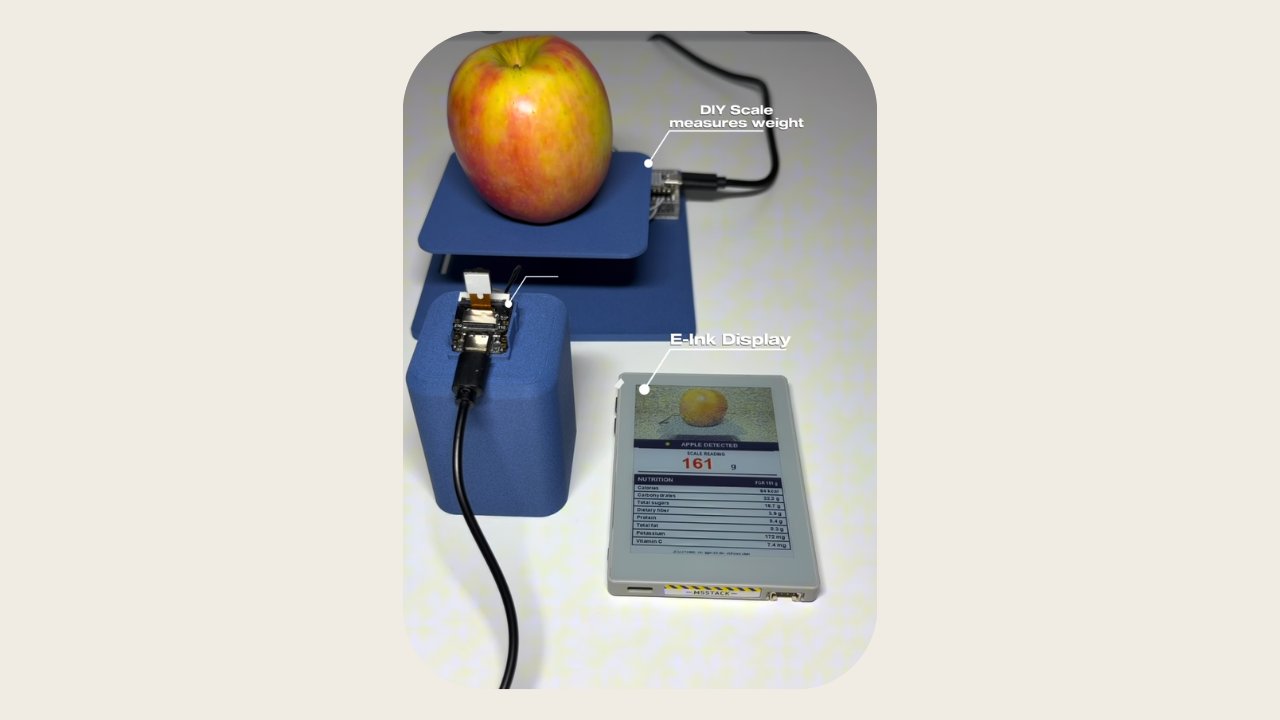
This project builds an intelligent kitchen scale that weighs food and identifies it using computer vision. The scale combines a 1 kg load cell with an ESP32-C6 microcontroller for precise weight measurement, while a separate ESP32-S3 Sense module with camera captures images of the food. The two nodes communicate wirelessly via ESP-NOW to coordinate measurements and send data to a nutrition API for detailed nutritional analysis.
The guide provides a complete wiring diagram showing how to connect the load cell to the HX711 amplifier and then to the ESP32-C6, a full parts list, firmware for both the scale node and camera node, and step-by-step assembly instructions. After building and calibrating the scale, users will have a functioning device that returns detailed nutrition information including calories, protein, carbs, fat, fiber, sugar, sodium, and potassium for identified foods.
Wiring diagram

Gather all the parts
Assemble it in 6 steps
1. Mount the 1 kg load cell
Bolt one end of loadcell_1kg_1 rigidly to the scale base and bolt the opposite end to the platter bracket. The platter must not touch the base, screws, cable, or enclosure at any point; that would bypass the sensing beam and cause incorrect readings.
- Route the load-cell cable with a slack loop so the cable cannot pull on the beam.
- Keep the entire food/container load within the 1 kg rated capacity.
- Do not drill through, bend, or clamp the thin flexing section of the load cell.
- Do not overload the sensor; it can be permanently damaged.
2. Connect the load cell to the HX711
Wire loadcell_1kg_1 to hx711_1 one-for-one: E+ to E+, E- to E-, A+ to A+, and A- to A-. Follow the wire labels supplied with your particular load cell rather than relying only on wire colors.
- Keep these four wires short and away from USB power cables where practical.
- If the output changes in the wrong direction, correct the calibration factor only after confirming the A+/A- wiring labels.
- Do not connect any load-cell wires to the M5Paper Color.
3. Wire the HX711 only to the XIAO ESP32-C6
Connect hx711_1 VCC to xiao_esp32c6_scale_1 3V3, GND to GND, DT/DOUT to D2 (GPIO25), and SCK to D3 (GPIO7). This is the only physical MCU connection for the amplifier.
- Use 3.3 V for both supply and digital logic so DOUT never exceeds the C6 input voltage.
- Power the C6 through its USB-C port during normal use.
- Never use the Grove 5 V rail for this HX711 connection.
- The M5Paper has no wire connection to the HX711 or load cell.
4. Place and power the camera node
Attach xiao_esp32s3_sense_camera_1 on a stable gooseneck above the platter, framing the whole food area. Power the Sense board through its own USB-C supply and leave enough slack that the cable does not touch the load-cell platter.
- Use diffuse light to avoid strong reflections and shadows on the food.
- Aim the camera downward and lock the gooseneck after framing.
- The camera cable and gooseneck must not bear any part of the platter’s load.
5. Configure the wireless nodes and controller
Flash the C6 scale-node and S3 Sense camera-node companion sketches separately, then copy each printed MAC address into the M5Paper include/secrets.h file. Put all three devices on the same 2.4 GHz Wi-Fi channel; ESP-NOW and the M5Paper’s LAN connection must share that radio channel.
- The two companion sources are stored as data/xiao_esp32c6_scale_node.ino and data/xiao_esp32s3_sense_camera_node.ino.
- Set the M5Paper MAC in each companion source before deploying it.
- Keep API keys only at the LAN proxy; do not add them to any of the three device firmwares.
6. Calibrate and use the scale
With the platter/container empty, press M5Paper button A. The PaperColor commands the C6 to tare and median-filter the weight, commands the Sense camera to capture, then sends the JPEG and grams by plain HTTP to your trusted-LAN proxy.
- Adjust CAL_FACTOR in the C6 companion sketch using a known mass before food measurements.
- The proxy must return food_name plus calories, protein, carbs, fat, fiber, sugar, sodium, and potassium per 100 g.
- Plain HTTP is appropriate only on a trusted LAN. Do not expose the proxy to the public internet.
Review all connections
1. Connections between "hx711_1" and "ESP32"
2. Connections between "xiao_esp32s3_sense_camera_1" and "ESP32"
3. Connections between "xiao_esp32c6_scale_1" and "ESP32"
Deploy the firmware
#include <Arduino.h>
#include <M5Unified.h>
#include <WiFi.h>
#include <esp_now.h>
#include <HTTPClient.h>
#include <ArduinoJson.h>
#include "secrets.h"

// Protocol shared by all three nodes. The XIAO scale node returns grams;
// the XIAO ESP32-S3 Sense returns an ordered set of JPEG chunks.
enum PacketType : uint8_t { WEIGH_REQUEST = 0xB1, WEIGHT_RESULT = 0xB2, CAPTURE_REQUEST = 0xA1, JPEG_CHUNK = 0xA2 };
struct __attribute__((packed)) WeightPacket { uint8_t type; float grams; };
struct __attribute__((packed)) JpegHeader { uint8_t type; uint16_t sequence; uint16_t total; uint16_t payloadLength; };
struct Nutrition { String name; float calories, protein, carbs, fat, fiber, sugar, sodium, potassium; };


// Forward declarations
void status(const char *line);
void onEspNowReceive(const esp_now_recv_info_t *, const uint8_t *data, int len);
bool sendAndWaitForWeight();
bool sendAndWaitForPhoto();
bool postToProxy(Nutrition &n);
void line(int y, const char *label, float value, const char *unit);
void drawResult(const Nutrition &n);
bool addPeer(const uint8_t *mac);

static constexpr size_t JPEG_CAPACITY = 140000;
static constexpr uint32_t SCALE_TIMEOUT_MS = 12000;
static constexpr uint32_t CAMERA_TIMEOUT_MS = 15000;
uint8_t *jpegData = nullptr;
volatile size_t jpegLength = 0;
volatile uint16_t expectedChunk = 0, expectedTotal = 0;
volatile bool jpegComplete = false, jpegInvalid = false, weightReceived = false;
volatile float measuredGrams = 0;

void status(const char *line) {
  M5.Display.fillScreen(TFT_WHITE);
  M5.Display.setTextColor(TFT_BLACK, TFT_WHITE);
  M5.Display.setTextSize(2); M5.Display.setCursor(15, 25); M5.Display.println("AI Kitchen Scale");
  M5.Display.setTextSize(1); M5.Display.setCursor(15, 75); M5.Display.println(line);
}

void onEspNowReceive(const esp_now_recv_info_t *, const uint8_t *data, int len) {
  if (len < 1) return;
  if (data[0] == WEIGHT_RESULT && len == (int)sizeof(WeightPacket)) {
    WeightPacket p; memcpy(&p, data, sizeof(p));
    measuredGrams = p.grams; weightReceived = isfinite(p.grams); return;
  }
  if (data[0] != JPEG_CHUNK || len < (int)sizeof(JpegHeader) || jpegInvalid || !jpegData) return;
  JpegHeader h; memcpy(&h, data, sizeof(h));
  if (h.payloadLength + sizeof(h) != (uint16_t)len || h.sequence != expectedChunk ||
      (expectedTotal && h.total != expectedTotal) || jpegLength + h.payloadLength > JPEG_CAPACITY) { jpegInvalid = true; return; }
  if (!expectedTotal) expectedTotal = h.total;
  memcpy(jpegData + jpegLength, data + sizeof(h), h.payloadLength);
  jpegLength += h.payloadLength; ++expectedChunk;
  if (expectedChunk == expectedTotal) jpegComplete = true;
}

bool sendAndWaitForWeight() {
  weightReceived = false;
  uint8_t request = WEIGH_REQUEST;
  if (esp_now_send(XIAO_SCALE_MAC, &request, 1) != ESP_OK) return false;
  uint32_t started = millis();
  while (!weightReceived && millis() - started < SCALE_TIMEOUT_MS) { M5.update(); delay(5); }
  return weightReceived;
}

bool sendAndWaitForPhoto() {
  jpegData = (uint8_t *)ps_malloc(JPEG_CAPACITY);
  if (!jpegData) jpegData = (uint8_t *)malloc(JPEG_CAPACITY);
  if (!jpegData) return false;
  jpegLength = 0; expectedChunk = 0; expectedTotal = 0; jpegComplete = false; jpegInvalid = false;
  uint8_t request = CAPTURE_REQUEST;
  if (esp_now_send(XIAO_CAMERA_MAC, &request, 1) != ESP_OK) return false;
  uint32_t started = millis();
  while (!jpegComplete && !jpegInvalid && millis() - started < CAMERA_TIMEOUT_MS) { M5.update(); delay(5); }
  return jpegComplete && !jpegInvalid && jpegLength > 100;
}

bool postToProxy(Nutrition &n) {
  String boundary = "----KitchenScaleBoundary";
  String prefix = "--" + boundary + "\r\nContent-Disposition: form-data; name=\"grams\"\r\n\r\n" + String(measuredGrams, 1) +
    "\r\n--" + boundary + "\r\nContent-Disposition: form-data; name=\"image\"; filename=\"food.jpg\"\r\nContent-Type: image/jpeg\r\n\r\n";
  String suffix = "\r\n--" + boundary + "--\r\n";
  size_t length = prefix.length() + jpegLength + suffix.length();
  uint8_t *body = (uint8_t *)ps_malloc(length);
  if (!body) body = (uint8_t *)malloc(length);
  if (!body) return false;
  memcpy(body, prefix.c_str(), prefix.length());
  memcpy(body + prefix.length(), jpegData, jpegLength);
  memcpy(body + prefix.length() + jpegLength, suffix.c_str(), suffix.length());
  HTTPClient http; http.begin(PROXY_URL);
  http.addHeader("Content-Type", "multipart/form-data; boundary=" + boundary);
  int responseCode = http.POST(body, length); free(body);
  if (responseCode != HTTP_CODE_OK) { http.end(); return false; }
  JsonDocument doc; DeserializationError err = deserializeJson(doc, http.getString()); http.end();
  if (err) return false;
  n.name = doc["food_name"] | doc["name"] | "Unknown food";
  JsonObject per100 = doc["per_100g"].as<JsonObject>();
  float multiplier = measuredGrams / 100.0f;
  auto nutrient = [&](const char *key) { return (per100[key] | doc[key] | 0.0f) * multiplier; };
  n.calories=nutrient("calories"); n.protein=nutrient("protein"); n.carbs=nutrient("carbs"); n.fat=nutrient("fat");
  n.fiber=nutrient("fiber"); n.sugar=nutrient("sugar"); n.sodium=nutrient("sodium"); n.potassium=nutrient("potassium");
  return true;
}

void line(int y, const char *label, float value, const char *unit) { M5.Display.setCursor(210, y); M5.Display.printf("%s: %.1f %s", label, value, unit); }
void drawResult(const Nutrition &n) {
  M5.Display.fillScreen(TFT_WHITE);
  M5.Display.drawJpg(jpegData, jpegLength, 10, 14, 190, 145);
  M5.Display.setTextColor(TFT_BLACK, TFT_WHITE); M5.Display.setTextSize(2); M5.Display.setCursor(210, 18); M5.Display.println(n.name);
  M5.Display.setTextSize(1); M5.Display.setCursor(210, 55); M5.Display.printf("Weight: %.1f g", measuredGrams);
  line(85,"Calories",n.calories,"kcal"); line(107,"Protein",n.protein,"g"); line(129,"Carbs",n.carbs,"g"); line(151,"Fat",n.fat,"g");
  line(173,"Fiber",n.fiber,"g"); line(195,"Sugar",n.sugar,"g"); line(217,"Sodium",n.sodium,"mg"); line(239,"Potassium",n.potassium,"mg");
  M5.Display.setCursor(10, 575); M5.Display.println("Press A for the next measurement.");
}

bool addPeer(const uint8_t *mac) {
  esp_now_peer_info_t peer = {}; memcpy(peer.peer_addr, mac, 6); peer.channel = 0; peer.encrypt = false;
  return esp_now_is_peer_exist(mac) || esp_now_add_peer(&peer) == ESP_OK;
}
void setup() {
  auto cfg = M5.config(); M5.begin(cfg); M5.Display.setRotation(0); status("Connecting to Wi-Fi...");
  WiFi.mode(WIFI_STA); WiFi.begin(WIFI_SSID, WIFI_PASSWORD);
  uint32_t started = millis(); while (WiFi.status() != WL_CONNECTED && millis() - started < 15000) delay(250);
  if (WiFi.status() != WL_CONNECTED) { status("Wi-Fi failed. Check secrets.h."); return; }
  if (esp_now_init() != ESP_OK || !addPeer(XIAO_SCALE_MAC) || !addPeer(XIAO_CAMERA_MAC)) { status("ESP-NOW peer setup failed."); return; }
  esp_now_register_recv_cb(onEspNowReceive);
  status("Ready. Empty the platter/container, then press A.");
}
void loop() {
  M5.update(); if (!M5.BtnA.wasPressed()) { delay(20); return; }
  status("Taring and measuring on the XIAO C6...");
  if (!sendAndWaitForWeight()) { status("Scale node failed. Check C6 power, MAC, and Wi-Fi channel."); return; }
  status("Capturing on the XIAO S3 Sense...");
  if (!sendAndWaitForPhoto()) { status("Camera failed. Check S3 Sense power, MAC, and Wi-Fi channel."); if (jpegData) { free(jpegData); jpegData=nullptr; } return; }
  status("Sending JPEG and grams to LAN proxy..."); Nutrition n = {};
  if (!postToProxy(n)) { status("Proxy failed. Check PROXY_URL and JSON response."); free(jpegData); jpegData=nullptr; return; }
  drawResult(n); free(jpegData); jpegData=nullptr;
}
Download project files
Remix this project
Make it yours in one click
Open a full copy of this project in your own Schematik workspace — diagram, code, parts, and assembly steps included. Swap the sensor, add features, or redesign the whole thing with AI. The author's original stays untouched.
Related projects
Build A Heart Rate Spo2 Monitor Esp32 Gy-max3010
Arduino · Beginner · 45 minutes · July 26, 2026Schematik
How to Build an ESP32-CAM Setup Portal Security Camera
ESP32 · Intermediate · 35 minutes · July 22, 2026Schematik
How to Build an ESP32 Pet Treat Dispenser
ESP32 · Intermediate · 55 minutes · June 12, 2026Schematik