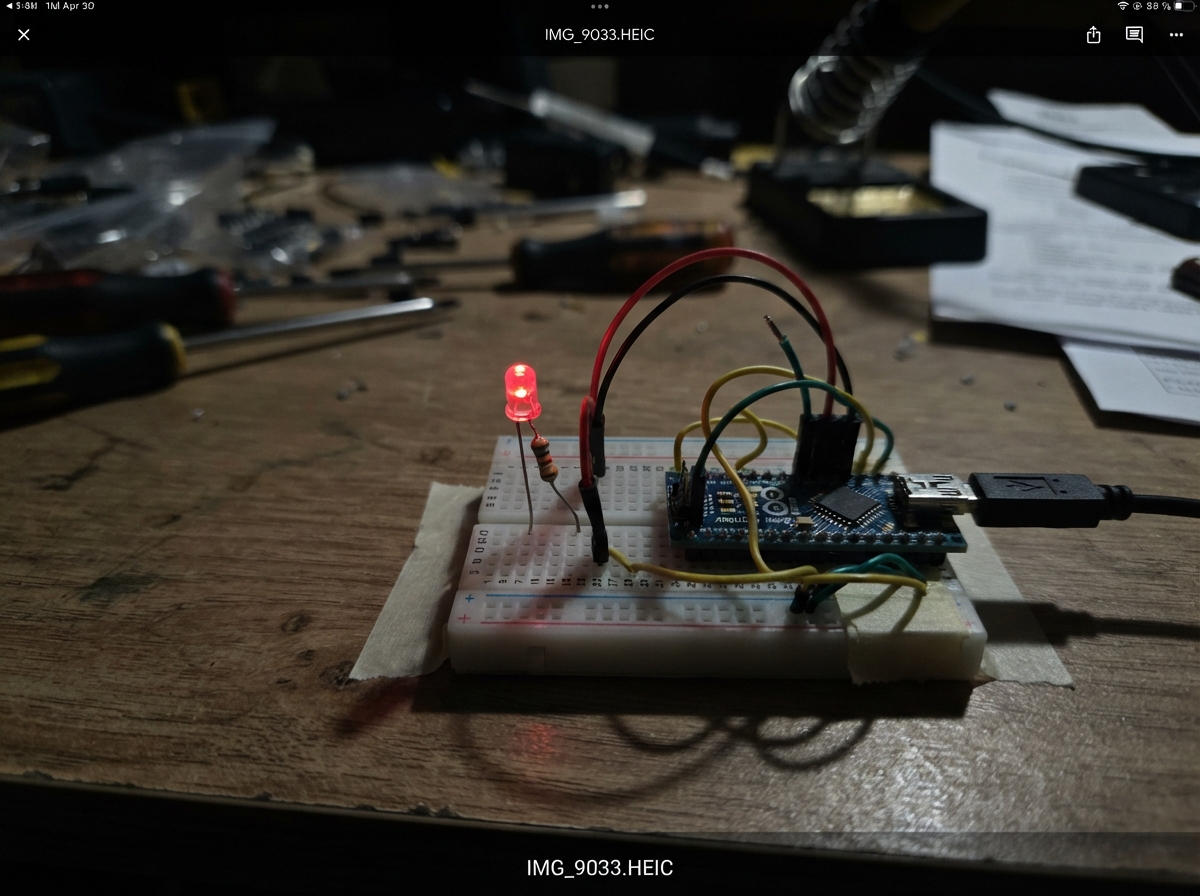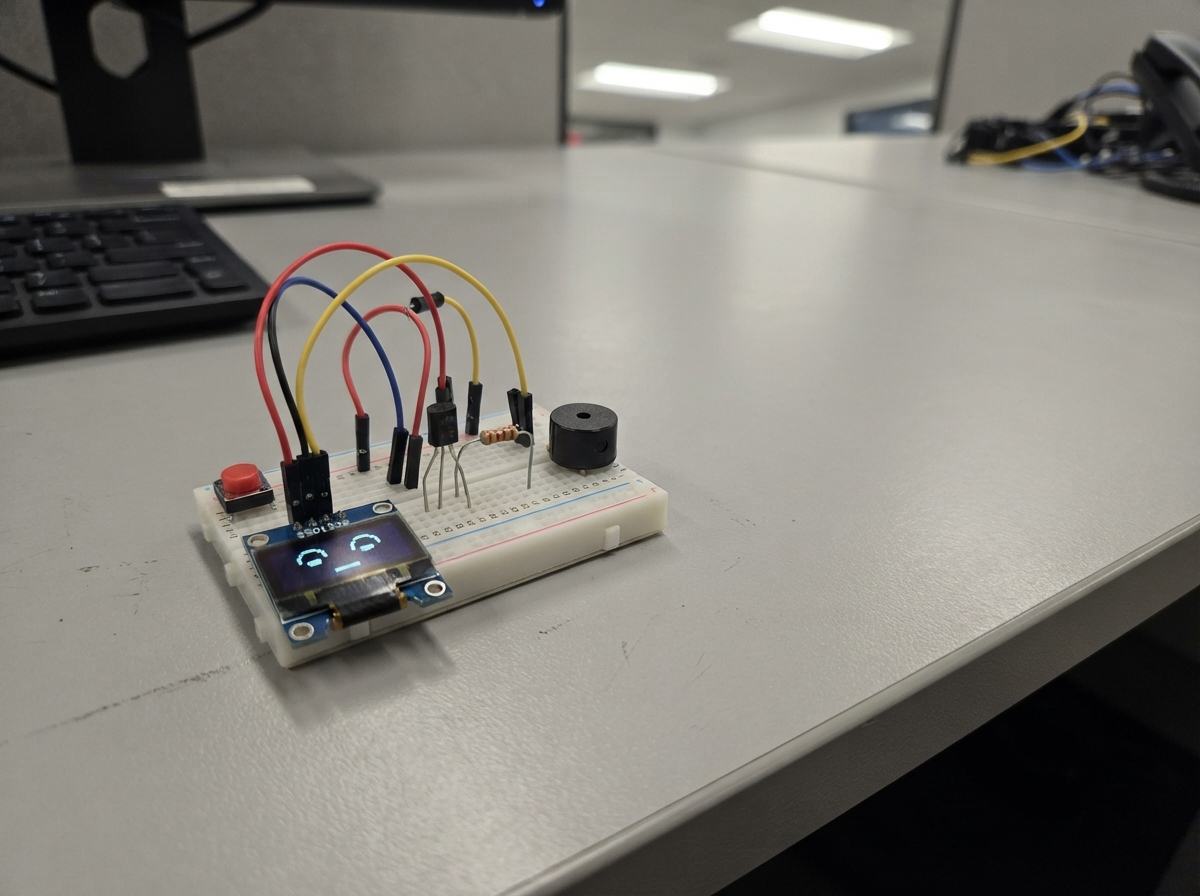
This project brings an expressive character to life on a small OLED screen, displaying different eye emotions that respond to button presses. The ESP32 microcontroller drives the display while a push button lets users cycle through various emotional states, with audio feedback from a piezo buzzer adding another layer of interactivity.
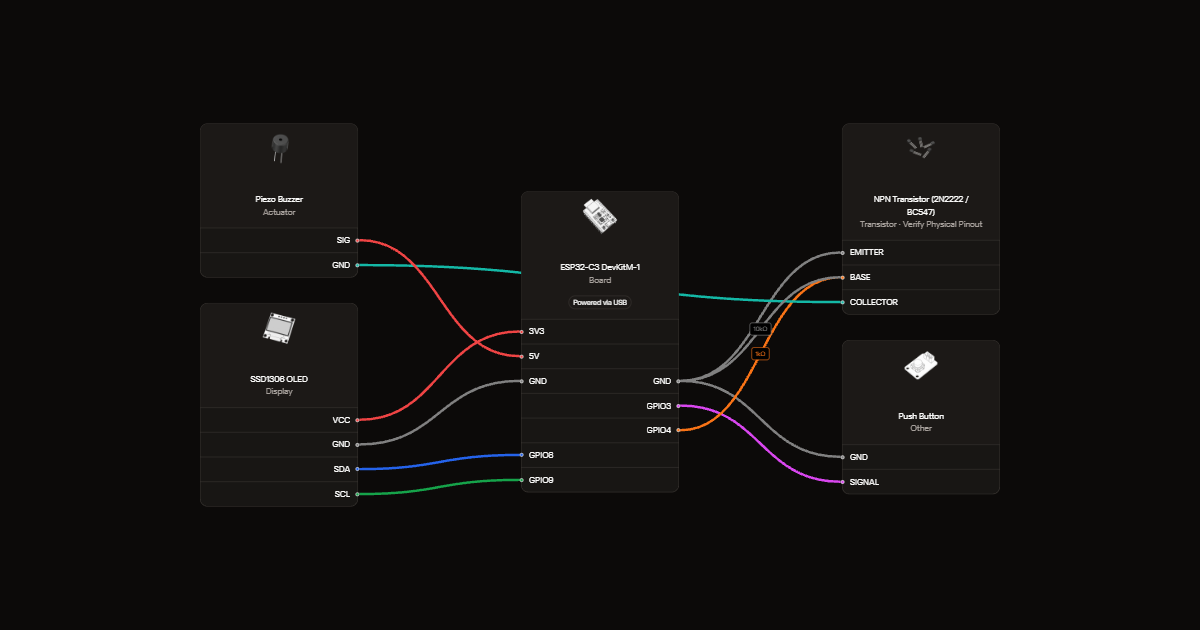
The guide includes a complete wiring diagram showing how to connect the SSD1306 OLED display, push button, and piezo buzzer to the ESP32, along with a full parts list and ready-to-upload firmware. Assembly steps walk through component preparation, circuit connections, and buzzer driver setup, making it accessible for makers of all levels.
Wiring diagram
Gather all the parts
Assemble it in 5 steps
1. Siapkan komponen
Gunakan ESP32-C3 DevKitM-1, OLED SSD1306 I2C 0,96 inci 128x64 beralamat 0x3C, dan tombol sesaat tanpa pengunci. Cabut USB sebelum merangkai. Siapkan breadboard dan kabel jumper.
2. Hubungkan OLED
Hubungkan VCC OLED ke 3V3 untuk daya, GND ke GND, SDA ke GPIO8 untuk data, dan SCL ke GPIO9 untuk detak komunikasi.
- Ikuti tulisan pada modul, bukan urutan kaki. Tertukar VCC dan GND dapat merusak OLED. Gunakan 3V3, bukan 5V.
3. Hubungkan tombol
Hubungkan satu kontak tombol ke GPIO3 dan kontak lainnya ke GND. Program menggunakan penarik tegangan internal sehingga tidak membutuhkan resistor tambahan.
- Pada tombol empat kaki, dua kaki pada sisi yang sama biasanya sudah terhubung. Pilih kontak yang hanya tersambung saat ditekan; pasang tombol melintasi celah tengah breadboard.
- Gunakan tombol tambahan ini, bukan tombol BOOT pada papan.
4. Periksa rangkaian
Setelah Deploy, slide 1 dan 2 mengetik ucapan lengkap. Tekan tombol setelah teks selesai untuk lanjut. Slide 3 menampilkan gambar dan memainkan lagu sekali; tekan tombol setelah lagu selesai. Slide 4 senang, 5 sedih, 6 marah bergerak tanpa teks. Setiap tekan-lepas mengganti slide, lalu kembali ke slide 1. SDA tetap GPIO8 dan SCL GPIO9 sesuai PCB pengguna. Keduanya pin penentu mode boot; jangan ditahan LOW saat dinyalakan atau reset.
5. Pasang penggerak buzzer pasif
Gunakan piezo pasif PS1240, bukan buzzer aktif. Hubungkan GPIO4 lewat resistor 1kΩ ke basis transistor NPN. Pasang resistor 10kΩ antara basis dan GND agar tetap mati saat boot. Emitor ke GND, kolektor ke kaki balik piezo, dan kaki piezo lainnya ke 5V USB. Periksa susunan B/C/E dari datasheet transistor; urutannya berbeda antar model.
- Jangan hubungkan 5V ke GPIO ESP32. Cabut USB saat merangkai.
- Piezo ini dioptimalkan untuk nada tinggi sehingga nada lagu rendah mungkin terdengar pelan.
Review all connections
1. Connections between "oled" and "ESP32"
2. Connections between "tombol" and "ESP32"
3. Connections between "basis" and "ESP32"
4. Connections between "transistor" and "ESP32"
5. Connections between "pulldown" and "ESP32"
6. Connections between "buzzer" and "ESP32"
Deploy the firmware
#include <Arduino.h>
#include <Wire.h>
#include <Adafruit_GFX.h>
#include <Adafruit_SSD1306.h>
#include <string.h>

#define SCREEN_WIDTH 128
#define SCREEN_HEIGHT 64

// Pin ESP32-C3 Super Mini
#define BUTTON_PIN 3
#define BUZZER_PIN 4
#define OLED_SDA 8
#define OLED_SCL 9

Adafruit_SSD1306 display(SCREEN_WIDTH, SCREEN_HEIGHT, &Wire, -1);

void matikanBuzzer();
void bunyiTombol();
void tampilKetikanPROGMEM(const char*);
void tampilGambar();
void laguHappyBirthdayBaru();
void tampilEmoji();
// =====================================================
// BITMAP GAMBAR 128x64
// =====================================================

const unsigned char epd_bitmap_Gemini_Generated_Image__1_ [] PROGMEM = {
	0xff, 0xff, 0xff, 0xff, 0xff, 0xff, 0xff, 0xff, 0xff, 0xff, 0xff, 0xff, 0xff, 0xff, 0xff, 0xff,
	0xff, 0xff, 0xff, 0xff, 0xff, 0xff, 0xff, 0xff, 0xff, 0xff, 0xff, 0xff, 0xff, 0xff, 0xff, 0xff,
	0xff, 0xff, 0xff, 0xff, 0xff, 0xff, 0xff, 0xff, 0xff, 0xff, 0xff, 0xff, 0xff, 0xff, 0xff, 0xff,
	0xff, 0xff, 0xff, 0xff, 0xff, 0xff, 0xff, 0xff, 0xff, 0xff, 0xff, 0xff, 0xff, 0xff, 0xff, 0xff,
	0xff, 0xff, 0xff, 0xff, 0xff, 0xff, 0xff, 0xff, 0xff, 0xff, 0xff, 0xff, 0xff, 0xff, 0xff, 0xff,
	0xff, 0xff, 0xff, 0xff, 0xff, 0xff, 0xff, 0xff, 0xff, 0xff, 0xff, 0xff, 0xff, 0xff, 0xff, 0xff,
	0xff, 0xff, 0xff, 0xff, 0xff, 0xff, 0xff, 0xff, 0xff, 0xff, 0xff, 0xff, 0xff, 0xff, 0xff, 0xff,
	0xff, 0xff, 0xff, 0xff, 0xff, 0xff, 0xf0, 0x1f, 0xff, 0xff, 0xff, 0xff, 0xff, 0xff, 0xff, 0xff,
	0xff, 0xff, 0xff, 0xff, 0xff, 0xff, 0xd8, 0x03, 0xff, 0xff, 0xff, 0xff, 0xff, 0xff, 0xff, 0xff,
	0xff, 0xff, 0xff, 0xff, 0xff, 0xff, 0xa0, 0x00, 0xff, 0xff, 0xff, 0xff, 0xff, 0xff, 0xff, 0xff,
	0xff, 0xff, 0xff, 0xff, 0xff, 0xfc, 0xc0, 0x00, 0x7f, 0xff, 0xff, 0xff, 0xff, 0xff, 0xff, 0xff,
	0xff, 0xff, 0xff, 0xff, 0xff, 0x7a, 0x00, 0x00, 0x3f, 0xff, 0xff, 0xff, 0xff, 0xff, 0xff, 0xff,
	0xff, 0xff, 0xff, 0xff, 0xff, 0x74, 0x00, 0x00, 0x1f, 0xff, 0xff, 0xff, 0xff, 0xff, 0xff, 0xff,
	0xff, 0xff, 0xff, 0xff, 0xff, 0xe8, 0x00, 0x00, 0x1f, 0xff, 0xff, 0xff, 0xf7, 0xff, 0xff, 0xff,
	0xff, 0xff, 0xff, 0xff, 0xff, 0xe0, 0x00, 0x00, 0x0f, 0xff, 0xff, 0xff, 0xf3, 0xff, 0xff, 0xff,
	0xff, 0xff, 0xff, 0xff, 0xf7, 0xd0, 0x00, 0x00, 0x0f, 0xff, 0xff, 0xff, 0xe3, 0xff, 0xff, 0xff,
	0xff, 0xff, 0xff, 0xff, 0xf3, 0xc0, 0x0c, 0x00, 0x07, 0xbf, 0xff, 0xff, 0xf7, 0xff, 0xff, 0xff,
	0xff, 0xff, 0xff, 0xff, 0xc1, 0xc0, 0x7c, 0x00, 0x07, 0xbf, 0xff, 0xff, 0xff, 0xff, 0xff, 0xff,
	0xff, 0xff, 0xff, 0xff, 0xe3, 0x80, 0xfe, 0x00, 0x07, 0x1f, 0xff, 0xff, 0xff, 0xff, 0xff, 0xff,
	0xff, 0xff, 0xff, 0xff, 0xf7, 0x80, 0xfe, 0x00, 0x03, 0xbf, 0xff, 0xff, 0xff, 0xff, 0xff, 0xff,
	0xff, 0xff, 0xff, 0xff, 0xf7, 0x80, 0xff, 0x00, 0x03, 0xbf, 0xff, 0xff, 0xff, 0xff, 0xff, 0xff,
	0xff, 0xff, 0xff, 0xff, 0xff, 0x80, 0xff, 0x40, 0x00, 0xff, 0xff, 0xff, 0xff, 0xff, 0xff, 0xff,
	0xff, 0xff, 0xff, 0xff, 0xff, 0x81, 0xff, 0xa0, 0x47, 0xff, 0xff, 0xff, 0xff, 0xff, 0xff, 0xff,
	0xff, 0xff, 0xff, 0xff, 0xff, 0x81, 0xff, 0xc8, 0x42, 0xff, 0xd9, 0x0c, 0x3f, 0xff, 0xff, 0xff,
	0xff, 0xff, 0xff, 0xff, 0xff, 0x83, 0xff, 0xfe, 0x63, 0xff, 0xd9, 0x6d, 0xbf, 0xff, 0xff, 0xff,
	0xff, 0xff, 0xff, 0xff, 0xff, 0x83, 0x8f, 0xff, 0x60, 0xff, 0xd9, 0x2d, 0xbf, 0xff, 0xff, 0xff,
	0xff, 0xff, 0xff, 0xff, 0xff, 0x82, 0x0f, 0xf7, 0x81, 0xff, 0xc1, 0x0d, 0xbf, 0xff, 0xff, 0xff,
	0xff, 0xff, 0xff, 0xff, 0xff, 0x13, 0x0f, 0xc9, 0x91, 0xff, 0xd9, 0x65, 0xbf, 0xff, 0xff, 0xff,
	0xff, 0xff, 0xff, 0xff, 0xff, 0x1b, 0x0f, 0xff, 0xb1, 0xff, 0xd9, 0x65, 0xbf, 0xff, 0xff, 0xff,
	0xff, 0xff, 0xff, 0xff, 0xff, 0x0b, 0x9f, 0xff, 0xa0, 0xff, 0xd9, 0x0c, 0x3f, 0xff, 0xff, 0xff,
	0xff, 0xff, 0xff, 0xff, 0xfe, 0x0b, 0x1f, 0xf1, 0xa0, 0xff, 0xff, 0x9e, 0xff, 0xff, 0xff, 0xff,
	0xff, 0xff, 0xff, 0xff, 0xfc, 0x03, 0x1d, 0x71, 0x80, 0x7f, 0xff, 0xff, 0xff, 0xf7, 0xff, 0xff,
	0xff, 0xff, 0xff, 0xff, 0xfc, 0x01, 0xff, 0xff, 0x00, 0x73, 0x5a, 0xd4, 0x55, 0x7f, 0xff, 0xff,
	0xff, 0xff, 0xff, 0xff, 0xfc, 0x01, 0xff, 0xff, 0x00, 0x67, 0x2e, 0x41, 0x4d, 0x7f, 0xff, 0xff,
	0xff, 0xff, 0xff, 0xff, 0xfc, 0x00, 0x7f, 0xfc, 0x00, 0x72, 0x24, 0x41, 0xcd, 0x7f, 0xff, 0xff,
	0xff, 0xff, 0xff, 0xff, 0xfc, 0x00, 0x3f, 0xf8, 0x00, 0x78, 0x34, 0x41, 0x0d, 0x7f, 0xff, 0xff,
	0xff, 0xff, 0xff, 0xff, 0xfd, 0x00, 0x07, 0xc0, 0x00, 0x68, 0xb5, 0x15, 0x55, 0x7f, 0xff, 0xff,
	0xff, 0xff, 0xff, 0xff, 0xfe, 0x00, 0x0f, 0xf0, 0x00, 0xff, 0xff, 0xff, 0xff, 0xff, 0xff, 0xff,
	0xff, 0xff, 0xff, 0xff, 0xfe, 0x00, 0x0f, 0xe0, 0x00, 0xff, 0xff, 0xff, 0xff, 0xff, 0xff, 0xff,
	0xff, 0xff, 0xff, 0xff, 0xff, 0x00, 0x07, 0xe0, 0x01, 0xff, 0xf7, 0xdd, 0x7f, 0x9f, 0xff, 0xff,
	0xff, 0xff, 0xff, 0xff, 0xff, 0x80, 0x07, 0xe0, 0x01, 0xfb, 0xc1, 0x04, 0x3f, 0x0f, 0xff, 0xff,
	0xff, 0xff, 0xff, 0xff, 0xfb, 0x80, 0x07, 0xe0, 0x01, 0xf3, 0xc9, 0x25, 0x7f, 0x9f, 0xff, 0xff,
	0xff, 0xff, 0xff, 0xff, 0xf1, 0x80, 0x07, 0xf0, 0x00, 0xfb, 0xd9, 0x75, 0x7f, 0xff, 0xff, 0xff,
	0xff, 0xff, 0xff, 0xff, 0xfb, 0x80, 0x0f, 0xf0, 0x00, 0xff, 0xf9, 0xe5, 0x7d, 0xff, 0xff, 0xff,
	0xff, 0xff, 0xff, 0xff, 0xff, 0x00, 0x0f, 0xf8, 0x00, 0x7f, 0xf3, 0xcf, 0xfd, 0xff, 0xff, 0xff,
	0xff, 0xff, 0xff, 0xff, 0xff, 0x00, 0x1f, 0xfc, 0x00, 0x7f, 0xe7, 0x9f, 0xff, 0xff, 0xff, 0xff,
	0xff, 0xff, 0xff, 0xff, 0xfe, 0x00, 0x1f, 0xfc, 0x00, 0xff, 0xcf, 0x3f, 0xff, 0xff, 0xff, 0xff,
	0xff, 0xff, 0xff, 0xff, 0xfe, 0x00, 0x3f, 0xfe, 0x00, 0xff, 0xc1, 0x07, 0xff, 0xff, 0xff, 0xff,
	0xff, 0xff, 0xff, 0xff, 0xfe, 0x00, 0x5f, 0xf8, 0x01, 0xff, 0xc1, 0x07, 0xff, 0xff, 0xff, 0xff,
	0xff, 0xff, 0xff, 0xff, 0xff, 0x00, 0x1f, 0xfc, 0x07, 0xff, 0xff, 0xff, 0xff, 0xff, 0xff, 0xff,
	0xff, 0xff, 0xff, 0xff, 0xff, 0x00, 0x3f, 0xf4, 0x0f, 0xff, 0xff, 0xff, 0xff, 0xff, 0xff, 0xff,
	0xff, 0xff, 0xff, 0xff, 0xff, 0x80, 0x1f, 0xf0, 0x0f, 0xff, 0xff, 0xff, 0xff, 0xff, 0xff, 0xff,
	0xff, 0xff, 0xff, 0xff, 0xff, 0xe0, 0x1f, 0xf8, 0x03, 0xff, 0xff, 0xff, 0xff, 0xff, 0xff, 0xff,
	0xff, 0xff, 0xff, 0xff, 0xff, 0xf0, 0x3f, 0xf8, 0x03, 0xff, 0xff, 0xff, 0xff, 0xff, 0xff, 0xff,
	0xff, 0xff, 0xff, 0xff, 0xff, 0xf0, 0x3f, 0xfc, 0x7f, 0xff, 0xff, 0xff, 0xff, 0xff, 0xff, 0xff,
	0xff, 0xff, 0xff, 0xff, 0xff, 0xc0, 0x7f, 0xfc, 0x3f, 0xff, 0xff, 0xff, 0xff, 0xff, 0xff, 0xff,
	0xff, 0xff, 0xff, 0xff, 0xff, 0xe0, 0xff, 0xff, 0x3f, 0xff, 0xff, 0xff, 0xff, 0xff, 0xff, 0xff,
	0xff, 0xff, 0xff, 0xff, 0xff, 0xff, 0xff, 0xff, 0xff, 0xff, 0xff, 0xff, 0xff, 0xff, 0xff, 0xff,
	0xff, 0xff, 0xff, 0xff, 0xff, 0xff, 0xff, 0xff, 0xff, 0xff, 0xff, 0xff, 0xff, 0xff, 0xff, 0xff,
	0xff, 0xff, 0xff, 0xff, 0xff, 0xff, 0xff, 0xff, 0xff, 0xff, 0xff, 0xff, 0xff, 0xff, 0xff, 0xff,
	0xff, 0xff, 0xff, 0xff, 0xff, 0xff, 0xff, 0xff, 0xff, 0xff, 0xff, 0xff, 0xff, 0xff, 0xff, 0xff,
	0xff, 0xff, 0xff, 0xff, 0xff, 0xff, 0xff, 0xff, 0xff, 0xff, 0xff, 0xff, 0xff, 0xff, 0xff, 0xff,
	0xff, 0xff, 0xff, 0xff, 0xff, 0xff, 0xff, 0xff, 0xff, 0xff, 0xff, 0xff, 0xff, 0xff, 0xff, 0xff,
	0xff, 0xff, 0xff, 0xff, 0xff, 0xff, 0xff, 0xff, 0xff, 0xff, 0xff, 0xff, 0xff, 0xff, 0xff, 0xff
};

// =====================================================
// TEKS UCAPAN
// =====================================================

const char teks1[] PROGMEM =
"Selamat ulang tahun ke-21 ya, unii. Barakallahu fii umrik Nabillah USti Humairaa. Semoga Allah SWT senantiasa memberikanmu umur yang berkah, kesehatan, kebahagiaan, serta kemudahan dalam setiap urusanmu. Semoga segala doa dan harapan baikmu dikabulkan. Semoga segala hal baik dalam dirimu selalu diistiqamahkan dan semakin bertambah.";

const char teks2[] PROGMEM =
"Semoga Allah memudahkanmu untuk meninggalkan segala hal buruk dan menggantinya dengan hal-hal yang lebih baik. Semoga setiap langkahmu selalu dalam lindungan-Nya, diberikan kekuatan serta kesabaran dalam menghadapi segala hal. Semoga Allah selalu menjagamu dan menghadirkan banyak kebahagiaan dalam hidupmu. Tetaplah menjadi perempuan hebat yang selalu aku sayangi.";

int bagian = 1;

// =====================================================
// MELODI ULANG TAHUN
// =====================================================

const int length = 28;
char notes[] = "GGAGcB GGAGdc GGxecBA yyecdc";

int beats[] = {
  2, 2, 8, 8, 8, 16, 1,
  2, 2, 8, 8, 8, 16, 1,
  2, 2, 8, 8, 8, 8, 16, 1,
  2, 2, 8, 8, 8, 16
};

int tempo = 200;

// =====================================================
// SETUP
// =====================================================

void setup() {
  Wire.begin(OLED_SDA, OLED_SCL);

  pinMode(BUTTON_PIN, INPUT_PULLUP);

  // Wiring buzzer 5V dengan transistor NPN:
  // GPIO4 -> resistor 1k -> basis (B)
  // Kolektor (C) -> buzzer (-)
  // Buzzer (+) -> +5V
  // Emitor (E) -> GND
  // GND suplai 5V harus disatukan dengan GND ESP32.

  pinMode(BUZZER_PIN, OUTPUT);
  digitalWrite(BUZZER_PIN, LOW);

  matikanBuzzer();

  if (!display.begin(SSD1306_SWITCHCAPVCC, 0x3C)) {
    while (true) {
      delay(100);
    }
  }

  display.clearDisplay();
  display.setTextColor(SSD1306_WHITE);
  display.setTextWrap(false);

  matikanBuzzer();
}

// =====================================================
// LOOP UTAMA
// =====================================================

void loop() {
  if (bagian == 1) {
    tampilKetikanPROGMEM(teks1);

    while (digitalRead(BUTTON_PIN) == HIGH) {
      delay(10);
    }

    bunyiTombol();

    while (digitalRead(BUTTON_PIN) == LOW) {
      delay(10);
    }

    delay(100);
    bagian = 2;
  }

  else if (bagian == 2) {
    tampilKetikanPROGMEM(teks2);

    while (digitalRead(BUTTON_PIN) == HIGH) {
      delay(10);
    }

    bunyiTombol();

    while (digitalRead(BUTTON_PIN) == LOW) {
      delay(10);
    }

    delay(100);
    bagian = 3;
  }

  else if (bagian == 3) {
    tampilGambar();
    laguHappyBirthdayBaru();

    while (digitalRead(BUTTON_PIN) == HIGH) {
      delay(10);
    }

    bunyiTombol();

    while (digitalRead(BUTTON_PIN) == LOW) {
      delay(10);
    }

    delay(100);
    bagian = 4;
  }
  else {
    tampilEmoji();
  }
}

// =====================================================
// FUNGSI BUZZER DENGAN TRANSISTOR NPN
// =====================================================

// Duty cycle 0 membuat sinyal ke basis transistor LOW,
// sehingga transistor OFF dan buzzer berhenti berbunyi.
void matikanBuzzer() {
  noTone(BUZZER_PIN);
  digitalWrite(BUZZER_PIN, LOW);
}

void playNote(char note, int duration) {
  int frekuensi = 0;

  switch (note) {
    case 'G': frekuensi = 392; break;
    case 'A': frekuensi = 440; break;
    case 'B': frekuensi = 494; break;
    case 'c': frekuensi = 523; break;
    case 'd': frekuensi = 587; break;
    case 'e': frekuensi = 659; break;
    case 'x': frekuensi = 698; break;
    case 'y': frekuensi = 784; break;
    default:  frekuensi = 0; break;
  }

  if (frekuensi > 0) {
    tone(BUZZER_PIN, frekuensi);
  } else {
    matikanBuzzer();
  }

  delay(duration);
  matikanBuzzer();
}

void bunyiTombol() {
  tone(BUZZER_PIN, 1200);
  delay(60);
  matikanBuzzer();
  delay(50);

  tone(BUZZER_PIN, 1400);
  delay(60);
  matikanBuzzer();
  delay(50);

  tone(BUZZER_PIN, 1600);
  delay(70);
  matikanBuzzer();
}

// =====================================================
// EFEK TEKS BERJALAN SEPERTI MENGETIK
// =====================================================

void tampilKetikanPROGMEM(const char* teksProgmem) {
  display.setTextSize(2);

  int panjangTeks = strlen_P(teksProgmem);
  char bufferTeks[sizeof(teks1) > sizeof(teks2) ? sizeof(teks1) : sizeof(teks2)];

  for (int i = 0; i < panjangTeks; i++) {
    for (int j = 0; j <= i; j++) {
      bufferTeks[j] = pgm_read_byte_near(teksProgmem + j);
    }

    bufferTeks[i + 1] = '\0';

    int lebar = (i + 1) * 12;

    display.clearDisplay();

    if (lebar <= SCREEN_WIDTH) {
      display.setCursor(0, 24);
    } else {
      display.setCursor(SCREEN_WIDTH - lebar, 24);
    }

    display.print(bufferTeks);
    display.display();

    delay(100);
  }
}

// =====================================================
// TAMPILKAN GAMBAR
// =====================================================

void tampilGambar() {
  display.clearDisplay();

  display.drawBitmap(
    0,
    0,
   epd_bitmap_Gemini_Generated_Image__1_,
    128,
    64,
    SSD1306_WHITE
  );

  display.display();
}

// =====================================================
// LAGU HAPPY BIRTHDAY
// =====================================================

void laguHappyBirthdayBaru() {
  for (int i = 0; i < int(sizeof(notes) - 1); i++) {
    if (notes[i] == ' ') {
      matikanBuzzer();
      delay(beats[i] * tempo);
    } else {
      playNote(notes[i], beats[i] * tempo / 5);
    }

    matikanBuzzer();
    delay(tempo);
  }

  delay(1000);
}
uint8_t mood = 0;
int lastKey = -1;
const int bounce[] = {0,-2,-4,-6,-4,-2,0,2,3,2,1,0};

void drawEyes(uint32_t elapsed) {
  int phase = (elapsed / 90) % 12;
  // Animated expressions: sad, happy, angry, surprised, sleepy, confused.
  int pose = phase;
  int key = mood * 100 + pose;
  if (key == lastKey) return;
  lastKey = key;
  display.clearDisplay();
  for (int i = 0; i < 2; ++i) {
    int x = i == 0 ? 20 : 78;
    if (mood == 1) {
      int y = bounce[phase];
      for (int t = 0; t < 4; ++t) {
        display.drawLine(x,32+y+t,x+13,20+y+t,SSD1306_WHITE);
        display.drawLine(x+13,20+y+t,x+26,32+y+t,SSD1306_WHITE);
      }
    } else if (mood == 0) {
      int sway = phase < 6 ? -1 : 1;
      display.fillRoundRect(x+sway,18,28,23,7,SSD1306_WHITE);
      if (i == 0) display.fillTriangle(x+sway,18,x+28+sway,18,x+sway,32,SSD1306_BLACK);
      else display.fillTriangle(x+sway,18,x+28+sway,18,x+28+sway,32,SSD1306_BLACK);
      int tearY = 35 + ((phase + i*6) % 12);
      int tearX = i == 0 ? x+4 : x+24;
      display.fillTriangle(tearX,tearY-4,tearX-2,tearY,tearX+2,tearY,SSD1306_WHITE);
      display.fillCircle(tearX,tearY,2,SSD1306_WHITE);
    } else if (mood == 3) {
      // Wide eyes pulse in size, with a small round mouth.
      int radius = 12 + (phase < 6 ? phase / 2 : (11-phase) / 2);
      display.fillCircle(x+14,27,radius,SSD1306_WHITE);
      display.fillCircle(x+14,27,5,SSD1306_BLACK);
      display.drawCircle(64,53,5+phase%3,SSD1306_WHITE);
    } else if (mood == 4) {
      // Heavy eyelids slowly close and reopen; no text symbols.
      const int heights[] = {10,8,6,4,2,2,2,2,4,6,8,10};
      int h = heights[phase];
      int y = 30 + bounce[phase]/2;
      display.fillRoundRect(x,y,28,h,2,SSD1306_WHITE);
      display.drawLine(x,y-5,x+27,y-5,SSD1306_WHITE);
    } else if (mood == 5) {
      // Uneven eyes glance from side to side with raised eyebrows.
      int look = phase < 4 ? -5 : (phase < 8 ? 5 : 0);
      int y = i == 0 ? 22 : 29;
      int h = i == 0 ? 25 : 14;
      display.fillRoundRect(x,y,28,h,6,SSD1306_WHITE);
      display.fillCircle(x+14+look,y+h/2,4,SSD1306_BLACK);
      if (i == 0) display.drawLine(x,14,x+27,10+phase%3,SSD1306_WHITE);
      else display.drawLine(x,23,x+27,20,SSD1306_WHITE);
    } else {
      int dx = phase % 2 == 0 ? -1 : 1;
      display.fillRoundRect(x+dx,17,28,25,5,SSD1306_WHITE);
      if (i == 0) display.fillTriangle(x+dx,17,x+28+dx,17,x+28+dx,32,SSD1306_BLACK);
      else display.fillTriangle(x+dx,17,x+28+dx,17,x+dx,32,SSD1306_BLACK);
      for (int t = 0; t < 2; ++t) {
        if (i == 0) display.drawLine(x+dx,10+t,x+28+dx,20+t,SSD1306_WHITE);
        else display.drawLine(x+dx,20+t,x+28+dx,10+t,SSD1306_WHITE);
      }
    }
  }
  display.display();
}

// Three extra slides, drawn only when their animation frame changes.
void drawBirthdayScene(uint32_t elapsed) {
  int frame = (elapsed / 120) % 32;
  if (lastKey == frame) return;
  lastKey = frame;
  display.clearDisplay();
  if (bagian == 10) {
    // Cake, icing and three flickering candles.
    display.fillRoundRect(27, 36, 74, 23, 4, SSD1306_WHITE);
    display.fillRect(33, 46, 62, 3, SSD1306_BLACK);
    display.drawFastHLine(20, 61, 88, SSD1306_WHITE);
    for (int i = 0; i < 3; ++i) {
      int x = 43 + i * 21;
      display.fillRect(x, 24, 3, 12, SSD1306_WHITE);
      int sway = (frame + i) % 3 - 1;
      display.fillTriangle(x-2, 21, x+4, 21, x+1+sway, 12+(frame+i)%3, SSD1306_WHITE);
    }
    for (int i = 0; i < 8; ++i) {
      int x = (i * 37 + 9) % 128;
      int y = (frame * 3 + i * 11) % 64;
      if (x < 24 || x > 104) display.drawLine(x,y,x+2,y+2,SSD1306_WHITE);
    }
  } else if (bagian == 11) {
    // Closed gift wiggles, then its lid lifts and stars emerge.
    bool opened = frame >= 10 && frame < 28;
    int shake = opened ? 0 : frame % 3 - 1;
    int x = 40 + shake;
    display.drawRect(x, 34, 48, 27, SSD1306_WHITE);
    display.fillRect(x+21, 35, 6, 25, SSD1306_WHITE);
    int lift = opened ? min(18, (frame-9)*3) : 0;
    display.fillRect(x-4, 29-lift, 56, 6, SSD1306_WHITE);
    display.drawCircle(x+17, 24-lift, 6, SSD1306_WHITE);
    display.drawCircle(x+30, 24-lift, 6, SSD1306_WHITE);
    if (opened) {
      for (int i=0; i<5; ++i) {
        int sx=19+i*22;
        int sy=32-(frame-10+i*3)%24;
        display.drawFastHLine(sx-2,sy,5,SSD1306_WHITE);
        display.drawFastVLine(sx,sy-2,5,SSD1306_WHITE);
      }
    }
  } else {
    // Twinkling stars with staggered growth and a moving shooting star.
    for (int i=0; i<11; ++i) {
      int x=8+(i*37)%112, y=7+(i*19)%50;
      int r=1+((frame+i*5)%8)/2;
      display.drawFastHLine(x-r,y,2*r+1,SSD1306_WHITE);
      display.drawFastVLine(x,y-r,2*r+1,SSD1306_WHITE);
      if (r==4) {
        display.drawPixel(x-1,y-1,SSD1306_WHITE);
        display.drawPixel(x+1,y+1,SSD1306_WHITE);
      }
    }
    int sx=frame*5-20;
    if (sx>=0 && sx<128) display.drawLine(sx-12,3+frame,sx,7+frame,SSD1306_WHITE);
  }
  display.display();
}

// Slides 13-15: aquarium, dancing penguin and blooming flower.
void drawExtraScene(uint32_t elapsed) {
  int frame = (elapsed / 120) % 64;
  if (lastKey == frame) return;
  lastKey = frame;
  display.clearDisplay();
  if (bagian == 13) {
    display.drawRoundRect(0, 2, 128, 62, 4, SSD1306_WHITE);
    display.drawFastHLine(2, 57, 124, SSD1306_WHITE);
    for (int i=0; i<4; ++i) {
      int x=9+i*33;
      int sway=(frame+i)%6<3 ? -3 : 3;
      display.drawLine(x,56,x+sway,42,SSD1306_WHITE);
      display.drawLine(x+sway,42,x,33,SSD1306_WHITE);
      display.drawLine(x,50,x-5,45,SSD1306_WHITE);
    }
    for (int i=0; i<2; ++i) {
      int x=i==0 ? (frame*3)%160-16 : 144-(frame*2)%160;
      int y=19+i*20+((frame/4+i)%3-1);
      int dir=i==0 ? 1 : -1;
      display.fillRoundRect(x-10,y-5,21,11,5,SSD1306_WHITE);
      display.fillTriangle(x-dir*8,y,x-dir*17,y-6,x-dir*17,y+6,SSD1306_WHITE);
      display.drawPixel(x+dir*6,y-1,SSD1306_BLACK);
    }
    for (int i=0;i<5;++i) {
      int y=53-(frame*2+i*13)%48;
      display.drawCircle(18+i*23,y,1+i%2,SSD1306_WHITE);
    }
  } else if (bagian == 14) {
    int sway=frame%12<6 ? -3 : 3;
    int hop=frame%8<2 ? -3 : 0;
    int x=64+sway, y=33+hop;
    display.drawFastHLine(23,61,82,SSD1306_WHITE);
    display.fillRoundRect(x-19,y-23,38,48,17,SSD1306_WHITE);
    display.fillRoundRect(x-17,y-21,34,44,15,SSD1306_BLACK);
    display.fillRoundRect(x-12,y-2,24,24,10,SSD1306_WHITE);
    display.fillCircle(x-7,y-9,5,SSD1306_WHITE);
    display.fillCircle(x+7,y-9,5,SSD1306_WHITE);
    display.fillCircle(x-6,y-9,2,SSD1306_BLACK);
    display.fillCircle(x+6,y-9,2,SSD1306_BLACK);
    display.fillTriangle(x-4,y-3,x+4,y-3,x,y+2,SSD1306_WHITE);
    int wing=frame%12<6 ? -10 : 7;
    display.fillTriangle(x-17,y-5,x-30,y+wing,x-18,y+13,SSD1306_WHITE);
    display.fillTriangle(x+17,y-5,x+30,y-wing,x+18,y+13,SSD1306_WHITE);
    display.fillTriangle(x-13,y+24,x-3,y+24,x-12,y+28,SSD1306_WHITE);
    display.fillTriangle(x+3,y+24,x+13,y+24,x+12,y+28,SSD1306_WHITE);
    for (int i=0;i<2;++i) {
      int nx=18+i*91, ny=13+(frame+i*9)%18;
      display.drawLine(nx,ny,nx,ny+8,SSD1306_WHITE);
      display.fillCircle(nx-2,ny+8,2,SSD1306_WHITE);
      display.drawLine(nx,ny,nx+4,ny+2,SSD1306_WHITE);
    }
  } else {
    int growth=frame<40 ? frame : 63-frame;
    int r=3+min(growth,24)/3;
    int cx=64+(frame%16<8 ? -1 : 1), cy=24;
    display.drawLine(cx,cy+6,64,56,SSD1306_WHITE);
    display.fillTriangle(64,46,46,35,48,45,SSD1306_WHITE);
    display.fillTriangle(64,50,82,39,79,49,SSD1306_WHITE);
    const int8_t dx[]={0,7,10,7,0,-7,-10,-7};
    const int8_t dy[]={-10,-7,0,7,10,7,0,-7};
    int spread=min(growth,24);
    for(int i=0;i<8;++i) {
      int px=cx+dx[i]*spread/20, py=cy+dy[i]*spread/20;
      display.drawCircle(px,py,r,SSD1306_WHITE);
    }
    display.fillCircle(cx,cy,5,SSD1306_BLACK);
    display.drawCircle(cx,cy,5,SSD1306_WHITE);
    display.fillCircle(cx,cy,2,SSD1306_WHITE);
    display.drawRoundRect(46,55,36,9,2,SSD1306_WHITE);
    for(int i=0;i<4;++i) {
      int sx=15+i*31, sy=8+(i*17)%38;
      if((frame+i*4)%16<5) {
        display.drawFastHLine(sx-2,sy,5,SSD1306_WHITE);
        display.drawFastVLine(sx,sy-2,5,SSD1306_WHITE);
      }
    }
  }
  display.display();
}

void tampilEmoji() {
  // Slides 4-15: animated expressions and scenes, without text.
  mood = bagian == 4 ? 1 : (bagian == 5 ? 0 : bagian - 4);
  lastKey = -1;
  uint32_t since = millis(), changed = millis();
  bool rawLast = digitalRead(BUTTON_PIN), stable = rawLast;
  bool released = stable == HIGH;
  while (true) {
    uint32_t now = millis();
    if (bagian <= 9) drawEyes(now - since);
    else if (bagian <= 12) drawBirthdayScene(now - since);
    else drawExtraScene(now - since);
    bool raw = digitalRead(BUTTON_PIN);
    if (raw != rawLast) { rawLast = raw; changed = now; }
    if (raw != stable && uint32_t(now - changed) >= 35) {
      stable = raw;
      if (stable == HIGH) released = true;
      else if (released) {
        bunyiTombol();
        while (digitalRead(BUTTON_PIN) == LOW) delay(5);
        delay(35);
        bagian = bagian == 15 ? 1 : bagian + 1;
        return;
      }
    }
    delay(1);
  }
}
Download project files
Remix this project
Make it yours in one click
Open a full copy of this project in your own Schematik workspace, diagram, code, parts, and assembly steps included. Swap the sensor, add features, or redesign the whole thing with AI. The author's original stays untouched.