Community project
Dual-Channel PS3 HDMI Control System
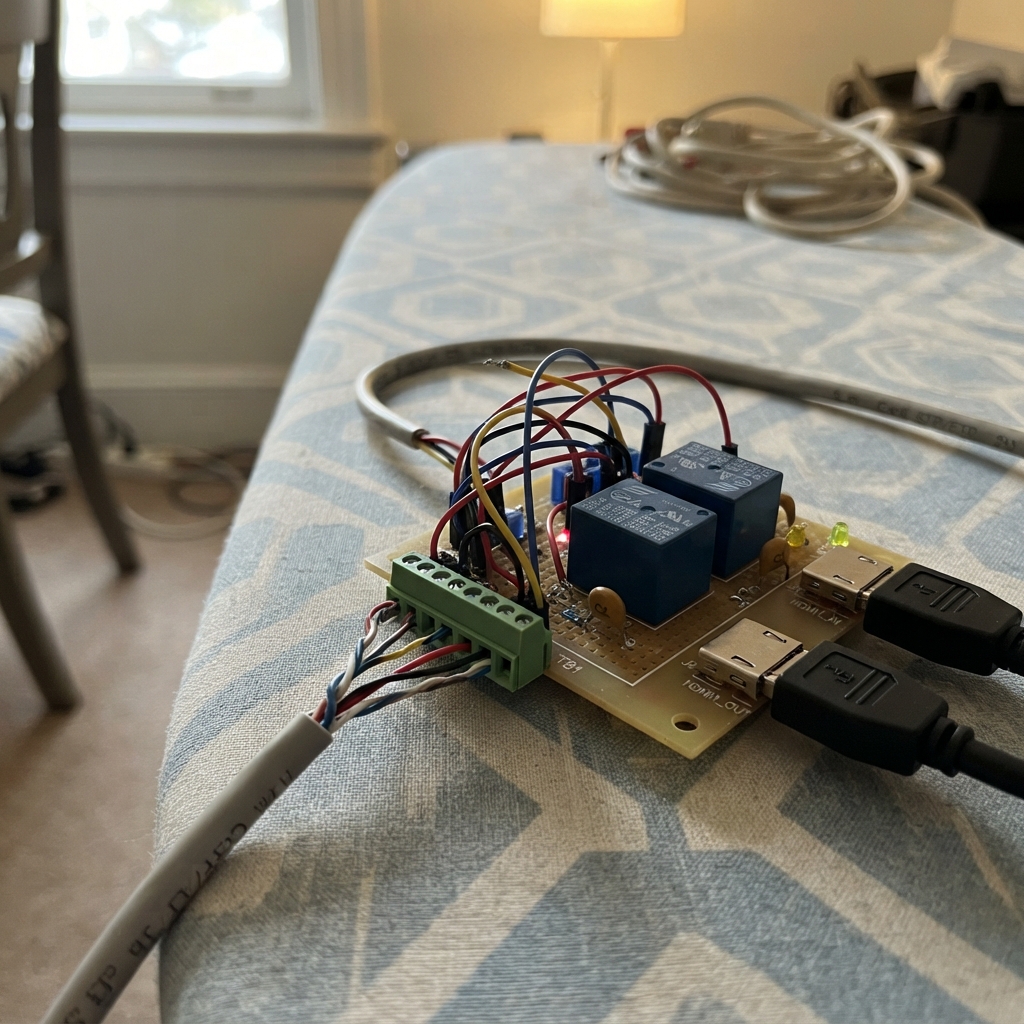
This project builds a dual-channel HDMI switcher controlled by an ESP32 microcontroller, allowing remote selection between two PS3 consoles on a single television. The system uses two relay modules to switch the 5 V power pin (pin 18) on HDMI cables, enabling or disabling each console's video output independently while maintaining signal integrity through shielded Cat6 cabling and controlled-impedance PCB routing.
The guide provides a complete parts list, wiring diagram showing relay control connections and HDMI signal routing, step-by-step assembly instructions for terminating the shielded cable and connecting the two enclosures, and Arduino firmware with serial commands to toggle each channel on and off. Builders will learn relay-based HDMI switching techniques, proper shielding practices for high-speed video signals, and how to implement remote device control via the ESP32.
Wiring diagram

Gather all the parts
Assemble it in 6 steps
1. Lay out the two boxes
Place the ESP32 board at the cashier station. Put the receiver box exactly between the two tables, then keep one 1 m HDMI lead from J2 to TV 1 and one 1 m HDMI lead from J4 to TV 2. Keep the PS3-to-J1 and PS3-to-J3 leads away from the relay coils and their wiring.
- Use a metal receiver enclosure only if the HDMI connector shells can be bonded safely to it.
- Do not build the HDMI paths on solderless breadboard or with loose jumper wire; it can corrupt the very fast video signals.
2. Terminate the long shielded cable
At the cashier end, join orange and orange-white to the ESP32 VIN 5 V point (power), join brown and brown-white to GND (ground), connect blue to GPIO25 (TV 1 signal), and connect green to GPIO33 (TV 2 signal). Tie blue-white, green-white, the foil, and drain wire together, then connect that bundle to the board GND reference (shield). At the receiver end, land the matching five bundles on TB1 in the printed order: 5V_BUS, GND_BUS, SIG_TV1, SIG_TV2, SHIELD.
- Fit strain relief at both cable entries so a tug cannot pull a conductor from its terminal.
- Make sure no foil or drain strands touch the 5 V or signal terminals; a stray strand can short the supply or control line.
3. Wire the relay control side
From TB1, wire 5V_BUS to K1 VCC and K2 VCC (power), GND_BUS to K1 GND and K2 GND (ground), SIG_TV1 to K1 IN (signal), and SIG_TV2 to K2 IN (signal). Leave both NC relay terminals empty.
- Use a relay module whose IN pin is specified to recognize 3.3 V logic from an ESP32.
- A relay board that pulls its IN pin up to 5 V can damage an ESP32 GPIO, especially while the ESP32 is unpowered.
4. Wire the HDMI 5 V contacts
Connect J1 pin 18, HDMI1_5V_IN, to K1 COM (switched 5 V input). Connect K1 NO to J2 pin 18, HDMI1_5V_OUT (switched 5 V output). Connect C1 directly across K1 COM and NO. Repeat the same pattern from J3 pin 18 to K2 COM, K2 NO to J4 pin 18, and C2 across K2 COM and NO.
- Ceramic capacitors are not polarised, so either C1 or C2 lead can go to either contact.
- The capacitor across a relay contact creates a small AC path even while the contact is open; test this function with the actual PS3 and TVs before relying on it for rental control.
5. Route the HDMI bypass pairs on a controlled-impedance PCB
For each channel, route pins 1–17 and 19 straight from input receptacle to output receptacle, pin-for-pin. Keep every TMDS plus/minus pair together at the same length over an uninterrupted ground reference: 1/2, 4/5, 7/8, and 10/11. Route pins 3, 6, 9, and 12 as their matching shields, and route pins 13–17 and 19 directly. Bond all four connector shells to the TB1 SHIELD net.
- Have the PCB fabricator calculate the trace width and spacing for 100-ohm differential impedance using its exact layer stack-up.
- Do not use ordinary hookup wire, perfboard, or long unmatched PCB traces for TMDS pairs; video may fail, flicker, or work only at a lower resolution.
6. Connect the consoles and televisions
Connect PS3 1 to J1 and TV 1 to J2 with the two 1 m HDMI cables. Connect PS3 2 to J3 and TV 2 to J4 the same way. Power the ESP32 from its micro-USB connector, then use the cashier controller to send 1 or 2 to toggle a channel, A to turn on both, or O to turn off both.
- Start with both channels off and enable one channel at a time while checking that its intended television responds.
- Do not connect or disconnect HDMI wiring while equipment is powered if you can avoid it; connector shells and pin 18 can carry live signals.
Review all connections
1. Connections between "cat6_stp_5m" and "ESP32"
2. Connections between "tb1" and "ESP32"
3. Connections between "k1" and "ESP32"
4. Connections between "k2" and "ESP32"
5. Connections between "c1" and "ESP32"
6. Connections between "c2" and "ESP32"
7. Connections between "j1_hdmi1_in" and "ESP32"
8. Connections between "j2_hdmi1_out" and "ESP32"
9. Connections between "j3_hdmi2_in" and "ESP32"
Deploy the firmware
#include <Arduino.h>

constexpr uint8_t SIG_TV1_PIN = 25;
constexpr uint8_t SIG_TV2_PIN = 33;

bool channel1Enabled = false;
bool channel2Enabled = false;

void applyOutputs() {
  digitalWrite(SIG_TV1_PIN, channel1Enabled ? HIGH : LOW);
  digitalWrite(SIG_TV2_PIN, channel2Enabled ? HIGH : LOW);
}

void printStatus() {
  Serial.print("TV1 HDMI 5V: ");
  Serial.println(channel1Enabled ? "ENABLED" : "DISABLED");
  Serial.print("TV2 HDMI 5V: ");
  Serial.println(channel2Enabled ? "ENABLED" : "DISABLED");
  Serial.println("Commands: 1 toggle TV1, 2 toggle TV2, A enable both, O disable both");
}

void setup() {
  pinMode(SIG_TV1_PIN, OUTPUT);
  pinMode(SIG_TV2_PIN, OUTPUT);
  applyOutputs();

  Serial.begin(115200);
  delay(100);
  Serial.println("Dual-channel HDMI pin-18 controller ready.");
  printStatus();
}

void loop() {
  if (Serial.available() > 0) {
    const char command = static_cast<char>(Serial.read());
    bool changed = true;

    switch (command) {
      case '1':
        channel1Enabled = !channel1Enabled;
        break;
      case '2':
        channel2Enabled = !channel2Enabled;
        break;
      case 'A':
      case 'a':
        channel1Enabled = true;
        channel2Enabled = true;
        break;
      case 'O':
      case 'o':
        channel1Enabled = false;
        channel2Enabled = false;
        break;
      case '\r':
      case '\n':
        changed = false;
        break;
      default:
        Serial.println("Unknown command. Use 1, 2, A, or O.");
        changed = false;
        break;
    }

    if (changed) {
      applyOutputs();
      printStatus();
    }
  }
  delay(10);
}
Remix this project
Make it yours in one click
Open a full copy of this project in your own Schematik workspace — diagram, code, parts, and assembly steps included. Swap the sensor, add features, or redesign the whole thing with AI. The author's original stays untouched.