Community project
Dual-Zone Fan Controller
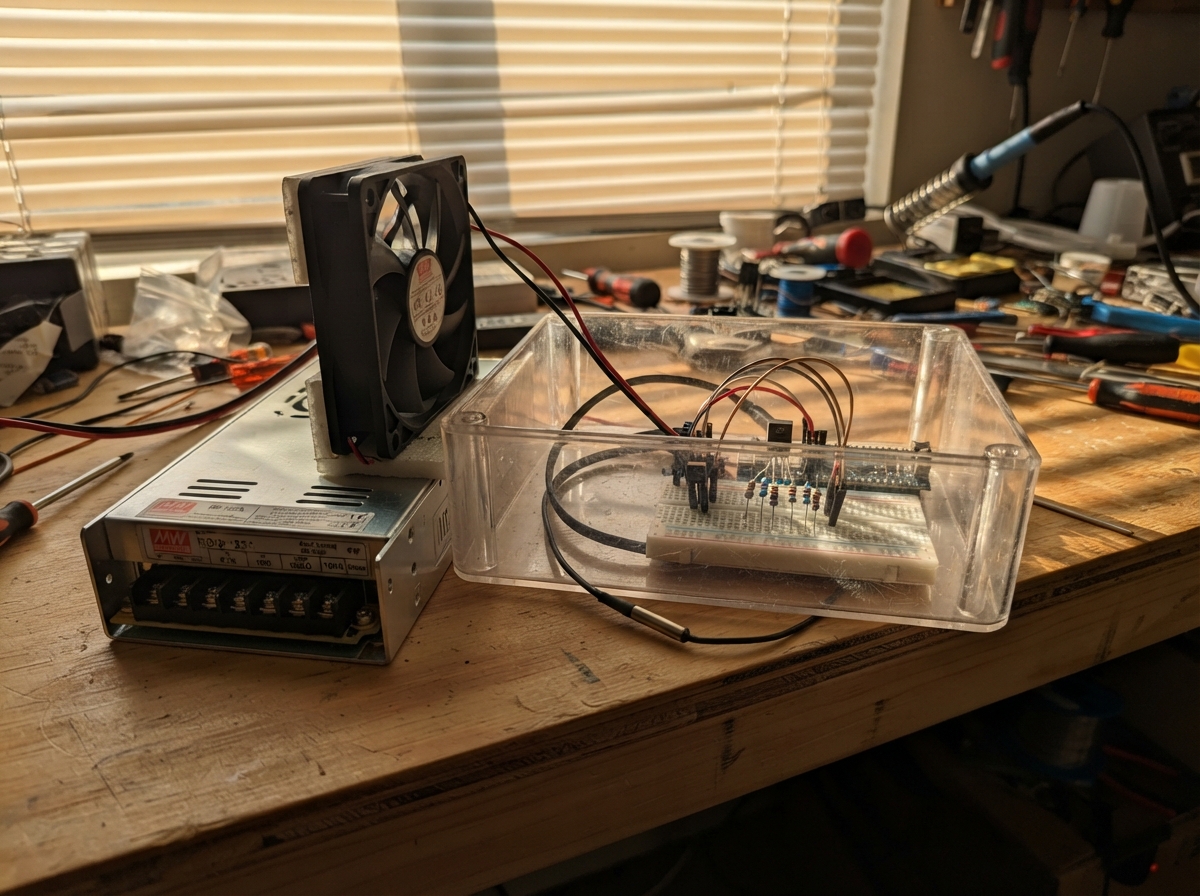
This project builds a dual-zone temperature monitor and fan controller using an ESP32 microcontroller to manage cooling in enclosed spaces. Two DS18B20 temperature sensors independently monitor separate zones, and the controller adjusts fan speed via PWM based on thermal readings, with RPM feedback for stall detection. The guide provides a complete wiring diagram, parts list, and firmware that implements smooth ramping, hysteresis control, and optional MQTT telemetry.
Builders will learn how to interface multiple one-wire temperature sensors with an ESP32, design a MOSFET-based PWM fan driver, and safely integrate mains-powered cooling equipment using a Mean Well dual-output supply. The assembly outline covers power distribution, sensor wiring, PWM stage construction, and tachometer feedback integration, with inspection checkpoints before energizing the system.
Wiring diagram

Gather all the parts
Assemble it in 6 steps
1. Keep mains wiring out of the carrier board
Turn off and unplug the RD-125A before opening the enclosure. Mount the small carrier board and ESP32-S3-Zero well away from the power supply’s mains terminals and the SDR antenna path. Bring only the already-regulated +5V, +12V, and COM terminals to the carrier board.
- Use short twisted pairs for +12V/COM to the fan and +5V/COM to the carrier board.
- Keep the ESP32 ceramic antenna clear of metal and at least several centimetres from the SDR RF section.
- The RD-125A mains terminals can retain dangerous voltage; do not put mains wiring, mains terminals, or exposed metal on this low-voltage carrier board.
2. Power the controller and fan
Connect RD-125A +5V to the ESP32-S3-Zero 5V pin (controller power), and connect RD-125A COM to an ESP32 GND pin (ground). Connect RD-125A +12V to the fan’s yellow 12V wire (fan power) and COM to the fan’s black wire (ground).
- A standard 4-wire fan usually uses black = ground, yellow = 12V, green = tachometer, and blue = PWM; confirm the colours in the fan’s own label or datasheet.
- Use a removable 4-pin fan header so the fan can be replaced.
- Never connect the 12V fan wire to an ESP32 pin or the ESP32 5V pin — 12 volts can permanently damage the board.
3. Wire both temperature probes
Connect each DS18B20 red wire to 3V3 (power), each black wire to GND (ground), and join both white or yellow data wires to GPIO4 (signal). Place the 4.7 kΩ resistor between 3V3 and that same GPIO4/data junction (keeps the shared data wire at a valid idle level). Put one probe near the Orange Pi/NVMe/SDR heat path and the other where it senses the RD-125A lower-compartment air, not directly against a live mains terminal.
- Twist each probe’s data wire loosely with a ground wire if the cable is long.
- Label the upper and lower probe cables before closing the enclosure; the firmware cools from the hotter reading regardless of discovery order.
- Make sure 3V3 and GND are not swapped on either probe — swapped power can damage a probe.
4. Build the PWM control stage
With the flat face of a common 2N7000 facing you, verify the actual lead order from its datasheet before soldering. Connect its source to GND (ground), its drain to the fan blue PWM wire (fan control), and its gate through the 100 Ω resistor to GPIO5 (signal). Connect the 100 kΩ resistor from that gate junction to GND (holds the transistor off if the ESP32 is unpowered).
- Keep the blue PWM wire and this transistor stage close together, and keep it away from the DS18B20 data wire.
- The fan provides its own pull-up on the blue control wire; do not connect it to 5V or 12V yourself.
- Reversing drain and source or connecting the blue fan wire to 12V can prevent speed control and can damage the fan or controller.
5. Wire the RPM feedback safely
Connect the fan green tachometer wire to one end of the 1 kΩ resistor. Connect the other end of that resistor to GPIO6 (RPM signal). Connect the 10 kΩ resistor from 3V3 to the GPIO6 side of the 1 kΩ resistor (makes a safe 3.3V logic signal).
- Keep the tach wire away from the 12V fan power pair where practical.
- The tach wire is an output from the fan; do not drive it from an ESP32 output pin.
- Do not pull the tach wire up to 5V or 12V — GPIO6 accepts 3.3V logic only.
6. Inspect before applying power
With power still off, check that +12V reaches only the fan yellow wire, 5V reaches only the ESP32 5V pin, and every low-voltage part shares COM/GND. Confirm the MOSFET gate has the 100 kΩ path to ground. Then power the RD-125A: the fan should start at full speed for about five seconds before settling.
- If the fan does not start at full speed, remove power and check the fan connector order first.
- Mount the fan so it produces a defined enclosure airflow path rather than recirculating air inside one compartment.
- Do not handle loose wires near the RD-125A mains terminals while it is powered.
Review all connections
1. Connections between "rd125a" and "ESP32"
2. Connections between "upper_probe" and "ESP32"
3. Connections between "lower_probe" and "ESP32"
4. Connections between "r_ds_pullup" and "ESP32"
5. Connections between "fan_120mm" and "ESP32"
6. Connections between "q1_pwm" and "ESP32"
7. Connections between "r_gate" and "ESP32"
8. Connections between "r_gate_pd" and "ESP32"
9. Connections between "r_tach_series" and "ESP32"
10. Connections between "r_tach_pullup" and "ESP32"
Deploy the firmware
#include <Arduino.h>
#include <OneWire.h>
#include <DallasTemperature.h>

// Set to 1 only after entering real network and MQTT details below.
// Cooling is entirely local and does not depend on this feature.
#define ENABLE_MQTT 0
#if ENABLE_MQTT
#include <WiFi.h>
#include <PubSubClient.h>
const char *WIFI_SSID = "YOUR_WIFI_NAME";
const char *WIFI_PASSWORD = "YOUR_WIFI_PASSWORD";
const char *MQTT_HOST = "192.168.1.10";
const uint16_t MQTT_PORT = 1883;
const char *MQTT_TOPIC = "adsb-enclosure/cooling/state";
WiFiClient wifiClient;
PubSubClient mqttClient(wifiClient);
#endif

#define ONEWIRE_PIN 4
#define FAN_PWM_PIN 5
#define FAN_TACH_PIN 6

constexpr uint32_t PWM_FREQUENCY_HZ = 25000;
constexpr uint8_t PWM_RESOLUTION_BITS = 10;
constexpr uint16_t PWM_MAX = (1U << PWM_RESOLUTION_BITS) - 1U;
constexpr float MIN_FAN_PERCENT = 35.0f;
constexpr float FULL_FAN_PERCENT = 100.0f;
constexpr float TEMP_START_C = 30.0f;
constexpr float TEMP_FULL_C = 55.0f;
constexpr float TEMP_HYSTERESIS_C = 1.5f;
constexpr float SLEW_PERCENT_PER_STEP = 1.0f;
constexpr uint32_t CONTROL_INTERVAL_MS = 250;
constexpr uint32_t TEMP_INTERVAL_MS = 1000;
constexpr uint32_t TACH_WINDOW_MS = 5000;
constexpr uint32_t STARTUP_FULL_SPEED_MS = 5000;
constexpr uint16_t STALL_RPM_LIMIT = 200;
constexpr uint8_t FAN_PULSES_PER_REV = 2;

OneWire oneWire(ONEWIRE_PIN);
DallasTemperature sensors(&oneWire);
DeviceAddress sensorAddress[2];
bool sensorPresent[2] = {false, false};
float compartmentC[2] = {NAN, NAN};
volatile uint32_t tachPulses = 0;
float fanPercent = FULL_FAN_PERCENT;
float requestedPercent = FULL_FAN_PERCENT;
uint16_t fanRpm = 0;
bool sensorFault = true;
bool stallFault = false;
uint32_t startupUntil = 0;
uint32_t lastControlMs = 0;
uint32_t lastTempMs = 0;
uint32_t lastTachMs = 0;
uint32_t lastMqttMs = 0;

void IRAM_ATTR onTachPulse() {
  tachPulses++;
}

void applyFanPercent(float percent) {
  percent = constrain(percent, 0.0f, 100.0f);
  // GPIO high turns Q1 on, pulling the fan's PWM wire low. This is the
  // active-low open-drain control expected by a compliant 4-wire PWM fan.
  const uint16_t duty = static_cast<uint16_t>((percent * PWM_MAX) / 100.0f);
  ledcWrite(FAN_PWM_PIN, duty);
  fanPercent = percent;
}

float demandForTemperature(float temperatureC) {
  if (temperatureC <= TEMP_START_C - TEMP_HYSTERESIS_C) return MIN_FAN_PERCENT;
  if (temperatureC >= TEMP_FULL_C) return FULL_FAN_PERCENT;
  const float span = TEMP_FULL_C - (TEMP_START_C - TEMP_HYSTERESIS_C);
  return MIN_FAN_PERCENT + (temperatureC - (TEMP_START_C - TEMP_HYSTERESIS_C)) *
         (FULL_FAN_PERCENT - MIN_FAN_PERCENT) / span;
}

void discoverSensors() {
  sensors.begin();
  const uint8_t found = sensors.getDeviceCount();
  for (uint8_t i = 0; i < 2; i++) {
    sensorPresent[i] = (i < found) && sensors.getAddress(sensorAddress[i], i);
    if (sensorPresent[i]) sensors.setResolution(sensorAddress[i], 12);
  }
}

void readTemperatures() {
  sensorFault = false;
  sensors.requestTemperatures();
  for (uint8_t i = 0; i < 2; i++) {
    if (!sensorPresent[i]) {
      sensorFault = true;
      compartmentC[i] = NAN;
      continue;
    }
    const float value = sensors.getTempC(sensorAddress[i]);
    // DallasTemperature returns DEVICE_DISCONNECTED_C (-127) when absent.
    if (value == DEVICE_DISCONNECTED_C || value < -55.0f || value > 125.0f) {
      sensorFault = true;
      compartmentC[i] = NAN;
    } else {
      compartmentC[i] = value;
    }
  }
}

void updateTachometer(uint32_t now) {
  if (now - lastTachMs < TACH_WINDOW_MS) return;
  noInterrupts();
  const uint32_t pulses = tachPulses;
  tachPulses = 0;
  interrupts();
  const uint32_t elapsed = now - lastTachMs;
  lastTachMs = now;
  fanRpm = static_cast<uint16_t>((pulses * 60000UL) / (FAN_PULSES_PER_REV * elapsed));
  // Do not report a stall while deliberately asking for a low fan speed.
  stallFault = (fanPercent >= 45.0f && fanRpm < STALL_RPM_LIMIT);
}

#if ENABLE_MQTT
void publishTelemetry(uint32_t now) {
  if (now - lastMqttMs < 10000) return;
  lastMqttMs = now;
  if (WiFi.status() != WL_CONNECTED) {
    WiFi.begin(WIFI_SSID, WIFI_PASSWORD);
    return;
  }
  if (!mqttClient.connected()) {
    mqttClient.connect("adsb-cooling-controller");
    return;
  }
  char payload[220];
  snprintf(payload, sizeof(payload),
           "{\"upper_c\":%.2f,\"lower_c\":%.2f,\"fan_rpm\":%u,\"pwm_percent\":%.1f,\"sensor_fault\":%s,\"stall_fault\":%s}",
           compartmentC[0], compartmentC[1], fanRpm, fanPercent,
           sensorFault ? "true" : "false", stallFault ? "true" : "false");
  mqttClient.publish(MQTT_TOPIC, payload, true);
}
#endif

void setup() {
  // Default to full speed before temperature discovery or any network activity.
  ledcAttach(FAN_PWM_PIN, PWM_FREQUENCY_HZ, PWM_RESOLUTION_BITS);
  applyFanPercent(FULL_FAN_PERCENT);
  pinMode(FAN_TACH_PIN, INPUT_PULLUP);
  attachInterrupt(digitalPinToInterrupt(FAN_TACH_PIN), onTachPulse, FALLING);
  Serial.begin(115200);
  discoverSensors();
  startupUntil = millis() + STARTUP_FULL_SPEED_MS;
  lastTachMs = millis();
#if ENABLE_MQTT
  WiFi.mode(WIFI_STA);
  mqttClient.setServer(MQTT_HOST, MQTT_PORT);
#endif
}

void loop() {
  const uint32_t now = millis();
  if (now - lastTempMs >= TEMP_INTERVAL_MS) {
    lastTempMs = now;
    readTemperatures();
  }
  updateTachometer(now);

  if (now - lastControlMs >= CONTROL_INTERVAL_MS) {
    lastControlMs = now;
    if (now < startupUntil || sensorFault || stallFault) {
      requestedPercent = FULL_FAN_PERCENT;
    } else {
      const float hotterC = max(compartmentC[0], compartmentC[1]);
      requestedPercent = demandForTemperature(hotterC);
    }
    if (fanPercent < requestedPercent) fanPercent = min(fanPercent + SLEW_PERCENT_PER_STEP, requestedPercent);
    if (fanPercent > requestedPercent) fanPercent = max(fanPercent - SLEW_PERCENT_PER_STEP, requestedPercent);
    applyFanPercent(fanPercent);
  }

#if ENABLE_MQTT
  mqttClient.loop();
  publishTelemetry(now);
#endif
  delay(10);
}
Remix this project
Make it yours in one click
Open a full copy of this project in your own Schematik workspace — diagram, code, parts, and assembly steps included. Swap the sensor, add features, or redesign the whole thing with AI. The author's original stays untouched.