Community project
ESP32 ADS-B Plane Radar
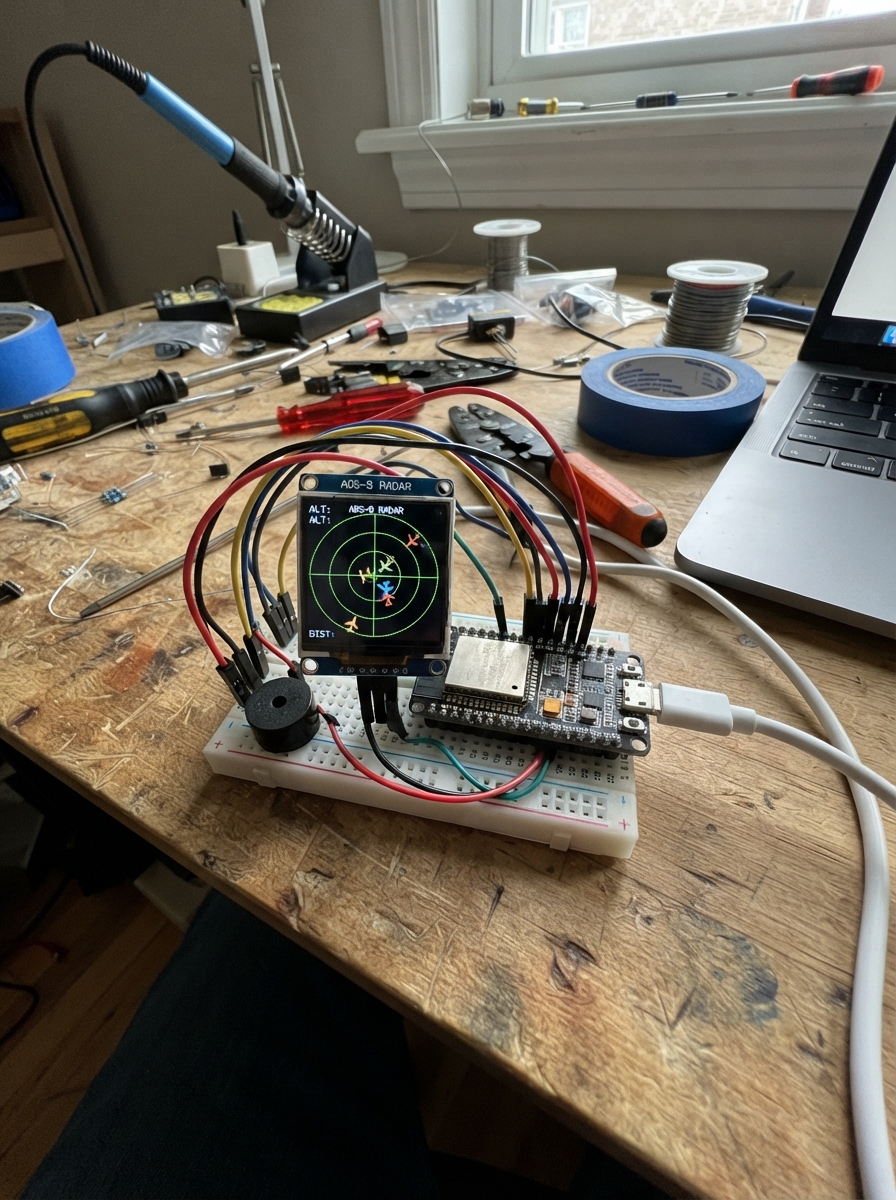
This ESP32 project turns a round 1.28-inch GC9A01 display into a live aircraft radar that plots nearby planes using ADS-B data. The radar fetches real-time aircraft positions from the internet, displays them on the circular screen with range rings, and sounds a piezo buzzer when planes enter the detection zone. A BOOT button cycles through detection ranges (5, 10, 15, and 25 km), while a first-boot Wi-Fi portal lets you configure the radar's location and network credentials.
This guide provides a complete wiring diagram, parts list, and step-by-step assembly instructions for connecting the display, buzzer, and USB-C power to the ESP32. You'll flash the pre-built firmware using Schematik Deploy, configure your location and Wi-Fi through the setup portal, and test the live radar feed with real aircraft data.
Wiring diagram

Gather all the parts
Assemble it in 7 steps
1. Wire the GC9A01 display power
Use female-to-female jumper wires to connect display VCC to the ESP32-C3 Super Mini 3V3 pin (power) and display GND to an ESP32 GND pin (ground).
- Make sure VCC and GND are not swapped — swapped power can damage the screen.
- Do not connect the display VCC pin to 5 V; this display needs 3.3 V power.
2. Wire the GC9A01 display signals
Connect display RST to GPIO0 (reset signal), CS to GPIO1 (display-select signal), DC to GPIO10 (command/data signal), SDA to GPIO3 (display data), and SCL to GPIO4 (display clock).
- Keep these five display wires short. On this display, SDA means display data and SCL means display clock; they are not the I2C pins.
- Do not move the BOOT-button wire: GPIO9 is already used by the board's built-in BOOT button.
3. Attach the buzzer
Connect one piezo buzzer lead, either lead is fine, to GPIO7 (sound signal). Connect its other lead to an ESP32 GND pin (ground). The buzzer has no polarity, so there is no positive or negative lead to match.
- This is a passive piezo, so it only makes sound when the board sends a changing signal.
- The radar gives a short chirp when it opens the Wi-Fi setup page and when a short BOOT press changes range.
- Do not connect the buzzer to 5 V; GPIO7 produces the safe 3.3 V signal it needs.
4. Connect the USB-C data cable
Plug the USB-C data cable into the ESP32-C3 Super Mini and your computer. This cable provides power and carries the program to the board.
- If the board is not offered in the browser, try another USB-C cable because some cables provide power only.
5. Flash the firmware with Schematik Deploy
Open Schematik's Deploy panel and press Deploy. If flashing does not begin, hold the board's BOOT button while pressing Deploy, then release the button when flashing begins.
- The built-in BOOT button remains available for normal radar range control after flashing.
6. Set up Wi-Fi and radar location
After flashing, join the Wi-Fi network named PlaneRadar-Setup on a phone or computer, then open http://192.168.4.1. Enter your Wi-Fi name and password, plus the latitude and longitude for the centre of your radar, then press Save.
- You can find coordinates by right-clicking a place in Google Maps.
- Hold BOOT for three seconds to erase saved Wi-Fi details and show the setup page again.
7. Test the radar and buzzer
Once connected, the display shows the radar rings and aircraft positions. Briefly press BOOT to change between 5, 10, 15, and 25 km ranges; the buzzer chirps once to confirm the press counted. The display refreshes aircraft data every five seconds.
- If no aircraft appear, increase the range with short BOOT presses.
- If the display stays blank, first check its 3V3 and GND wires, then check SDA GPIO3 and SCL GPIO4 are not swapped.
Review all connections
1. Connections between "round-display" and "ESP32"
2. Connections between "radar-buzzer" and "ESP32"
Deploy the firmware
/*
* ESP32 Plane Radar
* Plots live ADS-B aircraft on a GC9A01 1.28-inch round display.
* First-boot softAP portal (192.168.4.1) stores Wi-Fi + location in NVS.
* BOOT button (GPIO9) cycles radar range 5 → 10 → 15 → 25 km.
* Hold BOOT for 3 s to clear saved credentials and relaunch the portal.
*
* Inspired by MatixYo's ESP32-Plane-Radar: https://github.com/MatixYo/ESP32-Plane-Radar
*/
#include <Arduino.h>
#include <WiFi.h>
#include <WebServer.h>
#include <Preferences.h>
#include <HTTPClient.h>
#include <WiFiClientSecure.h>
#include <ArduinoJson.h>
#include <LovyanGFX.hpp>
#include <math.h>
// ── Pin assignments ──────────────────────────────────────────────────────────
#define RADAR_RST 0
#define RADAR_CS 1
#define RADAR_DC 10
#define RADAR_MOSI 3
#define RADAR_SCLK 4
#define BOOT_BUTTON 9
#define BUZZER_PIN 7
// ── Radar settings ───────────────────────────────────────────────────────────
#define FETCH_INTERVAL_MS 5000
#define HOLD_CLEAR_MS 3000 // hold BOOT this long to wipe credentials
#define AP_SSID "PlaneRadar-Setup"
#define NVS_NAMESPACE "planeradar"
#define DISPLAY_SIZE 240
#define DISPLAY_CENTER 120
#define DISPLAY_RADIUS 105 // outermost radar ring
// ── Math helpers ─────────────────────────────────────────────────────────────
static const double DEG2RAD = M_PI / 180.0;
// Returns great-circle distance in kilometres between two lat/lon points.
double haversineKm(double lat1, double lon1, double lat2, double lon2) {
double dlat = (lat2 - lat1) * DEG2RAD;
double dlon = (lon2 - lon1) * DEG2RAD;
double a = sin(dlat / 2) * sin(dlat / 2)
+ cos(lat1 * DEG2RAD) * cos(lat2 * DEG2RAD)
* sin(dlon / 2) * sin(dlon / 2);
return 6371.0 * 2.0 * atan2(sqrt(a), sqrt(1.0 - a));
}
// Returns initial bearing in degrees (0 = north, clockwise) from p1 to p2.
double initialBearing(double lat1, double lon1, double lat2, double lon2) {
double dlon = (lon2 - lon1) * DEG2RAD;
double y = sin(dlon) * cos(lat2 * DEG2RAD);
double x = cos(lat1 * DEG2RAD) * sin(lat2 * DEG2RAD)
- sin(lat1 * DEG2RAD) * cos(lat2 * DEG2RAD) * cos(dlon);
double bearing = atan2(y, x) / DEG2RAD;
return fmod(bearing + 360.0, 360.0);
}
// ── LovyanGFX display class ──────────────────────────────────────────────────
class RadarDisplay : public lgfx::LGFX_Device {
lgfx::Bus_SPI _bus;
lgfx::Panel_GC9A01 _panel;
public:
RadarDisplay() {
auto busCfg = _bus.config();
busCfg.spi_host = SPI2_HOST;
busCfg.freq_write = 40000000;
busCfg.pin_sclk = RADAR_SCLK;
busCfg.pin_mosi = RADAR_MOSI;
busCfg.pin_miso = -1;
busCfg.pin_dc = RADAR_DC;
_bus.config(busCfg);
_panel.setBus(&_bus);
auto panelCfg = _panel.config();
panelCfg.pin_cs = RADAR_CS;
panelCfg.pin_rst = RADAR_RST;
panelCfg.invert = true;
panelCfg.rgb_order = true;
_panel.config(panelCfg);
setPanel(&_panel);
}
};
// ── Globals ──────────────────────────────────────────────────────────────────
RadarDisplay display;
Preferences prefs;
WebServer configServer(80);
float radarRangeKm = 10.0f;
double radarLat = 0.0;
double radarLon = 0.0;
bool configMode = false;
unsigned long lastFetchMs = 0;
unsigned long bootPressedAt = 0;
bool bootWasLow = false;
// ── Forward declarations ─────────────────────────────────────────────────────
void drawRadarShell();
void drawAircraft(float bearingDeg, float distanceKm, const char* label);
void fetchAircraft();
void startConfigPortal();
void handleConfigRoot();
void handleConfigSave();
void showMessage(const char* line1, const char* line2 = nullptr);
void chirp();
// ── Display helpers ──────────────────────────────────────────────────────────
void drawRadarShell() {
display.fillScreen(TFT_BLACK);
display.drawCircle(DISPLAY_CENTER, DISPLAY_CENTER, DISPLAY_RADIUS, TFT_GREEN);
display.drawCircle(DISPLAY_CENTER, DISPLAY_CENTER, 78, TFT_DARKGREEN);
display.drawCircle(DISPLAY_CENTER, DISPLAY_CENTER, 52, TFT_DARKGREEN);
display.drawCircle(DISPLAY_CENTER, DISPLAY_CENTER, 26, TFT_DARKGREEN);
display.drawLine(15, DISPLAY_CENTER, 225, DISPLAY_CENTER, TFT_DARKGREEN);
display.drawLine(DISPLAY_CENTER, 15, DISPLAY_CENTER, 225, TFT_DARKGREEN);
display.setTextColor(TFT_WHITE, TFT_BLACK);
display.setTextSize(1);
display.drawString("N", 116, 8);
display.drawString("S", 116, 221);
display.drawString("W", 6, 116);
display.drawString("E", 225, 116);
// Range label bottom-right
char rangeBuf[8];
snprintf(rangeBuf, sizeof(rangeBuf), "%dkm", (int)radarRangeKm);
display.setTextColor(TFT_YELLOW, TFT_BLACK);
display.drawString(rangeBuf, 195, 218);
}
void drawAircraft(float bearingDeg, float distanceKm, const char* label) {
if (distanceKm > radarRangeKm) return;
// bearingDeg is 0=north, rotate so north = up (subtract 90° for screen coords)
float angle = (bearingDeg - 90.0f) * DEG_TO_RAD;
float radius = (distanceKm / radarRangeKm) * (float)DISPLAY_RADIUS;
int px = DISPLAY_CENTER + (int)(cosf(angle) * radius);
int py = DISPLAY_CENTER + (int)(sinf(angle) * radius);
// Small filled triangle pointing north
display.fillTriangle(px, py - 5, px - 4, py + 4, px + 4, py + 4, TFT_RED);
display.setTextColor(TFT_WHITE, TFT_BLACK);
display.setTextSize(1);
display.drawString(label,
constrain(px + 6, 0, 190),
constrain(py - 8, 0, 230));
}
void showMessage(const char* line1, const char* line2) {
display.fillScreen(TFT_BLACK);
display.setTextColor(TFT_WHITE, TFT_BLACK);
display.setTextSize(1);
display.drawString(line1, 20, 110);
if (line2) display.drawString(line2, 20, 125);
}
// Brief feedback sound for a user action. The passive piezo needs a square wave.
void chirp() {
tone(BUZZER_PIN, 4000, 80);
}
// ── Config portal ────────────────────────────────────────────────────────────
// Small HTML form served over softAP — stores SSID/password/lat/lon in NVS.
// This replaces WiFiManager to keep binary size under the 1 280 KB app partition.
static const char CONFIG_HTML[] PROGMEM = R"rawhtml(
<!DOCTYPE html><html><head>
<meta name='viewport' content='width=device-width,initial-scale=1'>
<title>PlaneRadar Setup</title>
<style>body{font-family:sans-serif;max-width:380px;margin:40px auto;padding:0 16px}
input{width:100%;box-sizing:border-box;padding:8px;margin:6px 0 14px;font-size:15px}
button{width:100%;padding:10px;background:#27ae60;color:#fff;border:none;font-size:16px;cursor:pointer}
h2{margin-bottom:4px}p{color:#555;font-size:13px;margin-top:0}</style>
</head><body>
<h2>PlaneRadar Setup</h2>
<p>Enter your Wi-Fi details and the coordinates for the radar centre.</p>
<form method='POST' action='/save'>
<label>Wi-Fi Name (SSID)</label><input name='ssid' required>
<label>Wi-Fi Password</label><input name='pass' type='password'>
<label>Latitude (e.g. 52.3676)</label><input name='lat' required placeholder='52.3676'>
<label>Longitude (e.g. 4.9041)</label><input name='lon' required placeholder='4.9041'>
<button type='submit'>Save & Connect</button>
</form>
</body></html>
)rawhtml";
static const char SAVED_HTML[] PROGMEM = R"rawhtml(
<!DOCTYPE html><html><head>
<meta name='viewport' content='width=device-width,initial-scale=1'>
<title>Saved</title>
<style>body{font-family:sans-serif;max-width:380px;margin:40px auto;padding:0 16px}</style>
</head><body>
<h2>Saved!</h2>
<p>The radar is connecting to your Wi-Fi. You can close this page.</p>
</body></html>
)rawhtml";
void handleConfigRoot() {
configServer.send(200, "text/html", CONFIG_HTML);
}
void handleConfigSave() {
String ssid = configServer.arg("ssid");
String pass = configServer.arg("pass");
String lat = configServer.arg("lat");
String lon = configServer.arg("lon");
prefs.begin(NVS_NAMESPACE, false);
prefs.putString("ssid", ssid);
prefs.putString("pass", pass);
prefs.putDouble("lat", lat.toDouble());
prefs.putDouble("lon", lon.toDouble());
prefs.end();
configServer.send(200, "text/html", SAVED_HTML);
delay(1500);
ESP.restart();
}
void startConfigPortal() {
configMode = true;
chirp();
WiFi.mode(WIFI_AP);
WiFi.softAP(AP_SSID);
Serial.print("Config portal at: ");
Serial.println(WiFi.softAPIP());
configServer.on("/", HTTP_GET, handleConfigRoot);
configServer.on("/save", HTTP_POST, handleConfigSave);
configServer.begin();
showMessage("PlaneRadar-Setup", "192.168.4.1");
}
// ── Aircraft fetch ────────────────────────────────────────────────────────────
void fetchAircraft() {
if (WiFi.status() != WL_CONNECTED) return;
// opendata.adsb.fi: dist is nautical miles; convert km → nm (1 nm = 1.852 km)
// adsb.fi is HTTPS-only (plain HTTP gets a 301 the ESP32 HTTPClient will
// not follow). setInsecure() skips certificate validation: this is public,
// read-only flight data, and the C3's 1.25 MB app partition has no room
// for a CA bundle on top of the TLS stack.
float nm = radarRangeKm / 1.852f;
WiFiClientSecure client;
client.setInsecure();
String url = "https://opendata.adsb.fi/api/v3/lat/"
+ String(radarLat, 5)
+ "/lon/"
+ String(radarLon, 5)
+ "/dist/"
+ String(nm, 1);
HTTPClient http;
http.begin(client, url);
http.setTimeout(4000);
int code = http.GET();
if (code == HTTP_CODE_OK) {
// Parse JSON — static allocation avoids heap fragmentation
JsonDocument doc;
DeserializationError err = deserializeJson(doc, http.getStream());
if (err) {
Serial.printf("JSON error: %s\n", err.c_str());
http.end();
return;
}
drawRadarShell();
int plotted = 0;
for (JsonObject plane : doc["ac"].as<JsonArray>()) {
if (!plane["lat"].is<double>() || !plane["lon"].is<double>()) continue;
double acLat = plane["lat"].as<double>();
double acLon = plane["lon"].as<double>();
double distKm = haversineKm(radarLat, radarLon, acLat, acLon);
double bearDeg = initialBearing(radarLat, radarLon, acLat, acLon);
if (distKm > radarRangeKm) continue; // outside current range
// Label preference: flight callsign → ICAO hex → fallback "AC"
const char* label = plane["flight"] | plane["hex"] | "AC";
drawAircraft((float)bearDeg, (float)distKm, label);
plotted++;
}
Serial.printf("Plotted %d aircraft within %.0f km\n", plotted, radarRangeKm);
} else {
Serial.printf("HTTP error: %d\n", code);
}
http.end();
}
// ── Setup ─────────────────────────────────────────────────────────────────────
void setup() {
Serial.begin(115200);
pinMode(BOOT_BUTTON, INPUT_PULLUP);
pinMode(BUZZER_PIN, OUTPUT);
noTone(BUZZER_PIN);
display.init();
display.setRotation(0);
display.setTextSize(1);
drawRadarShell();
// Load saved credentials from NVS
prefs.begin(NVS_NAMESPACE, true);
String savedSsid = prefs.getString("ssid", "");
String savedPass = prefs.getString("pass", "");
radarLat = prefs.getDouble("lat", 0.0);
radarLon = prefs.getDouble("lon", 0.0);
prefs.end();
if (savedSsid.length() == 0) {
Serial.println("No credentials — starting config portal");
startConfigPortal();
return;
}
showMessage("Connecting to WiFi...", savedSsid.c_str());
WiFi.mode(WIFI_STA);
WiFi.begin(savedSsid.c_str(), savedPass.c_str());
unsigned long t0 = millis();
while (WiFi.status() != WL_CONNECTED && millis() - t0 < 15000) {
delay(250);
}
if (WiFi.status() != WL_CONNECTED) {
Serial.println("Wi-Fi failed — starting config portal");
startConfigPortal();
return;
}
Serial.printf("Connected. IP: %s Lat: %.4f Lon: %.4f\n",
WiFi.localIP().toString().c_str(), radarLat, radarLon);
drawRadarShell();
}
// ── Loop ──────────────────────────────────────────────────────────────────────
void loop() {
if (configMode) {
configServer.handleClient();
return;
}
// BOOT button: short press cycles range; hold 3 s clears credentials
bool bootLow = (digitalRead(BOOT_BUTTON) == LOW);
if (bootLow && !bootWasLow) {
bootPressedAt = millis();
bootWasLow = true;
}
if (!bootLow && bootWasLow) {
unsigned long held = millis() - bootPressedAt;
bootWasLow = false;
if (held >= HOLD_CLEAR_MS) {
// Long press: wipe saved credentials and reboot into portal
Serial.println("Long press — clearing credentials");
prefs.begin(NVS_NAMESPACE, false);
prefs.clear();
prefs.end();
delay(200);
ESP.restart();
} else {
// Short press: cycle range
if (radarRangeKm == 5) radarRangeKm = 10;
else if (radarRangeKm == 10) radarRangeKm = 15;
else if (radarRangeKm == 15) radarRangeKm = 25;
else radarRangeKm = 5;
Serial.printf("Range → %.0f km\n", radarRangeKm);
chirp();
drawRadarShell();
}
}
// Fetch every FETCH_INTERVAL_MS
if (millis() - lastFetchMs >= FETCH_INTERVAL_MS) {
lastFetchMs = millis();
fetchAircraft();
}
}Remix this project
Make it yours in one click
Open a full copy of this project in your own Schematik workspace — diagram, code, parts, and assembly steps included. Swap the sensor, add features, or redesign the whole thing with AI. The author's original stays untouched.