Community project
Interactive AI Tutor Robot
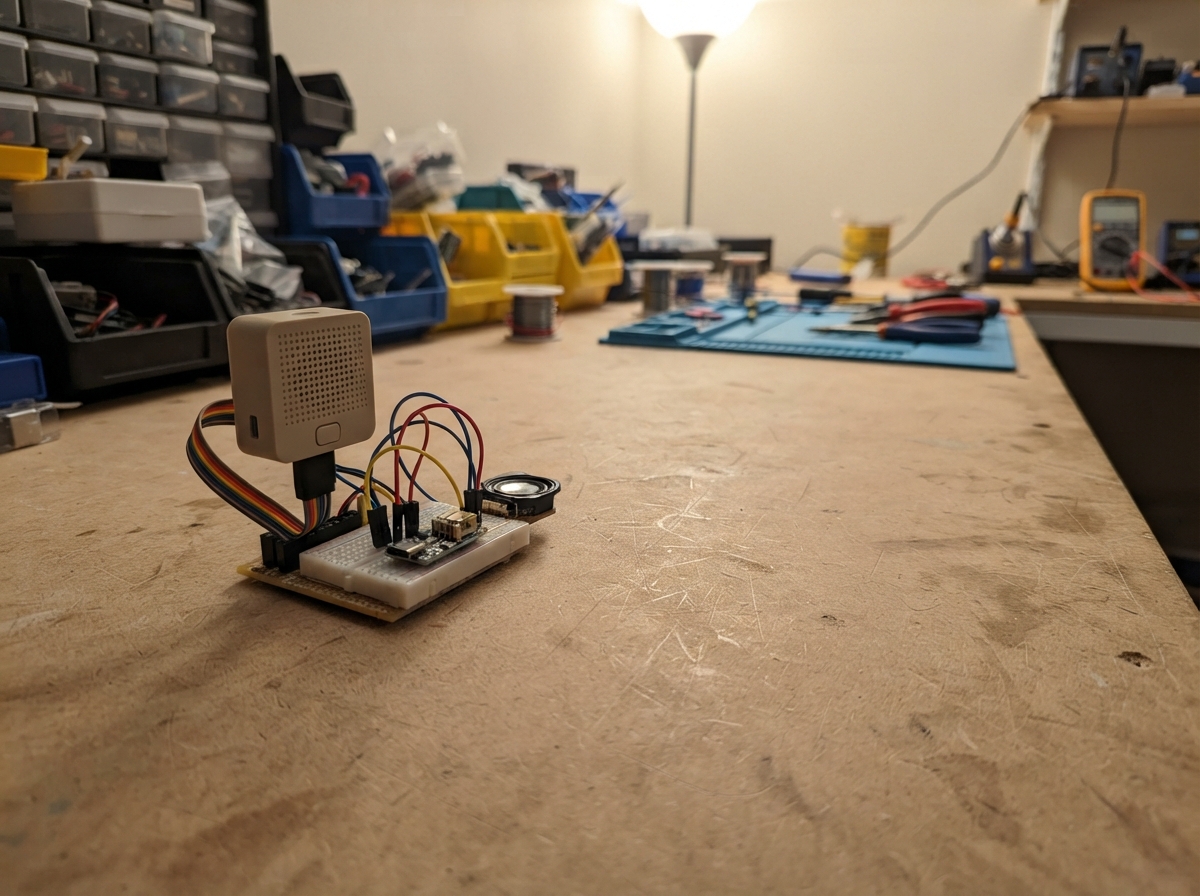
This interactive AI tutor robot combines an M5Stack Atom Echo microphone module with an M5Dial display to create a conversational learning assistant. The Atom Echo captures voice input and sends recognized speech to a local server, while the M5Dial displays the tutor's responses on its circular screen with animated facial expressions that react to different conversation states.
This guide provides a complete wiring diagram, parts list, and step-by-step assembly instructions for connecting the two modules via serial communication. The included firmware handles WiFi connectivity, speech recognition bridging, and animated face rendering, allowing makers to build a responsive educational robot that listens, thinks, and responds with visual feedback.
Wiring diagram

Gather all the parts
Assemble it in 5 steps
1. Préparer les deux modules
Pose le M5Stack Dial et l’Atom Echo côte à côte, chacun alimenté par son propre câble USB. Ne relie pas leurs bornes 5 V entre elles : les câbles USB les alimentent déjà.
- Éteins ou débranche les deux modules avant de poser les fils de données.
- Relier deux sorties 5 V ensemble peut endommager un module ou un câble USB.
2. Envoyer les commandes au module qui écoute
Branche GPIO 1, le fil G1 du port B du Dial, vers RX / GPIO32 de l’Atom Echo (commande). Le Dial envoie LISTEN pour demander à l’Atom Echo d’écouter, puis SAY: suivi de la réponse à prononcer.
- Sur le port B du Dial, le fil blanc est normalement G1 ; vérifie toujours l’étiquette G1 sur votre câble.
- Ne branche pas ce fil sur 5 V : une tension au mauvais endroit peut abîmer l’entrée de l’Atom Echo.
3. Renvoyer les mots reconnus au Dial
Branche TX / GPIO26 de l’Atom Echo vers GPIO 2, le fil G2 du port B du Dial (texte reconnu), puis relie GND du Dial vers GND de l’Atom Echo (ground). L’Atom Echo renvoie une ligne HEARD: suivie des mots entendus ; le fil GND donne aux deux modules le même repère électrique.
- Sur le port B du Dial, le fil jaune est normalement G2 ; vérifie l’étiquette G2 si les couleurs de votre câble diffèrent.
- Sans le fil GND commun, l’Atom Echo peut être entendu mais le Dial risque de ne pas comprendre les mots renvoyés.
4. Mettre le serveur local sur le même réseau
Allume l’ordinateur ou le mini-serveur qui exécute le pont local, la reconnaissance vocale et Ollama, puis connecte-le au réseau rzowifi comme le Dial. Remplace 0.0.0.0 dans le programme par l’adresse locale réelle de cet ordinateur : 0.0.0.0 sert à écouter côté serveur, mais le Dial ne peut pas l’utiliser pour le joindre.
- Une adresse locale ressemble souvent à 192.168.1.50.
5. Parler au tuteur
Après le déploiement, appuie une fois sur le bouton central : le Dial affiche « Je t’écoute ». Pose une question à voix haute ; l’Atom Echo doit renvoyer HEARD: suivi de la phrase reconnue, puis le Dial demande une réponse au serveur et l’affiche avant de l’envoyer à l’Atom Echo.
- Parle à environ une longueur de main du micro et attends la fin de la réponse avant de poser une nouvelle question.
- Le programme de l’Atom Echo doit comprendre LISTEN et renvoyer HEARD:texte ; sans ce logiciel de reconnaissance vocale, le Dial attendra 15 secondes puis reviendra au visage.
Review all connections
1. Connections between "atom_echo_1" and "ESP32"
Deploy the firmware
#include <M5Dial.h>
#include <WiFi.h>
#include <HTTPClient.h>

// Remplace BRIDGE_HOST par l'adresse locale réelle du serveur lorsque le pont est prêt.
static const char* WIFI_SSID = "rzowifi";
static const char* WIFI_PASSWORD = "";
static const char* BRIDGE_HOST = "0.0.0.0";
static const uint16_t BRIDGE_PORT = 8080;
static const int ATOM_ECHO_TX_PIN = 1;  // Dial vers RX/GPIO32 de l'Atom Echo
static const int ATOM_ECHO_RX_PIN = 2;  // TX/GPIO26 de l'Atom Echo vers Dial
static const unsigned long LISTEN_TIMEOUT_MS = 15000;

HardwareSerial AtomSerial(1);

enum FaceMode { FACE_IDLE, FACE_LISTENING, FACE_THINKING, FACE_ANSWER };
FaceMode faceMode = FACE_IDLE;
String answerText;
String atomLine;
unsigned long answerShownAt = 0;
unsigned long listeningStartedAt = 0;
unsigned long nextBlinkAt = 0;
unsigned long blinkUntil = 0;
unsigned long nextLookAt = 0;
int eyeOffset = 0;

void drawCenteredLines(const String& text, int y, uint8_t textSize) {
  M5Dial.Display.setTextSize(textSize);
  M5Dial.Display.setTextDatum(top_center);
  String line;
  int lineY = y;
  for (size_t i = 0; i < text.length(); ++i) {
    const char c = text[i];
    if (c == '\n' || (line.length() >= 22 && c == ' ')) {
      M5Dial.Display.drawString(line, 120, lineY);
      line = "";
      lineY += 15 * textSize;
      if (c == '\n') continue;
    }
    line += c;
  }
  if (line.length()) M5Dial.Display.drawString(line, 120, lineY);
}

void drawFace() {
  M5Dial.Display.fillScreen(TFT_BLACK);
  const bool closed = millis() < blinkUntil;
  const bool busy = faceMode == FACE_LISTENING || faceMode == FACE_THINKING;
  const int eyeY = busy ? 82 : 96;
  const int radius = busy ? 18 : 25;
  M5Dial.Display.fillCircle(76 + eyeOffset, eyeY, radius, TFT_BLUE);
  M5Dial.Display.fillCircle(164 + eyeOffset, eyeY, radius, TFT_BLUE);
  if (closed) {
    M5Dial.Display.fillRect(45, eyeY - radius - 2, 150, radius * 2 + 4, TFT_BLACK);
    M5Dial.Display.drawLine(52, eyeY, 100, eyeY, TFT_CYAN);
    M5Dial.Display.drawLine(140, eyeY, 188, eyeY, TFT_CYAN);
  } else {
    M5Dial.Display.fillCircle(76 + eyeOffset, eyeY, 9, TFT_WHITE);
    M5Dial.Display.fillCircle(164 + eyeOffset, eyeY, 9, TFT_WHITE);
  }
  M5Dial.Display.setTextColor(TFT_WHITE, TFT_BLACK);
  M5Dial.Display.setTextDatum(middle_center);
  M5Dial.Display.setTextSize(1);
  if (faceMode == FACE_LISTENING) M5Dial.Display.drawString("Je t'ecoute... parle maintenant", 120, 180);
  else if (faceMode == FACE_THINKING) M5Dial.Display.drawString("Je reflechis...", 120, 180);
  else {
    M5Dial.Display.drawLine(88, 164, 152, 164, TFT_CYAN);
    M5Dial.Display.drawString("Appuie, puis pose ta question", 120, 202);
  }
}

void drawAnswer(const String& text) {
  M5Dial.Display.fillScreen(TFT_BLACK);
  M5Dial.Display.setTextColor(TFT_CYAN, TFT_BLACK);
  const uint8_t size = text.length() < 15 ? 3 : (text.length() < 80 ? 2 : 1);
  drawCenteredLines(text, 35, size);
  M5Dial.Display.setTextColor(TFT_DARKGREY, TFT_BLACK);
  M5Dial.Display.setTextSize(1);
  M5Dial.Display.setTextDatum(bottom_center);
  M5Dial.Display.drawString("Appuie pour poser une autre question", 120, 232);
}

String cleanForSpeech(String text) {
  text.replace("\r", " ");
  text.replace("\n", " ");
  text.replace("\"", "'");
  if (text.length() > 190) text = text.substring(0, 190);
  return text;
}

void sayOnAtom(const String& text) {
  AtomSerial.print("SAY:");
  AtomSerial.println(cleanForSpeech(text));
}

void requestTutor(const String& prompt) {
  faceMode = FACE_THINKING;
  drawFace();
  const String url = String("http://") + BRIDGE_HOST + ":" + BRIDGE_PORT + "/prompt";
  HTTPClient http;
  http.setConnectTimeout(3000);
  http.setTimeout(12000);
  http.begin(url);
  http.addHeader("Content-Type", "text/plain; charset=utf-8");
  const int status = http.POST(prompt);
  if (status == HTTP_CODE_OK) {
    answerText = http.getString();
    answerText.trim();
    if (answerText.length() == 0) answerText = "Je n'ai pas recu de reponse. Reessaie doucement.";
  } else {
    answerText = "Je ne trouve pas encore le serveur local. Verifie son adresse et le Wi-Fi.";
  }
  http.end();
  faceMode = FACE_ANSWER;
  answerShownAt = millis();
  drawAnswer(answerText);
  sayOnAtom(answerText);
}

void startListening() {
  atomLine = "";
  AtomSerial.println("LISTEN");
  faceMode = FACE_LISTENING;
  listeningStartedAt = millis();
  drawFace();
}

void handleAtomLine(String line) {
  line.trim();
  if (!line.startsWith("HEARD:")) return;
  String prompt = line.substring(6);
  prompt.trim();
  if (prompt.length() == 0) {
    faceMode = FACE_IDLE;
    drawFace();
    return;
  }
  requestTutor(prompt);
}

void readAtom() {
  while (AtomSerial.available()) {
    const char c = static_cast<char>(AtomSerial.read());
    if (c == '\r') continue;
    if (c == '\n') {
      if (atomLine.length()) handleAtomLine(atomLine);
      atomLine = "";
    } else if (atomLine.length() < 240) {
      atomLine += c;
    } else {
      atomLine = "";
    }
  }
}

void connectWiFi() {
  WiFi.mode(WIFI_STA);
  WiFi.begin(WIFI_SSID, WIFI_PASSWORD);
}

void setup() {
  auto cfg = M5.config();
  M5Dial.begin(cfg, true, false);
  M5Dial.Display.setRotation(0);
  AtomSerial.begin(115200, SERIAL_8N1, ATOM_ECHO_RX_PIN, ATOM_ECHO_TX_PIN);
  connectWiFi();
  randomSeed(micros());
  nextBlinkAt = millis() + random(1800, 4500);
  nextLookAt = millis() + 1200;
  drawFace();
}

void loop() {
  M5Dial.update();
  readAtom();
  const unsigned long now = millis();
  if (faceMode == FACE_ANSWER && now - answerShownAt >= 30000) {
    faceMode = FACE_IDLE;
    drawFace();
  }
  if (faceMode == FACE_LISTENING && now - listeningStartedAt >= LISTEN_TIMEOUT_MS) {
    faceMode = FACE_IDLE;
    drawFace();
  }
  if (faceMode == FACE_IDLE) {
    if (now >= nextBlinkAt) {
      blinkUntil = now + 130;
      nextBlinkAt = now + random(1800, 4500);
      drawFace();
    } else if (blinkUntil && now >= blinkUntil) {
      blinkUntil = 0;
      drawFace();
    }
    if (now >= nextLookAt) {
      eyeOffset = random(-5, 6);
      nextLookAt = now + random(1000, 2800);
      drawFace();
    }
  }
  if (M5Dial.BtnA.wasPressed()) {
    if (faceMode == FACE_IDLE) startListening();
    else if (faceMode == FACE_ANSWER) {
      faceMode = FACE_IDLE;
      drawFace();
    }
  }
  delay(10);
}
Remix this project
Make it yours in one click
Open a full copy of this project in your own Schematik workspace — diagram, code, parts, and assembly steps included. Swap the sensor, add features, or redesign the whole thing with AI. The author's original stays untouched.