Community project
ESP32 Tiny TV Projects
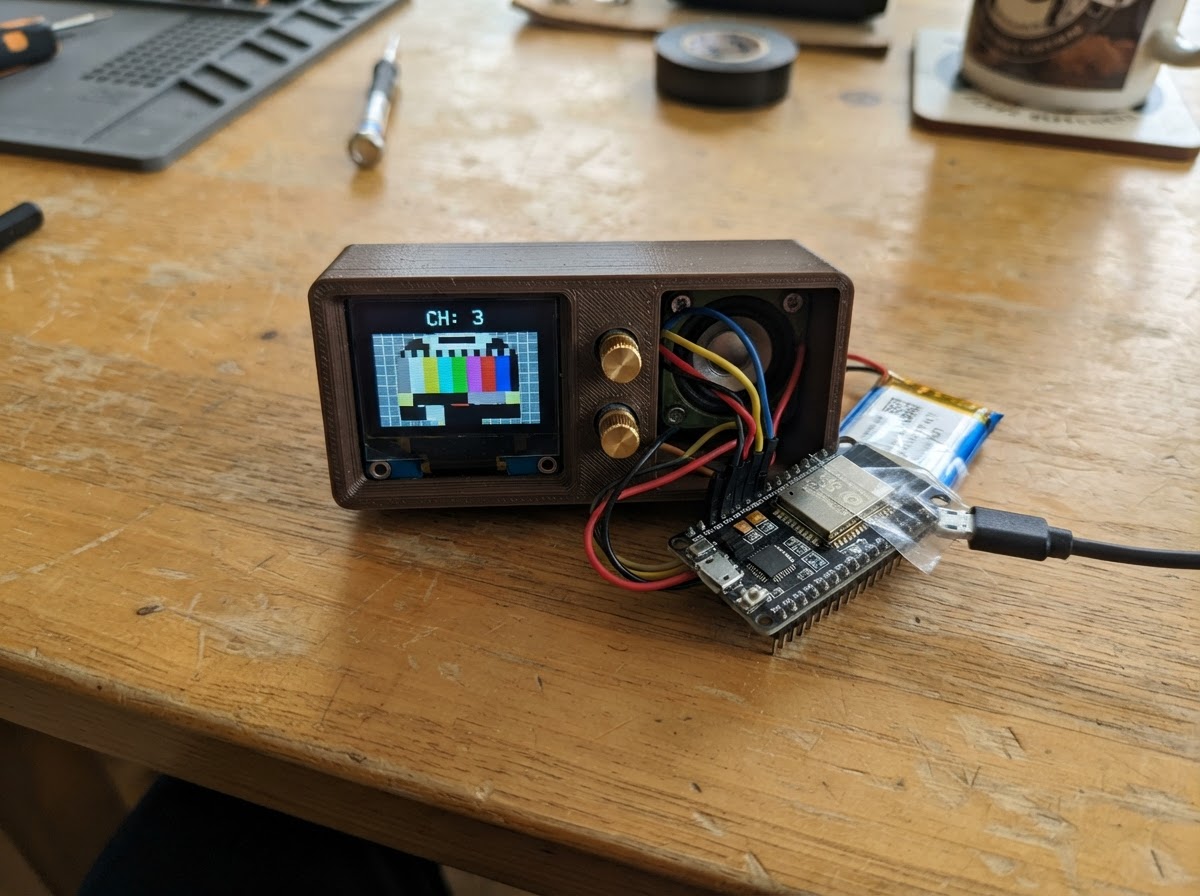
Transform a Mini TV into a connected weather station and clock display powered by an ESP32. This project fetches real-time weather data over Wi-Fi and renders it on a small TFT screen, creating a compact desktop dashboard that updates automatically.
The guide includes a complete parts list, wiring diagram for connecting the ESP32 to the display, and ready-to-flash firmware. Assembly is straightforward—keep the Mini TV intact, provide USB power, and configure Wi-Fi credentials before deployment.
Wiring diagram
Assemble it in 3 steps
1. Keep the Mini TV assembled
Use the Freenove Mini TV as supplied. Its color screen is already wired inside the enclosure; do not add jumper wires to the screen pins.
- The project uses the built-in screen and its internal SPI wiring only.
- Do not connect external circuits to the display pins GPIO 2, 4, 5, 18, or 23; they are used by the integrated screen.
2. Provide USB power
Connect the Mini TV to a stable USB power source using its normal USB connector. The USB connection powers the board during use.
- A standard USB power adapter or powered USB port is suitable.
- Use only the board's normal USB power input. Do not feed power into GPIO pins.
3. Prepare Wi-Fi access
Use a 2.4 GHz Wi-Fi network with internet access. The dashboard needs it to obtain accurate time and the Ottawa weather forecast.
- Before deployment, replace the two Wi-Fi placeholder strings near the top of the firmware with your network name and password.
- This original ESP32 module supports 2.4 GHz Wi-Fi, not 5 GHz-only networks.
Deploy the firmware
#include <Arduino.h>
#include <WiFi.h>
#include <WiFiClientSecure.h>
#include <HTTPClient.h>
#include <ArduinoJson.h>
#include <Adafruit_GFX.h>
#include <Adafruit_ST7735.h>
#include <SPI.h>
#include <time.h>
// Enter your 2.4 GHz Wi-Fi network details before deploying to the Mini TV.
struct Weather {
bool valid = false;
int temperatureC = 0;
int feelsLikeC = 0;
int humidityPercent = 0;
int windKmh = 0;
int weatherCode = -1;
int highC = 0;
int lowC = 0;
};
// Forward declarations
void drawCentered(const String &text, int16_t y, uint8_t size, uint16_t color);
String weatherText(int code);
void drawStaticLayout();
void drawClock();
void drawWeather();
void drawConnectionStatus();
void connectWiFiIfNeeded();
bool fetchWeather();
const char *WIFI_SSID = "AhsokaTano";
const char *WIFI_PASSWORD = "xinmir-Gercek-qewpe5";
constexpr int TFT_SCLK = 18;
constexpr int TFT_MOSI = 23;
constexpr int TFT_CS = 5;
constexpr int TFT_DC = 2;
constexpr int TFT_RST = 4;
constexpr float OTTAWA_LATITUDE = 45.4215;
constexpr float OTTAWA_LONGITUDE = -75.6972;
constexpr uint32_t WEATHER_REFRESH_MS = 10UL * 60UL * 1000UL;
constexpr uint32_t WIFI_RETRY_MS = 15UL * 1000UL;
Adafruit_ST7735 tft(TFT_CS, TFT_DC, TFT_RST);
Weather weather;
uint32_t lastWeatherAttempt = 0;
uint32_t lastWiFiAttempt = 0;
int lastDrawnMinute = -1;
// Start opposite the disconnected state so the dashboard explicitly shows OFF until Wi-Fi joins.
bool previousWiFiState = true;
const uint16_t NAVY = 0x000E;
const uint16_t PANEL = 0x10A3;
const uint16_t SKY = 0x04FF;
const uint16_t SUN = 0xFEA0;
const uint16_t WHITE = ST77XX_WHITE;
const uint16_t MUTED = 0xBDF7;
const uint16_t RED = 0xF800;
void drawCentered(const String &text, int16_t y, uint8_t size, uint16_t color) {
tft.setTextSize(size);
tft.setTextColor(color);
int16_t x1, y1;
uint16_t w, h;
tft.getTextBounds(text, 0, y, &x1, &y1, &w, &h);
tft.setCursor((tft.width() - w) / 2, y);
tft.print(text);
}
String weatherText(int code) {
if (code == 0) return "Clear";
if (code == 1 || code == 2) return "Mostly clear";
if (code == 3) return "Overcast";
if (code == 45 || code == 48) return "Fog";
if (code >= 51 && code <= 57) return "Drizzle";
if (code >= 61 && code <= 67) return "Rain";
if (code >= 71 && code <= 77) return "Snow";
if (code >= 80 && code <= 82) return "Showers";
if (code >= 85 && code <= 86) return "Snow showers";
if (code >= 95) return "Thunderstorms";
return "Weather unavailable";
}
void drawStaticLayout() {
tft.fillScreen(NAVY);
tft.fillRect(0, 0, tft.width(), 17, SKY);
drawCentered("OTTAWA, ON", 4, 1, NAVY);
tft.drawRoundRect(4, 21, 152, 38, 4, PANEL);
tft.drawRoundRect(4, 64, 152, 59, 4, PANEL);
tft.setTextSize(1);
tft.setTextColor(MUTED);
tft.setCursor(10, 68);
tft.print("CURRENT WEATHER");
}
void drawClock() {
struct tm timeInfo;
if (!getLocalTime(&timeInfo, 10)) {
tft.fillRect(7, 24, 146, 32, PANEL);
drawCentered("Syncing time...", 35, 1, MUTED);
return;
}
char timeBuffer[9];
char dateBuffer[25];
strftime(timeBuffer, sizeof(timeBuffer), "%H:%M", &timeInfo);
strftime(dateBuffer, sizeof(dateBuffer), "%a, %b %d", &timeInfo);
tft.fillRect(7, 24, 146, 32, PANEL);
drawCentered(String(timeBuffer), 26, 3, WHITE);
drawCentered(String(dateBuffer), 48, 1, MUTED);
}
void drawWeather() {
tft.fillRect(7, 79, 146, 40, PANEL);
if (!weather.valid) {
drawCentered("Getting forecast...", 91, 1, MUTED);
return;
}
String temperature = String(weather.temperatureC) + " C";
tft.setTextSize(2);
tft.setTextColor(SUN);
tft.setCursor(11, 81);
tft.print(temperature);
tft.setTextSize(1);
tft.setTextColor(WHITE);
tft.setCursor(77, 82);
tft.print(weatherText(weather.weatherCode));
tft.setTextColor(MUTED);
tft.setCursor(77, 94);
tft.print("Feels " + String(weather.feelsLikeC) + " C");
tft.setCursor(77, 106);
tft.print("H " + String(weather.highC) + " L " + String(weather.lowC));
tft.setTextColor(MUTED);
tft.setCursor(11, 108);
tft.print(String(weather.humidityPercent) + "% RH");
}
void drawConnectionStatus() {
const bool connected = WiFi.status() == WL_CONNECTED;
if (connected == previousWiFiState) return;
previousWiFiState = connected;
tft.fillRect(132, 1, 27, 14, SKY);
tft.setTextSize(1);
tft.setTextColor(connected ? NAVY : RED);
tft.setCursor(134, 4);
tft.print(connected ? "WiFi" : "OFF");
}
void connectWiFiIfNeeded() {
if (WiFi.status() == WL_CONNECTED) return;
const uint32_t now = millis();
if (now - lastWiFiAttempt < WIFI_RETRY_MS) return;
lastWiFiAttempt = now;
if (strcmp(WIFI_SSID, "YOUR_WIFI_NAME") == 0) return;
WiFi.mode(WIFI_STA);
WiFi.begin(WIFI_SSID, WIFI_PASSWORD);
}
bool fetchWeather() {
if (WiFi.status() != WL_CONNECTED) return false;
WiFiClientSecure client;
client.setInsecure(); // Open-Meteo is HTTPS; this avoids requiring a stored root certificate.
HTTPClient http;
const String url =
"https://api.open-meteo.com/v1/forecast?latitude=" + String(OTTAWA_LATITUDE, 4) +
"&longitude=" + String(OTTAWA_LONGITUDE, 4) +
"¤t=temperature_2m,apparent_temperature,relative_humidity_2m,weather_code,wind_speed_10m"
"&daily=weather_code,temperature_2m_max,temperature_2m_min"
"&temperature_unit=celsius&wind_speed_unit=kmh&timezone=America%2FToronto&forecast_days=1";
if (!http.begin(client, url)) return false;
const int status = http.GET();
if (status != HTTP_CODE_OK) {
http.end();
return false;
}
JsonDocument doc;
const DeserializationError error = deserializeJson(doc, http.getStream());
http.end();
if (error) return false;
weather.temperatureC = round(doc["current"]["temperature_2m"] | 0.0);
weather.feelsLikeC = round(doc["current"]["apparent_temperature"] | 0.0);
weather.humidityPercent = round(doc["current"]["relative_humidity_2m"] | 0.0);
weather.windKmh = round(doc["current"]["wind_speed_10m"] | 0.0);
weather.weatherCode = doc["current"]["weather_code"] | -1;
weather.highC = round(doc["daily"]["temperature_2m_max"][0] | 0.0);
weather.lowC = round(doc["daily"]["temperature_2m_min"][0] | 0.0);
weather.valid = true;
return true;
}
void setup() {
SPI.begin(TFT_SCLK, -1, TFT_MOSI, TFT_CS);
tft.initR(INITR_BLACKTAB);
tft.setRotation(1); // Landscape: 160 x 128 pixels.
tft.setTextWrap(false);
drawStaticLayout();
drawClock();
drawWeather();
configTzTime("EST5EDT,M3.2.0,M11.1.0", "time.google.com", "pool.ntp.org");
// Permit the first successful Wi-Fi connection to fetch weather immediately.
lastWeatherAttempt = millis() - WEATHER_REFRESH_MS;
connectWiFiIfNeeded();
}
void loop() {
connectWiFiIfNeeded();
drawConnectionStatus();
struct tm timeInfo;
if (getLocalTime(&timeInfo, 10) && timeInfo.tm_min != lastDrawnMinute) {
lastDrawnMinute = timeInfo.tm_min;
drawClock();
}
const uint32_t now = millis();
if (WiFi.status() == WL_CONNECTED && now - lastWeatherAttempt >= WEATHER_REFRESH_MS) {
lastWeatherAttempt = now;
if (fetchWeather()) drawWeather();
}
delay(100);
}Remix this project
Make it yours in one click
Open a full copy of this project in your own Schematik workspace — diagram, code, parts, and assembly steps included. Swap the sensor, add features, or redesign the whole thing with AI. The author's original stays untouched.