Community project
Football Player GPS Tracker
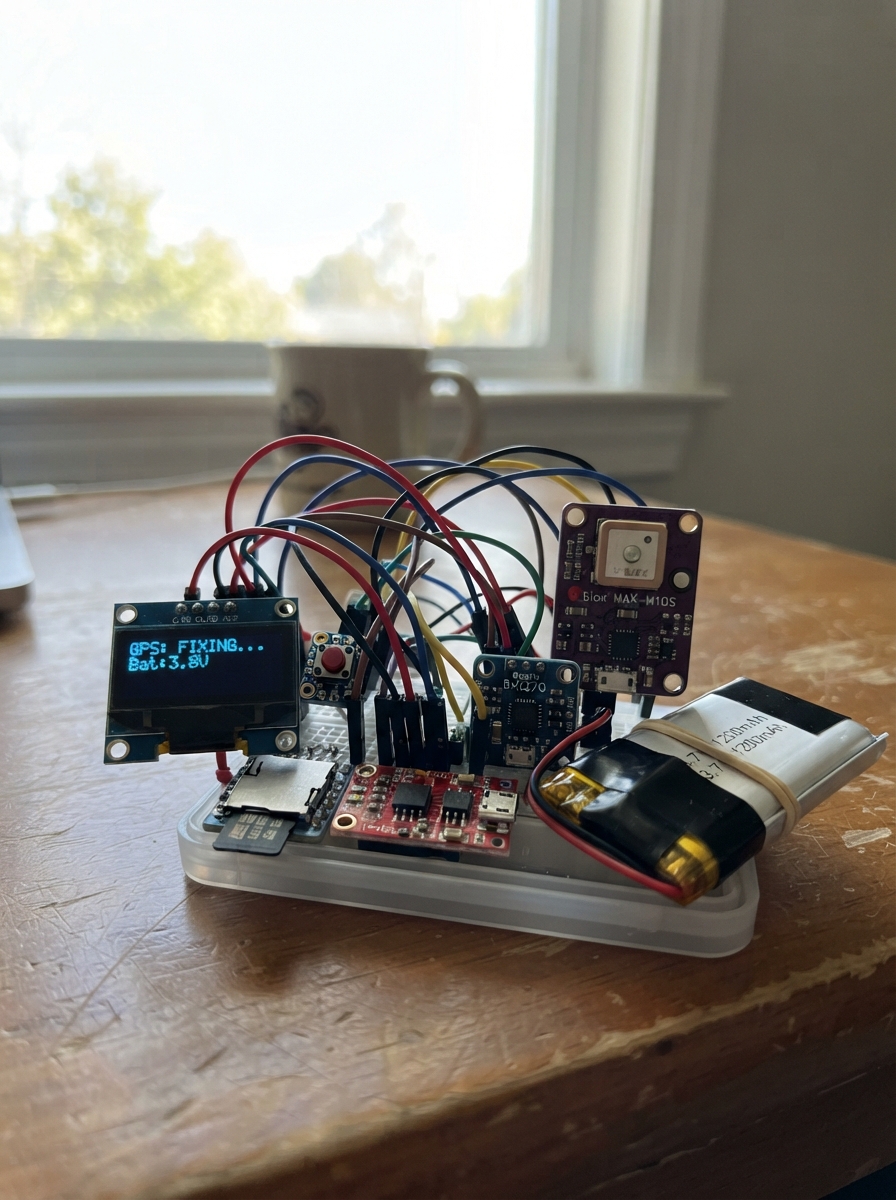
This project builds a wearable GPS tracker for football players that logs position, speed, and motion data during practice and games. The ESP32 microcontroller combines a Max M10s GPS receiver for accurate location tracking, a BMI270 IMU for detecting sprints and acceleration events, and a microSD card module for storing detailed performance logs. Data is displayed on a small OLED screen and can be streamed via Bluetooth for real-time monitoring.
The guide provides a complete wiring diagram, parts list, and step-by-step assembly instructions for building the tracker into a compact 80×50×30 mm case. Included firmware captures GPS coordinates and motion events at 5 Hz, identifies sprints above 20 km/h, logs acceleration spikes, and tracks maximum speed—giving coaches and players detailed metrics for performance analysis. The TP4056 charger and power switch make the device practical for repeated use on the field.
Wiring diagram

Gather all the parts
Assemble it in 7 steps
1. Prepare the battery and charging parts
Keep battery_1 unplugged while you work. Join battery_1 BAT+ to charger_1 B+ (battery power) and battery_1 BAT− to charger_1 B− (battery ground). Connect charger_1 IN+ to the positive side of the covered USB-C 5 V charging connector (charging power) and charger_1 IN− to its ground side (charging ground).
- Use the keyed battery plug and plan for the charge connector at the bottom edge of the finished case.
- Do not connect the battery straight to the ESP32 3V3 pin; a full Li-Po can reach 4.2 V and can damage the electronics.
2. Add the press-on, press-off power control
Connect charger_1 OUT+ to power_switch_1 IN (protected battery power). Connect power_switch_1 OUT to regulator_1 VIN (switched battery power). Connect power_switch_1 GND to charger_1 OUT− (ground). Connect power_button_1 SIGNAL to power_switch_1 BTN (power-button signal) and power_button_1 GND to GND (ground). Mount the button at the top edge of the case, behind a flexible waterproof rubber cap; one short press turns the tracker on or off.
- The power switch board has its own tiny button, but the separate button is easier to reach once the enclosure is closed.
- Do not use a permanent on/off slide switch in place of the momentary button; the latching power board needs a brief button press.
3. Make the regulated power and ground connections
Connect regulator_1 VOUT to the ESP32 3V3 pin (power), then share that same 3.3 V wire with gnss_1 VCC, imu_1 VCC, sd_1 VCC, and display_1 VCC (power). Connect regulator_1 GND, ESP32 GND, gnss_1 GND, imu_1 GND, sd_1 GND, and display_1 GND together (ground).
- Make a small insulated 3.3 V distribution point and a separate ground distribution point so no header pin carries a loose stack of wires.
- Make sure 3V3 and GND are not swapped — swapped power can damage the screen or sensor boards.
4. Wire and position the GPS receiver
Connect gnss_1 TX to ESP32 GPIO16 (data) and gnss_1 RX to ESP32 GPIO17 (configuration data). Place its antenna at the top end of the case, immediately below the upward-facing plastic surface, with open space above it.
- Keep the battery, regulator, microSD socket, and ESP32 antenna at least 10 mm away from the GNSS antenna area.
- Do not cover the GPS antenna with foil, carbon-fibre fabric, or a metal badge; these materials can prevent a reliable outdoor fix.
5. Wire the front screen and motion sensor
Connect display_1 SDA to ESP32 GPIO21 (data) and display_1 SCL to GPIO22 (clock). Connect imu_1 SDA to that same GPIO21 wire (data) and imu_1 SCL to that same GPIO22 wire (clock). Fit the OLED behind a clear non-metallic window on the front face, away from the GNSS antenna. Fix the IMU flat near the enclosure centre, with its forward arrow pointing toward the player’s head.
- The status screen shares the two sensor data wires safely because each device has a different address.
- Mark the enclosure with a forward arrow so all units record motion in the same direction.
- Do not leave the IMU dangling on long flexible wires, because wire movement becomes false acceleration data.
6. Wire the removable log card
Connect sd_1 MISO to ESP32 GPIO19 (data), MOSI to GPIO23 (data), SCK to GPIO18 (clock), and CS to GPIO4 (select). Insert a FAT32-formatted microSD card before powering the tracker. Place the socket beside a covered enclosure slot.
- Use a 3.3 V-only microSD breakout or socket so it cannot send unsafe 5 V signals into the ESP32.
- Do not remove the card while the tracker is powered and recording; the current log file can be damaged.
7. Pack the rounded 80 by 50 by 30 mm case
Use an 80 mm long × 50 mm wide × 30 mm deep rounded-corner plastic enclosure. Define the display side as the front. Fit display_1 behind a sealed clear window centered on this front face. Fit the USB-C charging opening on the bottom edge, recessed slightly and protected by a silicone flap. Fit power_button_1 at the top edge under a rubber cap. Keep gnss_1 directly below the top-facing plastic area at the top end, separated from the display, battery, regulator, and metal USB-C hardware. Place the flat battery against the rear or lower interior wall without covering the antenna, and use thin foam pads around all boards to stop impact movement. Fit the tracker high between the player’s shoulder blades in the vest.
- Use a clear polycarbonate screen window and a gasketed lid. The OLED is 28 mm square, so it fits within the 50 mm case width.
- Use low-profile wiring or remove tall headers; a DevKit plus breakout boards can otherwise exceed the 30 mm case depth.
- The bottom USB-C opening, front screen window, and top button cap need gaskets or adhesive seals; sweat entering any of them can corrode the boards.
Review all connections
1. Connections between "battery_1" and "ESP32"
2. Connections between "charger_1" and "ESP32"
3. Connections between "regulator_1" and "ESP32"
4. Connections between "gnss_1" and "ESP32"
5. Connections between "imu_1" and "ESP32"
6. Connections between "sd_1" and "ESP32"
7. Connections between "power_switch_1" and "ESP32"
8. Connections between "power_button_1" and "ESP32"
9. Connections between "display_1" and "ESP32"
Deploy the firmware
#include <Arduino.h>
#include <Wire.h>
#include <SPI.h>
#include <SD.h>
#include <TinyGPSPlus.h>
#include <SparkFun_BMI270_Arduino_Library.h>
#include <BLEDevice.h>
#include <BLEServer.h>
#include <BLEUtils.h>
#include <BLE2902.h>
#include <Adafruit_GFX.h>
#include <Adafruit_SSD1306.h>

constexpr int GNSS_RX_PIN = 16;
constexpr int GNSS_TX_PIN = 17;
constexpr int IMU_SDA_PIN = 21;
constexpr int IMU_SCL_PIN = 22;
constexpr int SD_CS_PIN = 4;
constexpr int SD_MISO_PIN = 19;
constexpr int SD_MOSI_PIN = 23;
constexpr int SD_SCK_PIN = 18;
constexpr uint32_t LOG_INTERVAL_MS = 200; // 5 records per second
constexpr float SPRINT_THRESHOLD_KMH = 20.0f;
constexpr float ACCEL_EVENT_THRESHOLD_MPS2 = 2.5f;
constexpr uint8_t OLED_ADDRESS = 0x3C;
constexpr int OLED_WIDTH = 128;
constexpr int OLED_HEIGHT = 64;

HardwareSerial gnssSerial(2);
TinyGPSPlus gps;
BMI270 imu;
BLECharacteristic *liveCharacteristic = nullptr;
Adafruit_SSD1306 display(OLED_WIDTH, OLED_HEIGHT, &Wire, -1);

bool sdReady = false;
bool imuReady = false;
bool haveLastPoint = false;
bool sprintActive = false;
float lastLatitude = 0.0f;
float lastLongitude = 0.0f;
float lastSpeedMps = 0.0f;
uint32_t lastSpeedMs = 0;
uint32_t lastLogMs = 0;
uint32_t lastBleMs = 0;
float distanceM = 0.0f;
float maxSpeedKmh = 0.0f;
float lastAccelerationMps2 = 0.0f;
uint32_t sprintCount = 0;
uint32_t accelerationCount = 0;
bool displayReady = false;
char lastDisplayText[128] = "";

void sendUbx(const uint8_t *payload, size_t payloadLength) {
  uint8_t ckA = 0;
  uint8_t ckB = 0;
  for (size_t i = 0; i < payloadLength; ++i) {
    ckA += payload[i];
    ckB += ckA;
  }
  gnssSerial.write(0xB5);
  gnssSerial.write(0x62);
  gnssSerial.write(payload, payloadLength);
  gnssSerial.write(ckA);
  gnssSerial.write(ckB);
}

void configureGnssFor5Hz() {
  // UBX-CFG-VALSET: RAM layer, CFG-RATE-MEAS (0x30210001) = 200 ms.
  const uint8_t setRate5Hz[] = {
    0x06, 0x8A, 0x0C, 0x00,
    0x00, 0x01, 0x00, 0x00,
    0x01, 0x00, 0x21, 0x30,
    0xC8, 0x00, 0x00, 0x00
  };
  sendUbx(setRate5Hz, sizeof(setRate5Hz));
}

void appendHeader() {
  if (!sdReady || SD.exists("/track.csv")) return;
  File file = SD.open("/track.csv", FILE_WRITE);
  if (file) {
    file.println("ms,lat,lon,speed_kmh,distance_m,max_speed_kmh,sprints,accel_mps2,accel_events,ax,ay,az,gx,gy,gz");
    file.close();
  }
}

void updateDisplay() {
  if (!displayReady) return;

  const bool fixValid = gps.location.isValid() && gps.location.age() < 1500;
  char status[128];
  snprintf(status, sizeof(status),
           "GPS: %s\nSPD: %5.1f km/h\nDST: %6.0f m\nMAX: %5.1f km/h\nSPRINTS: %lu\nSD: %s  BLE: ON",
           fixValid ? "FIX" : "SEARCHING", gps.speed.isValid() ? gps.speed.kmph() : 0.0f,
           distanceM, maxSpeedKmh, static_cast<unsigned long>(sprintCount), sdReady ? "OK" : "NO");
  if (strcmp(status, lastDisplayText) == 0) return;

  strncpy(lastDisplayText, status, sizeof(lastDisplayText) - 1);
  lastDisplayText[sizeof(lastDisplayText) - 1] = '\0';
  display.clearDisplay();
  display.setTextSize(1);
  display.setTextColor(SSD1306_WHITE);
  display.setCursor(0, 0);
  display.print(status);
  display.display();
}

void updateBle() {
  if (liveCharacteristic == nullptr) return;
  char message[160];
  snprintf(message, sizeof(message),
           "distance_m=%.1f;speed_kmh=%.1f;max_kmh=%.1f;sprints=%lu;accel_mps2=%.2f;accel_events=%lu",
           distanceM, gps.speed.isValid() ? gps.speed.kmph() : 0.0f, maxSpeedKmh,
           static_cast<unsigned long>(sprintCount), lastAccelerationMps2,
           static_cast<unsigned long>(accelerationCount));
  liveCharacteristic->setValue(reinterpret_cast<uint8_t *>(message), strlen(message));
  liveCharacteristic->notify();
}

void setupBle() {
  BLEDevice::init("FootballTracker");
  BLEServer *server = BLEDevice::createServer();
  BLEService *service = server->createService("7f770001-8b3d-4ca9-8c64-7d9d21a4c001");
  liveCharacteristic = service->createCharacteristic(
      "7f770002-8b3d-4ca9-8c64-7d9d21a4c001",
      BLECharacteristic::PROPERTY_READ | BLECharacteristic::PROPERTY_NOTIFY);
  liveCharacteristic->addDescriptor(new BLE2902());
  liveCharacteristic->setValue("waiting for GNSS fix");
  service->start();
  BLEAdvertising *advertising = BLEDevice::getAdvertising();
  advertising->addServiceUUID(service->getUUID());
  advertising->start();
}

void setup() {
  Serial.begin(115200);
  Wire.begin(IMU_SDA_PIN, IMU_SCL_PIN);
  gnssSerial.begin(9600, SERIAL_8N1, GNSS_RX_PIN, GNSS_TX_PIN);
  delay(300);
  configureGnssFor5Hz();

  int imuStatus = imu.beginI2C();
  imuReady = (imuStatus == BMI2_OK);

  SPI.begin(SD_SCK_PIN, SD_MISO_PIN, SD_MOSI_PIN, SD_CS_PIN);
  sdReady = SD.begin(SD_CS_PIN, SPI);
  appendHeader();
  displayReady = display.begin(SSD1306_SWITCHCAPVCC, OLED_ADDRESS);
  if (displayReady) {
    display.clearDisplay();
    display.setTextSize(1);
    display.setTextColor(SSD1306_WHITE);
    display.setCursor(0, 0);
    display.println("Football Tracker");
    display.println("Starting GNSS...");
    display.display();
  }
  setupBle();
}

void loop() {
  while (gnssSerial.available() > 0) {
    gps.encode(gnssSerial.read());
  }

  const uint32_t now = millis();
  if (now - lastLogMs >= LOG_INTERVAL_MS) {
    lastLogMs = now;
    float ax = NAN, ay = NAN, az = NAN, gx = NAN, gy = NAN, gz = NAN;
    if (imuReady) {
      imu.getSensorData();
      ax = imu.data.accelX;
      ay = imu.data.accelY;
      az = imu.data.accelZ;
      gx = imu.data.gyroX;
      gy = imu.data.gyroY;
      gz = imu.data.gyroZ;
    }

    float speedKmh = gps.speed.isValid() ? gps.speed.kmph() : 0.0f;
    if (gps.location.isValid() && gps.location.age() < 1500) {
      const float latitude = gps.location.lat();
      const float longitude = gps.location.lng();
      if (haveLastPoint) {
        const float stepM = TinyGPSPlus::distanceBetween(lastLatitude, lastLongitude, latitude, longitude);
        // Reject impossible 5 Hz jumps caused by a weak GNSS fix.
        if (stepM < 25.0f) distanceM += stepM;
      }
      lastLatitude = latitude;
      lastLongitude = longitude;
      haveLastPoint = true;
    }

    if (speedKmh > maxSpeedKmh) maxSpeedKmh = speedKmh;
    if (speedKmh >= SPRINT_THRESHOLD_KMH && !sprintActive) {
      ++sprintCount;
      sprintActive = true;
    } else if (speedKmh < (SPRINT_THRESHOLD_KMH - 1.0f)) {
      sprintActive = false;
    }

    if (lastSpeedMs != 0 && now > lastSpeedMs) {
      const float speedMps = speedKmh / 3.6f;
      lastAccelerationMps2 = (speedMps - lastSpeedMps) * 1000.0f / static_cast<float>(now - lastSpeedMs);
      if (lastAccelerationMps2 >= ACCEL_EVENT_THRESHOLD_MPS2) ++accelerationCount;
      lastSpeedMps = speedMps;
    } else {
      lastSpeedMps = speedKmh / 3.6f;
    }
    lastSpeedMs = now;

    if (sdReady) {
      File file = SD.open("/track.csv", FILE_APPEND);
      if (file) {
        file.printf("%lu,%.7f,%.7f,%.2f,%.2f,%.2f,%lu,%.3f,%lu,%.4f,%.4f,%.4f,%.4f,%.4f,%.4f\n",
                    static_cast<unsigned long>(now),
                    gps.location.isValid() ? gps.location.lat() : NAN,
                    gps.location.isValid() ? gps.location.lng() : NAN,
                    speedKmh, distanceM, maxSpeedKmh, static_cast<unsigned long>(sprintCount),
                    lastAccelerationMps2, static_cast<unsigned long>(accelerationCount),
                    ax, ay, az, gx, gy, gz);
        file.close();
      }
    }
  }

  if (now - lastBleMs >= 1000) {
    lastBleMs = now;
    updateBle();
    updateDisplay();
  }
  delay(1);
}
Remix this project
Make it yours in one click
Open a full copy of this project in your own Schematik workspace — diagram, code, parts, and assembly steps included. Swap the sensor, add features, or redesign the whole thing with AI. The author's original stays untouched.