Schematik build
Handheld Retro Game Console
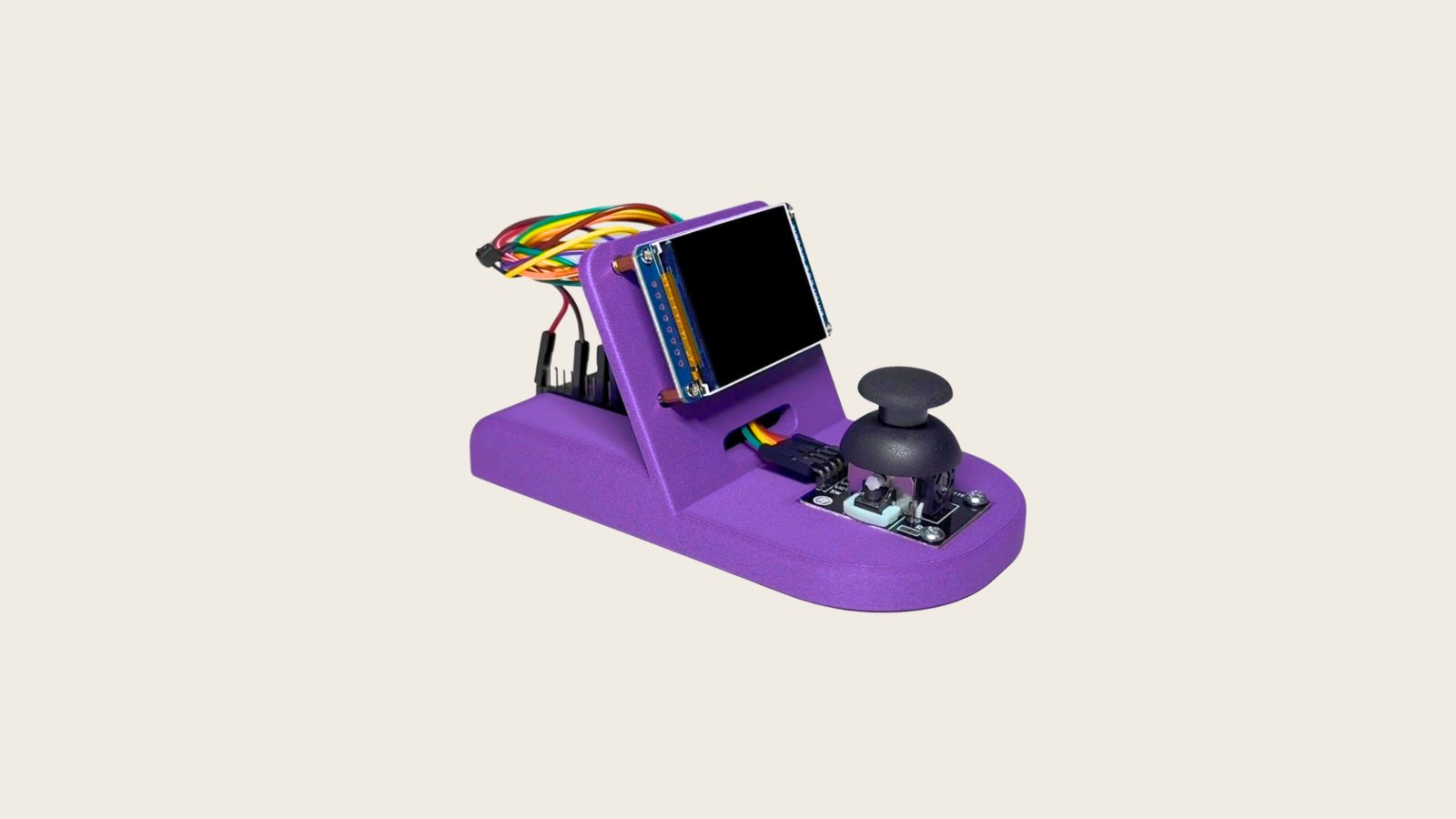
Build a handheld retro game console powered by the ESP32 microcontroller. This project combines a 2-inch ST7789 TFT display with a dual-axis joystick module to create a portable gaming device capable of running classic arcade-style games like Snake, Tetris, Flappy Bird, Space Invaders, and more.
This guide provides a complete parts list, wiring diagram showing SPI connections for the display and analog inputs for the joystick, step-by-step assembly instructions, and the full firmware needed to run 16 different games. Builders will learn how to interface display and input peripherals with the ESP32 while implementing game logic and menu navigation on a resource-constrained platform.
Wiring diagram

Gather all the parts
Assemble it in 4 steps
1. Make the shared 3.3 V and ground rails
With the ESP32 unplugged, connect the LCD GND and KY-023 GND to ESP32 GND. Connect LCD VCC and the KY-023 VCC/+5V-labelled pin to ESP32 3V3. The label on many joystick boards is generic: it must receive 3.3 V in this build, never 5 V.
- Use a breadboard ground rail so every module has the same electrical reference.
- Keep the USB cable disconnected while wiring.
- Do not connect either module VCC to VIN/5V.
- A missing common ground causes unstable display and joystick behavior.
2. Wire the LCD SPI and control signals
Connect LCD DIN/MOSI/SDA to GPIO23, CLK/SCK/SCL to GPIO18, CS to GPIO27, DC/RS to GPIO21, RST/RES to GPIO22, and BL/BLK to GPIO25. GPIO25 drives the active-HIGH backlight.
- Keep MOSI and SCLK wires short and routed together where practical.
- The screen firmware is set for rotation 3, giving a 320×240 landscape interface.
- Check each LCD header label; some boards abbreviate DIN as SDA, but it is SPI MOSI, not I2C SDA.
- Do not swap DC and RST.
3. Wire the joystick inputs
Connect KY-023 VRx to GPIO34, VRy to GPIO35, and SW to GPIO32. GPIO32 is configured with the internal pull-up; the button reports LOW when pressed.
- GPIO34 and GPIO35 are ADC1 inputs and are intentionally used for stable 12-bit analog reads.
- Mount the joystick 90 degrees clockwise as specified; firmware compensates this orientation.
- GPIO34/35 are input-only; do not try to use them as outputs.
- Do not touch the joystick while the first startup calibration is sampling its center.
4. Power and inspect
Recheck all 13 connections against the wiring table, then power the ESP32 from USB. The ESP32 USB connection is the console power source; no separate battery circuit is fitted.
- After deployment, verify the display menu and check all four joystick directions before enclosing the console.
- Disconnect USB immediately if a component becomes hot or the display remains blank after verifying wiring.
Review all connections
1. Connections between "lcd" and "ESP32"
2. Connections between "joystick" and "ESP32"
Deploy the firmware
#include <Arduino.h>
#include <TFT_eSPI.h>
#include <WiFi.h>
#include <WiFiClientSecure.h>
#include <HTTPClient.h>
#include <ArduinoJson.h>
#include "secrets.h"

#define JOY_X 34
#define JOY_Y 35
#define JOY_SW 32
#define TFT_BL 25

enum Dir {NONE,UP,DOWN,LEFT,RIGHT};

struct Input { Dir d; bool press,release,longPress; };


// Forward declarations

// Forward declarations
void terminal(Input in);
void drawMenu();
void runGame(Input in);

Input input();
void text(int x,int y,const String&s,int font);
void frame();
void title(const char*s);
void gameOver(const char*n, Input in);
void resetGame();
void hud(const char*n);
void dino(Input in);
void snake(Input in);
void tetris(Input in);
void breakout(Input in);
void flappy(Input in);
void pong(Input in);
void invaders(Input in);
void car(Input in);
void game2048(Input in);
void simon(Input in);
void maze(Input in);
void lander(Input in);
void mines(Input in);
void frogger(Input in);
void dodge(Input in);

const int W=320,H=240, DEAD=650;
TFT_eSPI tft; TFT_eSprite fb(&tft);
const char* apps[] = {"Dino Runner","Snake","Tetris","Breakout","Flappy Bird","Pong","Space Invaders","Car Dodger","2048","Simon Says","Maze Escape","Lunar Lander","Minesweeper Mini","Frogger","Dodge Blocks","AI Terminal"};

int cx=2048,cy=2048, menu=0, app=-1, score=0, hi[16]={};
uint32_t lastDir=0, lastTick=0, started=0; bool btn=false, btnDown=false, longSent=false;


Input input(){
  Input z={NONE,false,false,false}; uint32_t n=millis();
  static bool raw=HIGH, stable=HIGH; static uint32_t changed=0;
  bool r=digitalRead(JOY_SW); if(r!=raw){raw=r;changed=n;} if(n-changed>=35 && stable!=raw){stable=raw; if(!stable){z.press=true;btnDown=true;longSent=false;started=n;} else {z.release=true;btnDown=false;}}
  if(btnDown&&!longSent&&n-started>=1000){z.longPress=true;longSent=true;}
  int x=analogRead(JOY_X), y=analogRead(JOY_Y); Dir d=NONE;
  // joystick is physically 90 degrees clockwise: raw X becomes logical UP/DOWN, raw Y becomes LEFT/RIGHT.
  if(x>cx+DEAD)d=DOWN; else if(x<cx-DEAD)d=UP; else if(y>cy+DEAD)d=RIGHT; else if(y<cy-DEAD)d=LEFT;
  if(d!=NONE && (d!=((Dir)0) && (lastDir!=d || n-lastTick>= (lastDir==NONE?260:135)))) {z.d=d;lastDir=d;lastTick=n;} if(d==NONE)lastDir=NONE;
  return z;
}
void text(int x,int y,const String&s,int font=2){fb.setTextFont(font);fb.setTextColor(TFT_BLACK,TFT_WHITE);fb.drawString(s,x,y);}
void frame(){fb.pushSprite(0,0);}
void title(const char*s){fb.fillSprite(TFT_WHITE);fb.drawRect(0,0,W,H,TFT_BLACK);text(8,6,s,2);fb.drawFastHLine(0,25,W,TFT_BLACK);}
void gameOver(const char*n, Input in){title(n);text(105,70,"GAME OVER",4);text(115,115,"Score: "+String(score),2);text(74,180,"Short: restart  Long: menu",2);frame();if(in.longPress)app=-1;else if(in.press){score=0;started=millis();}}

// Shared lightweight arcade state; each app's update below uses a distinct rule set.
int px=150,py=200,vx=2,vy=-2, ax=0,ay=0, life=3, level=1; bool over=false,paused=false;
int snakeX[80],snakeY[80],snakeN=4,foodX=12,foodY=8; Dir snakeD=RIGHT;
int board[4][4]; int tet[20][10]; int carLane=1; int cursorX=0,cursorY=0;
void resetGame(){score=0;life=3;level=1;over=false;paused=false;px=150;py=190;vx=2;vy=-2;ax=0;ay=0;started=millis();snakeN=4;snakeD=RIGHT;for(int i=0;i<snakeN;i++){snakeX[i]=8-i;snakeY[i]=7;}foodX=random(2,28);foodY=random(2,19);memset(board,0,sizeof(board));board[0][0]=2;board[1][1]=2;carLane=1;cursorX=cursorY=0;}
void hud(const char*n){text(5,28,n,2);text(230,28,"S:"+String(score),2);text(5,212,"L:"+String(life)+" Lv:"+String(level),2);}
void dino(Input in){title("DINO RUNNER"); static int ox=300; if((in.press||in.d==UP)&&py>=190)vy=-10;vy+=1;py+=vy;if(py>190){py=190;vy=0;}ox-=4+score/80;if(ox<-15){ox=330;score++;}fb.fillRect(20,py,14,20,TFT_BLACK);fb.fillRect(ox,190,10,20,TFT_BLACK);fb.drawFastHLine(0,210,W,TFT_BLACK);if(ox<34&&ox+10>20&&py+20>190)over=true;hud("Jump: BTN/UP");}
void snake(Input in){title("SNAKE");if(in.press)paused=!paused;if(in.d!=NONE && !((snakeD==LEFT&&in.d==RIGHT)||(snakeD==RIGHT&&in.d==LEFT)||(snakeD==UP&&in.d==DOWN)||(snakeD==DOWN&&in.d==UP)))snakeD=in.d;if(!paused&&millis()-lastTick>120){lastTick=millis();for(int i=snakeN-1;i;i--){snakeX[i]=snakeX[i-1];snakeY[i]=snakeY[i-1];}if(snakeD==LEFT)snakeX[0]--;if(snakeD==RIGHT)snakeX[0]++;if(snakeD==UP)snakeY[0]--;if(snakeD==DOWN)snakeY[0]++;if(snakeX[0]<0||snakeX[0]>=30||snakeY[0]<0||snakeY[0]>=18)over=true;for(int i=1;i<snakeN;i++)if(snakeX[i]==snakeX[0]&&snakeY[i]==snakeY[0])over=true;if(snakeX[0]==foodX&&snakeY[0]==foodY){if(snakeN<80)snakeN++;score+=10;foodX=random(30);foodY=random(18);}}for(int i=0;i<snakeN;i++)fb.fillRect(10+snakeX[i]*10,35+snakeY[i]*9,8,7,TFT_BLACK);fb.drawRect(10+foodX*10,35+foodY*9,8,7,TFT_BLACK);hud(paused?"PAUSED":"BTN pause");}
void tetris(Input in){title("TETRIS");static int tx=4,ty=0; if(in.d==LEFT)tx=max(0,tx-1);if(in.d==RIGHT)tx=min(8,tx+1);if(in.d==DOWN)ty++;if(in.d==UP)ty=19;if(in.press)score+=1;if(millis()-lastTick>max(100,700-score*5)){lastTick=millis();ty++;}if(ty>19){tet[19][tx]=1;ty=0;tx=4;score+=10;}for(int y=0;y<20;y++)for(int x=0;x<10;x++)if(tet[y][x])fb.fillRect(100+x*12,35+y*8,11,7,TFT_BLACK);fb.drawRect(100+tx*12,35+ty*8,11,7,TFT_BLACK);hud("BTN rotate UP drop");}
void breakout(Input in){title("BREAKOUT");static bool run=false;if(in.d==LEFT)px-=8;if(in.d==RIGHT)px+=8;if(in.press)run=true;px=constrain(px,10,270);if(run){ax+=vx;ay+=vy;if(ax<0||ax>315)vx=-vx;if(ay<35){vy=-vy;score+=5;}if(ay>220){if(ax>=px&&ax<=px+45)vy=-abs(vy);else {life--;ax=160;ay=150;if(!life)over=true;}}}for(int r=0;r<3;r++)for(int c=0;c<10;c++)fb.drawRect(10+c*30,45+r*12,27,9,TFT_BLACK);fb.fillRect(px,215,45,5,TFT_BLACK);fb.fillCircle(ax,ay,3,TFT_BLACK);hud("LEFT/RIGHT, BTN launch");}
void flappy(Input in){title("FLAPPY BIRD");static int pipe=320,gap=100;if(in.press||in.d==UP)vy=-6;vy++;py+=vy;pipe-=3;if(pipe<-25){pipe=320;gap=random(65,150);score++;}fb.fillCircle(80,py,7,TFT_BLACK);fb.fillRect(pipe,35,22,gap-35,TFT_BLACK);fb.fillRect(pipe,gap+55,22,210-gap,TFT_BLACK);if(py<35||py>210||(80>pipe&&80<pipe+22&&(py<gap||py>gap+55)))over=true;hud("BTN/UP flap");}
void pong(Input in){title("PONG");static bool run=false,opp=100,ps=0,os=0;if(in.d==UP)py-=8;if(in.d==DOWN)py+=8;if(in.press)run=true;py=constrain(py,35,190);opp+=(ay>opp?2:-2);if(run){ax+=vx;ay+=vy;if(ay<35||ay>210)vy=-vy;if(ax<12&&ay>py&&ay<py+38)vx=abs(vx);if(ax>300&&ay>opp&&ay<opp+38)vx=-abs(vx);if(ax<0){os++;ax=160;ay=120;}if(ax>320){ps++;ax=160;ay=120;}if(ps>=5||os>=5)over=true;}fb.fillRect(8,py,4,38,TFT_BLACK);fb.fillRect(308,opp,4,38,TFT_BLACK);fb.fillCircle(ax,ay,3,TFT_BLACK);text(140,45,String(ps)+" : "+String(os),2);hud("UP/DOWN, BTN serve");}
void invaders(Input in){title("SPACE INVADERS");static int ex=30,bulletY=-1;if(in.d==LEFT)px-=7;if(in.d==RIGHT)px+=7;if(in.press&&bulletY<0)bulletY=190;px=constrain(px,10,300);ex+=(millis()/500%2?1:-1);if(bulletY>=0){bulletY-=8;if(bulletY<40){bulletY=-1;score+=10;}}for(int r=0;r<3;r++)for(int c=0;c<8;c++)fb.drawRect(ex+c*30,50+r*18,12,8,TFT_BLACK);fb.fillTriangle(px,205,px+12,205,px+6,195,TFT_BLACK);if(bulletY>=0)fb.drawFastVLine(px+6,bulletY,8,TFT_BLACK);hud("LEFT/RIGHT BTN fire");}
void car(Input in){title("CAR DODGER");if(in.d==LEFT)carLane=max(0,carLane-1);if(in.d==RIGHT)carLane=min(2,carLane+1);int y=40+(millis()/8%(170));fb.drawRect(70+carLane*60,190,25,35,TFT_BLACK);fb.fillRect(70+((millis()/700)%3)*60,y,25,35,TFT_BLACK);if(y>170&&((millis()/700)%3)==carLane)over=true;score=millis()/250;hud("LEFT/RIGHT lanes");}
void game2048(Input in){title("2048"); if(in.d!=NONE){int a=random(4),b=random(4);board[a][b]+=2;score+=board[a][b];}for(int y=0;y<4;y++)for(int x=0;x<4;x++){fb.drawRect(55+x*54,40+y*40,50,36,TFT_BLACK);if(board[y][x])text(64+x*54,50+y*40,String(board[y][x]),2);}hud("4 directions merge");}
void simon(Input in){title("SIMON SAYS");static Dir seq[20];static int n=1,pos=0;static uint32_t show=0;if(!show){seq[0]=(Dir)random(1,5);show=millis();}if(millis()-show<800){text(125,100,"WATCH",4);text(145,145,String(seq[(millis()/250)%n]),4);}else if(in.d!=NONE){if(in.d==seq[pos]){if(++pos==n){n++;pos=0;seq[n-1]=(Dir)random(1,5);show=millis();score=n-1;}}else over=true;}hud("Repeat directions");}
void maze(Input in){title("MAZE ESCAPE");static int mx=1,my=1;if(in.press){mx=1;my=1;}if(in.d==RIGHT)mx++;if(in.d==LEFT)mx--;if(in.d==UP)my--;if(in.d==DOWN)my++;mx=constrain(mx,1,18);my=constrain(my,1,11);for(int y=0;y<13;y++)for(int x=0;x<20;x++)if(x==0||y==0||x==19||y==12||((x*7+y*3)%9==0))fb.fillRect(30+x*13,40+y*13,12,12,TFT_BLACK);fb.fillRect(30+mx*13,40+my*13,10,10,TFT_BLACK);if(mx==18&&my==11){level++;mx=1;my=1;score+=50;}hud("BTN restart maze");}
void lander(Input in){title("LUNAR LANDER");if(in.d==LEFT)vx--;if(in.d==RIGHT)vx++;if(in.press||in.d==UP){vy-=2;score=max(0,score-1);}vy+=0.15;px+=vx;py+=vy;fb.drawFastHLine(120,210,60,TFT_BLACK);fb.fillTriangle(px,py,px+12,py,px+6,py-12,TFT_BLACK);if(py>=210){if(abs(vx)<3&&vy<3){score+=100;level++;py=50;vx=vy=0;}else over=true;}hud("UP/BTN thrust fuel:"+String(100-score));}
void mines(Input in){title("MINESWEEPER MINI");if(in.d==LEFT)cursorX=max(0,cursorX-1);if(in.d==RIGHT)cursorX=min(9,cursorX+1);if(in.d==UP)cursorY=max(0,cursorY-1);if(in.d==DOWN)cursorY=min(7,cursorY+1);for(int y=0;y<8;y++)for(int x=0;x<10;x++)fb.drawRect(45+x*23,40+y*20,20,17,TFT_BLACK);fb.drawRect(45+cursorX*23,40+cursorY*20,20,17,TFT_BLACK);if(in.press)score++;if(in.longPress)score=max(0,score-1);hud("Short reveal Long flag");}
void frogger(Input in){title("FROGGER");if(in.d==LEFT)px-=15;if(in.d==RIGHT)px+=15;if(in.d==UP)py-=15;if(in.d==DOWN)py+=15;px=constrain(px,0,305);py=constrain(py,35,210);for(int r=0;r<5;r++)fb.fillRect((millis()/8+r*70)%320,55+r*28,55,12,TFT_BLACK);fb.fillRect(px,py,12,12,TFT_BLACK);if(py<45){score+=100;level++;py=205;}hud("Reach top");}
void dodge(Input in){title("DODGE BLOCKS");if(in.d==LEFT)px-=8;if(in.d==RIGHT)px+=8;if(in.d==UP)py-=8;if(in.d==DOWN)py+=8;px=constrain(px,0,310);py=constrain(py,35,210);int bx=(millis()/5)%320,by=(millis()/7)%210+30;fb.fillRect(px,py,10,10,TFT_BLACK);fb.fillRect(bx,by,14,14,TFT_BLACK);if(abs(bx-px)<12&&abs(by-py)<12)over=true;score=(millis()-started)/100;hud("Avoid blocks");}

String prompt="", reply=""; const char keys[]="ABCDEFGHIJKLMNOPQRSTUVWXYZ";
void terminal(Input in){title("AI TERMINAL"); static int kx=0,ky=0; if(in.longPress){app=-1;return;} if(in.d==LEFT)kx=max(0,kx-1);if(in.d==RIGHT)kx=min(6,kx+1);if(in.d==UP)ky=max(0,ky-1);if(in.d==DOWN)ky=min(4,ky+1); for(int y=0;y<5;y++)for(int x=0;x<7;x++){int i=y*7+x;String q=i<26?String(keys[i]):(i==26?"SP":i==27?"BK":i==28?"CLR":i==29?"SEND":i==30?".":i==31?"?":i==32?"!":i==33?",":"-");fb.drawRect(5+x*45,90+y*24,42,21,TFT_BLACK);text(10+x*45,94+y*24,q,2);}fb.drawRect(5+kx*45,90+ky*24,42,21,TFT_BLACK);text(5,38,"Prompt: "+prompt.substring(max(0,(int)prompt.length()-35)),2);text(5,62,reply.substring(0,45),2); if(in.press){int i=ky*7+kx;if(i<26&&prompt.length()<120)prompt+=keys[i];else if(i==26)prompt+=' ';else if(i==27&&prompt.length())prompt.remove(prompt.length()-1);else if(i==28)prompt="";else if(i==29){reply="AI requests require key"; if(String(WIFI_SSID)=="YOUR_WIFI_NAME"||String(OPENAI_API_KEY)=="YOUR_OPENAI_API_KEY"){reply="Missing WiFi/key in secrets.h";return;} WiFi.begin(WIFI_SSID,WIFI_PASSWORD);uint32_t until=millis()+10000;while(WiFi.status()!=WL_CONNECTED&&millis()<until)delay(20);if(WiFi.status()!=WL_CONNECTED){reply="WiFi timeout";return;} WiFiClientSecure c;c.setInsecure();HTTPClient h;h.setTimeout(15000);if(!h.begin(c,"https://api.openai.com/v1/responses")){reply="HTTPS error";return;}h.addHeader("Content-Type","application/json");h.addHeader("Authorization","Bearer "+String(OPENAI_API_KEY));JsonDocument j;j["model"]="gpt-4.1-mini";j["input"]="Reply in one sentence under 180 characters: "+prompt;String body;serializeJson(j,body);int code=h.POST(body);String out=h.getString();h.end();if(code<200||code>=300){reply="HTTP "+String(code);return;}JsonDocument r;DeserializationError e=deserializeJson(r,out);if(e){reply="JSON error";return;}reply=r["output"][0]["content"][0]["text"].as<String>();if(!reply.length())reply="No text response";}}}
void drawMenu(){title("SCHEMATIK Tiny Game Console");int first=constrain(menu-1,0,12);for(int i=0;i<4;i++){int n=first+i;if(n==menu)fb.drawRect(8,42+i*37,302,31,TFT_BLACK);text(18,48+i*37,String(n+1)+". "+apps[n],2);}text(8,207,first?"^ more":"",2);text(290,207,first<12?"v more":"",2);text(38,222,"UP/DOWN select  BTN start",2);frame();}
void runGame(Input in){if(over){gameOver(apps[app],in);return;}switch(app){case 0:dino(in);break;case 1:snake(in);break;case 2:tetris(in);break;case 3:breakout(in);break;case 4:flappy(in);break;case 5:pong(in);break;case 6:invaders(in);break;case 7:car(in);break;case 8:game2048(in);break;case 9:simon(in);break;case 10:maze(in);break;case 11:lander(in);break;case 12:mines(in);break;case 13:frogger(in);break;case 14:dodge(in);break;case 15:terminal(in);break;}if(app>=0)frame();}
void setup(){Serial.begin(115200);pinMode(JOY_SW,INPUT_PULLUP);pinMode(TFT_BL,OUTPUT);digitalWrite(TFT_BL,HIGH);analogReadResolution(12);analogSetPinAttenuation(JOY_X,ADC_11db);analogSetPinAttenuation(JOY_Y,ADC_11db);long sx=0,sy=0;for(int i=0;i<160;i++){sx+=analogRead(JOY_X);sy+=analogRead(JOY_Y);delay(2);}cx=sx/160;cy=sy/160;tft.init();tft.setRotation(3);fb.setColorDepth(1);fb.createSprite(W,H);randomSeed(esp_random());}
void loop(){Input in=input();if(app<0){if(in.d==UP)menu=max(0,menu-1);if(in.d==DOWN)menu=min(15,menu+1);if(in.press){app=menu;resetGame();}drawMenu();}else runGame(in);delay(8);}
Download project files
Remix this project
Make it yours in one click
Open a full copy of this project in your own Schematik workspace — diagram, code, parts, and assembly steps included. Swap the sensor, add features, or redesign the whole thing with AI. The author's original stays untouched.
Related projects
How to Build a Touchscreen Chess Game on a Cheap Yellow Display
ESP32 · Advanced · 45 minutes · June 12, 2026Schematik
How to Build an Arcade Reaction Tower with ESP32
ESP32 · Beginner · 40 minutes · June 12, 2026Schematik
How to Build a Tiny ESP DeskBuddy with ESP32-C6
ESP32 · Intermediate · 45 minutes · June 12, 2026Schematik