Community project
Maak Een Loop Timinsysteem Met Df Mijni En
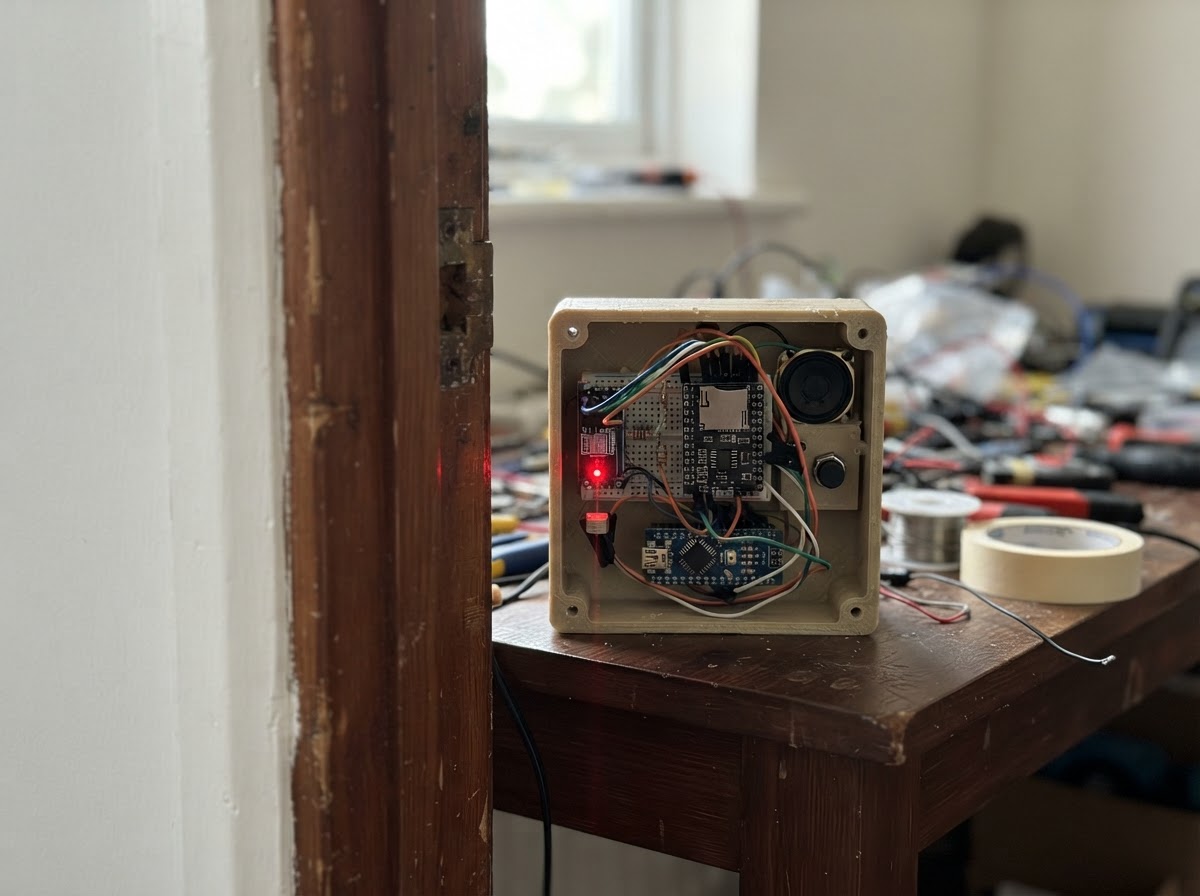
Build a loop timer system that uses a laser beam and light sensor to detect when a runner crosses the finish line. This Arduino-based timer combines a DFPlayer Mini audio module for sound feedback, a red laser module creating a light gate, and a photoresistor to sense beam interruption. The guide provides a complete wiring diagram, parts list, calibration procedure, and Arduino firmware with configurable timing parameters.
Assembly involves connecting the start button, laser module, and light sensor to form an optical gate, then integrating the DFPlayer Mini and speaker for audio announcements. The firmware handles debouncing, threshold calibration, and state management to accurately measure lap times. Customize sensitivity, lead times, and audio volume through serial commands before running your first timed loop.
Wiring diagram

Gather all the parts
Assemble it in 6 steps
1. Schakel alles uit en maak een gezamenlijke massa
Plaats de Arduino Uno, DFPlayer Mini, startknop, laser, LDR, weerstanden en luidspreker op een breadboard. Verbind alle GND-aansluitingen met de GND-rail van de Uno.
- Gebruik één GND-rail; zonder gedeelde massa werken de sensor en DFPlayer niet betrouwbaar.
- Voed dit project via de USB-aansluiting van de Uno.
- Sluit de voeding pas aan nadat alle bedrading is gecontroleerd.
2. Sluit de startknop aan
Verbind één aansluiting van de normaal-open startknop met Uno D2 en de andere aansluiting met GND. De firmware gebruikt de interne pull-upweerstand, dus er is geen externe knopweerstand nodig.
- Een druk op de knop maakt D2 tijdelijk met GND verbonden.
3. Bouw de laser-lichtsluis
Verbind de rode lasermodule met 5V en GND. Verbind één poot van de LDR met 5V en de andere met Uno A0. Verbind de 10 kΩ-weerstand tussen diezelfde A0/LDR-knoop en GND.
- Richt de laser precies op de LDR en scherm de LDR af met een kort zwart kokertje tegen omgevingslicht.
- De laserwaarde moet duidelijk dalen wanneer iemand de laser onderbreekt.
- Kijk nooit in de laserstraal en richt hem niet op ogen, verkeer of reflecterende oppervlakken. Gebruik uitsluitend een laagvermogen-lasermodule.
4. Sluit de DFPlayer en luidspreker aan
Verbind DFPlayer VCC met Uno 5V en DFPlayer GND met GND. Verbind DFPlayer TX met Uno D11. Verbind Uno D10 via de losse 1 kΩ-weerstand met DFPlayer RX. Verbind een 8 Ω-luidspreker uitsluitend tussen DFPlayer SPK1 en SPK2.
- Plaats de 1 kΩ-weerstand in serie: D10 → weerstand → DFPlayer RX.
- Voor geluid moet een microSD-kaart in de DFPlayer zitten met het startsignaal als 0001.mp3; 0002.mp3 is optioneel als finishgeluid.
- Verbind SPK1 of SPK2 nooit met GND; dit zijn de twee versterkte, zwevende luidsprekeruitgangen.
- Gebruik geen hoofdtelefoon op SPK1/SPK2.
5. Kalibreer vóór de eerste ronde
Flash de firmware met Schematik Deploy en open daarna src/timer_gui.py op je Linux-computer. Verbind de GUI met de Uno. Richt de laser op de LDR, zorg dat niets de straal onderbreekt en klik op ‘Kalibreer laser’. De gemeten lichtwaarde en de berekende finishdrempel verschijnen in de GUI en blijven bruikbaar na herstart.
- Herhaal kalibreren wanneer de laser, LDR of omgevingslicht verandert.
- Een kort zwart kokertje rond de LDR vermindert invloed van zon- en kamerlicht.
- Kalibreer alleen met een vrije laserstraal; anders ontstaat een te lage en onbetrouwbare finishdrempel.
6. Stel gevoeligheid en timing in
Pas in de GUI naar wens de drempel, het aantal vereiste donkere metingen, de startvertraging, blokkeertijd, resultaatduur, knop-ontdendering en DFPlayer-volume aan. Klik op ‘Pas alle instellingen toe en bewaar’. Iedere geldige waarde wordt direct en blijvend in het EEPROM-geheugen van de Uno opgeslagen.
- Verlaag ‘Finishdrempel (%)’ als de finish te gevoelig is voor omgevingslicht.
- Verhoog ‘Benodigde donkere metingen’ als korte storingen een valse finish geven.
- Gebruik ‘Herstel standaardwaarden’ in de GUI om terug te gaan naar veilige beginwaarden.
- Koppel USB los voordat u bedrading verplaatst.
Review all connections
1. Connections between "dfplayer_1" and "Arduino"
2. Connections between "dfplayer_rx_resistor_1" and "Arduino"
3. Connections between "start_button_1" and "Arduino"
4. Connections between "laser_1" and "Arduino"
5. Connections between "ldr_1" and "Arduino"
6. Connections between "ldr_resistor_1" and "Arduino"
Deploy the firmware
#include <Arduino.h>
#include <EEPROM.h>
#include <SoftwareSerial.h>
#include <DFRobotDFPlayerMini.h>


// Hoisted type definitions
enum TimerState { READY, STARTING, RUNNING, FINISHED };

struct TimerConfig {
  uint16_t magic;
  uint16_t debounceMs;
  uint16_t startLeadMs;
  uint16_t finishArmMs;
  uint16_t resultHoldMs;
  uint8_t darkSamples;
  uint8_t thresholdPercent;
  uint16_t minimumThreshold;
  uint8_t volume;
};


// Forward declarations
void setDefaults();
void saveConfig();
void loadConfig();
int readLightAverage(uint8_t samples);
void calculateThreshold();
void sendConfig();
void reportReady();
void calibrate();
bool setValue(const char *key, long value);
void processCommand();
bool startButtonPressed();
void beginStartSequence();
void beginRun();
void finishRun(int light);

const uint8_t START_BUTTON_PIN = 2;
const uint8_t DFPLAYER_TX_PIN = 10;
const uint8_t DFPLAYER_RX_PIN = 11;
const uint8_t LDR_PIN = A0;
const uint16_t CONFIG_MAGIC = 0x4C54;


TimerConfig config;
TimerState state = READY;
SoftwareSerial dfPlayerSerial(DFPLAYER_RX_PIN, DFPLAYER_TX_PIN);
DFRobotDFPlayerMini dfPlayer;
bool dfPlayerReady = false;
unsigned long stateChangedAt = 0, runStartedAt = 0, lastButtonChangeAt = 0;
bool lastButtonReading = HIGH, stableButtonState = HIGH;
int beamValue = 0, finishThreshold = 0;
uint8_t darkSampleCount = 0;

void setDefaults() {
  config.magic = CONFIG_MAGIC;
  config.debounceMs = 35;
  config.startLeadMs = 1000;
  config.finishArmMs = 250;
  config.resultHoldMs = 2500;
  config.darkSamples = 3;
  config.thresholdPercent = 70;
  config.minimumThreshold = 20;
  config.volume = 22;
}

void saveConfig() { EEPROM.put(0, config); }

void loadConfig() {
  EEPROM.get(0, config);
  if (config.magic != CONFIG_MAGIC) { setDefaults(); saveConfig(); }
}

int readLightAverage(uint8_t samples) {
  long total = 0;
  for (uint8_t i = 0; i < samples; ++i) { total += analogRead(LDR_PIN); delay(2); }
  return total / samples;
}

void calculateThreshold() {
  finishThreshold = (beamValue * (long)config.thresholdPercent) / 100L;
  if (finishThreshold < config.minimumThreshold) finishThreshold = config.minimumThreshold;
  if (finishThreshold > 1023) finishThreshold = 1023;
}

void sendConfig() {
  Serial.print(F("EVENT,CONFIG,"));
  Serial.print(config.debounceMs); Serial.print(',');
  Serial.print(config.startLeadMs); Serial.print(',');
  Serial.print(config.finishArmMs); Serial.print(',');
  Serial.print(config.resultHoldMs); Serial.print(',');
  Serial.print(config.darkSamples); Serial.print(',');
  Serial.print(config.thresholdPercent); Serial.print(',');
  Serial.print(config.minimumThreshold); Serial.print(',');
  Serial.println(config.volume);
}

void reportReady() {
  Serial.print(F("EVENT,READY,")); Serial.print(beamValue); Serial.print(','); Serial.println(finishThreshold);
}

void calibrate() {
  beamValue = readLightAverage(40);
  calculateThreshold();
  saveConfig();
  Serial.print(F("EVENT,CALIBRATED,")); Serial.print(beamValue); Serial.print(','); Serial.println(finishThreshold);
  reportReady();
}

bool setValue(const char *key, long value) {
  if (!strcmp(key, "debounce") && value >= 5 && value <= 500) config.debounceMs = value;
  else if (!strcmp(key, "lead") && value >= 0 && value <= 10000) config.startLeadMs = value;
  else if (!strcmp(key, "arm") && value >= 0 && value <= 10000) config.finishArmMs = value;
  else if (!strcmp(key, "hold") && value >= 0 && value <= 20000) config.resultHoldMs = value;
  else if (!strcmp(key, "samples") && value >= 1 && value <= 20) config.darkSamples = value;
  else if (!strcmp(key, "percent") && value >= 1 && value <= 99) config.thresholdPercent = value;
  else if (!strcmp(key, "minimum") && value >= 0 && value <= 1023) config.minimumThreshold = value;
  else if (!strcmp(key, "volume") && value >= 0 && value <= 30) { config.volume = value; if (dfPlayerReady) dfPlayer.volume(config.volume); }
  else return false;
  calculateThreshold();
  saveConfig();
  return true;
}

void processCommand() {
  static char line[48];
  static uint8_t length = 0;
  while (Serial.available()) {
    char c = Serial.read();
    if (c == '\r') continue;
    if (c == '\n') {
      line[length] = 0;
      if (!strcmp(line, "GET_CONFIG")) sendConfig();
      else if (!strcmp(line, "CALIBRATE") && state == READY) calibrate();
      else if (!strcmp(line, "DEFAULTS") && state == READY) { setDefaults(); saveConfig(); calculateThreshold(); sendConfig(); }
      else if (!strncmp(line, "SET,", 4)) {
        char *key = line + 4;
        char *comma = strchr(key, ',');
        if (comma) { *comma = 0; if (setValue(key, atol(comma + 1))) { Serial.println(F("EVENT,SAVED")); sendConfig(); } else Serial.println(F("EVENT,ERROR,ongeldige waarde")); }
      }
      length = 0;
    } else if (length < sizeof(line) - 1) line[length++] = c;
  }
}

bool startButtonPressed() {
  bool reading = digitalRead(START_BUTTON_PIN);
  if (reading != lastButtonReading) { lastButtonChangeAt = millis(); lastButtonReading = reading; }
  if (millis() - lastButtonChangeAt >= config.debounceMs && reading != stableButtonState) { stableButtonState = reading; return stableButtonState == LOW; }
  return false;
}

void beginStartSequence() {
  beamValue = readLightAverage(20); calculateThreshold(); darkSampleCount = 0;
  if (dfPlayerReady) dfPlayer.play(1);
  state = STARTING; stateChangedAt = millis();
  Serial.print(F("EVENT,COUNTDOWN,")); Serial.print(beamValue); Serial.print(','); Serial.println(finishThreshold);
}

void beginRun() { state = RUNNING; runStartedAt = millis(); darkSampleCount = 0; Serial.println(F("EVENT,START")); }

void finishRun(int light) {
  unsigned long elapsed = millis() - runStartedAt;
  state = FINISHED; stateChangedAt = millis();
  Serial.print(F("EVENT,RESULT,")); Serial.print(elapsed); Serial.print(','); Serial.print(light); Serial.print(','); Serial.println(finishThreshold);
  if (dfPlayerReady) dfPlayer.play(2);
}

void setup() {
  pinMode(START_BUTTON_PIN, INPUT_PULLUP);
  Serial.begin(115200); loadConfig();
  dfPlayerSerial.begin(9600);
  if (dfPlayer.begin(dfPlayerSerial, true, true)) { dfPlayerReady = true; dfPlayer.volume(config.volume); Serial.println(F("EVENT,AUDIO_OK")); }
  else Serial.println(F("EVENT,AUDIO_NOT_FOUND"));
  calibrate(); sendConfig();
}

void loop() {
  processCommand();
  if (state == READY) { if (startButtonPressed()) beginStartSequence(); }
  else if (state == STARTING) { if (millis() - stateChangedAt >= config.startLeadMs) beginRun(); }
  else if (state == RUNNING) {
    if (millis() - runStartedAt >= config.finishArmMs) {
      int light = analogRead(LDR_PIN);
      if (light < finishThreshold) { if (++darkSampleCount >= config.darkSamples) finishRun(light); }
      else darkSampleCount = 0;
    }
  } else if (millis() - stateChangedAt >= config.resultHoldMs) { calibrate(); state = READY; }
}
Remix this project
Make it yours in one click
Open a full copy of this project in your own Schematik workspace — diagram, code, parts, and assembly steps included. Swap the sensor, add features, or redesign the whole thing with AI. The author's original stays untouched.
Related projects
Solar Clap-Controlled Follow-Me Home
Arduino · October 19, 2026Jella Mae Lhyzelle Rodillo
Solar Light Tracker
Arduino · October 19, 2026kelleyriverarodriguez1969
RC Kontrollü Balıkçı Gemisi
Arduino · October 19, 2026hasan azmi hacıfettahoğlu