Community project
NFC POS Payment Network
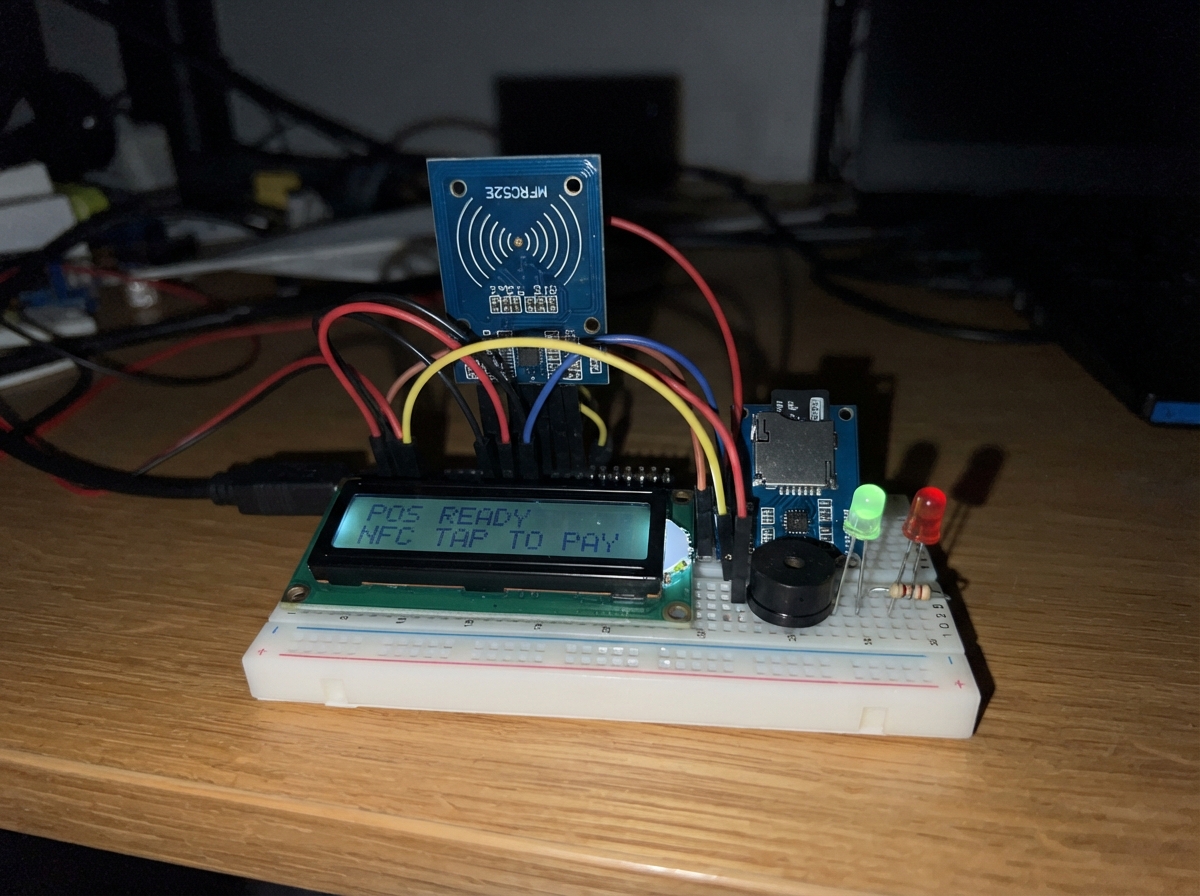
Build a networked NFC payment terminal that reads card credentials via RFID, validates transactions against a local user database, and logs all activity to persistent storage. This ESP32-based point-of-sale system operates as a WiFi access point, allowing client devices to submit payment requests over HTTP while the terminal manages user accounts and transaction history on a MicroSD card.
This guide provides a complete wiring diagram, parts list, and step-by-step assembly instructions to connect the MFRC522 NFC reader, MicroSD module, LCD status display, buzzer, and LED indicators. You'll also get the full Arduino firmware with web server endpoints, card validation logic, and local data storage—everything needed to deploy a standalone payment network without external internet dependency.
Wiring diagram

Gather all the parts
Assemble it in 7 steps
1. Prepare the DevKit and memory card
Insert a formatted MicroSD card into storage_sd before applying power. Place the ESP32 DevKit v1 where it has a clear Wi-Fi path to the client terminals.
- The server creates users.csv and transactions.csv on the card automatically the first time it starts.
- Do not remove the MicroSD card while the server has power; interrupting a write can damage the stored balance records.
2. Wire the NFC reader
Connect nfc_reader VCC to 3V3 (power), GND to GND (ground), SCK to GPIO18 (clock), MOSI to GPIO23 (data to reader), MISO to GPIO19 (data from reader), SDA/SS to GPIO4 (reader-select signal), and RST to GPIO27 (reset signal).
- The RC522 uses 3.3 V only; keep every RC522 lead short.
- Connecting RC522 VCC to 5 V can damage its radio chip or the ESP32.
3. Wire the MicroSD storage module
Connect storage_sd VCC to 3V3 (power), GND to GND (ground), SCK to GPIO18 (shared clock), MOSI to GPIO23 (shared data to card), MISO to GPIO19 (shared data from card), and CS to GPIO13 (this card's select signal).
- The NFC reader and MicroSD module share the three SPI data wires; GPIO4 and GPIO13 select the module that should answer.
- Use a MicroSD module that accepts 3.3 V logic. A module that sends 5 V from its MISO pin can damage the ESP32.
4. Wire the status screen
Connect status_lcd VCC to 3V3 (power), GND to GND (ground), SDA to GPIO21 (display data), and SCL to GPIO22 (display clock).
- If the screen lights but shows no letters, turn the small contrast screw on its backpack slowly.
- Use an LCD backpack that works at 3.3 V, or put a two-way level converter on SDA and SCL. A 5 V signal sent directly into GPIO21 or GPIO22 can damage the ESP32.
5. Wire the sound and success light
Connect status_buzzer GND to GND (ground) and SIGNAL to GPIO25 (sound signal). Connect green_led cathode, the short leg beside the flat edge, to GND (ground). Connect green_led anode, the long leg, to green_led_resistor P1; connect green_led_resistor P2 to GPIO26 (success-light signal).
- The resistor may point either way; it limits current so the green LED is safe.
- Do not connect the green LED directly from GPIO26 to GND without its 220 Ω resistor; too much current can damage the LED or board pin.
6. Wire the error light
Connect red_led cathode, the short leg beside the flat edge, to GND (ground). Connect red_led anode, the long leg, to red_led_resistor P1; connect red_led_resistor P2 to GPIO32 (error-light signal).
- The red LED resistor may point either way.
- Make sure the LED long and short legs are not swapped; a reversed LED will not light.
7. Power and test the server
Recheck that every module shares the ESP32 GND, then power the ESP32 DevKit v1 from its USB port. The screen should show Server ready and 192.168.4.1. Touch an NTAG213 card to nfc_reader to show its UID and current balance.
- A new card first reports as unknown. A future client can add credit with POST http://192.168.4.1/api/topup and the X-API-Key value built into the firmware.
- The supplied API key and Wi-Fi password are development defaults. Change both values in the firmware before using the system for real money or sensitive account information.
Review all connections
1. Connections between "nfc_reader" and "ESP32"
2. Connections between "storage_sd" and "ESP32"
3. Connections between "status_lcd" and "ESP32"
4. Connections between "status_buzzer" and "ESP32"
5. Connections between "green_led" and "ESP32"
6. Connections between "green_led_resistor" and "ESP32"
7. Connections between "red_led" and "ESP32"
8. Connections between "red_led_resistor" and "ESP32"
Deploy the firmware
#include <Arduino.h>
#include <WiFi.h>
#include <WebServer.h>
#include <SPI.h>
#include <SD.h>
#include <Wire.h>
#include <MFRC522.h>
#include <LiquidCrystal_I2C.h>


// Forward declarations
void showScreen(const String &line1, const String &line2);
void beepSuccess();
void beepFailure();
String jsonValue(const String &json, const String &key);

const char *AP_SSID = "NFC-POS-Server";
const char *AP_PASSWORD = "posserver2026"; // Change before real financial use.
const char *API_KEY = "change-this-local-api-key"; // Every client must send this in X-API-Key.

// ESP32 DevKit v1 external SPI: SCK=18, MISO=19, MOSI=23.
constexpr uint8_t RC522_SS_PIN = 4;
constexpr uint8_t RC522_RST_PIN = 27;
constexpr uint8_t SD_CS_PIN = 13;
constexpr uint8_t LCD_SDA_PIN = 21;
constexpr uint8_t LCD_SCL_PIN = 22;
constexpr uint8_t BUZZER_PIN = 25;
constexpr uint8_t GREEN_LED_PIN = 26;
constexpr uint8_t RED_LED_PIN = 32;

const char *USERS_FILE = "/users.csv";
const char *USERS_TEMP_FILE = "/users.tmp";
const char *TRANSACTIONS_FILE = "/transactions.csv";

WebServer server(80);
MFRC522 rfid(RC522_SS_PIN, RC522_RST_PIN);
LiquidCrystal_I2C lcd(0x27, 16, 2);
bool sdReady = false;
String shownLine1;
String shownLine2;

void showScreen(const String &line1, const String &line2) {
  if (line1 == shownLine1 && line2 == shownLine2) return;
  shownLine1 = line1;
  shownLine2 = line2;
  lcd.clear();
  lcd.setCursor(0, 0);
  lcd.print(line1.substring(0, 16));
  lcd.setCursor(0, 1);
  lcd.print(line2.substring(0, 16));
}

void beepSuccess() {
  digitalWrite(RED_LED_PIN, LOW);
  digitalWrite(GREEN_LED_PIN, HIGH);
  digitalWrite(BUZZER_PIN, HIGH);
  delay(200);
  digitalWrite(BUZZER_PIN, LOW);
  digitalWrite(GREEN_LED_PIN, LOW);
}

void beepFailure() {
  digitalWrite(GREEN_LED_PIN, LOW);
  digitalWrite(RED_LED_PIN, HIGH);
  for (int i = 0; i < 3; ++i) {
    digitalWrite(BUZZER_PIN, HIGH);
    delay(90);
    digitalWrite(BUZZER_PIN, LOW);
    delay(90);
  }
  digitalWrite(RED_LED_PIN, LOW);
}

String jsonValue(const String &json, const String &key) {
  String marker = "\"" + key + "\"";
  int keyPos = json.indexOf(marker);
  if (keyPos < 0) return "";
  int colon = json.indexOf(':', keyPos + marker.length());
  if (colon < 0) return "";
  int start = colon + 1;
  while (start < json.length() && (json[start] == ' ' || json[start] == '\t' || json[start] == '\"')) start++;
  int end = start;
  while (end < json.length() && json[end] != '\"' && json[end] != ',' && json[end] != '}' && json[end] != '\r' && json[end] != '\n') end++;
  return json.substring(start, end);
}

bool validUid(const String &uid) {
  if (uid.length() < 8 || uid.length() > 20) return false;
  for (size_t i = 0; i < uid.length(); i++) {
    if (!isxdigit(uid[i])) return false;
  }
  return true;
}

bool findBalance(const String &uid, long &balance) {
  if (!sdReady || !SD.exists(USERS_FILE)) return false;
  File file = SD.open(USERS_FILE, FILE_READ);
  if (!file) return false;
  bool found = false;
  while (file.available()) {
    String line = file.readStringUntil('\n');
    line.trim();
    int comma = line.indexOf(',');
    if (comma > 0 && line.substring(0, comma) == uid) {
      balance = line.substring(comma + 1).toInt();
      found = true;
      break;
    }
  }
  file.close();
  return found;
}

bool saveBalance(const String &uid, long balance) {
  if (!sdReady || balance < 0) return false;
  File source = SD.open(USERS_FILE, FILE_READ);
  File temp = SD.open(USERS_TEMP_FILE, FILE_WRITE);
  if (!temp) {
    if (source) source.close();
    return false;
  }
  bool replaced = false;
  if (source) {
    while (source.available()) {
      String line = source.readStringUntil('\n');
      line.trim();
      int comma = line.indexOf(',');
      if (comma > 0 && line.substring(0, comma) == uid) {
        temp.printf("%s,%ld\n", uid.c_str(), balance);
        replaced = true;
      } else if (line.length() > 0) {
        temp.println(line);
      }
    }
    source.close();
  }
  if (!replaced) temp.printf("%s,%ld\n", uid.c_str(), balance);
  temp.close();
  SD.remove(USERS_FILE);
#if defined(ESP32)
  // ESP32 SD supports an atomic-style replacement on the real server.
  return SD.rename(USERS_TEMP_FILE, USERS_FILE);
#else
  // The browser's SD compatibility layer has no rename(). Copy the completed
  // temporary file instead; this branch is never used by the ESP32 firmware.
  File completed = SD.open(USERS_TEMP_FILE, FILE_READ);
  File destination = SD.open(USERS_FILE, FILE_WRITE);
  if (!completed || !destination) {
    if (completed) completed.close();
    if (destination) destination.close();
    return false;
  }
  while (completed.available()) destination.write(completed.read());
  completed.close();
  destination.close();
  SD.remove(USERS_TEMP_FILE);
  return true;
#endif
}

void logTransaction(const String &type, const String &uid, long amount, long newBalance, const String &terminal) {
  if (!sdReady) return;
  // FILE_WRITE appends on the ESP32 SD library and is also available in the browser simulator.
  File logFile = SD.open(TRANSACTIONS_FILE, FILE_WRITE);
  if (!logFile) return;
  logFile.printf("%lu,%s,%s,%ld,%ld,%s\n", static_cast<unsigned long>(millis()), type.c_str(), uid.c_str(), amount, newBalance, terminal.c_str());
  logFile.close();
}

void sendJson(int code, const String &body) {
  server.sendHeader("Content-Type", "application/json");
  server.send(code, "application/json", body);
}

bool apiAuthorized() {
  if (!server.hasHeader("X-API-Key") || server.header("X-API-Key") != API_KEY) {
    sendJson(401, "{\"status\":\"error\",\"reason\":\"unauthorized\"}");
    return false;
  }
  return true;
}

void handleBalance() {
  if (!apiAuthorized()) return;
  String uid = server.arg("uid");
  uid.toUpperCase();
  long balance = 0;
  if (!validUid(uid)) {
    sendJson(400, "{\"status\":\"error\",\"reason\":\"invalid_uid\"}");
  } else if (!findBalance(uid, balance)) {
    sendJson(404, "{\"status\":\"error\",\"reason\":\"unknown_card\"}");
  } else {
    sendJson(200, "{\"status\":\"success\",\"uid\":\"" + uid + "\",\"balance\":" + String(balance) + "}");
  }
}

void handleTopup() {
  if (!apiAuthorized()) return;
  String body = server.arg("plain");
  String uid = jsonValue(body, "uid");
  uid.toUpperCase();
  long amount = jsonValue(body, "amount").toInt();
  String terminal = jsonValue(body, "terminal");
  if (!validUid(uid) || amount <= 0 || amount > 100000) {
    beepFailure();
    sendJson(400, "{\"status\":\"error\",\"reason\":\"invalid_request\"}");
    return;
  }
  long balance = 0;
  findBalance(uid, balance);
  long newBalance = balance + amount;
  if (!saveBalance(uid, newBalance)) {
    beepFailure();
    sendJson(500, "{\"status\":\"error\",\"reason\":\"storage_failure\"}");
    return;
  }
  logTransaction("topup", uid, amount, newBalance, terminal);
  beepSuccess();
  showScreen("Topup OK", "Bal " + String(newBalance) + " THB");
  sendJson(200, "{\"status\":\"success\",\"new_balance\":" + String(newBalance) + "}");
}

void handlePay() {
  if (!apiAuthorized()) return;
  String body = server.arg("plain");
  String uid = jsonValue(body, "uid");
  uid.toUpperCase();
  long amount = jsonValue(body, "amount").toInt();
  String terminal = jsonValue(body, "terminal");
  long balance = 0;
  if (!validUid(uid) || amount <= 0 || amount > 100000) {
    beepFailure();
    sendJson(400, "{\"status\":\"error\",\"reason\":\"invalid_request\"}");
  } else if (!findBalance(uid, balance)) {
    beepFailure();
    sendJson(404, "{\"status\":\"declined\",\"reason\":\"unknown_card\"}");
  } else if (balance < amount) {
    beepFailure();
    sendJson(200, "{\"status\":\"declined\",\"reason\":\"insufficient_funds\",\"balance\":" + String(balance) + "}");
  } else {
    long newBalance = balance - amount;
    if (!saveBalance(uid, newBalance)) {
      beepFailure();
      sendJson(500, "{\"status\":\"error\",\"reason\":\"storage_failure\"}");
      return;
    }
    logTransaction("pay", uid, amount, newBalance, terminal);
    beepSuccess();
    showScreen("Payment OK", "Bal " + String(newBalance) + " THB");
    sendJson(200, "{\"status\":\"approved\",\"new_balance\":" + String(newBalance) + "}");
  }
}

void handleStatus() {
  String json = "{\"status\":\"online\",\"ip\":\"" + WiFi.softAPIP().toString() + "\",\"storage\":";
  json += sdReady ? "\"ready\"}" : "\"unavailable\"}";
  sendJson(200, json);
}

void readPresentedCard() {
  if (!rfid.PICC_IsNewCardPresent() || !rfid.PICC_ReadCardSerial()) return;
  String uid;
  for (byte i = 0; i < rfid.uid.size; i++) {
    if (rfid.uid.uidByte[i] < 0x10) uid += "0";
    uid += String(rfid.uid.uidByte[i], HEX);
  }
  uid.toUpperCase();
  long balance = 0;
  if (findBalance(uid, balance)) {
    beepSuccess();
    showScreen("Card " + uid.substring(0, 6), "Bal " + String(balance) + " THB");
  } else {
    beepFailure();
    showScreen("New/unknown card", uid.substring(0, 16));
  }
  rfid.PICC_HaltA();
  rfid.PCD_StopCrypto1();
}

void setup() {
  Serial.begin(115200);
  pinMode(BUZZER_PIN, OUTPUT);
  pinMode(GREEN_LED_PIN, OUTPUT);
  pinMode(RED_LED_PIN, OUTPUT);
  digitalWrite(BUZZER_PIN, LOW);
  digitalWrite(GREEN_LED_PIN, LOW);
  digitalWrite(RED_LED_PIN, LOW);

  Wire.begin(LCD_SDA_PIN, LCD_SCL_PIN);
  lcd.init();
  lcd.backlight();
  showScreen("NFC POS Server", "Starting...");

  SPI.begin(18, 19, 23, -1);
  rfid.PCD_Init();
  sdReady = SD.begin(SD_CS_PIN);
  if (sdReady && !SD.exists(USERS_FILE)) {
    File users = SD.open(USERS_FILE, FILE_WRITE);
    if (users) users.close();
  }
  if (sdReady && !SD.exists(TRANSACTIONS_FILE)) {
    File transactions = SD.open(TRANSACTIONS_FILE, FILE_WRITE);
    if (transactions) {
      transactions.println("uptime_ms,type,uid,amount,new_balance,terminal");
      transactions.close();
    }
  }

  WiFi.mode(WIFI_AP);
  WiFi.softAP(AP_SSID, AP_PASSWORD);
  const char *headerKeys[] = {"X-API-Key"};
  server.collectHeaders(headerKeys, 1);
  server.on("/api/status", HTTP_GET, handleStatus);
  server.on("/api/balance", HTTP_GET, handleBalance);
  server.on("/api/topup", HTTP_POST, handleTopup);
  server.on("/api/pay", HTTP_POST, handlePay);
  server.onNotFound([]() { sendJson(404, "{\"status\":\"error\",\"reason\":\"not_found\"}"); });
  server.begin();

  showScreen(sdReady ? "Server ready" : "SD card error", WiFi.softAPIP().toString());
  Serial.println("NFC POS Server ready at " + WiFi.softAPIP().toString());
}

void loop() {
  server.handleClient();
  readPresentedCard();
}
Remix this project
Make it yours in one click
Open a full copy of this project in your own Schematik workspace — diagram, code, parts, and assembly steps included. Swap the sensor, add features, or redesign the whole thing with AI. The author's original stays untouched.