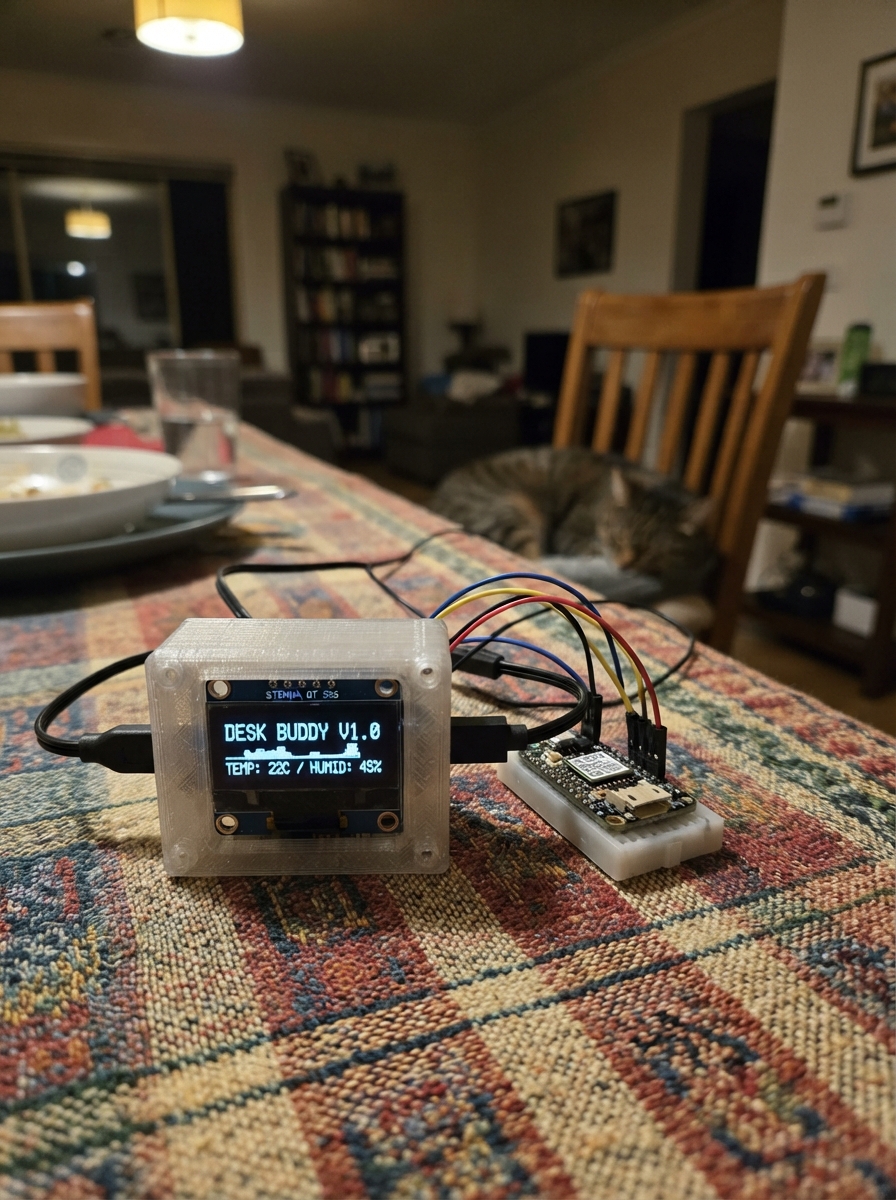
OLED Desk Buddy is a small Arduino-powered display that sits on your desk and delivers a fresh joke every time you press a button. Built around an Arduino Uno and a compact 0.96-inch OLED screen, this project combines simple hardware with charming firmware to create an entertaining desk companion.
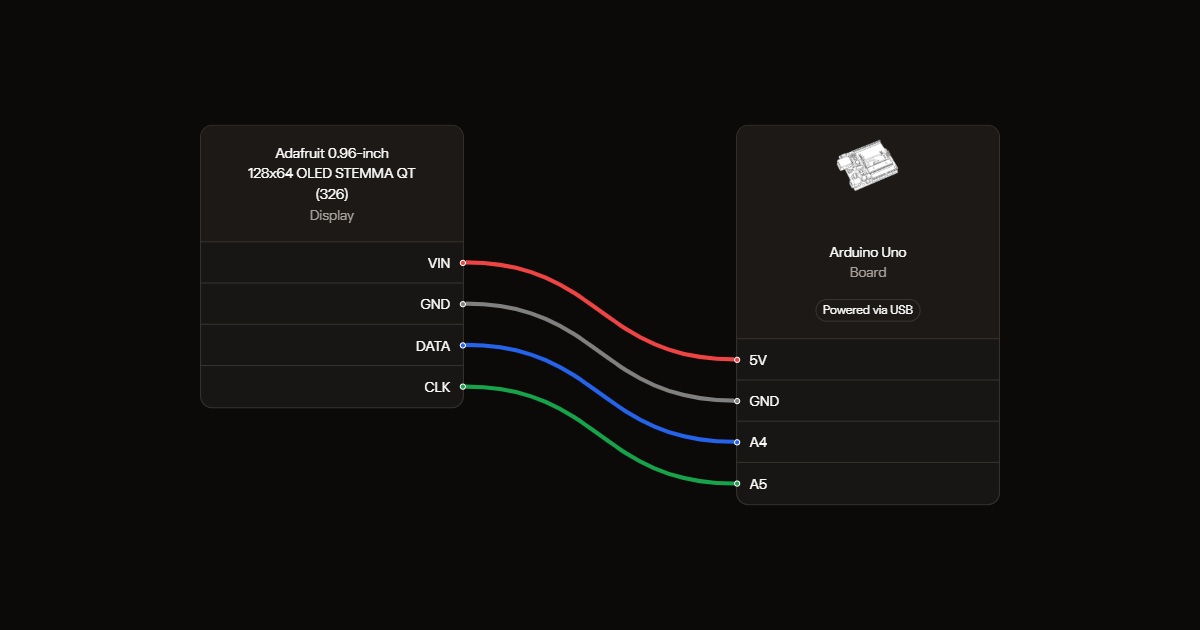
This guide provides everything needed to build and deploy the project: a wiring diagram showing how to connect the OLED display via I2C, a complete parts list, the Arduino sketch with 20 pre-loaded jokes stored efficiently in flash memory, and step-by-step assembly instructions. The straightforward four-wire connection makes this an ideal first project for learning about displays and microcontroller programming.
Wiring diagram
Gather all the parts
Assemble it in 3 steps
1. Use the compatible replacement OLED
Unplug USB. Remove the external BSS138 module and replace the generic OLED with Adafruit product 326, the current 0.96-inch 128x64 STEMMA QT version. Leave its default I2C jumpers unchanged. Use soldered header pins with breadboard jumper wires.
- These direct connections are for Adafruit 326 with built-in 5 V signal protection, not an unverified generic OLED.
2. Connect four screen wires directly
Connect OLED Vin to Uno 5V (power), GND to GND (ground), Data to A4 (data), and Clk to A5 (clock). Leave other OLED header pins disconnected; this revision resets automatically. Follow printed labels rather than pin positions.
3. Deploy your desk buddy
Check the wires, connect a USB-B data cable, and press Deploy. Keep exposed pins clear of metal objects.
Review all connections
1. Connections between "oled" and "Arduino"
Deploy the firmware
#include <Arduino.h>
#include <Wire.h>
#include <Adafruit_GFX.h>
#include <Adafruit_SSD1306.h>

Adafruit_SSD1306 screen(128, 64, &Wire, -1);
bool ready = false;
// Keep joke text in flash so the Uno has room for the screen buffer.
const char j0[] PROGMEM = "Why did the robot\ngo on holiday?";
const char j1[] PROGMEM = "It needed to\nrecharge!";
const char j2[] PROGMEM = "What do you call\na sleeping robot?";
const char j3[] PROGMEM = "A robo-nap!";
const char j4[] PROGMEM = "Why was the\ncomputer cold?";
const char j5[] PROGMEM = "It left its\nWindows open!";
const char j6[] PROGMEM = "What is a robot's\nfavorite snack?";
const char j7[] PROGMEM = "Computer chips!";
const char j8[] PROGMEM = "Why did the cookie\nvisit the doctor?";
const char j9[] PROGMEM = "It felt crummy!";
const char j10[] PROGMEM = "Why did the banana\ngo to the doctor?";
const char j11[] PROGMEM = "It was not\npeeling well!";
const char j12[] PROGMEM = "What do clouds wear\nunder their clothes?";
const char j13[] PROGMEM = "Thunderwear!";
const char j14[] PROGMEM = "What do you call\na bear with no teeth?";
const char j15[] PROGMEM = "A gummy bear!";
const char j16[] PROGMEM = "Why did the bicycle\nfall over?";
const char j17[] PROGMEM = "It was two-tired!";
const char j18[] PROGMEM = "How does the ocean\nsay hello?";
const char j19[] PROGMEM = "It waves!";
const char *const jokes[] PROGMEM = {j0,j1,j2,j3,j4,j5,j6,j7,j8,j9,
                                      j10,j11,j12,j13,j14,j15,j16,j17,j18,j19};
int lastPose = -1, lastPage = -1;
bool lastBlink = false;

void setup() {
  Serial.begin(115200);
  // Uno uses fixed I2C pins: A4 (SDA), A5 (SCL).
  Wire.begin();
  Wire.beginTransmission(0x3C);
  uint8_t address = Wire.endTransmission() == 0 ? 0x3C : 0x3D;
  Wire.beginTransmission(address);
  if (Wire.endTransmission() != 0) {
    Serial.println(F("OLED not found. Check Vin to 5V, GND, Data to A4 and Clk to A5."));
    return;
  }
  ready = screen.begin(SSD1306_SWITCHCAPVCC, address, true, false);
  if (!ready) { Serial.println(F("OLED initialization failed.")); return; }
  screen.dim(true);
  screen.setTextSize(1);
  screen.setTextColor(SSD1306_WHITE);
  screen.setTextWrap(false);
}

void loop() {
  if (!ready) { delay(100); return; }
  uint32_t now = millis();
  // Repeat: joke setup (6s), punchline (6s), kindness (6s), quiet animations with normal-face breaks (42s).
  uint8_t joke = (now / 60000UL) % 10;
  uint32_t elapsed = now % 60000UL;
  uint8_t phase = elapsed < 6000UL ? 1 : elapsed < 12000UL ? 2 : elapsed < 18000UL ? 3 : 0;
  int page = joke * 4 + phase;
  uint32_t quietTime = phase == 0 ? elapsed - 18000UL : 0;
  // Six seconds each: normal, wave, normal, sleep, normal, angry, normal.
  uint8_t slot = quietTime / 6000UL;
  uint8_t animation = slot == 1 ? 1 : slot == 3 ? 2 : slot == 5 ? 3 : 0;
  uint8_t frame = (quietTime / 350UL) % 4;
  // Include only visible changes in the redraw key.
  int pose = phase == 0 ? animation * 4 + frame : 0;
  bool blink = phase == 0 && now % 4300UL < 160;
  if (pose == lastPose && page == lastPage && blink == lastBlink) {
    delay(20); return;
  }
  lastPose = pose; lastPage = page; lastBlink = blink;
  screen.clearDisplay();
  if (phase != 0) {
    if (phase == 3) {
      // Compact face leaves two full text lines underneath.
      screen.fillRoundRect(32, 1, 22, 23, 7, SSD1306_WHITE);
      screen.fillRoundRect(74, 1, 22, 23, 7, SSD1306_WHITE);
      screen.drawLine(54, 27, 59, 31, SSD1306_WHITE);
      screen.drawLine(59, 31, 69, 31, SSD1306_WHITE);
      screen.drawLine(69, 31, 74, 27, SSD1306_WHITE);
      screen.setCursor(0, 44);
      switch (joke) {
        case 0: screen.print(F("You make the world\na little brighter!")); break;
        case 1: screen.print(F("Small steps count.\nYou are doing great!")); break;
        case 2: screen.print(F("You deserve kindness\nand a lovely day!")); break;
        case 3: screen.print(F("It is okay to rest.\nYou matter!")); break;
        case 4: screen.print(F("Thanks for being you.\nKeep shining!")); break;
        case 5: screen.print(F("Your ideas matter.\nStay curious!")); break;
        case 6: screen.print(F("You bring good things\nto this world!")); break;
        case 7: screen.print(F("I am glad you are\nhere today!")); break;
        case 8: screen.print(F("You can be proud\nof your progress!")); break;
        default: screen.print(F("You are one of a kind\nand that is lovely!")); break;
      }
    } else {
      screen.setCursor(0, 0);
      screen.print(phase == 1 ? F("JOKE TIME!") : F("HA HA!"));
      screen.drawLine(0, 12, 127, 12, SSD1306_WHITE);
      screen.setCursor(0, 24);
      char text[64];
      strcpy_P(text, (PGM_P)pgm_read_ptr(&jokes[joke * 2 + phase - 1]));
      screen.print(text);
    }
  } else {
    int offset = animation == 0 ? (frame == 1 ? -5 : frame == 3 ? 5 : 0) : 0;
    if (animation == 2) {
      // Sleepy eyelids gently bob; a small sleep bubble grows and shrinks.
      int bob = frame == 1 || frame == 2 ? 1 : 0;
      for (int eye = 0; eye < 2; ++eye) {
        int x = eye == 0 ? 32 : 74;
        screen.drawLine(x, 24 + bob, x + 7, 28 + bob, SSD1306_WHITE);
        screen.drawLine(x + 7, 28 + bob, x + 15, 28 + bob, SSD1306_WHITE);
        screen.drawLine(x + 15, 28 + bob, x + 22, 24 + bob, SSD1306_WHITE);
      }
      screen.drawCircle(64, 43, 3 + (frame % 2), SSD1306_WHITE);
      screen.drawCircle(105, 12, 2 + frame, SSD1306_WHITE);
    } else {
      for (int eye = 0; eye < 2; ++eye) {
        int x = eye == 0 ? 32 : 74;
        if (blink) screen.fillRoundRect(x + offset, 22, 22, 3, 1, SSD1306_WHITE);
        else screen.fillRoundRect(x + offset, 10, 22, 27, 7, SSD1306_WHITE);
      }
      if (animation == 3) {
        // Slanted brows and a little frown: pretend grumpiness.
        screen.fillTriangle(30, 8, 56, 8, 56, 22, SSD1306_BLACK);
        screen.fillTriangle(72, 8, 98, 8, 72, 22, SSD1306_BLACK);
        screen.drawLine(54, 46, 60, 41, SSD1306_WHITE);
        screen.drawLine(60, 41, 68, 41, SSD1306_WHITE);
        screen.drawLine(68, 41, 74, 46, SSD1306_WHITE);
        int puff = frame % 2;
        screen.drawLine(108, 20, 113 + puff, 15, SSD1306_WHITE);
        screen.drawLine(108, 20, 113 + puff, 25, SSD1306_WHITE);
      } else {
        screen.drawLine(54 + offset, 39, 59 + offset, 43, SSD1306_WHITE);
        screen.drawLine(59 + offset, 43, 69 + offset, 43, SSD1306_WHITE);
        screen.drawLine(69 + offset, 43, 74 + offset, 39, SSD1306_WHITE);
        if (animation == 1) {
          // Raised arm and open hand swing side to side.
          int handX = 111 + (frame == 1 ? -4 : frame == 3 ? 4 : 0);
          screen.drawLine(95, 53, 104, 43, SSD1306_WHITE);
          screen.drawLine(104, 43, handX, 30, SSD1306_WHITE);
          screen.drawCircle(handX, 27, 4, SSD1306_WHITE);
          screen.drawLine(handX - 3, 24, handX - 5, 19, SSD1306_WHITE);
          screen.drawLine(handX, 23, handX, 17, SSD1306_WHITE);
          screen.drawLine(handX + 3, 24, handX + 5, 19, SSD1306_WHITE);
        }
      }
    }
    // Quiet time: face only, no text.
  }
  screen.display();
}
Remix this project
Make it yours in one click
Open a full copy of this project in your own Schematik workspace, diagram, code, parts, and assembly steps included. Swap the sensor, add features, or redesign the whole thing with AI. The author's original stays untouched.