Community project
Pixel-Style Mini OS
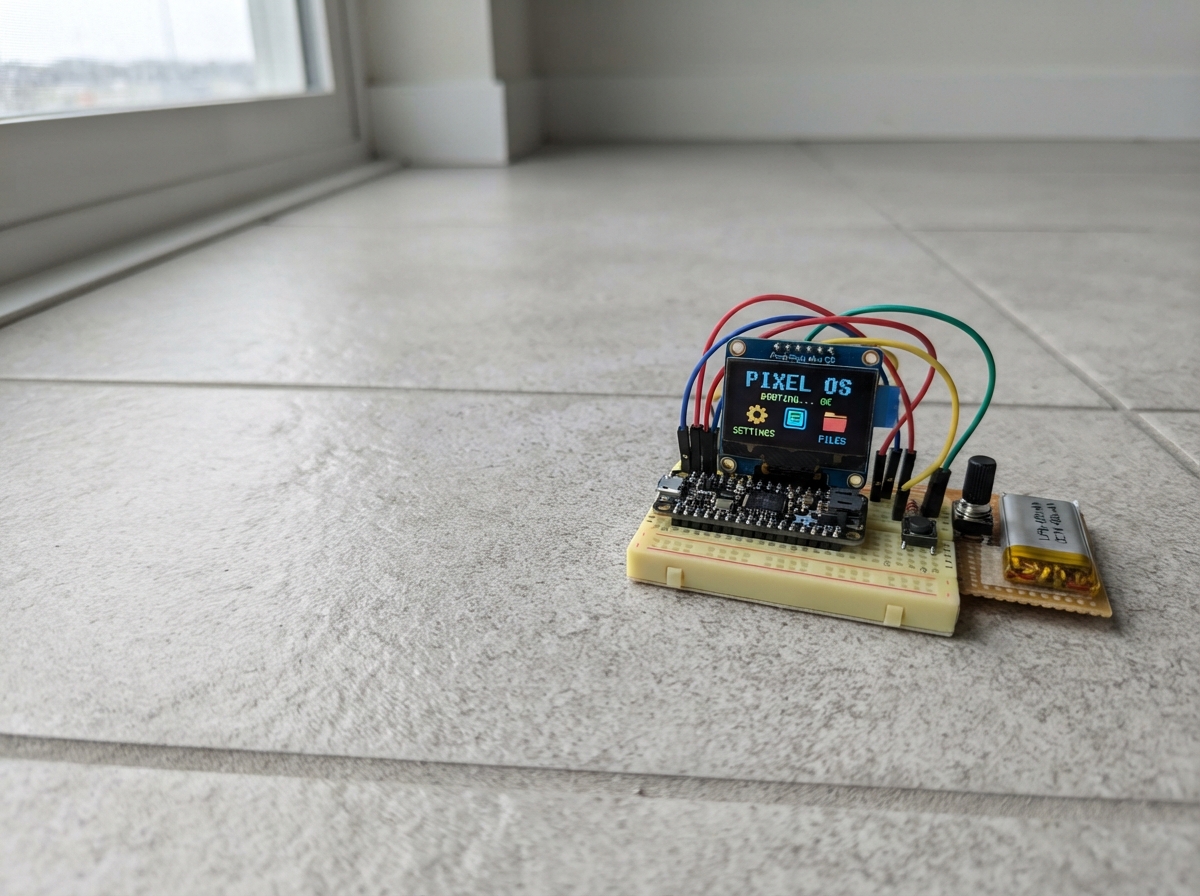
The Pixel-Style Mini OS transforms an M5Stack Tab5 into a retro-inspired handheld device with a custom graphical interface. Built on the ESP32 platform with LVGL graphics library, this project delivers a fully functional operating system featuring WiFi connectivity, touch controls, video browsing, customizable backgrounds, and a screensaver system.
This guide provides everything needed to bring the project to life: a complete wiring diagram for the Tab5 setup, a full parts list, the complete firmware source code, and step-by-step assembly instructions. Builders will learn how to prepare the device, establish USB connectivity, and test all interactive controls to ensure the pixel-style OS runs smoothly.
Wiring diagram
Assemble it in 3 steps
1. Prepare the Tab5
Place the M5Stack Tab5 flat with its screen facing up. No extra wires are needed because the screen and touch surface are already built into the device.
- Remove any thick protective film that makes taps or swipes unreliable.
- Do not open the case or touch the internal display connectors — damage there can stop the screen or touch surface working.
2. Connect the Tab5 over USB
Connect the Tab5 to USB with a data-capable cable. The cable supplies power while Schematik installs the phone-style launcher.
- Keep the Tab5 flat while first testing the portrait screen so a top-edge swipe is easy to perform.
- Do not suddenly unplug power while the device is saving Wi-Fi or appearance choices — that can lose the latest setting.
3. Test the new controls
After deploying, wait for the short Pixel Desk boot animation. Tap a TextArea such as the browser address to show its keyboard, use the bottom bar to return Home, and swipe down from the top edge to open Control centre.
- In YouTube Low data, press and hold a feed card to open the three video choices.
- The YouTube cards are low-data previews, not a direct YouTube video decoder; do not expect normal YouTube streams to play on the Tab5.
Deploy the firmware
#include <Arduino.h>
#include <M5Unified.h>
#include <WiFi.h>
#include <HTTPClient.h>
#include <Preferences.h>
#include <lvgl.h>
#include <esp_system.h>
#include <esp_heap_caps.h>


struct VideoInfo { const char *title; const char *channel; uint32_t color; };


// Forward declarations

// Forward declarations

// Forward declarations
static void saveVideoGateway(lv_event_t *);

static void restoreBackground();

static void flushDisplay(lv_display_t *d, const lv_area_t *a, uint8_t *pixels);
static void readTouch(lv_indev_t *, lv_indev_data_t *data);
static void setStatus();
static void styleLabel(lv_obj_t *obj, const lv_font_t *font, lv_color_t color);
static void addCard(const char *heading, const char *detail, int y, int h);
static void clearPage(const char *title, const char *subtitle);
static void navHome(lv_event_t *);
static void navBack(lv_event_t *);
static void navApps(lv_event_t *);
static void makeNav();
static void fieldFocused(lv_event_t *e);
static String fetchText(const char *url);
static void browserFetch(lv_event_t *);
static void createVideoCard(int index, int y);
static void connectWiFi(lv_event_t *);
static void chooseBackground(lv_event_t *e);
static void chooseKeyboard(lv_event_t *e);
static void chooseSaver(lv_event_t *e);
static void restartDevice(lv_event_t *);
static void brightnessChanged(lv_event_t *e);
static void dismissSaver(lv_event_t *);
static void showSaver();
static void checkGestureAndSaver();
static void bootFinished(lv_timer_t *t);
static void showBoot();

static constexpr uint16_t DRAW_W = 720;
static constexpr uint16_t DRAW_LINES = 24;
static constexpr uint32_t IDLE_MS = 60000;
static constexpr int NAV_H = 92;
static constexpr int TOP_ZONE = 70;
static constexpr int SWIPE_DISTANCE = 105;
static const char *DEFAULT_BROWSER_URL = "http://worldtimeapi.org/api/ip";

static lv_color_t drawBuffer[DRAW_W * DRAW_LINES];
static Preferences preferences;
static uint16_t screenW = 720, screenH = 1280;
static lv_display_t *displayDriver;
static lv_obj_t *root, *content, *titleLabel, *subtitleLabel, *statusLabel, *keyboard;
static lv_obj_t *ssidField, *passwordField, *browserField, *videoGatewayField, *messageLabel, *brightnessLabel;
static lv_obj_t *screensaver;
static lv_obj_t *bootOverlay;
static String browserUrl = DEFAULT_BROWSER_URL;
// A gateway you control may provide authorised low-resolution JPEG/MJPEG previews.
// The Tab5 decodes those JPEG frames locally; it does not bypass YouTube's web player.
static String videoGatewayUrl = "";
static String backgroundName = "Obsidian";
static String keyboardStyle = "abc";
static String saverStyle = "Clock";
static lv_color_t backgroundColor = lv_color_hex(0x151218);
static bool latestPressed = false, touchDown = false, controlUsed = false, saverVisible = false;
static int latestX = 0, latestY = 0, startY = 0;
static uint32_t lastTouchMs = 0, lastStatusMs = 0;

static const lv_color_t SURFACE = lv_color_hex(0x211F26);
static const lv_color_t CARD = lv_color_hex(0x2B2930);
static const lv_color_t TEXT = lv_color_hex(0xE8E0EA);
static const lv_color_t MUTED = lv_color_hex(0xCAC4D0);
static const lv_color_t PIXEL_BLUE = lv_color_hex(0xA8C7FA);

static void showHome(lv_event_t *e = nullptr);
static void showBrowser(lv_event_t *e = nullptr);
static void showVideo(lv_event_t *e = nullptr);
static void showSettings(lv_event_t *e = nullptr);
static void showControl(lv_event_t *e = nullptr);
static void showSettingsConnections(lv_event_t *e = nullptr);
static void showSettingsAppearance(lv_event_t *e = nullptr);
static void showSettingsInput(lv_event_t *e = nullptr);
static void showSettingsSystem(lv_event_t *e = nullptr);
static void applyBackground();
static void hideKeyboard();

static void flushDisplay(lv_display_t *d, const lv_area_t *a, uint8_t *pixels) {
  M5.Display.pushImage(a->x1, a->y1, a->x2 - a->x1 + 1, a->y2 - a->y1 + 1,
                       reinterpret_cast<lgfx::rgb565_t *>(pixels));
  lv_display_flush_ready(d);
}

static void readTouch(lv_indev_t *, lv_indev_data_t *data) {
  latestPressed = M5.Touch.getCount() > 0;
  if (latestPressed) {
    const auto &p = M5.Touch.getDetail(0);
    latestX = constrain((int)p.x, 0, (int)screenW - 1);
    latestY = constrain((int)p.y, 0, (int)screenH - 1);
    data->point.x = latestX;
    data->point.y = latestY;
    lastTouchMs = millis();
  }
  data->state = latestPressed ? LV_INDEV_STATE_PRESSED : LV_INDEV_STATE_RELEASED;
}

static void setStatus() {
  if (!statusLabel) return;
  String state = WiFi.status() == WL_CONNECTED ? "● " + WiFi.SSID() : "○ Offline";
  lv_label_set_text(statusLabel, state.c_str());
}

static void styleLabel(lv_obj_t *obj, const lv_font_t *font = nullptr, lv_color_t color = TEXT) {
  lv_obj_set_style_text_color(obj, color, 0);
  if (font) lv_obj_set_style_text_font(obj, font, 0);
}

static lv_obj_t *button(lv_obj_t *parent, const char *text, int x, int y, int w, int h, lv_event_cb_t cb = nullptr, void *data = nullptr) {
  lv_obj_t *b = lv_button_create(parent);
  lv_obj_set_pos(b, x, y); lv_obj_set_size(b, w, h);
  lv_obj_set_style_bg_color(b, CARD, 0); lv_obj_set_style_bg_color(b, PIXEL_BLUE, LV_STATE_PRESSED);
  lv_obj_set_style_radius(b, 26, 0); lv_obj_set_style_border_width(b, 0, 0);
  if (cb) lv_obj_add_event_cb(b, cb, LV_EVENT_CLICKED, data);
  lv_obj_t *l = lv_label_create(b); lv_label_set_text(l, text); styleLabel(l, &lv_font_montserrat_20);
  lv_label_set_long_mode(l, LV_LABEL_LONG_WRAP); lv_obj_set_width(l, w - 22); lv_obj_center(l);
  return b;
}

static void addCard(const char *heading, const char *detail, int y, int h = 116) {
  lv_obj_t *card = lv_obj_create(content);
  lv_obj_set_pos(card, 0, y); lv_obj_set_size(card, screenW - 40, h);
  lv_obj_set_style_bg_color(card, CARD, 0); lv_obj_set_style_border_width(card, 0, 0); lv_obj_set_style_radius(card, 28, 0);
  lv_obj_t *head = lv_label_create(card); lv_label_set_text(head, heading); styleLabel(head, &lv_font_montserrat_20); lv_obj_set_pos(head, 22, 16);
  lv_obj_t *detailLabel = lv_label_create(card); lv_label_set_text(detailLabel, detail); styleLabel(detailLabel, nullptr, MUTED);
  lv_obj_set_width(detailLabel, screenW - 84); lv_label_set_long_mode(detailLabel, LV_LABEL_LONG_WRAP); lv_obj_set_pos(detailLabel, 22, 51);
}

static void clearPage(const char *title, const char *subtitle) {
  hideKeyboard();
  lv_obj_clean(content);
  lv_label_set_text(titleLabel, title); lv_label_set_text(subtitleLabel, subtitle);
  lv_obj_scroll_to_y(content, 0, LV_ANIM_OFF);
}

static void navHome(lv_event_t *) { showHome(); }
static void navBack(lv_event_t *) { showHome(); }
static void navApps(lv_event_t *) { showHome(); }

static lv_obj_t *navButton(lv_obj_t *parent, const char *label, int x, lv_event_cb_t cb) {
  // Use plain text rather than optional symbol-font glyphs: every Tab5 build can show these labels.
  lv_obj_t *b = lv_button_create(parent);
  lv_obj_set_pos(b, x, 14); lv_obj_set_size(b, 180, 62);
  lv_obj_set_style_radius(b, 31, 0);
  lv_obj_set_style_bg_color(b, lv_color_hex(0x34313B), 0);
  lv_obj_set_style_bg_opa(b, LV_OPA_COVER, 0);
  lv_obj_set_style_bg_color(b, PIXEL_BLUE, LV_STATE_PRESSED);
  lv_obj_set_style_border_width(b, 0, 0);
  lv_obj_add_event_cb(b, cb, LV_EVENT_CLICKED, nullptr);
  lv_obj_t *l = lv_label_create(b); lv_label_set_text(l, label); styleLabel(l, &lv_font_montserrat_20); lv_obj_center(l);
  return b;
}
static void makeNav() {
  lv_obj_t *nav = lv_obj_create(root);
  lv_obj_set_size(nav, screenW, NAV_H); lv_obj_set_pos(nav, 0, screenH - NAV_H);
  lv_obj_set_style_bg_color(nav, lv_color_hex(0x1B191F), 0); lv_obj_set_style_bg_opa(nav, LV_OPA_COVER, 0);
  lv_obj_set_style_border_width(nav, 0, 0); lv_obj_set_style_radius(nav, 0, 0);
  navButton(nav, "Back", 30, navBack);
  navButton(nav, "Home", 270, navHome);
  navButton(nav, "Apps", 510, navApps);
}

static void fieldFocused(lv_event_t *e) {
  if (!keyboard) return;
  lv_obj_t *field = (lv_obj_t *)lv_event_get_target(e);
  // Make a tap reliable even when LVGL has not yet applied its normal focus state.
  lv_obj_add_state(field, LV_STATE_FOCUSED);
  lv_keyboard_set_textarea(keyboard, field);
  lv_keyboard_set_mode(keyboard, keyboardStyle == "123" ? LV_KEYBOARD_MODE_NUMBER : LV_KEYBOARD_MODE_TEXT_LOWER);
  lv_obj_remove_flag(keyboard, LV_OBJ_FLAG_HIDDEN);
  // This is an overlay, never a card within the scrollable page.
  lv_obj_move_foreground(keyboard);
  lv_obj_scroll_to_view_recursive(field, LV_ANIM_ON);
}
static void hideKeyboard() {
  if (keyboard) {
    lv_keyboard_set_textarea(keyboard, nullptr);
    lv_obj_add_flag(keyboard, LV_OBJ_FLAG_HIDDEN);
  }
}

static lv_obj_t *textField(const char *hint, int y, bool secret = false) {
  lv_obj_t *field = lv_textarea_create(content);
  lv_obj_set_pos(field, 0, y); lv_obj_set_size(field, screenW - 40, 64);
  lv_textarea_set_one_line(field, true); lv_textarea_set_placeholder_text(field, hint); lv_textarea_set_password_mode(field, secret);
  lv_obj_set_style_bg_color(field, CARD, 0); lv_obj_set_style_text_color(field, TEXT, 0); lv_obj_set_style_border_color(field, PIXEL_BLUE, LV_STATE_FOCUSED); lv_obj_set_style_radius(field, 18, 0);
  // Some touch controllers report a click before a focus transition, so accept both.
  lv_obj_add_event_cb(field, fieldFocused, LV_EVENT_FOCUSED, nullptr);
  lv_obj_add_event_cb(field, fieldFocused, LV_EVENT_CLICKED, nullptr);
  return field;
}

static String fetchText(const char *url) {
  if (WiFi.status() != WL_CONNECTED) return "Not connected. Open Settings, then Connections, and join Wi-Fi first.";
  HTTPClient http; http.setTimeout(7000);
  if (!http.begin(url)) return "Could not open that address.";
  int code = http.GET(); String result = code > 0 ? http.getString() : "The network request failed."; http.end();
  result.replace("\n", " "); if (result.length() > 850) result = result.substring(0, 850) + "…";
  return "HTTP " + String(code) + "\n" + result;
}

static void browserFetch(lv_event_t *) {
  String value = lv_textarea_get_text(browserField); value.trim();
  if (!value.startsWith("http://") && !value.startsWith("https://")) { lv_label_set_text(messageLabel, "Use a full address starting with http:// or https://."); return; }
  browserUrl = value; preferences.begin("pixel-desk", false); preferences.putString("browser-url", browserUrl); preferences.end();
  hideKeyboard(); lv_label_set_text(messageLabel, "Fetching readable page data…"); lv_timer_handler();
  String answer = fetchText(browserUrl.c_str()); lv_label_set_text(messageLabel, answer.c_str());
}

static void showHome(lv_event_t *) {
  clearPage("Pixel Desk", "Portrait launcher • swipe down from the top for quick controls.");
  button(content, "Web Browser", 0, 0, (screenW - 60) / 2, 150, showBrowser);
  button(content, "YouTube\nLow data", (screenW - 40) / 2, 0, (screenW - 60) / 2, 150, showVideo);
  button(content, "Settings", 0, 168, (screenW - 60) / 2, 150, showSettings);
  addCard("Quick controls", "Swipe down from the very top edge for brightness, network, and screen-saver controls.", 340, 132);
  addCard("Phone-style navigation", "The round bottom buttons give you Back, Home, and Apps.", 490, 104);
}

static void showBrowser(lv_event_t *) {
  clearPage("Web Browser", "Fetches readable web data; it is not a full HTML page renderer.");
  browserField = textField("https://example.com/data", 0); lv_textarea_set_text(browserField, browserUrl.c_str());
  button(content, "Save URL and fetch page", 0, 82, screenW - 40, 72, browserFetch);
  messageLabel = lv_label_create(content); lv_obj_set_pos(messageLabel, 4, 180); lv_obj_set_width(messageLabel, screenW - 48); lv_label_set_long_mode(messageLabel, LV_LABEL_LONG_WRAP); styleLabel(messageLabel, nullptr, TEXT);
  lv_label_set_text(messageLabel, "Tap the address box to type. The saved address remains after a restart.");
}


static const VideoInfo videos[] = {
  {"Daily science in 60 seconds", "Open learning feed", 0x3D6E70},
  {"Tiny desk studio session", "Public music channel", 0x74558D},
  {"How touch screens work", "Tech explainer", 0x8B5A48}
};
static int selectedVideo = 0;
static void videoOptions(lv_event_t *e);
static void showMiniPlayer(lv_event_t *);
static void loadGatewayFrame(lv_event_t *);
static void setVideoBackground(lv_event_t *);
static void watchVideo(lv_event_t *);

static void createVideoCard(int index, int y) {
  lv_obj_t *b = button(content, videos[index].title, 0, y, screenW - 40, 142, nullptr);
  lv_obj_set_style_bg_color(b, lv_color_hex(videos[index].color), 0);
  lv_obj_add_event_cb(b, videoOptions, LV_EVENT_LONG_PRESSED, (void *)(intptr_t)index);
  lv_obj_add_event_cb(b, showMiniPlayer, LV_EVENT_CLICKED, (void *)(intptr_t)index);
  lv_obj_t *small = lv_label_create(b); lv_label_set_text(small, videos[index].channel); styleLabel(small, nullptr, TEXT); lv_obj_set_pos(small, 18, 102);
}
static void saveVideoGateway(lv_event_t *) {
  videoGatewayUrl = lv_textarea_get_text(videoGatewayField); videoGatewayUrl.trim();
  preferences.begin("pixel-desk", false); preferences.putString("video-gateway", videoGatewayUrl); preferences.end();
  hideKeyboard();
}
static void showVideo(lv_event_t *) {
  clearPage("YouTube • low data", "Tap a video for its mini player. Press and hold for more options.");
  videoGatewayField = textField("https://your-gateway.example/frame.jpg", 0);
  lv_textarea_set_text(videoGatewayField, videoGatewayUrl.c_str());
  button(content, "Save permitted JPEG stream", 0, 76, screenW - 40, 58, saveVideoGateway);
  for (int i = 0; i < 3; ++i) createVideoCard(i, 150 + i * 158);
  addCard("Video decoding", "The Tab5 decodes JPEG preview frames from the saved permitted gateway. Direct YouTube web streams are not supported.", 630, 148);
}
static void videoOptions(lv_event_t *e) {
  selectedVideo = (int)(intptr_t)lv_event_get_user_data(e);
  clearPage("Video options", videos[selectedVideo].title);
  button(content, "Set thumbnail colour\nas background", 0, 0, screenW - 40, 100, setVideoBackground);
  button(content, "Watch in mini player", 0, 118, screenW - 40, 100, showMiniPlayer);
  button(content, "Watch", 0, 236, screenW - 40, 100, watchVideo);
}
static void setVideoBackground(lv_event_t *) {
  backgroundName = String("Video colour ") + String(selectedVideo + 1);
  backgroundColor = lv_color_hex(videos[selectedVideo].color);
  preferences.begin("pixel-desk", false); preferences.putString("background", backgroundName); preferences.end(); applyBackground(); showHome();
}
static void loadGatewayFrame(lv_event_t *e) {
  if (!messageLabel) return;
  if (!videoGatewayUrl.startsWith("http://") && !videoGatewayUrl.startsWith("https://")) { lv_label_set_text(messageLabel, "Save a full http:// or https:// JPEG-frame address first."); return; }
  if (WiFi.status() != WL_CONNECTED) { lv_label_set_text(messageLabel, "Connect to Wi-Fi before loading the preview."); return; }
  lv_label_set_text(messageLabel, "Downloading and decoding JPEG frame…");
  HTTPClient http; http.setTimeout(10000);
  if (!http.begin(videoGatewayUrl)) { lv_label_set_text(messageLabel, "Could not open the video gateway."); return; }
  int status = http.GET(); int bytes = http.getSize();
  if (status != HTTP_CODE_OK || bytes <= 0 || bytes > 450000) { http.end(); lv_label_set_text(messageLabel, "Gateway must return one JPEG image under 450 KB."); return; }
  uint8_t *jpg = (uint8_t *)heap_caps_malloc(bytes, MALLOC_CAP_SPIRAM | MALLOC_CAP_8BIT);
  if (!jpg) { http.end(); lv_label_set_text(messageLabel, "Not enough memory for this preview frame."); return; }
  WiFiClient *stream = http.getStreamPtr(); size_t received = stream->readBytes(jpg, bytes); http.end();
  if (received != (size_t)bytes) { free(jpg); lv_label_set_text(messageLabel, "The preview frame download was incomplete."); return; }
  // M5GFX performs the JPEG decode on the Tab5 and draws the resulting image locally.
  M5.Display.drawJpg(jpg, received, 10, 190, screenW - 20, 300);
  free(jpg); lv_label_set_text(messageLabel, "Decoded JPEG preview. Tap Load preview to refresh it.");
}
static void showMiniPlayer(lv_event_t *e) {
  if (e && lv_event_get_user_data(e)) selectedVideo = (int)(intptr_t)lv_event_get_user_data(e);
  clearPage("Mini player", videos[selectedVideo].title);
  lv_obj_t *art = lv_obj_create(content); lv_obj_set_pos(art, 0, 0); lv_obj_set_size(art, screenW - 40, 330); lv_obj_set_style_bg_color(art, lv_color_hex(videos[selectedVideo].color), 0); lv_obj_set_style_radius(art, 30, 0); lv_obj_set_style_border_width(art, 0, 0);
  lv_obj_t *note = lv_label_create(art);
  String decoderText = videoGatewayUrl.length() ? "JPEG decoder ready\nOpen stream in Browser" : "Add a permitted JPEG\nstream in the YouTube app";
  lv_label_set_text(note, decoderText.c_str()); styleLabel(note, &lv_font_montserrat_20); lv_obj_center(note);
  button(content, "Load preview frame", 0, 345, screenW - 40, 64, loadGatewayFrame);
  messageLabel = lv_label_create(content); lv_obj_set_pos(messageLabel, 4, 425); lv_obj_set_width(messageLabel, screenW - 48); lv_label_set_long_mode(messageLabel, LV_LABEL_LONG_WRAP); styleLabel(messageLabel, nullptr, TEXT);
  lv_label_set_text(messageLabel, "This is a real JPEG decoder for one authorised gateway frame. Direct YouTube web-player streams are not supported.");
}
static void watchVideo(lv_event_t *) { showMiniPlayer(nullptr); }

static void connectWiFi(lv_event_t *) {
  const char *ssid = lv_textarea_get_text(ssidField); const char *pass = lv_textarea_get_text(passwordField);
  if (!strlen(ssid)) { lv_label_set_text(messageLabel, "Enter your Wi-Fi name first."); return; }
  preferences.begin("pixel-desk", false); preferences.putString("ssid", ssid); preferences.putString("password", pass); preferences.end();
  hideKeyboard(); lv_label_set_text(messageLabel, "Connecting… this can take a few seconds."); WiFi.disconnect(); WiFi.begin(ssid, pass);
}

static void showSettings(lv_event_t *) {
  clearPage("Settings", "Choose a category.");
  button(content, "Connections", 0, 0, screenW - 40, 94, showSettingsConnections);
  button(content, "Appearance", 0, 112, screenW - 40, 94, showSettingsAppearance);
  button(content, "Keyboard and screen saver", 0, 224, screenW - 40, 94, showSettingsInput);
  button(content, "System", 0, 336, screenW - 40, 94, showSettingsSystem);
}
static void showSettingsConnections(lv_event_t *) {
  clearPage("Connections", "Wi-Fi details are saved on this Tab5.");
  preferences.begin("pixel-desk", true); String ssid = preferences.getString("ssid", ""); String pass = preferences.getString("password", ""); preferences.end();
  ssidField = textField("Wi-Fi name", 0); passwordField = textField("Wi-Fi password", 78, true); lv_textarea_set_text(ssidField, ssid.c_str()); lv_textarea_set_text(passwordField, pass.c_str());
  button(content, "Save and connect", 0, 158, screenW - 40, 72, connectWiFi);
  messageLabel = lv_label_create(content); lv_obj_set_pos(messageLabel, 4, 250); lv_obj_set_width(messageLabel, screenW - 48); styleLabel(messageLabel, nullptr, TEXT);
  String state = WiFi.status() == WL_CONNECTED ? "Connected to " + WiFi.SSID() : "Not connected"; lv_label_set_text(messageLabel, state.c_str());
  addCard("Bluetooth", "Bluetooth controls are not available through the Tab5 Arduino wireless link. Wi-Fi is available here.", 310, 128);
}
static void chooseBackground(lv_event_t *e) {
  int value = (int)(intptr_t)lv_event_get_user_data(e);
  if (value == 0) { backgroundName = "Obsidian"; backgroundColor = lv_color_hex(0x151218); }
  if (value == 1) { backgroundName = "Violet"; backgroundColor = lv_color_hex(0x302B45); }
  if (value == 2) { backgroundName = "Forest"; backgroundColor = lv_color_hex(0x203A35); }
  preferences.begin("pixel-desk", false); preferences.putString("background", backgroundName); preferences.end(); applyBackground(); showSettingsAppearance();
}
static void showSettingsAppearance(lv_event_t *) {
  clearPage("Appearance", "Choose a background colour for your phone-style home screen.");
  button(content, "Obsidian", 0, 0, screenW - 40, 82, chooseBackground, (void *)0);
  button(content, "Violet", 0, 100, screenW - 40, 82, chooseBackground, (void *)1);
  button(content, "Forest", 0, 200, screenW - 40, 82, chooseBackground, (void *)2);
  addCard("Current background", backgroundName.c_str(), 310, 104);
}
static void chooseKeyboard(lv_event_t *e) { keyboardStyle = (int)(intptr_t)lv_event_get_user_data(e) ? "123" : "abc"; preferences.begin("pixel-desk", false); preferences.putString("keyboard", keyboardStyle); preferences.end(); showSettingsInput(); }
static void chooseSaver(lv_event_t *e) { int choice = (int)(intptr_t)lv_event_get_user_data(e); saverStyle = choice == 0 ? "Off" : choice == 1 ? "Clock" : "Colour pulse"; preferences.begin("pixel-desk", false); preferences.putString("saver", saverStyle); preferences.end(); showSettingsInput(); }
static void showSettingsInput(lv_event_t *) {
  clearPage("Keyboard and screen saver", "Every text box opens this keyboard when you tap it.");
  button(content, "Letters keyboard", 0, 0, (screenW - 60) / 2, 82, chooseKeyboard, (void *)0);
  button(content, "Number keyboard", (screenW - 40) / 2, 0, (screenW - 60) / 2, 82, chooseKeyboard, (void *)1);
  addCard("Keyboard now", keyboardStyle == "123" ? "Number keyboard" : "Letters keyboard", 105, 94);
  button(content, "Screen saver: off", 0, 220, screenW - 40, 70, chooseSaver, (void *)0);
  button(content, "Screen saver: clock", 0, 304, screenW - 40, 70, chooseSaver, (void *)1);
  button(content, "Screen saver: colour pulse", 0, 388, screenW - 40, 70, chooseSaver, (void *)2);
  addCard("Screen saver now", saverStyle.c_str(), 480, 94);
}
static void restartDevice(lv_event_t *) { lv_label_set_text(messageLabel, "Restarting the Tab5…"); delay(300); esp_restart(); }
static void showSettingsSystem(lv_event_t *) {
  clearPage("System", "System tools for this Tab5.");
  button(content, "Restart Tab5", 0, 0, screenW - 40, 82, restartDevice);
  messageLabel = lv_label_create(content); lv_obj_set_pos(messageLabel, 4, 110); styleLabel(messageLabel, nullptr, MUTED); lv_label_set_text(messageLabel, "Restart closes apps and reloads your saved Wi-Fi, background, keyboard, and screen saver choices."); lv_obj_set_width(messageLabel, screenW - 48); lv_label_set_long_mode(messageLabel, LV_LABEL_LONG_WRAP);
}

static void brightnessChanged(lv_event_t *e) { int val = lv_slider_get_value((lv_obj_t *)lv_event_get_target(e)); M5.Display.setBrightness(val); String s = "Brightness " + String(val) + "%"; lv_label_set_text(brightnessLabel, s.c_str()); }
static void showControl(lv_event_t *) {
  clearPage("Control centre", "Swipe down from the top edge to open this page.");
  brightnessLabel = lv_label_create(content); lv_obj_set_pos(brightnessLabel, 2, 0); styleLabel(brightnessLabel, &lv_font_montserrat_20); lv_label_set_text(brightnessLabel, "Brightness 75%");
  lv_obj_t *slider = lv_slider_create(content); lv_obj_set_pos(slider, 0, 50); lv_obj_set_width(slider, screenW - 40); lv_slider_set_range(slider, 20, 100); lv_slider_set_value(slider, 75, LV_ANIM_OFF); lv_obj_add_event_cb(slider, brightnessChanged, LV_EVENT_VALUE_CHANGED, nullptr);
  addCard("Network", WiFi.status() == WL_CONNECTED ? "Wi-Fi connected" : "Wi-Fi offline — open Settings > Connections.", 100);
  addCard("Screen saver", saverStyle.c_str(), 232);
}

static void applyBackground() { if (root) lv_obj_set_style_bg_color(root, backgroundColor, 0); }
static void restoreBackground() {
  if (backgroundName == "Violet") backgroundColor = lv_color_hex(0x302B45);
  else if (backgroundName == "Forest") backgroundColor = lv_color_hex(0x203A35);
  else if (backgroundName == "Video colour 1") backgroundColor = lv_color_hex(videos[0].color);
  else if (backgroundName == "Video colour 2") backgroundColor = lv_color_hex(videos[1].color);
  else if (backgroundName == "Video colour 3") backgroundColor = lv_color_hex(videos[2].color);
  else { backgroundName = "Obsidian"; backgroundColor = lv_color_hex(0x151218); }
}
static void dismissSaver(lv_event_t *) { if (screensaver) { lv_obj_add_flag(screensaver, LV_OBJ_FLAG_HIDDEN); saverVisible = false; lastTouchMs = millis(); } }
static void showSaver() {
  if (saverStyle == "Off" || saverVisible || !screensaver) return;
  lv_obj_clean(screensaver); lv_obj_set_style_bg_color(screensaver, saverStyle == "Colour pulse" ? lv_color_hex(0x3D526B) : lv_color_hex(0x08070A), 0);
  lv_obj_remove_flag(screensaver, LV_OBJ_FLAG_HIDDEN); saverVisible = true;
  lv_obj_t *l = lv_label_create(screensaver); String s;
  if (saverStyle == "Clock") { unsigned long seconds = millis() / 1000UL; s = String("Pixel Desk\n") + String((seconds / 3600UL) % 24UL) + ":" + String((seconds / 60UL) % 60UL); }
  else s = "Pixel Desk\nTouch to wake";
  lv_label_set_text(l, s.c_str()); styleLabel(l, &lv_font_montserrat_32); lv_obj_center(l);
  if (saverStyle == "Colour pulse") { lv_anim_t pulse; lv_anim_init(&pulse); lv_anim_set_var(&pulse, screensaver); lv_anim_set_values(&pulse, 80, 255); lv_anim_set_duration(&pulse, 1300); lv_anim_set_playback_duration(&pulse, 1300); lv_anim_set_repeat_count(&pulse, LV_ANIM_REPEAT_INFINITE); lv_anim_set_exec_cb(&pulse, [](void *obj, int32_t value) { lv_obj_set_style_bg_opa((lv_obj_t *)obj, (lv_opa_t)value, 0); }); lv_anim_start(&pulse); }
}
static void checkGestureAndSaver() {
  if (latestPressed && saverVisible) { dismissSaver(nullptr); return; }
  if (!latestPressed) { touchDown = false; controlUsed = false; }
  else if (!touchDown) { touchDown = true; startY = latestY; }
  else if (!controlUsed && startY <= TOP_ZONE && latestY - startY >= SWIPE_DISTANCE) { controlUsed = true; showControl(); }
  if (!latestPressed && !saverVisible && millis() - lastTouchMs > IDLE_MS) showSaver();
}
static void bootFinished(lv_timer_t *t) {
  lv_timer_delete(t);
  if (bootOverlay) {
    lv_obj_delete(bootOverlay);
    bootOverlay = nullptr;
  }
  showHome();
}
static void showBoot() {
  // Keep the permanent UI objects alive; this panel sits above them briefly.
  bootOverlay = lv_obj_create(root);
  lv_obj_set_size(bootOverlay, screenW, screenH);
  lv_obj_set_pos(bootOverlay, 0, 0);
  lv_obj_set_style_bg_color(bootOverlay, backgroundColor, 0);
  lv_obj_set_style_border_width(bootOverlay, 0, 0);
  lv_obj_set_style_radius(bootOverlay, 0, 0);
  lv_obj_move_foreground(bootOverlay);
  lv_obj_t *logo = lv_label_create(bootOverlay);
  lv_label_set_text(logo, "Pixel Desk");
  styleLabel(logo, &lv_font_montserrat_32, PIXEL_BLUE);
  lv_obj_align(logo, LV_ALIGN_CENTER, 0, -40);
  lv_obj_t *bar = lv_bar_create(bootOverlay);
  lv_obj_set_size(bar, 330, 16);
  lv_obj_align(bar, LV_ALIGN_CENTER, 0, 35);
  lv_bar_set_range(bar, 0, 100);
  lv_bar_set_value(bar, 100, LV_ANIM_ON);
  lv_timer_create(bootFinished, 950, nullptr);
}

void setup() {
  // ST7123 Tab5 panels can retain state after a USB/warm reset.  Let the integrated
  // touch-and-display controller settle before M5GFX probes its DSI panel ID.
  delay(1200);
  auto cfg = M5.config(); M5.begin(cfg);
  // Rotation 0 is the Tab5's upright portrait panel orientation; M5Unified maps GT911 to this same surface.
  M5.Display.setRotation(0); screenW = M5.Display.width(); screenH = M5.Display.height(); M5.Display.setBrightness(75);
  Serial.begin(115200); Serial.printf("Tab5 portrait: %u x %u; touch %s\n", screenW, screenH, M5.Touch.isEnabled() ? "enabled" : "disabled");
  preferences.begin("pixel-desk", true); String ssid = preferences.getString("ssid", ""); String pass = preferences.getString("password", ""); browserUrl = preferences.getString("browser-url", DEFAULT_BROWSER_URL); videoGatewayUrl = preferences.getString("video-gateway", ""); backgroundName = preferences.getString("background", "Obsidian"); keyboardStyle = preferences.getString("keyboard", "abc"); saverStyle = preferences.getString("saver", "Clock"); preferences.end();
  restoreBackground();
  if (ssid.length()) WiFi.begin(ssid.c_str(), pass.c_str());
  lv_init(); lv_tick_set_cb([]() -> uint32_t { return millis(); });
  displayDriver = lv_display_create(screenW, screenH); lv_display_set_color_format(displayDriver, LV_COLOR_FORMAT_RGB565); lv_display_set_buffers(displayDriver, drawBuffer, nullptr, sizeof(drawBuffer), LV_DISPLAY_RENDER_MODE_PARTIAL); lv_display_set_flush_cb(displayDriver, flushDisplay);
  lv_indev_t *touch = lv_indev_create(); lv_indev_set_type(touch, LV_INDEV_TYPE_POINTER); lv_indev_set_display(touch, displayDriver); lv_indev_set_read_cb(touch, readTouch);
  root = lv_screen_active(); applyBackground();
  titleLabel = lv_label_create(root); lv_obj_set_pos(titleLabel, 22, 38); styleLabel(titleLabel, &lv_font_montserrat_32);
  subtitleLabel = lv_label_create(root); lv_obj_set_pos(subtitleLabel, 24, 84); lv_obj_set_width(subtitleLabel, screenW - 48); lv_label_set_long_mode(subtitleLabel, LV_LABEL_LONG_WRAP); styleLabel(subtitleLabel, nullptr, MUTED);
  statusLabel = lv_label_create(root); lv_obj_set_pos(statusLabel, 24, 120); styleLabel(statusLabel, nullptr, PIXEL_BLUE);
  content = lv_obj_create(root); lv_obj_set_pos(content, 20, 160); lv_obj_set_size(content, screenW - 20, screenH - 160 - NAV_H); lv_obj_set_style_bg_opa(content, LV_OPA_TRANSP, 0); lv_obj_set_style_border_width(content, 0, 0); lv_obj_set_style_pad_all(content, 0, 0);
  // Put the keyboard on LVGL's top layer so pages, navigation, and cards can never cover it.
  keyboard = lv_keyboard_create(lv_layer_top());
  lv_obj_set_size(keyboard, screenW, 370);
  lv_obj_set_pos(keyboard, 0, screenH - 370);
  lv_obj_set_style_bg_color(keyboard, lv_color_hex(0x1B191F), 0);
  lv_obj_set_style_bg_opa(keyboard, LV_OPA_COVER, 0);
  lv_obj_add_event_cb(keyboard, [](lv_event_t *event) {
    lv_event_code_t code = lv_event_get_code(event);
    if (code == LV_EVENT_READY || code == LV_EVENT_CANCEL) hideKeyboard();
  }, LV_EVENT_ALL, nullptr);
  lv_obj_add_flag(keyboard, LV_OBJ_FLAG_HIDDEN);
  makeNav();
  screensaver = lv_obj_create(root); lv_obj_set_size(screensaver, screenW, screenH); lv_obj_set_pos(screensaver, 0, 0); lv_obj_set_style_border_width(screensaver, 0, 0); lv_obj_add_flag(screensaver, LV_OBJ_FLAG_HIDDEN); lv_obj_add_event_cb(screensaver, dismissSaver, LV_EVENT_CLICKED, nullptr);
  lastTouchMs = millis(); setStatus(); showBoot();
}
void loop() {
  M5.update(); lv_timer_handler(); checkGestureAndSaver();
  // USB serial control is available for diagnostics on Windows; it is not Android ADB.
  if (Serial.available()) {
    String command = Serial.readStringUntil('\n'); command.trim(); command.toUpperCase();
    if (command == "HOME") showHome();
    else if (command == "SETTINGS") showSettings();
    else if (command == "CONTROL") showControl();
    else if (command == "RESTART") esp_restart();
    else Serial.println("Commands: HOME, SETTINGS, CONTROL, RESTART");
  }
  if (millis() - lastStatusMs > 1000) { setStatus(); lastStatusMs = millis(); }
  delay(5);
}
Remix this project
Make it yours in one click
Open a full copy of this project in your own Schematik workspace — diagram, code, parts, and assembly steps included. Swap the sensor, add features, or redesign the whole thing with AI. The author's original stays untouched.