Community project
Secure RFID Identity Console
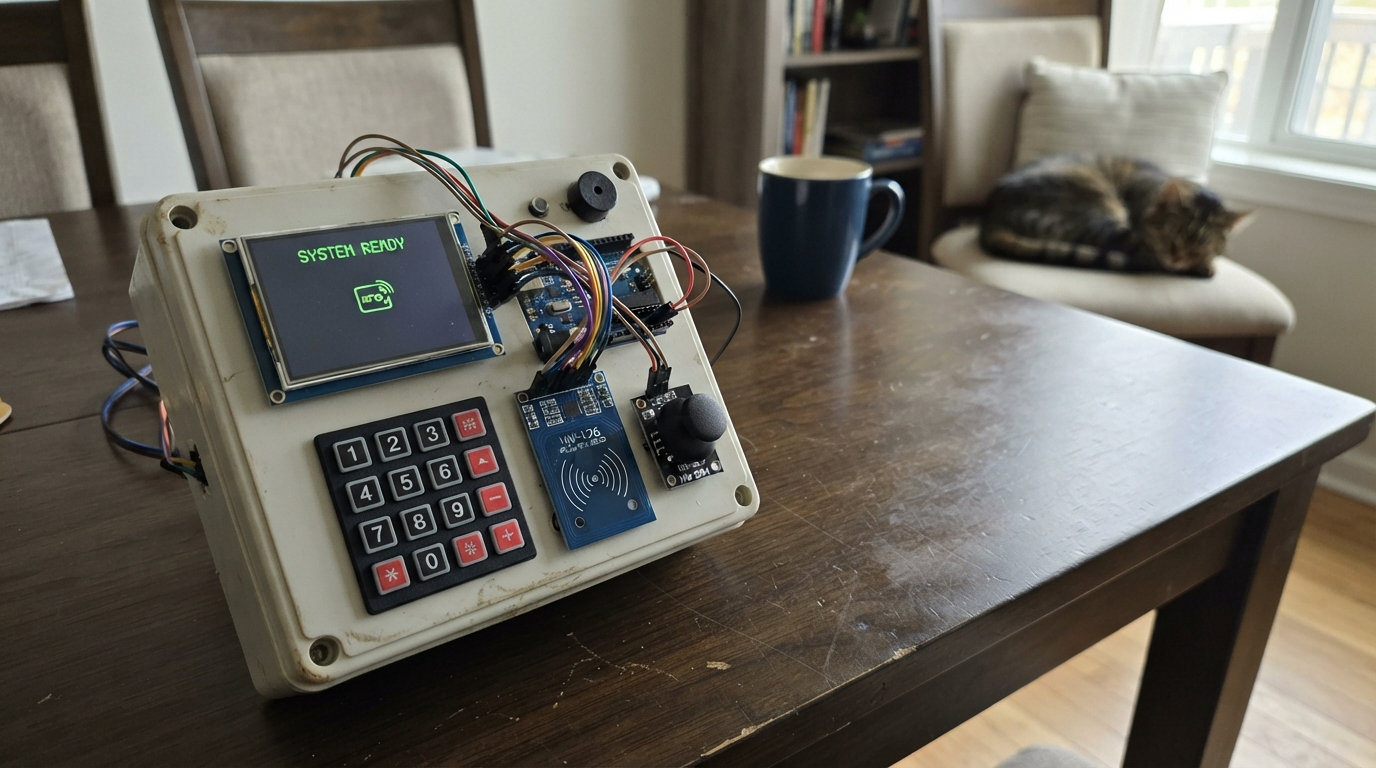
The Secure RFID Identity Console is a standalone access control system built around an ESP32 microcontroller with a vibrant 2.4-inch color display. It reads NFC/RFID cards via the RC522 module, verifies PIN codes through the matrix keypad, and provides visual and audio feedback with the display and piezo buzzer. The joystick module allows navigation through multiple screens including home, card information, and an admin enrollment menu.
This guide provides a complete wiring diagram, detailed parts list, and step-by-step assembly instructions to get the console operational. The included firmware handles card enrollment, PIN verification, admin controls, and persistent storage of card records. Builders will learn how to integrate multiple input devices with an SPI display while managing a secure authentication workflow on the ESP32 platform.
Wiring diagram

Gather all the parts
Assemble it in 6 steps
1. Keep the power wires safe
Leave the ESP32 unplugged while wiring. Use the ESP32 3V3 pin for the TFT, RC522 reader, and joystick VCC pins; connect every GND pin to an ESP32 GND pin. Do not connect either the RC522 or the joystick to 5V because their signal pins are intended for 3.3 V.
- All modules must share ground or card reads and button presses will be unreliable.
- Connecting 5V to the RC522 reader can damage it.
2. Wire the color display
Connect TFT VCC to ESP32 3V3 (power), TFT GND to ESP32 GND (ground), TFT SCK/CLK to GPIO18 (screen clock), TFT MOSI/SDI to GPIO23 (screen data), TFT CS to GPIO5 (screen select), TFT DC to GPIO27 (screen command/data), TFT RST to 3V3 (keeps the screen enabled), and TFT LED to 3V3 (backlight power).
- The pins may be printed as SCL instead of SCK and SDA instead of MOSI on some TFT boards; use the display board's SPI labels, not its I2C labels.
- Make sure VCC and GND are not swapped — swapped power can damage the screen.
3. Wire the RFID and NFC reader
Connect HW-126 3.3V to ESP32 3V3 (power), GND to ESP32 GND (ground), SCK to GPIO18 (shared clock), MOSI to GPIO23 (shared data to reader), MISO to GPIO19 (card data back to ESP32), SDA/SS to GPIO21 (reader select), and RST to GPIO22 (reader reset).
- The reader and screen deliberately share GPIO18 and GPIO23. Their separate CS/SDA select wires let the ESP32 talk to only one at a time.
- Do not use the RC522/HW-126 5V pin if it has one; use its 3.3V pin only.
4. Wire the keypad
Connect keypad R1 to GPIO13 (keypad signal), R2 to GPIO14 (keypad signal), R3 to GPIO15 (keypad signal), R4 to GPIO26 (keypad signal), C1 to GPIO16 (keypad signal), C2 to GPIO17 (keypad signal), C3 to GPIO32 (keypad signal), and C4 to GPIO33 (keypad signal).
- The row and column labels are usually printed on the keypad ribbon or back sticker. If yours only labels pins 1–8, check its supplied pinout before connecting.
- Do not hold a keypad key while powering the ESP32 because GPIO15 is sampled during startup.
5. Wire the joystick and buzzer
Connect joystick VCC to 3V3 (power), GND to GND (ground), VRx to GPIO34 (left/right input), VRy to GPIO35 (up/down input), and SW to GPIO4 (press-button input). Connect one passive-buzzer lead to GPIO25 (sound signal) and the other lead to GND (ground).
- A passive buzzer has two leads; if it is marked +, connect that marked lead to GPIO25.
- Keep the joystick on 3.3V so its analog outputs cannot exceed the ESP32's safe input voltage.
6. Power up and use the controller
Check each power wire once more, then plug the ESP32 into USB. The home screen asks for a card tap. Press A on the keypad to open enrolment, use the joystick to choose Enroll a new card, tap the new NFC/RFID card, then create its four-digit PIN with the keypad and press # to save it.
- The built-in demo UIDs are placeholders. Your first real card should be added through the administrator enrolment screen.
- The ESP32 sends VIDEO_CARD when a verified card opens or the joystick button is pressed, and STOP_VIDEO when * returns from the card screen.
- This prototype stores one enrolled UID and PIN in the ESP32's local memory. It is suitable for a demonstration, not for safeguarding real passport, medical, or government identity data.
Review all connections
1. Connections between "tft_ili9341" and "ESP32"
2. Connections between "rfid_hw126" and "ESP32"
3. Connections between "keypad_4x4" and "ESP32"
4. Connections between "joystick_hw504" and "ESP32"
5. Connections between "buzzer_1" and "ESP32"
Deploy the firmware
#include <Arduino.h>
#include <SPI.h>
#include <MFRC522.h>
#include <Adafruit_GFX.h>
#include <Adafruit_ILI9341.h>
#include <Keypad.h>
#include <Preferences.h>


enum Screen { HOME, CARD_PIN, CARD_INFO, ADMIN_MENU, ENROL_UID, ENROL_PIN, MESSAGE };

struct CardRecord {
  String uid;
  String label;
  String detail;
  String pin;
  bool admin;
};


// Forward declarations
void toneOk();
void toneError();
void header(const char *title);
void showMessage(const String &line1, const String &line2, uint16_t color, unsigned long milliseconds);
void drawHome();
void drawPinScreen();
void drawInfo(const CardRecord &card);
void drawAdminMenu();
void drawEnrolWait();
void drawEnrolPin();
String uidString();
bool loadEnrolled(CardRecord &record, const String &uid);
bool findCard(const String &uid, CardRecord &record);
void saveEnrolledCard();
void processCard();
void checkPin();
void handleKeypad();
void handleJoystick();

constexpr uint8_t TFT_CS = 5;
constexpr uint8_t TFT_DC = 27;
constexpr int8_t TFT_RST = -1;
constexpr uint8_t RFID_SS = 21;
constexpr uint8_t RFID_RST = 22;
constexpr uint8_t BUZZER_PIN = 25;
constexpr uint8_t JOY_X = 34;
constexpr uint8_t JOY_Y = 35;
constexpr uint8_t JOY_SW = 4;

// RGB565 colors that are supported by both the physical ILI9341 and browser simulator.
constexpr uint16_t COLOR_NAVY = 0x000F;
constexpr uint16_t COLOR_DARK_CYAN = 0x03EF;
constexpr uint16_t COLOR_DARK_GREY = 0x7BEF;
constexpr uint16_t COLOR_DARK_GREEN = 0x03E0;
constexpr uint16_t COLOR_MAROON = 0x7800;

constexpr byte ROWS = 4;
constexpr byte COLS = 4;
byte rowPins[ROWS] = {13, 14, 15, 26};
byte colPins[COLS] = {16, 17, 32, 33};
char keys[ROWS][COLS] = {
  {'1', '2', '3', 'A'},
  {'4', '5', '6', 'B'},
  {'7', '8', '9', 'C'},
  {'*', '0', '#', 'D'}
};

Adafruit_ILI9341 tft(TFT_CS, TFT_DC, TFT_RST);
MFRC522 rfid(RFID_SS, RFID_RST);
Keypad keypad = Keypad(makeKeymap(keys), rowPins, colPins, ROWS, COLS);
Preferences preferences;


Screen screen = HOME;


// Replace these example UIDs with the UIDs shown during enrolment.
CardRecord knownCards[] = {
  {"DEADBEEF", "Demo passport", "Passport profile: demo holder", "1234", false},
  {"A1B2C3D4", "System administrator", "Administrator access enabled", "4321", true}
};
constexpr size_t BUILTIN_CARD_COUNT = sizeof(knownCards) / sizeof(knownCards[0]);

String activeUid;
String entry;
String pendingUid;
int menuIndex = 0;
unsigned long lastJoyMove = 0;
unsigned long lastCardRead = 0;
String messageLine1;
String messageLine2;
unsigned long messageUntil = 0;

void toneOk() { tone(BUZZER_PIN, 1800, 70); }
void toneError() { tone(BUZZER_PIN, 250, 180); }

void header(const char *title) {
  tft.fillRect(0, 0, 240, 34, COLOR_NAVY);
  tft.setTextColor(ILI9341_WHITE);
  tft.setTextSize(2);
  tft.setCursor(10, 9);
  tft.print(title);
}

void showMessage(const String &line1, const String &line2, uint16_t color, unsigned long milliseconds = 1600) {
  screen = MESSAGE;
  messageLine1 = line1;
  messageLine2 = line2;
  messageUntil = millis() + milliseconds;
  tft.fillScreen(ILI9341_BLACK);
  tft.fillRoundRect(12, 65, 216, 150, 10, color);
  tft.setTextColor(ILI9341_WHITE);
  tft.setTextSize(2);
  tft.setCursor(24, 95);
  tft.print(line1);
  tft.setTextSize(1);
  tft.setCursor(24, 135);
  tft.print(line2);
}

void drawHome() {
  screen = HOME;
  tft.fillScreen(ILI9341_BLACK);
  header("SecureTap");
  tft.fillRoundRect(15, 54, 210, 90, 12, COLOR_DARK_CYAN);
  tft.setTextColor(ILI9341_WHITE);
  tft.setTextSize(2);
  tft.setCursor(36, 75);
  tft.print("TAP YOUR CARD");
  tft.setTextSize(1);
  tft.setCursor(32, 112);
  tft.print("Every card requires its 4-digit PIN");
  tft.setTextColor(ILI9341_CYAN);
  tft.setCursor(18, 174);
  tft.print("Joystick: move / select");
  tft.setCursor(18, 190);
  tft.print("Press A on keypad: administrator menu");
  tft.setTextColor(COLOR_DARK_GREY);
  tft.setCursor(18, 280);
  tft.print("RFID/NFC identity controller");
}

void drawPinScreen() {
  screen = CARD_PIN;
  tft.fillScreen(ILI9341_BLACK);
  header("Verify identity");
  tft.setTextColor(ILI9341_WHITE);
  tft.setTextSize(2);
  tft.setCursor(18, 62);
  tft.print("Enter 4-digit PIN");
  tft.setTextSize(1);
  tft.setCursor(18, 90);
  tft.print("# checks it   * clears it");
  tft.drawRoundRect(35, 120, 170, 50, 8, ILI9341_CYAN);
  tft.setTextSize(3);
  tft.setCursor(80, 132);
  for (size_t i = 0; i < entry.length(); i++) tft.print('*');
}

void drawInfo(const CardRecord &card) {
  screen = CARD_INFO;
  tft.fillScreen(ILI9341_BLACK);
  header(card.admin ? "Administrator" : "Verified card");
  tft.setTextColor(ILI9341_GREEN);
  tft.setTextSize(2);
  tft.setCursor(18, 58);
  tft.print(card.label);
  tft.setTextColor(ILI9341_WHITE);
  tft.setTextSize(1);
  tft.setCursor(18, 94);
  tft.print(card.detail);
  tft.setTextColor(ILI9341_CYAN);
  tft.setCursor(18, 145);
  tft.print("Joystick button: send VIDEO_CARD");
  tft.setCursor(18, 162);
  tft.print("Key *: return to home");
  Serial.println("VIDEO_CARD");
}

void drawAdminMenu() {
  screen = ADMIN_MENU;
  const char *items[] = {"Enroll a new card", "View last card UID", "Exit"};
  tft.fillScreen(ILI9341_BLACK);
  header("Administrator menu");
  for (int i = 0; i < 3; i++) {
    uint16_t color = i == menuIndex ? COLOR_DARK_CYAN : ILI9341_BLACK;
    tft.fillRoundRect(12, 58 + i * 52, 216, 40, 6, color);
    tft.setTextColor(ILI9341_WHITE);
    tft.setTextSize(2);
    tft.setCursor(25, 70 + i * 52);
    tft.print(items[i]);
  }
  tft.setTextSize(1);
  tft.setTextColor(ILI9341_CYAN);
  tft.setCursor(15, 230);
  tft.print("Move joystick, then press it to select");
}

void drawEnrolWait() {
  screen = ENROL_UID;
  tft.fillScreen(ILI9341_BLACK);
  header("Enroll card");
  tft.setTextColor(ILI9341_YELLOW);
  tft.setTextSize(2);
  tft.setCursor(30, 90);
  tft.print("Tap a new NFC/RFID");
  tft.setCursor(70, 118);
  tft.print("card now");
  tft.setTextSize(1);
  tft.setTextColor(ILI9341_WHITE);
  tft.setCursor(20, 175);
  tft.print("The card UID and chosen PIN are saved");
  tft.setCursor(20, 190);
  tft.print("in ESP32 memory for this prototype.");
}

void drawEnrolPin() {
  screen = ENROL_PIN;
  tft.fillScreen(ILI9341_BLACK);
  header("Set new card PIN");
  tft.setTextColor(ILI9341_WHITE);
  tft.setTextSize(2);
  tft.setCursor(22, 70);
  tft.print("Enter a 4-digit PIN");
  tft.setTextSize(1);
  tft.setCursor(22, 98);
  tft.print("# saves card    * clears");
  tft.drawRoundRect(35, 122, 170, 50, 8, ILI9341_CYAN);
  tft.setTextSize(3);
  tft.setCursor(80, 134);
  for (size_t i = 0; i < entry.length(); i++) tft.print('*');
}

String uidString() {
  String uid;
  for (byte i = 0; i < rfid.uid.size; i++) {
    if (rfid.uid.uidByte[i] < 0x10) uid += '0';
    uid += String(rfid.uid.uidByte[i], HEX);
  }
  uid.toUpperCase();
  return uid;
}

bool loadEnrolled(CardRecord &record, const String &uid) {
  preferences.begin("securetap", true);
  String storedUid = preferences.getString("uid", "");
  if (storedUid != uid) {
    preferences.end();
    return false;
  }
  record.uid = storedUid;
  record.label = preferences.getString("label", "Enrolled card");
  record.detail = preferences.getString("detail", "Locally enrolled identity record");
  record.pin = preferences.getString("pin", "");
  record.admin = false;
  preferences.end();
  return true;
}

bool findCard(const String &uid, CardRecord &record) {
  for (size_t i = 0; i < BUILTIN_CARD_COUNT; i++) {
    if (knownCards[i].uid == uid) { record = knownCards[i]; return true; }
  }
  return loadEnrolled(record, uid);
}

void saveEnrolledCard() {
  preferences.begin("securetap", false);
  preferences.putString("uid", pendingUid);
  preferences.putString("label", "Enrolled card");
  preferences.putString("detail", "Locally enrolled identity record");
  preferences.putString("pin", entry);
  preferences.end();
  Serial.print("ENROLLED_CARD,");
  Serial.println(pendingUid);
  toneOk();
  showMessage("Card enrolled", "The new card is now protected by its PIN", COLOR_DARK_GREEN);
}

void processCard() {
  if (!rfid.PICC_IsNewCardPresent() || !rfid.PICC_ReadCardSerial()) return;
  if (millis() - lastCardRead < 1200) { rfid.PICC_HaltA(); return; }
  lastCardRead = millis();
  String uid = uidString();
  rfid.PICC_HaltA();
  rfid.PCD_StopCrypto1();

  if (screen == ENROL_UID) {
    pendingUid = uid;
    entry = "";
    drawEnrolPin();
    toneOk();
    return;
  }

  CardRecord card;
  if (!findCard(uid, card)) {
    toneError();
    showMessage("Unknown card", "An administrator must enrol this card", COLOR_MAROON);
    return;
  }
  activeUid = uid;
  entry = "";
  drawPinScreen();
  toneOk();
}

void checkPin() {
  CardRecord card;
  if (screen == CARD_PIN && findCard(activeUid, card)) {
    if (entry == card.pin) { toneOk(); drawInfo(card); }
    else { toneError(); entry = ""; showMessage("PIN not accepted", "Tap the card and try again", COLOR_MAROON); }
  } else if (screen == ENROL_PIN) {
    if (entry.length() == 4) saveEnrolledCard();
    else { toneError(); showMessage("Use four digits", "Choose a PIN from 0000 to 9999", COLOR_MAROON); }
  }
}

void handleKeypad() {
  char key = keypad.getKey();
  if (!key) return;
  if (screen == HOME && key == 'A') { menuIndex = 0; drawAdminMenu(); return; }
  if (screen == CARD_INFO && key == '*') { Serial.println("STOP_VIDEO"); drawHome(); return; }
  if (screen == ADMIN_MENU && key == '*') { drawHome(); return; }
  if (screen == CARD_PIN || screen == ENROL_PIN) {
    if (key >= '0' && key <= '9' && entry.length() < 4) { entry += key; screen == CARD_PIN ? drawPinScreen() : drawEnrolPin(); }
    else if (key == '*') { entry = ""; screen == CARD_PIN ? drawPinScreen() : drawEnrolPin(); }
    else if (key == '#') checkPin();
  }
}

void handleJoystick() {
  static bool lastButton = HIGH;
  bool button = digitalRead(JOY_SW);
  bool pressed = lastButton == HIGH && button == LOW;
  lastButton = button;

  if (screen == ADMIN_MENU && millis() - lastJoyMove > 220) {
    int y = analogRead(JOY_Y);
    if (y < 1100) { menuIndex = (menuIndex + 2) % 3; drawAdminMenu(); lastJoyMove = millis(); }
    if (y > 3000) { menuIndex = (menuIndex + 1) % 3; drawAdminMenu(); lastJoyMove = millis(); }
  }
  if (!pressed) return;
  if (screen == CARD_INFO) { Serial.println("VIDEO_CARD"); showMessage("Video command sent", "Your connected PC received VIDEO_CARD", COLOR_DARK_CYAN); }
  else if (screen == ADMIN_MENU) {
    if (menuIndex == 0) drawEnrolWait();
    else if (menuIndex == 1) { preferences.begin("securetap", true); String uid = preferences.getString("uid", "No locally enrolled card"); preferences.end(); showMessage("Last saved UID", uid, COLOR_DARK_CYAN, 2500); }
    else drawHome();
  }
}

void setup() {
  Serial.begin(115200);
  pinMode(BUZZER_PIN, OUTPUT);
  pinMode(JOY_SW, INPUT_PULLUP);
  analogReadResolution(12);
  SPI.begin(18, 19, 23, -1);
  tft.begin();
  tft.setRotation(1);
  rfid.PCD_Init();
  drawHome();
}

void loop() {
  processCard();
  handleKeypad();
  handleJoystick();
  if (screen == MESSAGE && millis() > messageUntil) drawHome();
}
Remix this project
Make it yours in one click
Open a full copy of this project in your own Schematik workspace — diagram, code, parts, and assembly steps included. Swap the sensor, add features, or redesign the whole thing with AI. The author's original stays untouched.