Community project
AI API Reliability Sentinel
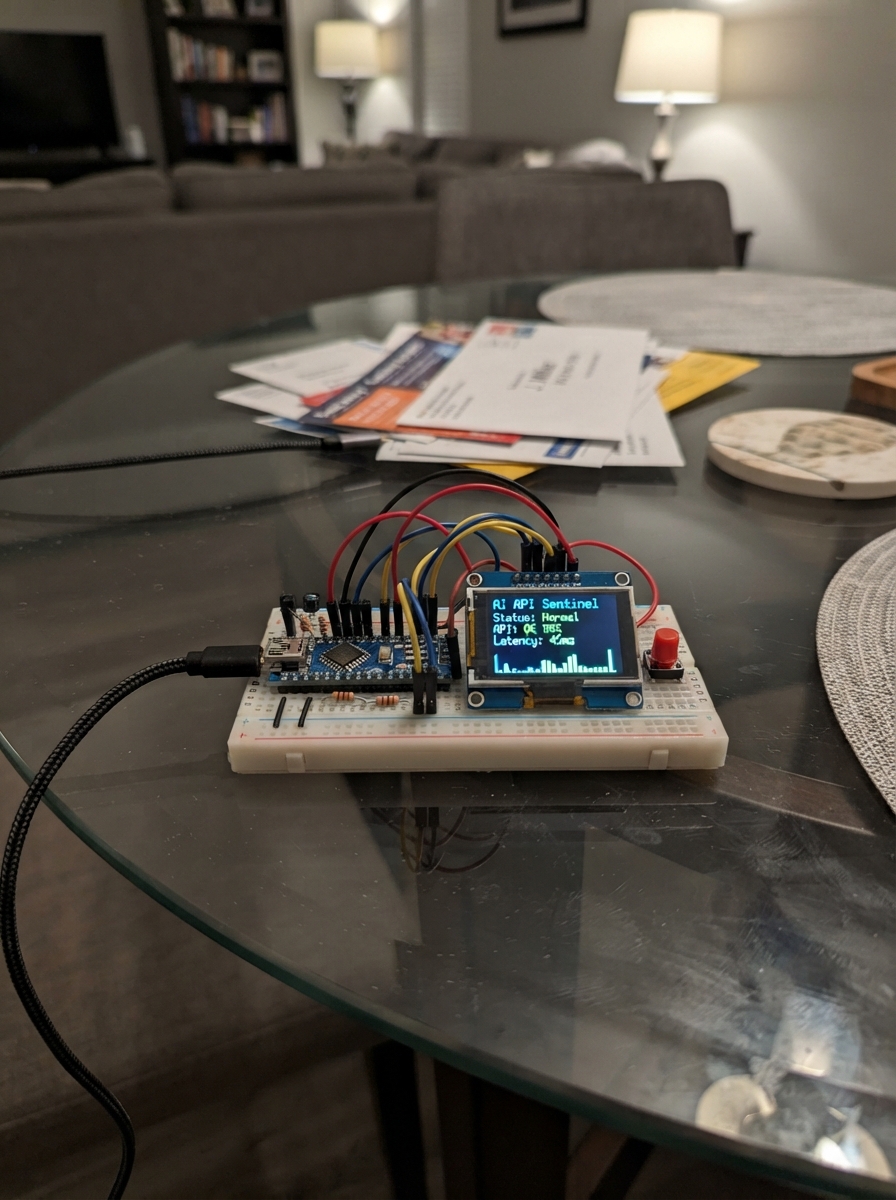
The AI API Reliability Sentinel is a portable monitoring device built around an ESP32 microcontroller that tracks the health and responsiveness of remote API endpoints. Using a 2-inch TFT display and a single push button for interaction, this project provides real-time status visualization and historical data logging for up to four monitored services, storing results locally without exposing sensitive credentials.
This guide includes a complete wiring diagram showing how to connect the ST7789 display and setup button to the ESP32, a full parts list, Arduino firmware with WiFi connectivity and secure API monitoring capabilities, and step-by-step assembly instructions. Builders will learn how to configure API endpoints, interpret status indicators on the display, and deploy a self-contained reliability monitoring solution.
Wiring diagram

Gather all the parts
Assemble it in 5 steps
1. Place the board and screen
Put the ESP32-S3-DevKitC-1 and the 2.0-inch ST7789 screen on a non-conductive work surface with their printed pin labels facing up. Leave the USB socket reachable because it supplies power and is used for deployment.
- Use short jumper wires for the screen so its picture stays stable.
- Do not power the screen from 5V in this build; connect its VCC pin to the board's 3V3 pin.
2. Connect screen power
Connect the screen VCC pin to the ESP32-S3 3V3 pin (power). Connect the screen GND pin to any ESP32-S3 GND pin (ground).
- Make sure VCC and GND are not swapped — swapped power can damage the screen.
3. Connect the screen signal wires
Connect screen SCK to GPIO12 (clock), MOSI to GPIO11 (data), CS to GPIO10 (screen select), DC to GPIO14 (data/command), RST to GPIO15 (screen reset), and BL to GPIO16 (backlight control). Leave MISO and SDCS disconnected because this build does not use the screen's microSD holder.
- Match each jumper wire to the printed label on the screen; SCK and MOSI are easy to swap.
- Do not connect a wire to a screen pin marked 5V for this build.
4. Wire the setup button
Connect one leg of the momentary push button to GPIO4 (signal) and the other leg to any ESP32-S3 GND pin (ground). The button opens Wi-Fi setup when held after startup.
- For a four-leg tactile switch, use two legs on opposite sides, not two legs on the same internally connected side.
5. Power and inspect the build
Check that every screen wire has one matching label and that no bare wires touch. Plug the ESP32-S3 into your computer using a data-capable USB cable. USB powers the board and screen.
- If the board or screen becomes hot, unplug USB immediately and recheck the power wires.
Review all connections
1. Connections between "sentinel_tft" and "ESP32"
2. Connections between "sentinel_button" and "ESP32"
Deploy the firmware
#include <Arduino.h>

#define TFT_DC 14
#define TFT_RST 15
#define TFT_BL 16
#define BUTTON_PIN 4
/* AI/API Sentinel v0.1.0 — portable ESP32-S3 Arduino foundation.
 * Intentionally bounded: 4 monitor definitions and 12 retained results each.
 * Secrets are stored locally in ESP32 NVS; never printed or returned unmasked.
 */
#include <WiFi.h>
#include <WiFiClientSecure.h>
#include <HTTPClient.h>
#include <WebServer.h>
#include <WiFiManager.h>
#include <Preferences.h>
#include <ArduinoJson.h>
#include <SPI.h>
#include <Adafruit_GFX.h>
#include <Adafruit_ST7789.h>


// Hoisted type definitions
enum State : uint8_t { HEALTHY, WARNING, FAILED, TIMEOUT, AUTH_ERROR, RATE_LIMITED, VALIDATION_FAILED, NETWORK_ERROR, UNKNOWN };

struct Result { uint32_t at=0, ms=0; int status=0; State state=UNKNOWN; String message="Not tested"; };

struct Monitor {
  String id, name, provider, endpoint, method, headers, body, requiredFields, keyword;
  int expectedStatus=200; uint32_t intervalS=DEFAULT_INTERVAL_S, timeoutMs=DEFAULT_TIMEOUT_MS, warnMs=2000, criticalMs=5000;
  bool enabled=true; uint8_t failures=0, consecutiveFailures=0; uint32_t lastRun=0;
  Result history[HISTORY_PER_MONITOR]; uint8_t historyCount=0;
};


// Forward declarations
String safeText(const String &s, size_t maxLen);
bool online();
void logLine(const char *tag, const String &s);
void addHistory(Monitor &m, Result r);
State currentState(const Monitor &m);
void saveMonitors();
void loadMonitors();
void defaultMonitor();
bool hasField(JsonVariantConst root, String path);
void runMonitor(Monitor &m);
void drawDashboard();
void sendJson(int code, JsonDocument &d);
void monitorJson(JsonObject o, const Monitor &m, bool detail);
int findMonitor(const String&id);
bool applyMonitor(Monitor &m, JsonObject o, bool create);
void setupWeb();
void connectWiFi();

constexpr char FW_VERSION[] = "0.1.0";
constexpr uint8_t MAX_MONITORS = 4, HISTORY_PER_MONITOR = 12;
constexpr uint32_t DEFAULT_INTERVAL_S = 300, DEFAULT_TIMEOUT_MS = 15000;
constexpr int TFT_CS=10, TFT_DC=14, TFT_RST=15, TFT_BL=16, BUTTON_PIN=4;
Adafruit_ST7789 tft(TFT_CS, TFT_DC, TFT_RST);
WebServer server(80); Preferences prefs;


const char *stateName(State s) { const char *n[]={"HEALTHY","WARNING","FAILED","TIMEOUT","AUTH_ERROR","RATE_LIMITED","VALIDATION_FAILED","NETWORK_ERROR","UNKNOWN"}; return n[s]; }


Monitor monitors[MAX_MONITORS]; uint8_t monitorCount=0; bool portalStarted=false; uint32_t lastDisplay=0, startedAt=0;

String safeText(const String &s, size_t maxLen=240) { String o=s; o.replace("\r",""); o.replace("\n",""); return o.substring(0, min(o.length(),maxLen)); }
bool online() { return WiFi.status()==WL_CONNECTED; }
void logLine(const char *tag, const String &s) { Serial.printf("[%s] %s\n", tag, s.c_str()); }

void addHistory(Monitor &m, Result r) { if (m.historyCount < HISTORY_PER_MONITOR) m.history[m.historyCount++]=r; else { for(uint8_t i=1;i<HISTORY_PER_MONITOR;i++) m.history[i-1]=m.history[i]; m.history[HISTORY_PER_MONITOR-1]=r; } }
State currentState(const Monitor &m) { return m.historyCount ? m.history[m.historyCount-1].state : UNKNOWN; }

void saveMonitors() {
  DynamicJsonDocument d(8192); JsonArray a=d.to<JsonArray>();
  for(uint8_t i=0;i<monitorCount;i++) { Monitor &m=monitors[i]; JsonObject o=a.createNestedObject();
    o["id"]=m.id; o["name"]=m.name; o["provider"]=m.provider; o["endpoint"]=m.endpoint; o["method"]=m.method; o["headers"]=m.headers; o["body"]=m.body; o["requiredFields"]=m.requiredFields; o["keyword"]=m.keyword; o["expectedStatus"]=m.expectedStatus; o["intervalS"]=m.intervalS; o["timeoutMs"]=m.timeoutMs; o["warnMs"]=m.warnMs; o["criticalMs"]=m.criticalMs; o["enabled"]=m.enabled;
  }
  String out; serializeJson(d,out); prefs.putString("monitors",out);
}
void loadMonitors() {
  String raw=prefs.getString("monitors",""); if(!raw.length()) return; DynamicJsonDocument d(8192); if(deserializeJson(d,raw)) return;
  for(JsonObject o:d.as<JsonArray>()) { if(monitorCount>=MAX_MONITORS) break; Monitor &m=monitors[monitorCount++]; m.id=o["id"]|String("m"+String(monitorCount)); m.name=o["name"]|"Monitor"; m.provider=o["provider"]|"Generic REST"; m.endpoint=o["endpoint"]|""; m.method=o["method"]|"GET"; m.headers=o["headers"]|""; m.body=o["body"]|""; m.requiredFields=o["requiredFields"]|""; m.keyword=o["keyword"]|""; m.expectedStatus=o["expectedStatus"]|200; m.intervalS=o["intervalS"]|DEFAULT_INTERVAL_S; m.timeoutMs=o["timeoutMs"]|DEFAULT_TIMEOUT_MS; m.warnMs=o["warnMs"]|2000; m.criticalMs=o["criticalMs"]|5000; m.enabled=o["enabled"]|true; }
}
void defaultMonitor() { if(monitorCount) return; Monitor &m=monitors[monitorCount++]; m.id="example"; m.name="Example API"; m.provider="Generic REST"; m.endpoint="https://example.com/health"; m.method="GET"; m.expectedStatus=200; m.intervalS=300; m.requiredFields=""; saveMonitors(); }

bool hasField(JsonVariantConst root, String path) { JsonVariantConst v=root; int start=0; while(start<(int)path.length()) { int dot=path.indexOf('.',start); String key=path.substring(start,dot<0?path.length():dot); v=v[key]; if(v.isNull()) return false; if(dot<0) break; start=dot+1; } return !v.isNull(); }
void runMonitor(Monitor &m) {
  Result r; r.at=millis()/1000; uint32_t begin=millis();
  if(!online()) { r.state=NETWORK_ERROR; r.message="Local Wi-Fi is offline"; addHistory(m,r); return; }
  if(!m.endpoint.startsWith("https://") && !m.endpoint.startsWith("http://")) { r.state=VALIDATION_FAILED; r.message="Endpoint must begin http:// or https://"; addHistory(m,r); return; }
  WiFiClientSecure secure; secure.setInsecure(); // Trust-store provisioning is a future production extension.
  HTTPClient http; http.setConnectTimeout(m.timeoutMs); http.setTimeout(m.timeoutMs);
  if(!http.begin(secure,m.endpoint)) { r.state=NETWORK_ERROR; r.message="Could not start HTTP client"; addHistory(m,r); return; }
  int pos=0; while(pos<(int)m.headers.length()) { int nl=m.headers.indexOf('\n',pos); String line=m.headers.substring(pos,nl<0?m.headers.length():nl); int colon=line.indexOf(':'); if(colon>0) http.addHeader(line.substring(0,colon),line.substring(colon+1)); if(nl<0) break; pos=nl+1; }
  int code = m.method=="POST" ? http.POST(m.body) : (m.method=="PUT" ? http.PUT(m.body) : http.GET());
  r.ms=millis()-begin; r.status=code;
  if(code<=0) { r.state=(code==HTTPC_ERROR_CONNECTION_REFUSED||code==HTTPC_ERROR_CONNECTION_LOST)?NETWORK_ERROR:TIMEOUT; r.message="HTTP client error "+String(code); http.end(); addHistory(m,r); m.consecutiveFailures++; m.failures++; return; }
  String payload=http.getString(); http.end();
  if(code==401||code==403) { r.state=AUTH_ERROR; r.message="Authentication rejected (HTTP "+String(code)+")"; }
  else if(code==429) { r.state=RATE_LIMITED; r.message="Rate limited (HTTP 429)"; }
  else if(code!=m.expectedStatus) { r.state=FAILED; r.message="Expected HTTP "+String(m.expectedStatus)+", got "+String(code); }
  else {
    r.state=HEALTHY; r.message="HTTP "+String(code)+"";
    if(m.requiredFields.length()) { DynamicJsonDocument d(4096); DeserializationError e=deserializeJson(d,payload); if(e) {r.state=VALIDATION_FAILED; r.message="Expected JSON but response was invalid";} else { int p=0; while(p<(int)m.requiredFields.length()) { int c=m.requiredFields.indexOf(',',p); String field=m.requiredFields.substring(p,c<0?m.requiredFields.length():c); field.trim(); if(field.length()&&!hasField(d.as<JsonVariantConst>(),field)){r.state=VALIDATION_FAILED;r.message="Missing field: "+field;break;} if(c<0)break;p=c+1; } } }
    if(r.state==HEALTHY && m.keyword.length() && payload.indexOf(m.keyword)<0) { r.state=VALIDATION_FAILED; r.message="Expected text was not found"; }
    if(r.state==HEALTHY && r.ms>=m.criticalMs) {r.state=WARNING;r.message="Critical latency threshold exceeded";} else if(r.state==HEALTHY && r.ms>=m.warnMs) {r.state=WARNING;r.message="Latency warning threshold exceeded";}
  }
  if(r.state==HEALTHY||r.state==WARNING) { if(m.consecutiveFailures) logLine("RECOVERY",m.name+" recovered"); m.consecutiveFailures=0; } else {m.consecutiveFailures++;m.failures++;}
  addHistory(m,r); logLine("TEST",m.name+" "+stateName(r.state)+" "+String(r.ms)+"ms: "+r.message);
}

void drawDashboard() {
  if(millis()-lastDisplay<1000) return; lastDisplay=millis(); tft.fillScreen(ST77XX_BLACK); tft.setTextWrap(false);
  tft.setTextColor(ST77XX_CYAN); tft.setTextSize(2); tft.setCursor(8,8); tft.print("AI/API SENTINEL");
  tft.setTextSize(1); tft.setTextColor(ST77XX_WHITE); tft.setCursor(8,35); tft.printf("Firmware v%s",FW_VERSION);
  tft.setCursor(8,52); tft.setTextColor(online()?ST77XX_GREEN:ST77XX_RED); tft.printf("Wi-Fi: %s",online()?"OK":"OFFLINE");
  tft.setTextColor(ST77XX_WHITE); tft.setCursor(8,72); tft.print("SERVICES");
  for(uint8_t i=0;i<monitorCount && i<6;i++) { State s=currentState(monitors[i]); uint16_t col=(s==HEALTHY?ST77XX_GREEN:(s==WARNING?ST77XX_YELLOW:ST77XX_RED)); tft.setTextColor(col); tft.setCursor(10,90+i*22); tft.print("● "); tft.print(monitors[i].name.substring(0,17)); tft.setCursor(205,90+i*22); tft.print(stateName(s)); }
  tft.setTextColor(ST77XX_WHITE); tft.setCursor(8,225); tft.printf("IP: %s",online()?WiFi.localIP().toString().c_str():"configure via AP");
}

void sendJson(int code, JsonDocument &d) { String out; serializeJson(d,out); server.sendHeader("Cache-Control","no-store"); server.send(code,"application/json",out); }
void monitorJson(JsonObject o, const Monitor &m, bool detail=false) { o["id"]=m.id;o["name"]=m.name;o["provider"]=m.provider;o["endpoint"]=m.endpoint;o["method"]=m.method;o["expectedStatus"]=m.expectedStatus;o["intervalS"]=m.intervalS;o["timeoutMs"]=m.timeoutMs;o["warnMs"]=m.warnMs;o["criticalMs"]=m.criticalMs;o["enabled"]=m.enabled;o["state"]=stateName(currentState(m));o["failures"]=m.failures;o["consecutiveFailures"]=m.consecutiveFailures; if(m.historyCount){Result&r=m.history[m.historyCount-1];o["lastMs"]=r.ms;o["lastStatus"]=r.status;o["message"]=r.message;} if(detail){o["headersMasked"]=m.headers.length()?"Configured (not returned)":"";o["bodyConfigured"]=m.body.length()>0;o["requiredFields"]=m.requiredFields;o["keyword"]=m.keyword;} }
int findMonitor(const String&id){for(uint8_t i=0;i<monitorCount;i++)if(monitors[i].id==id)return i;return -1;}
bool applyMonitor(Monitor &m, JsonObject o, bool create) { String endpoint=o["endpoint"]|m.endpoint; if(!endpoint.startsWith("http://")&&!endpoint.startsWith("https://")) return false; m.name=safeText(o["name"]|m.name,32);m.provider=safeText(o["provider"]|m.provider,24);m.endpoint=endpoint;m.method=(o["method"]|m.method);m.method.toUpperCase(); if(m.method!="GET"&&m.method!="POST"&&m.method!="PUT")return false; if(o.containsKey("headers"))m.headers=safeText(o["headers"].as<String>(),512);if(o.containsKey("body"))m.body=o["body"].as<String>();m.requiredFields=safeText(o["requiredFields"]|m.requiredFields,180);m.keyword=safeText(o["keyword"]|m.keyword,120);m.expectedStatus=constrain(o["expectedStatus"]|m.expectedStatus,100,599);m.intervalS=constrain(o["intervalS"]|m.intervalS,30,86400);m.timeoutMs=constrain(o["timeoutMs"]|m.timeoutMs,1000,30000);m.warnMs=constrain(o["warnMs"]|m.warnMs,100,30000);m.criticalMs=constrain(o["criticalMs"]|m.criticalMs,m.warnMs,60000);m.enabled=o["enabled"]|m.enabled;return true; }

const char INDEX_HTML[] PROGMEM=R"HTML(<!doctype html><html><head><meta name=viewport content="width=device-width,initial-scale=1"><title>AI/API Sentinel</title><style>body{font:16px system-ui;margin:20px;background:#10151d;color:#e6edf3;max-width:900px}h1{color:#5eead4}.card{background:#19212c;border-radius:10px;padding:14px;margin:10px 0}.ok{color:#4ade80}.bad{color:#fb7185}.warn{color:#facc15}button{padding:9px;margin:4px}small{color:#9ca3af}</style></head><body><h1>AI/API Sentinel</h1><div id=sys class=card>Loading...</div><h2>Monitors</h2><div id=mon></div><p><button onclick="location='/api/restart'">Restart device</button> <button onclick="location='/api/reset'">Reset Wi-Fi and configuration</button></p><small>This local interface is unauthenticated. Keep it on a trusted LAN.</small><script>async function load(){let s=await(await fetch('/api/status')).json();sys.innerHTML=`<b>${s.device}</b> · Wi-Fi: <span class=${s.wifi?'ok':'bad'}>${s.wifi?'OK':'OFFLINE'}</span><br>IP: ${s.ip} · Uptime: ${s.uptime}s · Free heap: ${s.heap}`;let a=await(await fetch('/api/monitors')).json();mon.innerHTML=a.map(x=>`<div class=card><b>${x.name}</b> <span class=${x.state==='HEALTHY'?'ok':x.state==='WARNING'?'warn':'bad'}>${x.state}</span><br><small>${x.provider} · ${x.lastMs||'-'} ms · ${x.message||'Not tested'}</small><br><button onclick="fetch('/api/monitors/'+x.id+'/test',{method:'POST'}).then(load)">Test now</button></div>`).join('')}load();setInterval(load,5000)</script></body></html>)HTML";
void setupWeb() {
 server.on("/",[](){server.send_P(200,"text/html",INDEX_HTML);});
 server.on("/api/status",[](){DynamicJsonDocument d(1024);d["device"]=prefs.getString("device","AI/API Sentinel");d["version"]=FW_VERSION;d["wifi"]=online();d["ip"]=online()?WiFi.localIP().toString():"";d["uptime"]=millis()/1000;d["heap"]=ESP.getFreeHeap();d["monitors"]=monitorCount;sendJson(200,d);});
 server.on("/api/monitors",HTTP_GET,[](){DynamicJsonDocument d(4096);JsonArray a=d.to<JsonArray>();for(uint8_t i=0;i<monitorCount;i++)monitorJson(a.createNestedObject(),monitors[i]);sendJson(200,d);});
 server.on("/api/system",[](){DynamicJsonDocument d(1024);d["firmware"]=FW_VERSION;d["chip"]=ESP.getChipModel();d["heap"]=ESP.getFreeHeap();d["uptimeSeconds"]=millis()/1000;d["rssi"]=online()?WiFi.RSSI():0;sendJson(200,d);});
 server.on("/api/config",HTTP_GET,[](){DynamicJsonDocument d(512);d["deviceName"]=prefs.getString("device","AI/API Sentinel");d["wifiConfigured"]=online();d["monitorLimit"]=MAX_MONITORS;sendJson(200,d);});
 server.on("/api/config",HTTP_POST,[](){DynamicJsonDocument in(512),out(256);if(deserializeJson(in,server.arg("plain"))){server.send(400,"application/json","{\"error\":\"invalid JSON\"}");return;}String n=safeText(in["deviceName"]|"",32);if(n.length())prefs.putString("device",n);out["ok"]=true;sendJson(200,out);});
 server.on("/api/restart",HTTP_GET,[](){server.send(202,"application/json","{\"restarting\":true}");delay(200);ESP.restart();});
 server.on("/api/reset",HTTP_GET,[](){server.send(202,"application/json","{\"resetting\":true}");delay(200);prefs.clear();WiFiManager().resetSettings();ESP.restart();});
 server.onNotFound([](){String u=server.uri(); if(!u.startsWith("/api/monitors/")){server.send(404,"application/json","{\"error\":\"not found\"}");return;} String tail=u.substring(14); bool test=tail.endsWith("/test");if(test)tail=tail.substring(0,tail.length()-5);int i=findMonitor(tail);if(i<0){server.send(404,"application/json","{\"error\":\"unknown monitor\"}");return;}if(test&&server.method()==HTTP_POST){runMonitor(monitors[i]);DynamicJsonDocument d(1024);monitorJson(d.to<JsonObject>(),monitors[i],true);sendJson(200,d);return;}if(server.method()==HTTP_GET){DynamicJsonDocument d(2048);JsonObject o=d.to<JsonObject>();monitorJson(o,monitors[i],true);JsonArray h=o.createNestedArray("history");for(uint8_t k=0;k<monitors[i].historyCount;k++){Result&r=monitors[i].history[k];JsonObject x=h.createNestedObject();x["at"]=r.at;x["ms"]=r.ms;x["status"]=r.status;x["state"]=stateName(r.state);x["message"]=r.message;}sendJson(200,d);return;}if(server.method()==HTTP_DELETE){for(uint8_t k=i+1;k<monitorCount;k++)monitors[k-1]=monitors[k];monitorCount--;saveMonitors();server.send(204);return;}if(server.method()==HTTP_POST||server.method()==HTTP_PUT){DynamicJsonDocument in(2048);if(deserializeJson(in,server.arg("plain"))||!applyMonitor(monitors[i],in.as<JsonObject>(),false)){server.send(400,"application/json","{\"error\":\"invalid monitor\"}");return;}saveMonitors();server.send(200,"application/json","{\"ok\":true}");return;}server.send(405,"application/json","{\"error\":\"method not allowed\"}");});
 server.on("/api/monitors",HTTP_POST,[](){if(monitorCount>=MAX_MONITORS){server.send(409,"application/json","{\"error\":\"monitor limit reached\"}");return;}DynamicJsonDocument in(2048);if(deserializeJson(in,server.arg("plain"))){server.send(400,"application/json","{\"error\":\"invalid JSON\"}");return;}Monitor m;m.id="m"+String(millis());if(!applyMonitor(m,in.as<JsonObject>(),true)){server.send(400,"application/json","{\"error\":\"invalid monitor\"}");return;}monitors[monitorCount++]=m;saveMonitors();server.send(201,"application/json","{\"ok\":true}");});
 server.begin();
}
void connectWiFi() { WiFiManager wm; wm.setConfigPortalTimeout(180); wm.setConnectTimeout(15); wm.setDarkMode(true); if(!wm.autoConnect("AI-API-Sentinel","configure-sentinel")){logLine("WIFI","Offline mode; hold button to reopen configuration");}else logLine("WIFI","Connected: "+WiFi.localIP().toString()); }
void setup(){Serial.begin(115200);delay(200);logLine("SYSTEM","AI/API Sentinel booting");startedAt=millis();pinMode(BUTTON_PIN,INPUT_PULLUP);pinMode(TFT_BL,OUTPUT);digitalWrite(TFT_BL,HIGH);SPI.begin(12,-1,11,TFT_CS);tft.init(240,320);tft.setRotation(1);tft.fillScreen(ST77XX_BLACK);prefs.begin("sentinel",false);loadMonitors();defaultMonitor();connectWiFi();setupWeb();}
void loop(){server.handleClient(); if(WiFi.status()!=WL_CONNECTED && millis()>30000) WiFi.reconnect(); if(!digitalRead(BUTTON_PIN)){delay(30);if(!digitalRead(BUTTON_PIN)){WiFiManager wm;wm.startConfigPortal("AI-API-Sentinel","configure-sentinel");}} for(uint8_t i=0;i<monitorCount;i++){Monitor&m=monitors[i];if(m.enabled && millis()-m.lastRun>=m.intervalS*1000UL){m.lastRun=millis();runMonitor(m);}}drawDashboard();delay(5);}
Remix this project
Make it yours in one click
Open a full copy of this project in your own Schematik workspace — diagram, code, parts, and assembly steps included. Swap the sensor, add features, or redesign the whole thing with AI. The author's original stays untouched.