Community project
Active-Tracking Robot Vehicle
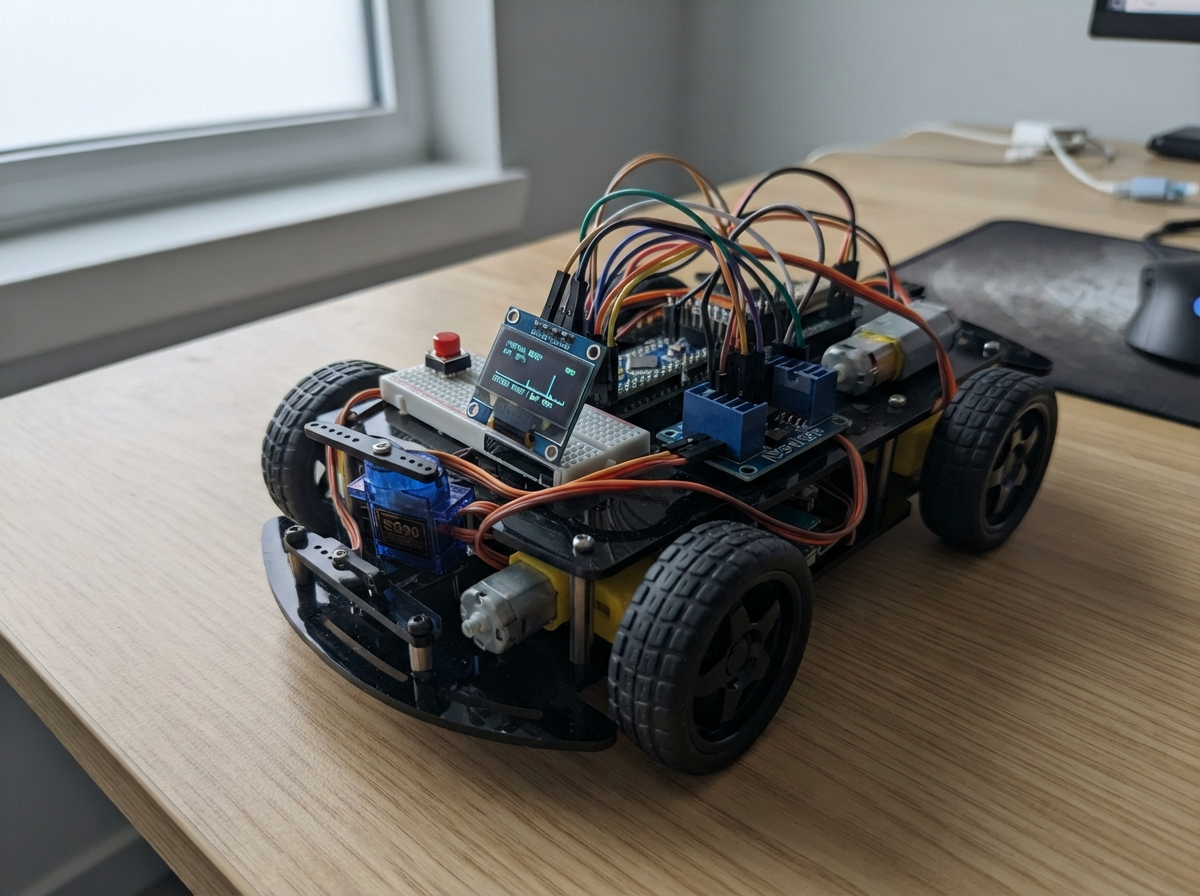
This active-tracking robot vehicle uses an ESP32 microcontroller to autonomously follow a target while displaying status on an onboard OLED screen. The four-wheel tank-drive platform is powered by DC gearmotors controlled through an L298N motor driver, with servo-controlled mechanisms for additional functionality.
The guide provides a complete wiring diagram, parts list, and step-by-step assembly instructions for building and configuring the rover. Firmware is included to enable WiFi-based manual control, autonomous following modes, and a maintenance dashboard accessible via the onboard web server.
Wiring diagram

Gather all the parts
Assemble it in 6 steps
1. Keep the electronics unpowered while rewiring
Unplug the USB cable and disconnect the motor battery before moving wires. This stops the rover from moving unexpectedly while the L298N, servos, and buttons are being changed.
- Do not test the motors with the wheels lifted near fingers, loose wires, or the service tray.
2. Connect the L298N control wires
Connect ENA to GPIO14 (left-side motor-pair enable), IN1 to GPIO27 (left direction), IN2 to GPIO26 (left direction), ENB to GPIO25 (right-side motor-pair enable), IN3 to GPIO33 (right direction), and IN4 to GPIO32 (right direction). Connect the L298N GND to ESP32 GND (shared ground).
- Remove the ENA and ENB jumper caps if your particular L298N board has them; these two pins must be connected to the ESP32 for the firmware to enable or stop each side.
- Make sure the L298N ground and ESP32 ground are connected together — without this shared ground, the direction signals cannot be read reliably.
3. Make the two parallel tank-drive pairs
Connect L298N OUT1 to the M+ lead of left_front_motor and left_rear_motor, then connect OUT2 to the M- lead of both left motors. Connect OUT3 to the M+ lead of right_front_motor and right_rear_motor, then connect OUT4 to the M- lead of both right motors. This makes each L298N channel run two motors on one side of the rover.
- If one wheel spins the opposite way from the other wheel on the same side, swap only that motor's two leads.
- Four motors can draw more current than an L298N module can safely supply, especially when starting or stalled. Use a motor supply and driver rating suitable for the measured stall current of both motors on each channel.
4. Move the service controls
Connect the lower tray servo signal wire to GPIO16 (signal), the service-boot servo signal wire to GPIO17 (signal), and the Service Mode push button between GPIO13 (signal) and GND (ground). The firmware uses the ESP32's internal pull-up, so the button reads as pressed when it connects GPIO13 to GND.
- Power both servos from a stable 5 V supply and connect that supply ground to ESP32 GND — servo current can reset the ESP32 if it is taken from the 3V3 pin.
5. Check the remaining control wiring
Keep the mode button between GPIO4 (signal) and GND (ground). Keep OLED VCC to 3V3 (power), OLED GND to GND (ground), OLED SDA to GPIO21 (data), and OLED SCL to GPIO22 (clock).
- Make sure OLED VCC and GND are not swapped — swapped power can damage the screen.
6. Power up for the first test
Lift the rover so its wheels cannot touch the floor, power the motor system and ESP32, then use the control page. Push the Ghost Stick upward to drive both sides forward; drag it left or right to turn the rover in place or curve it.
- If pushing up makes the rover reverse, swap the two motor leads for both motors on each side, or change the direction in firmware after confirming the wiring.
Review all connections
1. Connections between "oled_1" and "ESP32"
2. Connections between "mode_button" and "ESP32"
3. Connections between "service_button" and "ESP32"
4. Connections between "tray_servo" and "ESP32"
5. Connections between "boot_servo" and "ESP32"
6. Connections between "l298n_driver" and "ESP32"
Deploy the firmware
#include <WiFi.h>
#include <AsyncTCP.h>
#include <ESPAsyncWebServer.h>
#include <Wire.h>
#include <Adafruit_GFX.h>
#include <Adafruit_SSD1306.h>
#include <ESP32Servo.h>
#include <Preferences.h>
#include <math.h>

// Local-only rover firmware. The AP password protects the wireless network;
// HTTP Basic authentication protects the maintenance dashboard.
constexpr char SSID[]="Direct follow", PASS[]="12345678", ADMIN[]="admin", ADMIN_PASS[]="3245";
constexpr int OLED_SDA_PIN=21, OLED_SCL_PIN=22, MODE_BUTTON_PIN=4;
// L298N tank-drive channels: channel A is the left motor pair; channel B is the right motor pair.
constexpr int ENA_PIN=14, IN1_PIN=27, IN2_PIN=26, ENB_PIN=25, IN3_PIN=33, IN4_PIN=32;
// These moved away from the L298N pins.
constexpr int TRAY_SERVO_PIN=16, BOOT_SERVO_PIN=17, SERVICE_BUTTON_PIN=13;
constexpr uint32_t DEBOUNCE=35, DOUBLE_CLICK=350, STICK_TIMEOUT=500, GPS_TIMEOUT=5000;
constexpr float STOP_DISTANCE=2.0f, HEADING_TOLERANCE=14.0f;
Adafruit_SSD1306 oled(128,64,&Wire,-1); AsyncWebServer server(80); Servo tray,boot; Preferences prefs;
enum State:uint8_t{WAITING,MANUAL,FOLLOW_READY,COUNTDOWN,FOLLOWING,SERVICE}; State state=WAITING;
bool ai=false,connected=false,tabletOK=false,targetOK=false,trayOpen=false,bootOpen=false;
float tLat,tLng,tHead,gLat,gLng; uint32_t started,lastStick,lastPhone,lastTablet,lastTarget,lastFollow;
bool raw4=HIGH,stable4=HIGH,raw27=HIGH,stable27=HIGH,pending=false; uint32_t raw4At,raw27At,firstClick,holdAt;
struct Room{String name;float lat,lng;bool valid;}; Room rooms[8]; String message="Robo-helper ready.";

const char GPS[] PROGMEM=R"X(<!doctype html><meta name="viewport" content="width=device-width,initial-scale=1"><style>body{background:#101820;color:white;font:20px Arial;text-align:center;padding:24px}button{font-size:22px;padding:18px;background:#287ee8;color:white;border:0;border-radius:12px}.eyes{font-size:70px;color:#29aaff}</style><div id=e class=eyes style="display:none">● ●</div><p>Welcome to the ESP32 robot car. This device is used as a GPS and a pass for the robot. Please mount it on the robot.</p><button id=b>I mounted it on the bottom</button><p id=s></p><script>let lat,lng,head=null;function send(){if(lat!==undefined&&head!==null)fetch('/update-data?lat='+lat+'&lng='+lng+'&heading='+head).catch(()=>{})}function bad(){s.textContent='Browser not supported.'}async function go(){if(!navigator.geolocation||!window.DeviceOrientationEvent)return bad();try{if(DeviceOrientationEvent.requestPermission&&await DeviceOrientationEvent.requestPermission()!='granted')return bad();addEventListener('deviceorientationabsolute',o=>{head=o.webkitCompassHeading??o.alpha;if(typeof head=='number')send()},true);addEventListener('deviceorientation',o=>{head=o.webkitCompassHeading??o.alpha;if(typeof head=='number')send()},true);navigator.geolocation.watchPosition(p=>{lat=p.coords.latitude;lng=p.coords.longitude;send()},bad,{enableHighAccuracy:true});s.textContent='Tracking location and heading.';b.style.display='none'}catch(x){bad()}}b.onclick=go;fetch('/ai-status').then(x=>x.json()).then(x=>{if(!x.ai)e.style.display='block'})</script>)X";
const char CONTROL[] PROGMEM=R"X(<!doctype html><meta name="viewport" content="width=device-width,initial-scale=1,user-scalable=no"><style>body{margin:0;background:#101820;color:white;font:Arial;overflow:hidden}.bar{position:absolute;padding:10px;z-index:2}.bar button{font-size:16px;padding:11px;border:0;border-radius:9px;color:white;background:#2677d8}.bar .stop{background:#d22835}.area{height:100vh;touch-action:none}.r,.k{position:absolute;display:none;transform:translate(-50%,-50%);border-radius:50%}.r{height:120px;width:120px;border:3px solid #6cbcff}.k{height:52px;width:52px;background:#6cbcff}</style><div class=bar><button class=stop onclick="fetch('/estop')">EMERGENCY STOP</button><button onclick="fetch('/switch-follow')">Switch Follow</button><button onclick="come()">Come to me</button></div><div id=a class=area><i id=r class=r></i><i id=k class=k></i></div><script>let ox,oy,on=false;function tx(x,y){fetch('/joystick?x='+x+'&y='+y).catch(()=>{})}function mv(t){let x=t.clientX-ox,y=t.clientY-oy,d=Math.hypot(x,y);if(d>60){x*=60/d;y*=60/d}k.style.left=ox+x+'px';k.style.top=oy+y+'px';tx(x/60,-y/60)}a.ontouchstart=x=>{let t=x.touches[0];on=true;ox=t.clientX;oy=t.clientY;r.style.left=ox+'px';r.style.top=oy+'px';r.style.display=k.style.display='block';mv(t);x.preventDefault()};a.ontouchmove=x=>{if(on)mv(x.touches[0]);x.preventDefault()};function end(){on=false;r.style.display=k.style.display='none';tx(0,0)}a.ontouchend=end;a.ontouchcancel=end;fetch('/control-connected');setInterval(()=>fetch('/control-connected'),1000);function come(){navigator.geolocation?navigator.geolocation.getCurrentPosition(p=>fetch('/target-data?lat='+p.coords.latitude+'&lng='+p.coords.longitude).then(()=>fetch('/switch-follow')),()=>alert('Browser not supported.'),{enableHighAccuracy:true}):alert('Browser not supported.')}</script>)X";
const char SERVICE_PAGE[] PROGMEM=R"X(<!doctype html><meta name="viewport" content="width=device-width,initial-scale=1"><style>body{background:#111;color:#eee;font:18px Arial;padding:18px}button,input{font-size:18px;padding:11px;margin:5px}button{background:#286dcc;color:white;border:0;border-radius:8px}</style><h2>Service Control Dashboard</h2><p id=s>Loading...</p><button onclick="f('/service/open-boot')">Open Service Boot</button><button onclick="f('/service/return')">Return to Starting Position</button><button onclick="f('/service/tray')">Toggle Public Tray</button><hr><h3>Robo-helper/bot</h3><button onclick="f('/ai/toggle')">Toggle Gemini AI mode</button><p>Local commands: “go to kitchen” or “list rooms”.</p><input id=c placeholder="go to kitchen"><button onclick="fetch('/bot?text='+encodeURIComponent(c.value)).then(x=>x.json()).then(x=>alert(x.reply))">Send</button><p><a href="/robo-helper/new-homes">Add a named room</a></p><script>function f(u){fetch(u).then(refresh)}function refresh(){fetch('/status').then(x=>x.json()).then(x=>s.textContent='Mode: '+x.mode+' | AI: '+(x.ai?'on':'off')+' | '+x.message)}refresh();setInterval(refresh,1000)</script>)X";
const char ROOMS[] PROGMEM=R"X(<!doctype html><meta name="viewport" content="width=device-width,initial-scale=1"><style>body{background:#111;color:#eee;font:18px Arial;padding:18px}input,button{font-size:18px;padding:10px}</style><h2>Add a named room</h2><p>Stand at the room reference point, name it, then save.</p><input id=n placeholder="Kitchen"><button onclick="save()">Save this location</button><p id=o></p><script>function save(){if(!navigator.geolocation){o.textContent='Browser not supported.';return}navigator.geolocation.getCurrentPosition(p=>fetch('/room/save?name='+encodeURIComponent(n.value)+'&lat='+p.coords.latitude+'&lng='+p.coords.longitude).then(x=>x.json()).then(x=>o.textContent=x.reply),()=>o.textContent='Browser not supported.',{enableHighAccuracy:true})}</script>)X";

// Disable both L298N channels before changing direction, then drive each tank side.
void stopAll(){
  digitalWrite(ENA_PIN,LOW); digitalWrite(ENB_PIN,LOW);
  digitalWrite(IN1_PIN,LOW); digitalWrite(IN2_PIN,LOW);
  digitalWrite(IN3_PIN,LOW); digitalWrite(IN4_PIN,LOW);
}
void setTankChannel(int enablePin,int forwardPin,int reversePin,float value){
  if(fabsf(value)<0.12f){digitalWrite(enablePin,LOW);digitalWrite(forwardPin,LOW);digitalWrite(reversePin,LOW);return;}
  digitalWrite(forwardPin,value>0.0f?HIGH:LOW);
  digitalWrite(reversePin,value>0.0f?LOW:HIGH);
  digitalWrite(enablePin,HIGH);
}
void tankDrive(float left,float right){
  if(state==SERVICE){stopAll();return;}
  left=constrain(left,-1.0f,1.0f); right=constrain(right,-1.0f,1.0f);
  setTankChannel(ENA_PIN,IN1_PIN,IN2_PIN,left);
  setTankChannel(ENB_PIN,IN3_PIN,IN4_PIN,right);
}
String nameOf(){const char*n[]={"waiting","manual","follow ready","follow countdown","direct follow active","service mode"};return n[state];}
void screen(){oled.clearDisplay();oled.setTextSize(1);oled.setTextColor(SSD1306_WHITE);if(state==WAITING)oled.println("Robot vehicle waiting");else if(state==MANUAL){oled.println("Manual control");oled.println();oled.println(connected?"connected":"Not connected");}else if(state==FOLLOW_READY)oled.println("Follow: press and\nhold button to start.");else if(state==COUNTDOWN){oled.println("Follow starting");oled.print("COUNT: ");oled.println(min(3UL,(millis()-holdAt)/1000UL+1));}else if(state==FOLLOWING){oled.println("Direct follow active");oled.println();oled.println("AP: Direct follow");}else{oled.println("SERVICE MODE");oled.println();oled.println("Driving locked");}oled.display();}
bool auth(AsyncWebServerRequest*r){if(!r->authenticate(ADMIN,ADMIN_PASS)){r->requestAuthentication();return false;}return true;}
void json(AsyncWebServerRequest*r,String s){r->send(200,"application/json",s);}
float rad(float x){return x*PI/180.0f;}float distanceM(){float a=rad(tLat),b=rad(gLat),d=rad(gLat-tLat),e=rad(gLng-tLng);float x=sinf(d/2)*sinf(d/2)+cosf(a)*cosf(b)*sinf(e/2)*sinf(e/2);return 6371000*2*atan2f(sqrtf(x),sqrtf(1-x));}float bearing(){float d=rad(gLng-tLng),y=sinf(d)*cosf(rad(gLat)),x=cosf(rad(tLat))*sinf(rad(gLat))-sinf(rad(tLat))*cosf(rad(gLat))*cosf(d);return fmodf(atan2f(y,x)*180/PI+360,360);}
void follow(){if(!tabletOK||!targetOK||millis()-lastTablet>GPS_TIMEOUT||millis()-lastTarget>GPS_TIMEOUT){stopAll();message="Follow paused: waiting for fresh location.";return;}if(distanceM()<STOP_DISTANCE){stopAll();message="At target location.";return;}float e=fmodf(bearing()-tHead+540,360)-180;if(fabsf(e)>HEADING_TOLERANCE){
    // Turn in place until the tablet compass faces the target.
    tankDrive(e<0.0f?-0.70f:0.70f,e<0.0f?0.70f:-0.70f);
  }else{
    tankDrive(0.80f,0.80f);
  }}
String bot(String c){c.trim();c.toLowerCase();if(!ai)return "Robo-helper is off. Turn it on from the service dashboard.";if(c=="list rooms"){String out="Saved rooms: ";bool any=false;for(auto &q:rooms)if(q.valid){out+=(any?", ":"")+q.name;any=true;}return any?out:"No rooms have been saved yet.";}if(c.startsWith("go to ")){String w=c.substring(6);w.trim();for(auto&q:rooms)if(q.valid&&q.name.equalsIgnoreCase(w)){gLat=q.lat;gLng=q.lng;targetOK=true;lastTarget=millis();stopAll();state=FOLLOWING;message="Going to "+q.name+".";screen();return message;}return "Sorry, I could not do your request. I'm really sorry, but there is no home name like this.";}return "Try: go to kitchen, or list rooms.";}
void routes(){server.on("/",HTTP_GET,[](AsyncWebServerRequest*r){r->redirect("/control-phone");});server.on("/GPS",HTTP_GET,[](AsyncWebServerRequest*r){r->send_P(200,"text/html",GPS);});server.on("/control-phone",HTTP_GET,[](AsyncWebServerRequest*r){r->send_P(200,"text/html",CONTROL);});server.on("/robo-helper-secret",HTTP_GET,[](AsyncWebServerRequest*r){if(auth(r))r->send_P(200,"text/html",SERVICE_PAGE);});server.on("/robo-helper/new-homes",HTTP_GET,[](AsyncWebServerRequest*r){if(auth(r))r->send_P(200,"text/html",ROOMS);});server.on("/control-connected",HTTP_GET,[](AsyncWebServerRequest*r){connected=true;lastPhone=millis();r->send(204);});server.on("/update-data",HTTP_GET,[](AsyncWebServerRequest*r){if(r->hasParam("lat")&&r->hasParam("lng")&&r->hasParam("heading")){tLat=r->getParam("lat")->value().toFloat();tLng=r->getParam("lng")->value().toFloat();tHead=r->getParam("heading")->value().toFloat();tabletOK=true;lastTablet=millis();r->send(204);}else r->send(400,"text/plain","lat, lng, and heading are required");});server.on("/target-data",HTTP_GET,[](AsyncWebServerRequest*r){if(r->hasParam("lat")&&r->hasParam("lng")){gLat=r->getParam("lat")->value().toFloat();gLng=r->getParam("lng")->value().toFloat();targetOK=true;lastTarget=millis();r->send(204);}else r->send(400,"text/plain","lat and lng are required");});server.on("/joystick",HTTP_GET,[](AsyncWebServerRequest*r){float x=r->hasParam("x")?r->getParam("x")->value().toFloat():0,y=r->hasParam("y")?r->getParam("y")->value().toFloat():0;lastStick=millis();
  if(state==MANUAL){
    // Differential mixing: forward/back controls both sides; horizontal motion changes their relative directions.
    tankDrive(y+x,y-x);
  }else stopAll();
  r->send(204);});server.on("/estop",HTTP_GET,[](AsyncWebServerRequest*r){stopAll();state=MANUAL;message="Emergency stop applied.";screen();r->send(204);});server.on("/switch-follow",HTTP_GET,[](AsyncWebServerRequest*r){if(state!=SERVICE){stopAll();state=FOLLOW_READY;message="Follow ready: hold the physical button.";screen();}r->send(204);});server.on("/service/open-boot",HTTP_GET,[](AsyncWebServerRequest*r){if(!auth(r))return;stopAll();boot.write(100);bootOpen=true;message="Service boot opened.";r->send(204);});server.on("/service/return",HTTP_GET,[](AsyncWebServerRequest*r){if(!auth(r))return;tray.write(0);boot.write(0);trayOpen=bootOpen=false;stopAll();if(state==SERVICE)state=MANUAL;message="Both servos closed; manual mode restored.";screen();r->send(204);});server.on("/service/tray",HTTP_GET,[](AsyncWebServerRequest*r){if(!auth(r))return;if(state==SERVICE){r->send(423,"text/plain","Tray locked in service mode");return;}trayOpen=!trayOpen;tray.write(trayOpen?90:0);r->send(204);});server.on("/ai/toggle",HTTP_GET,[](AsyncWebServerRequest*r){if(!auth(r))return;ai=!ai;prefs.putBool("ai",ai);message=ai?"Robo-helper command mode on.":"Robo-helper command mode off; tablet eyes shown.";r->send(204);});server.on("/ai-status",HTTP_GET,[](AsyncWebServerRequest*r){json(r,String("{\"ai\":")+(ai?"true":"false")+"}");});server.on("/status",HTTP_GET,[](AsyncWebServerRequest*r){String m=message;m.replace("\"","'");json(r,"{\"mode\":\""+nameOf()+"\",\"ai\":"+(ai?"true":"false")+",\"message\":\""+m+"\"}");});server.on("/room/save",HTTP_GET,[](AsyncWebServerRequest*r){if(!auth(r))return;if(!r->hasParam("name")||!r->hasParam("lat")||!r->hasParam("lng")){r->send(400,"application/json","{\"reply\":\"Name and location are required.\"}");return;}String n=r->getParam("name")->value();n.trim();if(n.length()<1||n.length()>20){r->send(400,"application/json","{\"reply\":\"Use a room name of 1 to 20 characters.\"}");return;}int i=0;for(;i<8;i++)if(!rooms[i].valid||rooms[i].name.equalsIgnoreCase(n))break;if(i==8)i=0;rooms[i]={n,r->getParam("lat")->value().toFloat(),r->getParam("lng")->value().toFloat(),true};prefs.putString(("n"+String(i)).c_str(),n);prefs.putFloat(("a"+String(i)).c_str(),rooms[i].lat);prefs.putFloat(("o"+String(i)).c_str(),rooms[i].lng);json(r,"{\"reply\":\"Saved "+n+".\"}");});server.on("/bot",HTTP_GET,[](AsyncWebServerRequest*r){if(!auth(r))return;String x=bot(r->hasParam("text")?r->getParam("text")->value():"");x.replace("\"","'");json(r,"{\"reply\":\""+x+"\"}");});server.onNotFound([](AsyncWebServerRequest*r){r->send(404,"text/plain","Not found");});}
void setup(){Serial.begin(115200);pinMode(MODE_BUTTON_PIN,INPUT_PULLUP);pinMode(SERVICE_BUTTON_PIN,INPUT_PULLUP);for(int p:{ENA_PIN,IN1_PIN,IN2_PIN,ENB_PIN,IN3_PIN,IN4_PIN})pinMode(p,OUTPUT);stopAll();Wire.begin(OLED_SDA_PIN,OLED_SCL_PIN);oled.begin(SSD1306_SWITCHCAPVCC,0x3C);tray.setPeriodHertz(50);boot.setPeriodHertz(50);tray.attach(TRAY_SERVO_PIN,500,2400);boot.attach(BOOT_SERVO_PIN,500,2400);tray.write(0);boot.write(0);prefs.begin("rover",false);ai=prefs.getBool("ai",false);for(int i=0;i<8;i++){rooms[i].name=prefs.getString(("n"+String(i)).c_str(),"");rooms[i].valid=rooms[i].name.length();rooms[i].lat=prefs.getFloat(("a"+String(i)).c_str(),0);rooms[i].lng=prefs.getFloat(("o"+String(i)).c_str(),0);}WiFi.mode(WIFI_AP);WiFi.softAP(SSID,PASS);routes();server.begin();started=millis();screen();}
void buttons(){uint32_t n=millis();bool a=digitalRead(MODE_BUTTON_PIN),b=digitalRead(SERVICE_BUTTON_PIN);if(a!=raw4){raw4=a;raw4At=n;}if(b!=raw27){raw27=b;raw27At=n;}if(a!=stable4&&n-raw4At>=DEBOUNCE){stable4=a;if(a==LOW&&state!=SERVICE){if(pending&&n-firstClick<=DOUBLE_CLICK){pending=false;stopAll();state=FOLLOW_READY;message="Follow ready: hold button to start.";screen();}else{pending=true;firstClick=n;}}}if(pending&&n-firstClick>DOUBLE_CLICK){pending=false;if(state==FOLLOW_READY&&stable4==LOW){state=COUNTDOWN;holdAt=n;screen();}}if(b!=stable27&&n-raw27At>=DEBOUNCE){stable27=b;if(b==LOW){stopAll();if(state==SERVICE){state=MANUAL;message="Service mode released.";}else{state=SERVICE;message="Service mode: driving and tray locked.";}screen();}}}
void loop(){uint32_t n=millis();buttons();if(state==WAITING&&n-started>=2000){state=MANUAL;screen();}if(connected&&n-lastPhone>3000){connected=false;if(state==MANUAL){stopAll();screen();}}if(state==MANUAL&&n-lastStick>STICK_TIMEOUT)stopAll();if(state==COUNTDOWN){if(stable4==HIGH){state=MANUAL;message="Follow countdown cancelled.";screen();}else if(n-holdAt>=3000){state=FOLLOWING;message="Direct follow active.";screen();}else screen();}if(state==FOLLOWING&&n-lastFollow>=250){lastFollow=n;follow();}delay(5);}
Remix this project
Make it yours in one click
Open a full copy of this project in your own Schematik workspace — diagram, code, parts, and assembly steps included. Swap the sensor, add features, or redesign the whole thing with AI. The author's original stays untouched.