Community project
DIY ESP Phone
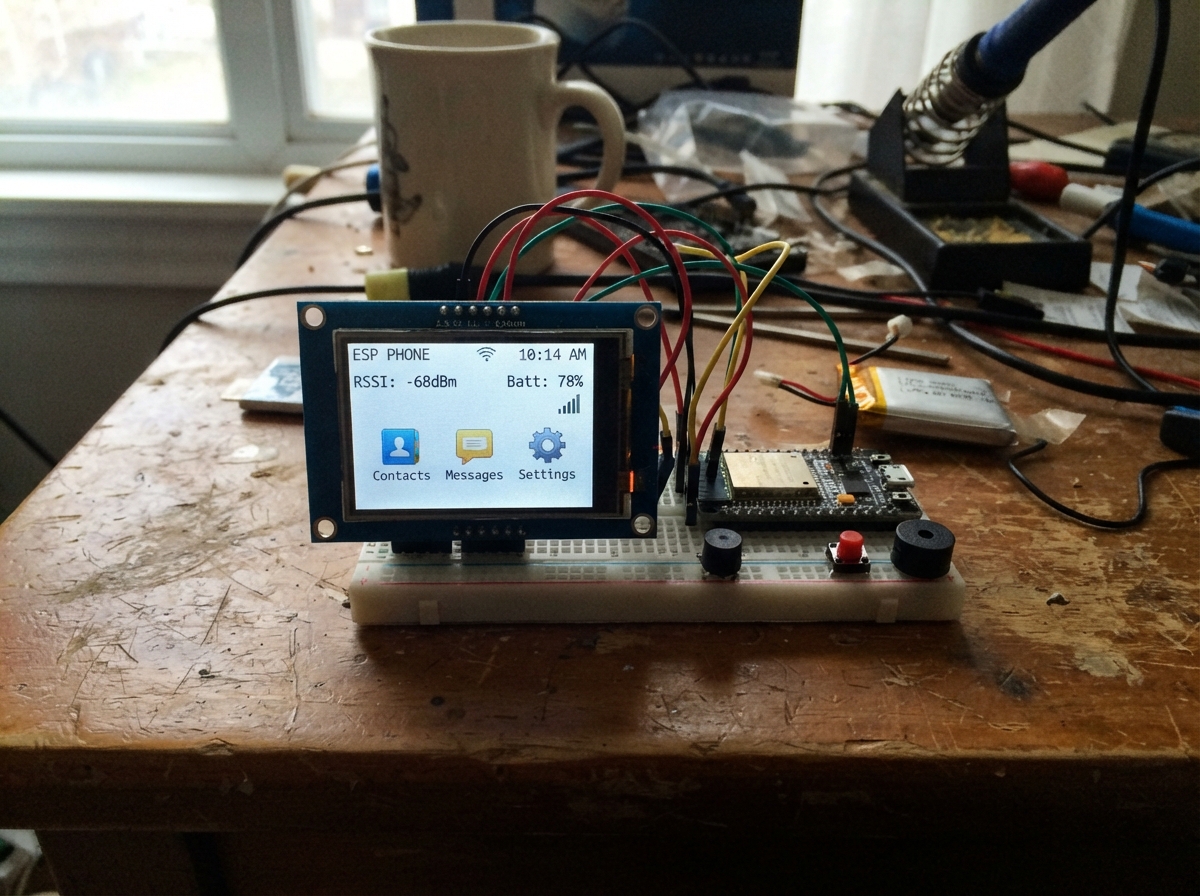
The DIY ESP Phone is a touchscreen-based device built around an ESP32 microcontroller and a 3.2-inch ILI9341 TFT display with capacitive touch input. It runs a custom operating system called Bindroid OS that provides a home screen launcher and multiple built-in applications including a clock, stopwatch, calculator, WiFi scanner, and simple game.
This guide provides a complete wiring diagram, parts list, and step-by-step assembly instructions to connect the display and touch panel to the ESP32 using SPI communication. Builders will also receive the full firmware code to load onto their device, enabling them to customize the interface and add their own applications to the platform.
Wiring diagram

Gather all the parts
Assemble it in 4 steps
1. برق را قطع کنید و برچسب پایهها را بخوانید
ESP32 را از USB جدا کنید. روی ماژول نمایشگر، پایههای VCC، GND، SCK یا CLK، MOSI یا DIN، MISO یا DO، CS، DC، RST، T_CS و T_IRQ را پیدا کنید. این پروژه برای ILI9341 با لمس XPT2046 است؛ اگر روی برد شما فقط SDA و SCL نوشته شده، این ماژول با این سیمکشی سازگار نیست.
- VCC و GND را جابهجا نکنید؛ جابهجا کردن برق میتواند نمایشگر را آسیب بزند.
2. برق و سه سیم ارتباطی را وصل کنید
VCC نمایشگر را با سیم قرمز به 3V3 ESP32 وصل کنید (برق). GND نمایشگر را با سیم مشکی به GND ESP32 وصل کنید (زمین). SCK یا CLK را به GPIO18 وصل کنید (ضربان ارتباط)، MOSI یا DIN را به GPIO23 وصل کنید (داده به نمایشگر)، و MISO یا DO را به GPIO19 وصل کنید (دادهٔ لمس به برد). اگر پایهٔ LED یا BL دارید، آن را به 3V3 وصل کنید (روشن نگهداشتن نور پسزمینه).
- سیمهای SCK، MOSI و MISO را تا جای ممکن کوتاه نگه دارید؛ سیم بلند و شل میتواند باعث صفحهٔ خالی یا نویز شود.
- VCC را به 5V یا VIN وصل نکنید؛ این طراحی نمایشگر را با 3.3 ولت تغذیه میکند.
3. سیمهای کنترل تصویر و لمس را وصل کنید
CS یا TFT_CS را به GPIO4 وصل کنید (انتخاب نمایشگر)، DC را به GPIO27 وصل کنید (انتخاب دستور یا داده)، و RST را به GPIO26 وصل کنید (بازنشانی نمایشگر). سپس T_CS را به GPIO25 وصل کنید (انتخاب کنترلر لمس) و T_IRQ یا IRQ را به GPIO33 وصل کنید (تشخیص لمس).
- CS نمایشگر و T_CS لمس دو پایهٔ جدا هستند؛ آنها را به هم وصل نکنید، چون تصویر یا لمس از کار میافتد.
4. صفحهٔ راهاندازی را بررسی کنید
ESP32 را با USB وصل کنید و در Schematik روی Deploy بزنید. در شروع باید زمینهٔ سرمهای، نوشتهٔ بزرگ BINDROID و عبارت Display check: OK را حدود یک ثانیه ببینید؛ سپس صفحهٔ اصلی Bindroid OS ظاهر میشود.
- اگر نور پسزمینه روشن است اما نوشتهٔ BINDROID نمیآید، ابتدا اتصالهای GND، SCK به GPIO18، MOSI به GPIO23، CS به GPIO4، DC به GPIO27 و RST به GPIO26 را دوباره بررسی کنید.
- اگر BINDROID دیده میشود اما لمسها در جای اشتباه ثبت میشوند، خود نمایشگر سالم است و فقط چهار عدد کالیبراسیون لمس در sketch.ino باید برای همان ماژول تنظیم شود.
- در حالی که USB وصل است سیمها را جابهجا نکنید؛ تماس اتفاقی سیمها میتواند به برد یا نمایشگر آسیب بزند.
Review all connections
1. Connections between "ili9341_touch_1" and "ESP32"
Deploy the firmware
#include <SPI.h>
#include <WiFi.h>
#include <Adafruit_GFX.h>
#include <Adafruit_ILI9341.h>
#include <XPT2046_Touchscreen.h>
#include <BindroidUI.h>

constexpr int TFT_CS = 4, TFT_DC = 27, TFT_RST = 26;
constexpr int TOUCH_CS = 25, TOUCH_IRQ = 33;
constexpr int SPI_SCK = 18, SPI_MISO = 19, SPI_MOSI = 23;
constexpr uint32_t TFT_SPI_HZ = 10000000;
constexpr uint16_t BG = ILI9341_BLACK, PANEL = 0x18E3, ACCENT = 0x05FF, DIM = 0xBDF7, GOOD = ILI9341_GREEN;

Adafruit_ILI9341 tft(TFT_CS, TFT_DC, TFT_RST);
XPT2046_Touchscreen touch(TOUCH_CS, TOUCH_IRQ);
BindroidUI ui(tft);
enum App { HOME, CLOCK_APP, STOPWATCH_APP, CALC_APP, WIFI_APP, GAME_APP, DEVICE_APP };
App app = HOME;
unsigned long lastTouch = 0, lastTick = 0, stopwatchStart = 0, frozenStopwatch = 0;
bool stopwatchRunning = false;
bool wifiScanning = false;
int calcValue = 0, gameScore = 0, wifiCount = -2;

void centered(const String &s, int y, int size, uint16_t color) { ui.printCentered(s, y, size, color); }
void bootScreen() {
  tft.fillScreen(ILI9341_NAVY); tft.fillRect(0, 0, tft.width(), 8, ACCENT);
  centered("BINDROID", 72, 4, ILI9341_WHITE); centered("Bindroid OS", 116, 2, ACCENT);
  centered("Display check: OK", 170, 1, GOOD); delay(700);
}
void home() {
  app = HOME; tft.fillScreen(BG); ui.drawHeader("Bindroid", false); centered("Bindroid OS  •  tap an app", 42, 1, DIM);
  ui.drawCard(8, 58, "Clock", "device time", ILI9341_YELLOW); ui.drawCard(168, 58, "Timer", "stopwatch", GOOD);
  ui.drawCard(8, 136, "Calc", "quick math", ILI9341_ORANGE); ui.drawCard(168, 136, "WiFi", "scan nearby", ILI9341_CYAN);
  tft.fillRoundRect(8, 216, 144, 19, 5, PANEL); tft.fillRoundRect(168, 216, 144, 19, 5, PANEL);
  tft.setTextSize(1); tft.setTextColor(DIM); tft.setCursor(37, 222); tft.print("GAME"); tft.setCursor(198, 222); tft.print("DEVICE");
}
void clockApp(bool full) {
  if (full) { app = CLOCK_APP; tft.fillScreen(BG); ui.drawHeader("Clock"); centered("Uptime clock", 55, 1, DIM); }
  tft.fillRect(12, 84, 296, 55, BG); unsigned long s = millis() / 1000UL; char stamp[16];
  snprintf(stamp, sizeof(stamp), "%02lu:%02lu:%02lu", s / 3600UL, (s / 60UL) % 60UL, s % 60UL);
  centered(stamp, 91, 4, ACCENT); centered("Wi-Fi can add calendar time later", 177, 1, DIM);
}
void stopwatchApp(bool full) {
  if (full) { app = STOPWATCH_APP; tft.fillScreen(BG); ui.drawHeader("Stopwatch"); }
  unsigned long elapsed = frozenStopwatch + (stopwatchRunning ? millis() - stopwatchStart : 0); tft.fillRect(0, 54, 320, 96, BG); char stamp[16];
  snprintf(stamp, sizeof(stamp), "%02lu:%02lu.%01lu", elapsed / 60000UL, (elapsed / 1000UL) % 60UL, (elapsed / 100UL) % 10UL);
  centered(stamp, 72, 4, ACCENT); tft.fillRoundRect(94, 165, 132, 38, 8, stopwatchRunning ? ILI9341_RED : GOOD);
  centered(stopwatchRunning ? "STOP" : "START", 177, 2, ILI9341_BLACK); centered("Tap the button", 215, 1, DIM);
}
void calculator() {
  app = CALC_APP; tft.fillScreen(BG); ui.drawHeader("Calculator"); tft.fillRoundRect(20, 52, 280, 52, 8, PANEL);
  tft.setTextSize(4); tft.setTextColor(ACCENT); tft.setCursor(35, 65); tft.print(calcValue);
  const char *keys[6] = {"+1", "+5", "+10", "-1", "CLEAR", "HOME"};
  for (int i = 0; i < 6; i++) { int x = 20 + (i % 3) * 96, y = 124 + (i / 3) * 54; tft.fillRoundRect(x, y, 84, 40, 7, PANEL); tft.setTextSize(1); tft.setTextColor(ILI9341_WHITE); tft.setCursor(x + 22, y + 15); tft.print(keys[i]); }
}
void drawWifiResults() {
  tft.fillRect(0, 52, 320, 168, BG);
  if (wifiScanning) {
    centered("Scanning nearby networks...", 96, 1, DIM);
    centered("Please wait", 120, 1, DIM);
  } else if (wifiCount <= 0) {
    centered("No network found", 108, 2, ILI9341_YELLOW);
  } else {
    centered(String(wifiCount) + " network(s) found", 52, 1, GOOD);
    int shown = min(wifiCount, 6);
    for (int i = 0; i < shown; i++) {
      tft.setTextSize(1); tft.setTextColor(ILI9341_WHITE); tft.setCursor(20, 76 + i * 22);
      tft.print(WiFi.SSID(i)); tft.setTextColor(DIM); tft.print("  ");
      tft.print(WiFi.RSSI(i)); tft.print(" dBm");
    }
  }
  centered("Scan only — no password is stored", 218, 1, DIM);
}
void wifiApp() {
  app = WIFI_APP; tft.fillScreen(BG); ui.drawHeader("Wi-Fi scan");
  WiFi.scanDelete(); wifiCount = -1; wifiScanning = true;
  WiFi.scanNetworks(true, false); drawWifiResults();
}
void game() {
  app = GAME_APP; tft.fillScreen(BG); ui.drawHeader("Tap Dash"); tft.fillRoundRect(55, 72, 210, 92, 12, ILI9341_MAGENTA);
  centered("TAP ME", 96, 3, ILI9341_WHITE); centered("Score: " + String(gameScore), 182, 2, ACCENT); centered("Each tap raises your score", 215, 1, DIM);
}
void device() {
  app = DEVICE_APP; tft.fillScreen(BG); ui.drawHeader("Bindroid device"); centered("Bindroid", 58, 3, ACCENT); centered("Bindroid OS", 94, 2, ILI9341_WHITE);
  centered("ESP32 DevKit V1", 137, 1, DIM); centered("ILI9341 display: active", 159, 1, GOOD); centered("XPT2046 touch: active", 181, 1, GOOD); centered("USB powered", 215, 1, DIM);
}
bool getTouch(int16_t &x, int16_t &y) {
  if (!touch.touched() || millis() - lastTouch < 160) return false; TS_Point p = touch.getPoint();
  x = constrain(map(p.x, 200, 3800, 0, tft.width() - 1), 0, tft.width() - 1); y = constrain(map(p.y, 200, 3800, 0, tft.height() - 1), 0, tft.height() - 1); lastTouch = millis(); return true;
}
void handleTouch(int16_t x, int16_t y) {
  if (app != HOME && x < 62 && y < 38) { home(); return; }
  if (app == HOME) { if (y >= 58 && y < 132 && x < 160) clockApp(true); else if (y >= 58 && y < 132) stopwatchApp(true); else if (y >= 136 && y < 212 && x < 160) calculator(); else if (y >= 136 && y < 212) wifiApp(); else if (y >= 212 && x < 160) game(); else if (y >= 212) device(); }
  else if (app == STOPWATCH_APP && y >= 155 && y <= 210) { if (stopwatchRunning) { frozenStopwatch += millis() - stopwatchStart; stopwatchRunning = false; } else { stopwatchStart = millis(); stopwatchRunning = true; } stopwatchApp(true); }
  else if (app == CALC_APP && y >= 124 && y <= 218) { int col = min(2, x / 96), row = (y - 124) / 54, key = row * 3 + col; if (key == 0) calcValue++; else if (key == 1) calcValue += 5; else if (key == 2) calcValue += 10; else if (key == 3) calcValue--; else if (key == 4) calcValue = 0; else { home(); return; } calculator(); }
  else if (app == GAME_APP && x >= 55 && x <= 265 && y >= 72 && y <= 164) { gameScore++; game(); }
}
void setup() {
  pinMode(TFT_CS, OUTPUT); pinMode(TOUCH_CS, OUTPUT); pinMode(TFT_RST, OUTPUT); digitalWrite(TFT_CS, HIGH); digitalWrite(TOUCH_CS, HIGH);
  digitalWrite(TFT_RST, LOW); delay(20); digitalWrite(TFT_RST, HIGH); delay(120); SPI.begin(SPI_SCK, SPI_MISO, SPI_MOSI, TFT_CS);
  tft.begin(TFT_SPI_HZ); tft.setRotation(1); bootScreen();
  touch.begin(); touch.setRotation(1);
  WiFi.mode(WIFI_STA); WiFi.disconnect(false, true);
  home();
}
void loop() {
  int16_t x, y; if (getTouch(x, y)) handleTouch(x, y);
  if (app == WIFI_APP && wifiScanning) {
    int result = WiFi.scanComplete();
    if (result >= 0) { wifiCount = result; wifiScanning = false; drawWifiResults(); }
  }
  if ((app == CLOCK_APP || app == STOPWATCH_APP) && millis() - lastTick >= 100) { lastTick = millis(); if (app == CLOCK_APP) clockApp(false); else stopwatchApp(false); }
  delay(10);
}
Remix this project
Make it yours in one click
Open a full copy of this project in your own Schematik workspace — diagram, code, parts, and assembly steps included. Swap the sensor, add features, or redesign the whole thing with AI. The author's original stays untouched.