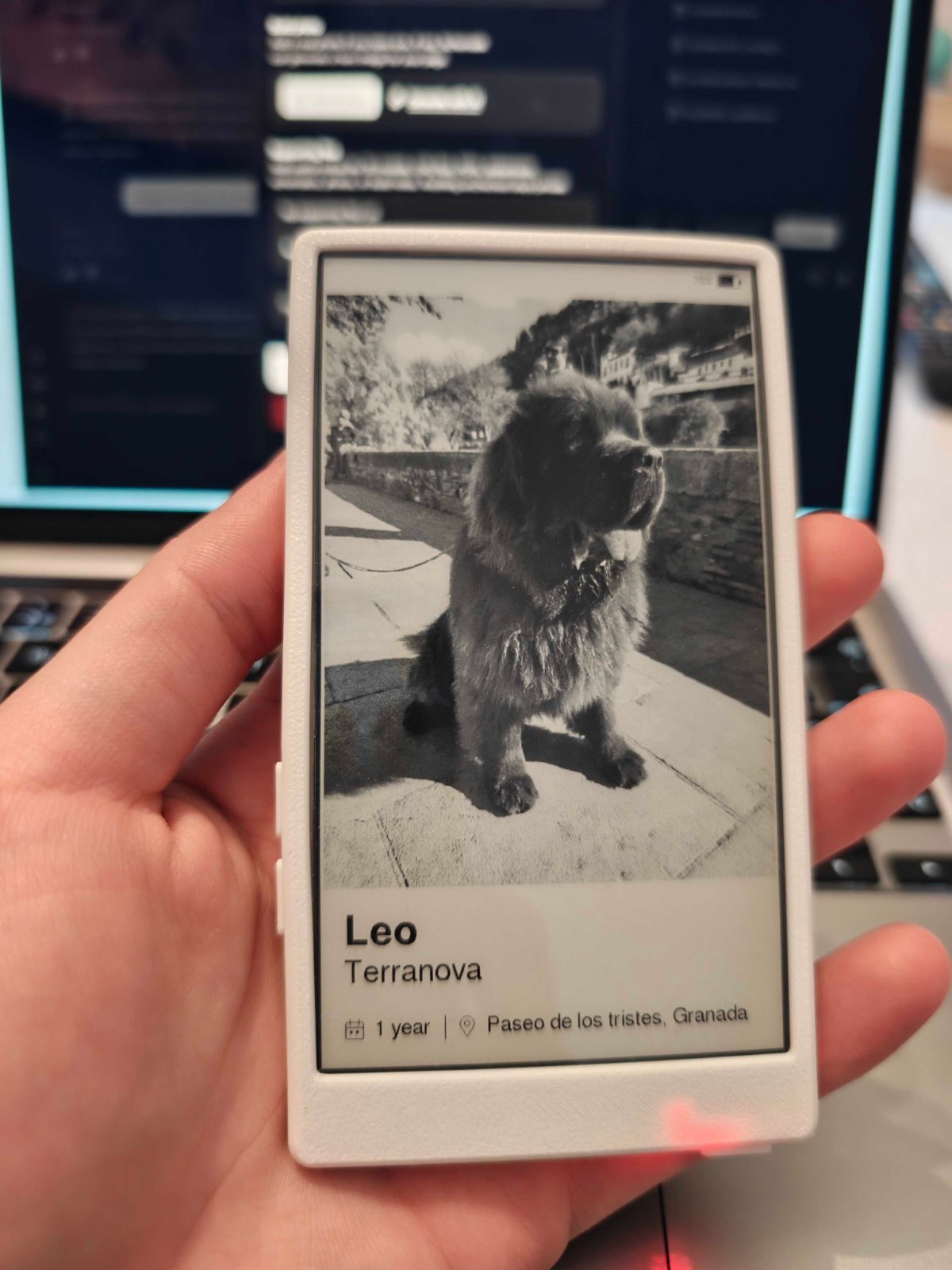
This project displays random dog photos on an e-paper screen powered by an ESP32. The device fetches images from the internet, renders them on the PaperDIY display, and monitors battery status to keep makers informed about power levels.
Builders will receive a complete wiring diagram, parts list including the ESP32 and e-paper display components, and step-by-step assembly instructions for the PaperDIY. The guide includes the firmware code needed to connect to WiFi, download dog images, and refresh the e-paper display.
Wiring diagram
Assemble it in 2 steps
1. Assemble the PaperDIY
With USB disconnected, assemble the display and board following the kit instructions. No extra components or wires are needed.
- Handle the display ribbon cable gently without forcing the connector. Do not short-circuit or puncture the battery.
2. Connect the device
Connect the PaperDIY to your computer with a USB-C data cable. Keep the device within range of a 2.4 GHz Wi-Fi network.
- Perretex Dog Photo Viewer: displays random dog photos with real name, breed, age and location when available. English interface with year/years and month/months; API names and locations stay unchanged.
- Wi-Fi setup requires editing only include/wifi_config.h: enter your network name and password there, then press Deploy in Schematik. The optional fallback network is configured in the same file.
- All Wi-Fi credentials are blank in the publishable project. Remove your credentials again before sharing a configured copy.
- Clearing credentials here does not remove them from older shared versions or previously compiled firmware.
Deploy the firmware
#include <Arduino.h>
#include <M5Unified.h>
#include <M5PM1.h>
#include <WiFi.h>
#include <WiFiClientSecure.h>
#include <HTTPClient.h>
#include <ArduinoJson.h>
#include <esp_heap_caps.h>
#include <esp_system.h>
#include "wifi_config.h"

#ifndef CONFIG_SPIRAM_MODE_OCT
#error Este proyecto necesita la PSRAM octal del PaperDIY
#endif
#include "download_helpers.inc"

M5Canvas canvas(&M5.Display);
#include "photo_quality.inc"
// PaperDIY: official M5PM1 readVbat API. No periodic screen refresh.
M5PM1 batteryMonitor;
bool batteryMonitorReady = false;
void drawBattery() {
  if (!batteryMonitorReady) return;
  uint16_t mv = 0;
  if (batteryMonitor.readVbat(&mv) != M5PM1_OK || mv < 2500 || mv > 4500) return;
  // Voltage-based estimate, not a coulomb-counting fuel gauge.
  const int volts[] = {3300,3500,3600,3700,3750,3800,3850,3900,4000,4100,4200};
  const int levels[] = {0,5,10,20,30,40,50,60,75,90,100};
  int percent = 100;
  if (mv <= volts[0]) percent = 0;
  else for (int i=1; i<11; ++i) {
    if (mv <= volts[i]) {
      percent = levels[i-1] + (mv-volts[i-1])*(levels[i]-levels[i-1])/(volts[i]-volts[i-1]);
      break;
    }
  }
  // Compact status indicator in the upper-right, within the 32 px header.
  const int x=canvas.width()-46, y=8;
  canvas.setTextColor(TFT_BLACK, TFT_WHITE);
  canvas.setFont(&fonts::Font2);
  canvas.setTextSize(1);
  canvas.setTextDatum(middle_right);
  canvas.drawString(String(percent)+"%", x-6, y+9);
  canvas.drawRect(x,y,30,18,TFT_BLACK);
  canvas.fillRect(x+30,y+6,3,6,TFT_BLACK);
  int fill=26*percent/100;
  if (fill) canvas.fillRect(x+2,y+2,fill,14,TFT_BLACK);
}
constexpr uint32_t CONNECT_TIMEOUT = 10000;
constexpr uint32_t RECONNECT_INTERVAL = 15000;
constexpr uint32_t REFRESH_INTERVAL = 30UL * 60 * 1000;
constexpr uint32_t ERROR_RETRY_INTERVAL = 5UL * 60 * 1000;

// Result is passed by value through a FreeRTOS queue. The image has one owner.
struct Result { ImageBuffer *image; char error[100]; char name[80]; char breed[80]; char age[64]; char zone[192]; };
QueueHandle_t resultQueue;
bool ready = false, connecting = false, connectedBefore = false;
bool usingBackupWifi = false;
bool workerBusy = false, requestPending = false, hasDog = false;
uint32_t connectionStarted = 0, disconnectedAt = 0, lastFetchAt = 0;
uint32_t fetchInterval = REFRESH_INTERVAL;
String displayedMessage;
String currentName;
String currentAge, currentZone;
M5Canvas loadingDots(&M5.Display);
uint32_t lastLoadingFrame = 0;
uint8_t loadingFrame = 0;

// Normalize unsupported accents; preserve Spanish ñ for our vector overlay.
String displayText(const char *input) {
  String out;
  const uint8_t *p = reinterpret_cast<const uint8_t *>(input);
  while (*p) {
    uint32_t cp = *p++;
    if (cp >= 0x80) {
      int extra = (cp >= 0xC2 && cp <= 0xDF) ? 1 :
                  (cp >= 0xE0 && cp <= 0xEF) ? 2 :
                  (cp >= 0xF0 && cp <= 0xF4) ? 3 : 0;
      if (!extra) { out += '?'; continue; }
      cp &= (1U << (6 - extra)) - 1;
      bool valid = true;
      for (int i = 0; i < extra; ++i) {
        if ((*p & 0xC0) != 0x80) { valid = false; break; }
        cp = (cp << 6) | (*p++ & 0x3F);
      }
      if (!valid) { out += '?'; continue; }
    }
    if (cp >= 0x20 && cp <= 0x7E) out += (char)cp;
    else if (cp >= 0x0300 && cp <= 0x036F) continue; // combining accents
    else if (cp >= 0xC0 && cp <= 0xC5) out += 'A';
    else if (cp == 0xC7) out += 'C';
    else if (cp >= 0xC8 && cp <= 0xCB) out += 'E';
    else if (cp >= 0xCC && cp <= 0xCF) out += 'I';
    else if (cp == 0xD1) out += "Ñ";
    else if ((cp >= 0xD2 && cp <= 0xD6) || cp == 0xD8) out += 'O';
    else if (cp >= 0xD9 && cp <= 0xDC) out += 'U';
    else if (cp == 0xDD || cp == 0x178) out += 'Y';
    else if (cp >= 0xE0 && cp <= 0xE5) out += 'a';
    else if (cp == 0xE7) out += 'c';
    else if (cp >= 0xE8 && cp <= 0xEB) out += 'e';
    else if (cp >= 0xEC && cp <= 0xEF) out += 'i';
    else if (cp == 0xF1) out += "ñ";
    else if ((cp >= 0xF2 && cp <= 0xF6) || cp == 0xF8) out += 'o';
    else if (cp >= 0xF9 && cp <= 0xFC) out += 'u';
    else if (cp == 0xFD || cp == 0xFF) out += 'y';
    else if (cp == 0xA0) out += ' ';
    else if (cp == 0x2018 || cp == 0x2019) out += '\'';
    else if (cp == 0x2013 || cp == 0x2014) out += '-';
    else out += '?';
  }
  return out;
}

void clearCanvas() {
  canvas.fillSprite(TFT_WHITE);
}

// Use the base letter for font metrics; draw its missing tilde ourselves.
String spanishBase(String text) {
  text.replace("ñ", "n");
  text.replace("Ñ", "N");
  return text;
}
void drawSpanish(String text, int x, int y, bool centered = false) {
  String marked = text;
  marked.replace("ñ", "\x01");
  marked.replace("Ñ", "\x02");
  String base = spanishBase(text);
  const int left = centered ? x - canvas.textWidth(base)/2 : x;
  canvas.setTextDatum(middle_left);
  canvas.drawString(base, left, y);
  for (unsigned int i = 0; i < marked.length(); ++i) {
    if (marked[i] != '\x01' && marked[i] != '\x02') continue;
    int gx = left + canvas.textWidth(base.substring(0, i));
    int gw = canvas.textWidth(base.substring(i, i+1));
    int top = y - canvas.fontHeight()/2;
    canvas.drawLine(gx+1, top+2, gx+gw/3, top, TFT_BLACK);
    canvas.drawLine(gx+gw/3, top, gx+2*gw/3, top+2, TFT_BLACK);
    canvas.drawLine(gx+2*gw/3, top+2, gx+gw-1, top, TFT_BLACK);
  }
}
// Shorten UTF-8 safely using the same base glyphs as the renderer.
String fitDetail(String text, int maxWidth) {
  if (canvas.textWidth(spanishBase(text)) <= maxWidth) return text;
  while (text.length() && canvas.textWidth(spanishBase(text) + "...") > maxWidth) {
    int i = text.length() - 1;
    while (i > 0 && ((uint8_t)text[i] & 0xC0) == 0x80) --i;
    text.remove(i);
  }
  return text + "...";
}
// Small vector icons: no emoji glyphs or extra font required.
enum class DetailIcon { Paw, Calendar, Location };
void drawDetailIcon(DetailIcon icon, int x, int y) {
  const uint32_t ink = TFT_BLACK;
  if (icon == DetailIcon::Paw) {
    canvas.fillEllipse(x, y+4, 6, 5, ink);
    canvas.fillCircle(x-8, y-2, 3, ink);
    canvas.fillCircle(x-3, y-7, 3, ink);
    canvas.fillCircle(x+4, y-7, 3, ink);
    canvas.fillCircle(x+9, y-2, 3, ink);
  } else if (icon == DetailIcon::Calendar) {
    canvas.drawRoundRect(x-10, y-9, 21, 20, 2, ink);
    canvas.drawLine(x-10, y-3, x+10, y-3, ink);
    canvas.drawLine(x-5, y-12, x-5, y-6, ink);
    canvas.drawLine(x+5, y-12, x+5, y-6, ink);
    canvas.fillRect(x-5, y+1, 3, 3, ink);
    canvas.fillRect(x+2, y+1, 3, 3, ink);
  } else {
    canvas.drawCircle(x, y-4, 8, ink);
    // White lower half allows a clean pointed map marker.
    canvas.fillRect(x-9, y, 19, 10, TFT_WHITE);
    canvas.drawLine(x-7, y, x, y+11, ink);
    canvas.drawLine(x+7, y, x, y+11, ink);
    canvas.drawCircle(x, y-4, 3, ink);
  }
}
void detailRow(String text, DetailIcon icon, int y) {
  canvas.setFont(&fonts::FreeSans12pt7b);
  canvas.setTextDatum(middle_left);
  text = fitDetail(text, canvas.width()-88);
  const int total = canvas.textWidth(spanishBase(text))+38;
  const int left = (canvas.width()-total)/2;
  drawDetailIcon(icon, left+11, y);
  drawSpanish(text, left+38, y);
}
// Reference layout: large photo, rounded white sheet and left-aligned type.
// Keep the sheet below the photo so no part of the dog is hidden.
void footer(const char *breed) {
  const int width = canvas.width();
  const int top = canvas.height()-194;
  const int left = 26;
  canvas.fillRoundRect(4, top, width-8, 218, 30, TFT_WHITE);
  canvas.setTextColor(TFT_BLACK, TFT_WHITE);
  canvas.setTextSize(1);
  canvas.setFont(&fonts::FreeSansBold24pt7b);
  String name = displayText(currentName.c_str());
  if (canvas.textWidth(spanishBase(name)) > width-2*left)
    canvas.setFont(&fonts::FreeSansBold18pt7b);
  drawSpanish(fitDetail(name, width-2*left), left, top+42);

  canvas.setFont(&fonts::FreeSans18pt7b);
  drawSpanish(fitDetail(displayText(breed), width-2*left), left, top+88);

  canvas.setFont(&fonts::FreeSans12pt7b);
  String age = displayText(currentAge.c_str());
  String zone = displayText(currentZone.c_str());
  const int rowY = top+151;
  const int available = width-2*left;
  if (age.length() && zone.length()) {
    // Give the location most of the row; shrink long values with ellipses.
    const int ageWidth = min((int)canvas.textWidth(spanishBase(age)), 124);
    drawDetailIcon(DetailIcon::Calendar, left+11, rowY);
    drawSpanish(fitDetail(age, ageWidth), left+34, rowY);
    const int divider = left+34+ageWidth+16;
    canvas.drawFastVLine(divider, rowY-14, 28, TFT_BLACK);
    drawDetailIcon(DetailIcon::Location, divider+25, rowY);
    drawSpanish(fitDetail(zone, width-left-divider-48), divider+48, rowY);
  } else if (age.length() || zone.length()) {
    drawDetailIcon(age.length() ? DetailIcon::Calendar : DetailIcon::Location,
                   left+11, rowY);
    drawSpanish(fitDetail(age.length() ? age : zone, available-34), left+34, rowY);
  }
}
String currentBreed;
// E-paper is slow to refresh: one playful waiting screen, not a looping animation.
void showLoading() {
  if (!ready || displayedMessage == "__loading__") return;
  displayedMessage = "__loading__";
  hasDog = false;
  clearCanvas();
  const int x = canvas.width() / 2;
  const int y = canvas.height() / 2 - 48;
  // A paw print, drawn directly so it needs no extra image or storage.
  canvas.fillEllipse(x, y + 26, 55, 42, TFT_BLACK);
  canvas.fillEllipse(x - 58, y - 22, 20, 27, TFT_BLACK);
  canvas.fillEllipse(x - 20, y - 48, 20, 27, TFT_BLACK);
  canvas.fillEllipse(x + 20, y - 48, 20, 27, TFT_BLACK);
  canvas.fillEllipse(x + 58, y - 22, 20, 27, TFT_BLACK);
  canvas.setTextColor(TFT_BLACK, TFT_WHITE);
  canvas.setTextDatum(middle_center);
  canvas.setFont(&fonts::FreeSans12pt7b);
  canvas.drawString("Finding a friend...", x, y + 110);
  drawBattery();
  canvas.pushSprite(0, 0);
}
// Animate only a small area, at a cadence suitable for e-paper.
void animateLoading() {
  if (displayedMessage != "__loading__" ||
      (!workerBusy && !connecting) || millis()-lastLoadingFrame < 1800 ||
      !loadingDots.width()) return;
  lastLoadingFrame = millis();
  loadingDots.fillSprite(TFT_WHITE);
  loadingFrame = (loadingFrame + 1) % 3;
  for (int i=0; i<3; ++i)
    loadingDots.fillCircle(20+i*32, 12, i==loadingFrame ? 7 : 3, TFT_BLACK);
  loadingDots.pushSprite((canvas.width()-104)/2, canvas.height()/2+100);
}
void showInfo(const char *message) {
  if (!ready || displayedMessage == message) return;
  displayedMessage = message;
  hasDog = false;
  clearCanvas();
  canvas.setTextColor(TFT_BLACK, TFT_WHITE);
  canvas.setTextDatum(middle_center);
  canvas.setFont(&fonts::FreeSans12pt7b);
  // Wrap messages so network errors remain legible in portrait orientation.
  String lines[4];
  int count = 0;
  String text = displayText(message);
  while (text.length() && count < 4) {
    int end = text.length();
    while (end > 1 && canvas.textWidth(text.substring(0, end)) > canvas.width()-32) --end;
    if (end < (int)text.length()) {
      int space = text.lastIndexOf(' ', end);
      if (space > 0) end = space;
    }
    lines[count++] = text.substring(0, end);
    text.remove(0, end);
    text.trim();
  }
  int y = canvas.height()/2 - (count-1)*18;
  for (int i=0; i<count; ++i) canvas.drawString(lines[i], canvas.width()/2, y+i*36);
  drawBattery();
  canvas.pushSprite(0, 0);
}

// Perretex returns one image and its dog's details per request.
// All network I/O stays in the worker so buttons remain responsive.
bool loadCandidate(String &url, char *name, size_t nameSize,
                   char *breed, size_t breedSize,
                   char *age, size_t ageSize, char *zone, size_t zoneSize,
                   char *errorText, size_t errorSize) {
  ImageBuffer json(8192);
  if (!download("https://perretex.com/api/v1/images/random", json, errorText, errorSize, "API")) return false;
  JsonDocument doc;
  DeserializationError error = deserializeJson(doc, (const char *)json.data, json.length);
  const char *status = doc["status"] | "";
  const char *image = doc["message"] | "";
  if (error || strcmp(status, "success")) {
    strlcpy(errorText, "Invalid JSON. Press a button.", errorSize);
    return false;
  }
  url = image;
  if (url.length() > 512 || !url.startsWith("https://perretex.com/api/images/") ||
      url.indexOf('\\') >= 0 || url.indexOf('"') >= 0 ||
      url.indexOf('\n') >= 0 || url.indexOf('\r') >= 0) {
    strlcpy(errorText, "No valid photo URL. Press a button.", errorSize);
    return false;
  }
  strlcpy(name, doc["dog"]["name"] | "", nameSize);
  strlcpy(breed, doc["dog"]["breed"] | "", breedSize);
  // Only use documented model fields: age + age_unit, and the complete zone.
  String ageText;
  JsonVariant value = doc["dog"]["age"];
  String unit = displayText(doc["dog"]["age_unit"] | "");
  unit.toLowerCase();
  if (!value.isNull() && (value.is<int>() || value.is<float>() || value.is<const char *>())) {
    String number = value.as<String>();
    if (unit == "ano" || unit == "anos" || unit == "año" || unit == "años" || unit == "year" || unit == "years")
      ageText = number + (number == "1" ? " year" : " years");
    else if (unit == "mes" || unit == "meses" || unit == "month" || unit == "months")
      ageText = number + (number == "1" ? " month" : " months");
  }
  strlcpy(age, ageText.c_str(), ageSize);
  strlcpy(zone, doc["dog"]["zone"] | "", zoneSize);
  return true;
}

void fetchTask(void *) {
  Result result = {nullptr, "Network error. Press a button.", "", ""};
  Serial.println("Perretex: starting request");
  String url;
  if (loadCandidate(url, result.name, sizeof(result.name), result.breed, sizeof(result.breed), result.age, sizeof(result.age), result.zone, sizeof(result.zone), result.error, sizeof(result.error))) {
    ImageBuffer *image = new ImageBuffer(4 * 1024 * 1024);
    if (!image) {
      strlcpy(result.error,"Not enough memory. Press a button.",sizeof(result.error));
    } else if (!download(url, *image, result.error, sizeof(result.error), "Photo")) {
      delete image;
    } else {
      int w=0,h=0; bool png=false,progressive=false;
      bool valid=dimensions(image->data,image->length,w,h,png,progressive);
      if (!valid) {
        if (image->length >= 12 && memcmp(image->data,"RIFF",4)==0 && memcmp(image->data+8,"WEBP",4)==0)
          Serial.println("WebP photo received; this viewer has no WebP decoder");
        else Serial.println("Unrecognized photo format");
        delete image;
        strlcpy(result.error,"Cannot display photo. Press a button.",sizeof(result.error));
      } else {
        result.image=image;
        result.error[0]=0;
        Serial.printf("Photo received: %d x %d, %u bytes\n",w,h,(unsigned)image->length);
      }
    }
  }
  xQueueSend(resultQueue,&result,portMAX_DELAY);
  vTaskDelete(nullptr);
}
void startFetch() {
  if (!ready || workerBusy || WiFi.status()!=WL_CONNECTED) return;
  workerBusy=true; requestPending=false; lastFetchAt=millis();
  if (xTaskCreate(fetchTask,"dog-fetch",12288,nullptr,1,nullptr)!=pdPASS) {
    workerBusy=false; fetchInterval=ERROR_RETRY_INTERVAL;
    showInfo("Not enough memory. Press a button.");
  } else showLoading(); // Network task starts before the slow panel refresh.
}
void showResult(Result &result) {
  workerBusy=false; lastFetchAt=millis(); fetchInterval=ERROR_RETRY_INTERVAL;
  if (!result.image) { showInfo(result.error); return; }
  int w=0,h=0; bool png=false,progressive=false;
  bool valid=dimensions(result.image->data,result.image->length,w,h,png,progressive);
  if (!valid) {
    delete result.image;
    showInfo("Cannot display photo. Press a button.");
    return;
  }
  // Do not enlarge the low-resolution preview of progressive JPEGs.
  if (progressive) {
    Serial.println("Progressive JPEG: baseline JPEG required");
    delete result.image;
    showInfo("Cannot display photo. Press a button.");
    return;
  }
  clearCanvas();
  // Use almost the entire portrait screen, with just enough room for the
  // name, breed, age and location. Preserve every edge of each photo.
  const int left=4, top=40, areaW=canvas.width()-8;
  const int areaH=canvas.height()-234;
  // Fit the complete photo to the available area, without cropping.
  float scale=min((float)areaW/w,(float)areaH/h);
  int x=left+(areaW-(int)(w*scale))/2;
  int y=top+(areaH-(int)(h*scale))/2;
  bool ok=png ? canvas.drawPng(result.image->data,result.image->length,x,y,0,0,0,0,scale) :
      canvas.drawJpg(result.image->data,result.image->length,x,y,0,0,0,0,scale);
  delete result.image;
  if (!ok) {
    Serial.println("Photo rendering failed");
    displayedMessage="";
    showInfo("Cannot display photo. Press a button.");
    return;
  }
  enhancePhoto(x, y, max(1, (int)(w*scale)), max(1, (int)(h*scale)));
  Serial.printf("Photo: original %dx%d, scale %.3f, display %dx%d\n",
                w,h,scale,canvas.width(),canvas.height());
  currentName = result.name;
  currentBreed = result.breed;
  currentAge = result.age;
  currentZone = result.zone;
  footer(currentBreed.c_str());
  displayedMessage="";
  drawBattery();
  canvas.pushSprite(0,0);
  hasDog=true; fetchInterval=REFRESH_INTERVAL;
}
void beginConnection() {
  if (workerBusy) return;
  WiFi.disconnect();
  const char *ssid = usingBackupWifi ? WIFI_BACKUP_SSID : WIFI_SSID;
  const char *password = usingBackupWifi ? WIFI_BACKUP_PASSWORD : WIFI_PASSWORD;
  Serial.printf("Wi-Fi: connecting to %s\n", ssid);
  WiFi.begin(ssid,password);
  connectionStarted=millis(); connecting=true;
  showLoading();
}
void setup() {
  Serial.begin(115200);
  Serial.printf("Reset reason: %d\n", (int)esp_reset_reason());
  auto cfg=M5.config(); cfg.clear_display=false; M5.begin(cfg);
  batteryMonitorReady = batteryMonitor.begin(&M5.In_I2C, M5PM1_DEFAULT_ADDR, M5PM1_I2C_FREQ_100K) == M5PM1_OK;
  M5.Display.setRotation(1);
  // Choose the portrait orientation regardless of the panel's native rotation.
  if (M5.Display.width() > M5.Display.height()) M5.Display.setRotation(0);
  M5.Display.setEpdMode(epd_mode_t::epd_quality);
  canvas.setPsram(true);
  // Keep all 256 luminance values until the panel driver quantizes to 16.
  canvas.setColorDepth(lgfx::color_depth_t::grayscale_8bit);
  if (!canvas.createSprite(M5.Display.width(),M5.Display.height())) {
    M5.Display.println("Memory error"); return;
  }
  loadingDots.setColorDepth(lgfx::color_depth_t::grayscale_8bit);
  loadingDots.createSprite(104,24);
  ready=true;
  resultQueue=xQueueCreate(1,sizeof(Result));
  if (!resultQueue) { ready=false; M5.Display.println("Memory error"); return; }
  WiFi.mode(WIFI_STA); WiFi.setAutoReconnect(false); WiFi.setSleep(false);
  beginConnection();
}
void loop() {
  M5.update();
  if (!ready) { delay(50); return; }
  bool connected=WiFi.status()==WL_CONNECTED;
  Result result;
  if (xQueueReceive(resultQueue,&result,0)==pdTRUE) showResult(result);
  if (connected && !connectedBefore) {
    connecting=false; requestPending=true;
    Serial.printf("Wi-Fi connected: %s, RSSI %d dBm, %lu ms\n", WiFi.SSID().c_str(), WiFi.RSSI(), (unsigned long)(millis()-connectionStarted));
  }
  else if (!connected && connectedBefore) {
    connecting=false; disconnectedAt=millis();
    usingBackupWifi=false;
    showInfo("No Wi-Fi. Press a button.");
  }
  connectedBefore=connected;
  if (M5.BtnA.wasPressed() || M5.BtnB.wasPressed()) {
    if (connected && !workerBusy) { requestPending=true; }
    else if (!workerBusy && !connecting) beginConnection();
  }
  if (!connected && connecting && millis()-connectionStarted>=CONNECT_TIMEOUT) {
    WiFi.disconnect(); connecting=false; disconnectedAt=millis();
    if (!usingBackupWifi) {
      usingBackupWifi=true;
      beginConnection();
    } else {
      usingBackupWifi=false;
      showInfo("No Wi-Fi. Press a button.");
    }
  }
  if (!connected && !connecting && !workerBusy && millis()-disconnectedAt>=RECONNECT_INTERVAL) beginConnection();
  if (connected && !workerBusy && (requestPending || millis()-lastFetchAt>=fetchInterval)) startFetch();
  animateLoading();
  delay(20);
}
Remix this project
Make it yours in one click
Open a full copy of this project in your own Schematik workspace, diagram, code, parts, and assembly steps included. Swap the sensor, add features, or redesign the whole thing with AI. The author's original stays untouched.