Community project
Automated Medication Dispenser
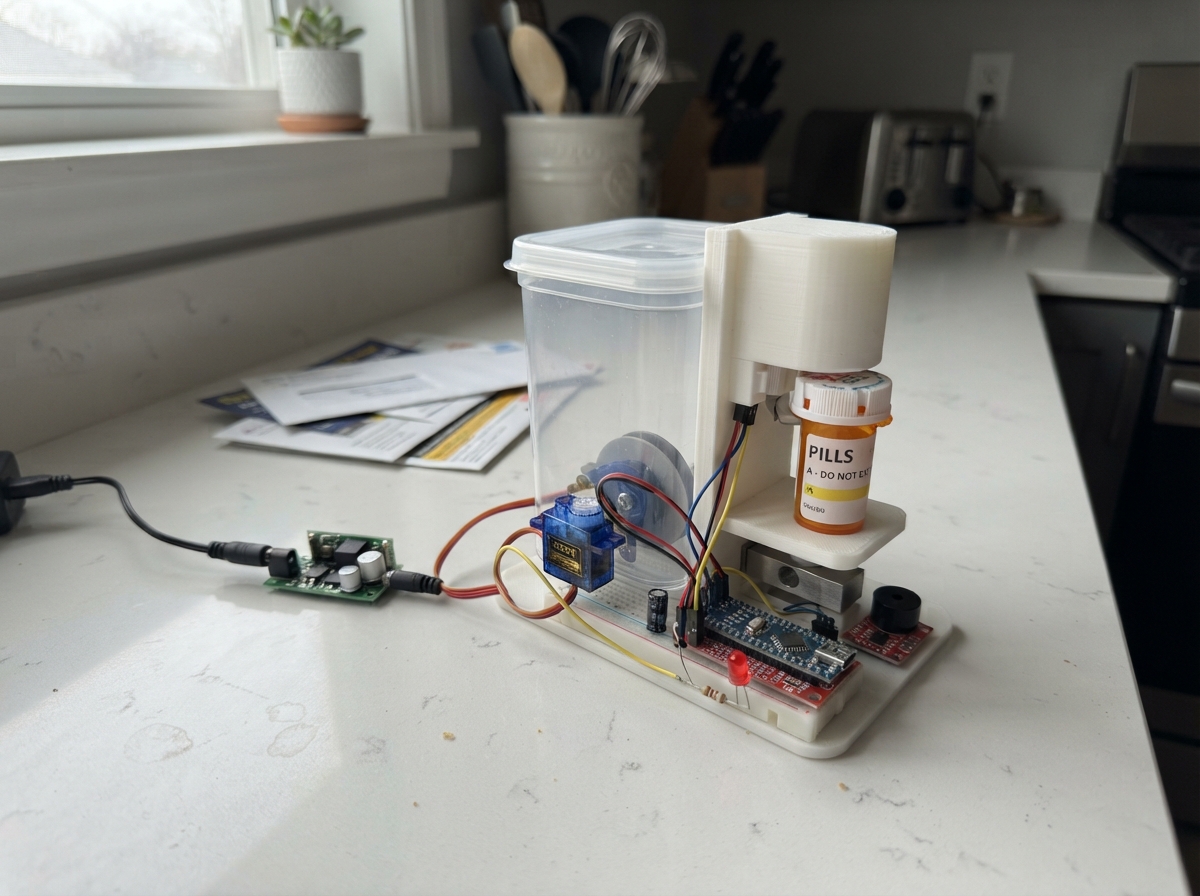
This automated medication dispenser uses an ESP32 microcontroller to manage four independent medication tubes with servo-controlled gates and weight verification. The system combines infrared sensors to detect medication passage, a load cell scale to verify dispensed quantities, and audio-visual feedback to confirm operations. Builders will receive a complete wiring diagram, parts list, and firmware code to assemble a bench prototype that demonstrates gated dispensing with weight validation.
The guide covers connecting the servo motors with proper power isolation, positioning the TCRT5000 infrared sensors on each tube, integrating the HX711 load cell amplifier for accurate weight measurement, and using the 74AHCT125 level shifter to safely interface 5V servo signals with the ESP32. Assembly steps walk through prototype construction, sensor calibration, and testing each medication gate independently before full system operation.
Wiring diagram

Gather all the parts
Assemble it in 6 steps
1. Prepare a safe bench prototype
Use non-medical test pieces only. Make each tube's gate mechanically closed when unpowered. An SG90 is not a reliable medicine safety gate; the mechanism must release only one piece per stroke. Mount horns with power off and check travel without pieces first.
- Startup servo motion can release contents. Do not load medication.
2. Connect separate servo power
Use an enclosed regulated 5 V 4 A supply. Connect its positive output only to the four servo VCC wires. Join supply ground, servo grounds and ESP32 ground. Power the ESP32 separately through USB; never join the external positive wire to its 5V or 3V3 pin. Put the capacitor across the servo supply, plus to 5 V and minus to ground.
- Reversing the capacitor may rupture it. Do not carry servo current through thin breadboard power rails.
3. Position the infrared sensors
Power all five modules from 3V3, never 5 V. Connect DO for tubes 1–4 to GPIO34, 35, 36, 39; counter DO to GPIO32. Leave AO unused. Place tube sensors at the refill level. Guide falling test pieces close to sensor 5, one at a time. Adjust the trim knobs and verify PRESENT polarity in STATUS; change PRESENT in firmware if required. These sensors detect a threshold, not remaining quantity.
- Reflective infrared sensors can miss dark pieces or count overlapping pieces as one. Shield them from room light and test every piece shape.
4. Connect indicators and gates
Servo signals 1–4 go to GPIO13, 14, 16, 17. Tube LED outputs go through their own 330 ohm resistor from GPIO18, 19, 21, 22 to the long LED leg; short legs go to ground. Alarm LED uses GPIO23 and its resistor. Piezo SIG goes to GPIO26 and its other leg to ground.
5. Mount and connect the collection scale
Fix one end of the load-cell bar to a rigid base and the other to the collection tray, with clearance beneath the bending section. Connect E+, E-, A+, A- by function to HX711, not guessed wire colours. HX711 VCC goes to 3V3, GND to ground, DT to GPIO33 and SCK to GPIO25. Keep motor wires away from scale wires.
- A 5 kg hobby load cell may not resolve lightweight tablets adequately. It does not verify drug identity. Do not rely on it for dosing.
6. Add the servo signal buffer
Route GPIO13, 14, 16, 17 to buffer inputs 1A, 2A, 3A, 4A instead of directly to servos. Outputs 1Y–4Y go to matching servo SIGNAL wires. Tie all four OE pins to ground. Buffer VCC uses the external 5 V rail, GND uses common ground. Put the 100 nF capacitor beside VCC and GND. Use the chip datasheet pin labels when locating its physical legs.
Review all connections
1. Connections between "supply" and "ESP32"
2. Connections between "buffer" and "ESP32"
3. Connections between "servo1" and "ESP32"
4. Connections between "servo2" and "ESP32"
5. Connections between "servo3" and "ESP32"
6. Connections between "servo4" and "ESP32"
7. Connections between "sensor1" and "ESP32"
8. Connections between "sensor2" and "ESP32"
9. Connections between "sensor3" and "ESP32"
10. Connections between "sensor4" and "ESP32"
11. Connections between "sensor5" and "ESP32"
12. Connections between "r1" and "ESP32"
13. Connections between "led1" and "ESP32"
14. Connections between "r2" and "ESP32"
15. Connections between "led2" and "ESP32"
16. Connections between "r3" and "ESP32"
17. Connections between "led3" and "ESP32"
18. Connections between "r4" and "ESP32"
19. Connections between "led4" and "ESP32"
20. Connections between "r5" and "ESP32"
21. Connections between "led5" and "ESP32"
22. Connections between "hx" and "ESP32"
23. Connections between "alarm" and "ESP32"
24. Connections between "cap" and "ESP32"
25. Connections between "decouple" and "ESP32"
Deploy the firmware
#include <Arduino.h>
#include <ESP32Servo.h>
#include <HX711.h>
// BENCH PROTOTYPE ONLY. No schedule or automatic retries. Power loss loses state.
const int servoPins[]={13,14,16,17}, tubePins[]={34,35,36,39}, ledPins[]={18,19,21,22};
const int counterPin=32, alarmLed=23, buzzerPin=26;
// Verify each module's polarity with STATUS before using test pieces.
const int PRESENT=LOW;
const int CLOSED=0, OPEN=60;
Servo gates[4]; HX711 scale;
enum State {IDLE, OPENING, SETTLING, READY, FAULT};
State state=IDLE;
bool calibrated=false,tared=false; float factor=0,weight=0,baseline=0,expected=0,tolerance=0;
long raw=0; unsigned long sampleAt=0,stageAt=0,stableAt=0,edgeAt=0;
int tube=0,count=0; bool lastBeam=false,beam=false; unsigned long beamAt=0;
String line;
void closeAll(){for(auto &s:gates)s.write(CLOSED);}
void fail(const char*why){closeAll();state=FAULT;Serial.print("FAULT: ");Serial.println(why);}
void setup(){
 Serial.begin(115200); line.reserve(100);
 for(int i=0;i<4;i++){pinMode(tubePins[i],INPUT);pinMode(ledPins[i],OUTPUT);gates[i].setPeriodHertz(50);gates[i].attach(servoPins[i],500,2400);gates[i].write(CLOSED);}
 pinMode(counterPin,INPUT);pinMode(alarmLed,OUTPUT);pinMode(buzzerPin,OUTPUT);scale.begin(33,25);
 Serial.println("BENCH ONLY. Commands: STATUS, TARE, CAL grams, DO tube grams tolerance, RESET. Use non-medical test pieces.");
}
void command(String s){
 s.trim();s.toUpperCase();
 if(s=="STATUS"){Serial.printf("state=%d raw=%ld weight=%.3fg count=%d calibrated=%d tared=%d beam=%d tubes:",state,raw,weight,count,calibrated,tared,digitalRead(counterPin));for(int p:tubePins)Serial.printf(" %d",digitalRead(p));Serial.println();return;}
 if(s=="RESET"){closeAll();state=IDLE;tared=false;Serial.println("Inspect and empty tray; TARE required. No automatic retry.");return;}
 if(state!=IDLE){Serial.println("Busy/fault. Inspect first, then RESET.");return;}
 if(millis()-sampleAt>500){Serial.println("Scale unavailable");return;}
 if(s=="TARE"){scale.set_offset(raw);weight=0;tared=true;Serial.println("Empty tray zero recorded; keep tray installed.");return;}
 float grams=0,tol=0;int t=0;
 if(sscanf(s.c_str(),"CAL %f",&grams)==1 && grams>0 && tared){factor=float(raw-scale.get_offset())/grams;if(fabsf(factor)<1){Serial.println("Calibration rejected");return;}scale.set_scale(factor);calibrated=true;Serial.println("Calibration stored in RAM only. Remove reference mass; TARE empty tray.");tared=false;return;}
 if(sscanf(s.c_str(),"DO %d %f %f",&t,&grams,&tol)==3){
 if(!calibrated||!tared||t<1||t>4||grams<=0||tol<=0||tol>=grams/2){Serial.println("Need calibration, tare, tube 1..4, expected grams, tolerance < half mass.");return;}
 if(fabsf(weight)>tol||digitalRead(counterPin)==PRESENT||digitalRead(tubePins[t-1])!=PRESENT){Serial.println("Tray not empty, counter blocked, or tube low.");return;}
 tube=t-1;expected=grams;tolerance=tol;baseline=weight;count=0;lastBeam=false;beam=false;beamAt=millis();stageAt=millis();state=OPENING;gates[tube].write(OPEN);return;
 }
 Serial.println("Unknown command");
}
void loop(){
 unsigned long now=millis();
 if(scale.is_ready()){raw=scale.read();sampleAt=now;weight=calibrated?float(raw-scale.get_offset())/factor:0;}
 for(int i=0;i<4;i++)digitalWrite(ledPins[i],digitalRead(tubePins[i])!=PRESENT);
 bool observed=digitalRead(counterPin)==PRESENT;
 if(observed!=beam){beam=observed;beamAt=now;}
 if(now-beamAt>=5 && beam!=lastBeam){lastBeam=beam;if(beam&&(state==OPENING||state==SETTLING||state==READY)){count++;edgeAt=now;if(count>1)fail("More than one counter event");}}
 if(state==OPENING||state==SETTLING||state==READY){
 if(now-sampleAt>700)fail("Scale stopped responding");
 else if(beam&&now-beamAt>1200)fail("Counter blocked");
 }
 if(state==OPENING && (count>=1 || now-stageAt>=350)){gates[tube].write(CLOSED);state=SETTLING;stageAt=now;stableAt=now;}
 if(state==SETTLING){
 float delta=weight-baseline;
 if(fabsf(delta-expected)>tolerance)stableAt=now;
 if(now-stageAt>1000 && count==1 && now-stableAt>=1000 && !beam){state=READY;stageAt=now;stableAt=now;Serial.printf("READY: count=1 mass=%.3fg. Collect test piece; leave tray fitted.\n",delta);}
 else if(now-stageAt>6000)fail("Count or settled weight mismatch; inspect manually");
 }
 if(state==READY){
 if(fabsf(weight-baseline)>tolerance)stableAt=now;
 if(now-stableAt>=1500){state=IDLE;tared=false;Serial.println("Tray appears empty. Inspect, then TARE before next test.");}
 }
 bool alarm=(state==READY||state==FAULT)&&((now/300)%2==0);
 digitalWrite(alarmLed,alarm);if(alarm)tone(buzzerPin,4000);else noTone(buzzerPin);
 while(Serial.available()){char c=Serial.read();if(c=='\n'){command(line);line="";}else if(c!='\r'&&line.length()<99)line+=c;}
 delay(1);
}

// Wiring verified: tube inputs use input-only GPIOs; servo outputs pass through AHCT buffer.
Remix this project
Make it yours in one click
Open a full copy of this project in your own Schematik workspace — diagram, code, parts, and assembly steps included. Swap the sensor, add features, or redesign the whole thing with AI. The author's original stays untouched.