Community project
Interactive AI Companion Robot
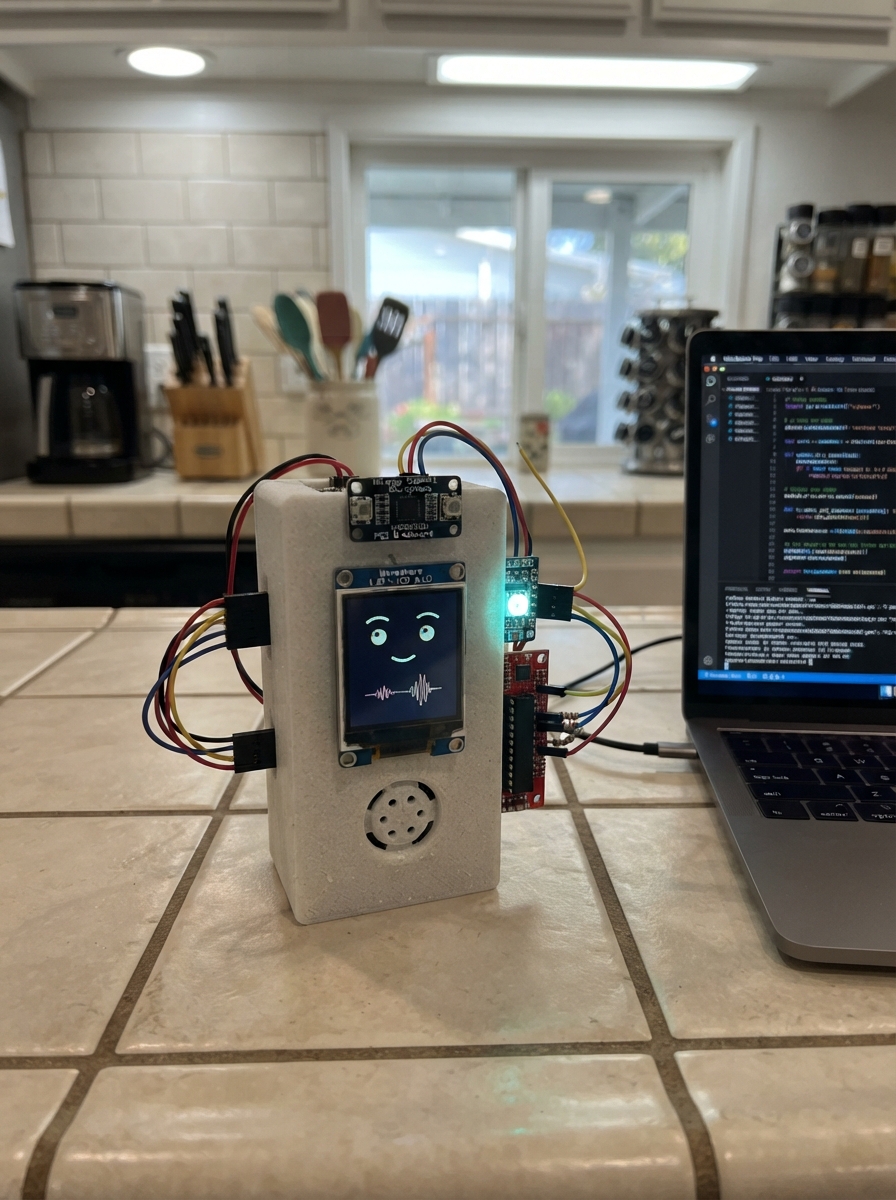
Build an interactive AI companion robot powered by an ESP32 that listens, thinks, and responds with expressive visuals and audio. This project combines a 240x280 LCD display for animated facial expressions, dual I²S microphones for stereo audio capture, and a Class-D amplifier with speaker for voice output, all coordinated through intelligent state management and real-time audio processing.
This guide provides a complete wiring diagram, parts list, and step-by-step assembly instructions for integrating the display, microphone array, audio amplifier, RGB status LEDs, and battery management into a functional robot platform. Firmware code handles I²S audio streaming, expression rendering, and state transitions, with all GPIO mappings and configuration parameters documented for easy customization.
Wiring diagram

Gather all the parts
Assemble it in 9 steps
1. Kenali modul dan putus semua daya
Gunakan DevKitC-1 dengan modul ESP32-S3-WROOM-1-N8R8, layar breakout Waveshare 1.69inch 8-pin, dua INMP441 dan breakout MAX98357A. Ikuti label pin, bukan warna kabel. GPIO35/36/37 dipakai PSRAM, GPIO19/20 untuk USB dan pin boot tidak dipakai.
- Rangkaian ini bukan untuk modul ESP32 telanjang atau panel layar FPC. Modul serupa dengan pinout berbeda tidak boleh disambung berdasarkan urutan fisik yang diasumsikan.
2. Siapkan baterai terlindungi dan sensor suhu
Gunakan satu protected 18650 3000mAh dengan proteksi terintegrasi, rating discharge minimal 3A dan charge minimal 1A. Pasang pada holder yang sesuai panjangnya. P+ ke LIPO charger, P- ke GND. Cocokkan polaritas JST dengan multimeter. Cut jumper THERM charger lalu pasang NTC 10k antara THERM dan GND. Tempel NTC terisolasi listrik ke badan sel. Pertahankan jumper arus pengisian default 1A.
- Jangan gunakan sel polos, sel rusak, sel bekas tak dikenal, LiFePO4, atau 2 sel seri. BQ24074 bukan pengganti PCB proteksi sel. Polaritas terbalik/korslet dapat menyebabkan kebakaran. Jangan menyolder langsung ke sel; jangan mengisi tanpa pengawasan.
3. Rangkai jalur daya dan saklar OFF
OUT charger ke VIN Pololu U3V70F5. GND charger dan boost ke ground bersama. VOUT boost ke rail 5V dan pin 5V DevKit. Regulator bawaan DevKit menghasilkan rail 3.3V. Saklar OFF menghubungkan ENABLE boost ke GND saat tertutup; buka untuk ON. Kapasitor input 100uF di OUT charger, bulk 1000uF di rail 5V. Semua kaki negatif kapasitor elektrolit ke GND. USB-C adaptor 5V 3A masuk ke charger, bukan rail 3.3V.
- Ukur rail 5V dan 3.3V sebelum memasang periferal. Gunakan kabel daya pendek 22AWG, sambungan solder/terminal, bukan breadboard untuk jalur baterai dan amplifier.
- OUT charger maksimal 1.5A. Anggaran rail 5V sekitar 0.75A kontinu saat baterai rendah. Firmware sengaja membatasi volume serta kecerahan; speaker 3W adalah rating, bukan target daya kontinu.
- Jangan memasukkan output boost ke pin 3V3. Jangan hubungkan daya boost ke DevKit bersamaan dengan kabel USB biasa: dapat memberi arus balik ke komputer. Untuk Deploy lepaskan kabel boost ke pin 5V DevKit dan matikan boost; gunakan daya USB saja. Pengujian daya baterai dilakukan setelah kabel USB DevKit dilepas.
4. Hubungkan layar landscape
VCC layar ke 3V3, GND ke GND; CLK ke GPIO12 (clock), DIN ke GPIO11 (data gambar), CS ke GPIO10 (pilih layar), DC ke GPIO9 (data/perintah), RST ke GPIO8 (reset), BL ke GPIO7 (kontrol backlight modul). Pasang kapasitor 10uF dekat VCC/GND layar. Gunakan breakout Waveshare yang memiliki rangkaian backlight, bukan LED panel langsung.
- Firmware memakai 240x280, rotasi 1 menjadi 280x240. Seluruh sinyal logika layar adalah 3.3V.
5. Hubungkan dua mikrofon sebagai stereo
Kedua VDD ke 3V3 dan kedua GND ke GND. Kedua SCK ke GPIO4 (bit clock), kedua WS ke GPIO5 (pilih kanal), dan kedua SD ke GPIO6 (data bersama). L/R mic kiri ke GND dan L/R mic kanan ke 3V3. Resistor 100k dari SD bersama ke GND. Pasang bypass 100nF pada masing-masing mikrofon.
- INMP441 tidak boleh diberi 5V. Dua SD boleh digabung hanya karena L/R memilih slot stereo yang berbeda. Jangan mengikat kedua L/R ke level yang sama.
6. Hubungkan amplifier dan speaker
VIN MAX98357A ke 5V, GND ke GND. BCLK ke GPIO15, LRC ke GPIO16, DIN ke GPIO17. Speaker hanya antara SPK+ dan SPK-. SD dan GAIN breakout dibiarkan pada default bawaan. Kapasitor 100uF dekat VIN/GND amp. Jauhkan mikrofon dari speaker dan boost.
- SPK- bukan ground! Jangan sambungkan terminal speaker ke GND atau ke input audio komputer. Speaker dan amplifier jangan diuji pada volume maksimum dengan jalur daya ini.
7. Pasang penggeser level dan dua LED
SN74AHCT125N PDIP-14: kaki14 ke 5V, kaki7 ke GND, kaki1 /OE ke GND, kaki2 input ke GPIO21, kaki3 output melalui resistor 330ohm ke DIN LED1. DOUT LED1 melalui resistor 330ohm kedua ke DIN LED2. DOUT LED2 kosong. Kedua VCC LED ke 5V, GND ke GND. Input tak terpakai kaki5/9/12 ke GND; /OE kaki4/10/13 ke 5V; output6/8/11 kosong. Pulldown100k dari kaki2 ke GND. Bypass100nF di IC dan setiap pixel.
- Pastikan IC AHCT, bukan HC yang ambang inputnya tidak cocok. LED tersusun berantai DATA, bukan seri pada jalur daya. Pembatas arus RGB berada dalam WS2812B; resistor eksternal adalah pelindung jalur data.
8. Pasang tombol dan pengukur baterai
Tombol normally-open antara GPIO18 dan GND; pull-up internal aktif. P+ baterai ke resistor atas100k, ujung lainnya ke GPIO1. Resistor bawah100k dari GPIO1 ke GND. Kapasitor100nF dari GPIO1 ke GND. Pada baterai4.2V, ADC menerima2.1V. Jangan pernah menyambung baterai langsung ke GPIO.
- Kalibrasikan tegangan terhadap multimeter; pembacaan tegangan bukan pengukur persentase kapasitas. Batas3.25V firmware adalah peringatan, proteksi hardware dalam sel tetap wajib.
9. Periksa dan lakukan uji awal bertahap
Periksa korslet rail terhadap GND, polaritas baterai dan kapasitor, serta semua ground bersama. Untuk uji USB: matikan boost dan lepaskan boost dari pin5V DevKit, lalu gunakan USB DevKit saja. Periksa wajah dan kedua LED dahulu. Tekan PTT sambil berbicara singkat lalu lepaskan: rekam stereo0.5s, THINKING1s, kemudian putar ulang pelan. Saat pengujian baterai, lepas USB DevKit sebelum menyambung kembali boost ke pin5V.
- Semua periferal tetap mendapat rail dari pin5V/3V3 DevKit saat uji USB. Gunakan port USB dengan kemampuan arus cukup, volume rendah dan LED redup.
- Periksa kenaikan suhu charger/boost saat mengisi sambil menyala. Sisakan ventilasi dan jauhkan sel dari komponen panas. Jika panas berlebihan, matikan dan periksa rangkaian.
Review all connections
1. Connections between "lcd" and "ESP32"
2. Connections between "mic_l" and "ESP32"
3. Connections between "mic_r" and "ESP32"
4. Connections between "amp" and "ESP32"
5. Connections between "led1" and "ESP32"
6. Connections between "led2" and "ESP32"
7. Connections between "r_data2" and "ESP32"
8. Connections between "level" and "ESP32"
9. Connections between "r_data1" and "ESP32"
10. Connections between "r_ledpull" and "ESP32"
11. Connections between "ptt" and "ESP32"
12. Connections between "r_sd" and "ESP32"
13. Connections between "battery" and "ESP32"
14. Connections between "charger" and "ESP32"
15. Connections between "boost" and "ESP32"
16. Connections between "off" and "ESP32"
17. Connections between "ntc" and "ESP32"
18. Connections between "r_batt_top" and "ESP32"
19. Connections between "r_batt_bottom" and "ESP32"
20. Connections between "c_adc" and "ESP32"
21. Connections between "c_level" and "ESP32"
22. Connections between "c_led1" and "ESP32"
23. Connections between "c_led2" and "ESP32"
24. Connections between "c_micl" and "ESP32"
25. Connections between "c_micr" and "ESP32"
26. Connections between "c_lcd" and "ESP32"
27. Connections between "c_input" and "ESP32"
28. Connections between "c_bulk" and "ESP32"
29. Connections between "c_amp" and "ESP32"
Deploy the firmware
#include <Arduino.h>
#include <SPI.h>
#include <WiFi.h>
#include <Adafruit_GFX.h>
#include <Adafruit_ST7789.h>
#include <Adafruit_NeoPixel.h>
#include <driver/i2s.h>
#include <esp_heap_caps.h>
#include <math.h>
#include "config.h"

// Seluruh GPIO sesuai wiring.yaml; LED bawaan DevKit tidak digunakan.
constexpr int TFT_SCK=12, TFT_MOSI=11, TFT_CS=10, TFT_DC=9, TFT_RST=8, TFT_BL=7;
constexpr int MIC_BCLK=4, MIC_WS=5, MIC_SD=6;
constexpr int AMP_BCLK=15, AMP_WS=16, AMP_DIN=17;
constexpr int PTT_PIN=18, RGB_PIN=21, BATTERY_PIN=1;
constexpr uint32_t SAMPLE_RATE=16000;
constexpr size_t CAPTURE_FRAMES=8000; // 0.5 detik stereo, RAM internal 32 kB
constexpr uint16_t CYAN=0x07FF, BLACK=0x0000;
enum RobotState { IDLE, LISTENING, THINKING, SPEAKING, ERROR };
enum Expression { NEUTRAL, HAPPY, SAD, ANGRY, SURPRISED, PONDER };
RobotState state=IDLE;
Expression expression=NEUTRAL;
const char* stateNames[]={"IDLE","LISTENING","THINKING","SPEAKING","ERROR"};
Adafruit_ST7789 display(&SPI,TFT_CS,TFT_DC,TFT_RST);
Adafruit_NeoPixel pixels(2,RGB_PIN,NEO_GRB+NEO_KHZ800);
GFXcanvas16 face(280,170); // frame offscreen agar gambar tidak berkedip hitam
int16_t* captured=nullptr; // interleaved L,R signed PCM16
int32_t rxWords[256];
int16_t txPCM[256];
size_t capturedFrames=0, playedFrames=0;
bool micReady=false, ampReady=false, recording=false, captureFull=false;
bool dirtyStatus=true, dirtyFace=true, batteryLow=false;
bool wifiPending=false, wifiWasConnected=false;
uint32_t stateSince=0, lastFrame=0, lastMeter=0, lastBattery=0, wifiSince=0;
uint32_t blinkStart=0, nextBlink=2200;
float batteryVolts=0;
int peakL=0,peakR=0;
String fault;
Expression demoOverride=NEUTRAL;
bool autoDemo=true, testTone=false;
uint32_t toneSample=0;

// Titik integrasi nyata: tidak ada HTTP/API palsu dan tidak ada kunci tersimpan.
// Future: unggah PCM16 stereo/mono atau WAV melalui HTTPS dengan verifikasi CA.
String sttPlaceholder(const int16_t* pcm,size_t frames) {
  (void)pcm;(void)frames;
  Serial.println("[STT placeholder] Tidak mengirim audio; mode uji lokal.");
  return "";
}
String llmPlaceholder(const String& text) {(void)text; return "";}
bool ttsPlaceholder(const String& text) {(void)text; return false;}

void setState(RobotState value) {
  state=value;stateSince=millis();dirtyStatus=dirtyFace=true;
  uint32_t c=0;
  switch(state) {
    case IDLE: c=pixels.Color(0,22,25);break;
    case LISTENING:c=pixels.Color(0,45,5);break;
    case THINKING:c=pixels.Color(30,0,40);break;
    case SPEAKING:c=pixels.Color(5,10,50);break;
    case ERROR:c=pixels.Color(55,0,0);break;
  }
  for(int i=0;i<2;i++) pixels.setPixelColor(i,c);
  pixels.show();
  Serial.printf("State: %s\n",stateNames[state]);
}
void fail(const char* message) {
  fault=message; recording=false;setState(ERROR);Serial.println(message);
}

bool setupI2S() {
  i2s_config_t rx={};
  rx.mode=(i2s_mode_t)(I2S_MODE_MASTER|I2S_MODE_RX);
  rx.sample_rate=SAMPLE_RATE;
  rx.bits_per_sample=I2S_BITS_PER_SAMPLE_32BIT;
  rx.channel_format=I2S_CHANNEL_FMT_RIGHT_LEFT;
  rx.communication_format=I2S_COMM_FORMAT_STAND_I2S;
  rx.intr_alloc_flags=ESP_INTR_FLAG_LEVEL1;
  rx.dma_buf_count=8;rx.dma_buf_len=128;
  rx.use_apll=false;rx.tx_desc_auto_clear=false;rx.fixed_mclk=0;
  i2s_pin_config_t rp={};
  rp.mck_io_num=I2S_PIN_NO_CHANGE;rp.bck_io_num=MIC_BCLK;
  rp.ws_io_num=MIC_WS;rp.data_out_num=I2S_PIN_NO_CHANGE;rp.data_in_num=MIC_SD;
  if(i2s_driver_install(I2S_NUM_0,&rx,0,nullptr)!=ESP_OK) return false;
  if(i2s_set_pin(I2S_NUM_0,&rp)!=ESP_OK) {i2s_driver_uninstall(I2S_NUM_0);return false;}
  micReady=true;
  i2s_config_t tx={};
  tx.mode=(i2s_mode_t)(I2S_MODE_MASTER|I2S_MODE_TX);
  tx.sample_rate=SAMPLE_RATE;tx.bits_per_sample=I2S_BITS_PER_SAMPLE_16BIT;
  tx.channel_format=I2S_CHANNEL_FMT_RIGHT_LEFT;
  tx.communication_format=I2S_COMM_FORMAT_STAND_I2S;
  tx.intr_alloc_flags=ESP_INTR_FLAG_LEVEL1;
  tx.dma_buf_count=8;tx.dma_buf_len=128;
  tx.use_apll=false;tx.tx_desc_auto_clear=true;tx.fixed_mclk=0;
  i2s_pin_config_t tp={};tp.mck_io_num=I2S_PIN_NO_CHANGE;
  tp.bck_io_num=AMP_BCLK;tp.ws_io_num=AMP_WS;tp.data_out_num=AMP_DIN;
  tp.data_in_num=I2S_PIN_NO_CHANGE;
  if(i2s_driver_install(I2S_NUM_1,&tx,0,nullptr)!=ESP_OK)return false;
  if(i2s_set_pin(I2S_NUM_1,&tp)!=ESP_OK){i2s_driver_uninstall(I2S_NUM_1);return false;}
  ampReady=true;i2s_zero_dma_buffer(I2S_NUM_1);return true;
}

void serviceMicrophones() {
  if(!micReady)return;
  // Drain DMA without waiting. Standard I2S: 24-bit mic sample in MSBs of 32-bit slot.
  // ESP32 RX DMA RIGHT_LEFT places WS=0 (left) then WS=1 (right) per frame.
  for(int block=0;block<3;block++) {
    size_t got=0;
    esp_err_t e=i2s_read(I2S_NUM_0,rxWords,sizeof(rxWords),&got,0);
    if(e!=ESP_OK && e!=ESP_ERR_TIMEOUT){fail("I2S RX gagal");return;}
    if(!got)break;
    size_t frames=got/(2*sizeof(int32_t));
    for(size_t i=0;i<frames;i++) {
      int16_t l=(int16_t)(rxWords[2*i]>>16);
      int16_t r=(int16_t)(rxWords[2*i+1]>>16);
      peakL=max(peakL,abs((int)l));peakR=max(peakR,abs((int)r));
      if(recording && capturedFrames<CAPTURE_FRAMES) {
        captured[capturedFrames*2]=l;captured[capturedFrames*2+1]=r;
        if(++capturedFrames==CAPTURE_FRAMES) {captureFull=true;dirtyStatus=true;}
      }
    }
  }
}

void servicePlayback() {
  if(state!=SPEAKING || !ampReady)return;
  // Chunk kecil, tanpa menunggu DMA, sehingga tombol dan wajah tetap responsif.
  size_t remain=testTone? (SAMPLE_RATE/4-toneSample):(capturedFrames-playedFrames);
  if(!remain) {
    // Allow the last DMA chunk to finish; do not cut the speaker tail.
    if(millis()-stateSince>750)setState(IDLE);
    return;
  }
  size_t n=min(remain,(size_t)128);
  for(size_t i=0;i<n;i++) {
    int mono;
    if(testTone) {
      float env=sinf(PI*(toneSample+i)/(SAMPLE_RATE/4));
      mono=(int)(700*env*sinf(2*PI*660*(toneSample+i)/SAMPLE_RATE));
    } else {
      mono=((int)captured[(playedFrames+i)*2]+captured[(playedFrames+i)*2+1])/2;
      mono=constrain(mono/2,-2000,2000); // low-volume commissioning, protect power budget
    }
    txPCM[2*i]=txPCM[2*i+1]=(int16_t)mono;
  }
  size_t written=0;
  esp_err_t e=i2s_write(I2S_NUM_1,txPCM,n*2*sizeof(int16_t),&written,0);
  if(e!=ESP_OK && e!=ESP_ERR_TIMEOUT){fail("I2S TX gagal");return;}
  size_t count=written/(2*sizeof(int16_t));
  if(testTone)toneSample+=count;else playedFrames+=count;
}

void startListening() {
  if(state==ERROR || !captured || !micReady || batteryLow)return;
  if(state==SPEAKING)i2s_zero_dma_buffer(I2S_NUM_1);
  capturedFrames=0;playedFrames=0;captureFull=false;recording=true;testTone=false;
  setState(LISTENING);
}
void stopListening() {
  if(state!=LISTENING)return;
  recording=false;
  Serial.printf("Captured %u frames, stereo 16k PCM16, %.2f s\n",(unsigned)capturedFrames,capturedFrames/(float)SAMPLE_RATE);
  setState(THINKING);
  String text=sttPlaceholder(captured,capturedFrames);
  String answer=llmPlaceholder(text);ttsPlaceholder(answer);
}
void buttonTick() {
  static bool raw=false, stable=false;
  static uint32_t changed=0;
  bool p=digitalRead(PTT_PIN)==LOW;
  if(p!=raw){raw=p;changed=millis();}
  if(p!=stable && millis()-changed>=25) {
    stable=p;
    if(stable)startListening();else stopListening();
  }
}

void readBattery() {
  uint32_t sum=0;
  for(int i=0;i<16;i++)sum+=analogReadMilliVolts(BATTERY_PIN);
  batteryVolts=(sum/16.0f)*0.002f*BATTERY_CALIBRATION;
  // Divider 100k/100k: maximum 4.2V battery -> 2.1V ADC. Not a fuel gauge.
  batteryLow=batteryVolts>1.0f && batteryVolts<3.25f;
  if(batteryLow && state!=ERROR)fail("Baterai rendah: OFF & isi ulang");
  dirtyStatus=true;
}

void drawStatus() {
  if(!dirtyStatus)return;
  dirtyStatus=false;
  display.fillRect(12,12,256,26,BLACK);
  display.setTextSize(2);display.setTextColor(CYAN,BLACK);display.setCursor(96,16);display.print("MIMO V1");
  display.fillRect(12,207,256,30,BLACK);
  display.setTextSize(1);display.setCursor(20,209);display.print(stateNames[state]);
  display.setCursor(156,209);display.printf("BAT %.2fV",batteryVolts);
  display.setCursor(20,224);
  if(state==ERROR)display.print(fault.substring(0,38));
  else if(state==LISTENING && captureFull) display.print("Buffer penuh - lepas tombol");
  else if(state==LISTENING)display.print("Merekam stereo (maks 0.5s)");
  else display.print(WiFi.status()==WL_CONNECTED?"Wi-Fi OK | AI belum terhubung":"Offline | uji lokal siap");
}

void drawFace() {
  uint32_t now=millis();
  if(now-lastFrame<33)return;
  lastFrame=now;
  Expression next=NEUTRAL;
  if(state==LISTENING)next=SURPRISED;
  else if(state==THINKING)next=PONDER;
  else if(state==SPEAKING)next=HAPPY;
  else if(state==ERROR)next=SAD;
  else next=autoDemo?(Expression)((now/4000)%6):demoOverride;
  if(expression!=next){expression=next;dirtyFace=true;}
  if(!blinkStart && (int32_t)(now-nextBlink)>=0)blinkStart=now;
  float open=1;
  if(blinkStart) {
    float t=(now-blinkStart)/240.0f;
    if(t>=1){blinkStart=0;nextBlink=now+random(2200,5200);dirtyFace=true;}
    else {open=1-sinf(PI*t);dirtyFace=true;}
  }
  int gaze=expression==PONDER?(int)(sinf(now/600.0f)*11):0;
  int mouth=state==SPEAKING? (int)(3+6*(1+sinf(now/75.0f))):4;
  static int prevGaze=-99, prevMouth=-99,prevEye=-99;
  int eyeH=max(3,(int)(56*open));
  if(gaze!=prevGaze||mouth!=prevMouth||eyeH!=prevEye)dirtyFace=true;
  if(!dirtyFace)return;
  dirtyFace=false;prevGaze=gaze;prevMouth=mouth;prevEye=eyeH;
  face.fillScreen(BLACK);
  for(int eye=0;eye<2;eye++) {
    int x=(eye?170:48)+gaze, y=48+(56-eyeH)/2;
    if(expression==SURPRISED) {
      face.fillRoundRect(x,y,56,eyeH,min(16,eyeH/2),CYAN);
      if(eyeH>18)face.fillRoundRect(x+13,y+7,30,eyeH-14,8,BLACK);
    } else {
      face.fillRoundRect(x,y,62,eyeH,min(15,eyeH/2),CYAN);
      if(expression==ANGRY && eyeH>12) {
        if(!eye)face.fillTriangle(x,y,x+62,y,x+62,y+23,BLACK);
        else face.fillTriangle(x,y,x+62,y,x,y+23,BLACK);
      }
      if(expression==SAD && eyeH>12) {
        if(!eye)face.fillTriangle(x,y,x+62,y,x,y+21,BLACK);
        else face.fillTriangle(x,y,x+62,y,x+62,y+21,BLACK);
      }
      if(expression==HAPPY && eyeH>18)face.fillRoundRect(x-2,y+eyeH/2,66,eyeH,16,BLACK);
    }
  }
  if(expression==SURPRISED)face.fillRoundRect(128,123,24,24,10,CYAN);
  else if(state==SPEAKING)face.fillRoundRect(116,134-mouth/2,48,mouth,4,CYAN);
  else if(expression==PONDER) {
    face.fillRoundRect(126,134,30,5,2,CYAN);
    int dot=(now/250)%3;
    face.fillCircle(216+dot*12,122,3,CYAN);
    static int prevDot=-1;if(prevDot!=dot){prevDot=dot;dirtyFace=true;}
  } else {
    for(int dx=-24;dx<=24;dx++) {
      int curve=(576-dx*dx)/90;
      int y=134+((expression==SAD||expression==ANGRY)?-curve:curve);
      face.drawFastVLine(140+dx,y,4,CYAN);
    }
  }
  display.drawRGBBitmap(0,38,face.getBuffer(),280,170);
}

void serviceWiFi() {
  bool connected=WiFi.status()==WL_CONNECTED;
  if(connected!=wifiWasConnected) {
    wifiWasConnected=connected;dirtyStatus=true;
    if(connected){wifiPending=false;Serial.print("Wi-Fi IP: ");Serial.println(WiFi.localIP());}
  }
  if(wifiPending && millis()-wifiSince>15000) {
    wifiPending=false;WiFi.disconnect();Serial.println("Wi-Fi timeout; lanjut uji offline.");dirtyStatus=true;
  }
}
void serialTick() {
  if(!Serial.available())return;
  char c=Serial.read();
  if(c>='0'&&c<='5'){autoDemo=false;demoOverride=(Expression)(c-'0');dirtyFace=true;}
  if(c=='d'){autoDemo=true;dirtyFace=true;}
  if(c=='t' && state==IDLE && ampReady && !batteryLow) {
    testTone=true;toneSample=0;setState(SPEAKING);
  }
  if(c=='e' && state==IDLE)fail("Demo ERROR; tekan r untuk pulih");
  if(c=='r' && state==ERROR && !batteryLow && micReady && ampReady && captured){fault="";setState(IDLE);}
}
void setup() {
  Serial.begin(115200);delay(200);
  pinMode(PTT_PIN,INPUT_PULLUP);
  pinMode(TFT_BL,OUTPUT);digitalWrite(TFT_BL,LOW);
  pixels.begin();pixels.setBrightness(64);pixels.clear();pixels.show();
  SPI.begin(TFT_SCK,-1,TFT_MOSI,TFT_CS);
  display.init(240,280,SPI_MODE0);display.setRotation(1);display.setSPISpeed(27000000);
  display.fillScreen(BLACK);digitalWrite(TFT_BL,HIGH);
  analogReadResolution(12);analogSetPinAttenuation(BATTERY_PIN,ADC_11db);
  captured=(int16_t*)heap_caps_malloc(CAPTURE_FRAMES*2*sizeof(int16_t),MALLOC_CAP_INTERNAL|MALLOC_CAP_8BIT);
  bool audio=setupI2S();
  setState(IDLE);
  if(!captured || !face.getBuffer())fail("RAM tidak cukup");
  else if(!audio)fail("Inisialisasi audio gagal");
  readBattery();
  WiFi.mode(WIFI_STA);
  if(WIFI_SSID[0]) {
    WiFi.setAutoReconnect(true);WiFi.begin(WIFI_SSID,WIFI_PASSWORD);wifiSince=millis();wifiPending=true;
  } else {WiFi.mode(WIFI_OFF);Serial.println("SSID kosong: mode offline.");}
  Serial.printf("MIMO V1 | flash %u | PSRAM %u | heap %u\n",ESP.getFlashChipSize(),ESP.getPsramSize(),ESP.getFreeHeap());
  Serial.println("PTT tahan/bicara/lepas: rekam 0.5s -> THINKING -> putar ulang pelan.");
  Serial.println("Serial: 0 netral, 1 happy, 2 sad, 3 angry, 4 surprised, 5 thinking; d demo; t nada; e error; r pulih.");
}
void loop() {
  buttonTick();serviceMicrophones();servicePlayback();serviceWiFi();serialTick();
  if(state==THINKING && millis()-stateSince>=1000) {
    if(!capturedFrames)setState(IDLE);
    else {testTone=false;playedFrames=0;setState(SPEAKING);}
  }
  if(millis()-lastBattery>=5000){lastBattery=millis();readBattery();}
  if(millis()-lastMeter>=1000) {
    lastMeter=millis();Serial.printf("MIC peak L=%d R=%d | BAT=%.2fV | heap=%u\n",peakL,peakR,batteryVolts,ESP.getFreeHeap());
    peakL=peakR=0;
  }
  if(face.getBuffer()){drawFace();drawStatus();}
  delay(1);
}
Remix this project
Make it yours in one click
Open a full copy of this project in your own Schematik workspace — diagram, code, parts, and assembly steps included. Swap the sensor, add features, or redesign the whole thing with AI. The author's original stays untouched.