Community project
ESP32 Camera Viewer
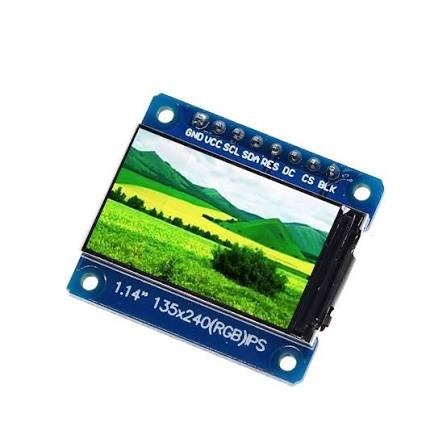
Build a portable camera viewer with the ESP32 and a 1.14-inch ST7789 display. This project captures photos using the ESP32's onboard camera, stores them on a microSD card, and displays them on a bright SPI screen. The push button triggers photo capture, while separate navigation buttons let you browse the gallery.
This guide provides a complete wiring diagram, parts list, and Arduino firmware to get the camera and display working together. Assembly steps cover connecting the camera ribbon, wiring the display signals, mounting the memory card, and configuring the button inputs. Once complete, capture photos and scroll through your saved images directly on the device.
Wiring diagram

Gather all the parts
Assemble it in 9 steps
1. Fit the camera ribbon
Unplug USB first. Carefully release the camera socket latch, insert the supplied camera ribbon fully with its exposed metal contacts facing the socket contacts, then close the latch. Do not force the latch or crease the ribbon.
- Connecting or removing the camera while powered can damage it.
2. Connect screen power
Connect screen GND to board GND, VCC to 3V3, and BLK to 3V3. Use the eight-pin 135x240 ST7789 breakout pictured, not a bare LCD panel.
- Use 3.3 V only. Connecting the display to 5 V can damage it.
3. Connect the five screen signals
SCL to GPIO21 (clock); SDA to GPIO47 (picture data); RES to GPIO42 (reset); DC to GPIO41 (command or picture selection); CS to GPIO14 (screen selection). Follow the printed GPIO numbers, not the physical pin positions.
- SCL and SDA here are SPI signals, not an I2C connection.
- Keep wires short, ideally under 15 cm.
4. Check connections and connect USB
Check that power and ground are not swapped and no loose wire touches another pin. Plug a USB data cable into the USB-to-UART socket, usually labeled UART. The display will show the live camera view after firmware is deployed. A memory card is required only for saving photos; preview still works without one.
- The pictured board is treated as the common Freenove-style ESP32-S3-WROOM camera layout. Different-looking or rewired variants need different camera pin assignments.
- The preview has black bars at the sides to keep the picture's proportions.
5. Connect the photo button
With USB unplugged, connect the push button SIGNAL terminal to GPIO1 (shutter input) and GND terminal to board GND. The firmware uses the ESP32 internal pull-up, so no external resistor is needed. For a bare four-leg tactile switch, use one leg from each separate contact pair; the button must connect GPIO1 to GND only when pressed.
- Do not connect the button to 5 V or 3V3.
6. Fit the memory card
Use a 16 GB microSDHC card formatted as FAT32. Back up its contents before formatting on your computer. With USB disconnected, insert it into the board's built-in microSD slot. No external reader or extra SD wires are needed. The board's internal slot uses GPIO39 (clock), GPIO38 (commands), and GPIO40 (data) in 1-bit mode.
- Formatting deletes existing files. The firmware never formats your card.
- Power off before inserting or removing the card. Do not unplug power while saving.
7. Save and view photos
Reconnect USB and press Deploy. Press and release the button to save one 160x120 BMP photo; holding it does not take repeated photos. The screen briefly confirms the saved filename, then returns to live view. Files are stored in the photos folder as IMG_000001.bmp and so on, without overwriting existing photos. To copy them to Windows, wait for saving to finish, unplug USB, and move the card to a computer card reader.
- These are small photos at the existing preview capture resolution, not full-resolution camera images.
- If saving fails, check that the card is FAT32 and has free space. Power off before reseating it.
8. Wire Select, Up and Down separately
Unplug all USB cables. Remove the old navigation resistors and shared GPIO2 wiring. Connect Select SIGNAL to GPIO2, Up SIGNAL to GPIO19, and Down SIGNAL to GPIO20. Connect each button GND to board GND. Internal pull-ups are enabled, so no external resistors are needed. For four-leg switches use one leg from each separate contact pair.
- GPIO19 and GPIO20 are native USB data pins. Leave the native USB socket disconnected; use only the UART USB socket for power and Deploy.
- Buttons must connect their GPIO to GND only when pressed. Do not connect them to 5 V or 3V3.
9. Browse saved photos
Connect USB through the UART socket and deploy. Select opens the newest saved photo; press Select again to return to live view. Up shows the previous saved photo and Down shows the next, wrapping at the ends. Up or Down can also open the viewer from live view. The shutter on GPIO1 still saves photos only in live view. The viewer supports the 160x120 BMP files created by this camera in the photos folder.
- A held button performs only one action. Release before pressing again.
- Keep the card inserted while viewing. Power off before removing it.
Review all connections
1. Connections between "screen" and "ESP32"
2. Connections between "shutter" and "ESP32"
3. Connections between "select" and "ESP32"
4. Connections between "up" and "ESP32"
5. Connections between "down" and "ESP32"
Deploy the firmware
#include <Arduino.h>
#include <SPI.h>
#include <Adafruit_GFX.h>
#include <Adafruit_ST7789.h>
#include "esp_camera.h"
#include <cstring>
#include <FS.h>
#include <SD_MMC.h>

// Separate from the camera, USB, flash, PSRAM and SD-card pins.
constexpr int TFT_SCK = 21, TFT_MOSI = 47, TFT_CS = 14;
constexpr int TFT_DC = 41, TFT_RST = 42;
Adafruit_ST7789 tft(&SPI, TFT_CS, TFT_DC, TFT_RST);
constexpr int VIEW_W = 180, VIEW_H = 135, VIEW_X = 30;
uint16_t previous[VIEW_H][VIEW_W];
uint16_t rowPixels[VIEW_W];
bool cameraReady = false, firstFrame = true;
uint32_t lastFrameTime = 0;
bool showingError = false;
constexpr int SHUTTER_PIN = 1;
bool sdReady = false, capturePending = false;
bool buttonRaw = HIGH, buttonStable = HIGH;
uint32_t buttonChanged = 0, statusUntil = 0, nextPhoto = 1;
constexpr int SELECT_PIN = 2, UP_PIN = 19, DOWN_PIN = 20;
bool gallery = false;
uint32_t galleryNumber = 0;
int navRaw = 0, navStable = 0;
uint32_t navChanged = 0;

bool mountCard() {
  // Freenove onboard slot: CLK39, CMD38, D0=40. 1-bit only.
  SD_MMC.setPins(39, 38, 40);
  sdReady = SD_MMC.begin("/sdcard", true, false); // NEVER format the card.
  if (sdReady && SD_MMC.cardType() == CARD_NONE) sdReady = false;
  if (!sdReady) SD_MMC.end();
  return sdReady;
}

void pollButton() {
  bool raw = digitalRead(SHUTTER_PIN);
  if (raw != buttonRaw) { buttonRaw = raw; buttonChanged = millis(); }
  if (raw != buttonStable && millis() - buttonChanged >= 35) {
    buttonStable = raw;
    if (raw == LOW) capturePending = true; // One photo per press, not hold.
  }
}

// Write a standard 24-bit BMP from the same RGB565 frame as the preview.
// Uses one small row buffer; no camera mode or PSRAM changes required.
bool savePhoto(camera_fb_t *fb, char *path, size_t pathSize) {
  if (!sdReady && !mountCard()) return false;
  if (!SD_MMC.exists("/photos") && !SD_MMC.mkdir("/photos")) return false;
  do {
    if (nextPhoto > 999999) return false;
    snprintf(path, pathSize, "/photos/IMG_%06lu.bmp", (unsigned long)nextPhoto++);
  } while (SD_MMC.exists(path));
  File file = SD_MMC.open(path, FILE_WRITE);
  if (!file) return false;
  const uint32_t stride = (fb->width * 3 + 3) & ~3U;
  const uint32_t imageSize = stride * fb->height;
  uint8_t header[54] = {};
  auto put16 = [&](int p, uint16_t v) {
    header[p] = v; header[p+1] = v >> 8;
  };
  auto put32 = [&](int p, uint32_t v) {
    for (int i = 0; i < 4; ++i) header[p+i] = v >> (8*i);
  };
  header[0] = 'B'; header[1] = 'M';
  put32(2, 54 + imageSize); put32(10, 54); put32(14, 40);
  put32(18, fb->width); put32(22, fb->height);
  put16(26, 1); put16(28, 24); put32(34, imageSize);
  uint8_t row[480] = {}; // Fixed 160-pixel capture width.
  bool ok = stride <= sizeof(row) && file.write(header, sizeof(header)) == sizeof(header);
  for (int y = fb->height - 1; ok && y >= 0; --y) {
    memset(row, 0, stride);
    for (unsigned x = 0; x < fb->width; ++x) {
      size_t p = (y * fb->width + x) * 2;
      uint16_t rgb = (uint16_t(fb->buf[p]) << 8) | fb->buf[p+1];
      uint8_t r = (rgb >> 11) & 31, g = (rgb >> 5) & 63, b = rgb & 31;
      row[x*3] = (b << 3) | (b >> 2);
      row[x*3+1] = (g << 2) | (g >> 4);
      row[x*3+2] = (r << 3) | (r >> 2);
    }
    ok = file.write(row, stride) == stride;
    yield();
  }
  file.flush();
  ok = ok && file.size() == 54 + imageSize;
  file.close();
  if (!ok) SD_MMC.remove(path); // Discard incomplete photos.
  return ok;
}

void message(const char *text, uint16_t color) {
  tft.fillScreen(ST77XX_BLACK);
  tft.setCursor(6, 45);
  tft.setTextColor(color);
  tft.setTextSize(1);
  tft.setTextWrap(true);
  tft.print(text);
}

// Three independent navigation buttons use internal pull-ups.
int navigationPress() {
  // Active-low buttons, one action per press after contact debounce.
  int key = digitalRead(SELECT_PIN) == LOW ? 3 :
            digitalRead(UP_PIN) == LOW ? 1 :
            digitalRead(DOWN_PIN) == LOW ? 2 : 0;
  if (key != navRaw) { navRaw = key; navChanged = millis(); }
  if (key != navStable && millis() - navChanged >= 45) {
    navStable = key;
    return key;
  }
  return 0;
}

bool showSavedPhoto(const char *path) {
  File file = SD_MMC.open(path, FILE_READ);
  uint8_t header[54];
  if (!file || file.read(header, sizeof(header)) != sizeof(header)) return false;
  auto u32 = [&](int p) -> uint32_t {
    return uint32_t(header[p]) | (uint32_t(header[p+1]) << 8) |
           (uint32_t(header[p+2]) << 16) | (uint32_t(header[p+3]) << 24);
  };
  // Only the uncompressed, bottom-up 160x120 BMP files this camera saves.
  if (header[0] != 'B' || header[1] != 'M' || u32(10) != 54 ||
      u32(14) != 40 || u32(18) != 160 || u32(22) != 120 ||
      header[26] != 1 || header[27] != 0 || header[28] != 24 ||
      header[29] != 0 || u32(30) != 0 || file.size() < 57654) return false;
  tft.fillScreen(ST77XX_BLACK);
  uint8_t bgr[480];
  for (int y = 0; y < 120; ++y) {
    if (!file.seek(54 + (119-y)*480) || file.read(bgr, sizeof(bgr)) != sizeof(bgr)) return false;
    for (int x = 0; x < 160; ++x) {
      rowPixels[x] = ((bgr[x*3+2] & 0xf8) << 8) |
                     ((bgr[x*3+1] & 0xfc) << 3) | (bgr[x*3] >> 3);
    }
    tft.startWrite();
    tft.setAddrWindow(40, y, 160, 1);
    tft.writePixels(rowPixels, 160);
    tft.endWrite();
    yield();
  }
  tft.setTextSize(1);
  tft.setTextColor(ST77XX_WHITE);
  tft.setCursor(4, 125);
  tft.print(strrchr(path, '/') + 1);
  tft.print("  Select: live");
  return true;
}

void browsePhotos(int direction, bool opening) {
  gallery = true;
  capturePending = false;
  statusUntil = 0;
  if (!sdReady && !mountCard()) {
    message("No SD card.\nSelect: live camera", ST77XX_RED);
    return;
  }
  File dir = SD_MMC.open("/photos");
  if (!dir || !dir.isDirectory()) {
    message("No saved photos.\nSelect: live camera", ST77XX_WHITE);
    return;
  }
  uint32_t smallest = 1000000, largest = 0, chosen = 0;
  for (File entry = dir.openNextFile(); entry; entry = dir.openNextFile()) {
    String name = entry.name();
    name = name.substring(name.lastIndexOf('/') + 1);
    if (!entry.isDirectory() && name.length() == 14 &&
        name.startsWith("IMG_") && name.endsWith(".bmp")) {
      bool digits = true;
      for (int i = 4; i < 10; ++i) if (name[i] < '0' || name[i] > '9') digits = false;
      uint32_t n = name.substring(4, 10).toInt();
      if (digits && n > 0) {
        if (n < smallest) smallest = n;
        if (n > largest) largest = n;
        if (direction > 0 && n > galleryNumber && (!chosen || n < chosen)) chosen = n;
        if (direction < 0 && n < galleryNumber && n > chosen) chosen = n;
      }
    }
    entry.close();
    yield();
  }
  dir.close();
  if (!largest) {
    message("No saved photos.\nSelect: live camera", ST77XX_WHITE);
    return;
  }
  if (opening) chosen = largest;
  else if (!chosen) chosen = direction > 0 ? smallest : largest;
  galleryNumber = chosen;
  char path[40];
  snprintf(path, sizeof(path), "/photos/IMG_%06lu.bmp", (unsigned long)chosen);
  if (!showSavedPhoto(path)) message("Cannot read this photo.\nUp/Down: another\nSelect: live camera", ST77XX_RED);
}

void setup() {
  pinMode(SHUTTER_PIN, INPUT_PULLUP);
  // GPIO19/20 are available only when native USB is not connected.
  pinMode(SELECT_PIN, INPUT_PULLUP);
  pinMode(UP_PIN, INPUT_PULLUP);
  pinMode(DOWN_PIN, INPUT_PULLUP);
  Serial.begin(115200);
  delay(300);
  // CS inactive before resetting the screen. BLK is powered from 3V3.
  pinMode(TFT_CS, OUTPUT);
  digitalWrite(TFT_CS, HIGH);
  SPI.begin(TFT_SCK, -1, TFT_MOSI, TFT_CS);
  tft.init(135, 240);
  tft.setRotation(1);
  tft.setSPISpeed(20000000);
  message("Starting camera...", ST77XX_WHITE);

  camera_config_t c = {};
  c.ledc_channel = LEDC_CHANNEL_0;
  c.ledc_timer = LEDC_TIMER_0;
  c.pin_d0 = 11; c.pin_d1 = 9; c.pin_d2 = 8; c.pin_d3 = 10;
  c.pin_d4 = 12; c.pin_d5 = 18; c.pin_d6 = 17; c.pin_d7 = 16;
  c.pin_xclk = 15; c.pin_pclk = 13;
  c.pin_vsync = 6; c.pin_href = 7;
  c.pin_sccb_sda = 4; c.pin_sccb_scl = 5;
  c.pin_pwdn = -1; c.pin_reset = -1;
  c.xclk_freq_hz = 20000000;
  c.pixel_format = PIXFORMAT_RGB565;
  c.frame_size = FRAMESIZE_QQVGA; // 160x120: modest memory, no PSRAM needed.
  c.jpeg_quality = 12; // Unused for RGB565.
  c.fb_count = 1;
  c.fb_location = CAMERA_FB_IN_DRAM;
  c.grab_mode = CAMERA_GRAB_WHEN_EMPTY;
  esp_err_t err = esp_camera_init(&c);
  if (err != ESP_OK) {
    Serial.printf("Camera initialization failed: 0x%x\n", unsigned(err));
    message("Camera not detected.\n\nUnplug USB; reseat ribbon.\nThen reconnect USB.", ST77XX_RED);
    return;
  }
  cameraReady = true;
  mountCard();
  Serial.println(sdReady ? "SD ready: press shutter on GPIO1." : "SD unavailable: insert FAT32 card with power off.");
  tft.fillScreen(ST77XX_BLACK);
  Serial.println("Camera ready: 160x120 RGB565, 180x135 preview. Button saves 160x120 BMP photos to /photos.");
}

void loop() {
  pollButton();
  int key = navigationPress();
  if (key == 3 && gallery) {
    gallery = false;
    capturePending = false;
    statusUntil = 0;
    showingError = false;
    firstFrame = true;
    tft.fillScreen(ST77XX_BLACK);
  } else if (key == 3) {
    browsePhotos(1, true);
  } else if (key == 1 || key == 2) {
    browsePhotos(key == 1 ? -1 : 1, !gallery);
  }
  if (gallery) {
    capturePending = false; // Shutter never saves while browsing.
    delay(1);
    return;
  }
  if (statusUntil) {
    if (int32_t(millis() - statusUntil) < 0) { delay(1); return; }
    statusUntil = 0;
    tft.fillScreen(ST77XX_BLACK);
    firstFrame = true;
  }
  if (!cameraReady) { delay(100); return; }
  if (millis() - lastFrameTime < 80) { delay(1); return; }
  lastFrameTime = millis();
  camera_fb_t *fb = esp_camera_fb_get();
  if (!fb) {
    if (!showingError) message("Camera frame failed.\nCheck power and ribbon.", ST77XX_RED);
    showingError = true;
    delay(200);
    return;
  }
  if (fb->format != PIXFORMAT_RGB565 || fb->len < fb->width * fb->height * 2) {
    esp_camera_fb_return(fb);
    delay(100);
    return;
  }
  if (showingError) {
    tft.fillScreen(ST77XX_BLACK);
    firstFrame = true;
    showingError = false;
  }
  // Preserve the full camera view, with black bars to either side.
  // RGB565 camera bytes arrive high byte first; convert for writePixels().
  for (int y = 0; y < VIEW_H; ++y) {
    unsigned sy = unsigned(y) * fb->height / VIEW_H;
    for (int x = 0; x < VIEW_W; ++x) {
      unsigned sx = unsigned(x) * fb->width / VIEW_W;
      size_t p = (sy * fb->width + sx) * 2;
      rowPixels[x] = (uint16_t(fb->buf[p]) << 8) | fb->buf[p + 1];
    }
    // Do not redraw an unchanged row; no repeated clearing or flicker.
    if (firstFrame || memcmp(previous[y], rowPixels, sizeof(rowPixels)) != 0) {
      tft.startWrite();
      tft.setAddrWindow(VIEW_X, y, VIEW_W, 1);
      tft.writePixels(rowPixels, VIEW_W);
      tft.endWrite();
      memcpy(previous[y], rowPixels, sizeof(rowPixels));
    }
  }
  firstFrame = false;
  if (capturePending) {
    capturePending = false;
    char path[40] = {};
    bool saved = savePhoto(fb, path, sizeof(path));
    esp_camera_fb_return(fb);
    if (saved) {
      char text[90];
      snprintf(text, sizeof(text), "Photo saved!\n\n%s", path);
      message(text, ST77XX_GREEN);
      Serial.printf("Saved %s\n", path);
    } else {
      message("Save failed.\nCheck FAT32 card / free space.\nPower off before removing card.", ST77XX_RED);
      Serial.println("Photo save failed; check card and free space.");
    }
    statusUntil = millis() + 1200;
    return;
  }
  esp_camera_fb_return(fb);
}
Remix this project
Make it yours in one click
Open a full copy of this project in your own Schematik workspace — diagram, code, parts, and assembly steps included. Swap the sensor, add features, or redesign the whole thing with AI. The author's original stays untouched.