Community project
Automatic Water Dispenser Monitor
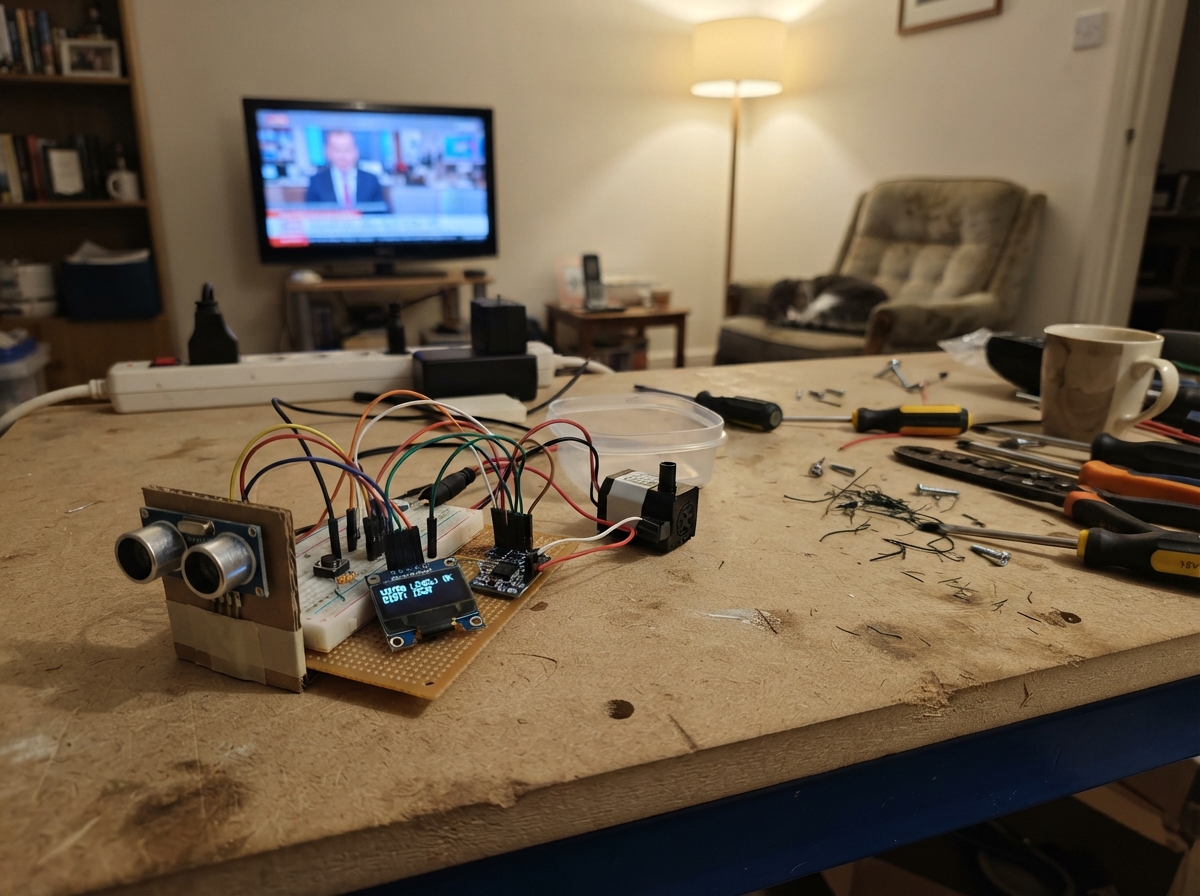
This project builds an automatic water dispenser monitor that tracks tank level in real time and dispenses water on demand. The ESP32 microcontroller reads distance measurements from an ultrasonic sensor to calculate water depth, displays the fill percentage on an OLED screen, and controls a 12V submersible pump via a MOSFET switch when the user presses the button.
The guide provides a complete wiring diagram, parts list, and step-by-step assembly instructions for mounting the sensor in a tank, connecting the display and pump control circuit, and calibrating the level thresholds. Firmware is included and ready to upload, with configuration constants for different tank dimensions.
Wiring diagram
Gather all the parts
Assemble it in 5 steps
1. Prepare a suitable tank
Fit the waterproof sensor head above the water, pointing straight down in a clear wide area. Keep its small circuit board dry. Use a tall tank: the sensor must be at least 30 cm above the water at full and 80 cm at the usable empty level with the default settings. Adjust FULL_CM and EMPTY_CM in the firmware to measured distances for your tank; full must be at least 25 cm. Test readings with your actual tank.
- The sensor is not a certified overflow or dry-run safety device. Do not fill above its blind zone or leave the system unattended.
2. Connect the screen and level sensor
With power unplugged, wire screen VCC to 3V3, GND to GND, SDA to GPIO21 (data) and SCL to GPIO22 (clock). Wire the sensor VCC to 5V, GND to GND, and TRIG to GPIO26 (trigger). Put the 1 kΩ resistor between ECHO and GPIO27, and the 2 kΩ resistor between GPIO27 and GND. They reduce the sensor signal to a safe voltage.
- Check the screen's printed pin labels; their order varies. Never connect ECHO directly to an ESP32 pin.
3. Connect the dispense button
Connect the button SIGNAL to GPIO32 and GND to GND. Hold it to run the pump and release to stop.
4. Wire the pump switch
Solder the small AO3400A MOSFET onto a suitable SOT-23 breakout. Connect its source to GND, drain to pump negative, and gate to GPIO25 through the 220 Ω resistor. Connect the 10 kΩ resistor between gate and GND. Connect pump positive to the 12 V adapter positive. Connect the adapter negative to ESP32 GND. Put the diode across the pump: banded end to pump positive, unbanded end to pump negative. Use a matching barrel-jack connector to access the adapter output.
- Never connect 12 V to the ESP32 power or GPIO pins. Choose a 12 V pump with startup and running current below the adapter's 2 A rating and compatible with the 1 A diode; verify MOSFET heating during tests. Keep all electronics, the adapter and mains power dry.
5. Test before using
Connect tubing and prime the pump as its instructions require. Power the board by USB and the pump from its separate adapter. Check the screen level against measured water heights. Briefly hold the button with a container under the outlet; release to stop. Check low-water and sensor-error stopping. The pump stops after 10 seconds until the button is released.
- For drinking water, use only a pump, tubing, tank and sensor materials explicitly rated food-safe, and clean and sanitize them. A generic irrigation pump is not automatically drink-safe.
Review all connections
1. Connections between "level" and "ESP32"
2. Connections between "echo_top" and "ESP32"
3. Connections between "echo_bottom" and "ESP32"
4. Connections between "screen" and "ESP32"
5. Connections between "button" and "ESP32"
6. Connections between "gate_resistor" and "ESP32"
7. Connections between "gate_pulldown" and "ESP32"
8. Connections between "switch" and "ESP32"
9. Connections between "pump" and "ESP32"
10. Connections between "diode" and "ESP32"
11. Connections between "supply" and "ESP32"
Deploy the firmware
#include <Arduino.h>
#include <Wire.h>
#include <Adafruit_GFX.h>
#include <Adafruit_SSD1306.h>

constexpr int TRIG = 26, ECHO = 27, PUMP = 25, BUTTON = 32;
// Measure vertically from the sensor face to the water. Adjust for your tank.
constexpr int FULL_CM = 30;   // Must be at least 25 cm from sensor.
constexpr int EMPTY_CM = 80;  // Water surface at the usable empty level.
constexpr unsigned long SAMPLE_MS = 600, MAX_RUN_MS = 10000;
Adafruit_SSD1306 screen(128, 64, &Wire, -1);
bool displayOK = false, sensorOK = false, pumping = false, locked = false;
int percent = 0, lastPercent = -2, lastState = -1;
unsigned long lastSample = 0, pumpStart = 0;

void sampleLevel() {
  digitalWrite(TRIG, LOW); delayMicroseconds(2);
  digitalWrite(TRIG, HIGH); delayMicroseconds(25);
  digitalWrite(TRIG, LOW);
  unsigned long us = pulseIn(ECHO, HIGH, 30000);
  float cm = us * 0.0343f / 2.0f;
  // Reject readings in the sensor's blind zone and well beyond the tank.
  sensorOK = us != 0 && cm >= 25.0f && cm <= EMPTY_CM + 10;
  if (sensorOK) percent = constrain((int)((EMPTY_CM - cm) * 100.0f / (EMPTY_CM - FULL_CM)), 0, 100);
}

void setup() {
  pinMode(PUMP, OUTPUT); digitalWrite(PUMP, LOW);
  pinMode(TRIG, OUTPUT); digitalWrite(TRIG, LOW);
  pinMode(ECHO, INPUT); pinMode(BUTTON, INPUT_PULLUP);
  Wire.begin(21, 22);
  displayOK = screen.begin(SSD1306_SWITCHCAPVCC, 0x3C);
  sampleLevel(); lastSample = millis();
}

void loop() {
  unsigned long now = millis();
  if (now - lastSample >= SAMPLE_MS) { lastSample = now; sampleLevel(); now = millis(); }
  bool pressed = digitalRead(BUTTON) == LOW;
  if (!pressed) locked = false;
  bool canPump = sensorOK && percent > 10 && !locked;
  if (pumping && now - pumpStart >= MAX_RUN_MS) { locked = true; canPump = false; }
  bool next = pressed && canPump;
  if (next && !pumping) pumpStart = now;
  pumping = next;
  digitalWrite(PUMP, pumping ? HIGH : LOW);
  // Redraw only when the displayed level or state changes.
  int state = !sensorOK ? 0 : percent <= 10 ? 1 : locked ? 2 : pumping ? 3 : 4;
  int shown = sensorOK ? percent : -1;
  if (displayOK && (state != lastState || shown != lastPercent)) {
    lastState = state; lastPercent = shown;
    screen.clearDisplay(); screen.setTextColor(SSD1306_WHITE);
    screen.setTextSize(1); screen.setCursor(0, 0); screen.print("WATER LEVEL");
    screen.setTextSize(2); screen.setCursor(0, 17);
    if (sensorOK) { screen.print(percent); screen.print('%'); } else screen.print("--");
    screen.setTextSize(1); screen.setCursor(0, 48);
    if (state == 0) screen.print("SENSOR ERROR");
    else if (state == 1) screen.print("LOW - REFILL");
    else if (state == 2) screen.print("RELEASE BUTTON");
    else if (state == 3) screen.print("DISPENSING");
    else screen.print("HOLD TO DISPENSE");
    screen.display();
  }
  delay(10);
}
Remix this project
Make it yours in one click
Open a full copy of this project in your own Schematik workspace, diagram, code, parts, and assembly steps included. Swap the sensor, add features, or redesign the whole thing with AI. The author's original stays untouched.