Community project
ESP32 Cyber Deck
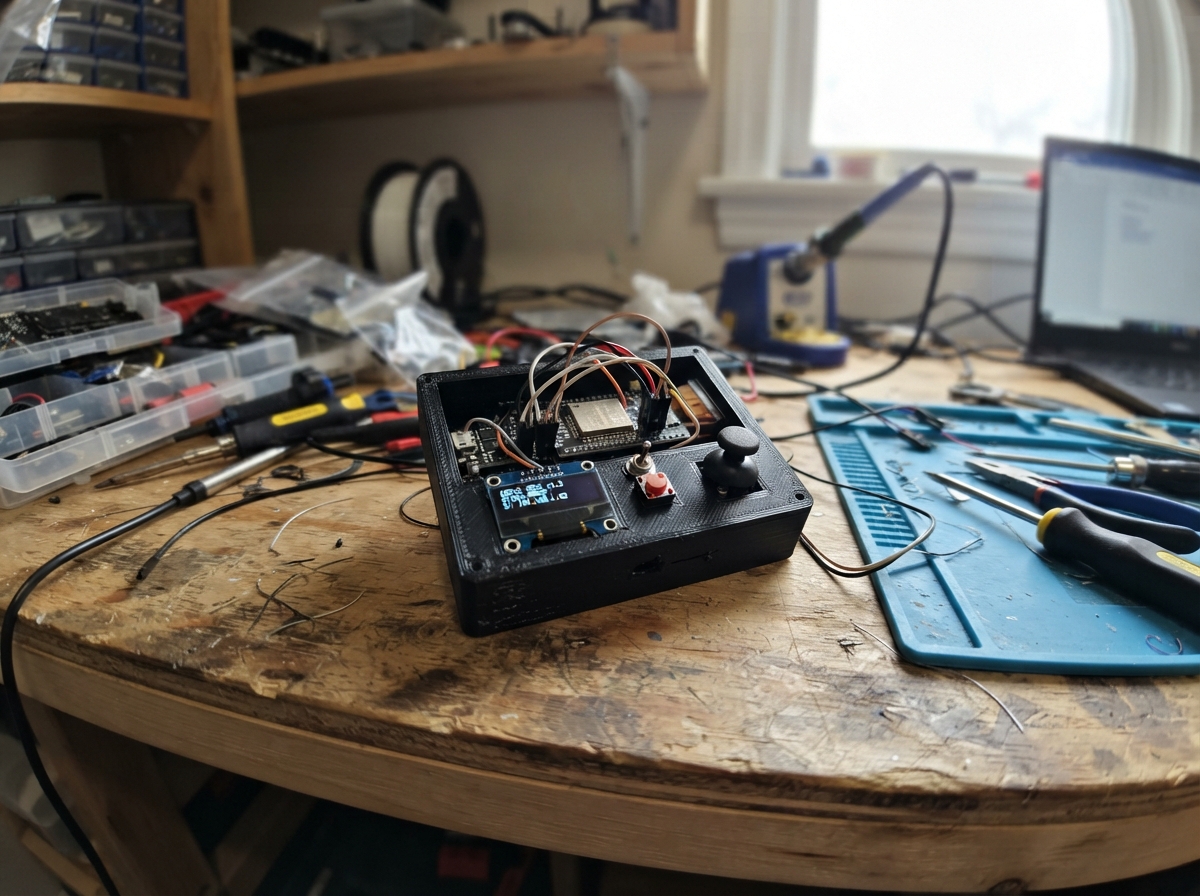
The ESP32 Cyber Deck is a compact, handheld WiFi scanning and status display device built around an ESP32 microcontroller. It features a 128x64 OLED screen for displaying system information and network data, along with push buttons for navigation and control.
This guide provides everything needed to assemble a functional cyber deck: a complete wiring diagram showing connections between the ESP32, OLED display, and buttons; a full parts list with component specifications; ready-to-use firmware with WiFi scanning capabilities and button debouncing; and step-by-step assembly instructions to get the device running.
Wiring diagram
Gather all the parts
Assemble it in 4 steps
1. Place the parts with USB unplugged
Put the ESP32 DevKit v1, 128x64 four-pin SSD1306 OLED and two momentary buttons on a breadboard. Leave access to the USB socket.
2. Connect the OLED screen
Connect VCC to 3V3 and GND to GND for power. Connect SDA to GPIO21 for data and SCL to GPIO22 for the clock signal.
- Check the printed pin labels rather than assuming their order. Swapping power and ground can damage the display. Use 3.3 V
- not 5 V.
3. Connect the navigation buttons
Connect NEXT SIGNAL to GPIO25 and its GND to GND. Connect ACTION SIGNAL to GPIO26 and its GND to GND. The firmware uses internal pull-up resistors, so pressing a button connects its input to ground.
- For a four-leg bare switch use contacts on opposite sides that connect only when pressed. The two legs on one side are usually already joined.
4. Mount your mini cyberdeck
Test on the breadboard first. Then secure the parts in a nonconductive enclosure with openings for the screen, two buttons and USB cable. Keep exposed contacts separated.
- This design uses USB power only. Do not connect a loose lithium battery directly to the board.
Review all connections
1. Connections between "screen" and "ESP32"
2. Connections between "next" and "ESP32"
3. Connections between "action" and "ESP32"
Deploy the firmware
#include <Arduino.h>
#include <Wire.h>
#include <WiFi.h>
#include <Adafruit_GFX.h>
#include <Adafruit_SSD1306.h>

Adafruit_SSD1306 screen(128, 64, &Wire, -1);
const uint8_t NEXT_PIN = 25, ACTION_PIN = 26;
struct Button {
  uint8_t pin; bool raw = true, stable = true; uint32_t changed = 0;
  bool pressed() {
    bool value = digitalRead(pin);
    if (value != raw) { raw = value; changed = millis(); }
    if (millis() - changed >= 30 && stable != raw) {
      stable = raw; return !stable;
    }
    return false;
  }
};
Button nextButton{NEXT_PIN}, actionButton{ACTION_PIN};
bool displayOK = false, scanning = false, dirty = true;
int page = 0, selected = 0, networks = 0;
uint32_t lastSecond = 0;
String note = "Ready for input";
String input;

void scan() {
  if (scanning) return;
  WiFi.scanDelete(); networks = 0; selected = 0;
  scanning = true;
  WiFi.scanNetworks(true);
  dirty = true;
}
void draw() {
  if (!displayOK) return;
  screen.clearDisplay(); screen.setTextSize(1); screen.setTextColor(SSD1306_WHITE);
  screen.setCursor(0, 0); screen.println("[ CYBERDECK // v1 ]");
  screen.drawLine(0, 10, 127, 10, SSD1306_WHITE); screen.setCursor(0, 14);
  if (page == 0) {
    screen.println("SYSTEM STATUS");
    screen.printf("Uptime: %lus\n", (unsigned long)(millis()/1000));
    screen.printf("Heap: %u KB\n", ESP.getFreeHeap()/1024);
    screen.println("USB serial: 115200");
    screen.println("ACT: scan networks");
  } else if (page == 1) {
    if (scanning) screen.println("Scanning 2.4GHz...");
    else if (networks == 0) screen.println("No networks. ACT scan");
    else {
      screen.printf("NETWORK %d/%d\n", selected+1, networks);
      String ssid = WiFi.SSID(selected); if (!ssid.length()) ssid = "<hidden>";
      screen.println(ssid.substring(0,21));
      screen.printf("%d dBm  CH %d\n", WiFi.RSSI(selected), WiFi.channel(selected));
      screen.println(WiFi.encryptionType(selected)==WIFI_AUTH_OPEN ? "Open network" : "Secured network");
      screen.println("ACT: next / USB:scan");
    }
  } else {
    screen.println("USB MESSAGE"); screen.println(note);
  }
  screen.setCursor(0,56); screen.print("NEXT: change page"); screen.display();
}
void command(String cmd) {
  cmd.trim();
  if (cmd == "scan") { page = 1; scan(); }
  else if (cmd == "status") Serial.printf("Uptime %lus, free heap %u bytes\n", (unsigned long)(millis()/1000), ESP.getFreeHeap());
  else if (cmd.startsWith("note ")) { note = cmd.substring(5,89); page = 2; dirty = true; }
  else Serial.println("Commands: scan | status | note your message | help");
}
void setup() {
  Serial.begin(115200);
  pinMode(NEXT_PIN, INPUT_PULLUP); pinMode(ACTION_PIN, INPUT_PULLUP);
  Wire.begin(21,22);
  displayOK = screen.begin(SSD1306_SWITCHCAPVCC, 0x3C);
  if (!displayOK) Serial.println("OLED failed: check wiring and address 0x3C");
  WiFi.mode(WIFI_STA); WiFi.disconnect();
  Serial.println("CYBERDECK ready. Commands: scan | status | note your message | help");
}
void loop() {
  if (nextButton.pressed()) { page = (page+1)%3; dirty = true; }
  if (actionButton.pressed()) {
    if (page == 0) { page = 1; scan(); }
    else if (page == 1 && !scanning) {
      if (networks > 0) selected = (selected+1)%networks;
      else scan();
    } else if (page == 2) note = "Ready for input";
    dirty = true;
  }
  if (scanning) {
    int count = WiFi.scanComplete();
    if (count != WIFI_SCAN_RUNNING) {
      scanning = false; networks = count > 0 ? count : 0; dirty = true;
      Serial.printf("Scan complete: %d networks\n", networks);
      for (int i=0; i<networks; i++) Serial.printf("%d: %s | %d dBm | CH %d\n", i+1, WiFi.SSID(i).c_str(), WiFi.RSSI(i), WiFi.channel(i));
    }
  }
  for (int n=0; n<64 && Serial.available(); n++) {
    char c = Serial.read();
    if (c == '\n') { command(input); input = ""; }
    else if (c != '\r' && input.length()<100) input += c;
  }
  uint32_t sec = millis()/1000;
  if (sec != lastSecond) { lastSecond = sec; if (page == 0) dirty = true; }
  if (dirty) { draw(); dirty = false; }
  delay(5);
}
Remix this project
Make it yours in one click
Open a full copy of this project in your own Schematik workspace, diagram, code, parts, and assembly steps included. Swap the sensor, add features, or redesign the whole thing with AI. The author's original stays untouched.