Community project
Autonomous AI Companion Robot
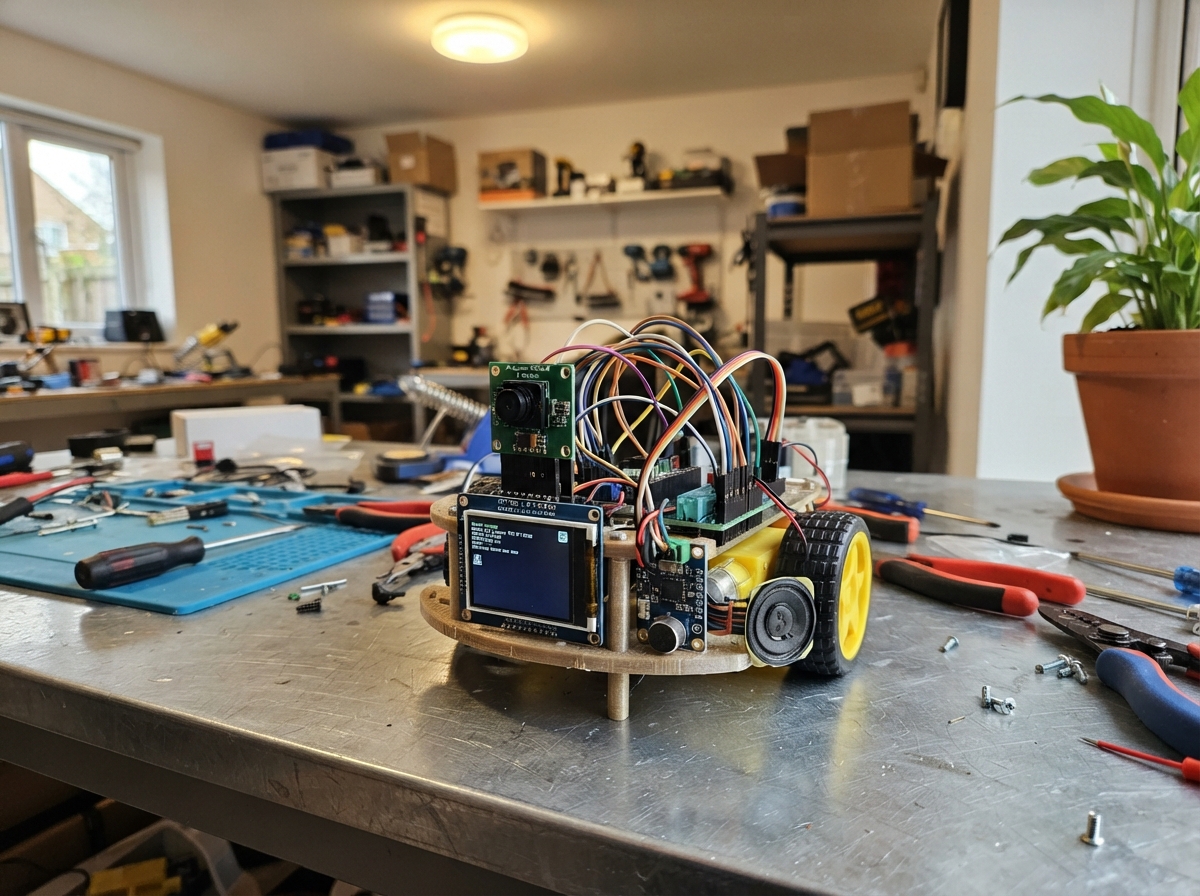
Build a rolling robot that sees, hears, and moves autonomously using an ESP32 microcontroller. The robot features a 2MP camera for vision, a microphone and speaker for audio interaction, ultrasonic distance sensing for obstacle avoidance, and dual motors for movement. This guide provides a complete wiring diagram, parts list, and step-by-step assembly instructions to get the robot operational and responsive to its environment.
The firmware handles camera capture, motor control via an I2C expander, distance measurement, and audio processing—all coordinated by the ESP32. Builders will learn how to integrate multiple sensors and actuators, manage I2C and SPI communication, and implement autonomous behaviors like obstacle detection and motion control.
Wiring diagram
Gather all the parts
Assemble it in 7 steps
1. Build the rolling base
Screw left_motor and right_motor to the two-wheel chassis, push a wheel onto each motor shaft, and fit the free caster at the other end. Keep both motor solder tabs facing inward so the wires can reach the motor driver.
- If a wheel rubs the chassis, loosen the motor bracket, centre the wheel, then retighten it.
- Do not connect the battery yet; loose motor wires can short together and become hot.
2. Set the two power converters first
With no other electronics connected, put the two protected 18650 cells in battery_holder. Connect its BAT+ and BAT- to both buck-converter inputs. Use a multimeter to adjust logic_buck to exactly 5.0 V and motor_buck to exactly 6.0 V before connecting anything else.
- Mark the 5 V converter with tape so it cannot be confused with the 6 V motor converter.
- A two-cell holder can be about 8.4 V just after charging. Never feed that directly into the 6 V motors, 5 V board pin, display, microphone, or camera.
- Use protected matched 18650 cells and charge them in a proper two-cell charger outside this holder.
3. Connect the motor power parts
Connect motor_buck VOUT+ to motor_driver VM and its VOUT- to the shared GND. Connect motor_driver VCC and STBY to 3V3, and GND to GND. Connect motor_driver A01 to left_motor M1 and A02 to left_motor M2; connect B01 to right_motor M1 and B02 to right_motor M2.
- If forward makes one wheel turn backward, swap that motor’s two wires rather than changing the power wiring.
- Do not connect either motor directly to an ESP32 pin — this can permanently damage the board.
4. Wire the motor control expander
Connect motor_expander VDD to 3V3 (power), VSS to GND (ground), SDA to GPIO8 (data), SCL to GPIO9 (clock), and RESET to 3V3. Connect GPA0 to motor_driver AIN1, GPA1 to AIN2, GPA2 to PWMA, GPA3 to BIN1, GPA4 to BIN2, and GPA5 to PWMB.
- The MCP23017 address jumpers should be left at their default address, 0x20.
- Keep these thin signal wires away from the motor wires; motor noise can make the robot behave unpredictably.
5. Add the face screen and camera
Connect face_tft VCC to 3V3 (power), GND to GND (ground), SCK to GPIO12 (clock), MOSI to GPIO11 (data), CS to GPIO10 (select), DC to GPIO13 (data/command), RST to 3V3, and BLK to 3V3. Connect camera_ov2640 3V3 to 3V3, GND to GND, PWDN to GND, RESET to 3V3, XCLK to GPIO18, SDA to GPIO8, SCL to GPIO9, D0–D7 to GPIO1, GPIO2, GPIO3, GPIO4, GPIO5, GPIO6, GPIO7, GPIO14 in that order, VSYNC to GPIO16, HREF to GPIO17, and PCLK to GPIO15.
- Mount the screen and camera high on the front of the chassis, with the camera lens unobstructed.
- Make sure VCC and GND are not swapped — swapped power can damage the screen or camera.
- The camera ribbon/connector is delicate; insert it straight and do not twist it.
6. Add hearing, sound, and distance sensing
Connect microphone VDD to 3V3 (power), GND to GND (ground), SCK to GPIO43 (clock), WS to GPIO44 (clock), SD to GPIO38 (sound data), and L/R to GND. Connect audio_amp VIN to the 5 V logic_buck output (power), GND to GND, BCLK to GPIO43, LRC to GPIO44, DIN to GPIO21, then connect SPK+ to speaker POS and SPK- to speaker NEG. Connect range_sensor VCC to 3V3, GND to GND, TRIG to GPIO39, and ECHO to GPIO40.
- Point the ultrasonic sensor straight ahead and keep its two round openings clear.
- The amplifier speaker terminals are a pair: both wires go only to the speaker, never to GND.
- Do not connect either speaker terminal to ground; this amplifier uses two active speaker wires and can be damaged by grounding one.
- Keep the microphone at least several centimetres from the speaker to reduce feedback.
7. Connect the regulated board supply and test safely
Connect logic_buck VOUT+ to the ESP32-S3 board 5V/VIN pin (power) and VOUT- to board GND (ground). Recheck every ground is shared, lift the wheels off the table, then switch on the battery. The screen should show the robot face after firmware is deployed.
- For the first power test, leave the wheels in the air so a reversed motor wire cannot make the robot drive away.
- Never power the board from the battery and USB at the same time unless your specific board’s power circuit explicitly supports it.
Review all connections
1. Connections between "camera_ov2640" and "ESP32"
2. Connections between "face_tft" and "ESP32"
3. Connections between "motor_expander" and "ESP32"
4. Connections between "motor_driver" and "ESP32"
5. Connections between "microphone" and "ESP32"
6. Connections between "audio_amp" and "ESP32"
7. Connections between "range_sensor" and "ESP32"
8. Connections between "battery_holder" and "ESP32"
9. Connections between "logic_buck" and "ESP32"
10. Connections between "motor_buck" and "ESP32"
Deploy the firmware
#include <Arduino.h>
#include <Wire.h>
#include <SPI.h>
#include <Adafruit_GFX.h>
#include <Adafruit_ST7735.h>
#include <Adafruit_MCP23X17.h>
#include "esp_camera.h"
#include "driver/i2s.h"

// Camera: Arducam OV2640 DVP module.
#define CAM_D0 1
#define CAM_D1 2
#define CAM_D2 3
#define CAM_D3 4
#define CAM_D4 5
#define CAM_D5 6
#define CAM_D6 7
#define I2C_SDA 8
#define I2C_SCL 9
#define TFT_CS 10
#define TFT_MOSI 11
#define TFT_SCK 12
#define TFT_DC 13
#define CAM_D7 14
#define CAM_PCLK 15
#define CAM_VSYNC 16
#define CAM_HREF 17
#define CAM_XCLK 18
#define AUDIO_DOUT 21
#define MIC_DATA 38
#define SONAR_TRIG 39
#define SONAR_ECHO 40
#define I2S_BCLK 43
#define I2S_LRCLK 44

Adafruit_ST7735 tft(TFT_CS, TFT_DC, -1);
Adafruit_MCP23X17 motorIo;

enum Motion { STOPPED, FORWARD, BACKWARD, TURN_LEFT, TURN_RIGHT, AUTO_MODE };
Motion motion = STOPPED;
String shownStatus = "STARTING";
String objectLabel = "LOOKING";
bool cameraReady = false;
uint32_t lastRangeMs = 0;
uint32_t lastVisionMs = 0;
uint32_t lastListenMs = 0;
uint32_t lastHeardMs = 0;

// MCP23017 port A bits connected to TB6612: AIN1, AIN2, PWMA, BIN1, BIN2, PWMB.
void setMotorPins(bool a1, bool a2, bool b1, bool b2, bool enable) {
  motorIo.digitalWrite(0, a1 ? HIGH : LOW);
  motorIo.digitalWrite(1, a2 ? HIGH : LOW);
  motorIo.digitalWrite(2, enable ? HIGH : LOW);
  motorIo.digitalWrite(3, b1 ? HIGH : LOW);
  motorIo.digitalWrite(4, b2 ? HIGH : LOW);
  motorIo.digitalWrite(5, enable ? HIGH : LOW);
}

void stopRobot() {
  setMotorPins(false, false, false, false, false);
  if (motion != AUTO_MODE) motion = STOPPED;
}

void driveForward() { setMotorPins(true, false, true, false, true); }
void driveBackward() { setMotorPins(false, true, false, true, true); }
void turnLeft() { setMotorPins(false, true, true, false, true); }
void turnRight() { setMotorPins(true, false, false, true, true); }

void drawFaceBase() {
  tft.fillScreen(ST77XX_BLACK);
  tft.fillRoundRect(12, 18, 52, 44, 12, ST77XX_CYAN);
  tft.fillRoundRect(96, 18, 52, 44, 12, ST77XX_CYAN);
  tft.fillRoundRect(24, 30, 28, 20, 8, ST77XX_BLACK);
  tft.fillRoundRect(108, 30, 28, 20, 8, ST77XX_BLACK);
  tft.drawRoundRect(36, 84, 88, 28, 14, ST77XX_GREEN);
  tft.setTextWrap(false);
  tft.setTextSize(1);
  tft.setTextColor(ST77XX_WHITE, ST77XX_BLACK);
  tft.setCursor(4, 132);
  tft.print("AI 2-WHEEL ROBOT");
}

void showStatus(const String &status) {
  if (status == shownStatus) return;
  shownStatus = status;
  tft.fillRect(2, 116, 156, 12, ST77XX_BLACK);
  tft.setTextSize(1);
  tft.setTextColor(ST77XX_YELLOW, ST77XX_BLACK);
  tft.setCursor(2, 116);
  tft.print(status);
}

void robotTone(uint16_t hz, uint16_t durationMs) {
  const uint16_t sampleRate = 16000;
  const uint16_t samples = (sampleRate * durationMs) / 1000;
  int16_t block[80];
  uint32_t phase = 0;
  const uint32_t step = ((uint32_t)hz << 24) / sampleRate;
  for (uint16_t done = 0; done < samples; ) {
    uint16_t count = min((uint16_t)80, (uint16_t)(samples - done));
    for (uint16_t i = 0; i < count; i++) {
      phase += step;
      block[i] = (phase & 0x800000) ? 6500 : -6500;
    }
    size_t written = 0;
    i2s_write(I2S_NUM_0, block, count * sizeof(int16_t), &written, portMAX_DELAY);
    done += count;
  }
}

void acknowledge() {
  robotTone(660, 70);
  robotTone(880, 90);
}

long distanceCm() {
  digitalWrite(SONAR_TRIG, LOW);
  delayMicroseconds(2);
  digitalWrite(SONAR_TRIG, HIGH);
  delayMicroseconds(10);
  digitalWrite(SONAR_TRIG, LOW);
  unsigned long pulse = pulseIn(SONAR_ECHO, HIGH, 26000);
  if (pulse == 0) return 500;
  return (long)(pulse / 58UL);
}

String classifyFrame() {
  if (!cameraReady) return "CAMERA OFFLINE";
  camera_fb_t *frame = esp_camera_fb_get();
  if (frame == nullptr || frame->format != PIXFORMAT_RGB565) {
    if (frame != nullptr) esp_camera_fb_return(frame);
    return "NO OBJECT FOUND";
  }
  uint32_t red = 0, green = 0, blue = 0, samples = 0;
  const uint16_t *pixels = reinterpret_cast<const uint16_t *>(frame->buf);
  const size_t total = frame->len / 2;
  for (size_t i = 0; i < total; i += 19) {
    uint16_t p = pixels[i];
    red += (p >> 11) & 0x1F;
    green += (p >> 5) & 0x3F;
    blue += p & 0x1F;
    samples++;
  }
  esp_camera_fb_return(frame);
  red /= samples;
  green /= samples;
  blue /= samples;
  uint32_t high = max(red, max(green, blue));
  uint32_t low = min(red, min(green, blue));
  if (high - low < 5) return "NEUTRAL OBJECT";
  if (red > green + 4 && red > blue + 4) return "RED OBJECT";
  if (green > red + 4 && green > blue + 4) return "GREEN OBJECT";
  if (blue > red + 3 && blue > green + 3) return "BLUE OBJECT";
  if (red > 18 && green > 22 && blue < 12) return "YELLOW OBJECT";
  return "MIXED OBJECT";
}

void listenForSound() {
  int16_t samples[96];
  size_t bytesRead = 0;
  i2s_read(I2S_NUM_0, samples, sizeof(samples), &bytesRead, 2 / portTICK_PERIOD_MS);
  if (bytesRead < 16) return;
  uint32_t average = 0;
  int count = bytesRead / sizeof(int16_t);
  for (int i = 0; i < count; i++) average += abs(samples[i]);
  average /= count;
  if (average > 2800 && millis() - lastHeardMs > 2500) {
    lastHeardMs = millis();
    showStatus("I HEAR YOU");
    acknowledge();
  }
}

void handleCommand(char command) {
  command = toupper(command);
  if (command == 'F') { motion = FORWARD; driveForward(); showStatus("MOVING FORWARD"); }
  else if (command == 'B') { motion = BACKWARD; driveBackward(); showStatus("MOVING BACK"); }
  else if (command == 'L') { motion = TURN_LEFT; turnLeft(); showStatus("TURNING LEFT"); }
  else if (command == 'R') { motion = TURN_RIGHT; turnRight(); showStatus("TURNING RIGHT"); }
  else if (command == 'S') { motion = STOPPED; stopRobot(); showStatus("STOPPED"); }
  else if (command == 'A') { motion = AUTO_MODE; driveForward(); showStatus("AUTO EXPLORE"); }
  else return;
  acknowledge();
}

bool initCamera() {
  camera_config_t c = {};
  c.pin_pwdn = -1;
  c.pin_reset = -1;
  c.pin_xclk = CAM_XCLK;
  c.pin_sccb_sda = I2C_SDA;
  c.pin_sccb_scl = I2C_SCL;
  c.pin_d0 = CAM_D0;
  c.pin_d1 = CAM_D1;
  c.pin_d2 = CAM_D2;
  c.pin_d3 = CAM_D3;
  c.pin_d4 = CAM_D4;
  c.pin_d5 = CAM_D5;
  c.pin_d6 = CAM_D6;
  c.pin_d7 = CAM_D7;
  c.pin_vsync = CAM_VSYNC;
  c.pin_href = CAM_HREF;
  c.pin_pclk = CAM_PCLK;
  c.xclk_freq_hz = 20000000;
  c.ledc_timer = LEDC_TIMER_0;
  c.ledc_channel = LEDC_CHANNEL_0;
  c.pixel_format = PIXFORMAT_RGB565;
  c.frame_size = FRAMESIZE_QQVGA;
  c.jpeg_quality = 12;
  c.fb_count = 1;
  c.fb_location = CAMERA_FB_IN_DRAM;
  c.grab_mode = CAMERA_GRAB_WHEN_EMPTY;
  return esp_camera_init(&c) == ESP_OK;
}

void setup() {
  Serial.begin(115200);
  pinMode(SONAR_TRIG, OUTPUT);
  pinMode(SONAR_ECHO, INPUT);
  Wire.begin(I2C_SDA, I2C_SCL);
  SPI.begin(TFT_SCK, -1, TFT_MOSI, TFT_CS);
  tft.initR(INITR_BLACKTAB);
  tft.setRotation(1);
  drawFaceBase();

  motorIo.begin_I2C(0x20, &Wire);
  for (uint8_t pin = 0; pin < 6; pin++) motorIo.pinMode(pin, OUTPUT);
  stopRobot();

  i2s_config_t audioConfig = {};
  audioConfig.mode = (i2s_mode_t)(I2S_MODE_MASTER | I2S_MODE_TX | I2S_MODE_RX);
  audioConfig.sample_rate = 16000;
  audioConfig.bits_per_sample = I2S_BITS_PER_SAMPLE_16BIT;
  audioConfig.channel_format = I2S_CHANNEL_FMT_ONLY_LEFT;
  audioConfig.communication_format = I2S_COMM_FORMAT_STAND_I2S;
  audioConfig.intr_alloc_flags = 0;
  audioConfig.dma_buf_count = 4;
  audioConfig.dma_buf_len = 128;
  audioConfig.use_apll = false;
  audioConfig.tx_desc_auto_clear = true;
  audioConfig.fixed_mclk = 0;
  i2s_driver_install(I2S_NUM_0, &audioConfig, 0, nullptr);
  i2s_pin_config_t audioPins = {};
  audioPins.bck_io_num = I2S_BCLK;
  audioPins.ws_io_num = I2S_LRCLK;
  audioPins.data_out_num = AUDIO_DOUT;
  audioPins.data_in_num = MIC_DATA;
  audioPins.mck_io_num = I2S_PIN_NO_CHANGE;
  i2s_set_pin(I2S_NUM_0, &audioPins);

  cameraReady = initCamera();
  showStatus(cameraReady ? "READY: F B L R S A" : "CAMERA CHECK WIRING");
  acknowledge();
}

void loop() {
  while (Serial.available()) handleCommand((char)Serial.read());
  uint32_t now = millis();

  if (now - lastListenMs >= 100) {
    lastListenMs = now;
    listenForSound();
  }

  if (motion == AUTO_MODE && now - lastRangeMs >= 130) {
    lastRangeMs = now;
    long cm = distanceCm();
    if (cm < 20) {
      stopRobot();
      showStatus("OBSTACLE: TURNING");
      turnRight();
      delay(350);
      if (motion == AUTO_MODE) driveForward();
    } else {
      driveForward();
    }
  }

  if (now - lastVisionMs >= 1500) {
    lastVisionMs = now;
    String next = classifyFrame();
    if (next != objectLabel) {
      objectLabel = next;
      if (motion == STOPPED) showStatus(objectLabel);
    }
  }
  delay(1);
}
Remix this project
Make it yours in one click
Open a full copy of this project in your own Schematik workspace — diagram, code, parts, and assembly steps included. Swap the sensor, add features, or redesign the whole thing with AI. The author's original stays untouched.