Community project
Bluetooth Flight Simulator Controller
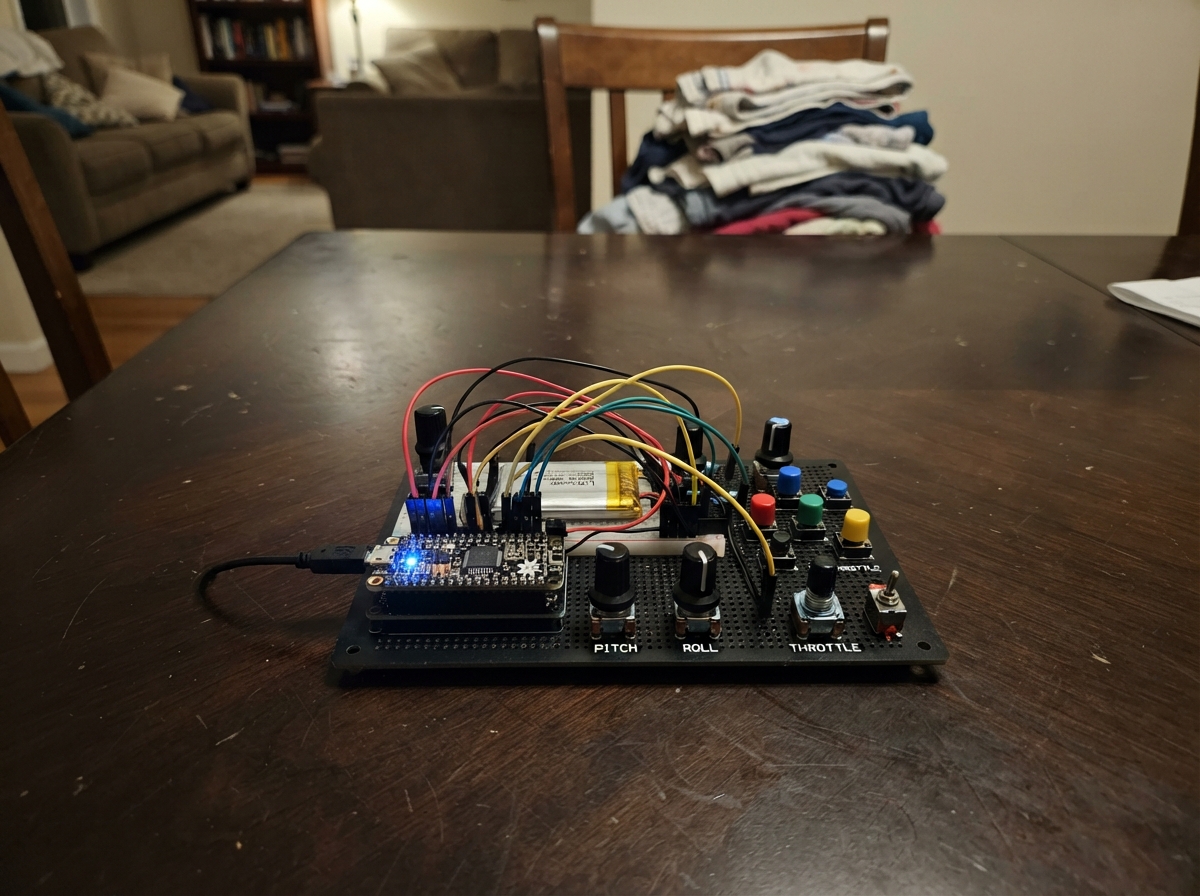
This project turns an M5 Cardputer into a wireless flight simulator controller using Bluetooth. The device's built-in accelerometer detects pitch and roll movements, while buttons provide rudder and auxiliary control inputs. Tilt the device to control aircraft attitude, calibrate the neutral flight position on startup, and map buttons to simulator functions through an on-device configuration screen.
The guide includes a complete wiring diagram, parts list, and step-by-step assembly instructions. Firmware is pre-configured for popular flight simulators and handles sensor calibration, dead zones, and axis scaling automatically. Builders will learn how to set up Bluetooth gamepad communication, configure tilt-to-control mapping, and customize button assignments for their preferred simulator.
Wiring diagram
Assemble it in 4 steps
1. Carregue e ligue o Cardputer
Carregue o Cardputer ADV pelo conector USB-C e ligue a chave lateral. Não é preciso ligar sensores ou fios: o sensor de movimento, a tela e o teclado já ficam dentro do aparelho.
- Use o cabo USB-C para carregar e depois para colocar o programa na placa.
- A bateria interna permite usar o controle longe do computador depois que o programa estiver instalado.
- Não force conectores nem use carregadores danificados; cabo ou conector danificado pode aquecer e prejudicar a bateria.
2. Defina a posição de voo reto
Segure ou apoie o Cardputer na posição que deve significar voo reto e nivelado. Pressione ENTER para guardar essa posição como o centro dos controles. Inclinar para os lados controla a rolagem e inclinar para frente ou para trás controla a arfagem.
- Se a aeronave se mover mesmo com o aparelho reto, deixe-o quieto na posição desejada e pressione ENTER novamente.
- Faça movimentos suaves para ter um comando mais preciso.
- Evite movimentar o Cardputer enquanto pressiona ENTER, pois isso pode deixar o centro dos comandos impreciso.
3. Escolha os botões usados pelas inclinações
Com o controle ligado, pressione M para abrir a tela MAPEAR INCLINACOES. Pressione F para selecionar FRENTE, B para TRAS, L para ESQUERDA ou R para DIREITA. Use Q para diminuir e E para aumentar o número do botão Bluetooth que aquela inclinação aperta. Pressione M novamente para voltar ao controle de voo.
- A tela destaca em amarelo a direção que você está mudando.
- Por padrão: frente aperta o botão 4, trás o botão 5, esquerda o botão 6 e direita o botão 7.
- Os botões W, S e Espaço continuam sendo os botões Bluetooth 1, 2 e 3.
- Evite escolher os botões 1, 2 ou 3 para uma inclinação se você também usa W, S ou Espaço para outra função; os dois comandos apertariam o mesmo botão Bluetooth.
4. Conecte ao simulador por Bluetooth
No computador, abra as opções de Bluetooth e conecte ao controle chamado "Cardputer Flight Controller". Ele aparece como um joystick. Dentro do simulador, escolha os eixos e botões desse joystick para cada função de voo.
- A tela mostra "Bluetooth: CONECTADO" quando o computador já está conectado.
- A linha "Tilt" mostra qual botão está sendo apertado ao inclinar em cada direção.
- A e D comandam o leme.
- Não use o Cardputer como controle de aeronave real; este projeto é somente para simuladores.
Deploy the firmware
#include <Arduino.h>
#include <M5Cardputer.h>
#include <BleGamepad.h>
#include <math.h>

int16_t clampAxis(int32_t value);
int16_t angleToAxis(float angleDegrees, bool invert);
bool pressedOnce(char key);
void drawMappingScreen();
void drawFlightScreen(float roll, float pitch, int16_t rudder, const bool tiltState[4]);
void updateFlightValues(float roll, float pitch, int16_t rudder, const bool tiltState[4]);

BleGamepad bleGamepad("Cardputer Flight Controller", "Schematik", 100);

constexpr bool INVERT_ROLL = false;
constexpr bool INVERT_PITCH = true;
constexpr float TILT_FULL_SCALE_DEGREES = 35.0f;
constexpr float TILT_DEAD_ZONE_DEGREES = 2.0f;
constexpr int16_t TILT_BUTTON_THRESHOLD = 9000;
constexpr uint32_t INPUT_INTERVAL_MS = 20;

int16_t rollCenter = 0;
int16_t pitchCenter = 0;
uint32_t lastInputMs = 0;
uint8_t tiltButtonMap[4] = {4, 5, 6, 7};
uint8_t selectedMapping = 0;
bool mappingScreen = false;

int16_t lastRollAxis = 32767;
int16_t lastPitchAxis = 32767;
int16_t lastRudderAxis = 32767;
bool lastTiltState[4] = {false, false, false, false};
bool lastConnected = false;

int16_t clampAxis(int32_t value) {
  if (value > 32767) return 32767;
  if (value < -32767) return -32767;
  return static_cast<int16_t>(value);
}

int16_t angleToAxis(float angleDegrees, bool invert) {
  if (invert) angleDegrees = -angleDegrees;
  if (fabsf(angleDegrees) < TILT_DEAD_ZONE_DEGREES) return 0;
  return clampAxis(lroundf((angleDegrees / TILT_FULL_SCALE_DEGREES) * 32767.0f));
}

bool pressedOnce(char key) {
  static bool previous[7] = {false, false, false, false, false, false, false};
  const char watched[7] = {'m', 'f', 'b', 'l', 'r', 'q', 'e'};
  bool down = M5Cardputer.Keyboard.isKeyPressed(key) || M5Cardputer.Keyboard.isKeyPressed(static_cast<char>(toupper(key)));
  for (uint8_t i = 0; i < 7; ++i) {
    if (watched[i] == key) {
      bool result = down && !previous[i];
      previous[i] = down;
      return result;
    }
  }
  return false;
}

void drawMappingScreen() {
  static const char *names[4] = {"FRENTE", "TRAS", "ESQUERDA", "DIREITA"};
  M5Cardputer.Display.fillScreen(TFT_BLACK);
  M5Cardputer.Display.setTextSize(1);
  M5Cardputer.Display.setTextColor(TFT_CYAN, TFT_BLACK);
  M5Cardputer.Display.setCursor(4, 4);
  M5Cardputer.Display.println("MAPEAR INCLINACOES");
  M5Cardputer.Display.setTextColor(TFT_WHITE, TFT_BLACK);
  M5Cardputer.Display.setCursor(4, 22);
  M5Cardputer.Display.println("Direcao             botao BLE");
  for (uint8_t i = 0; i < 4; ++i) {
    const int16_t y = 40 + i * 16;
    M5Cardputer.Display.setTextColor(i == selectedMapping ? TFT_BLACK : TFT_WHITE, i == selectedMapping ? TFT_YELLOW : TFT_BLACK);
    M5Cardputer.Display.fillRect(2, y - 1, 230, 14, i == selectedMapping ? TFT_YELLOW : TFT_BLACK);
    M5Cardputer.Display.setCursor(6, y);
    M5Cardputer.Display.printf("%c %s", i == selectedMapping ? '>' : ' ', names[i]);
    M5Cardputer.Display.setCursor(155, y);
    M5Cardputer.Display.printf("BOTAO %u", tiltButtonMap[i]);
  }
  M5Cardputer.Display.setTextColor(TFT_GREEN, TFT_BLACK);
  M5Cardputer.Display.setCursor(4, 111);
  M5Cardputer.Display.println("F/B/L/R: escolher direcao");
  M5Cardputer.Display.println("Q/E: mudar botao     M: voltar");
}

void drawFlightScreen(float roll, float pitch, int16_t rudder, const bool tiltState[4]) {
  M5Cardputer.Display.fillScreen(TFT_BLACK);
  M5Cardputer.Display.setTextSize(1);
  M5Cardputer.Display.setTextColor(TFT_CYAN, TFT_BLACK);
  M5Cardputer.Display.setCursor(4, 4);
  M5Cardputer.Display.println("CONTROLE DE VOO BLE");
  M5Cardputer.Display.setTextColor(TFT_WHITE, TFT_BLACK);
  M5Cardputer.Display.setCursor(4, 88);
  M5Cardputer.Display.println("Incline: eixos de voo");
  M5Cardputer.Display.println("A/D: leme  W/S/ESP: B1/2/3");
  M5Cardputer.Display.println("ENTER: centralizar   M: mapa");
  lastConnected = !bleGamepad.isConnected();
  lastRollAxis = 32767;
  lastPitchAxis = 32767;
  lastRudderAxis = 32767;
  for (uint8_t i = 0; i < 4; ++i) lastTiltState[i] = !tiltState[i];
}

void updateFlightValues(float roll, float pitch, int16_t rudder, const bool tiltState[4]) {
  const bool connected = bleGamepad.isConnected();
  if (connected != lastConnected) {
    M5Cardputer.Display.fillRect(4, 20, 232, 12, TFT_BLACK);
    M5Cardputer.Display.setTextColor(connected ? TFT_GREEN : TFT_ORANGE, TFT_BLACK);
    M5Cardputer.Display.setCursor(4, 22);
    M5Cardputer.Display.println(connected ? "Bluetooth: CONECTADO" : "Bluetooth: aguardando...");
    lastConnected = connected;
  }
  if (abs(lastRollAxis - angleToAxis(roll, INVERT_ROLL)) > 150 || abs(lastPitchAxis - angleToAxis(pitch, INVERT_PITCH)) > 150 || rudder != lastRudderAxis) {
    M5Cardputer.Display.fillRect(4, 38, 232, 42, TFT_BLACK);
    M5Cardputer.Display.setTextColor(TFT_WHITE, TFT_BLACK);
    M5Cardputer.Display.setCursor(4, 40);
    M5Cardputer.Display.printf("ROLAGEM %+.1f graus\n", roll);
    M5Cardputer.Display.printf("ARFAGEM %+.1f graus\n", pitch);
    M5Cardputer.Display.printf("LEME %d", rudder);
    lastRollAxis = angleToAxis(roll, INVERT_ROLL);
    lastPitchAxis = angleToAxis(pitch, INVERT_PITCH);
    lastRudderAxis = rudder;
  }
  bool changed = false;
  for (uint8_t i = 0; i < 4; ++i) changed |= (tiltState[i] != lastTiltState[i]);
  if (changed) {
    M5Cardputer.Display.fillRect(4, 136, 232, 16, TFT_BLACK);
    M5Cardputer.Display.setTextColor(TFT_YELLOW, TFT_BLACK);
    M5Cardputer.Display.setCursor(4, 138);
    M5Cardputer.Display.printf("Tilt: F%d T%d E%d D%d", tiltState[0] ? tiltButtonMap[0] : 0, tiltState[1] ? tiltButtonMap[1] : 0, tiltState[2] ? tiltButtonMap[2] : 0, tiltState[3] ? tiltButtonMap[3] : 0);
    for (uint8_t i = 0; i < 4; ++i) lastTiltState[i] = tiltState[i];
  }
}

void setup() {
  auto cfg = M5.config();
  M5Cardputer.begin(cfg, true);
  M5Cardputer.Display.setRotation(1);
  M5.Imu.begin();
  BleGamepadConfiguration config;
  config.setControllerType(CONTROLLER_TYPE_JOYSTICK);
  config.setAutoReport(false);
  config.setButtonCount(8);
  config.setWhichAxes(true, true, false, false, false, false, false, false);
  config.setAxesMin(-32767);
  config.setAxesMax(32767);
  bleGamepad.begin(&config);
  delay(300);
  float ax, ay, az;
  M5.Imu.getAccel(&ax, &ay, &az);
  rollCenter = angleToAxis(atan2f(ay, az) * 180.0f / PI, INVERT_ROLL);
  pitchCenter = angleToAxis(atan2f(-ax, sqrtf(ay * ay + az * az)) * 180.0f / PI, INVERT_PITCH);
  const bool none[4] = {false, false, false, false};
  drawFlightScreen(0, 0, 0, none);
}

void loop() {
  M5Cardputer.update();
  if (pressedOnce('m')) {
    mappingScreen = !mappingScreen;
    if (mappingScreen) drawMappingScreen();
    else { const bool none[4] = {false, false, false, false}; drawFlightScreen(0, 0, 0, none); }
  }
  if (mappingScreen) {
    if (pressedOnce('f')) { selectedMapping = 0; drawMappingScreen(); }
    if (pressedOnce('b')) { selectedMapping = 1; drawMappingScreen(); }
    if (pressedOnce('l')) { selectedMapping = 2; drawMappingScreen(); }
    if (pressedOnce('r')) { selectedMapping = 3; drawMappingScreen(); }
    if (pressedOnce('q')) { tiltButtonMap[selectedMapping] = tiltButtonMap[selectedMapping] == 1 ? 8 : tiltButtonMap[selectedMapping] - 1; drawMappingScreen(); }
    if (pressedOnce('e')) { tiltButtonMap[selectedMapping] = tiltButtonMap[selectedMapping] == 8 ? 1 : tiltButtonMap[selectedMapping] + 1; drawMappingScreen(); }
    return;
  }
  const uint32_t now = millis();
  if (now - lastInputMs < INPUT_INTERVAL_MS) return;
  lastInputMs = now;
  float ax, ay, az;
  M5.Imu.getAccel(&ax, &ay, &az);
  const float rollDegrees = atan2f(ay, az) * 180.0f / PI;
  const float pitchDegrees = atan2f(-ax, sqrtf(ay * ay + az * az)) * 180.0f / PI;
  const int16_t rollAxis = clampAxis(angleToAxis(rollDegrees, INVERT_ROLL) - rollCenter);
  const int16_t pitchAxis = clampAxis(angleToAxis(pitchDegrees, INVERT_PITCH) - pitchCenter);
  int16_t rudderAxis = 0;
  if (M5Cardputer.Keyboard.isKeyPressed('a') || M5Cardputer.Keyboard.isKeyPressed('A')) rudderAxis = -32767;
  if (M5Cardputer.Keyboard.isKeyPressed('d') || M5Cardputer.Keyboard.isKeyPressed('D')) rudderAxis = 32767;
  if (M5Cardputer.Keyboard.isKeyPressed(KEY_ENTER)) {
    rollCenter = angleToAxis(rollDegrees, INVERT_ROLL);
    pitchCenter = angleToAxis(pitchDegrees, INVERT_PITCH);
  }
  const bool tiltState[4] = {pitchAxis < -TILT_BUTTON_THRESHOLD, pitchAxis > TILT_BUTTON_THRESHOLD, rollAxis < -TILT_BUTTON_THRESHOLD, rollAxis > TILT_BUTTON_THRESHOLD};
  if (bleGamepad.isConnected()) {
    bleGamepad.setAxes(rollAxis, pitchAxis, rudderAxis, 0, 0, 0, 0, 0);
    const bool buttonState[8] = {
      false,
      M5Cardputer.Keyboard.isKeyPressed('w') || M5Cardputer.Keyboard.isKeyPressed('W'),
      M5Cardputer.Keyboard.isKeyPressed('s') || M5Cardputer.Keyboard.isKeyPressed('S'),
      M5Cardputer.Keyboard.isKeyPressed(' '),
      false, false, false, false
    };
    bool mappedButtonState[9] = {false, false, false, false, false, false, false, false, false};
    for (uint8_t i = 0; i < 4; ++i) mappedButtonState[tiltButtonMap[i]] |= tiltState[i];
    for (uint8_t button = 1; button <= 8; ++button) {
      const bool down = buttonState[button - 1] || mappedButtonState[button];
      if (down) bleGamepad.press(button);
      else bleGamepad.release(button);
    }
    bleGamepad.sendReport();
  }
  updateFlightValues(rollDegrees, pitchDegrees, rudderAxis, tiltState);
}
Remix this project
Make it yours in one click
Open a full copy of this project in your own Schematik workspace, diagram, code, parts, and assembly steps included. Swap the sensor, add features, or redesign the whole thing with AI. The author's original stays untouched.