Community project
Build A Tiny Esp Deskbuddy Using Waveshare Esp32
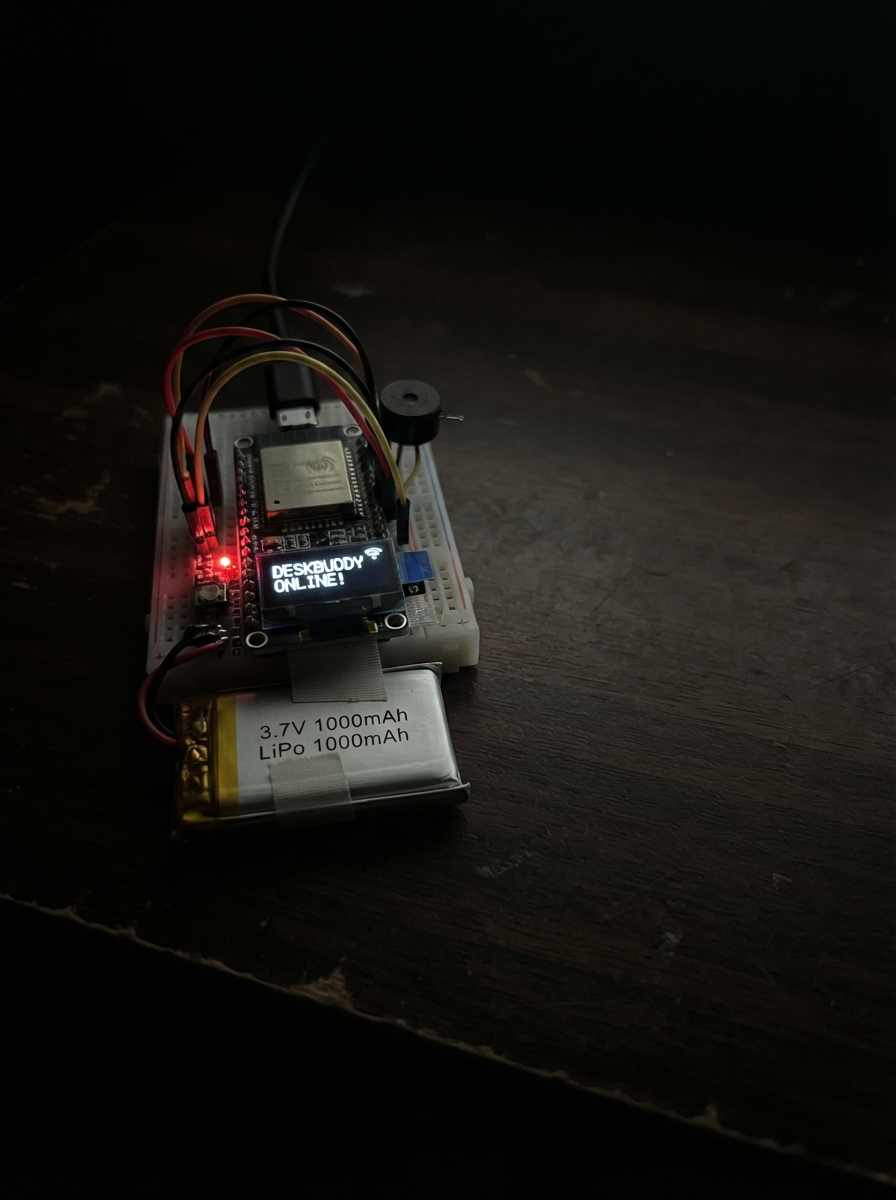
Build a tiny ESP32-powered desk companion that displays your personal data, weather, and mood on a compact screen. This project combines a Waveshare ESP32 board with a LiPo battery and piezo buzzer to create an always-on desktop widget that connects to the internet and responds to touch input.
This guide provides everything needed to assemble and deploy the DeskBuddy: a wiring diagram showing how to connect the battery and buzzer, a complete parts list, Arduino firmware that handles WiFi connectivity and data fetching, and step-by-step assembly instructions including case preparation, soldering, and final deployment.
Wiring diagram

Gather all the parts
Assemble it in 5 steps
1. Prepare the printed case
Use a printed case with a clear 1.47-inch front window, a USB-C opening, and a separate pocket behind the display for the flat battery. Test-fit the board before using tape or screws, and keep the touch surface uncovered.
- PETG is more heat-resistant than PLA if the DeskBuddy sits in sunlight.
- Leave enough room to remove the MicroSD card if you plan to change face artwork.
- Do not let a screw, metal standoff, or loose wire touch the back of the board; it can short the electronics.
2. Add the MicroSD face files
Format a MicroSD card as FAT32 and place optional 172 by 320 raw RGB565 little-endian face images in a folder named faces: calm.rgb565, happy.rgb565, love.rgb565, worried.rgb565, and levelup.rgb565. Insert the card into the built-in slot; if it is empty or missing, DeskBuddy safely draws its simple face instead.
- Keeping artwork on the card leaves flash memory for the program.
- Do this with USB power disconnected so the card is not being read while inserted.
- Do not force the MicroSD card; forcing it can damage the spring-loaded slot.
3. Solder the piezo buzzer
Solder one buzzer lead to the board GND pin and the other buzzer lead to GPIO7. The passive piezo has no plus or minus marking, so either lead can be the ground lead. Put heat-shrink or tape over both solder joints so they cannot touch each other or the board.
- Use short flexible wires so the buzzer can sit in a small hole in the enclosure.
- GPIO7 makes the short notification tones.
- Do not use GPIO8 or GPIO9 for the buzzer; those pins affect startup and can prevent flashing.
4. Solder and secure the LiPo battery
With all USB power unplugged, solder the battery positive lead to VBAT and the battery negative lead to GND on the board. Cover each joint with heat-shrink or insulating tape, then hold the flat cell in its own enclosure pocket with thin foam tape so it cannot move or be squeezed.
- The board charges the LiPo through its USB-C port when its onboard charging circuit is present.
- Route the battery leads away from the display and sharp case edges.
- Never connect this 3.7 V LiPo to 3V3, 5V, or VBUS — that can damage the board or battery.
- Never charge, puncture, bend, pinch, or use a swollen or warm LiPo battery.
5. Close the case and deploy
Place the board so its display faces the front window, keep the USB-C port aligned with its opening, and close the case without pressing on the battery. Plug the board into USB, then use Schematik’s Deploy button to flash the firmware. Enter Wi-Fi and optional service settings in include/secrets.h before deploying.
- Swipe left and right across the screen to change cards; tap the pet face to change its mood.
- Turning the unit face-down turns off the display as a focus cue; turn it upright to wake it.
- If the case will not close easily, stop and rearrange the battery — forcing the cover can puncture the cell.
Review all connections
1. Connections between "piezo-buzzer-1" and "ESP32"
2. Connections between "lipo-battery-1" and "ESP32"
Deploy the firmware
#include <Arduino.h>
#include <WiFi.h>
#include <WiFiClientSecure.h>
#include <HTTPClient.h>
#include <ArduinoJson.h>
#include <Wire.h>
#include <SPI.h>
#include <SD.h>
#include <Arduino_GFX_Library.h>
#include <FastIMU.h>
#include "secrets.h"
#define LCD_MOSI 2
#define LCD_CS 14
#define LCD_DC 15
#define LCD_RST 22
#define LCD_BL 23
#define SD_CS 4
#define TOUCH_SCL 19
#define TOUCH_RST 20
// Hoisted type definitions
enum Page : uint8_t { PET_PAGE, CLOCK_PAGE, WEATHER_PAGE, SPOTIFY_PAGE, STATS_PAGE, PAGE_COUNT };
enum Mood : uint8_t { CALM, HAPPY, LOVE, WORRIED, LEVEL_UP };
struct OnlineState {
float temperatureC = NAN;
int weatherCode = -1;
float aapl = NAN;
float aaplChange = NAN;
int githubRepos = -1;
int githubFollowers = -1;
int completedTasks = -1;
String nextEvent = "Sin calendario";
String track = "Sin conectar";
String artist = "Spotify remoto";
};
// Forward declarations
uint16_t color(uint8_t r, uint8_t g, uint8_t b);
void centered(const String &text, int16_t y, uint16_t ink, uint8_t size);
void beep(uint16_t hz, uint16_t durationMs);
void serviceBuzzer();
bool readTouch(int16_t &x, int16_t &y);
bool drawRgb565Asset(const char *path);
String moonPhase();
void drawDots();
void drawFallbackFace();
void drawScreen();
bool getJson(const String &url, JsonDocument &document, const String &authorization);
void requestProxy(const char *route);
void networkTask(void *);
void handleTouch();
void serviceImu();
constexpr int LCD_SCK = 1, LCD_MOSI = 2, LCD_CS = 14, LCD_DC = 15, LCD_RST = 22, LCD_BL = 23;
constexpr int SD_MISO = 3, SD_CS = 4;
constexpr int TOUCH_SDA = 18, TOUCH_SCL = 19, TOUCH_RST = 20;
constexpr int BUZZER_PIN = 7;
constexpr uint16_t SCREEN_W = 172, SCREEN_H = 320;
constexpr uint32_t NETWORK_PERIOD_MS = 10UL * 60UL * 1000UL;
Arduino_DataBus *bus = new Arduino_HWSPI(LCD_DC, LCD_CS, LCD_SCK, LCD_MOSI);
Arduino_GFX *gfx = new Arduino_ST7789(bus, LCD_RST, 0, false, SCREEN_W, SCREEN_H, 34, 0, 34, 0);
QMI8658 imu;
calData imuCalibration{};
OnlineState online;
Page page = PET_PAGE;
Mood mood = CALM;
bool sdReady = false, imuReady = false, faceDown = false, redrawNeeded = true;
bool touchActive = false, toneActive = false, networkBusy = false;
int16_t touchStartX = 0, touchLastX = 0;
float eyeX = 0, eyeY = 0;
uint32_t lastImuMs = 0, lastClockMs = 0, lastNetworkMs = 0, toneEndsMs = 0;
volatile bool networkResultReady = false;
volatile bool spotifyToggleRequested = false, spotifyNextRequested = false;
uint16_t color(uint8_t r, uint8_t g, uint8_t b) { return gfx->color565(r, g, b); }
void centered(const String &text, int16_t y, uint16_t ink, uint8_t size = 1) {
gfx->setTextSize(size);
gfx->setTextColor(ink);
int16_t x = (SCREEN_W - gfx->textWidth(text)) / 2;
gfx->setCursor(max<int16_t>(0, x), y);
gfx->print(text);
}
void beep(uint16_t hz, uint16_t durationMs) {
ledcAttach(BUZZER_PIN, hz, 8);
ledcWriteTone(BUZZER_PIN, hz);
toneEndsMs = millis() + durationMs;
toneActive = true;
}
void serviceBuzzer() {
if (toneActive && (int32_t)(millis() - toneEndsMs) >= 0) {
ledcWriteTone(BUZZER_PIN, 0);
toneActive = false;
}
}
// AXS5106L: byte 0 is touch count; point 0 then contains event/id, X hi/lo, Y hi/lo, pressure.
bool readTouch(int16_t &x, int16_t &y) {
Wire.beginTransmission(0x3B);
Wire.write(0x00);
if (Wire.endTransmission(false) != 0 || Wire.requestFrom(0x3B, 7) != 7) return false;
uint8_t count = Wire.read();
if ((count & 0x0F) == 0) { while (Wire.available()) Wire.read(); return false; }
Wire.read(); // event and finger id
uint8_t xh = Wire.read(), xl = Wire.read(), yh = Wire.read(), yl = Wire.read();
Wire.read(); // pressure
x = constrain((int16_t)(((xh & 0x0F) << 8) | xl), 0, (int)SCREEN_W - 1);
y = constrain((int16_t)(((yh & 0x0F) << 8) | yl), 0, (int)SCREEN_H - 1);
return true;
}
const char *faceAsset() {
switch (mood) {
case HAPPY: return "/faces/happy.rgb565";
case LOVE: return "/faces/love.rgb565";
case WORRIED: return "/faces/worried.rgb565";
case LEVEL_UP: return "/faces/levelup.rgb565";
default: return "/faces/calm.rgb565";
}
}
// Optional SD assets are raw 172x320 RGB565, little-endian. Missing assets fall back to vector art.
bool drawRgb565Asset(const char *path) {
File file = SD.open(path, FILE_READ);
if (!file) return false;
uint16_t row[SCREEN_W];
for (uint16_t y = 0; y < SCREEN_H; ++y) {
if (file.read((uint8_t *)row, sizeof(row)) != sizeof(row)) { file.close(); return false; }
gfx->draw16bitRGBBitmap(0, y, row, SCREEN_W, 1);
}
file.close();
return true;
}
String moonPhase() {
time_t now = time(nullptr);
if (now < 100000) return "Luna: esperando hora";
float age = fmodf((now / 86400.0f - 10957.5f), 29.53059f);
if (age < 0) age += 29.53059f;
if (age < 1.85f || age >= 27.68f) return "Luna nueva";
if (age < 7.38f) return "Luna creciente";
if (age < 14.77f) return "Luna llena";
if (age < 22.15f) return "Luna menguante";
return "Luna menguante";
}
void drawDots() {
for (uint8_t i = 0; i < PAGE_COUNT; ++i)
gfx->fillCircle(66 + i * 10, 307, 3, i == page ? WHITE : color(66, 76, 96));
}
void drawFallbackFace() {
uint16_t background = mood == WORRIED ? color(45, 15, 27) : color(15, 18, 30);
uint16_t accent = mood == LEVEL_UP ? color(92, 255, 165) : color(255, 100, 150);
gfx->fillScreen(background);
gfx->fillCircle(34, 218, 17, accent);
gfx->fillCircle(138, 218, 17, accent);
gfx->fillRoundRect(25, 102, 54, 76, 27, WHITE);
gfx->fillRoundRect(93, 102, 54, 76, 27, WHITE);
int radius = mood == LOVE ? 18 : (mood == CALM ? 10 : 14);
gfx->fillCircle(52 + (int)eyeX, 140 + (int)eyeY, radius, background);
gfx->fillCircle(120 + (int)eyeX, 140 + (int)eyeY, radius, background);
gfx->fillRoundRect(58, 197, 56, 14, 7, WHITE);
if (mood == LEVEL_UP) centered("LEVEL UP!", 47, color(120, 255, 180), 2);
if (mood == WORRIED) centered("!", 45, color(255, 190, 105), 3);
if (online.weatherCode >= 51 && online.weatherCode <= 82) centered("PARAGUAS", 268, color(120, 205, 255));
else if (!isnan(online.temperatureC) && online.temperatureC >= 28) centered("GAFAS", 268, color(255, 225, 100));
}
void drawScreen() {
if (faceDown) { gfx->fillScreen(BLACK); return; }
if (page == PET_PAGE) {
if (!(sdReady && SD.exists(faceAsset()) && drawRgb565Asset(faceAsset()))) drawFallbackFace();
drawDots();
return;
}
gfx->fillScreen(color(12, 14, 24));
if (page == CLOCK_PAGE) {
struct tm localTime;
if (getLocalTime(&localTime, 5)) {
char clockText[8], dateText[24];
strftime(clockText, sizeof(clockText), "%H:%M", &localTime);
strftime(dateText, sizeof(dateText), "%a %d %b", &localTime);
centered(clockText, 72, WHITE, 5); centered(dateText, 139, color(165, 190, 230), 2);
} else centered("Conectando reloj", 112, WHITE, 2);
centered(online.nextEvent, 205, color(180, 205, 255));
if (!isnan(online.temperatureC)) centered(String(online.temperatureC, 1) + " C", 245, color(115, 220, 255), 2);
} else if (page == WEATHER_PAGE) {
centered("CLIMA", 33, color(120, 215, 255), 2);
if (isnan(online.temperatureC)) centered("Wi-Fi pendiente", 118, WHITE, 2);
else centered(String(online.temperatureC, 1) + " C", 100, WHITE, 4);
centered(moonPhase(), 186, color(230, 225, 170), 2);
centered("Open-Meteo", 254, color(160, 180, 210));
} else if (page == SPOTIFY_PAGE) {
centered("SPOTIFY REMOTE", 33, color(80, 225, 130), 2);
gfx->fillRoundRect(36, 67, 100, 100, 14, color(35, 62, 46));
centered(online.track, 192, WHITE, 2);
centered(online.artist, 220, color(170, 200, 180));
centered("toque: pausa | deslice: sig.", 271, color(135, 160, 145));
} else {
centered("ESTADO", 33, WHITE, 2);
String stock = isnan(online.aapl) ? "AAPL: proxy pendiente" : "AAPL $" + String(online.aapl, 2);
uint16_t stockInk = (!isnan(online.aaplChange) && online.aaplChange < 0) ? color(255, 105, 120) : color(95, 235, 155);
centered(stock, 90, stockInk, 2);
centered("GitHub repos: " + String(online.githubRepos), 143, color(190, 200, 235), 2);
centered("Seguidores: " + String(online.githubFollowers), 178, color(190, 200, 235), 2);
centered("Tareas: " + String(online.completedTasks), 222, color(255, 210, 120), 2);
}
drawDots();
}
bool getJson(const String &url, JsonDocument &document, const String &authorization = "") {
if (WiFi.status() != WL_CONNECTED) return false;
WiFiClientSecure client; client.setInsecure();
HTTPClient request; request.setTimeout(7000);
if (!request.begin(client, url)) return false;
if (authorization.length()) request.addHeader("Authorization", authorization);
int status = request.GET();
if (status != HTTP_CODE_OK) { request.end(); return false; }
DeserializationError error = deserializeJson(document, request.getStream());
request.end();
return !error;
}
void requestProxy(const char *route) {
if (!String(DESKBUDDY_PROXY_URL).length() || WiFi.status() != WL_CONNECTED) return;
WiFiClientSecure client; client.setInsecure(); HTTPClient request;
String url = String(DESKBUDDY_PROXY_URL) + route;
if (!request.begin(client, url)) return;
if (String(DESKBUDDY_PROXY_BEARER).length()) request.addHeader("Authorization", "Bearer " + String(DESKBUDDY_PROXY_BEARER));
request.POST(""); request.end();
}
// Runs network I/O away from loop(), so touch, eyes and the clock remain responsive.
void networkTask(void *) {
for (;;) {
if (WiFi.status() == WL_CONNECTED) {
JsonDocument document;
String weatherUrl = "https://api.open-meteo.com/v1/forecast?latitude=" + String(WEATHER_LAT, 4) + "&longitude=" + String(WEATHER_LON, 4) + "¤t=temperature_2m,weather_code&timezone=" + String(WEATHER_TZ);
if (getJson(weatherUrl, document)) {
online.temperatureC = document["current"]["temperature_2m"] | NAN;
online.weatherCode = document["current"]["weather_code"] | -1;
}
if (String(GITHUB_USER).length()) {
document.clear();
String auth = String(GITHUB_TOKEN).length() ? "Bearer " + String(GITHUB_TOKEN) : "";
if (getJson("https://api.github.com/users/" + String(GITHUB_USER), document, auth)) {
online.githubRepos = document["public_repos"] | -1;
online.githubFollowers = document["followers"] | -1;
}
}
if (String(DESKBUDDY_PROXY_URL).length()) {
document.clear();
String auth = String(DESKBUDDY_PROXY_BEARER).length() ? "Bearer " + String(DESKBUDDY_PROXY_BEARER) : "";
if (getJson(String(DESKBUDDY_PROXY_URL) + "/deskbuddy/summary", document, auth)) {
online.aapl = document["aapl"]["price"] | NAN;
online.aaplChange = document["aapl"]["change"] | NAN;
online.completedTasks = document["productivity"]["completed"] | -1;
online.nextEvent = String((const char *)document["calendar"]["next"] | "Sin calendario");
online.track = String((const char *)document["spotify"]["track"] | "Sin reproducir");
online.artist = String((const char *)document["spotify"]["artist"] | "Spotify remoto");
}
}
if (spotifyToggleRequested) { spotifyToggleRequested = false; requestProxy("/spotify/toggle"); }
if (spotifyNextRequested) { spotifyNextRequested = false; requestProxy("/spotify/next"); }
networkResultReady = true;
}
vTaskDelay(pdMS_TO_TICKS(NETWORK_PERIOD_MS));
}
}
void handleTouch() {
int16_t x, y;
bool down = readTouch(x, y);
if (down) {
touchLastX = x;
if (!touchActive) { touchActive = true; touchStartX = x; }
return;
}
if (!touchActive) return;
touchActive = false;
int16_t dx = touchLastX - touchStartX;
if (abs(dx) > 35) {
if (page == SPOTIFY_PAGE && dx < 0) spotifyNextRequested = true;
page = (Page)((page + (dx < 0 ? 1 : PAGE_COUNT - 1)) % PAGE_COUNT);
redrawNeeded = true;
} else if (page == PET_PAGE) {
mood = (Mood)((mood + 1) % 5);
beep(mood == LEVEL_UP ? 1047 : 660, 75);
redrawNeeded = true;
} else if (page == SPOTIFY_PAGE) {
spotifyToggleRequested = true;
online.track = "Orden enviada";
redrawNeeded = true;
}
}
void serviceImu() {
if (!imuReady || millis() - lastImuMs < 50) return;
lastImuMs = millis();
AccelData acceleration; imu.getAccel(&acceleration);
float nextX = constrain(acceleration.accelY * 7.0f, -8.0f, 8.0f);
float nextY = constrain(-acceleration.accelX * 7.0f, -8.0f, 8.0f);
if (abs(nextX - eyeX) > 0.5f || abs(nextY - eyeY) > 0.5f) { eyeX = nextX; eyeY = nextY; if (page == PET_PAGE) redrawNeeded = true; }
bool nowFaceDown = acceleration.accelZ < -0.82f;
if (nowFaceDown != faceDown && (nowFaceDown || acceleration.accelZ > -0.55f)) {
faceDown = nowFaceDown; digitalWrite(LCD_BL, faceDown ? LOW : HIGH); redrawNeeded = true;
}
}
void setup() {
Serial.begin(115200);
pinMode(LCD_BL, OUTPUT); digitalWrite(LCD_BL, HIGH);
pinMode(TOUCH_RST, OUTPUT); digitalWrite(TOUCH_RST, LOW); delay(5); digitalWrite(TOUCH_RST, HIGH);
Wire.begin(TOUCH_SDA, TOUCH_SCL);
SPI.begin(LCD_SCK, SD_MISO, LCD_MOSI, SD_CS);
gfx->begin();
// JD9853 accepts the ST7789 command set; these commands wake and enable the panel.
bus->beginWrite(); bus->writeCommand(0x11); bus->endWrite(); delay(120);
bus->beginWrite(); bus->writeCommand(0x29); bus->endWrite();
gfx->setRotation(2); gfx->invertDisplay(true);
sdReady = SD.begin(SD_CS, SPI, 25000000);
imuReady = imu.init(imuCalibration, 0x6B) == 0;
if (imuReady) { imu.setAccelRange(QMI8658AccelRange::ACCEL_RANGE_2G); imu.setAccelOdr(QMI8658AccelOdr::ACCEL_ODR_125Hz); }
if (String(WIFI_SSID).length()) { WiFi.mode(WIFI_STA); WiFi.begin(WIFI_SSID, WIFI_PASSWORD); }
configTzTime(WEATHER_TZ, "pool.ntp.org", "time.nist.gov");
xTaskCreate(networkTask, "deskbuddy_net", 8192, nullptr, 1, nullptr);
drawScreen();
}
void loop() {
handleTouch(); serviceImu(); serviceBuzzer();
if (networkResultReady) {
networkResultReady = false;
if (!isnan(online.aaplChange)) mood = online.aaplChange < 0 ? WORRIED : HAPPY;
redrawNeeded = true;
}
if (page == CLOCK_PAGE && millis() - lastClockMs >= 1000) { lastClockMs = millis(); redrawNeeded = true; }
if (redrawNeeded && !faceDown) { redrawNeeded = false; drawScreen(); }
}Remix this project
Make it yours in one click
Open a full copy of this project in your own Schematik workspace — diagram, code, parts, and assembly steps included. Swap the sensor, add features, or redesign the whole thing with AI. The author's original stays untouched.