Community project
Build An Os Esp32 S3 Have 2 8
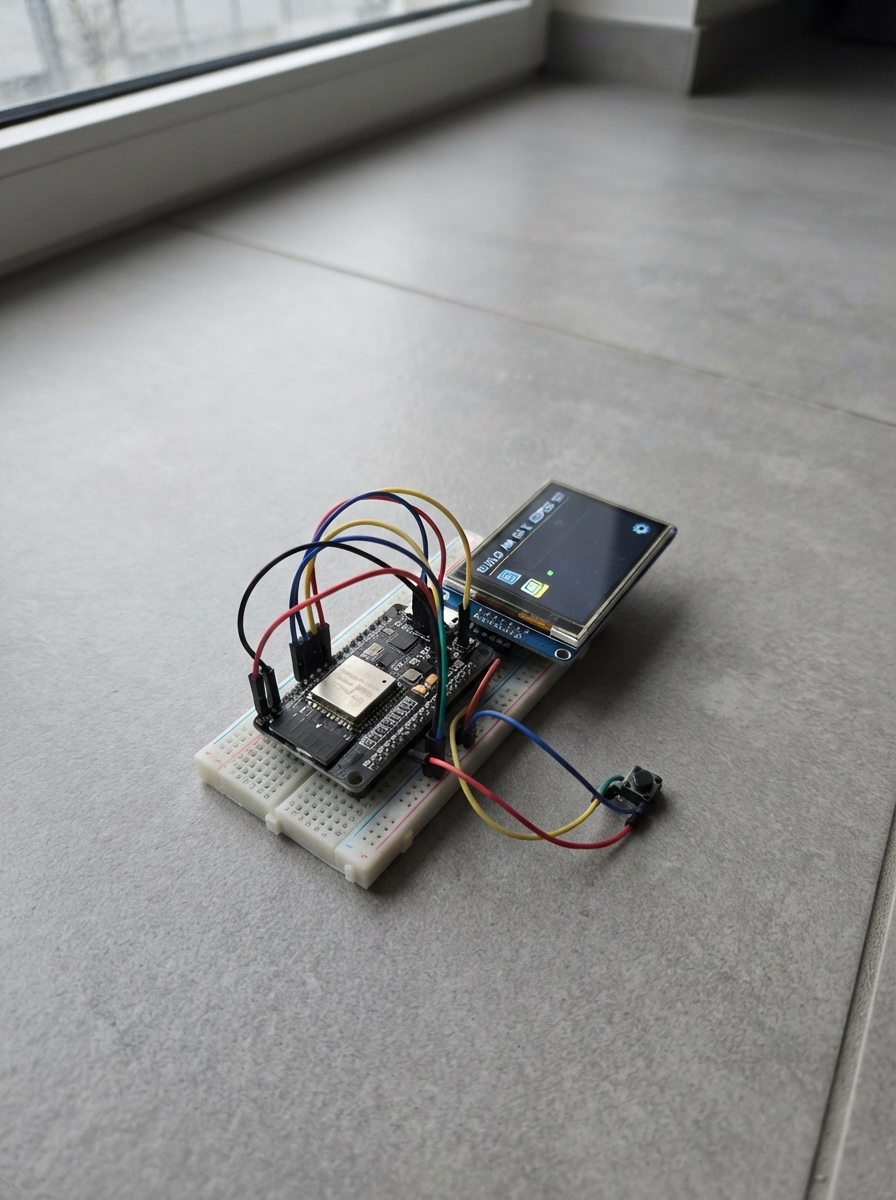
This guide walks through building a versatile touchscreen interface powered by an ESP32 S3 microcontroller. The project combines a 2.8-inch ILI9341 TFT display with capacitive touch input and physical push buttons to create a multi-function device capable of running games, tools, and utility applications.
Builders will receive a complete wiring diagram showing how to safely connect the display and touch controller to the ESP32 S3, a full parts list, step-by-step assembly instructions, and Arduino firmware that implements a dashboard, menu system, game launcher, timer, counter, and clock. The guide emphasizes safe power handling during assembly and provides all the code needed to get the interface running.
Wiring diagram
Gather all the parts
Assemble it in 7 steps
1. Keep the power disconnected while wiring
Unplug the ESP32-S3 from USB before placing wires. Put the ESP32-S3 board and the 2.8-inch screen where you can read each pin label.
- Use short jumper wires and check the label printed beside each screen pin before connecting it.
- Do not connect the screen to 5V — this ESP32-S3 and the display use 3.3V, and 5V can damage the screen.
2. Give the screen safe power
Connect the screen VCC pin to the ESP32-S3 3V3 pin and screen GND to an ESP32-S3 GND pin. Connect the screen TFT_BL or LED pin to 3V3 so its backlight is on.
- VCC → 3V3 (power), GND → GND (ground), TFT_BL/LED → 3V3 (backlight power).
- Make sure VCC and GND are not swapped — swapped power can damage the screen.
3. Wire the shared screen and touch data lines
Connect the screen MOSI pin to GPIO11, MISO to GPIO13, and SCK to GPIO12. These three wires are shared by the picture part of the screen and its touch part.
- MOSI → GPIO11 (data), MISO → GPIO13 (touch data), SCK → GPIO12 (clock).
- Keep these three wires separate; putting a data wire on the wrong label stops the display or touch controls from working.
4. Wire the screen control pins
Connect TFT_CS to GPIO10, TFT_DC to GPIO14, TFT_RST to GPIO15, and TOUCH_CS to GPIO16. Leave the optional TOUCH_IRQ pin unconnected.
- TFT_CS → GPIO10 (screen select), TFT_DC → GPIO14 (screen command/data), TFT_RST → GPIO15 (screen reset), TOUCH_CS → GPIO16 (touch select).
- Do not join TFT_CS and TOUCH_CS together — the screen and the touch controller each need their own select wire.
5. Wire the direction buttons
For each of the four arrow buttons, connect one side to GND and the other side to its named ESP32-S3 pin. On a four-leg pushbutton, use two legs from opposite sides of the button rather than two legs on the same side.
- Up: one leg → GPIO1 (signal), other leg → GND (ground). Down: GPIO2 and GND. Left: GPIO3 and GND. Right: GPIO4 and GND.
- A button fitted across the same breadboard rows is permanently connected and will act as if it is always pressed.
6. Wire Select and Back
Connect one side of the Select button to GPIO5 and its other side to GND. Connect one side of the Back button to GPIO6 and its other side to GND.
- Select: GPIO5 (signal) and GND (ground). Back: GPIO6 (signal) and GND (ground).
- Every button must share the same GND as the ESP32-S3 or button presses will not register reliably.
7. Use the safe offline tools
Connect the ESP32-S3 to USB. Tap the screen or press Select to open Apps; use Up and Down to move, Select to open, and Back to return. The added tools are Timer, Counter, Dice, Calculator, Flashlight, Random Picker, Color Viewer, Pixel Check, Touch Check, and Display Check. They work only on the screen and do not use radio, scanning, or attack functions.
- Timer: Up and Down adjust time, Select starts or pauses it, and Left resets it. Touch Check draws a marker where you tap. Pixel Check and Color Viewer cycle colors with Left or Right.
- If the screen stays blank, unplug USB first and recheck the VCC, GND, TFT_CS, TFT_DC, and SCK wires.
Review all connections
1. Connections between "tft_1" and "ESP32"
2. Connections between "button_up" and "ESP32"
3. Connections between "button_down" and "ESP32"
4. Connections between "button_left" and "ESP32"
5. Connections between "button_right" and "ESP32"
6. Connections between "button_select" and "ESP32"
7. Connections between "button_back" and "ESP32"
Deploy the firmware
#include <Arduino.h>
#include <SPI.h>
#include <Adafruit_GFX.h>
#include <Adafruit_ILI9341.h>
#include <XPT2046_Touchscreen.h>

#define BTN_UP 1

#define BTN_DOWN 2
#define BTN_LEFT 3
#define BTN_RIGHT 4
#define BTN_SELECT 5
#define BTN_BACK 6

enum Screen { DASHBOARD, MENU, TOOL, GAME_LIST, GAME, SLEEP_CLOCK };

// Forward declarations
int itemCount();
const char* itemName(int i);
void top(const char *label);
void bottom(const char *text);
void clockText(int y,int size);
void panel(const char *title,const char *help);
void dashboard();
void menu();
void tool();
void gameList();
void game();
void sleepClock();
void redraw();
void back();
void openItem();
void press(int p);
void buttons();
void touchPoll();

constexpr int TFT_CS=10, TFT_DC_PIN=14, TFT_RST_PIN=15, TFT_SCK_PIN=12, TFT_MISO_PIN=13, TFT_MOSI_PIN=11, TOUCH_CS_PIN=16;
constexpr int UP_PIN=1, DOWN_PIN=2, LEFT_PIN=3, RIGHT_PIN=4, SELECT_PIN=5, BACK_PIN=6;
constexpr uint16_t BLACK=ILI9341_BLACK, PURPLE=0xA81F, VIOLET=0x6012, PANEL=0x2008, TEXT=0xD69A, DIM=0x7B8F;
Adafruit_ILI9341 tft(TFT_CS,TFT_DC_PIN,TFT_RST_PIN);
XPT2046_Touchscreen touch(TOUCH_CS_PIN);
Screen screen=DASHBOARD;
int tab=0,cursor=0,activeTool=0,selectedGame=0,counterValue=0,diceValue=1,timerSeconds=60;
bool timerRunning=false,homeSwitchOn=false;
unsigned long timerStarted=0,lastTouch=0,lastFrame=0;
const char *tabNames[]={"MAIN","TOOLS","MORE"};
const char *mainItems[]={"CLOCK","GAMES","STOPWATCH","HOMEKIT"};
const char *toolItems[]={"TIMER","COUNTER","DICE","CALCULATOR","FLASHLIGHT","COLOR VIEW"};
const char *moreItems[]={"BUTTON TEST","TOUCH TEST","PIXEL CHECK","DISPLAY CHECK","SLEEP CLOCK"};
const char *gameItems[]={"REFLEX","DODGE","MEMORY","NUMBER GUESS","PONG"};
int itemCount(){return tab==0?4:(tab==1?6:5);}
const char* itemName(int i){return tab==0?mainItems[i]:(tab==1?toolItems[i]:moreItems[i]);}
void top(const char *label){tft.fillRect(0,0,240,29,BLACK);tft.drawFastHLine(0,28,240,PURPLE);tft.setTextSize(1);tft.setTextColor(DIM);tft.setCursor(6,9);tft.print("S3 SAFE");tft.setTextColor(PURPLE);tft.setCursor(94,9);tft.print(label);tft.setTextColor(TEXT);tft.setCursor(197,9);tft.print("100%");}
void bottom(const char *text){tft.fillRect(0,296,240,24,BLACK);tft.drawFastHLine(0,296,240,PURPLE);tft.setTextSize(1);tft.setTextColor(DIM);tft.setCursor(6,305);tft.print(text);}
void clockText(int y,int size){unsigned long s=millis()/1000;char out[12];snprintf(out,sizeof(out),"%02lu:%02lu:%02lu",(s/3600)%24,(s/60)%60,s%60);tft.setTextColor(TEXT);tft.setTextSize(size);tft.setCursor(size==3?34:48,y);tft.print(out);}
void panel(const char *title,const char *help){tft.fillScreen(BLACK);top(title);tft.drawRoundRect(10,43,220,230,8,PURPLE);bottom(help);}
void dashboard(){tft.fillScreen(BLACK);top("DASHBOARD");tft.drawRoundRect(8,42,224,228,8,PURPLE);tft.setTextColor(PURPLE);tft.setTextSize(2);tft.setCursor(70,64);tft.print("POCKET S3");clockText(112,3);tft.setTextColor(DIM);tft.setTextSize(1);tft.setCursor(42,194);tft.print("LEFT / RIGHT: OPEN MENU");tft.setCursor(57,216);tft.print("SELECT OR TAP: OPEN MENU");bottom("SAFE OFFLINE UTILITY DECK");}
void menu(){tft.fillScreen(BLACK);top(tabNames[tab]);for(int i=0;i<3;i++){int x=12+i*76;bool on=i==tab;tft.drawRect(x,38,68,22,on?PURPLE:VIOLET);tft.setTextColor(on?TEXT:DIM);tft.setTextSize(1);tft.setCursor(x+12,45);tft.print(tabNames[i]);}tft.setTextColor(PURPLE);tft.setTextSize(3);tft.setCursor(4,145);tft.print("<");tft.setCursor(214,145);tft.print(">");for(int i=0;i<itemCount();i++){int y=72+i*42;bool on=i==cursor;if(on)tft.fillRoundRect(30,y,180,34,5,PURPLE);else tft.drawRoundRect(30,y,180,34,5,VIOLET);tft.setTextColor(on?BLACK:TEXT);tft.setTextSize(2);tft.setCursor(45,y+9);tft.print(itemName(i));}bottom("UP/DOWN SELECT   LEFT/RIGHT TAB");}
void tool(){if(tab==0&&activeTool==0){panel("CLOCK","BACK: MENU");clockText(128,3);return;}if(tab==0&&activeTool==2){panel("STOPWATCH","SELECT: START/PAUSE   LEFT: RESET");tft.setTextColor(TEXT);tft.setTextSize(2);tft.setCursor(67,136);tft.print("SAFE TIMER");return;}if(tab==0&&activeTool==3){panel("HOMEKIT","SELECT: TOGGLE LOCAL HOME SWITCH");tft.setTextColor(TEXT);tft.setTextSize(2);tft.setCursor(46,78);tft.print("HOME SWITCH");tft.fillRoundRect(45,120,150,64,12,homeSwitchOn?ILI9341_GREEN:PANEL);tft.setTextColor(homeSwitchOn?BLACK:TEXT);tft.setTextSize(3);tft.setCursor(homeSwitchOn?96:87,140);tft.print(homeSwitchOn?"ON":"OFF");tft.setTextColor(DIM);tft.setTextSize(1);tft.setCursor(28,219);tft.print("No appliance is connected to this tile.");return;}if(tab==1&&activeTool==0){panel("TIMER","UP/DOWN: ADJUST   SELECT: START/PAUSE");int left=timerRunning?max(0,timerSeconds-(int)((millis()-timerStarted)/1000)):timerSeconds;tft.setTextColor(left==0?ILI9341_RED:TEXT);tft.setTextSize(5);tft.setCursor(67,120);tft.print(left);tft.setTextColor(DIM);tft.setTextSize(1);tft.setCursor(98,180);tft.print("SECONDS");return;}if(tab==1&&activeTool==1){panel("COUNTER","LEFT -1   RIGHT +1   UP: RESET");tft.setTextColor(PURPLE);tft.setTextSize(6);tft.setCursor(83,119);tft.print(counterValue);return;}if(tab==1&&activeTool==2){panel("DICE","SELECT: ROLL");tft.fillRoundRect(73,91,94,94,10,TEXT);tft.setTextColor(BLACK);tft.setTextSize(6);tft.setCursor(105,111);tft.print(diceValue);return;}if(tab==1&&activeTool==4){tft.fillScreen(ILI9341_WHITE);tft.setTextColor(BLACK);tft.setTextSize(2);tft.setCursor(65,145);tft.print("FLASHLIGHT");bottom("BACK: MENU");return;}if(tab==1&&activeTool==5){const uint16_t c[]={ILI9341_RED,ILI9341_GREEN,ILI9341_BLUE,ILI9341_YELLOW,ILI9341_MAGENTA};tft.fillScreen(c[counterValue%5]);bottom("LEFT/RIGHT: CHANGE COLOR");return;}panel(itemName(activeTool),"BACK: MENU");tft.setTextColor(TEXT);tft.setTextSize(2);tft.setCursor(43,116);tft.print("SAFE DISPLAY TOOL");tft.setTextColor(DIM);tft.setTextSize(1);tft.setCursor(25,155);tft.print("No wireless, scanning, or attack tools.");}
void gameList(){tft.fillScreen(BLACK);top("GAMES");for(int i=0;i<5;i++){int y=52+i*43;bool on=i==selectedGame;if(on)tft.fillRoundRect(30,y,180,34,5,PURPLE);else tft.drawRoundRect(30,y,180,34,5,VIOLET);tft.setTextColor(on?BLACK:TEXT);tft.setTextSize(2);tft.setCursor(46,y+9);tft.print(gameItems[i]);}bottom("UP/DOWN SELECT   BACK: MENU");}
void game(){panel(gameItems[selectedGame],"ARROWS/SELECT: PLAY   BACK: GAMES");tft.setTextColor(PURPLE);tft.setTextSize(3);tft.setCursor(65,95);tft.print("OFFLINE GAME");tft.setTextColor(TEXT);tft.setTextSize(1);tft.setCursor(35,155);tft.print("Use arrows and Select to play.");tft.setCursor(57,179);tft.print("Score: ");tft.print(counterValue);}
void sleepClock(){tft.fillScreen(BLACK);tft.drawRoundRect(10,65,220,150,6,PURPLE);clockText(116,3);tft.setTextColor(TEXT);tft.setTextSize(1);tft.setCursor(75,180);tft.print("CASIO SLEEP CLOCK");}
void redraw(){if(screen==DASHBOARD)dashboard();else if(screen==MENU)menu();else if(screen==TOOL)tool();else if(screen==GAME_LIST)gameList();else if(screen==GAME)game();else sleepClock();}
void back(){if(screen==DASHBOARD)return;if(screen==GAME)screen=GAME_LIST;else if(screen==MENU)screen=DASHBOARD;else screen=MENU;redraw();}
void openItem(){activeTool=cursor;if(tab==0&&cursor==1)screen=GAME_LIST;else if(tab==2&&cursor==4)screen=SLEEP_CLOCK;else screen=TOOL;redraw();}
void press(int p){if(screen==SLEEP_CLOCK){screen=DASHBOARD;redraw();return;}if(p==BTN_BACK){back();return;}if(screen==DASHBOARD){if(p==BTN_SELECT||p==BTN_LEFT||p==BTN_RIGHT){screen=MENU;redraw();}return;}if(screen==MENU){if(p==BTN_LEFT||p==BTN_RIGHT){tab=(tab+(p==BTN_LEFT?2:1))%3;cursor=0;}else if(p==BTN_UP)cursor=(cursor+itemCount()-1)%itemCount();else if(p==BTN_DOWN)cursor=(cursor+1)%itemCount();else if(p==BTN_SELECT){openItem();return;}redraw();return;}if(screen==GAME_LIST){if(p==BTN_UP)selectedGame=(selectedGame+4)%5;else if(p==BTN_DOWN)selectedGame=(selectedGame+1)%5;else if(p==BTN_SELECT){counterValue=0;screen=GAME;}redraw();return;}if(screen==GAME){if(p==BTN_LEFT||p==BTN_RIGHT||p==BTN_SELECT)counterValue++;redraw();return;}if(tab==0&&activeTool==3&&p==BTN_SELECT)homeSwitchOn=!homeSwitchOn;else if(tab==1&&activeTool==0){if(p==BTN_UP)timerSeconds+=10;else if(p==BTN_DOWN)timerSeconds=max(0,timerSeconds-10);else if(p==BTN_SELECT){timerRunning=!timerRunning;timerStarted=millis();}}else if(tab==1&&activeTool==1){if(p==BTN_LEFT)counterValue--;else if(p==BTN_RIGHT||p==BTN_SELECT)counterValue++;else if(p==BTN_UP)counterValue=0;}else if(tab==1&&activeTool==2&&p==BTN_SELECT)diceValue=random(1,7);else if(tab==1&&(activeTool==3||activeTool==5)){if(p==BTN_LEFT)counterValue=max(0,counterValue-1);else if(p==BTN_RIGHT||p==BTN_SELECT)counterValue++;}redraw();}
void buttons(){static bool old[]={HIGH,HIGH,HIGH,HIGH,HIGH,HIGH};const int p[]={BTN_UP,BTN_DOWN,BTN_LEFT,BTN_RIGHT,BTN_SELECT,BTN_BACK};for(int i=0;i<6;i++){bool n=digitalRead(p[i]);if(old[i]&&!n)press(p[i]);old[i]=n;}}
void touchPoll(){if(!touch.touched()||millis()-lastTouch<220)return;TS_Point q=touch.getPoint();int x=constrain(map(q.x,200,3800,0,240),0,239),y=constrain(map(q.y,200,3800,0,320),0,319);lastTouch=millis();if(screen==DASHBOARD||screen==SLEEP_CLOCK){screen=screen==SLEEP_CLOCK?DASHBOARD:MENU;redraw();return;}if(screen==MENU){if(x<55)press(BTN_LEFT);else if(x>185)press(BTN_RIGHT);else if(y>70&&y<290){cursor=constrain((y-72)/42,0,itemCount()-1);openItem();}return;}if(x<45&&y<45)back();else press(BTN_SELECT);}
void setup(){for(int p:{BTN_UP,BTN_DOWN,BTN_LEFT,BTN_RIGHT,BTN_SELECT,BTN_BACK})pinMode(p,INPUT_PULLUP);SPI.begin(TFT_SCK_PIN,TFT_MISO_PIN,TFT_MOSI_PIN,TFT_CS);tft.begin();tft.setRotation(0);touch.begin();touch.setRotation(0);randomSeed(micros());redraw();}
void loop(){buttons();touchPoll();if(millis()-lastFrame>=500){lastFrame=millis();if(screen==DASHBOARD||screen==SLEEP_CLOCK||(screen==TOOL&&((tab==0&&activeTool==0)||(tab==1&&activeTool==0))))redraw();}}
Remix this project
Make it yours in one click
Open a full copy of this project in your own Schematik workspace, diagram, code, parts, and assembly steps included. Swap the sensor, add features, or redesign the whole thing with AI. The author's original stays untouched.