Community project
CO2 Monitor Display
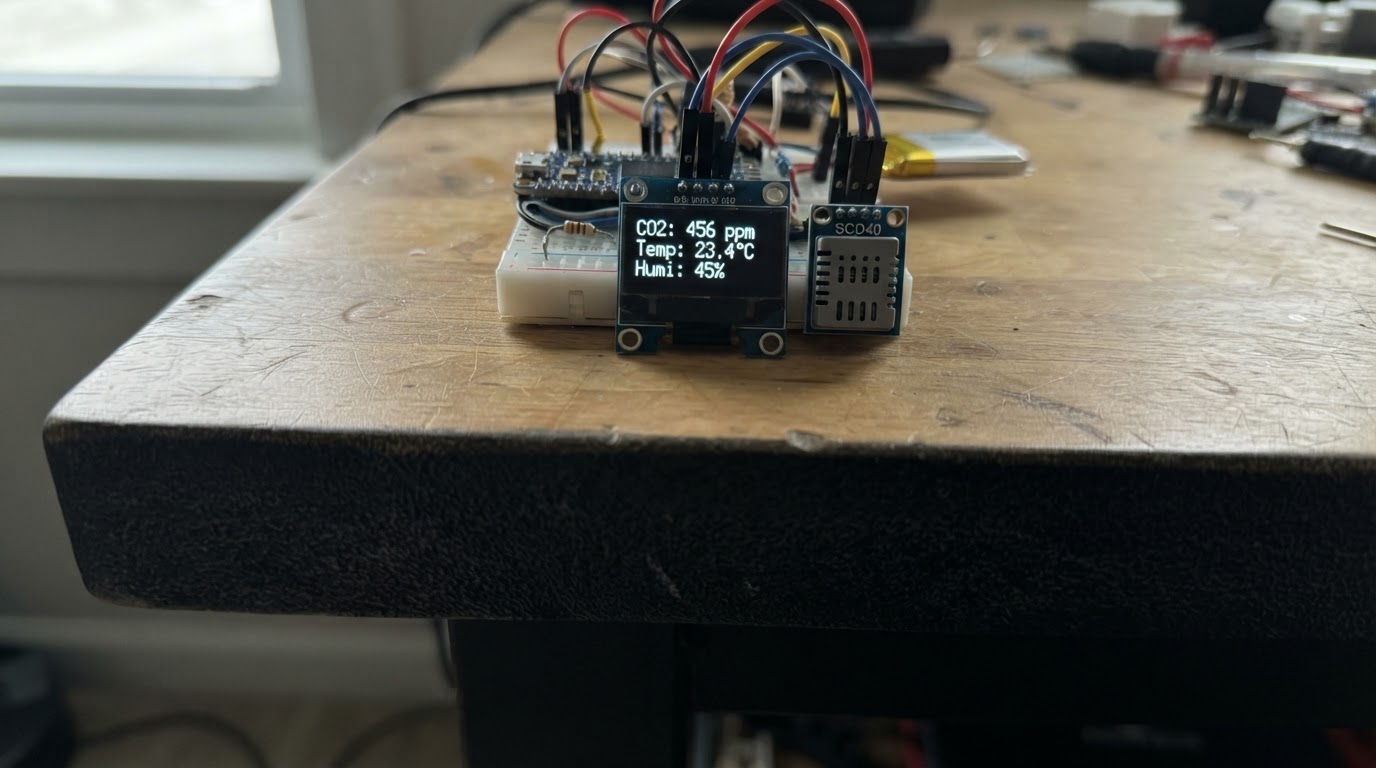
This project builds a real-time CO2 monitor using an ESP32 microcontroller, a Sensirion SCD40 sensor, and an SSD1306 OLED display. The sensor measures carbon dioxide concentration, temperature, and humidity, while the display shows live readings and air quality assessments (Good, Fair, High, or Very High) to help identify when ventilation is needed.
The guide provides a complete wiring diagram, parts list, and ready-to-deploy firmware. Assembly is straightforward: connect power and ground rails, link the I2C data bus between the sensor and display, then upload the code to start monitoring air quality in real time.
Wiring diagram

Gather all the parts
Assemble it in 4 steps
1. Keep power disconnected while wiring
Place the Seeed Studio XIAO ESP32S3, SCD40 breakout, and SSD1306 I2C OLED where the sensor has open access to room air. Do not seal the SCD40 in a tight enclosure or place it directly above a heat source.
- The SCD40 needs air circulation for meaningful CO2 readings.
- Use short jumper wires for the shared I2C bus.
- Disconnect the XIAO ESP32S3 USB cable before making or changing connections.
2. Wire the common 3.3 V power and ground
Connect the XIAO ESP32S3 3V3 pin to VCC on both the SCD40 and OLED. Connect a XIAO GND pin to GND on both modules.
- All three devices must share ground.
- Use the XIAO 3V3 pin, not a 5 V supply, so the I2C signal pull-ups remain safe at 3.3 V.
- Do not power either I2C module from 5 V unless its documentation explicitly guarantees that SDA and SCL are level-shifted to 3.3 V.
3. Wire the shared I2C data bus
Connect XIAO D4 / GPIO5 to SDA on the SCD40 and SDA on the OLED. Connect XIAO D5 / GPIO6 to SCL on the SCD40 and SCL on the OLED.
- SDA and SCL are shared: each XIAO pin branches to the same-named pin on both modules.
- The firmware expects the common OLED I2C address 0x3C.
- Do not swap SDA and SCL. Check the silkscreen labels on each module rather than wire colors.
4. Power and deploy
Recheck every connection, then connect the XIAO ESP32S3 by USB. Use Schematik’s Deploy button to build and flash the firmware. The display shows a warm-up message first; the SCD40 then provides a new measurement approximately every five seconds.
- Place the monitor at breathing height and away from open windows, direct exhalation, heaters, and humidifiers for representative room readings.
- The OLED displays CO2 in ppm plus temperature and relative humidity.
- Avoid touching exposed wiring while powered.
Review all connections
1. Connections between "co2_sensor" and "ESP32"
2. Connections between "oled_display" and "ESP32"
Deploy the firmware
#include <Arduino.h>
#include <Wire.h>
#include <SensirionI2CScd4x.h>
#include <Adafruit_GFX.h>
#include <Adafruit_SSD1306.h>


// Forward declarations
const char* airQualityLabel(uint16_t co2ppm);
void drawStatus(const char* title, const char* detail);
void drawMeasurement(uint16_t co2ppm, float temperatureC, float humidityRh);

constexpr int I2C_SDA = 21;
constexpr int I2C_SCL = 22;
constexpr uint8_t OLED_ADDRESS = 0x3C;
constexpr int SCREEN_WIDTH = 128;
constexpr int SCREEN_HEIGHT = 64;

Adafruit_SSD1306 display(SCREEN_WIDTH, SCREEN_HEIGHT, &Wire, -1);
SensirionI2CScd4x scd4x;
uint32_t lastPollMs = 0;

const char* airQualityLabel(uint16_t co2ppm) {
  if (co2ppm <= 800) return "Good";
  if (co2ppm <= 1200) return "Fair - ventilate";
  if (co2ppm <= 2000) return "High - ventilate";
  return "Very high";
}

void drawStatus(const char* title, const char* detail) {
  display.clearDisplay();
  display.setTextColor(SSD1306_WHITE);
  display.setTextSize(1);
  display.setCursor(0, 8);
  display.println(title);
  display.setCursor(0, 28);
  display.println(detail);
  display.display();
}

void drawMeasurement(uint16_t co2ppm, float temperatureC, float humidityRh) {
  display.clearDisplay();
  display.setTextColor(SSD1306_WHITE);
  display.setTextSize(1);
  display.setCursor(0, 0);
  display.print("CO2 MONITOR");
  display.setTextSize(2);
  display.setCursor(0, 14);
  display.print(co2ppm);
  display.setTextSize(1);
  display.print(" ppm");
  display.setCursor(0, 39);
  display.print("Temp: ");
  display.print(temperatureC, 1);
  display.print(" C");
  display.setCursor(0, 50);
  display.print("RH: ");
  display.print(humidityRh, 1);
  display.print("% ");
  display.print(airQualityLabel(co2ppm));
  display.display();
}

void setup() {
  Serial.begin(115200);
  Wire.begin(I2C_SDA, I2C_SCL);
  if (!display.begin(SSD1306_SWITCHCAPVCC, OLED_ADDRESS)) {
    Serial.println("SSD1306 OLED not found at 0x3C");
    while (true) delay(1000);
  }
  drawStatus("CO2 MONITOR", "Starting sensor...");
  scd4x.begin(Wire);
  scd4x.stopPeriodicMeasurement();
  delay(500);
  uint16_t error = scd4x.startPeriodicMeasurement();
  if (error != 0) {
    Serial.print("SCD40 start error: ");
    Serial.println(error);
    drawStatus("SCD40 error", "Check wiring");
    while (true) delay(1000);
  }
  drawStatus("CO2 MONITOR", "Warming up...");
}

void loop() {
  if (millis() - lastPollMs < 1000) return;
  lastPollMs = millis();
  bool dataReady = false;
  uint16_t error = scd4x.getDataReadyFlag(dataReady);
  if (error != 0) {
    Serial.print("SCD40 ready-check error: ");
    Serial.println(error);
    return;
  }
  if (!dataReady) return;
  uint16_t co2ppm = 0;
  int32_t temperatureMilliC = 0;
  int32_t humidityMilliPercent = 0;
  error = scd4x.readMeasurement(co2ppm, temperatureMilliC, humidityMilliPercent);
  if (error != 0) {
    Serial.print("SCD40 read error: ");
    Serial.println(error);
    return;
  }
  if (co2ppm == 0) return;
  float temperatureC = temperatureMilliC / 1000.0f;
  float humidityRh = humidityMilliPercent / 1000.0f;
  Serial.printf("CO2: %u ppm, Temperature: %.1f C, RH: %.1f%%\n", co2ppm, temperatureC, humidityRh);
  drawMeasurement(co2ppm, temperatureC, humidityRh);
}
Remix this project
Make it yours in one click
Open a full copy of this project in your own Schematik workspace — diagram, code, parts, and assembly steps included. Swap the sensor, add features, or redesign the whole thing with AI. The author's original stays untouched.