Community project
E-INK Live Flight Scanner
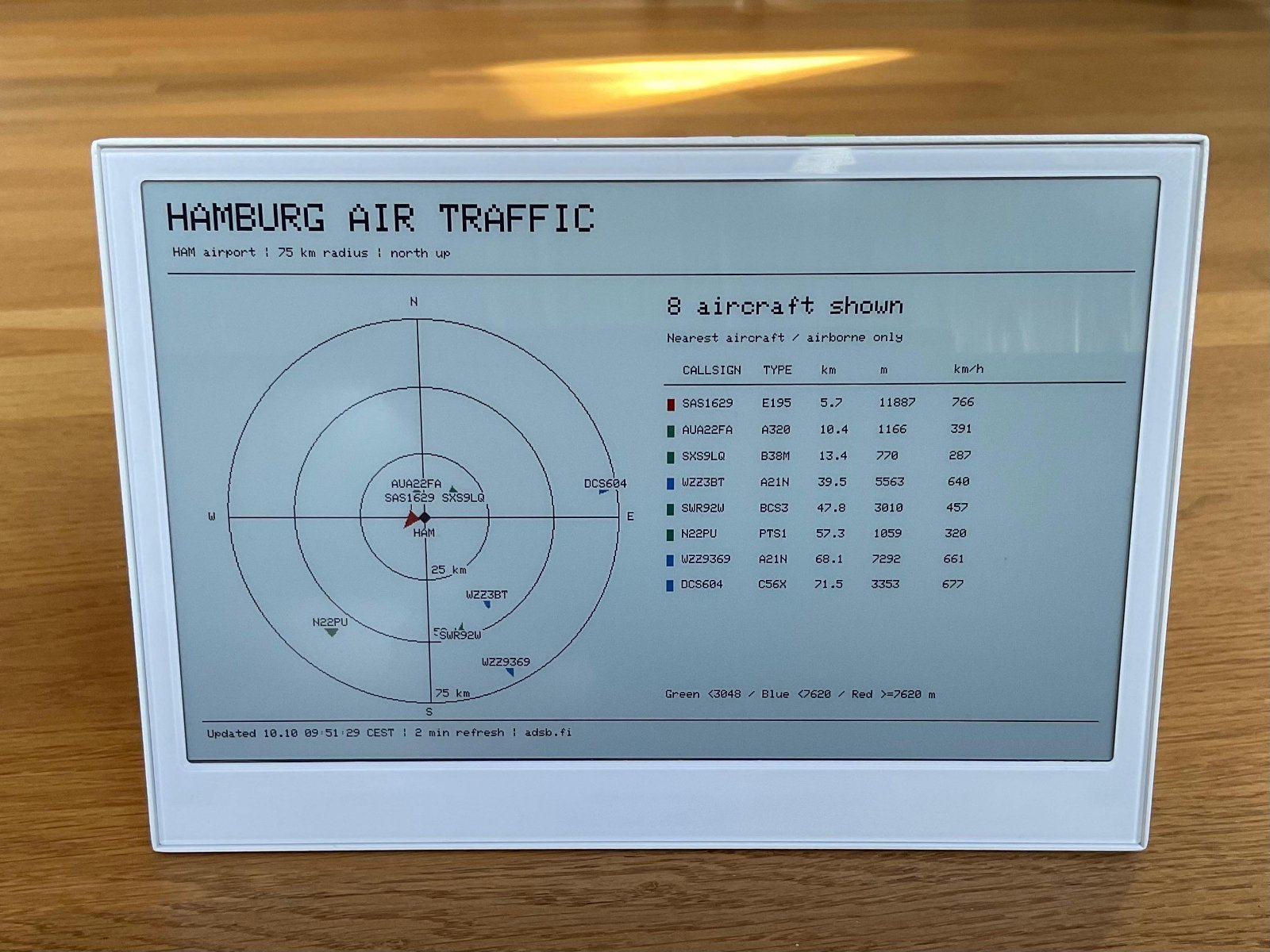
This project turns an ESP32 and e-ink display into a live flight scanner that shows aircraft in the vicinity. The display updates with real-time data about nearby planes, including their distance, altitude, speed, and bearing relative to the scanner's location. Readers will receive a complete wiring diagram, parts list, step-by-step assembly instructions, and the Arduino firmware needed to fetch flight data over WiFi and render it on the e-ink screen.
The guide covers everything from safely mounting the e-ink display to configuring the ESP32 with WiFi credentials and setting up the flight data API integration. Once assembled and powered via USB, the scanner continuously monitors airspace and refreshes the display with current aircraft information, making it ideal for aviation enthusiasts or anyone curious about overhead traffic.
Wiring diagram
Assemble it in 2 steps
1. Place the E1002 safely
Place the reTerminal E1002 on a dry, stable surface with its screen facing you. The screen and Wi-Fi are built in, so no extra parts or jumper wires are needed.
- Do not press on the e-paper panel or open the battery enclosure; pressure can crack the screen.
2. Connect USB power
Plug a USB-C cable into the E1002 and connect the other end to your computer. Leave the internal screen connections and expansion header untouched.
- Use a cable that carries data as well as power.
Deploy the firmware
#include <Arduino.h>
#include <WiFi.h>
#include <WiFiManager.h>
#include <TFT_eSPI.h>
#include <WiFiClientSecure.h>
#include <HTTPClient.h>
#include <ArduinoJson.h>
#include <time.h>
#include <math.h>
EPaper epaper;
WiFiManager wm;
struct Plane {String name,type;float km,bearing,track,alt,speed;bool altitude;};
Plane planes[40];int count=0;bool haveData=false,first=true;String errorText="Waiting for network",stamp="--";uint32_t nextPoll=0;
const float LAT=53.6304f,LON=9.9882f;
uint32_t offlineSince=0,lastReconnect=0;bool wasConnected=false;
int lastWifiStatus=-1;
bool setupPagePending=false;
uint32_t setupVisibleUntil=0;
void showSetupPage();
float rad(float d){return d*PI/180.0f;}
float distance(float lat,float lon){float a=sin(rad(lat-LAT)/2),b=sin(rad(lon-LON)/2);float q=constrain(a*a+cos(rad(LAT))*cos(rad(lat))*b*b,0.0f,1.0f);return 12742*atan2(sqrt(q),sqrt(1-q));}
float bearing(float lat,float lon){return fmod(atan2(sin(rad(lon-LON))*cos(rad(lat)),cos(rad(LAT))*sin(rad(lat))-sin(rad(LAT))*cos(rad(lat))*cos(rad(lon-LON)))*180/PI+360,360);}
void text(int x,int y,const String&s,int size=1,uint16_t c=TFT_BLACK){epaper.setTextSize(size);epaper.setTextColor(c,TFT_WHITE);epaper.setCursor(x,y);epaper.print(s);}
String clockText(){tm t;if(!getLocalTime(&t,5000))return "time not synced";char b[32];strftime(b,sizeof b,"%d.%m %H:%M:%S %Z",&t);return String(b);}
bool fetch(){
 if(WiFi.status()!=WL_CONNECTED){errorText="Wi-Fi disconnected";WiFi.reconnect();return false;}
 WiFiClientSecure client;client.setInsecure();client.setHandshakeTimeout(12);HTTPClient http;http.setTimeout(15000);http.setConnectTimeout(10000);http.useHTTP10(true);
 if(!http.begin(client,"https://opendata.adsb.fi/api/v3/lat/53.6304/lon/9.9882/dist/41")){errorText="Connection failed";return false;}
 http.setUserAgent("HamburgFlightScanner/1.0 (reTerminal E1002)");
 http.addHeader("Accept","application/json");
 int status=http.GET();if(status!=200){errorText="Service HTTP "+String(status);http.end();return false;}
 JsonDocument filter;for(const char* list:{"ac","aircraft"}){JsonObject f=filter[list].add<JsonObject>();for(const char*k:{"flight","hex","t","lat","lon","alt_baro","alt_geom","gs","track","seen_pos"})f[k]=true;}
 JsonDocument doc;auto err=deserializeJson(doc,http.getStream(),DeserializationOption::Filter(filter));http.end();if(err){errorText="Unreadable flight data";return false;}
 JsonArray ac=doc["ac"].as<JsonArray>();if(ac.isNull())ac=doc["aircraft"].as<JsonArray>();if(ac.isNull()){errorText="Missing aircraft list";return false;}
 Plane fresh[40];int n=0;
 for(JsonObject a:ac){if(a["lat"].isNull()||a["lon"].isNull()||(a["seen_pos"]|0.0f)>60||a["alt_baro"].is<const char*>())continue;
 float lat=a["lat"]|0.0f,lon=a["lon"]|0.0f;Plane p;p.km=distance(lat,lon);if(p.km>75)continue;p.bearing=bearing(lat,lon);p.track=a["track"]|p.bearing;p.speed=(a["gs"]|0.0f)*1.852f;p.name=String(a["flight"]|"");p.name.trim();if(p.name.isEmpty())p.name=String(a["hex"]|"?");p.type=String(a["t"]|"?");p.altitude=!a["alt_baro"].isNull()||!a["alt_geom"].isNull();p.alt=(a["alt_baro"].isNull()?(a["alt_geom"]|0.0f):(a["alt_baro"]|0.0f))*0.3048f;
 if(n<40)fresh[n++]=p;else{int far=0;for(int i=1;i<n;i++)if(fresh[i].km>fresh[far].km)far=i;if(p.km<fresh[far].km)fresh[far]=p;}}
 for(int i=0;i<n;i++)for(int j=i+1;j<n;j++)if(fresh[j].km<fresh[i].km){Plane p=fresh[i];fresh[i]=fresh[j];fresh[j]=p;}count=n;for(int i=0;i<n;i++)planes[i]=fresh[i];haveData=true;errorText="";return true;
}
uint16_t color(const Plane&p){return !p.altitude?TFT_BLACK:p.alt<3048?TFT_GREEN:p.alt<7620?TFT_BLUE:TFT_RED;}
void draw(){
 // Timestamp this successful display refresh in Hamburg local time.
 // Failed requests keep the last successful refresh timestamp.
 if(haveData && errorText.isEmpty())stamp=clockText();
 epaper.fillScreen(TFT_WHITE);text(16,14,"HAMBURG AIR TRAFFIC",3);text(18,48,"HAM airport | 75 km radius | north up");epaper.drawLine(12,68,788,68,TFT_BLACK);
 const int cx=210,cy=267,R=164;for(int i=1;i<=3;i++){epaper.drawCircle(cx,cy,R*i/3,TFT_BLACK);text(cx+5,cy+R*i/3-12,String(i*25)+" km");}epaper.drawLine(cx-R,cy,cx+R,cy,TFT_BLACK);epaper.drawLine(cx,cy-R,cx,cy+R,TFT_BLACK);text(cx-4,cy-R-17,"N");text(cx-4,cy+R+5,"S");text(cx-R-16,cy-4,"W");text(cx+R+8,cy-4,"E");
 for(int i=count-1;i>=0;i--){Plane&p=planes[i];float d=p.km/75*R;int x=cx+lround(d*sin(rad(p.bearing))),y=cy-lround(d*cos(rad(p.bearing)));float a=rad(p.track);epaper.fillTriangle(x+lround(9*sin(a)),y-lround(9*cos(a)),x+lround(-6*sin(a)-5*cos(a)),y+lround(6*cos(a)-5*sin(a)),x+lround(-6*sin(a)+5*cos(a)),y+lround(6*cos(a)+5*sin(a)),color(p)); }
 // Place every label in its own box; leader lines link displaced labels to symbols.
 int lx[40],ly[40],lw[40];
 for(int i=0;i<count;i++){
  Plane&p=planes[i];float d=p.km/75*R;
  int x=cx+lround(d*sin(rad(p.bearing))),y=cy-lround(d*cos(rad(p.bearing)));
  String label=p.name.substring(0,9);int w=label.length()*6+4;
  int bestX=20,bestY=90;long best=2147483647L;
  for(int yy=90;yy<=426;yy+=12)for(int xx=20;xx+w<=400;xx+=6){
   bool free=true;
   if(xx<cx+22&&xx+w>cx-12&&yy<cy+22&&yy+10>cy-10)free=false;
   for(int j=0;j<i&&free;j++)if(xx<lx[j]+lw[j]+2&&xx+w+2>lx[j]&&yy<ly[j]+12&&yy+12>ly[j])free=false;
   if(!free)continue;
   long dx=xx+w/2-x,dy=yy+5-y,score=dx*dx+dy*dy;
   if(score<best){best=score;bestX=xx;bestY=yy;}
  }
  lx[i]=bestX;ly[i]=bestY;lw[i]=w;
  epaper.drawLine(x,y,bestX+w/2,bestY+5,color(p));
 }
 for(int i=0;i<count;i++){
  epaper.fillRect(lx[i],ly[i],lw[i],10,TFT_WHITE);
  text(lx[i]+2,ly[i]+1,planes[i].name.substring(0,9));
 }
 epaper.fillCircle(cx,cy,4,TFT_BLACK);text(cx-9,cy+10,"HAM");text(415,86,String(count)+" aircraft shown",2);text(415,115,"Nearest aircraft / airborne only");const int callX=428,typeX=494,distX=542,altX=590,speedX=650;
 text(callX,141,"CALLSIGN");text(typeX,141,"TYPE");text(distX,141,"km");text(altX,141,"m");text(speedX,141,"km/h");epaper.drawLine(412,156,788,156,TFT_BLACK);
 for(int i=0;i<min(count,11);i++){Plane&p=planes[i];int y=168+i*22;epaper.fillRect(415,y,6,10,color(p));text(callX,y,p.name.substring(0,9));text(typeX,y,p.type.substring(0,4));text(distX,y,String(p.km,1));text(altX,y,p.altitude?String((int)lround(p.alt)):"--");text(speedX,y,String((int)lround(p.speed)));}if(!haveData)text(422,225,"No data yet",2);
 text(415,420,"Green <3048 / Blue <7620 / Red >=7620 m");epaper.drawLine(12,447,788,447,TFT_BLACK);if(errorText.length())text(16,455,"STALE: "+errorText+" | last good "+stamp,1,TFT_RED);else text(16,455,"Updated "+stamp+" | 2 min refresh | adsb.fi");epaper.update();}
void showSetupPage(){
 epaper.fillScreen(TFT_WHITE);
 text(24,30,"HAMBURG FLIGHT SCANNER",3);
 text(24,110,"Connect your phone to Wi-Fi:",2);
 text(24,155,"Hamburg-Airtraffic",2);
 text(24,200,"Password: HamburgSetup",2);
 text(24,260,"Open http://192.168.4.1",2);
 text(24,305,"Choose a 2.4 GHz network and enter its password.");
 text(24,335,"Stay connected even if your phone says no internet.");
 text(24,375,"Saved Wi-Fi is retried. Scanner starts when connected.");
 Serial0.println("Refreshing Wi-Fi setup screen");epaper.update();
 Serial0.println("Wi-Fi setup screen refresh completed");
}
void setup(){
 Serial0.begin(115200);Serial0.println("Starting Hamburg scanner");
 Serial0.flush();
 pinMode(4,INPUT_PULLUP);bool forceSetup=digitalRead(4)==LOW;
 WiFi.mode(WIFI_STA);
 WiFi.setAutoReconnect(true);WiFi.setSleep(false);
 wm.setDebugOutput(true);wm.setConnectTimeout(20);wm.setSaveConnectTimeout(20);
 wm.setConfigPortalTimeout(0);wm.setConfigPortalBlocking(false);
 wm.setAPCallback([](WiFiManager*){
  Serial0.println("Wi-Fi setup at http://192.168.4.1");setupPagePending=true;
 });
 // Always offer setup at boot; retain existing credentials.
 wm.startConfigPortal("Hamburg-Airtraffic","HamburgSetup");
 if(!forceSetup)WiFi.begin();
 Serial0.printf("Wi-Fi initialization returned; portal=%d AP IP=%s\n",wm.getConfigPortalActive(),WiFi.softAPIP().toString().c_str());
 epaper.begin();
 showSetupPage();setupPagePending=false;
 setupVisibleUntil=millis()+60000UL;
 offlineSince=millis();
}
void loop(){
 wm.process();
 if(setupPagePending){
  setupPagePending=false;showSetupPage();
  setupVisibleUntil=millis()+60000UL;first=true;
 }
 uint32_t now=millis();int status=WiFi.status();
 if(status!=lastWifiStatus){Serial0.printf("Wi-Fi status=%d\n",status);lastWifiStatus=status;}
 if(status!=WL_CONNECTED){
  if(wasConnected){wasConnected=false;offlineSince=now;Serial0.println("Wi-Fi lost; reconnecting");}
  if(!wm.getConfigPortalActive()){
   if((uint32_t)(now-offlineSince)>=30000UL){Serial0.println("Reopening Wi-Fi setup after 30 seconds offline");wm.startConfigPortal("Hamburg-Airtraffic","HamburgSetup");}
   else if((uint32_t)(now-lastReconnect)>=10000UL){lastReconnect=now;WiFi.reconnect();}
  }
  delay(10);return;
 }
 // Give the user one minute to read and use setup, even if saved Wi-Fi connects.
 if((int32_t)(now-setupVisibleUntil)<0){delay(10);return;}
 if(wm.getConfigPortalActive())wm.stopConfigPortal();
 if(!wasConnected){
  wasConnected=true;
  Serial0.printf("Wi-Fi connected: SSID=%s IP=%s RSSI=%d dBm\n",WiFi.SSID().c_str(),WiFi.localIP().toString().c_str(),WiFi.RSSI());
  configTzTime("CET-1CEST,M3.5.0,M10.5.0/3","pool.ntp.org","time.google.com");first=true;
 }
 if(first||(int32_t)(now-nextPoll)>=0){first=false;bool ok=fetch();Serial0.printf("Traffic fetch %s, %d aircraft: %s\n",ok?"OK":"FAILED",count,errorText.c_str());draw();nextPoll=millis()+120000UL;}
 delay(10);
}
Remix this project
Make it yours in one click
Open a full copy of this project in your own Schematik workspace — diagram, code, parts, and assembly steps included. Swap the sensor, add features, or redesign the whole thing with AI. The author's original stays untouched.