Community project
ESP32-CAM Security Livestream
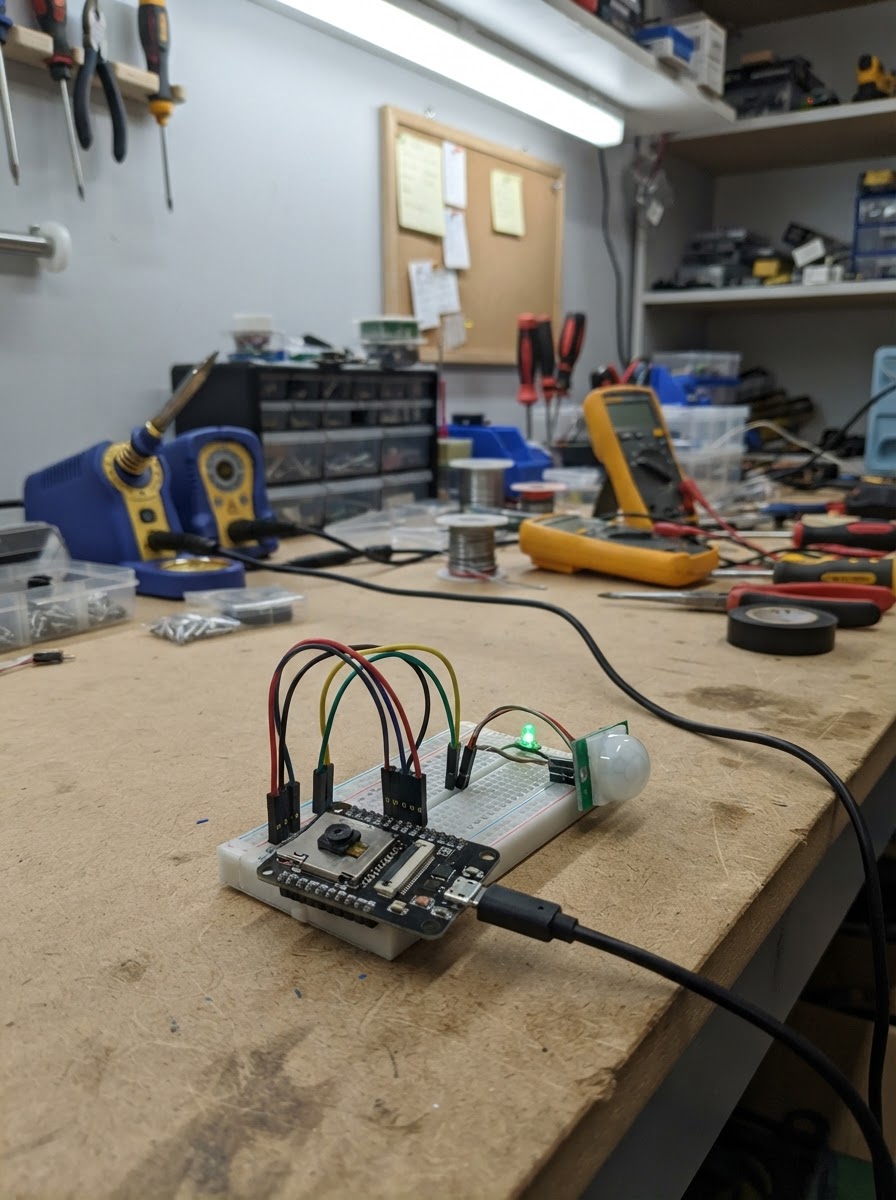
This project turns an ESP32-CAM into a WiFi-connected security camera that streams live video to a web browser. The camera connects to a local network and serves an embedded web interface where viewers can watch the stream in real time and control an onboard LED flash.
The guide includes a complete wiring diagram, parts list, and ready-to-flash firmware. Assembly takes just minutes: inspect the ESP32-CAM module, connect a stable 5V USB power supply, and mount the camera in your desired location. The firmware handles WiFi setup, camera initialization, and HTTP streaming—no additional microcontroller or complex networking knowledge required.
Wiring diagram
Assemble it in 3 steps
1. Inspect the ESP32-CAM
With power disconnected, make sure the OV2640 camera ribbon is fully seated in its connector and the locking tab is closed. The camera and white flash LED are already built into the AI Thinker ESP32-CAM board.
- Avoid touching the camera lens.
- The board uses 3.3 V logic even when powered through its 5V pin.
- Do not connect or remove the camera ribbon while power is applied.
2. Connect a stable 5 V USB supply
Use a regulated USB power source rated for at least 500 mA. Connect its 5 V output to the ESP32-CAM 5V pin and its ground output to an ESP32-CAM GND pin. Use short, secure connections.
- A good-quality USB wall adapter or powered USB lead is suitable.
- The USB power source must provide a steady 5 V supply during Wi-Fi and camera current bursts.
- Never connect 5 V to the ESP32-CAM 3.3V pin.
- Check polarity before applying power.
3. Mount and operate the camera
Mount the board where the lens has a clear view and reliable Wi-Fi coverage. Apply the regulated 5 V power, then open the local network stream page address reported by the firmware.
- Test the video stream near the Wi-Fi router before permanent installation.
- Use a non-metal enclosure for indoor placement and keep the lens unobstructed.
- This stream is intended for the local Wi-Fi network; do not expose it directly to the public internet.
- Avoid aiming the camera at private areas or places where recording is not permitted.
Deploy the firmware
#include <Arduino.h>

// The hardware implementation is compiled only for the ESP32-CAM target.
// The browser simulator has no ESP-IDF HTTP server or physical camera.
#if defined(ARDUINO_ARCH_ESP32)
#include <WiFi.h>
#include "esp_camera.h"
#include "esp_http_server.h"

// Change these two values before deploying.

// Forward declarations
static esp_err_t indexHandler(httpd_req_t *request);
static esp_err_t flashHandler(httpd_req_t *request);
static esp_err_t streamHandler(httpd_req_t *request);
static void startCameraServer();
static bool startCamera();

static const char *WIFI_SSID = "MyESP32";
static const char *WIFI_PASSWORD = "ESP32PASS";

// AI Thinker ESP32-CAM: fixed, onboard OV2640 camera connections.
#define PWDN_GPIO_NUM     32
#define RESET_GPIO_NUM    -1
#define XCLK_GPIO_NUM      0
#define SIOD_GPIO_NUM     26
#define SIOC_GPIO_NUM     27
#define Y9_GPIO_NUM       35
#define Y8_GPIO_NUM       34
#define Y7_GPIO_NUM       39
#define Y6_GPIO_NUM       36
#define Y5_GPIO_NUM       21
#define Y4_GPIO_NUM       19
#define Y3_GPIO_NUM       18
#define Y2_GPIO_NUM        5
#define VSYNC_GPIO_NUM    25
#define HREF_GPIO_NUM     23
#define PCLK_GPIO_NUM     22

static const int FLASH_LED_PIN = 4;
static httpd_handle_t streamServer = nullptr;

static const char INDEX_HTML[] PROGMEM = R"HTML(
<!doctype html><html><head><meta name="viewport" content="width=device-width,initial-scale=1">
<title>ESP32-CAM Live View</title><style>
body{margin:0;background:#101317;color:#f2f4f8;font-family:Arial,sans-serif;text-align:center}
main{max-width:900px;margin:auto;padding:18px}h1{font-size:1.35rem}img{width:100%;max-width:800px;border-radius:10px;background:#000}
button{margin:14px 5px;padding:10px 15px;border:0;border-radius:7px;font-weight:bold;cursor:pointer}
</style></head><body><main><h1>ESP32-CAM live stream</h1><img src="/stream" alt="Live camera stream">
<p>Keep this page on your private Wi-Fi network.</p><button onclick="fetch('/flash?on=1')">Flash on</button><button onclick="fetch('/flash?on=0')">Flash off</button>
</main></body></html>
)HTML";

static esp_err_t indexHandler(httpd_req_t *request) {
  httpd_resp_set_type(request, "text/html");
  return httpd_resp_send(request, INDEX_HTML, HTTPD_RESP_USE_STRLEN);
}

static esp_err_t flashHandler(httpd_req_t *request) {
  const bool on = request->uri && strstr(request->uri, "on=1");
  digitalWrite(FLASH_LED_PIN, on ? HIGH : LOW);
  httpd_resp_set_type(request, "text/plain");
  return httpd_resp_sendstr(request, on ? "Flash on" : "Flash off");
}

static esp_err_t streamHandler(httpd_req_t *request) {
  static const char *CONTENT_TYPE = "multipart/x-mixed-replace;boundary=frame";
  static const char *BOUNDARY = "\r\n--frame\r\n";
  static const char *HEADER = "Content-Type: image/jpeg\r\nContent-Length: %u\r\n\r\n";
  char headerBuffer[64];

  httpd_resp_set_type(request, CONTENT_TYPE);
  while (true) {
    camera_fb_t *frame = esp_camera_fb_get();
    if (frame == nullptr) return ESP_FAIL;

    const int headerLength = snprintf(headerBuffer, sizeof(headerBuffer), HEADER, frame->len);
    esp_err_t result = httpd_resp_send_chunk(request, BOUNDARY, strlen(BOUNDARY));
    if (result == ESP_OK) result = httpd_resp_send_chunk(request, headerBuffer, headerLength);
    if (result == ESP_OK) result = httpd_resp_send_chunk(request, (const char *)frame->buf, frame->len);
    esp_camera_fb_return(frame);
    if (result != ESP_OK) break;
  }
  return ESP_OK;
}

static void startCameraServer() {
  httpd_config_t config = HTTPD_DEFAULT_CONFIG();
  config.server_port = 80;
  config.ctrl_port = 32769;
  config.max_uri_handlers = 8;
  if (httpd_start(&streamServer, &config) != ESP_OK) return;

  httpd_uri_t indexUri = { .uri = "/", .method = HTTP_GET, .handler = indexHandler, .user_ctx = nullptr };
  httpd_uri_t streamUri = { .uri = "/stream", .method = HTTP_GET, .handler = streamHandler, .user_ctx = nullptr };
  httpd_uri_t flashUri = { .uri = "/flash", .method = HTTP_GET, .handler = flashHandler, .user_ctx = nullptr };
  httpd_register_uri_handler(streamServer, &indexUri);
  httpd_register_uri_handler(streamServer, &streamUri);
  httpd_register_uri_handler(streamServer, &flashUri);
}

static bool startCamera() {
  camera_config_t config = {};
  config.ledc_channel = LEDC_CHANNEL_0;
  config.ledc_timer = LEDC_TIMER_0;
  config.pin_d0 = Y2_GPIO_NUM;
  config.pin_d1 = Y3_GPIO_NUM;
  config.pin_d2 = Y4_GPIO_NUM;
  config.pin_d3 = Y5_GPIO_NUM;
  config.pin_d4 = Y6_GPIO_NUM;
  config.pin_d5 = Y7_GPIO_NUM;
  config.pin_d6 = Y8_GPIO_NUM;
  config.pin_d7 = Y9_GPIO_NUM;
  config.pin_xclk = XCLK_GPIO_NUM;
  config.pin_pclk = PCLK_GPIO_NUM;
  config.pin_vsync = VSYNC_GPIO_NUM;
  config.pin_href = HREF_GPIO_NUM;
  config.pin_sccb_sda = SIOD_GPIO_NUM;
  config.pin_sccb_scl = SIOC_GPIO_NUM;
  config.pin_pwdn = PWDN_GPIO_NUM;
  config.pin_reset = RESET_GPIO_NUM;
  config.xclk_freq_hz = 20000000;
  config.pixel_format = PIXFORMAT_JPEG;
  config.frame_size = FRAMESIZE_VGA;
  config.jpeg_quality = 12;
  config.fb_count = psramFound() ? 2 : 1;
  config.fb_location = CAMERA_FB_IN_PSRAM;
  config.grab_mode = CAMERA_GRAB_LATEST;
  return esp_camera_init(&config) == ESP_OK;
}

void setup() {
  Serial.begin(115200);
  pinMode(FLASH_LED_PIN, OUTPUT);
  digitalWrite(FLASH_LED_PIN, LOW);

  if (!startCamera()) {
    Serial.println("Camera initialization failed. Check the OV2640 ribbon cable.");
    return;
  }

  WiFi.mode(WIFI_STA);
  WiFi.begin(WIFI_SSID, WIFI_PASSWORD);
  Serial.print("Connecting to Wi-Fi");
  const unsigned long start = millis();
  while (WiFi.status() != WL_CONNECTED && millis() - start < 20000) {
    delay(250);
    Serial.print('.');
  }

  if (WiFi.status() == WL_CONNECTED) {
    startCameraServer();
    Serial.println();
    Serial.print("Open http://");
    Serial.print(WiFi.localIP());
    Serial.println("/ in a browser on the same Wi-Fi network.");
  } else {
    Serial.println("\nWi-Fi connection failed. Check WIFI_SSID and WIFI_PASSWORD.");
  }
}

void loop() {
  if (WiFi.status() != WL_CONNECTED) {
    WiFi.reconnect();
    delay(1000);
  }
}
#else
// Browser-only fallback: it intentionally does not emulate camera capture or HTTP streaming.
void setup() {
  Serial.begin(115200);
  Serial.println("ESP32-CAM livestream hardware is unavailable in the browser simulator.");
}

void loop() {
  delay(1000);
}
#endif
Remix this project
Make it yours in one click
Open a full copy of this project in your own Schematik workspace — diagram, code, parts, and assembly steps included. Swap the sensor, add features, or redesign the whole thing with AI. The author's original stays untouched.