Community project
ESP32 E-Paper Display Interface
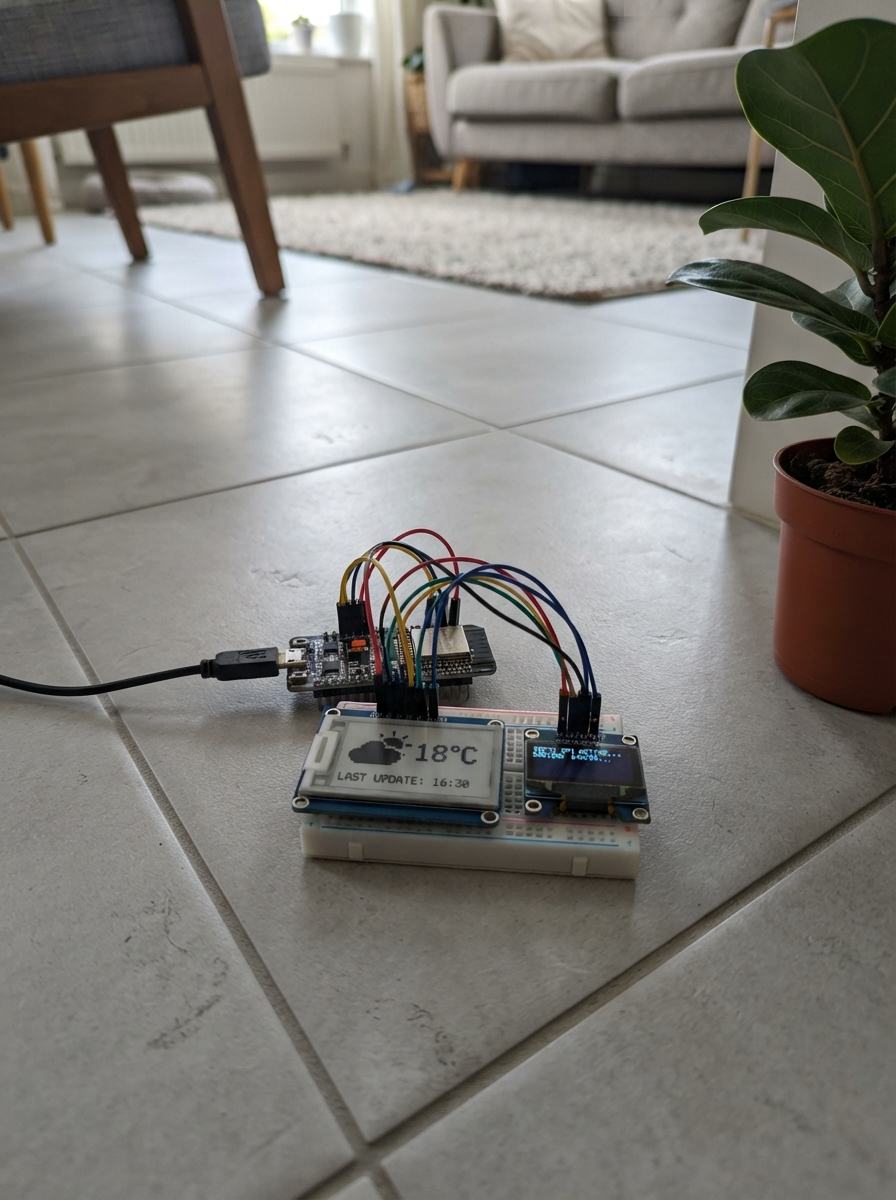
This project builds a dual-display notification hub using an ESP32 microcontroller paired with a Waveshare 2.13-inch e-Paper display and an SSD1306 OLED screen. The e-Paper shows persistent information with minimal power draw, while the OLED provides real-time updates. Notifications arrive via HTTP requests with token authentication, allowing remote systems to push alerts to the displays.
The guide includes a complete wiring diagram for connecting both displays to the ESP32, a full parts list, Arduino firmware with WiFi and web server capabilities, and step-by-step assembly instructions. Builders will learn how to manage multiple SPI devices, handle incoming notifications, and create a custom dashboard that bridges mobile and desktop notifications to physical displays.
Wiring diagram
Gather all the parts
Assemble it in 5 steps
1. Disconnect USB before wiring
Use the assembled Waveshare HAT (B) V4, not a bare ribbon panel. Check the V4 label and red/black/white panel.
2. Connect power
Connect VCC to ESP32 3V3 and GND to GND.
- Do not connect VCC or any signal to 5V in this circuit. Incorrect power can damage the ESP32.
3. Connect screen signals
Connect DIN to GPIO23 (data), CLK to GPIO18 (clock), CS to GPIO27 (select), DC to GPIO26 (command or data), RST to GPIO25 (reset), and BUSY to GPIO33 (screen ready signal).
- Read pin labels rather than relying on cable colors. Keep wires under 20 cm. The HAT does not plug directly onto the ESP32.
4. Set up Android forwarding
Follow src/SETUP.md to configure MacroDroid on Android. Keep the phone and ESP32 on the same home Wi-Fi. Plug the ESP32 into USB and press Deploy.
- Use only trusted private Wi-Fi. Notification text and the shared secret travel unencrypted on the local network. The screen can retain private messages after power is removed.
5. Wire the additional SPI OLED with USB unplugged
Assumes a common SSD1306 128x64 seven-pin OLED. Connect GND to GND, VCC to 3V3, D0 to GPIO14 (clock), D1 to GPIO13 (data), RES to GPIO21 (reset), DC to GPIO22 (command or data), and CS to GPIO32 (select). Existing e-paper wires stay unchanged. Reconnect USB and press Deploy. The OLED shows UTC date and time, weekday and week number, Wi-Fi ONLINE/OFFLINE status, the latest notification, and the display IP address. Time is synchronized over the internet; until synchronization it shows Waiting for time. ONLINE means connected to Wi-Fi, not proof that the phone forwarding app is running.
- Use 3.3V power and logic only. Seven pins alone do not identify the controller; an SH1106 or other OLED needs a different driver.
- The e-paper shows only wallpaper on a black background. All four pictures rotate once per minute and fill the full display by cropping edges. Notifications stay on the OLED.
Review all connections
1. Connections between "epaper" and "ESP32"
2. Connections between "oled" and "ESP32"
Deploy the firmware
#include <Arduino.h>
#include <WiFi.h>
#include <time.h>
#include <WebServer.h>

#include <GxEPD2_3C.h>
#include <SPI.h>
#include <Adafruit_SSD1306.h>
Adafruit_SSD1306 oled(128,64,13,14,22,21,32);
bool oledReady=false;
String oledView;
#include "config.h"
#include "dashboard.h"
#include "picture1.h"
#include "picture2.h"
#include "picture3.h"
#include "picture4.h"
GxEPD2_3C<GxEPD2_213_Z98c, GxEPD2_213_Z98c::HEIGHT> screen(GxEPD2_213_Z98c(27,26,25,33));
String lastView;
WebServer server(80);
String pendingApp="ANDROID READY", pendingTitle="Send a notification", pendingBody;
bool pending=true, hadNotification=false;
uint32_t lastRefresh=0, lastReceived=0;
void receiveNotification(){
 if(server.header("Authorization") != String("Bearer ")+BRIDGE_TOKEN){server.send(401,"text/plain","Unauthorized");return;}
 String payload=server.arg("plain");
 if(payload.length()>2048){server.send(413,"text/plain","Too long");return;}
 int first=payload.indexOf('\n'), second=payload.indexOf('\n',first+1);
 if(first<1 || second<0){server.send(400,"text/plain","Use app, title, body on separate lines");return;}
 pendingApp=payload.substring(0,first); pendingTitle=payload.substring(first+1,second); pendingBody=payload.substring(second+1);
 lastReceived=millis(); hadNotification=true; pending=true;
 server.send(202,"text/plain","Notification queued");
}
uint32_t lastWifiAttempt=0;
int lastWifiStatus=-1;
String clean(String s) {
 for(size_t i=0;i<s.length();i++) if((uint8_t)s[i]<32 || (uint8_t)s[i]>126) s.setCharAt(i,' ');
 return s;
}
const uint16_t* pictures[]={PICTURE1_DATA,PICTURE2_DATA,PICTURE3_DATA,PICTURE4_DATA};
uint8_t pictureIndex=0;
uint32_t pictureSince=0;
void drawPicture(int height){
 const uint16_t* data=pictures[pictureIndex];
 // Trim black padding and center-crop to fill the entire artwork area.
 int top=250,bottom=-1,leftEdge=122,rightEdge=-1;
 for(int y=0;y<250;y++) for(int x=0;x<122;x++)
  if(pgm_read_word(data+y*122+x)!=0){
   top=min(top,y);bottom=max(bottom,y);
   leftEdge=min(leftEdge,x);rightEdge=max(rightEdge,x);
  }
 if(bottom<top){top=0;bottom=249;leftEdge=0;rightEdge=121;}
 int sourceW=rightEdge-leftEdge+1,sourceH=bottom-top+1;
 float scale=max(122.0f/sourceW,float(height)/sourceH);
 int width=max(1,int(sourceW*scale)),drawH=max(1,int(sourceH*scale));
 int offsetX=(122-width)/2,offsetY=(height-drawH)/2;
 for(int y=0;y<drawH;y++) for(int x=0;x<width;x++){
  int sx=constrain(leftEdge+int(x/scale),leftEdge,rightEdge);
  int sy=constrain(top+int(y/scale),top,bottom);
  uint16_t c=pgm_read_word(data+sy*122+sx);
  int r=((c>>11)&31)*255/31,g=((c>>5)&63)*255/63,b=(c&31)*255/31;
  // Ordered halftoning preserves grey details using real black/white pixels.
  // Keep saturated warm highlights red; lift neutral details for this panel.
  static const uint8_t bayer[4][4]={{0,8,2,10},{12,4,14,6},{3,11,1,9},{15,7,13,5}};
  int luminance=(r*54+g*183+b*19)/256;
  int threshold=48+bayer[y&3][x&3]*11;
  bool red=(r>70 && r>g*1.4 && r>b*1.25);
  uint16_t ink=red?GxEPD_RED:(luminance>threshold?GxEPD_WHITE:GxEPD_BLACK);
  if(offsetX+x>=0 && offsetX+x<122 && offsetY+y>=0 && offsetY+y<height)
   screen.drawPixel(offsetX+x,offsetY+y,ink);
 }
}
void updateOled(){
 if(!oledReady)return;
 time_t now=time(nullptr);
 struct tm t;
 char clockText[24]="--:-- UTC",dateText[24]="Waiting for time",weekText[24]="";
 if(now>1700000000 && gmtime_r(&now,&t)){
  strftime(clockText,sizeof(clockText),"%H:%M UTC",&t);
  strftime(dateText,sizeof(dateText),"%d %b %Y",&t);
  strftime(weekText,sizeof(weekText),"%a  Week %V",&t);
 }
 String status=WiFi.status()==WL_CONNECTED?"ONLINE":"OFFLINE";
 String app=clean(pendingApp).substring(0,21);
 String title=clean(pendingTitle).substring(0,21);
 String body=clean(pendingBody).substring(0,42);
 String key=String(clockText)+dateText+weekText+status+app+title+body;
 if(key==oledView)return;
 oled.clearDisplay();oled.setTextSize(1);oled.setTextColor(SSD1306_WHITE);
 oled.setTextWrap(false);
 oled.setCursor(0,0);oled.print(clockText);
 oled.setCursor(86,0);oled.print(status);
 oled.setCursor(0,8);oled.print(dateText);
 oled.setCursor(0,16);oled.print(weekText);
 oled.setCursor(0,24);oled.print(app);
 oled.setCursor(0,32);oled.print(title);
 oled.setCursor(0,40);oled.print(body.substring(0,21));
 oled.setCursor(0,48);oled.print(body.substring(21,42));
 oled.setCursor(0,56);
 if(WiFi.status()==WL_CONNECTED)oled.print(WiFi.localIP());
 else oled.print("Reconnecting Wi-Fi...");
 oled.display();oledView=key;
}
void showWallpaper(){
 String key=String(pictureIndex);
 if(key==lastView)return;
 screen.init(115200,true,2,false);
 screen.setRotation(0);screen.setFullWindow();screen.firstPage();
 do{
  screen.fillScreen(GxEPD_BLACK);
  drawPicture(250);
 }while(screen.nextPage());
 screen.hibernate();lastView=key;
}
void setup(){
 Serial.begin(115200);
 pinMode(27,OUTPUT);digitalWrite(27,HIGH);
 pinMode(26,OUTPUT);pinMode(25,OUTPUT);digitalWrite(25,HIGH);
 SPI.begin(18,-1,23,27);
 oledReady=oled.begin(SSD1306_SWITCHCAPVCC);
 if(!oledReady) Serial.println("OLED buffer allocation failed");
 WiFi.mode(WIFI_STA); WiFi.setAutoReconnect(true);
 WiFi.begin(WIFI_SSID,WIFI_PASSWORD);
 configTime(0,0,"pool.ntp.org","time.nist.gov");
 const char* headers[]={"Authorization"};
 server.collectHeaders(headers,1);
 server.on("/notify",HTTP_POST,receiveNotification);
 server.on("/",HTTP_GET,[]{server.sendHeader("Cache-Control","no-store");server.send_P(200,"text/html",DASHBOARD_HTML);});
 server.begin();
 lastWifiAttempt=millis();
 Serial.printf("Connecting to Wi-Fi: %s\n", WIFI_SSID);
 updateOled();
 showWallpaper();
 pictureSince=millis();
}
void loop(){
 int status=WiFi.status();
 if(status!=lastWifiStatus){
  Serial.printf("Wi-Fi status: %d (3=connected, 1=network not found, 4=connection failed, 6=disconnected)\n",status);
  if(status==WL_CONNECTED) Serial.printf("Wi-Fi connected. IP: %s\n",WiFi.localIP().toString().c_str());
  lastWifiStatus=status;
 }
 if(status!=WL_CONNECTED){
  if(millis()-lastWifiAttempt>=30000){WiFi.reconnect();lastWifiAttempt=millis();}
 }else server.handleClient();
 if(!hadNotification && pending) pendingBody="IP: "+WiFi.localIP().toString();
 // Notifications never refresh the e-paper; the OLED retains the latest one.
 pending=false;
 updateOled();
 if(millis()-pictureSince>=60000){
  pictureIndex=(pictureIndex+1)%4;
  showWallpaper();
  pictureSince=millis();
 }
 delay(20);
}
Remix this project
Make it yours in one click
Open a full copy of this project in your own Schematik workspace, diagram, code, parts, and assembly steps included. Swap the sensor, add features, or redesign the whole thing with AI. The author's original stays untouched.