Community project
ESP32 Flight Radar Tracker
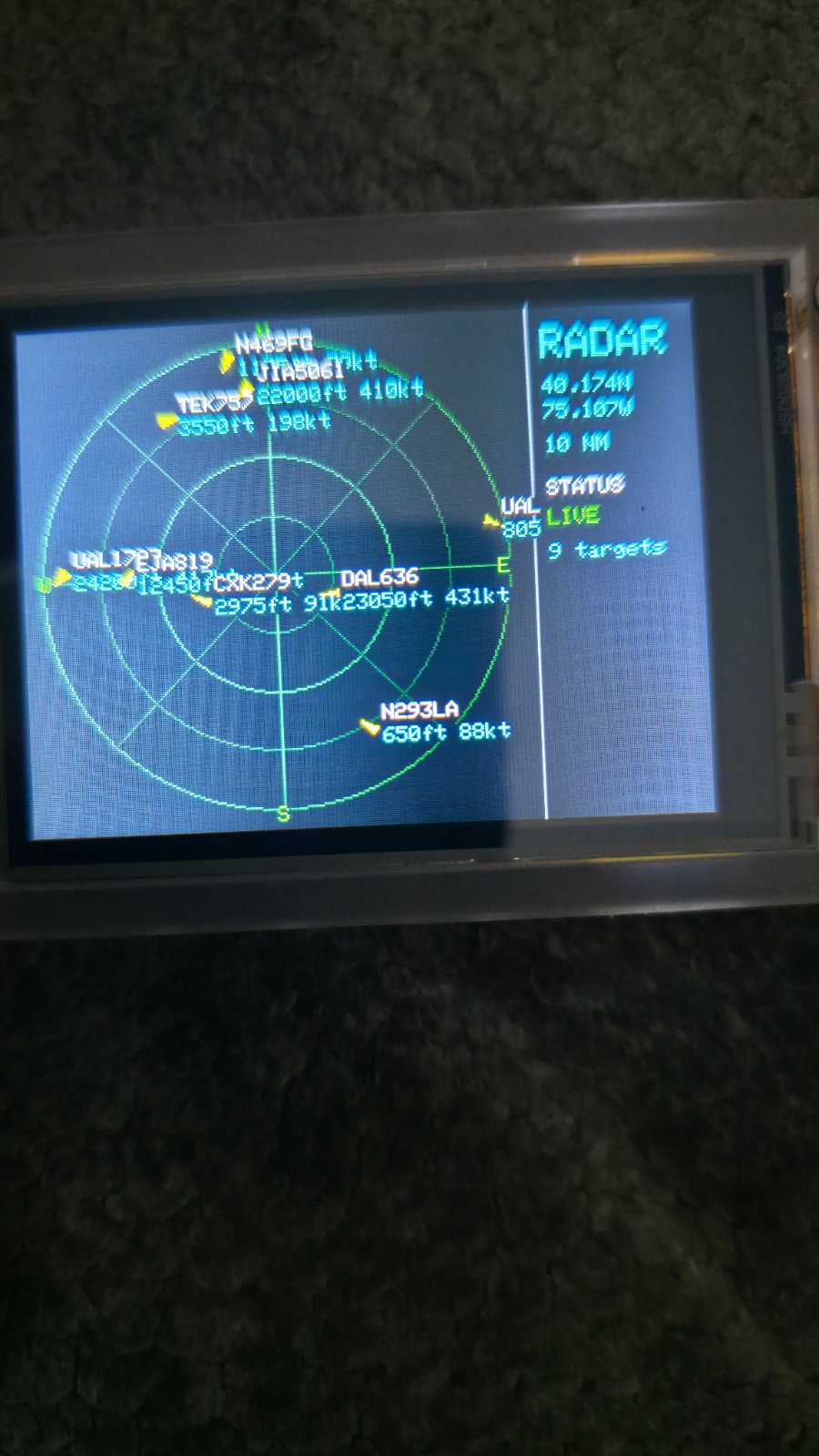
This project turns an ESP32 into a real-time flight radar display that shows aircraft in the surrounding airspace. The tracker connects to WiFi, queries live aircraft data, and renders a radar-style visualization on the integrated display with bearing, distance, altitude, and callsign information for each detected aircraft.
The guide includes a complete parts list, wiring diagram for the display and power connections, and step-by-step assembly instructions. Builders will receive the full Arduino firmware with WiFi configuration, aircraft data fetching, radar rendering, and status indicators—just add WiFi credentials and set your location coordinates to start tracking nearby flights.
Wiring diagram
Assemble it in 2 steps
1. Use the integrated display board
This project uses the ESP32-2432S028R Cheap Yellow Display as supplied. Its ILI9341 screen is already wired on the circuit board, so do not add jumper wires to the TFT, touchscreen, microSD slot, speaker, or RGB LED.
- Keep the board on a non-conductive surface or mount it in an enclosure with the screen facing outward.
- The radar center is fixed in the firmware at 40.174, -75.107 with a 50 nautical-mile radius.
- Use only a known-good USB data/power cable and a normal 5 V USB supply.
- Do not power any GPIO pin from 5 V; ESP32 input/output logic is 3.3 V.
2. Provide USB power
Connect the Cheap Yellow Display's USB connector to a stable USB power source. The board and its built-in display receive power through that connector.
- For a permanent installation, use a USB supply rated for at least 1 A.
- The board must be within range of the Wi-Fi network entered in the firmware.
- Do not connect a second power supply to the board while it is USB-powered unless you have designed a safe common-ground power arrangement.
Deploy the firmware
#include <Arduino.h>
#include <WiFi.h>
#include <WiFiClientSecure.h>
#include <HTTPClient.h>
#include <ArduinoJson.h>
#include <SPI.h>
#include <Adafruit_GFX.h>
#include <Adafruit_ILI9341.h>
#include <math.h>

struct Aircraft {
  float bearing;
  float distanceNm;
  float track;
  int altitudeFt;
  int groundSpeedKt;
  char callsign[10];
  char airline[19];
};

// Forward declarations
float radiansf(float degrees);
float nauticalMiles(float lat1, float lon1, float lat2, float lon2);
float bearingDegrees(float lat1, float lon1, float lat2, float lon2);
void drawRadarFrame();
void drawRadarGrid();
void drawStatus();
void drawAircraft();
void render();
bool fetchAircraft();
void connectWiFi();
void updateBackLed();
void setBackLed(bool redOn, bool greenOn, bool blueOn);

// Enter your network details before deploying. Do not share them in chat.
const char *WIFI_SSID = "your-wifi-here";
const char *WIFI_PASSWORD = "your-wifi-password";

constexpr float CENTER_LAT = 40.174f;
constexpr float CENTER_LON = -75.107f;
// A 10-NM, capped request fits the CYD's available RAM reliably.
constexpr int RANGE_NM = 10;
constexpr uint32_t POLL_INTERVAL_MS = 10000;
constexpr int MAX_AIRCRAFT = 24;

// Fixed, built-in TFT wiring on the ESP32-2432S028R Cheap Yellow Display.
constexpr int PIN_TFT_CS = 15;
constexpr int PIN_TFT_DC = 2;
constexpr int PIN_TFT_SCLK = 14;
constexpr int PIN_TFT_MOSI = 13;
constexpr int PIN_TFT_MISO = 12;
constexpr int PIN_TFT_BACKLIGHT = 21;

// Built-in rear RGB LED: common-anode, so LOW turns each color channel on.
constexpr int PIN_LED_RED = 4;
constexpr int PIN_LED_GREEN = 16;
constexpr int PIN_LED_BLUE = 17;
constexpr uint32_t LED_COLOR_INTERVAL_MS = 1000;

SPIClass tftSPI(HSPI);
Adafruit_ILI9341 tft(&tftSPI, PIN_TFT_DC, PIN_TFT_CS);

Aircraft aircraft[MAX_AIRCRAFT];
int aircraftCount = 0;
uint32_t lastPoll = 0;
uint32_t lastWifiAttempt = 0;
uint32_t lastLedColorChange = 0;
uint8_t ledColorIndex = 0;
String statusLine = "Starting";

void setBackLed(bool redOn, bool greenOn, bool blueOn) {
  digitalWrite(PIN_LED_RED, redOn ? LOW : HIGH);
  digitalWrite(PIN_LED_GREEN, greenOn ? LOW : HIGH);
  digitalWrite(PIN_LED_BLUE, blueOn ? LOW : HIGH);
}

void updateBackLed() {
  if (millis() - lastLedColorChange < LED_COLOR_INTERVAL_MS) return;
  lastLedColorChange = millis();
  switch (ledColorIndex++ % 6) {
    case 0: setBackLed(true,  false, false); break; // Red
    case 1: setBackLed(false, true,  false); break; // Green
    case 2: setBackLed(false, false, true);  break; // Blue
    case 3: setBackLed(false, true,  true);  break; // Cyan
    case 4: setBackLed(true,  false, true);  break; // Magenta
    default:setBackLed(true,  true,  false); break; // Yellow
  }
}

float radiansf(float degrees) { return degrees * DEG_TO_RAD; }

float nauticalMiles(float lat1, float lon1, float lat2, float lon2) {
  const float dLat = radiansf(lat2 - lat1);
  const float dLon = radiansf(lon2 - lon1);
  const float a = sinf(dLat / 2) * sinf(dLat / 2) +
                  cosf(radiansf(lat1)) * cosf(radiansf(lat2)) *
                  sinf(dLon / 2) * sinf(dLon / 2);
  return 3440.065f * 2.0f * atan2f(sqrtf(a), sqrtf(1.0f - a));
}

float bearingDegrees(float lat1, float lon1, float lat2, float lon2) {
  const float dLon = radiansf(lon2 - lon1);
  const float y = sinf(dLon) * cosf(radiansf(lat2));
  const float x = cosf(radiansf(lat1)) * sinf(radiansf(lat2)) -
                  sinf(radiansf(lat1)) * cosf(radiansf(lat2)) * cosf(dLon);
  float bearing = atan2f(y, x) * RAD_TO_DEG;
  return bearing < 0 ? bearing + 360.0f : bearing;
}

void drawRadarGrid() {
  const int cx = 119, cy = 120;
  const uint16_t grid = tft.color565(0, 72, 20);
  const uint16_t dim = tft.color565(0, 38, 12);
  tft.drawCircle(cx, cy, 110, grid);
  tft.drawCircle(cx, cy, 82, dim);
  tft.drawCircle(cx, cy, 55, grid);
  tft.drawCircle(cx, cy, 27, dim);
  tft.drawLine(cx - 110, cy, cx + 110, cy, grid);
  tft.drawLine(cx, cy - 110, cx, cy + 110, grid);
  tft.drawLine(cx - 78, cy - 78, cx + 78, cy + 78, dim);
  tft.drawLine(cx + 78, cy - 78, cx - 78, cy + 78, dim);
}

void drawRadarFrame() {
  tft.fillScreen(ILI9341_BLACK);
  drawRadarGrid();
  const int cx = 119, cy = 120;
  tft.setTextSize(1); tft.setTextColor(ILI9341_GREEN, ILI9341_BLACK);
  tft.setCursor(116, 4); tft.print("N");
  tft.setCursor(224, 117); tft.print("E");
  tft.setCursor(116, 229); tft.print("S");
  tft.setCursor(8, 117); tft.print("W");
  tft.drawFastVLine(241, 0, 240, ILI9341_DARKGREY);
  tft.setTextColor(ILI9341_CYAN, ILI9341_BLACK); tft.setTextSize(2);
  tft.setCursor(248, 10); tft.print("RADAR");
  tft.setTextSize(1);
  tft.setCursor(248, 34); tft.print("40.174N");
  tft.setCursor(248, 46); tft.print("75.107W");
  tft.setCursor(248, 62); tft.print(RANGE_NM); tft.print(" NM");
}

void drawStatus() {
  tft.fillRect(244, 80, 75, 54, ILI9341_BLACK);
  tft.setTextSize(1); tft.setTextColor(ILI9341_WHITE, ILI9341_BLACK);
  tft.setCursor(248, 82); tft.print("STATUS");
  tft.setTextColor(WiFi.status() == WL_CONNECTED ? ILI9341_GREEN : ILI9341_ORANGE, ILI9341_BLACK);
  tft.setCursor(248, 96); tft.print(statusLine.substring(0, 12));
  tft.setTextColor(ILI9341_CYAN, ILI9341_BLACK);
  tft.setCursor(248, 112); tft.print(aircraftCount); tft.print(" targets");
}

void drawAircraft() {
  const int cx = 119, cy = 120;
  const float pixelsPerNm = 110.0f / RANGE_NM;
  for (int i = 0; i < aircraftCount; ++i) {
    const float angle = radiansf(aircraft[i].bearing - 90.0f);
    const int x = cx + (int)(cosf(angle) * aircraft[i].distanceNm * pixelsPerNm);
    const int y = cy + (int)(sinf(angle) * aircraft[i].distanceNm * pixelsPerNm);
    const float heading = radiansf(aircraft[i].track - 90.0f);
    tft.fillTriangle(x + (int)(cosf(heading) * 6), y + (int)(sinf(heading) * 6),
                     x + (int)(cosf(heading + 2.55f) * 4), y + (int)(sinf(heading + 2.55f) * 4),
                     x + (int)(cosf(heading - 2.55f) * 4), y + (int)(sinf(heading - 2.55f) * 4), ILI9341_YELLOW);
    tft.setTextSize(1); tft.setTextColor(ILI9341_WHITE, ILI9341_BLACK);
    tft.setCursor(x + 6, y - 10); tft.print(aircraft[i].callsign);
    tft.setTextColor(ILI9341_CYAN, ILI9341_BLACK);
    tft.setCursor(x + 6, y + 1);
    if (aircraft[i].altitudeFt >= 0) {
      tft.print(aircraft[i].altitudeFt);
      tft.print("ft ");
    } else {
      tft.print("ALT-- ");
    }
    if (aircraft[i].groundSpeedKt >= 0) {
      tft.print(aircraft[i].groundSpeedKt);
      tft.print("kt");
    } else {
      tft.print("SPD--");
    }
    if (aircraft[i].airline[0]) {
      tft.setTextColor(ILI9341_CYAN, ILI9341_BLACK);
      tft.setCursor(x + 6, y + 12);
      tft.print(aircraft[i].airline);
    }
  }
}

void render() {
  drawRadarFrame();
  drawAircraft();
  drawStatus();
}

bool fetchAircraft() {
  // The server-side limit reduces both download size and peak RAM use.
  // ADSB.lol's point endpoint accepts only latitude, longitude, and radius.
  // Adding unsupported query parameters makes the service return HTTP 400.
  const String url = "https://api.adsb.lol/v2/point/40.174/-75.107/10";
  JsonDocument filter;
  filter["ac"][0]["lat"] = true;
  filter["ac"][0]["lon"] = true;
  filter["ac"][0]["track"] = true;
  filter["ac"][0]["alt_baro"] = true;
  filter["ac"][0]["gs"] = true;
  filter["ac"][0]["flight"] = true;
  filter["ac"][0]["ownOp"] = true;
  filter["ac"][0]["hex"] = true;

  // HTTPClient decodes chunked transfer encoding when getString() is used.
  // Parsing its raw stream can otherwise end at a chunk boundary.
  for (int attempt = 0; attempt < 2; ++attempt) {
    WiFiClientSecure client;
    client.setInsecure();
    client.setTimeout(45);
    HTTPClient http;
    http.setTimeout(45000);
    http.setReuse(false);
    http.addHeader("Accept", "application/json");
    http.addHeader("Accept-Encoding", "identity");
    http.addHeader("Connection", "close");
    http.addHeader("User-Agent", "CYD-Flight-Radar/1.0");
    if (!http.begin(client, url)) { statusLine = "HTTP setup err"; return false; }

    const int code = http.GET();
    if (code != HTTP_CODE_OK) {
      statusLine = "HTTP " + String(code);
      http.end();
      return false;
    }

    // getString() uses HTTPClient's decoded response path. getStreamPtr()
    // exposes the raw chunked TLS stream, which caused IncompleteInput.
    String payload = http.getString();
    http.end();
    if (payload.length() == 0) {
      statusLine = "Feed empty";
      if (attempt == 0) { delay(1000); continue; }
      return false;
    }

    JsonDocument doc;
    DeserializationError error = deserializeJson(doc, payload, DeserializationOption::Filter(filter));
    if (error) {
      if (attempt == 0 && error == DeserializationError::IncompleteInput) {
        statusLine = "Feed retry";
        delay(1000);
        continue;
      }
      statusLine = String("JSON ") + error.c_str();
      return false;
    }

    aircraftCount = 0;
    JsonArray list = doc["ac"].as<JsonArray>();
    for (JsonObject item : list) {
      if (aircraftCount >= MAX_AIRCRAFT || item["lat"].isNull() || item["lon"].isNull()) continue;
      const float distance = nauticalMiles(CENTER_LAT, CENTER_LON, item["lat"].as<float>(), item["lon"].as<float>());
      if (distance > RANGE_NM) continue;
      Aircraft &a = aircraft[aircraftCount++];
      a.distanceNm = distance;
      a.bearing = bearingDegrees(CENTER_LAT, CENTER_LON, item["lat"].as<float>(), item["lon"].as<float>());
      a.track = item["track"] | 0.0f;
      a.altitudeFt = item["alt_baro"].is<int>() ? item["alt_baro"].as<int>() : -1;
      a.groundSpeedKt = item["gs"].is<float>() ? (int)lroundf(item["gs"].as<float>()) : -1;
      const char *flight = item["flight"].as<const char *>();
      if (!flight || !flight[0]) flight = item["hex"] | "UNKNOWN";
      snprintf(a.callsign, sizeof(a.callsign), "%.9s", flight);
      for (char *p = a.callsign; *p; ++p) if (*p == ' ') *p = '\0';
      const char *operatorName = item["ownOp"] | "";
      snprintf(a.airline, sizeof(a.airline), "%.18s", operatorName);
    }
    statusLine = "LIVE";
    return true;
  }
  return false;
}

void connectWiFi() {
  if (WiFi.status() == WL_CONNECTED || millis() - lastWifiAttempt < 10000) return;
  lastWifiAttempt = millis();
  if (String(WIFI_SSID) == "YOUR_WIFI_NAME") { statusLine = "Set WiFi"; return; }
  statusLine = "WiFi connect";
  WiFi.mode(WIFI_STA);
  WiFi.begin(WIFI_SSID, WIFI_PASSWORD);
}

void setup() {
  pinMode(PIN_TFT_BACKLIGHT, OUTPUT);
  digitalWrite(PIN_TFT_BACKLIGHT, HIGH);
  pinMode(PIN_LED_RED, OUTPUT);
  pinMode(PIN_LED_GREEN, OUTPUT);
  pinMode(PIN_LED_BLUE, OUTPUT);
  setBackLed(true, false, false);
  tftSPI.begin(PIN_TFT_SCLK, PIN_TFT_MISO, PIN_TFT_MOSI, PIN_TFT_CS);
  tft.begin();
  tft.setRotation(1);
  drawRadarFrame();
  drawStatus();
  connectWiFi();
}

void loop() {
  updateBackLed();
  connectWiFi();
  if (WiFi.status() == WL_CONNECTED && (lastPoll == 0 || millis() - lastPoll >= POLL_INTERVAL_MS)) {
    lastPoll = millis();
    fetchAircraft();
    render();
  }
  delay(20);
}
Remix this project
Make it yours in one click
Open a full copy of this project in your own Schematik workspace — diagram, code, parts, and assembly steps included. Swap the sensor, add features, or redesign the whole thing with AI. The author's original stays untouched.