Community project
ESP32-S3 serial wifi+ble scanner id
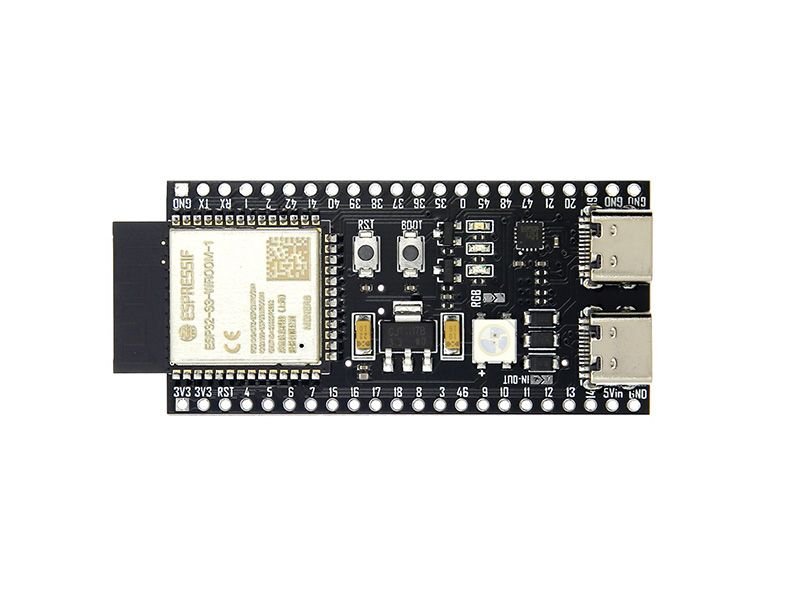
This ESP32-S3 project scans and identifies nearby Wi-Fi networks and Bluetooth Low Energy devices, reporting signal strength, estimated distance, and security details over a serial connection. The guide includes a complete parts list, wiring diagram, and pre-built firmware that runs passive scans triggered by command input or the onboard BOOT button.
Readers will learn how to set up the ESP32-S3 for dual-mode wireless scanning, configure the serial interface for command control, and interpret real-time signal data. The firmware supports manual scans, automatic periodic scanning, temperature monitoring, and status reporting—all accessible through simple text commands sent via USB serial.
Wiring diagram
Assemble it in 2 steps
1. Place the ESP32 where it can receive Wi‑Fi
Set the ESP32-S3 development board on a non-metal surface with its antenna end clear of metal objects. This project uses the board’s built-in Wi‑Fi radio, so there are no loose parts or jumper wires to connect.
- Keep the board a short distance away from a metal PC case or large metal objects so the signal reading is more useful.
- Do not place the bare board on a conductive surface such as foil or loose metal parts — this can short its pins.
2. Connect the USB cable
Plug a data-capable USB cable into the board and your computer. The cable provides power and carries the scan results to Schematik’s device log; no external wiring is needed.
- If the board does not appear connected, try another USB cable because some cables provide power only.
- Use the USB connector on the board; do not connect power to loose pins while USB is plugged in.
Deploy the firmware
#include <ctype.h>
#include <stdio.h>
#include <string.h>
#include "esp_err.h"
#include "esp_event.h"
#include "esp_netif.h"
#include "esp_timer.h"
#include "esp_wifi.h"
#include "nvs_flash.h"
#include "driver/gpio.h"
#include "driver/temperature_sensor.h"
#include "freertos/FreeRTOS.h"
#include "freertos/task.h"
#include "nimble/nimble_port.h"
#include "nimble/nimble_port_freertos.h"
#include "host/ble_gap.h"
#include "host/ble_hs.h"
#define BOOT GPIO_NUM_0
#define AUTO_US 20000000LL
#define BLE_MS 5000
static temperature_sensor_handle_t ts;static int64_t lw,lb;static bool aut=true,ws,bs,br;static char cmd[48];static size_t cn;
static void bar(void){printf("------------------------------------------------------------\n");}
static const char*sig(int x){return x>=-50?"sangat kuat":x>=-67?"kuat":x>=-75?"cukup":"lemah";}
static const char*jarak(int x){return x>=-45?"sangat dekat (~1-2 m)":x>=-60?"dekat (~2-5 m)":x>=-70?"sedang (~5-10 m)":"jauh (>10 m)";}
static const char*sec(wifi_auth_mode_t x){switch(x){case WIFI_AUTH_OPEN:return"terbuka";case WIFI_AUTH_WEP:return"WEP";case WIFI_AUTH_WPA_PSK:return"WPA";case WIFI_AUTH_WPA2_PSK:return"WPA2";case WIFI_AUTH_WPA_WPA2_PSK:return"WPA/WPA2";case WIFI_AUTH_WPA3_PSK:return"WPA3";case WIFI_AUTH_WPA2_WPA3_PSK:return"WPA2/WPA3";default:return"lainnya";}}
static void help(void){bar();printf("PERINTAH: SCAN | BLESCAN | TEMP | STATUS | AUTO ON | AUTO OFF | HELP\nTombol BOOT memulai scan Wi-Fi manual.\n");bar();}
static void temp(void){float c;if(!ts||temperature_sensor_get_celsius(ts,&c)!=ESP_OK)printf("Suhu chip tidak tersedia.\n");else printf("Suhu internal chip: %.1f C\nCatatan: ini suhu di dalam ESP32, bukan suhu ruangan yang akurat.\n",c);}
static void wscan(void){if(ws||bs)return;ws=true;bar();printf("Memindai jaringan Wi-Fi, tunggu sebentar...\n");wifi_scan_config_t c={0};esp_err_t e=esp_wifi_scan_start(&c,true);if(e!=ESP_OK){printf("Scan Wi-Fi gagal: %s\n",esp_err_to_name(e));ws=false;return;}uint16_t n=0;esp_wifi_scan_get_ap_num(&n);if(!n)printf("Tidak ada jaringan Wi-Fi ditemukan.\n");else{static wifi_ap_record_t a[20];uint16_t z=n>20?20:n;esp_wifi_scan_get_ap_records(&z,a);printf("Ditemukan %u jaringan Wi-Fi%s:\n",n,n>z?" (20 pertama ditampilkan)":"");for(uint16_t i=0;i<z;i++)printf("%2u. %-28s %4d dBm  %-10s %-12s %s\n",i+1,a[i].ssid[0]?(char*)a[i].ssid:"<jaringan tersembunyi>",a[i].rssi,sec(a[i].authmode),sig(a[i].rssi),jarak(a[i].rssi));}lw=esp_timer_get_time();ws=false;printf("Selesai. Ketik HELP untuk melihat perintah.\n");bar();}
static int gap(struct ble_gap_event*e,void*p){if(e->type==BLE_GAP_EVENT_DISC){const struct ble_gap_disc_desc*d=&e->disc;struct ble_hs_adv_fields f;char name[33]="<tanpa nama>";if(ble_hs_adv_parse_fields(&f,d->data,d->length_data)==0&&f.name&&f.name_len){size_t n=f.name_len<32?f.name_len:32;memcpy(name,f.name,n);name[n]=0;}printf("BLE: %-24s %02X:%02X:%02X:%02X:%02X:%02X  %d dBm  %s\n",name,d->addr.val[5],d->addr.val[4],d->addr.val[3],d->addr.val[2],d->addr.val[1],d->addr.val[0],d->rssi,jarak(d->rssi));}else if(e->type==BLE_GAP_EVENT_DISC_COMPLETE){bs=false;lb=esp_timer_get_time();printf("Pemindaian BLE selesai.\n");bar();}return 0;}
static void synced(void){uint8_t addr;if(ble_hs_id_infer_auto(0,&addr)==0){br=true;printf("BLE siap. Ketik BLESCAN untuk memindai perangkat di sekitar.\n");}else printf("BLE tidak dapat menentukan alamat radio.\n");}
static void host_task(void*x){nimble_port_run();nimble_port_freertos_deinit();}
static void bscan(void){if(bs||ws)return;bar();if(!br){printf("BLE belum siap. Tunggu sebentar lalu kirim BLESCAN lagi.\n");bar();return;}uint8_t addr;int r=ble_hs_id_infer_auto(0,&addr);if(r){printf("BLE tidak dapat mulai scan (kode %d).\n",r);bar();return;}struct ble_gap_disc_params p={0};p.filter_duplicates=1;p.passive=1;printf("Memindai perangkat BLE selama 5 detik...\n");bs=true;r=ble_gap_disc(addr,BLE_MS,&p,gap,NULL);if(r){bs=false;printf("BLE tidak dapat memulai scan (kode %d).\n",r);bar();}}
static void stat(void){int64_t n=esp_timer_get_time();bar();printf("STATUS ESP32 WI-FI + BLE SCANNER\nScan Wi-Fi otomatis: %s\n",aut?"aktif (setiap 20 detik)":"mati");if(lw)printf("Scan Wi-Fi terakhir: %lld detik lalu.\n",(long long)((n-lw)/1000000));else printf("Scan Wi-Fi terakhir: belum pernah.\n");if(lb)printf("Scan BLE terakhir: %lld detik lalu.\n",(long long)((n-lb)/1000000));else printf("Scan BLE terakhir: belum pernah.\n");printf("BLE saat ini: %s\n",bs?"sedang memindai":br?"siap":"sedang disiapkan");temp();bar();}
static void run(char*s){for(char*p=s;*p;p++)*p=toupper((unsigned char)*p);if(!strcmp(s,"SCAN"))wscan();else if(!strcmp(s,"BLESCAN"))bscan();else if(!strcmp(s,"TEMP"))temp();else if(!strcmp(s,"STATUS"))stat();else if(!strcmp(s,"AUTO ON")){aut=true;lw=esp_timer_get_time();printf("Scan Wi-Fi otomatis aktif: akan berjalan setiap 20 detik.\n");}else if(!strcmp(s,"AUTO OFF")){aut=false;printf("Scan Wi-Fi otomatis dimatikan.\n");}else if(!strcmp(s,"HELP")||!strcmp(s,"?"))help();else if(*s)printf("Perintah tidak dikenal. Ketik HELP untuk melihat perintah.\n");}
static void task(void*x){bool old=false;int64_t last=0;while(1){int c=getchar();if(c!=EOF){if(c=='\r'||c=='\n'){if(cn){cmd[cn]=0;run(cmd);cn=0;}}else if(c>=32&&c<=126&&cn<47)cmd[cn++]=c;}bool press=gpio_get_level(BOOT)==0;int64_t now=esp_timer_get_time();if(press&&!old&&now-last>250000){last=now;printf("Tombol BOOT ditekan: scan manual dimulai.\n");wscan();}old=press;if(aut&&!ws&&!bs&&now-lw>=AUTO_US)wscan();vTaskDelay(pdMS_TO_TICKS(10));}}
void app_main(void){ESP_ERROR_CHECK(nvs_flash_init());ESP_ERROR_CHECK(esp_netif_init());ESP_ERROR_CHECK(esp_event_loop_create_default());wifi_init_config_t w=WIFI_INIT_CONFIG_DEFAULT();ESP_ERROR_CHECK(esp_wifi_init(&w));ESP_ERROR_CHECK(esp_wifi_set_mode(WIFI_MODE_STA));ESP_ERROR_CHECK(esp_wifi_start());gpio_config_t g={.pin_bit_mask=1ULL<<BOOT,.mode=GPIO_MODE_INPUT,.pull_up_en=GPIO_PULLUP_ENABLE,.pull_down_en=GPIO_PULLDOWN_DISABLE,.intr_type=GPIO_INTR_DISABLE};ESP_ERROR_CHECK(gpio_config(&g));temperature_sensor_config_t t=TEMPERATURE_SENSOR_CONFIG_DEFAULT(-10,80);if(temperature_sensor_install(&t,&ts)==ESP_OK)temperature_sensor_enable(ts);ESP_ERROR_CHECK(nimble_port_init());ble_hs_cfg.sync_cb=synced;nimble_port_freertos_init(host_task);bar();printf("ESP32 WI-FI + BLE SCANNER VIA SERIAL (ESP-IDF NimBLE)\nAtur Serial Monitor ke 115200 baud dan kirim perintah diakhiri Enter.\n");help();wscan();xTaskCreate(task,"scanner_task",6144,NULL,5,NULL);}
Remix this project
Make it yours in one click
Open a full copy of this project in your own Schematik workspace — diagram, code, parts, and assembly steps included. Swap the sensor, add features, or redesign the whole thing with AI. The author's original stays untouched.