Community project
ESP32 Flight Radar Tracker
This project turns an ESP32 development board into a real-time flight radar display that tracks aircraft within a 15-mile radius of a home location. The all-in-one board includes a built-in TFT display, WiFi connectivity, and RGB status LED, making it a self-contained radar tracker that requires only USB power and internet access.
The guide provides a complete parts list, wiring diagram, and step-by-step assembly instructions. Firmware fetches live aircraft data from public aviation APIs, calculates distance and bearing to each aircraft, and renders them on a rotating radar sweep display. Personalize the home coordinates and WiFi credentials, then deploy to watch real planes fly overhead.
Wiring diagram
Assemble it in 3 steps
1. Inspect the all-in-one board
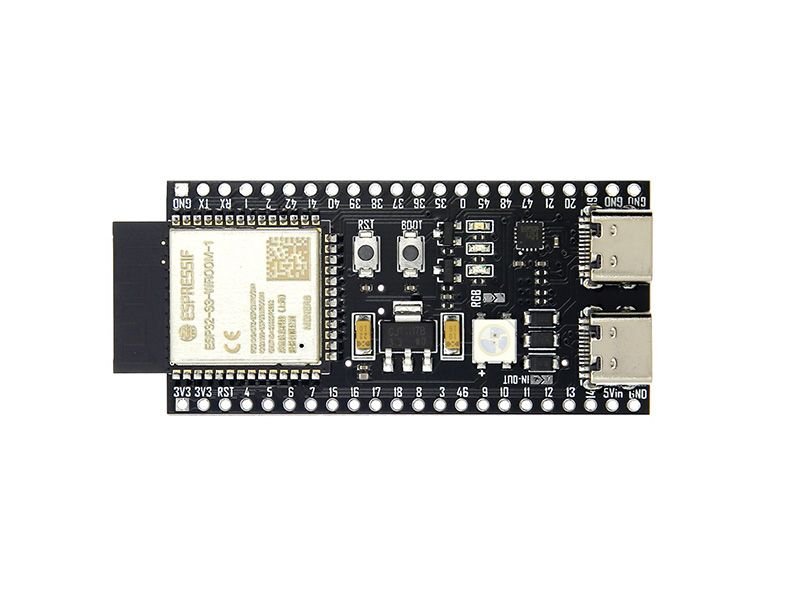
Use the ESP32-2432S028 / Cheap Yellow Display as supplied. Its ESP32, ILI9341 screen, touchscreen, backlight, and other onboard devices are already connected internally; do not add jumper wires to the display pins.
- Keep the protective screen film on until the first successful power-up, then remove it if desired.
- Do not connect external circuits to the display pins: GPIO 2, 12, 13, 14, 15, or 21; they are already used internally.
2. Provide USB power and internet access
Place the board where it can receive your normal 2.4 GHz Wi-Fi signal, then connect its USB connector to a suitable USB power source or your computer. The project uses the board's built-in Wi-Fi to obtain aircraft positions; no radio receiver module is needed.
- A clear view of the screen and a stable Wi-Fi signal are more important than the board's physical orientation.
- Use a regulated USB supply. Never apply power to more than one board power input at once.
3. Personalize and deploy the firmware
In the firmware, replace the two placeholder strings named WIFI_SSID and WIFI_PASSWORD with your Wi-Fi network name and password. The radar centre is already set to 40.174, -75.107 and the radius is 5 miles. Use Schematik's Deploy button to build and flash it.
- The display shows an explicit Wi-Fi or aircraft-data error message if it cannot retrieve the current list.
- The public ADS-B data service is receiver-based, so an empty radar can mean there are no reported aircraft in range, not necessarily a wiring fault.
Deploy the firmware
#include <Arduino.h>
#include <WiFi.h>
#include <HTTPClient.h>
#include <WiFiClientSecure.h>
#include <ArduinoJson.h>
#include <Arduino_GFX_Library.h>
#include <math.h>
#include <ctype.h>
#include <string.h>

struct Aircraft {
  float distanceKm;
  float bearingDeg;
  float trackDeg;
  int altitudeFt;
  int groundSpeedKt;
  char label[10];
  char operatorCode[16];
};

float greatCircleKm(double lat1, double lon1, double lat2, double lon2);
float initialBearing(double lat1, double lon1, double lat2, double lon2);
void drawAircraft(int x, int y, float track);
void drawAircraftPlots();
void drawSweepLine(float angleDeg, uint16_t color);
void drawRadar();
bool fetchAircraft();
void connectWiFi();
void setRearLed(bool redOn, bool greenOn, bool blueOn);

const char *WIFI_SSID = "Your_wifi";
const char *WIFI_PASSWORD = "Your_wifi_password";

constexpr double HOME_LAT = 40.174;
constexpr double HOME_LON = -75.107;
constexpr float RANGE_MILES = 15.0f;
constexpr float RANGE_KM = RANGE_MILES * 1.609344f;
constexpr uint32_t POLL_INTERVAL_MS = 10000;
constexpr uint32_t SWEEP_INTERVAL_MS = 50;  // 20 frames per second.
constexpr float SWEEP_DEGREES_PER_FRAME = 3.0f;
constexpr uint8_t MAX_PLOTS = 24;

// These pins are fixed internally on the ESP32-2432S028R board.
// Renamed to avoid conflicts with macros defined in the board/library headers.
constexpr int PIN_TFT_DC = 2;
constexpr int PIN_TFT_CS = 15;
constexpr int PIN_TFT_SCK = 14;
constexpr int PIN_TFT_MOSI = 13;
constexpr int PIN_TFT_MISO = 12;
constexpr int PIN_TFT_BACKLIGHT = 21;
// Built-in rear RGB LED: common-anode, therefore each channel is active-low.
constexpr int PIN_LED_RED = 4;
constexpr int PIN_LED_GREEN = 16;
constexpr int PIN_LED_BLUE = 17;

constexpr uint16_t C_BLACK = 0x0000;
constexpr uint16_t C_WHITE = 0xFFFF;
constexpr uint16_t C_YELLOW = 0xFFE0;
constexpr uint16_t C_RED = 0xF800;
constexpr uint16_t C_CYAN = 0x07FF;
constexpr uint16_t C_GREEN = 0x07E0;
constexpr uint16_t C_DARK_GREEN = 0x0320;
constexpr uint16_t C_GREY = 0x7BEF;

Arduino_DataBus *bus = new Arduino_ESP32SPI(PIN_TFT_DC, PIN_TFT_CS, PIN_TFT_SCK, PIN_TFT_MOSI, PIN_TFT_MISO, HSPI);
Arduino_GFX *gfx = new Arduino_ILI9341(bus, GFX_NOT_DEFINED, 1, false);

Aircraft aircraft[MAX_PLOTS];
uint8_t aircraftCount = 0;
uint32_t lastPoll = 0;
uint32_t lastSweep = 0;
float sweepAngleDeg = 0.0f;
String statusLine = "Starting...";

void setRearLed(bool redOn, bool greenOn, bool blueOn) {
  digitalWrite(PIN_LED_RED, redOn ? LOW : HIGH);
  digitalWrite(PIN_LED_GREEN, greenOn ? LOW : HIGH);
  digitalWrite(PIN_LED_BLUE, blueOn ? LOW : HIGH);
}

float greatCircleKm(double lat1, double lon1, double lat2, double lon2) {
  const double dLat = radians(lat2 - lat1);
  const double dLon = radians(lon2 - lon1);
  const double a = sin(dLat / 2.0) * sin(dLat / 2.0) +
                   cos(radians(lat1)) * cos(radians(lat2)) * sin(dLon / 2.0) * sin(dLon / 2.0);
  return (float)(6371.0 * 2.0 * atan2(sqrt(a), sqrt(1.0 - a)));
}

float initialBearing(double lat1, double lon1, double lat2, double lon2) {
  const double dLon = radians(lon2 - lon1);
  const double y = sin(dLon) * cos(radians(lat2));
  const double x = cos(radians(lat1)) * sin(radians(lat2)) -
                   sin(radians(lat1)) * cos(radians(lat2)) * cos(dLon);
  float bearing = degrees(atan2(y, x));
  return bearing < 0 ? bearing + 360.0f : bearing;
}

void drawAircraft(int x, int y, float track) {
  const float a = radians(track - 90.0f);
  const int tx = x + (int)(7 * cos(a));
  const int ty = y + (int)(7 * sin(a));
  const int lx = x + (int)(4 * cos(a + 2.45f));
  const int ly = y + (int)(4 * sin(a + 2.45f));
  const int rx = x + (int)(4 * cos(a - 2.45f));
  const int ry = y + (int)(4 * sin(a - 2.45f));
  gfx->drawLine(lx, ly, tx, ty, C_WHITE);
  gfx->drawLine(tx, ty, rx, ry, C_WHITE);
  gfx->drawLine(rx, ry, lx, ly, C_WHITE);
}

void drawSweepLine(float angleDeg, uint16_t color) {
  const int cx = 160;
  const int cy = 132;
  const int radius = 104;
  const float angle = radians(angleDeg - 90.0f);
  const int x = cx + (int)(radius * cos(angle));
  const int y = cy + (int)(radius * sin(angle));
  gfx->drawLine(cx, cy, x, y, color);
}

void drawAircraftPlots() {
  const int cx = 160;
  const int cy = 132;
  const int radius = 104;
  for (uint8_t i = 0; i < aircraftCount; i++) {
    const Aircraft &a = aircraft[i];
    const float r = min(a.distanceKm / RANGE_KM, 1.0f) * radius;
    const float angle = radians(a.bearingDeg - 90.0f);
    const int x = cx + (int)(r * cos(angle));
    const int y = cy + (int)(r * sin(angle));
    drawAircraft(x, y, a.trackDeg);
    gfx->setTextColor(C_YELLOW);
    gfx->setCursor(x + 8, y - 8);
    gfx->print(a.label);
    gfx->setTextColor(C_CYAN);
    gfx->setCursor(x + 8, y + 2);
    gfx->print("OP:");
    gfx->print(a.operatorCode);
    gfx->setCursor(x + 8, y + 12);
    if (a.altitudeFt > -9000) {
      gfx->print(a.altitudeFt / 100);
      gfx->print("00 ft");
    } else {
      gfx->print("alt n/a");
    }
    gfx->setCursor(x + 8, y + 22);
    if (a.groundSpeedKt >= 0) {
      gfx->print(a.groundSpeedKt);
      gfx->print(" kt");
    } else {
      gfx->print("spd n/a");
    }
  }
}

void drawRadar() {
  const int cx = 160;
  const int cy = 132;
  const int radius = 104;
  gfx->fillScreen(C_BLACK);
  gfx->setTextSize(1);
  gfx->setTextColor(C_CYAN);
  gfx->setCursor(5, 5);
  gfx->print("FLIGHT RADAR | 15 MILES");
  gfx->setTextColor(C_GREY);
  gfx->setCursor(250, 5);
  gfx->print(aircraftCount);

  gfx->drawCircle(cx, cy, radius, C_DARK_GREEN);
  gfx->drawCircle(cx, cy, radius / 2, C_DARK_GREEN);
  gfx->drawCircle(cx, cy, radius / 4, C_DARK_GREEN);
  gfx->drawFastHLine(cx - radius, cy, radius * 2, C_DARK_GREEN);
  gfx->drawFastVLine(cx, cy - radius, radius * 2, C_DARK_GREEN);
  gfx->setTextColor(C_GREEN);
  gfx->setCursor(cx - 3, cy - radius - 10); gfx->print("N");
  gfx->setCursor(cx + radius + 4, cy - 3); gfx->print("E");
  gfx->setCursor(cx - 3, cy + radius + 4); gfx->print("S");
  gfx->setCursor(cx - radius - 10, cy - 3); gfx->print("W");
  gfx->fillCircle(cx, cy, 3, C_RED);

  drawAircraftPlots();
  drawSweepLine(sweepAngleDeg, C_GREEN);

  gfx->drawFastHLine(0, 241, 320, C_GREY);
  gfx->setTextColor(C_WHITE);
  gfx->setCursor(5, 250);
  gfx->print(statusLine);
  gfx->setTextColor(C_GREY);
  gfx->setCursor(5, 268);
  gfx->print("Centre: 40.174, -75.107");
  gfx->setCursor(5, 284);
  gfx->print("ADS-B receiver data may be incomplete");
}

bool fetchAircraft() {
  setRearLed(false, false, true);  // Blue: downloading aircraft data.
  const char *url = "https://api.adsb.lol/v2/lat/40.174/lon/-75.107/dist/24.140";
  WiFiClientSecure client;
  client.setInsecure();
  HTTPClient http;
  http.setTimeout(12000);
  if (!http.begin(client, url)) {
    statusLine = "Could not begin aircraft request";
    setRearLed(true, false, false);
    return false;
  }
  const int response = http.GET();
  if (response != HTTP_CODE_OK) {
    statusLine = "Aircraft request HTTP " + String(response);
    http.end();
    setRearLed(true, false, false);
    return false;
  }

  JsonDocument doc;
  const DeserializationError err = deserializeJson(doc, http.getStream());
  http.end();
  if (err) {
    statusLine = "Could not read aircraft response";
    setRearLed(true, false, false);
    return false;
  }

  aircraftCount = 0;
  for (JsonObject item : doc["ac"].as<JsonArray>()) {
    if (aircraftCount >= MAX_PLOTS) break;
    if (item["lat"].isNull() || item["lon"].isNull()) continue;
    const double lat = item["lat"].as<double>();
    const double lon = item["lon"].as<double>();
    const float distance = greatCircleKm(HOME_LAT, HOME_LON, lat, lon);
    if (distance > RANGE_KM) continue;
    Aircraft &a = aircraft[aircraftCount++];
    a.distanceKm = distance;
    a.bearingDeg = initialBearing(HOME_LAT, HOME_LON, lat, lon);
    a.trackDeg = item["track"].isNull() ? a.bearingDeg : item["track"].as<float>();
    a.altitudeFt = item["alt_baro"].is<int>() ? item["alt_baro"].as<int>() : -9999;
    a.groundSpeedKt = item["gs"].isNull() ? -1 : (int)roundf(item["gs"].as<float>());
    const char *flight = item["flight"] | "";
    const char *hex = item["hex"] | "UNKNOWN";
    const char *operatorName = item["ownOp"] | "";
    snprintf(a.label, sizeof(a.label), "%s", flight[0] ? flight : hex);
    for (uint8_t c = 0; a.label[c]; c++) if (a.label[c] == ' ') { a.label[c] = '\0'; break; }
    if (operatorName[0]) {
      snprintf(a.operatorCode, sizeof(a.operatorCode), "%s", operatorName);
    } else if (strlen(a.label) >= 3 && isalpha((unsigned char)a.label[0]) &&
               isalpha((unsigned char)a.label[1]) && isalpha((unsigned char)a.label[2])) {
      snprintf(a.operatorCode, sizeof(a.operatorCode), "%.3s", a.label);
    } else {
      snprintf(a.operatorCode, sizeof(a.operatorCode), "n/a");
    }
  }
  statusLine = "Updated: " + String(aircraftCount) + " aircraft within 15 mi";
  setRearLed(false, true, false);  // Green: request completed successfully.
  return true;
}

void connectWiFi() {
  setRearLed(false, false, true);  // Blue: connecting to Wi-Fi.
  if (String(WIFI_SSID) == "YOUR_WIFI_NAME") {
    statusLine = "Edit Wi-Fi name and password first";
    setRearLed(true, false, false);
    return;
  }
  WiFi.mode(WIFI_STA);
  WiFi.begin(WIFI_SSID, WIFI_PASSWORD);
  const uint32_t start = millis();
  while (WiFi.status() != WL_CONNECTED && millis() - start < 15000) delay(250);
  if (WiFi.status() == WL_CONNECTED) {
    statusLine = "Wi-Fi connected";
  } else {
    statusLine = "Wi-Fi connection failed";
    setRearLed(true, false, false);
  }
}

void setup() {
  pinMode(PIN_TFT_BACKLIGHT, OUTPUT);
  digitalWrite(PIN_TFT_BACKLIGHT, HIGH);
  pinMode(PIN_LED_RED, OUTPUT);
  pinMode(PIN_LED_GREEN, OUTPUT);
  pinMode(PIN_LED_BLUE, OUTPUT);
  setRearLed(false, false, false);
  gfx->begin();
  gfx->setRotation(1);
  drawRadar();
  connectWiFi();
  if (WiFi.status() == WL_CONNECTED) {
    fetchAircraft();
    lastPoll = millis();
  }
  drawRadar();
}

void loop() {
  if (WiFi.status() != WL_CONNECTED) {
    static uint32_t lastReconnect = 0;
    if (millis() - lastReconnect >= 15000) {
      lastReconnect = millis();
      connectWiFi();
      drawRadar();
    }
    return;
  }
  if (millis() - lastPoll >= POLL_INTERVAL_MS) {
    lastPoll = millis();
    fetchAircraft();
    drawRadar();
  }

  if (millis() - lastSweep >= SWEEP_INTERVAL_MS) {
    lastSweep = millis();
    // Restore the previous beam to the radar-grid colour, then restore any
    // aircraft it crossed before drawing the next bright-green beam.
    drawSweepLine(sweepAngleDeg, C_DARK_GREEN);
    drawAircraftPlots();
    sweepAngleDeg += SWEEP_DEGREES_PER_FRAME;
    if (sweepAngleDeg >= 360.0f) sweepAngleDeg -= 360.0f;
    drawSweepLine(sweepAngleDeg, C_GREEN);
  }
}
Remix this project
Make it yours in one click
Open a full copy of this project in your own Schematik workspace — diagram, code, parts, and assembly steps included. Swap the sensor, add features, or redesign the whole thing with AI. The author's original stays untouched.