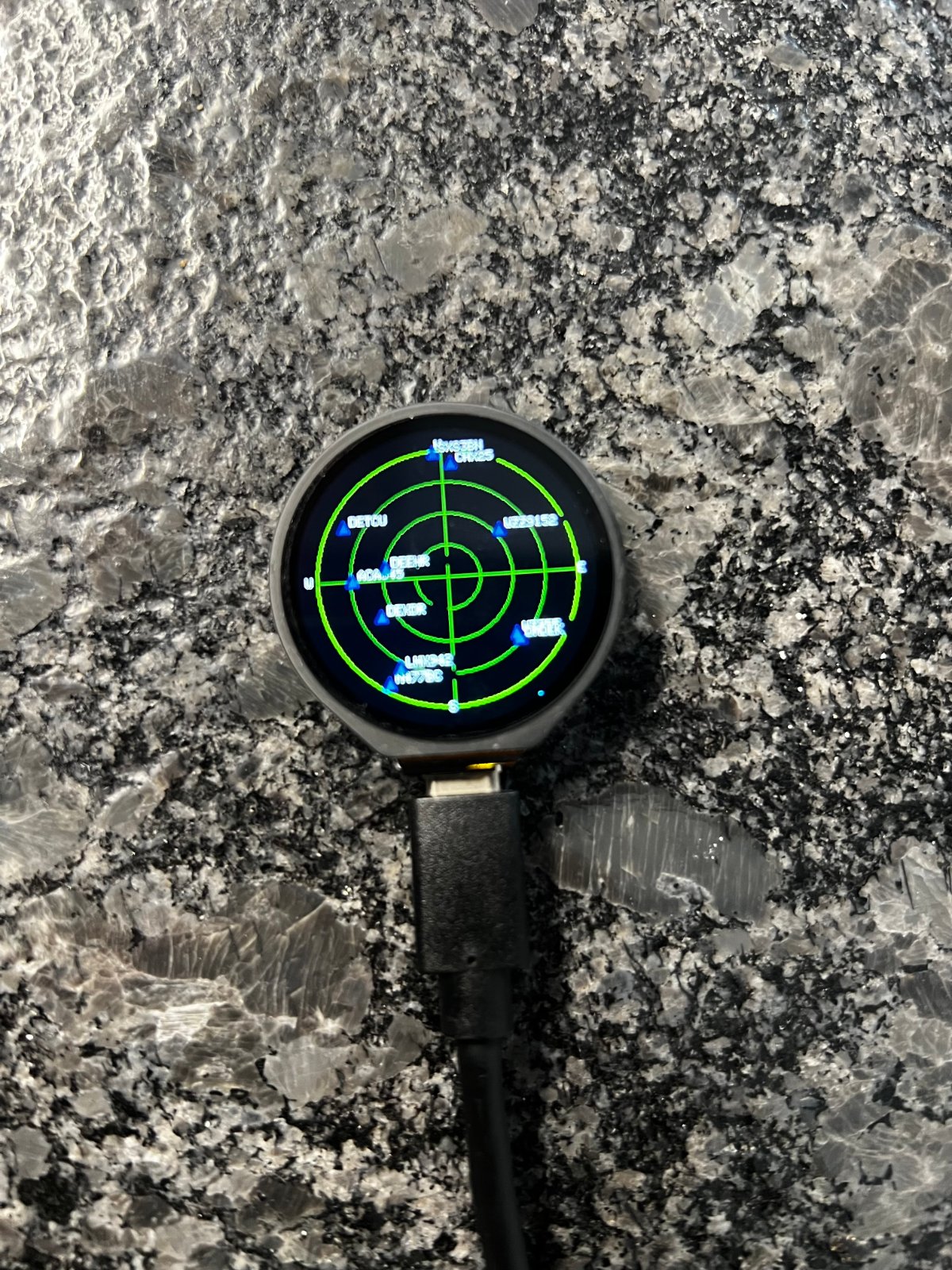
This project turns an ESP32-S3 with a 1.28-inch touchscreen into a live plane radar display. It fetches real-time aircraft data from public ADS-B feeds and plots nearby planes on a circular radar view, showing their distance, heading, altitude, speed, and flight information.
The guide includes a wiring diagram for the pre-assembled board, a complete parts list, ready-to-flash firmware, and step-by-step assembly instructions. After connecting the USB-C cable and configuring your Wi-Fi and radar location, the display will show aircraft in your area with adjustable radar range.
Wiring diagram
Assemble it in 6 steps
1. Use the screen already fitted to the board
The round screen and touch glass are already connected inside the Waveshare ESP32-S3-Touch-LCD-1.28 board. Do not connect the old Super Mini display jumper wires: the board has its own fixed screen connections.
- The radar now uses the board’s built-in GC9A01A round screen and built-in touch glass.
- Do not connect another display to the pins used by the built-in screen — that can stop the screen working.
2. Connect the USB-C data cable
Plug the USB-C data cable into the Waveshare board and your computer. This cable powers the board and carries the program to it.
- If the board does not appear to power up, try another USB-C cable because some cables provide power only.
- Use the board’s USB-C connector and do not connect a separate power supply while testing over USB.
3. Flash with Schematik Deploy
Open Schematik’s Deploy panel and press Deploy. The round screen should light while the board starts.
- If flashing does not begin, hold the built-in BOOT button, press Deploy, then release BOOT when flashing starts.
- A long BOOT-button press after flashing clears the saved Wi-Fi name, password, and radar location.
4. Set Wi-Fi and the radar location
On the first start, join the Wi-Fi network named PlaneRadar-Setup from a phone or computer. Open http://192.168.4.1, then enter your Wi-Fi name, password, latitude, and longitude. These map coordinates put the middle of the radar at your location.
- A map value such as 52.3676 for latitude and 4.9041 for longitude is suitable.
- Enter your real nearby location — wrong coordinates put aircraft in the wrong direction and at the wrong distance.
5. Change the radar distance
Tap the round touch screen once or briefly press the built-in BOOT button to cycle through 5, 10, 15, and 25 km. Hold BOOT for three seconds only when you want to erase saved Wi-Fi and location details and reopen the setup page.
- Start at 25 km if no aircraft appear at a shorter distance.
- Holding BOOT for three seconds erases the saved setup, so you will need to enter Wi-Fi and location details again.
6. Check a blank screen
First make sure the USB-C data cable is supplying power and that this Waveshare project is selected before pressing Deploy. The display is built in, so there are no display jumper wires to reseat. Press the small reset button once, wait a few seconds, then deploy again if it stays blank.
- A screen reading PlaneRadar-Setup means the display is working and it only needs Wi-Fi and location details.
- Do not probe or short the exposed pins around the display while USB power is connected — a slipped metal tool can damage the board.
Deploy the firmware
/* Waveshare ESP32-S3-Touch-LCD-1.28 Plane Radar
   Inspired by MatixYo's public project:
   https://github.com/MatixYo/ESP32-Plane-Radar
   Aircraft data: https://opendata.adsb.fi/
*/
#include <Arduino.h>
#include <WiFi.h>
#include <WebServer.h>
#include <Preferences.h>
#include <HTTPClient.h>
#include <WiFiClientSecure.h>
#include <ArduinoJson.h>
#include <LovyanGFX.hpp>
#include <Wire.h>
#include <math.h>

#define LCD_BL 2
#define LCD_DC 8
#define LCD_CS 9
#define LCD_SCLK 10
#define LCD_MOSI 11
#define LCD_RST 14
#define TOUCH_INT 5
#define TOUCH_SDA 6
#define TOUCH_SCL 7
#define TOUCH_RST 13
#define BOOT_BUTTON 0


struct Plane {
  bool valid;
  int x, y;
  double distance;
  double heading;
  int altitudeFt;
  int speedKt;
  char flight[13];
  char hex[8];
  char airline[25];
  char planeType[13];
  char origin[9];
  char destination[9];
};


// Forward declarations

// Forward declarations
void handleTouchTap(uint16_t x, uint16_t y);

void message(const char *one, const char *two);
double distanceKm(double a, double b, double c, double d);
double bearing(double a, double b, double c, double d);
void drawShell();
void drawPlane(const Plane &p);
void drawRangeNotice();
void drawFlightCard(const Plane &p);
void renderRadar();
void fetchPlanes();
void advanceRange();
bool readTouchTap(uint16_t &x, uint16_t &y, bool &controllerDoubleTap);
void showFlightAt(uint16_t x, uint16_t y);
void IRAM_ATTR onTouchInterrupt();
void startPortal();

constexpr uint16_t SCREEN = 240;
constexpr int CENTER = 120;
constexpr int RADAR_RADIUS = 104;
constexpr uint32_t FETCH_INTERVAL_MS = 5000;
constexpr uint32_t CLEAR_HOLD_MS = 3000;
constexpr uint32_t RANGE_NOTICE_MS = 1800;
constexpr uint8_t CST816_ADDRESS = 0x15;
constexpr uint8_t CST816_GESTURE_REG = 0x01;
constexpr uint8_t CST816_SINGLE_TAP = 0x05;
constexpr uint8_t CST816_DOUBLE_TAP = 0x0B;
constexpr uint16_t PLANE_TAP_RADIUS_PX = 24;
constexpr uint32_t TOUCH_DEBOUNCE_MS = 180;
constexpr uint8_t MAX_PLANES = 36;
const char *AP_NAME = "PlaneRadar-Setup";
const char *NVS_NAME = "planeradar";

class RoundDisplay : public lgfx::LGFX_Device {
  lgfx::Bus_SPI bus;
  lgfx::Panel_GC9A01 panel;
 public:
  RoundDisplay() {
    auto bc = bus.config();
    bc.spi_host = SPI2_HOST; bc.spi_mode = 0; bc.freq_write = 40000000;
    bc.pin_sclk = LCD_SCLK; bc.pin_mosi = LCD_MOSI; bc.pin_miso = -1; bc.pin_dc = LCD_DC;
    bus.config(bc); panel.setBus(&bus);
    auto pc = panel.config();
    pc.pin_cs = LCD_CS; pc.pin_rst = LCD_RST;
    pc.panel_width = SCREEN; pc.panel_height = SCREEN;
    pc.memory_width = SCREEN; pc.memory_height = SCREEN;
    pc.invert = true; pc.rgb_order = true;
    panel.config(pc); setPanel(&panel);
  }
};


RoundDisplay lcd;
Preferences prefs;
WebServer server(80);
Plane planes[MAX_PLANES];
double homeLat = 0.0, homeLon = 0.0;
uint8_t rangeIndex = 1;
const uint8_t rangesKm[] = {10, 20, 35, 50};
bool portalMode = false, wasBootPressed = false, haveFirstTap = false;
volatile bool touchInterruptPending = false;
uint32_t bootPressedAt = 0, lastFetch = 0, rangeNoticeUntil = 0, lastTouchAt = 0;
int selectedPlane = -1;
char selectedHex[8] = "";

const char PAGE[] PROGMEM = R"HTML(<!doctype html><html><head><meta name="viewport" content="width=device-width,initial-scale=1"><title>Plane Radar setup</title><style>body{font-family:Arial;max-width:420px;margin:35px auto;padding:0 18px}input,button{box-sizing:border-box;width:100%;padding:11px;margin:5px 0 14px;font-size:16px}button{background:#137d3d;color:white;border:0;border-radius:4px}</style></head><body><h2>Plane Radar setup</h2><p>Enter Wi-Fi and the location at the middle of the radar.</p><form method="post" action="/save"><label>Wi-Fi name</label><input name="ssid" required><label>Wi-Fi password</label><input name="pass" type="password"><label>Latitude</label><input name="lat" placeholder="52.3676" required><label>Longitude</label><input name="lon" placeholder="4.9041" required><button>Save and restart</button></form></body></html>)HTML";

void message(const char *one, const char *two = "") {
  lcd.fillScreen(TFT_BLACK); lcd.setTextColor(TFT_WHITE, TFT_BLACK); lcd.setTextDatum(middle_center);
  lcd.setTextSize(1); lcd.drawString(one, CENTER, 108); lcd.drawString(two, CENTER, 128); lcd.setTextDatum(top_left);
}

double distanceKm(double a, double b, double c, double d) {
  const double k = PI / 180.0; double da = (c-a)*k, db = (d-b)*k;
  double h = sin(da/2)*sin(da/2) + cos(a*k)*cos(c*k)*sin(db/2)*sin(db/2);
  return 6371.0 * 2.0 * atan2(sqrt(h), sqrt(1.0-h));
}

double bearing(double a, double b, double c, double d) {
  const double k = PI / 180.0, dl = (d-b)*k;
  double y = sin(dl)*cos(c*k), x = cos(a*k)*sin(c*k)-sin(a*k)*cos(c*k)*cos(dl);
  return fmod(atan2(y,x)/k+360.0,360.0);
}

void drawShell() {
  lcd.fillScreen(TFT_BLACK);
  lcd.drawCircle(CENTER,CENTER,RADAR_RADIUS,TFT_GREEN);
  lcd.drawCircle(CENTER,CENTER,78,TFT_DARKGREEN); lcd.drawCircle(CENTER,CENTER,52,TFT_DARKGREEN); lcd.drawCircle(CENTER,CENTER,26,TFT_DARKGREEN);
  lcd.drawLine(16,CENTER,224,CENTER,TFT_DARKGREEN); lcd.drawLine(CENTER,16,CENTER,224,TFT_DARKGREEN);
  lcd.setTextColor(TFT_WHITE,TFT_BLACK); lcd.setTextSize(1);
  lcd.drawString("N",116,8); lcd.drawString("S",116,221); lcd.drawString("W",7,116); lcd.drawString("E",225,116);
  char label[12]; snprintf(label,sizeof(label),"%u km",rangesKm[rangeIndex]);
  lcd.setTextColor(TFT_YELLOW,TFT_BLACK); lcd.drawString(label,187,218);
}

void drawPlane(const Plane &p) {
  lcd.fillTriangle(p.x,p.y-5,p.x-4,p.y+4,p.x+4,p.y+4,TFT_RED);
  lcd.setTextColor(TFT_WHITE,TFT_BLACK); lcd.drawString(p.flight,constrain(p.x+6,0,190),constrain(p.y-8,0,230));
}

void drawRangeNotice() {
  lcd.fillRoundRect(57,96,126,48,8,TFT_NAVY); lcd.drawRoundRect(57,96,126,48,8,TFT_CYAN);
  char line[22]; snprintf(line,sizeof(line),"Range: %u km",rangesKm[rangeIndex]);
  lcd.setTextColor(TFT_WHITE,TFT_NAVY); lcd.setTextDatum(middle_center); lcd.setTextSize(2); lcd.drawString(line,CENTER,112);
  lcd.setTextSize(1); lcd.drawString("short BOOT press",CENTER,130); lcd.setTextDatum(top_left);
}

void drawFlightCard(const Plane &p) {
  // A selected flight remains visible until the next screen tap.
  lcd.fillRoundRect(8,35,224,170,10,TFT_NAVY); lcd.drawRoundRect(8,35,224,170,10,TFT_CYAN);
  lcd.setTextColor(TFT_WHITE,TFT_NAVY); lcd.setTextDatum(middle_center); lcd.setTextSize(2);
  lcd.drawString(p.flight[0] ? p.flight : p.hex, CENTER, 50); lcd.setTextSize(1);
  char line[48];
  snprintf(line, sizeof(line), "Airline: %s", p.airline[0] ? p.airline : "unavailable"); lcd.drawString(line, CENTER, 72);
  snprintf(line, sizeof(line), "Plane type: %s", p.planeType[0] ? p.planeType : "unavailable"); lcd.drawString(line, CENTER, 90);
  snprintf(line, sizeof(line), "Source: %s  To: %s", p.origin[0] ? p.origin : "unavailable", p.destination[0] ? p.destination : "unavailable"); lcd.drawString(line, CENTER, 108);
  if (p.speedKt >= 0) snprintf(line, sizeof(line), "Speed: %d kt   Alt: %d ft", p.speedKt, p.altitudeFt);
  else snprintf(line, sizeof(line), "Speed: unavailable   Alt: %d ft", p.altitudeFt);
  lcd.drawString(line, CENTER, 126);
  snprintf(line, sizeof(line), "%.1f km   heading %.0f", p.distance, p.heading); lcd.drawString(line, CENTER, 144);
  lcd.drawString("Data: opendata.adsb.fi", CENTER, 162);
  lcd.drawString("tap screen to close", CENTER, 183); lcd.setTextDatum(top_left);
}

void renderRadar() {
  drawShell();
  for (uint8_t i=0; i<MAX_PLANES; ++i) if (planes[i].valid) drawPlane(planes[i]);
  if (millis() < rangeNoticeUntil) drawRangeNotice();
  else if (selectedPlane >= 0 && planes[selectedPlane].valid) drawFlightCard(planes[selectedPlane]);
}

void fetchPlanes() {
  if (WiFi.status() != WL_CONNECTED) return;
  float nauticalMiles = rangesKm[rangeIndex] / 1.852f;
  String url = "https://opendata.adsb.fi/api/v3/lat/" + String(homeLat,5) + "/lon/" + String(homeLon,5) + "/dist/" + String(nauticalMiles,1);
  WiFiClientSecure client; client.setInsecure(); HTTPClient http; http.setTimeout(8000); http.useHTTP10(true);
  if (!http.begin(client,url)) { Serial.println("ADS-B request could not start"); return; }
  http.addHeader("Accept-Encoding","identity"); int status=http.GET();
  if (status == HTTP_CODE_OK) {
    String payload=http.getString(); JsonDocument doc; DeserializationError err=deserializeJson(doc,payload);
    if (!err) {
      for (uint8_t i=0;i<MAX_PLANES;++i) planes[i].valid=false;
      uint16_t shown=0;
      for (JsonObject plane : doc["ac"].as<JsonArray>()) {
        if (shown >= MAX_PLANES || plane["lat"].isNull() || plane["lon"].isNull()) continue;
        double lat=plane["lat"].as<double>(), lon=plane["lon"].as<double>();
        double dist=distanceKm(homeLat,homeLon,lat,lon); if (dist > rangesKm[rangeIndex]) continue;
        Plane &p=planes[shown]; p.valid=true; p.distance=dist; p.heading=plane["track"] | -1.0; p.altitudeFt=plane["alt_baro"] | -1; p.speedKt=plane["gs"] | -1;
        const char *flight=plane["flight"] | ""; const char *hex=plane["hex"] | "AC";
        // The public ADS-B feed may omit operator and route details. Use them
        // when the feed supplies them; otherwise the card says unavailable.
        const char *airline=plane["ownOp"] | plane["airline"] | "";
        const char *planeType=plane["t"] | plane["type"] | "";
        // Route data is optional. Feed records can name the departure airport
        // from, orig, or origin.
        const char *origin=plane["from"] | plane["orig"] | plane["origin"] | "";
        const char *destination=plane["to"] | plane["dest"] | "";
        snprintf(p.flight,sizeof(p.flight),"%.12s",flight); snprintf(p.hex,sizeof(p.hex),"%.7s",hex);
        snprintf(p.airline,sizeof(p.airline),"%.24s",airline); snprintf(p.planeType,sizeof(p.planeType),"%.12s",planeType); snprintf(p.origin,sizeof(p.origin),"%.8s",origin); snprintf(p.destination,sizeof(p.destination),"%.8s",destination);
        if (!p.flight[0]) snprintf(p.flight,sizeof(p.flight),"%.12s",p.hex);
        float r=dist/rangesKm[rangeIndex]*RADAR_RADIUS, a=(bearing(homeLat,homeLon,lat,lon)-90.0)*DEG_TO_RAD;
        p.x=CENTER+round(cos(a)*r); p.y=CENTER+round(sin(a)*r); ++shown;
      }
      // Keep a selected flight card open across data refreshes when that aircraft
      // is still in the feed; otherwise the next tap can choose a new flight.
      selectedPlane = -1;
      if (selectedHex[0]) {
        for (uint8_t i = 0; i < shown; ++i) {
          if (strcmp(planes[i].hex, selectedHex) == 0) { selectedPlane = i; break; }
        }
        if (selectedPlane < 0) selectedHex[0] = '\0';
      }
      renderRadar(); Serial.printf("ADS-B: %u aircraft in %u km range\n",shown,rangesKm[rangeIndex]);
    } else Serial.printf("ADS-B JSON error: %s\n",err.c_str());
  } else Serial.printf("ADS-B HTTP status: %d\n",status);
  http.end();
}

void advanceRange() {
  rangeIndex=(rangeIndex+1)%4; rangeNoticeUntil=millis()+RANGE_NOTICE_MS; selectedPlane=-1; selectedHex[0]='\0'; renderRadar();
  Serial.printf("Radar range: %u km\n",rangesKm[rangeIndex]);
}

void IRAM_ATTR onTouchInterrupt() {
  touchInterruptPending = true;
}

bool readTouchTap(uint16_t &x, uint16_t &y, bool &controllerDoubleTap) {
  controllerDoubleTap = false;
  if (!touchInterruptPending && digitalRead(TOUCH_INT) != LOW) return false;
  touchInterruptPending = false;

  // The controller interrupts on a finger event before the gesture byte is
  // always updated. Read the recorded point after a short settling delay and
  // use the valid coordinates, rather than rejecting a normal tap because its
  // gesture byte is still zero.
  delay(15);
  Wire.beginTransmission(CST816_ADDRESS);
  Wire.write(CST816_GESTURE_REG);
  if (Wire.endTransmission(false) != 0 || Wire.requestFrom(CST816_ADDRESS, (uint8_t)6) != 6) return false;
  uint8_t gesture = Wire.read();
  uint8_t fingers = Wire.read();
  uint8_t xh = Wire.read(), xl = Wire.read(), yh = Wire.read(), yl = Wire.read();
  x = ((xh & 0x0F) << 8) | xl;
  y = ((yh & 0x0F) << 8) | yl;
  controllerDoubleTap = (gesture == CST816_DOUBLE_TAP);
  if (x >= SCREEN || y >= SCREEN) return false;
  if (millis() - lastTouchAt < TOUCH_DEBOUNCE_MS) return false;
  // CST816 firmware versions vary: some report a one-finger count, others
  // leave it at zero for a completed tap. Both are valid touch reports.
  if (fingers > 1) return false;
  lastTouchAt = millis();
  return true;
}

void handleTouchTap(uint16_t x, uint16_t y) {
  // A touch is only for selecting an aircraft. Range changes are BOOT-button only.
  haveFirstTap = false;
  showFlightAt(x, y);
}

void showFlightAt(uint16_t x, uint16_t y) {
  int nearest=-1; uint32_t best=PLANE_TAP_RADIUS_PX * PLANE_TAP_RADIUS_PX;
  for (uint8_t i=0;i<MAX_PLANES;++i) if (planes[i].valid) {
    int dx=planes[i].x-(int)x, dy=planes[i].y-(int)y; uint32_t d2=dx*dx+dy*dy;
    if (d2<best) { best=d2; nearest=i; }
  }
  if (nearest < 0) {
    // The next tap away from a marker closes the currently displayed card.
    selectedPlane = -1;
    selectedHex[0] = '\0';
    rangeNoticeUntil = 0;
    renderRadar();
    Serial.println("Flight card closed");
    return;
  }
  selectedPlane=nearest;
  snprintf(selectedHex, sizeof(selectedHex), "%s", planes[nearest].hex);
  rangeNoticeUntil=0;
  renderRadar();
  Serial.printf("Flight card: %s\n",planes[nearest].flight);
}

void startPortal() {
  portalMode=true; WiFi.mode(WIFI_AP); WiFi.softAP(AP_NAME);
  server.on("/",HTTP_GET,[](){server.send(200,"text/html",PAGE);});
  server.on("/save",HTTP_POST,[](){ prefs.begin(NVS_NAME,false); prefs.putString("ssid",server.arg("ssid")); prefs.putString("pass",server.arg("pass")); prefs.putDouble("lat",server.arg("lat").toDouble()); prefs.putDouble("lon",server.arg("lon").toDouble()); prefs.end(); server.send(200,"text/html","<h2>Saved. The radar is restarting.</h2>"); delay(1000); ESP.restart(); });
  server.begin(); Serial.println("Setup portal: connect to PlaneRadar-Setup and open 192.168.4.1"); message("PlaneRadar-Setup","Open 192.168.4.1");
}

void setup() {
  Serial.begin(115200); delay(700); Serial.println("Plane Radar starting on Waveshare ESP32-S3-Touch-LCD-1.28");
  pinMode(LCD_BL,OUTPUT); digitalWrite(LCD_BL,HIGH); pinMode(BOOT_BUTTON,INPUT_PULLUP); pinMode(TOUCH_INT,INPUT_PULLUP); pinMode(TOUCH_RST,OUTPUT);
  digitalWrite(TOUCH_RST,LOW); delay(5); digitalWrite(TOUCH_RST,HIGH); Wire.begin(TOUCH_SDA,TOUCH_SCL);
  attachInterrupt(digitalPinToInterrupt(TOUCH_INT), onTouchInterrupt, FALLING);
  lcd.init(); lcd.setRotation(0); renderRadar();
  prefs.begin(NVS_NAME,true); String ssid=prefs.getString("ssid",""); String password=prefs.getString("pass",""); homeLat=prefs.getDouble("lat",0); homeLon=prefs.getDouble("lon",0); prefs.end();
  if (ssid.isEmpty()) { startPortal(); return; }
  message("Connecting to Wi-Fi",ssid.c_str()); WiFi.mode(WIFI_STA); WiFi.begin(ssid.c_str(),password.c_str()); uint32_t start=millis();
  while (WiFi.status()!=WL_CONNECTED && millis()-start<15000) delay(250);
  if (WiFi.status()!=WL_CONNECTED) { Serial.println("Wi-Fi failed; opening setup portal"); startPortal(); return; }
  Serial.printf("Wi-Fi connected: %s\n",WiFi.localIP().toString().c_str()); renderRadar();
}

void loop() {
  if (portalMode) { server.handleClient(); return; }
  bool bootPressed=digitalRead(BOOT_BUTTON)==LOW;
  if (bootPressed && !wasBootPressed) { bootPressedAt=millis(); wasBootPressed=true; }
  if (!bootPressed && wasBootPressed) { uint32_t held=millis()-bootPressedAt; wasBootPressed=false; if (held>=CLEAR_HOLD_MS) { prefs.begin(NVS_NAME,false); prefs.clear(); prefs.end(); Serial.println("Settings cleared; restarting"); ESP.restart(); } advanceRange(); }
  uint16_t touchX, touchY;
  bool controllerDoubleTap = false;
  if (readTouchTap(touchX, touchY, controllerDoubleTap)) handleTouchTap(touchX, touchY);
  if (rangeNoticeUntil && millis()>=rangeNoticeUntil) { rangeNoticeUntil=0; renderRadar(); }
  if (millis()-lastFetch>=FETCH_INTERVAL_MS) { lastFetch=millis(); fetchPlanes(); }
}
Remix this project
Make it yours in one click
Open a full copy of this project in your own Schematik workspace, diagram, code, parts, and assembly steps included. Swap the sensor, add features, or redesign the whole thing with AI. The author's original stays untouched.