Community project
ESP32 Real-Time Clock
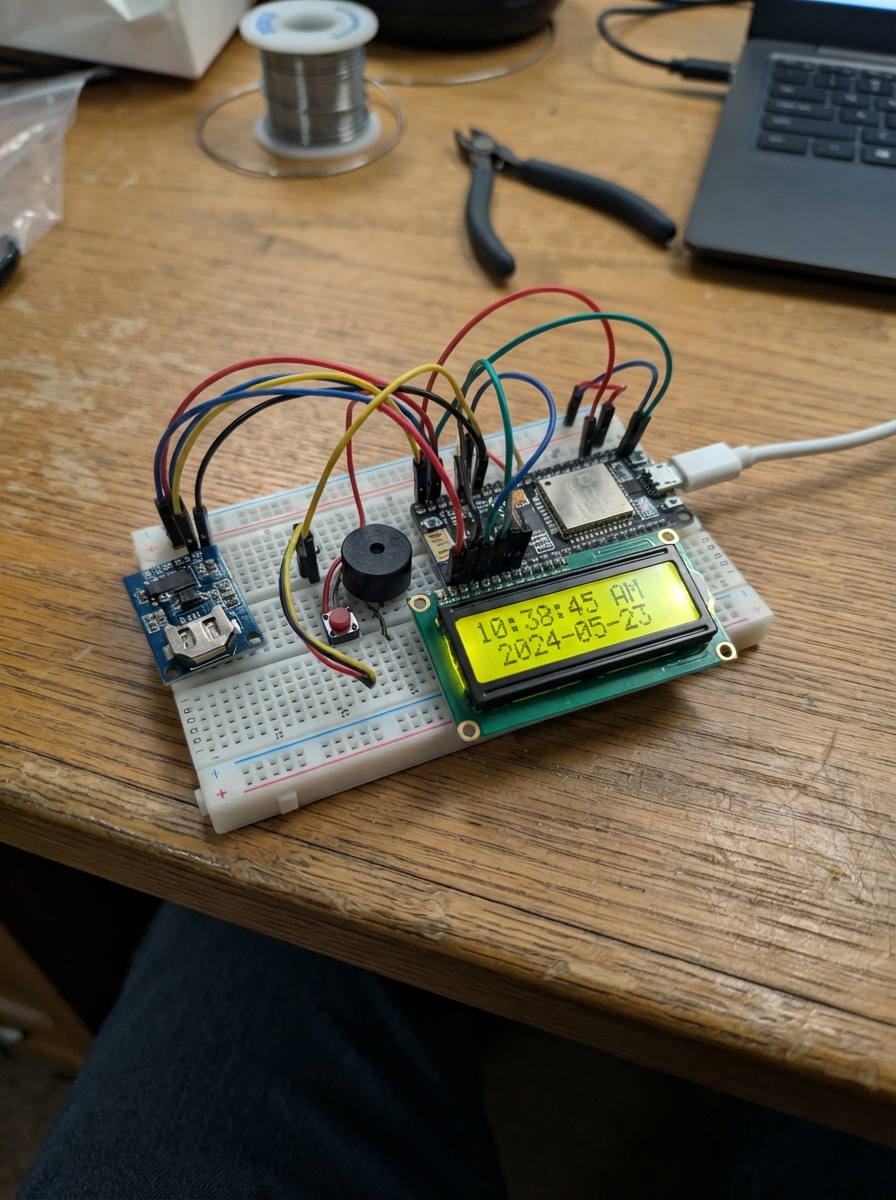
This project builds a real-time clock with alarm functionality using an ESP32 microcontroller, DS1307 RTC module, and 16x2 LCD display. The system tracks date and time accurately, triggers a piezo buzzer at set alarm times, and displays customizable messages on the screen.
The guide provides a complete wiring diagram, parts list, and step-by-step assembly instructions for breadboard construction. Firmware is included with button controls for setting time, date, and alarm parameters, plus EEPROM storage for persistent settings and USB serial monitoring for debugging.
Wiring diagram
Gather all the parts
Assemble it in 9 steps
1. Bố trí 2D — nhìn từ trên xuống
Đặt Arduino Uno bên trái, breadboard nằm ngang ở giữa, LCD phía trên và DS1307 bên phải. Đặt hai nút qua khe giữa breadboard, cách nhau vài hàng; đặt còi ở vùng trống bên phải hai nút. LCD và DS1307 có thể để bên ngoài breadboard rồi nối bằng dây jumper; không cắm cả dãy chân của module vào cùng một nhóm lỗ. [ LCD 16x2 I2C ] [ DS1307 ] [ UNO ] + rail breadboard: 5V - rail breadboard: GND [ Nút D2 ] [ Nút D3 ] [ Còi D9 ] ===== khe giữa breadboard ===== Đây là bố trí tương đối, không phải tọa độ lỗ theo đúng tỉ lệ. Xác định chân module theo chữ in VCC, GND, SDA, SCL trên chính module, không theo thứ tự trái/phải trong hình.
- Rút USB trước khi cắm hoặc đổi dây. Không nối thanh 5V với thanh GND vì sẽ gây chập nguồn.
2. Bảng nối dây cho sơ đồ 2D
UNO 5V -> thanh +; UNO GND -> thanh -. LCD VCC và DS1307 VCC -> thanh +. LCD GND và DS1307 GND -> thanh -. LCD SDA và DS1307 SDA -> A4 (dữ liệu). LCD SCL và DS1307 SCL -> A5 (xung nhịp). D2 -> tiếp điểm thứ nhất nút 1; tiếp điểm còn lại -> thanh -. D3 -> tiếp điểm thứ nhất nút 2; tiếp điểm còn lại -> thanh -. D9 -> SIG còi piezo; GND còi -> thanh -. DS1307 SQW để trống. Hai chân cùng phía của nút bốn chân có thể đã nối sẵn: chọn hai tiếp điểm chỉ thông nhau khi nhấn, không nối D2 hoặc D3 thẳng xuống GND.
3. Prepare the breadboard
Unplug USB. Use a standard solderless breadboard and jumper wires. Put the two buttons across its center gap and place the DS1307 module beside them; keep the LCD beside the breadboard and connect its backpack with jumper wires. Each group of five holes on one side of the gap is connected; the opposite side is separate. Connect Uno 5V to its positive rail and Uno GND to its negative rail. If the rails are split in the middle, bridge matching halves with jumper wires.
4. Connect the clock and screen
Connect both modules' VCC pins to the 5V rail and GND pins to the ground rail. Choose one unused five-hole row for the data wires: connect both SDA pins to that row and run a jumper from it to Uno A4 (data). Choose a separate unused row for both SCL pins and run a jumper from it to Uno A5 (clock). Never join these two rows together. Leave DS1307 SQW unconnected. Use a 16x2 LCD with a four-pin I2C backpack at address 0x27.
- Leave the clock battery holder empty unless you have verified its charging circuit and the correct battery type. A charging module can damage a non-rechargeable coin cell.
5. Fit the two buttons
Put each button across the breadboard's center gap. Connect one switched contact of the hour button to D2 and its other switched contact to ground. Wire the minute button the same way using D3. On four-leg buttons, two legs are already joined; use contacts that connect only when pressed. Internal pull-up resistors keep the inputs steady, so no extra resistors are needed.
6. Nối còi piezo
Dùng còi piezo thụ động PS1240, không dùng loa điện từ. Nối SIG tới D9 và GND tới thanh âm breadboard. Kiểm tra dây khi USB chưa cắm; sau đó cắm USB và nhấn Deploy. Chỉnh vít tương phản LCD nếu không thấy chữ.
7. Cài giờ và báo thức
Nhấn rồi thả cả hai nút để chuyển lần lượt: xem giờ, chỉnh giờ/phút, chỉnh năm, chỉnh tháng/ngày, chỉnh báo thức, về xem giờ. Trong từng mục, D2 tăng giá trị bên trái, D3 tăng bên phải; riêng chỉnh năm D2 tăng và D3 giảm. Cài báo thức được lưu tự động vào EEPROM. Khi xem giờ, D2 bật/tắt báo thức (A là bật, dấu - là tắt), D3 đổi giữa ngày tháng và lời nhắn. Khi còi kêu, nhấn nút bất kỳ để tắt; còi cũng tự tắt sau 60 giây.
8. Đổi lời nhắn LCD
Mở Serial Monitor trong Schematik ở 9600 baud. Gửi một dòng không dấu, tối đa 16 ký tự, kết thúc bằng Enter/newline. Lời nhắn được lưu vào EEPROM và không mất khi tắt nguồn. EEPROM giữ cài báo thức và lời nhắn, không thay pin dự phòng giữ giờ cho DS1307. Đồng hồ đang chạy không bị đặt lại; đồng hồ dừng được đặt theo thời điểm biên dịch gần đúng.
9. Máy tính qua USB–UART: cài đặt và giám sát
Dùng cáp USB có truyền dữ liệu nối Uno với máy tính. Không cần bộ chuyển UART ngoài; giữ D0/RX và D1/TX trống. Sau Deploy, mở Serial Monitor trong Schematik, chọn 9600 baud và kết thúc dòng bằng Enter (LF hoặc CRLF). Mở cổng có thể khiến Uno khởi động lại; chờ thông báo READY rồi gửi lệnh. Nếu báo ERR RTC, kiểm tra dây và khởi động lại. HELP: danh sách lệnh. PING: trả OK PONG để kiểm tra kết nối. STATUS: xem giờ, báo thức, còi và chế độ (0 xem giờ, 1 giờ/phút, 2 năm, 3 tháng/ngày, 4 báo thức). TIME 2026-11-02 14:30:00: đặt ngày giờ, năm 2000–2099. ALARM 06:30: đặt giờ báo thức. ON / OFF: bật hoặc tắt báo thức. STOP: tắt tiếng còi hiện tại. MON ON: gửi trạng thái mỗi giây. MON OFF: ngừng gửi tự động. MSG Xin chao: lưu lời nhắn không dấu, tối đa 16 ký tự. Dòng văn bản thường vẫn được lưu như trước; dùng MSG nếu lời nhắn trùng tên lệnh. Các lệnh viết HOA. Phản hồi OK là thành công; ERR là lỗi. Ngày giờ lưu ở RTC; báo thức và lời nhắn lưu EEPROM. Giám sát tự động mặc định tắt sau khởi động. USB vừa cấp nguồn vừa truyền dữ liệu; không nối thêm dây máy tính vào D0/D1.
Review all connections
1. Connections between "rtc" and "Arduino"
2. Connections between "lcd" and "Arduino"
3. Connections between "hourButton" and "Arduino"
4. Connections between "minuteButton" and "Arduino"
5. Connections between "breadboard" and "Arduino"
6. Connections between "buzzer" and "Arduino"
Deploy the firmware
#include <Arduino.h>
#include <Wire.h>
#include <RTClib.h>
#include <LiquidCrystal_I2C.h>
#include <EEPROM.h>
RTC_DS1307 rtc;
LiquidCrystal_I2C lcd(0x27,16,2);
const uint8_t BUZZER=9;
// Hai nut noi D2/D3 xuong GND. Nhan ca hai de doi che do.
struct Button {
 uint8_t pin; bool raw=true, down=false; uint32_t changed=0;
 Button(uint8_t p):pin(p){}
 bool update(){bool r=digitalRead(pin); if(r!=raw){raw=r;changed=millis();}
 bool released=false; if(millis()-changed>=30 && down==raw){released=down;down=!raw;} return released;}
} h(2),m(3);
enum Mode {VIEW,SET_TIME,SET_YEAR,SET_DATE,SET_ALARM};
Mode mode=VIEW;
uint8_t ah=6,am=0; bool enabled=true,showMessage=false,combo=false,ringing=false;
uint32_t lastAlarm=0xffffffffUL,ringStart=0;
char message[17]="CHUC BAN NGAY VUI";
char previous[2][17]={{0},{0}};
void save(){EEPROM.update(0,0xA7);EEPROM.update(1,ah);EEPROM.update(2,am);EEPROM.update(3,enabled); for(uint8_t i=0;i<16;i++)EEPROM.update(4+i,message[i]);}
void row(uint8_t n,const char* text){char padded[17];memset(padded,' ',16);padded[16]=0;memcpy(padded,text,min((size_t)16,strlen(text)));if(strcmp(previous[n],padded)){lcd.setCursor(0,n);lcd.print(padded);strcpy(previous[n],padded);}}
bool monitorEnabled=false;
void status(){
 DateTime t=rtc.now();char line[100];
 snprintf(line,sizeof(line),"TIME %04u-%02u-%02u %02u:%02u:%02u ALARM %02u:%02u %s RING %u MODE %u",
 t.year(),t.month(),t.day(),t.hour(),t.minute(),t.second(),ah,am,enabled?"ON":"OFF",ringing,(unsigned)mode);
 Serial.println(line);
}
void serialCommand(char* text){
 unsigned y,mo,d,hh,mm,ss;int end=0;
 if(!strcmp(text,"HELP")) Serial.println(F("HELP | PING | STATUS | TIME YYYY-MM-DD HH:MM:SS | ALARM HH:MM | ON | OFF | STOP | MON ON | MON OFF | MSG text"));
 else if(!strcmp(text,"PING")) Serial.println(F("OK PONG"));
 else if(!strcmp(text,"STATUS")) status();
 else if(!strcmp(text,"MON ON")){monitorEnabled=true;Serial.println(F("OK MON ON"));}
 else if(!strcmp(text,"MON OFF")){monitorEnabled=false;Serial.println(F("OK MON OFF"));}
 else if(!strcmp(text,"ON")||!strcmp(text,"OFF")){enabled=!strcmp(text,"ON");save();Serial.println(F("OK"));}
 else if(!strcmp(text,"STOP")){ringing=false;noTone(BUZZER);lastAlarm=rtc.now().unixtime()/60;Serial.println(F("OK STOP"));}
 else if(!strncmp(text,"TIME ",5)){
  bool valid=strlen(text)==24 && sscanf(text+5,"%4u-%2u-%2u %2u:%2u:%2u%n",&y,&mo,&d,&hh,&mm,&ss,&end)==6 && end==19;
  const uint8_t days[]={31,28,31,30,31,30,31,31,30,31,30,31};
  valid=valid && y>=2000 && y<=2099 && mo>=1 && mo<=12 && d>=1 && hh<24 && mm<60 && ss<60;
  if(valid) valid=d<=days[mo-1]+((mo==2 && y%4==0)?1:0);
  if(valid){rtc.adjust(DateTime(y,mo,d,hh,mm,ss));lastAlarm=0xffffffffUL;Serial.println(F("OK TIME"));}
  else Serial.println(F("ERR TIME: YYYY-MM-DD HH:MM:SS, years 2000-2099"));
 }
 else if(!strncmp(text,"ALARM ",6)){
  if(strlen(text)==11 && sscanf(text+6,"%2u:%2u%n",&hh,&mm,&end)==2 && end==5 && hh<24 && mm<60){ah=hh;am=mm;save();Serial.println(F("OK ALARM"));}
  else Serial.println(F("ERR ALARM: HH:MM"));
 }
 else {
  const char* value=!strncmp(text,"MSG ",4)?text+4:text;
  size_t n=strlen(value);
  if(n>16 || !n){Serial.println(F("ERR message: 1-16 ASCII characters"));return;}
  memset(message,' ',16);memcpy(message,value,n);message[16]=0;save();Serial.println(F("OK MSG"));
 }
}
void readSerial(){
 static char input[64];static uint8_t length=0;static bool overflow=false;
 while(Serial.available()){
  char c=Serial.read();
  if(c=='\r'||c=='\n'){
   if(overflow)Serial.println(F("ERR line too long or non-ASCII"));
   else if(length){input[length]=0;serialCommand(input);}
   length=0;overflow=false;
  }else if(c>=32 && c<=126 && length<sizeof(input)-1)input[length++]=c;
  else overflow=true;
 }
}
void setup(){
 pinMode(2,INPUT_PULLUP);pinMode(3,INPUT_PULLUP);pinMode(BUZZER,OUTPUT);digitalWrite(BUZZER,LOW);
 Serial.begin(9600);Wire.begin();lcd.init();lcd.backlight();
 if(!rtc.begin()){row(0,"RTC not found");Serial.println(F("ERR RTC not found: check 5V, GND, SDA A4, SCL A5"));while(true)delay(100);}
 if(!rtc.isrunning())rtc.adjust(DateTime(F(__DATE__),F(__TIME__)));
 if(EEPROM.read(0)==0xA7 && EEPROM.read(1)<24 && EEPROM.read(2)<60 && EEPROM.read(3)<2){ah=EEPROM.read(1);am=EEPROM.read(2);enabled=EEPROM.read(3);for(uint8_t i=0;i<16;i++){char c=EEPROM.read(4+i);message[i]=(c>=32&&c<=126)?c:' ';}message[16]=0;}
 Serial.println(F("READY 9600 baud. Send HELP, end with Enter."));
}
void loop(){
 bool hr=h.update(),mr=m.update();bool both=h.down&&m.down;
 bool stopped=false;
 if(ringing&&(h.down||m.down)){ringing=false;noTone(BUZZER);combo=true;stopped=true;}
 if(both&&!combo&&!stopped){combo=true;mode=Mode((mode+1)%5);save();}
 if(combo){hr=mr=false;if(!h.down&&!m.down)combo=false;}
 DateTime now=rtc.now();
 if(hr||mr){
  if(mode==VIEW){if(hr){enabled=!enabled;save();}if(mr)showMessage=!showMessage;}
  else if(mode==SET_ALARM){if(hr)ah=(ah+1)%24;if(mr)am=(am+1)%60;save();}
  else {
   uint16_t y=now.year();uint8_t mo=now.month(),d=now.day(),hh=now.hour(),mm=now.minute();
   if(mode==SET_TIME){if(hr)hh=(hh+1)%24;if(mr)mm=(mm+1)%60;}
   if(mode==SET_YEAR){if(hr)y=y>=2099?2000:y+1;if(mr)y=y<=2000?2099:y-1;}
   if(mode==SET_DATE){if(hr)mo=mo%12+1;}
   const uint8_t days[]={31,28,31,30,31,30,31,31,30,31,30,31};
   uint8_t maxday=days[mo-1]+((mo==2&&y%4==0)?1:0);
   if(mode==SET_DATE&&mr)d=d>=maxday?1:d+1;
   if(d>maxday)d=maxday;
   rtc.adjust(DateTime(y,mo,d,hh,mm,0));now=rtc.now();
  }
 }
 uint32_t minuteKey=now.unixtime()/60;
 if(enabled&&mode==VIEW&&now.hour()==ah&&now.minute()==am&&lastAlarm!=minuteKey){lastAlarm=minuteKey;ringing=true;ringStart=millis();}
 if(ringing&&(millis()-ringStart>=60000UL||!enabled)){ringing=false;noTone(BUZZER);}
 static bool sounding=false;bool beep=ringing&&((millis()-ringStart)%1000<500);
 if(beep!=sounding){sounding=beep;if(beep)tone(BUZZER,4000);else noTone(BUZZER);}
 readSerial();
 static uint32_t lastReport=0;
 if(monitorEnabled && millis()-lastReport>=1000){lastReport=millis();status();}
 char a[32],b[32];
 if(ringing){snprintf(a,sizeof(a),"BAO THUC %02u:%02u",ah,am);strcpy(b,"Nhan nut de tat");}
 else if(mode==VIEW){if(showMessage)strcpy(a,message);else snprintf(a,sizeof(a),"%02u/%02u/%04u",now.day(),now.month(),now.year());snprintf(b,sizeof(b),"%02u:%02u:%02u %c%02u:%02u",now.hour(),now.minute(),now.second(),enabled?'A':'-',ah,am);}
 else if(mode==SET_ALARM){strcpy(a,"CAI BAO THUC");snprintf(b,sizeof(b),"%02u:%02u %s",ah,am,enabled?"ON":"OFF");}
 else {strcpy(a,mode==SET_TIME?"CAI GIO / PHUT":mode==SET_YEAR?"CAI NAM + / -":"CAI THANG / NGAY");if(mode==SET_TIME)snprintf(b,sizeof(b),"%02u:%02u:%02u",now.hour(),now.minute(),now.second());else snprintf(b,sizeof(b),"%02u/%02u/%04u",now.day(),now.month(),now.year());}
 row(0,a);row(1,b);delay(5);
}
Remix this project
Make it yours in one click
Open a full copy of this project in your own Schematik workspace, diagram, code, parts, and assembly steps included. Swap the sensor, add features, or redesign the whole thing with AI. The author's original stays untouched.