Community project
Three-Way Waste Sorting
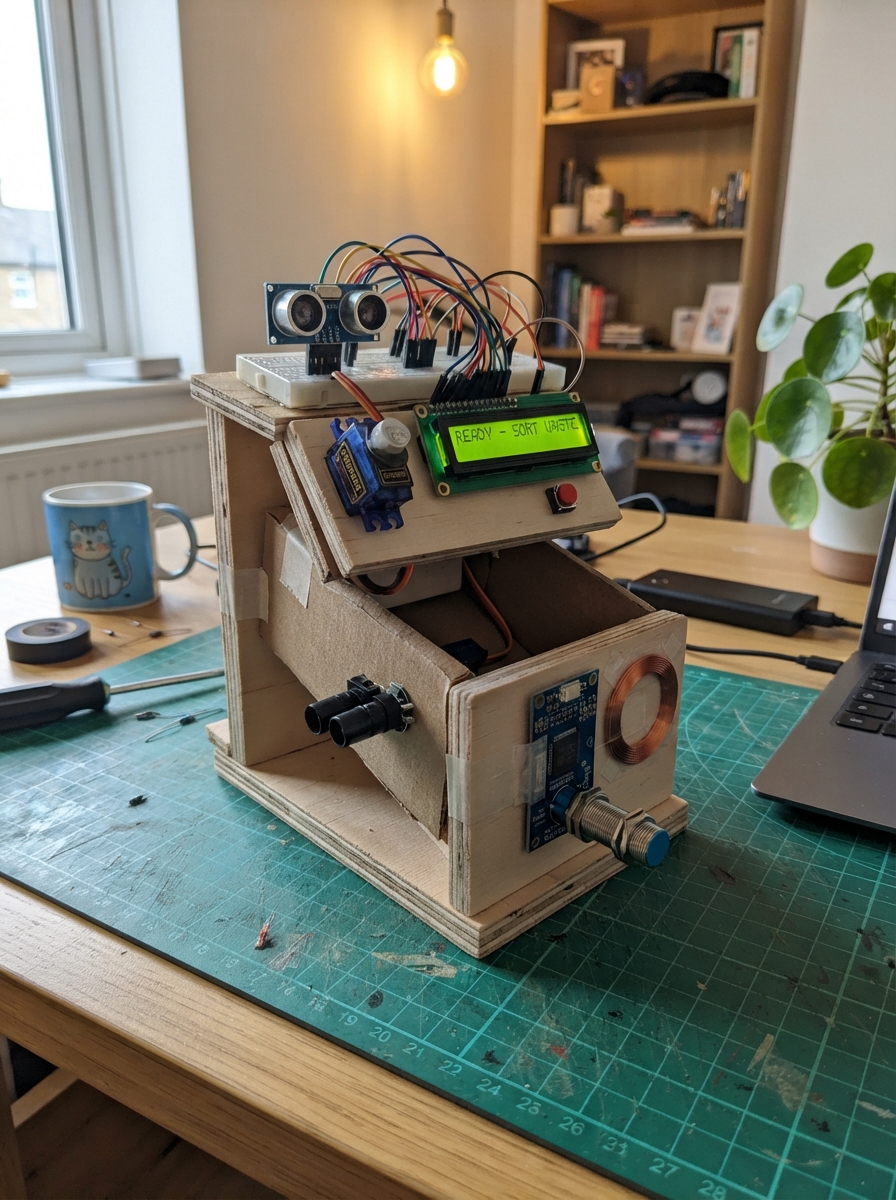
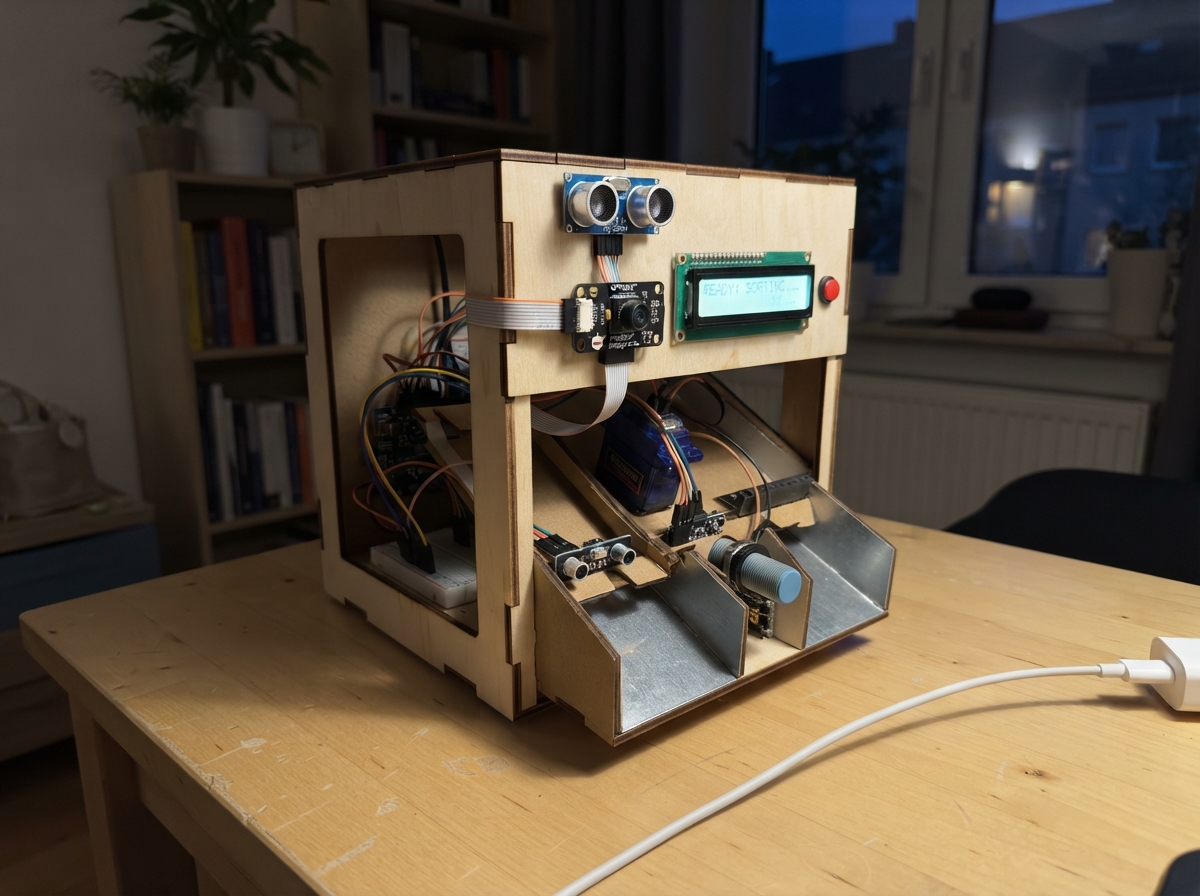
This project builds an automated waste sorting system that uses multiple sensors to identify and route items into three bins. An Arduino Uno coordinates a servo-driven rotating gate, ultrasonic distance sensing, RFID tag reading, metal detection, and an LCD display to manage the sorting workflow. The guide provides a complete wiring diagram, parts list, calibration procedures, and firmware with enrollment steps for registering approved waste categories.
Builders will learn how to integrate diverse sensors including proximity detection, infrared beams, and RFID identification into a single mechanical system. The assembly outline covers power distribution, sensor isolation, beam alignment, and the critical calibration phase needed before attaching servo horns. Testing includes registering sample tags and running a complete sort cycle to verify gate rotation, item detection, and bin routing.
Wiring diagram
Gather all the parts
Assemble it in 9 steps
1. Build a guarded tabletop mechanism
Use exactly two MG996R positional servos, not continuous-rotation motors. Support the lightweight holding tube on its own bearing so Servo 1 rotates it without carrying its weight. Servo 2 travels with the tube and operates its bottom flap. Keep the blue bottle bin, red can bin and green paper bin and their wide chutes fixed. Use a one-item loading throat and keep hands out of the enclosure. This is a controlled-sample demonstration, not an unattended public vending machine.
- Pinch points can injure fingers. Disconnect all power before clearing jams or adjusting linkages.
- No encoder or limit switch is fitted: rotation and gate completion are time allowances, not measured positions. A disconnected or stalled servo cannot be detected.
2. Distribute servo power separately
Use the enclosed regulated 5V 6A adapter. Connect its positive to both servo red wires and capacitor PLUS. Connect its negative to both servo brown wires, capacitor MINUS and Uno GND. Servo 1 orange signal goes to D9; Servo 2 orange goes to D10. Use a screw-terminal distribution point and short heavy wires for motor current, not breadboard tracks. Place the 1000uF 10V capacitor beside the servo supply connections. Uno and sensors use USB power.
- Do not join external servo positive to Uno 5V or USB 5V. Reversing the capacitor can make it rupture. Use only enclosed DC adapters; do not wire mains electricity.
3. Isolate the metal detector voltage
Use the NPN normally-open LJ12A3-4-Z/BX version only. Brown goes to 12V adapter positive and blue to its negative. Wire 12V positive through the 2.2k resistor to PC817 pin 1 (anode); pin 2 (cathode) to sensor black. PC817 pin 3 (emitter) goes to Uno GND; pin 4 (collector) to D3 with a 10k resistor from pin 4 to Uno 5V. Keep the 12V adapter negative separate from Uno ground: the optocoupler transfers the signal across the separation. LOW at D3 means metal.
- Never connect black, brown or the 12V rail directly to an Uno pin. PNP versions require different wiring.
- This detector detects other metals too; it is not an aluminum composition analyzer. Aluminum sensing distance is shorter than the quoted 4mm steel range. Test every approved can at its actual position; use a narrow guide so its wall passes very close without touching.
4. Install entrance and exit beams
For each Adafruit 2168 pair, connect red to Uno 5V and black to Uno GND. Receiver white goes to D2 for entry and D4 for exit. Built-in pull-ups are enabled; broken beam reads LOW. Mount entry across the loading throat. Mount the exit pair on the moving tube, below the gate and above its discharge, with strain relief and enough wire slack for 45 to 135 degrees. The exit beam must be clear before gate opening, then interrupted, then clear again. Do not locate it where a hand can reach it.
- Clear plastic can transmit infrared. Place the beam through an opaque bottle label or cap and verify every approved sample reliably interrupts it. If no exit passage is detected the machine gives no points.
5. Fit the ultrasonic sensor and reader
Mount HC-SR04 above the holding tube so it rotates with it, sees the item on the closed gate, and sees a fixed empty backstop below the open gate. VCC goes to 5V, GND to GND, TRIG to D7 and ECHO to D6. Calibrate EMPTY_CM (default 28cm) and OBJECT_CM (22cm) in src/main.cpp: empty must read at least EMPTY_CM and a loaded item below OBJECT_CM. Missing echoes are treated as unsafe, not empty. RDM6300 VCC goes to 5V, GND to GND and TX to A0 (software serial data); leave RX and LED unconnected and A1 unused. Plug its supplied antenna into ANT1/ANT2 and mount beside the held item's tag, away from metal.
- RFID is short range and orientation-sensitive. Arrange labels and the tube guide so each approved item's tag stays readable while held.
6. Connect screen sound and start control
LCD VCC goes to Uno 5V, GND to GND, SDA to A4 (data), SCL to A5 (clock). Firmware expects a PCF8574 backpack at 0x27; adjust its contrast screw and address if needed. Use a 5V self-oscillating ACTIVE buzzer module with an onboard transistor and active-HIGH input: VCC to 5V, GND to GND, IN to D8. A passive buzzer will not sound on a steady HIGH. Button goes between D5 and GND, across opposite switched contacts. The internal pull-up and 40ms software debounce are enabled. Use the breadboard only for these low-current connections.
7. Calibrate before attaching the servo horns
Start with the horns disconnected and tube empty; allow the gate to command CLOSED=0 and then tube HOME=90. Fit the horns with the gate closed and tube facing its home reference. Calibrate BIN_ANGLE values 45,90,135 to the blue, red, green chutes. Set CLOSED and OPEN (initially 0 and 90) to avoid end-stop strain. The code allows 2200ms after tube commands and 1000ms after gate commands; increase these for the actual load. Verify no motion remains before gate opening. Keep Servo 2 closed throughout tube movement.
- Servo angle commands do not guarantee physical travel or arrival. If the mechanism cannot stop reliably within the allowance, add position feedback before use. Do not overload, stall, or mount a heavy full-size waste tube on these servos.
8. Register three approved sample tags
Use three different EM4100-compatible 125kHz tags: one fixed to a clean empty plastic bottle, one to an aluminum can, and one to crumpled dry paper. RFID tags are classification labels, not material measurements; only labeled approved samples are supported. First boot automatically prompts Scan bottle tag, Scan can tag, then Scan paper tag. Present the correct tag for each prompt, removing the previous tag first. The identities are saved in EEPROM. Hold the start button during power-up to replace registrations. Do not mislabel items. Additional tags or general unmarked waste require a different classifier.
- All three classes require their registered tag. Can additionally requires stable metal detection; bottle and paper require no metal detection. Other items show Unknown Trash and earn zero points. This is not fraud-resistant and cannot prove chemical composition.
9. Test one complete cycle
With empty tube and clear exit, press and release Start. Insert exactly one registered item. The buzzer starts at detection. The machine identifies it, rotates the closed tube, waits, then opens the gate. A complete exit interruption followed by clearance AND an empty sonar reading are required to close the gate, return home and award exactly 2 points once. Standby requires a fresh button press for the next item; presses while busy are discarded. Test bottle, can, paper, unknown tag, blocked exit and missing item separately.
- Points are kept in RAM and reset to zero after a reset or power loss. Registered tags remain saved.
- On Unknown Trash the gate stays closed. On exit timeout it stays open and the tube stays still. Disconnect power, remove the item manually and clear both beams. Restore power with an empty mechanism. Alternatively after safe manual clearance, press Start to close and return with zero points; never reach into a powered mechanism.
Review all connections
1. Connections between "entry" and "Arduino"
2. Connections between "entrytx" and "Arduino"
3. Connections between "exit" and "Arduino"
4. Connections between "exittx" and "Arduino"
5. Connections between "sonar" and "Arduino"
6. Connections between "rfid" and "Arduino"
7. Connections between "lcd" and "Arduino"
8. Connections between "buzz" and "Arduino"
9. Connections between "start" and "Arduino"
10. Connections between "servoPS" and "Arduino"
11. Connections between "tube" and "Arduino"
12. Connections between "gate" and "Arduino"
13. Connections between "cap" and "Arduino"
14. Connections between "sensorPS" and "Arduino"
15. Connections between "metal" and "Arduino"
16. Connections between "optoR" and "Arduino"
17. Connections between "opto" and "Arduino"
18. Connections between "pullup" and "Arduino"
Deploy the firmware
#include <Arduino.h>
#include <Wire.h>
#include <Servo.h>
#include <LiquidCrystal_I2C.h>
#include <SoftwareSerial.h>
#include <EEPROM.h>
// All positions and time allowances must be calibrated with an empty mechanism.
const byte HOME=90, CLOSED=0, OPEN=90;
const byte BIN_ANGLE[3]={45,90,135}; // bottle, can, paper
const unsigned long ROTATE_MS=2200, GATE_MS=1000;
const int EMPTY_CM=28, OBJECT_CM=22; // sonar mounted above tube, unobstructed empty floor at >=28cm
Servo tube,gate;
LiquidCrystal_I2C lcd(0x27,16,2);
SoftwareSerial reader(A0,A1); // A1 reserved as unused TX; do not connect it
struct Registry {uint16_t magic; char uid[3][11];} registry;
char frame[13]; byte frameN=0; bool framing=false;
char lastUID[11]=""; unsigned long tagAt=0;
enum State {BOOT,IDLE,WAIT_ITEM,DETECT,IDENTIFY,ROTATE,OPEN_WAIT,PASS,CLOSE_WAIT,RETURN_WAIT,SUCCESS,TOTAL,FAULT,JAM,RECOVER,ENROLL};
State state=BOOT; unsigned long since=0, now=0;
unsigned long points=0, lastSonar=0; int cm=-1;
byte kind=0, enrollSlot=0; bool blockedSeen=false;
bool rawBtn=HIGH,stableBtn=HIGH,press=false; unsigned long btnAt=0;
bool exitRaw=false,exitStable=false; unsigned long exitAt=0;
unsigned long metalStart=0; bool metalStable=false,conflict=false;
char lineCache[2][17]={{0},{0}};
void row(byte n,const char *s){char b[17];snprintf(b,sizeof(b),"%-16.16s",s);if(strcmp(b,lineCache[n])){lcd.setCursor(0,n);lcd.print(b);strcpy(lineCache[n],b);}}
void screen(const char*a,const char*b){row(0,a);row(1,b);}
void enter(State s){state=s;since=now;}
bool elapsed(unsigned long ms){return now-since>=ms;}
void standby(){digitalWrite(8,LOW);screen("Click to Begin","");char b[17];snprintf(b,sizeof(b),"Points: %lu",points);row(1,b);enter(IDLE);}
void fail(const char *reason){digitalWrite(8,LOW);screen(reason,"Remove; press");enter(FAULT);}
int hexval(char c){if(c>='0'&&c<='9')return c-'0';if(c>='A'&&c<='F')return c-'A'+10;return -1;}
void promptEnroll(){const char* p[]={"Scan bottle tag","Scan can tag","Scan paper tag"};screen("Register tags",p[enrollSlot]);}
void tagFrame(){
byte data[6];for(byte i=0;i<6;i++){int a=hexval(frame[2*i]),b=hexval(frame[2*i+1]);if(a<0||b<0)return;data[i]=(a<<4)|b;}
if((data[0]^data[1]^data[2]^data[3]^data[4])!=data[5])return;
char uid[11];memcpy(uid,frame,10);uid[10]=0;
if(state==ENROLL){
for(byte i=0;i<enrollSlot;i++)if(!strcmp(uid,registry.uid[i]))return;
strcpy(registry.uid[enrollSlot],uid);enrollSlot++;
if(enrollSlot==3){registry.magic=0x527A;EEPROM.put(0,registry);screen("Tags saved","Release button");enter(BOOT);}
else promptEnroll();return;
}
if(state==DETECT||state==IDENTIFY){
if(lastUID[0]&&strcmp(uid,lastUID))conflict=true;
strcpy(lastUID,uid);tagAt=now;
}
}
void readTags(){while(reader.available()){char c=reader.read();if(c==2){frameN=0;framing=true;}else if(framing){if(c==3){if(frameN==12)tagFrame();framing=false;}else if(frameN<12)frame[frameN++]=c;else framing=false;}}}
bool emptyTube(){return cm>=EMPTY_CM && digitalRead(2)==HIGH && !exitStable;}
void setup(){
pinMode(2,INPUT_PULLUP);pinMode(3,INPUT_PULLUP);pinMode(4,INPUT_PULLUP);pinMode(5,INPUT_PULLUP);
pinMode(6,INPUT);pinMode(7,OUTPUT);digitalWrite(7,LOW);pinMode(8,OUTPUT);digitalWrite(8,LOW);
// Set gate target before attaching; gate closes before any commanded tube motion.
gate.write(CLOSED);gate.attach(10,544,2400);
reader.begin(9600);Wire.begin();lcd.init();lcd.backlight();
EEPROM.get(0,registry);now=millis();since=now;screen("Starting...","Keep hands clear");
}
void loop(){
now=millis();press=false;
bool b=digitalRead(5);if(b!=rawBtn){rawBtn=b;btnAt=now;}if(now-btnAt>=40&&stableBtn!=rawBtn){stableBtn=rawBtn;if(!b)press=true;}
bool x=digitalRead(4)==LOW;if(x!=exitRaw){exitRaw=x;exitAt=now;}if(now-exitAt>=10)exitStable=exitRaw;
if(digitalRead(3)==LOW){if(!metalStart)metalStart=now;metalStable=now-metalStart>=150;}else{metalStart=0;metalStable=false;}
// Sonar is sampled only while still, avoiding SoftwareSerial traffic during identification.
if((state==IDLE||state==WAIT_ITEM||state==FAULT||state==JAM||state==PASS)&&now-lastSonar>=120){
lastSonar=now;digitalWrite(7,LOW);delayMicroseconds(2);digitalWrite(7,HIGH);delayMicroseconds(10);digitalWrite(7,LOW);
unsigned long us=pulseIn(6,HIGH,12000);cm=us?us/58:-1;
}
readTags();
switch(state){
case BOOT:
if(elapsed(GATE_MS)){
if(!tube.attached()){tube.write(HOME);tube.attach(9,544,2400);since=now;break;}
if(!elapsed(ROTATE_MS))break;
if(!digitalRead(5)||registry.magic!=0x527A){memset(®istry,0,sizeof(registry));enrollSlot=0;promptEnroll();enter(ENROLL);}
else standby();
}break;
case ENROLL:break;
case IDLE:if(press){if(!emptyTube()){fail("Clear tube first");break;}screen("Insert Trash","Ready to Sort");lastUID[0]=0;conflict=false;reader.listen();enter(WAIT_ITEM);}break;
case WAIT_ITEM:
if(digitalRead(2)==LOW||(cm>1&&cm<=OBJECT_CM)){
lastUID[0]=0;conflict=false;digitalWrite(8,HIGH);screen("Trash Detected","On Processing");enter(DETECT);
}else if(elapsed(30000))standby();break;
case DETECT:if(elapsed(800))enter(IDENTIFY);break;
case IDENTIFY:
if(elapsed(2500)){
int match=-1;if(!conflict&&lastUID[0]&&now-tagAt<2000)for(byte i=0;i<3;i++)if(!strcmp(lastUID,registry.uid[i]))match=i;
if(match<0||(match==1&&!metalStable)||(match!=1&&metalStable)){fail("Unknown Trash");break;}
kind=match;reader.stopListening();screen("Trash Identified",kind==0?"Plastic Bottle":kind==1?"Aluminum Can":"Crumpled Paper");enter(ROTATE);
}break;
case ROTATE:
// Identification remains visible before the tube moves.
if(elapsed(1500)){
if(exitStable){fail("Exit blocked");break;}
gate.write(CLOSED);tube.write(BIN_ANGLE[kind]);screen("Sorting Trash","Please Wait...");enter(OPEN_WAIT);
}break;
case OPEN_WAIT:
if(elapsed(ROTATE_MS)){
if(exitStable){fail("Exit blocked");break;}
blockedSeen=false;gate.write(OPEN);enter(PASS);
}break;
case PASS:
if(exitStable)blockedSeen=true;
if(blockedSeen&&!exitStable&&elapsed(GATE_MS)&&emptyTube()){
gate.write(CLOSED);enter(CLOSE_WAIT);
}else if(elapsed(8000)){
digitalWrite(8,LOW);screen("Exit jam / no pass","Clear; press");enter(JAM);
}break;
case CLOSE_WAIT:if(elapsed(GATE_MS)){tube.write(HOME);enter(RETURN_WAIT);}break;
case RETURN_WAIT:if(elapsed(ROTATE_MS)){
digitalWrite(8,LOW);points+=2;screen(kind==0?"Bottle Sorted!":kind==1?"Can Sorted!":"Paper Sorted!","+2 Points");enter(SUCCESS);
}break;
case SUCCESS:if(elapsed(2000)){char b[17];snprintf(b,sizeof(b),"Total: %lu Points",points);screen("Sorting Success",b);enter(TOTAL);}break;
case TOTAL:if(elapsed(2500))standby();break;
case FAULT:case JAM:
// Gate remains in its last position; never sweep a jammed object across bins.
if(press&&emptyTube()){gate.write(CLOSED);enter(RECOVER);screen("Recovering...","Zero points");}break;
case RECOVER:
if(elapsed(GATE_MS)){tube.write(HOME);screen("Returning home","Zero points");enter(BOOT);}
break;
}
}Remix this project
Make it yours in one click
Open a full copy of this project in your own Schematik workspace, diagram, code, parts, and assembly steps included. Swap the sensor, add features, or redesign the whole thing with AI. The author's original stays untouched.