Community project
ESP32 Wi-Fi Repeater Router
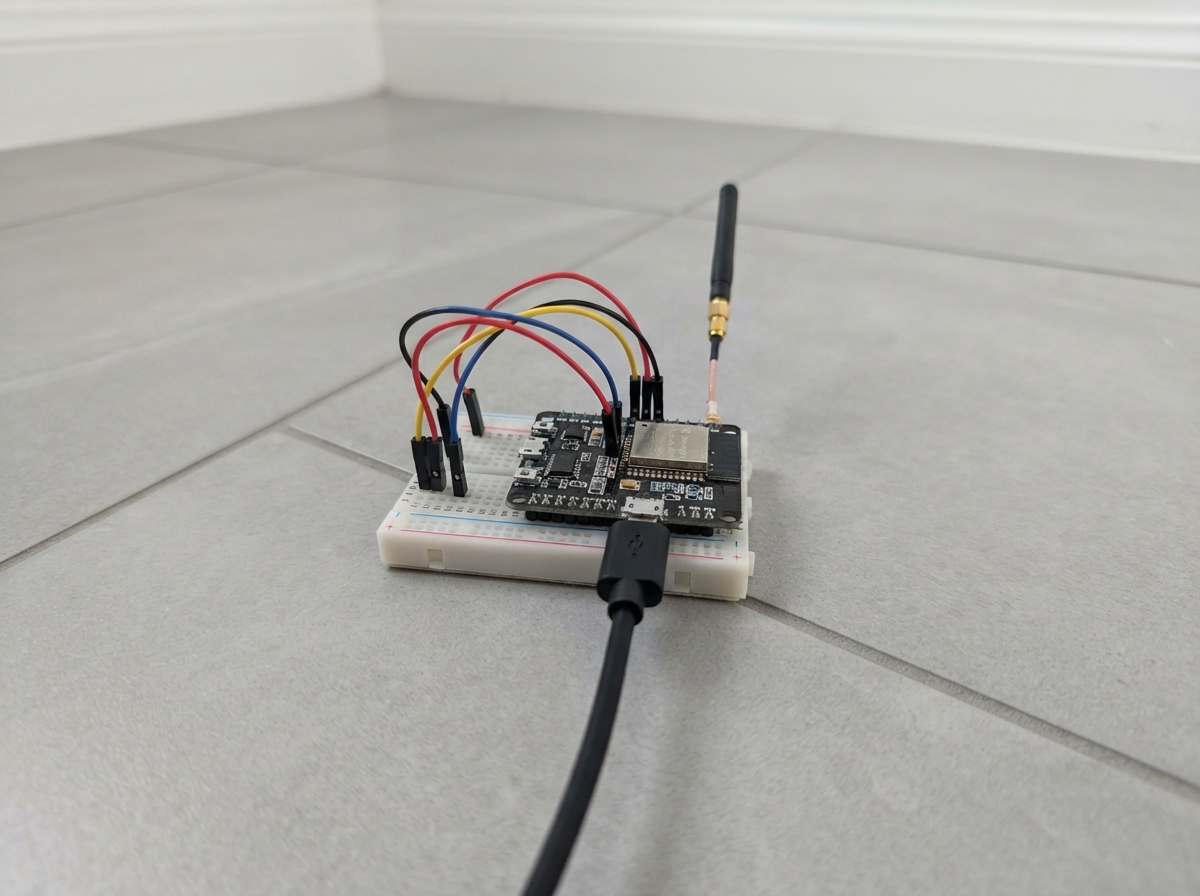
Turn an ESP32 into a Wi-Fi repeater router that extends your existing network coverage. The device connects to your primary Wi-Fi network and broadcasts its own access point, allowing other devices to join and route traffic through it. This guide provides a complete wiring diagram, parts list, and step-by-step assembly instructions to get the repeater up and running.
The firmware handles Wi-Fi station mode (connecting to your main network), access point mode (broadcasting a new network), and Network Address Translation (NAT) to route traffic between the two. Configuration happens through a web interface accessible from any connected device, with settings stored in the ESP32's non-volatile memory so they persist across power cycles.
Wiring diagram
Gather all the parts
Assemble it in 3 steps
1. Place the ESP32 where it can receive the existing Wi-Fi
Use the ESP32-WROOM-32 development board by itself; this project uses its built-in Wi-Fi radio and needs no signal wires or extra electronic parts.
- Place it roughly between the existing router and the room where you need the new Wi-Fi signal. Keep the metal antenna area clear of metal objects and cables.
- Do not power the board from more than one source at once.
2. Connect the board by USB
Plug a data-capable USB cable from your computer into the ESP32 board. The USB cable provides safe power and lets Schematik install the router firmware.
- The default ESP32 Wi-Fi name is ESP32-Router and its default password is ConfigureMe123.
3. Set up the router from a phone or computer
After the firmware is deployed, join the ESP32-Router Wi-Fi network, then open http://192.168.4.1 in a web browser. Enter the name and password of the existing 2.4 GHz Wi-Fi router, save the page, and reconnect to the ESP32 Wi-Fi if you changed its name or password.
- The web page works even when the upstream router is unavailable, so it can always be used to correct the saved settings.
- Use an upstream 2.4 GHz Wi-Fi network; this ESP32-WROOM-32 board cannot join a 5 GHz-only network.
Review all connections
1. Connections between "usb_cable_1" and "ESP32"
Deploy the firmware
#include <WiFi.h>
#include <WiFiClient.h>
#include <WebServer.h>
#include <Preferences.h>
// 1. Configuration. Requires Arduino-ESP32 3.x with WiFi.AP.enableNAPT().
const char *DEFAULT_AP_SSID = "ESP32-Router";
const char *DEFAULT_AP_PASSWORD = "ConfigureMe123";
const uint8_t DEFAULT_AP_CHANNEL = 9;
const IPAddress AP_IP(192, 168, 4, 1), AP_GATEWAY(192, 168, 4, 1), AP_SUBNET(255, 255, 255, 0);
const IPAddress FALLBACK_DNS(1, 1, 1, 1);
const unsigned long RECONNECT_INTERVAL_MS = 10000, STATUS_INTERVAL_MS = 30000, AP_CHECK_INTERVAL_MS = 15000;
struct RouterConfig { String staSsid, staPassword, apSsid, apPassword; uint8_t apChannel; } config;
Preferences preferences;
WebServer server(80);
unsigned long lastReconnectAttempt = 0, lastStatusReport = 0, lastApCheck = 0;
bool naptEnabled = false;
bool apNeedsRestart = false;
IPAddress advertisedDns = FALLBACK_DNS;
String htmlEscape(const String &value) {
String out;
for (size_t i = 0; i < value.length(); ++i) {
switch (value[i]) {
case '&': out += "&"; break; case '<': out += "<"; break;
case '>': out += ">"; break; case '"': out += """; break;
case '\'': out += "'"; break; default: out += value[i]; break;
}
}
return out;
}
// 6. NVS/Preferences storage
void loadConfig() {
preferences.begin("router", true);
config.staSsid = preferences.getString("staSsid", "");
config.staPassword = preferences.getString("staPass", "");
config.apSsid = preferences.getString("apSsid", DEFAULT_AP_SSID);
config.apPassword = preferences.getString("apPass", DEFAULT_AP_PASSWORD);
config.apChannel = preferences.getUChar("apChan", DEFAULT_AP_CHANNEL);
preferences.end();
if (config.apSsid.isEmpty()) config.apSsid = DEFAULT_AP_SSID;
if (config.apPassword.length() < 8) config.apPassword = DEFAULT_AP_PASSWORD;
if (config.apChannel < 1 || config.apChannel > 13) config.apChannel = DEFAULT_AP_CHANNEL;
}
void saveConfig() {
preferences.begin("router", false);
preferences.putString("staSsid", config.staSsid);
preferences.putString("staPass", config.staPassword);
preferences.putString("apSsid", config.apSsid);
preferences.putString("apPass", config.apPassword);
preferences.putUChar("apChan", config.apChannel);
preferences.end();
}
void printStatus() {
Serial.println("\n--- ESP32 Router status ---");
Serial.printf("Upstream SSID: %s\n", config.staSsid.length() ? config.staSsid.c_str() : "not configured");
Serial.printf("STA status: %s\n", WiFi.status() == WL_CONNECTED ? "connected" : "disconnected");
if (WiFi.status() == WL_CONNECTED) {
Serial.printf("STA IP: %s\n", WiFi.localIP().toString().c_str());
Serial.printf("RSSI: %d dBm\n", WiFi.RSSI());
Serial.printf("Active Wi-Fi channel: %d (2.4 GHz only)\n", WiFi.channel());
}
Serial.println("5 GHz: unavailable on ESP32-WROOM-32 hardware.");
Serial.printf("SoftAP SSID: %s\n", config.apSsid.c_str());
Serial.printf("SoftAP IP: %s\n", WiFi.softAPIP().toString().c_str());
Serial.printf("Connected clients: %d\n", WiFi.softAPgetStationNum());
Serial.printf("Hotspot DNS: %s\n", advertisedDns.toString().c_str());
Serial.printf("NAT routing: %s\n", naptEnabled ? "enabled" : "waiting for upstream");
}
// 2. Wi-Fi STA initialization
void beginUpstreamConnection() {
if (config.staSsid.isEmpty()) {
Serial.println("No upstream Wi-Fi is configured. Open http://192.168.4.1 after joining the ESP32 Wi-Fi.");
return;
}
Serial.printf("Connecting to upstream Wi-Fi: %s\n", config.staSsid.c_str());
WiFi.begin(config.staSsid.c_str(), config.staPassword.c_str());
}
// 3. SoftAP initialization
void startAccessPoint() {
WiFi.mode(WIFI_AP_STA);
// DHCP gives hotspot clients a usable DNS server. It is replaced with the
// upstream router's DNS address once the STA connection receives an IP.
WiFi.softAPConfig(AP_IP, AP_GATEWAY, AP_SUBNET, IPAddress(0, 0, 0, 0), advertisedDns);
bool started = WiFi.softAP(config.apSsid.c_str(), config.apPassword.c_str(), config.apChannel);
apNeedsRestart = !started;
Serial.printf("SoftAP %s: %s at %s\n", started ? "started" : "failed", config.apSsid.c_str(), WiFi.softAPIP().toString().c_str());
}
void ensureAccessPoint() {
wifi_mode_t mode = WiFi.getMode();
bool apModeEnabled = (mode == WIFI_MODE_AP || mode == WIFI_MODE_APSTA);
if (apNeedsRestart || !apModeEnabled) {
Serial.println("Restoring the ESP32 Wi-Fi access point.");
startAccessPoint();
}
}
// 4. NAT/routing initialization
void publishUpstreamDnsToClients() {
IPAddress dns = WiFi.dnsIP();
if (dns == IPAddress(0, 0, 0, 0)) dns = FALLBACK_DNS;
if (dns == advertisedDns) return;
// Update DHCP's DNS option without changing the hotspot address or subnet.
// Rejoining the ESP32 Wi-Fi makes an already-connected phone request the
// new DHCP lease immediately.
if (WiFi.softAPConfig(AP_IP, AP_GATEWAY, AP_SUBNET, IPAddress(0, 0, 0, 0), dns)) {
advertisedDns = dns;
Serial.printf("Hotspot clients will use DNS: %s\n", advertisedDns.toString().c_str());
} else {
Serial.println("Could not update hotspot DHCP DNS setting.");
}
}
void setNapt(bool enable) {
if (naptEnabled == enable) return;
if (WiFi.AP.enableNAPT(enable)) {
naptEnabled = enable;
Serial.printf("NAT routing %s\n", enable ? "enabled" : "disabled");
} else {
Serial.println("Could not change NAT routing state.");
}
}
void onWiFiEvent(arduino_event_id_t event, arduino_event_info_t info) {
(void)info;
switch (event) {
case ARDUINO_EVENT_WIFI_STA_CONNECTED: Serial.println("Upstream Wi-Fi link connected."); break;
case ARDUINO_EVENT_WIFI_STA_GOT_IP:
Serial.printf("Upstream IP received: %s\n", WiFi.localIP().toString().c_str());
publishUpstreamDnsToClients();
setNapt(true);
break;
case ARDUINO_EVENT_WIFI_STA_LOST_IP: Serial.println("Upstream IP lost."); setNapt(false); break;
case ARDUINO_EVENT_WIFI_STA_DISCONNECTED: Serial.println("Upstream Wi-Fi disconnected; reconnection will be retried."); setNapt(false); break;
case ARDUINO_EVENT_WIFI_AP_STACONNECTED: Serial.println("A device joined the ESP32 Wi-Fi."); break;
case ARDUINO_EVENT_WIFI_AP_STADISCONNECTED: Serial.println("A device left the ESP32 Wi-Fi."); break;
case ARDUINO_EVENT_WIFI_AP_STOP:
Serial.println("ESP32 Wi-Fi stopped; it will be restored.");
apNeedsRestart = true;
break;
default: break;
}
}
// 5. Web configuration server
String pageHeader(const String &title) {
return "<!doctype html><html><head><meta name='viewport' content='width=device-width,initial-scale=1'><title>" + title + "</title>"
"<style>body{font-family:Arial;max-width:650px;margin:24px auto;padding:0 14px}input,select,button{box-sizing:border-box;width:100%;padding:10px;margin:5px 0 14px}button{background:#1261a0;color:white;border:0;border-radius:4px}.card{border:1px solid #ddd;border-radius:7px;padding:16px;margin:12px 0}.ok{color:#087f23}.bad{color:#aa1d1d}</style></head><body><h1>ESP32 Wi-Fi Router</h1>";
}
void handleRoot() {
String state = WiFi.status() == WL_CONNECTED ? "<span class='ok'>Connected</span>" : "<span class='bad'>Not connected</span>";
String page = pageHeader("ESP32 Router setup");
String channelText = WiFi.status() == WL_CONNECTED ? String(WiFi.channel()) : "not connected";
page += "<div class='card'><b>Router status</b><br>Upstream: " + state + "<br>STA IP: " + WiFi.localIP().toString() + "<br>Active channel: " + channelText + " (2.4 GHz)<br>5 GHz: unavailable on this ESP32-WROOM-32 board<br>ESP32 Wi-Fi: " + htmlEscape(config.apSsid) + "<br>ESP32 Wi-Fi address: " + WiFi.softAPIP().toString() + "<br>DNS given to connected devices: " + advertisedDns.toString() + "<br>Connected devices: " + String(WiFi.softAPgetStationNum()) + "<br>NAT routing: " + String(naptEnabled ? "enabled" : "waiting for upstream") + "</div>";
page += "<form method='post' action='/save'><div class='card'><h2>Upstream Wi-Fi</h2><label>Router name (SSID)</label><input name='staSsid' maxlength='32' value='" + htmlEscape(config.staSsid) + "'><label>Router password (leave blank to keep current password)</label><input name='staPass' type='password' maxlength='63'></div><div class='card'><h2>ESP32 Wi-Fi</h2><label>Wi-Fi name</label><input name='apSsid' maxlength='32' value='" + htmlEscape(config.apSsid) + "'><label>Wi-Fi password (8–63 characters; leave blank to keep current password)</label><input name='apPass' type='password' maxlength='63'><label>Wi-Fi channel</label><select name='apChan'>";
for (int ch = 1; ch <= 13; ++ch) page += "<option value='" + String(ch) + "'" + (ch == config.apChannel ? " selected" : "") + ">" + String(ch) + "</option>";
page += "</select><button type='submit'>Save and restart router</button></div></form><form method='post' action='/reset' onsubmit=\"return confirm('Erase saved Wi-Fi settings?')\"><button type='submit'>Erase saved settings</button></form><p>After changing settings, reconnect to the ESP32 Wi-Fi using its new name if needed.</p></body></html>";
server.send(200, "text/html", page);
}
void handleSave() {
String apSsid = server.arg("apSsid"), staSsid = server.arg("staSsid"), apPass = server.arg("apPass");
uint8_t channel = (uint8_t)server.arg("apChan").toInt();
if (apSsid.isEmpty() || apSsid.length() > 32 || (apPass.length() > 0 && apPass.length() < 8) || channel < 1 || channel > 13) {
server.send(400, "text/plain", "Use an ESP32 Wi-Fi name of 1-32 characters, a new password of at least 8 characters, and channel 1-13."); return;
}
config.staSsid = staSsid;
if (server.arg("staPass").length() > 0) config.staPassword = server.arg("staPass");
config.apSsid = apSsid;
if (apPass.length() > 0) config.apPassword = apPass;
config.apChannel = channel;
saveConfig();
server.send(200, "text/html", pageHeader("Saved") + "<p>Settings saved. The ESP32 is restarting now.</p></body></html>");
delay(800); ESP.restart();
}
void handleReset() {
preferences.begin("router", false); preferences.clear(); preferences.end();
server.send(200, "text/html", pageHeader("Reset") + "<p>Saved settings erased. The ESP32 is restarting with its default setup Wi-Fi.</p></body></html>");
delay(800); ESP.restart();
}
void startWebServer() {
server.on("/", HTTP_GET, handleRoot); server.on("/save", HTTP_POST, handleSave); server.on("/reset", HTTP_POST, handleReset);
server.onNotFound([]() { server.send(404, "text/plain", "Not found"); });
server.begin(); Serial.println("Configuration page: http://192.168.4.1/");
}
void setup() {
Serial.begin(115200); delay(300); Serial.println("\nESP32 Wi-Fi NAT Router starting");
loadConfig(); WiFi.onEvent(onWiFiEvent); WiFi.persistent(false); WiFi.setSleep(false);
WiFi.mode(WIFI_AP_STA);
startAccessPoint();
delay(300);
WiFi.setAutoReconnect(true);
startWebServer(); beginUpstreamConnection(); printStatus();
}
// 7. Reconnection handling, 8. Client monitoring, 9. Main loop
void loop() {
server.handleClient();
unsigned long now = millis();
if (WiFi.status() != WL_CONNECTED && !config.staSsid.isEmpty() && now - lastReconnectAttempt >= RECONNECT_INTERVAL_MS) {
lastReconnectAttempt = now; Serial.println("Retrying upstream Wi-Fi connection."); WiFi.reconnect();
}
if (now - lastApCheck >= AP_CHECK_INTERVAL_MS) {
lastApCheck = now;
ensureAccessPoint();
}
if (now - lastStatusReport >= STATUS_INTERVAL_MS) { lastStatusReport = now; printStatus(); }
delay(2);
}Remix this project
Make it yours in one click
Open a full copy of this project in your own Schematik workspace — diagram, code, parts, and assembly steps included. Swap the sensor, add features, or redesign the whole thing with AI. The author's original stays untouched.