Community project
Generator Remote Monitor
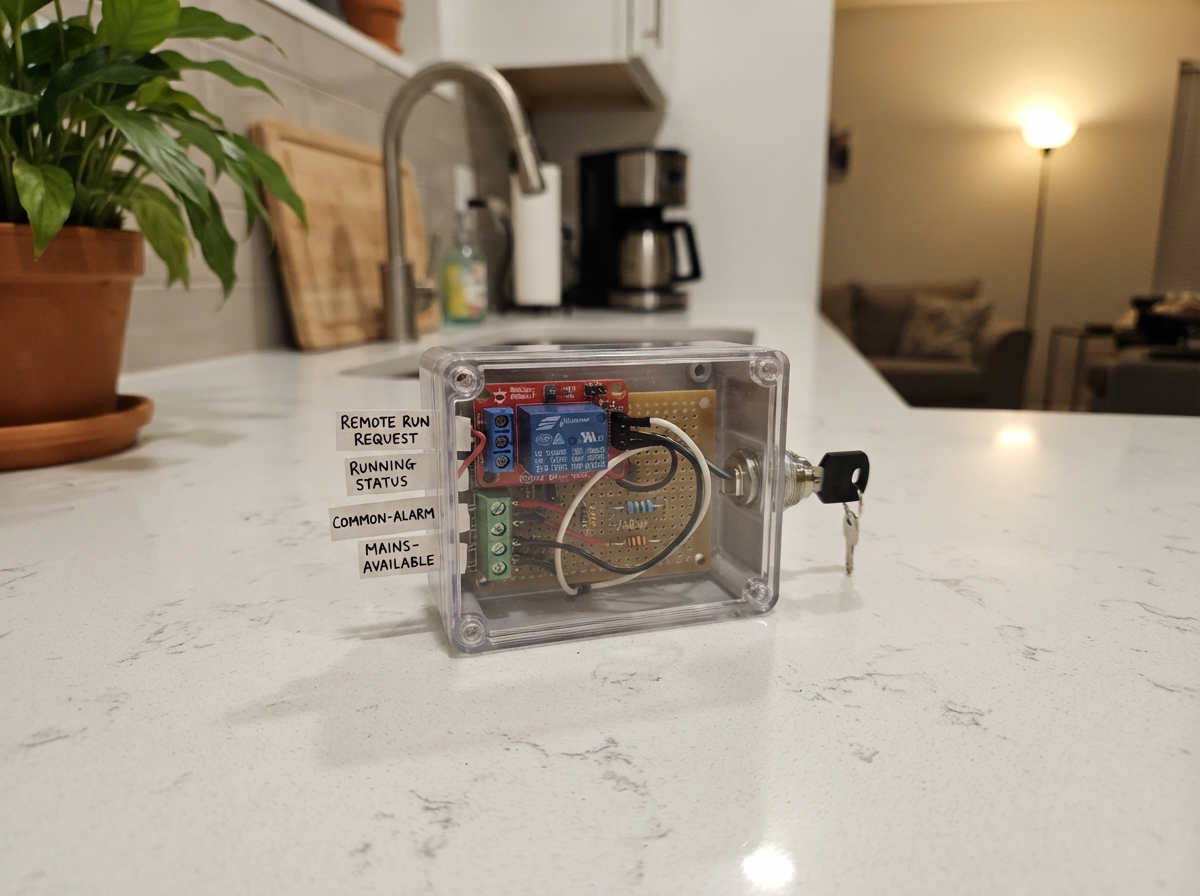
This project adds remote monitoring and control to an existing diesel generator by connecting an ESP32 to the generator's control interface. The system reads fuel level from a dedicated tank sender, monitors running status and alarm conditions through isolated contact inputs, and provides a web interface to request generator start commands via the relay module.
The guide includes a complete wiring diagram, parts list, and step-by-step assembly instructions covering relay circuit construction, status input wiring, fuel sender calibration, and safe integration with an existing generator controller. All firmware is provided and configured for the specified components, with bench-testing procedures to verify operation before connecting to live equipment.
Wiring diagram

Gather all the parts
Assemble it in 8 steps
1. Confirm controller compatibility before connecting
Have a generator technician verify a maintained two-wire remote-run input: closed requests RUN, open withdraws the request. It must accept a dry contact at no more than 24 V DC and 100 mA. This is not a pulse-start interface. No terminal numbers are assumed. The circuit diagram ends at the four two-way terminal blocks; their connections to the existing generator panel are described here and must be verified on site. Confirm separate isolated, volt-free NO/COM outputs for running, common alarm and mains available. If any feature is unavailable, leave that status terminal unplugged and treat its reading as unknown; do not attach voltage outputs.
- Do not touch the 400 V power wiring, ATS contactors, starter, fuel solenoid or emergency-stop circuit. Incorrect connections can kill or cause unexpected starting.
- This gateway is not a safety controller. Existing engine protection, emergency stop, automatic mains-failure controller and ATS interlocks must remain independent.
2. Build the relay circuit with USB unplugged
Use the DFRobot DFR0473 specifically, not a look-alike 5 V trigger board. Connect + (VCC) to ESP32 5V, minus (GND) to GND, and D to GPIO26 (control). Connect the 10 kΩ resistor from D/GPIO26 to GND so the relay stays off during reset. The module already includes its coil driver, diode and indicator resistor. Leave NC and the unused terminal empty. Power the ESP32 through USB only.
- Never power this board from the generator's 12 V or 24 V battery. Do not attach mains to the relay module.
3. Fit the local remote-enable key
With a continuity meter, identify the two isolated contact pairs on a DPST maintained key switch. Both pairs must open in OFF. Wire relay COM to A1, A2 to runterm T1, and relay NO to runterm T2. Wire B1 to GPIO27 (enable sense) and B2 to GND. Never join the A and B circuits. Key OFF physically breaks the remote run request even if software fails.
- Key OFF is not an engine emergency stop. The engine can still run due to local or ATS demand; follow the generator's lockout procedure before service.
4. Wire the three low-voltage status inputs
Connect GPIO32 through its own 1 kΩ resistor to running T1; GPIO33 through another 1 kΩ resistor to alarm T1; GPIO25 through another 1 kΩ resistor to mains T1. Connect each T2 to ESP32 GND. Internal pull-ups detect a closed contact as asserted. These 1 kΩ resistors do not make voltage outputs safe. Keep wires shorter than one metre and separate from power wiring.
- Only electrically isolated, volt-free contacts may touch these terminals. Never connect controller battery negative, 12/24 V outputs, mains or open-collector outputs. Long outdoor wiring needs a separately engineered isolated, surge-protected interface.
- Open contacts and broken wires look the same. An open alarm input does not prove the generator is healthy.
5. Bench-test without a generator attached
Leave all external controller wires disconnected and the key OFF. Temporarily bridge each status terminal's own T1 and T2 with a short test wire; its dashboard indication must change to asserted. Turn the key ON and request RUN; confirm relay NO/COM closes only while requested. Bridge the alarm contact to verify withdrawal; open the browser or network connection to verify the 20-second lease timeout. Reset and power-cycle to confirm no automatic restart. Check key OFF breaks the contact physically. Confirm a request with no running feedback is removed after 90 seconds. Remove every test bridge afterwards.
- Use a continuity meter on the isolated run terminals. A relay click alone does not verify the output wiring.
- Opening a status page does not renew a request. Only the page that successfully requested RUN renews its lease; keep that page open and active.
6. Have a technician make the final controller connections
Place the gateway in a separate low-voltage enclosure. With the generator secured against starting, connect runterm T1/T2 only across the documented remote-run input. Connect each status terminal T1 to its isolated status relay NO and T2 to that same isolated relay COM. Do not use controller DC common. Provide short protected cables and strain relief. Use a certified USB supply connected to existing backed-up power if monitoring must survive utility failure.
- A lost gateway power supply, Wi-Fi link, browser lease or alarm withdraws ONLY this remote run request. It cannot force an engine to stop against another controller demand.
- Do not enable unattended operation until a technician has tested start, shutdown/cooldown, controller alarms, ATS interlocks and loss of communications. A stuck relay contact is possible; the key switch remains a physical inhibit.
7. Add the dedicated diesel tank sender
Use a KUS SSS/SSL passive 240–33 ohm sender for diesel, not a voltage/current-output or 0–180 ohm model. A technician must measure the tank depth before purchase and select a length leaving at least 25.4 mm bottom and side/baffle clearance per the installation guide. Use the specified SAE five-hole gasket and fittings. Have a qualified installer fit and leak-check it using the maker's procedure. Never drill or modify a tank containing fuel or vapour. Keep the ESP32 and relay outside the tank and away from the fuel opening.
- This DIY circuit is not intrinsically safe or approved for hazardous locations. Use only on a technician-approved diesel installation in a non-classified location; not gasoline, LPG, flammable solvent or an explosive atmosphere.
- Use a dedicated sender only. Never parallel an existing gauge or generator controller sender input. Do not attach 12/24 V or controller DC common to this circuit.
8. Wire and test fuel level before fitting the sender
USB unplugged: connect 3V3 through the 330 ohm resistor to sender SIGNAL (KUS black). Connect sender RETURN (KUS pink, or blue when identified as return in its supplied guide) to ESP32 GND. SIGNAL goes through its own 1 kohm resistor to GPIO34 (fuel data). Place the 100 nF ceramic capacitor between GPIO34 and GND close to the ESP32. Confirm wire identity using the supplied KUS instructions and an ohmmeter, not colour alone. Keep sensor wires under one metre, away from mains and starter cables. On a clean, uninstalled sender, manually move the float from empty to full: resistance should change from about 240 to 33 ohms. After Deploy, hold each position steady for at least ten seconds; dashboard should show approximately 0, 25, 50, 75 and 100 percent across its travel. Disconnect a wire to test UNKNOWN/fault, then briefly bridge SIGNAL to RETURN to test short detection. Remove all test bridges.
- Low diesel at 20 percent or less is shown on the dashboard and logged locally. It does not stop or inhibit the generator and does not send SMS or push notifications. Faults do not change the existing run controls. A stuck float or some partial wiring faults cannot be detected.
- Sender return joins ESP32 GND. Have the technician verify tank/vehicle bonding is compatible; if isolation or long-cable surge protection is required, use a professionally engineered isolated interface instead of this direct circuit.
- Reading uses nominal 3.3 V excitation and a five-point maker curve; expect ADC, supply, cable and float-step errors. Verify against known fuel fills. Percentage is approximate level, not litres or guaranteed runtime, especially in irregular tanks. Never rely on this as the sole low-fuel protection.
Review all connections
1. Connections between "relay" and "ESP32"
2. Connections between "pulldown" and "ESP32"
3. Connections between "enable" and "ESP32"
4. Connections between "rrun" and "ESP32"
5. Connections between "running" and "ESP32"
6. Connections between "ralarm" and "ESP32"
7. Connections between "alarm" and "ESP32"
8. Connections between "rmains" and "ESP32"
9. Connections between "mains" and "ESP32"
10. Connections between "fuelbias" and "ESP32"
11. Connections between "fuel" and "ESP32"
12. Connections between "fuelseries" and "ESP32"
13. Connections between "fuelfilter" and "ESP32"
Deploy the firmware
#include <Arduino.h>
#include <WiFi.h>
#include <WebServer.h>
#include <Preferences.h>
#include <esp_system.h>
// DFR0473: HIGH energizes coil; external 10k pull-down holds OFF at reset.
constexpr uint8_t RELAY_PIN=26, ENABLE_PIN=27, RUN_PIN=32, ALARM_PIN=33, MAINS_PIN=25;
constexpr uint32_t LEASE_MS=20000, MAX_RUN_MS=30UL*60UL*1000UL, FEEDBACK_MS=90000;
// ADC1 works while Wi-Fi is active; GPIO34 is input-only by design.
constexpr uint8_t FUEL_PIN=34;
int fuelPercent=-1;
float fuelOhms=0;
String fuelState="Waiting for sender";
uint32_t fuelSampleAt=0, fuelStableAt=0;
int fuelCandidate=-1;
WebServer server(80);
Preferences prefs;
String ssid, wifiPassword, adminPassword, csrf, setupPassword;
bool setupMode=false, requested=false;
uint32_t leaseAt=0, startAt=0, missingAt=0, restartAt=0;
String events[24];
uint8_t logHead=0, logCount=0;
struct Contact {
uint8_t pin; bool raw=false, closed=false; uint32_t changed=0;
void begin(){pinMode(pin,INPUT_PULLUP);raw=digitalRead(pin)==LOW;closed=raw;changed=millis();}
bool update(){bool v=digitalRead(pin)==LOW;if(v!=raw){raw=v;changed=millis();}if(closed!=raw && millis()-changed>=100){closed=raw;return true;}return false;}
};
Contact running{RUN_PIN}, alarmContact{ALARM_PIN}, mainsContact{MAINS_PIN}, key{ENABLE_PIN};
bool connected(){return !setupMode && WiFi.status()==WL_CONNECTED;}
void logEvent(const String &s){events[logHead]=String(millis()/1000)+"s: "+s;logHead=(logHead+1)%24;if(logCount<24)++logCount;Serial.println(s);}
// KUS American curve is NONLINEAR. These five points are from the maker.
// Percentage is approximate indicated level, NOT calibrated tank volume.
int levelFromOhms(float r){
const float ohms[]={240,142.5f,105,67.5f,33};
if(r>=240)return 0;if(r<=33)return 100;
for(int i=0;i<4;i++)if(r<=ohms[i] && r>=ohms[i+1])
return (int)roundf(i*25.0f+25.0f*(ohms[i]-r)/(ohms[i]-ohms[i+1]));
return 0;
}
void updateFuel(uint32_t now){
if(now-fuelSampleAt<500)return;
fuelSampleAt=now;
uint32_t sum=0;for(int i=0;i<16;i++)sum+=analogReadMilliVolts(FUEL_PIN);
float mv=sum/16.0f;
// Nominal 3.3 V excitation; ADC/supply/lead resistance introduce error.
float r=mv<3250?330.0f*mv/(3300.0f-mv):100000;
int candidate=(mv<100)?-2:((mv>2200 || r>280 || r<20)?-3:levelFromOhms(r));
// Confirm five seconds to suppress float slosh and transient contact changes.
// Quantize to 5% steps; resolution is also limited by the sender reed spacing.
if(candidate>=0)candidate=constrain((candidate+2)/5*5,0,100);
if(candidate!=fuelCandidate){fuelCandidate=candidate;fuelStableAt=now;}
if(now-fuelStableAt<5000)return;
String next=candidate==-2?"FAULT: short or wrong sender":candidate==-3?"FAULT: open wire or out of range":candidate<=20?"LOW DIESEL (20% or less)":"Normal";
fuelPercent=candidate>=0?candidate:-1;fuelOhms=r;
if(next!=fuelState){fuelState=next;logEvent("Fuel: "+next);}
}
void stopRequest(const String &reason){digitalWrite(RELAY_PIN,LOW);if(requested){requested=false;logEvent(reason);}}
bool safeToStart(){return millis()>2000 && connected() && key.closed && digitalRead(ENABLE_PIN)==LOW && !alarmContact.closed && digitalRead(ALARM_PIN)==HIGH;}
bool auth(){if(server.authenticate("admin",adminPassword.c_str()))return true;server.requestAuthentication();return false;}
bool postAuth(){if(!auth())return false;if(!server.hasArg("token")||server.arg("token")!=csrf){server.send(403,"text/plain","Invalid session. Reload dashboard.");return false;}return true;}
String htmlEscape(String s){s.replace("&","&");s.replace("<","<");s.replace(">",">");s.replace("\"",""");s.replace("'","'");return s;}
void noCache(){server.sendHeader("Cache-Control","no-store");server.sendHeader("X-Frame-Options","DENY");server.sendHeader("X-Content-Type-Options","nosniff");}
const char PAGE[] PROGMEM=R"HTML(<!doctype html><html><head><meta name="viewport" content="width=device-width, initial-scale=1"><title>Generator gateway</title><style>body{font:17px system-ui;max-width:760px;margin:24px auto;padding:16px;background:#eef3f8}button{padding:14px;margin:6px}pre{white-space:pre-wrap;background:white;padding:16px}.warn{color:#963600}</style></head><body><h1>Generator gateway</h1><p class="warn">Run request only. Controller and ATS retain protection and transfer control. STOP withdraws this request, not an emergency stop.</p><pre id="state">Connecting...</pre><button onclick="command('start')">Request RUN (30 min maximum)</button><button onclick="command('stop')">Withdraw request</button><p id="result"></p><p>Fuel is approximate sender level, not litres. Low fuel warning at 20%; monitoring only, no automatic engine stop. A stuck float may not be detected.</p><h2>Recent events (lost on reset)</h2><pre id="logs"></pre><p>Keep this page open while requesting RUN. Loss of this page/network withdraws the request within about 20 seconds. No automatic restart.</p><p>Use LAN or a router VPN only. Never forward this web port to the internet.</p><script>
const token='TOKEN_VALUE';let alive=false,lastState='',lastLog='';
async function command(action){try{let r=await fetch('/command',{method:'POST',headers:{'Content-Type':'application/x-www-form-urlencoded'},body:new URLSearchParams({token,action})});let text=await r.text();document.getElementById('result').textContent=text;if(r.ok)alive=action==='start';}catch(e){alive=false;document.getElementById('result').textContent='Network lost; status is stale.';}}
async function poll(){try{let r=await fetch('/status',{cache:'no-store'});if(!r.ok)throw Error();let s=await r.json();let text='Remote key: '+(s.key?'ENABLED':'OFF')+'\nRunning contact: '+(s.running?'CLOSED / asserted':'OPEN / not asserted')+'\nAlarm contact: '+(s.alarm?'CLOSED / asserted':'OPEN / not asserted')+'\nMains available contact: '+(s.mains?'CLOSED / asserted':'OPEN / not asserted')+'\nDiesel level (approx.): '+(s.fuel_pct===null?'UNKNOWN':s.fuel_pct+'%')+'\nFuel status: '+s.fuel_status+'\nRun request: '+(s.request?'ON':'OFF')+'\nLease remaining: '+s.lease+' s\nRun limit remaining: '+s.remaining+' s\nUptime: '+s.uptime+' s';if(text!==lastState){document.getElementById('state').textContent=text;lastState=text;}if(s.log!==lastLog){document.getElementById('logs').textContent=s.log;lastLog=s.log;}if(!s.request)alive=false;}catch(e){document.getElementById('state').textContent='OFFLINE - last status is not current. Check generator locally.';lastState='';}}
setInterval(poll,2000);setInterval(async()=>{if(alive){try{let r=await fetch('/heartbeat',{method:'POST',headers:{'Content-Type':'application/x-www-form-urlencoded'},body:new URLSearchParams({token})});if(!r.ok)alive=false;}catch(e){alive=false;}}},5000);poll();
</script></body></html>)HTML";
void routes(){
server.on("/",HTTP_GET,[]{if(!auth())return;noCache();if(setupMode){String page="<!doctype html><meta name='viewport' content='width=device-width'><h1>Generator gateway setup</h1><p>Run output is disabled during setup. Use your private 2.4 GHz Wi-Fi.</p><form method='POST' action='/configure'><input type='hidden' name='token' value='"+csrf+"'><p>Wi-Fi name <input name='ssid' required maxlength='32'></p><p>Wi-Fi password <input name='wifi' type='password' maxlength='63'></p><p>New dashboard password (12+ characters) <input name='admin' type='password' minlength='12' maxlength='63' required></p><button>Save and restart</button></form>";server.send(200,"text/html",page);}else{String page=FPSTR(PAGE);page.replace("TOKEN_VALUE",csrf);server.send(200,"text/html",page);}});
server.on("/configure",HTTP_POST,[]{if(!postAuth())return;if(!setupMode){server.send(403,"text/plain","Setup mode only");return;}String s=server.arg("ssid"),p=server.arg("wifi"),a=server.arg("admin");if(s.length()<1||s.length()>32||p.length()>63||(p.length()>0&&p.length()<8)||a.length()<12||a.length()>63){server.send(400,"text/plain","Check Wi-Fi and password lengths.");return;}prefs.putString("ssid",s);prefs.putString("wifi",p);prefs.putString("admin",a);server.send(200,"text/plain","Saved. Reconnecting. Find the gateway address in serial output or your router's client list.");restartAt=millis()+1500;});
server.on("/status",HTTP_GET,[]{if(!auth())return;noCache();uint32_t now=millis();String logs;for(int i=0;i<logCount;i++){if(i)logs+="\\n";String e=events[(logHead+24-logCount+i)%24];e.replace("\\","\\\\");e.replace("\"","\\\"");logs+=e;}uint32_t lease=requested && now-leaseAt<LEASE_MS?(LEASE_MS-(now-leaseAt))/1000:0;uint32_t remain=requested && now-startAt<MAX_RUN_MS?(MAX_RUN_MS-(now-startAt))/1000:0;String json="{\"fuel_pct\":"+(fuelPercent<0?String("null"):String(fuelPercent))+",\"fuel_status\":\""+fuelState+"\",\"fuel_ohms\":"+String(fuelOhms,1)+",\"key\":"+String(key.closed?"true":"false")+",\"running\":"+String(running.closed?"true":"false")+",\"alarm\":"+String(alarmContact.closed?"true":"false")+",\"mains\":"+String(mainsContact.closed?"true":"false")+",\"request\":"+String(requested?"true":"false")+",\"lease\":"+String(lease)+",\"remaining\":"+String(remain)+",\"uptime\":"+String(now/1000)+",\"log\":\""+logs+"\"}";server.send(200,"application/json",json);});
server.on("/command",HTTP_POST,[]{if(!postAuth())return;String action=server.arg("action");if(action=="stop"){stopRequest("Operator withdrew run request");server.send(200,"text/plain","Run request OFF. Engine may continue under controller/ATS control.");}else if(action=="start"){if(!safeToStart()){server.send(409,"text/plain","Blocked: check key, alarm and Wi-Fi. Setup mode cannot start.");return;}if(!requested){startAt=millis();missingAt=millis();requested=true;digitalWrite(RELAY_PIN,HIGH);logEvent("Operator requested RUN");}leaseAt=millis();server.send(200,"text/plain","RUN requested; this does not confirm engine running.");}else server.send(400,"text/plain","Unknown command");});
server.on("/heartbeat",HTTP_POST,[]{if(!postAuth())return;if(requested&&safeToStart()){leaseAt=millis();server.send(200,"text/plain","Renewed");}else server.send(409,"text/plain","No active run request");});
server.onNotFound([]{server.send(404,"text/plain","Not found");});server.begin();
}
void setup(){
digitalWrite(RELAY_PIN,LOW);pinMode(RELAY_PIN,OUTPUT);
pinMode(FUEL_PIN,INPUT);analogReadResolution(12);analogSetPinAttenuation(FUEL_PIN,ADC_11db);
Serial.begin(115200);running.begin();alarmContact.begin();mainsContact.begin();key.begin();
prefs.begin("generator",false);
setupPassword=prefs.getString("setup","");if(setupPassword.length()<16){char secret[25];snprintf(secret,sizeof(secret),"%08lx%08lx%08lx",(unsigned long)esp_random(),(unsigned long)esp_random(),(unsigned long)esp_random());setupPassword=secret;prefs.putString("setup",setupPassword);}
char tok[33];snprintf(tok,sizeof(tok),"%08lx%08lx%08lx%08lx",(unsigned long)esp_random(),(unsigned long)esp_random(),(unsigned long)esp_random(),(unsigned long)esp_random());csrf=tok;
ssid=prefs.getString("ssid","");wifiPassword=prefs.getString("wifi","");adminPassword=prefs.getString("admin",setupPassword);
// USB serial recovery is local only and requires the physical key OFF.
setupMode=ssid.isEmpty();
if(setupMode){adminPassword=setupPassword;WiFi.mode(WIFI_AP);WiFi.softAP("Generator-Setup",setupPassword.c_str());Serial.println("SETUP AP: Generator-Setup");Serial.println("Setup Wi-Fi and admin password: "+setupPassword);Serial.println("Open http://192.168.4.1 ; username admin.");}
else{WiFi.mode(WIFI_STA);WiFi.setAutoReconnect(true);WiFi.begin(ssid.c_str(),wifiPassword.c_str());Serial.println("Connecting to saved Wi-Fi; no run request restored.");}
Serial.println("Local recovery: key OFF, send SETUP followed by newline over USB serial at 115200 baud.");
routes();logEvent("Boot: run request OFF");
}
void loop(){
uint32_t now=millis();
updateFuel(now);
if(running.update())logEvent(running.closed?"Running contact asserted":"Running contact not asserted");
if(alarmContact.update())logEvent(alarmContact.closed?"Alarm contact asserted":"Alarm contact not asserted");
if(mainsContact.update())logEvent(mainsContact.closed?"Mains available contact asserted":"Mains available contact not asserted");
if(key.update())logEvent(key.closed?"Remote key ON":"Remote key OFF");
static bool wasConnected=false;bool online=connected();if(online!=wasConnected){wasConnected=online;if(online){Serial.print("Dashboard: http://");Serial.println(WiFi.localIP());logEvent("Wi-Fi connected");}else logEvent("Wi-Fi disconnected");}
if(requested){
if(digitalRead(ENABLE_PIN)!=LOW)stopRequest("Key OFF: request withdrawn");
else if(digitalRead(ALARM_PIN)==LOW)stopRequest("Alarm: request withdrawn");
else if(!online)stopRequest("Wi-Fi lost: request withdrawn");
else if(now-leaseAt>=LEASE_MS)stopRequest("Dashboard lease expired: request withdrawn");
else if(now-startAt>=MAX_RUN_MS)stopRequest("30 minute limit: request withdrawn");
else {if(running.closed)missingAt=now;else if(now-missingAt>=FEEDBACK_MS)stopRequest("No running feedback for 90 seconds: request withdrawn");}
}
static String serialCommand;
while(Serial.available()){
char c=Serial.read();
if(c=='\n'){
serialCommand.trim();
if(serialCommand=="SETUP" && digitalRead(ENABLE_PIN)==HIGH){stopRequest("Local setup recovery");prefs.remove("ssid");restartAt=millis()+500;}
serialCommand="";
}else if(serialCommand.length()<32)serialCommand+=c;
}
server.handleClient();
if(restartAt && (int32_t)(millis()-restartAt)>=0){stopRequest("Restart");ESP.restart();}
delay(2);
}Remix this project
Make it yours in one click
Open a full copy of this project in your own Schematik workspace — diagram, code, parts, and assembly steps included. Swap the sensor, add features, or redesign the whole thing with AI. The author's original stays untouched.